

Guide · 15 articles branch off this one
Terraform Providers: Complete Configuration and Management Guide
What Terraform providers are and how to configure, pin, and troubleshoot them, with examples.
Key takeaways
- Configuring a Terraform provider is two steps: declare it in required_providers with a version constraint, then set auth, region, and defaults in a provider block. Never leave a provider unconstrained.
- Commit .terraform.lock.hcl to version control and pre-populate checksums for every platform your team and CI run on. Checksum-mismatch errors in CI almost always trace back to a lock file created on one OS and used on another.
- Provider-block credentials authenticate the provider plugin only. Subprocesses launched by local-exec provisioners fall back to the runner's default credential chain, which can mean a different identity entirely.
- OIDC trust policies are per-partition, per-account artifacts. A working commercial-AWS trust policy will not work in GovCloud, and different subsystems can issue tokens with different sub-claim formats.
- The AWS default_tags block has two recurring failure modes: platform-level tags that replace rather than merge with code-level tags, and variable expressions that some tooling statically parses into literal strings.
- Provider configurations and input variables are different delivery mechanisms. Attaching a provider configuration to a workspace does not populate TF_VAR_* variables.
Configuring a Terraform provider is two steps: declare it in required_providers with a version constraint, then set auth, region, and defaults in a provider block. The mistakes that cost teams time come after that: a lock file built on macOS that breaks Linux CI, an OIDC trust policy that doesn't survive a copy-paste into another account, and default_tags that never land in tags_all. This guide covers the two steps, then each of those failures with the error you'll see. Everything here works the same on OpenTofu, which uses the same provider plugin protocol.
What Are Terraform Providers?
A Terraform provider is a plugin that lets Terraform talk to a specific cloud provider (AWS, Azure, Google Cloud), a SaaS platform, an API, or any external service with a REST or gRPC interface. The provider configuration tells Terraform how to authenticate and connect to those services.
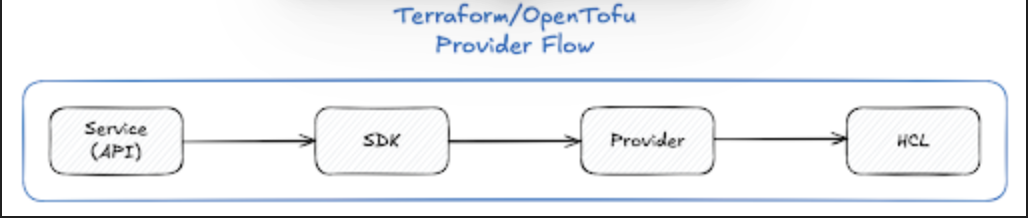
Without a configured provider, Terraform has no way to manage your resources. Each provider plugin adds a set of resource types and data sources that your infrastructure code can then manage.
Provider Blocks and Configuration
Configuring a provider takes two steps: declare the required providers, then configure them.
Step 1: Declare Required Providers
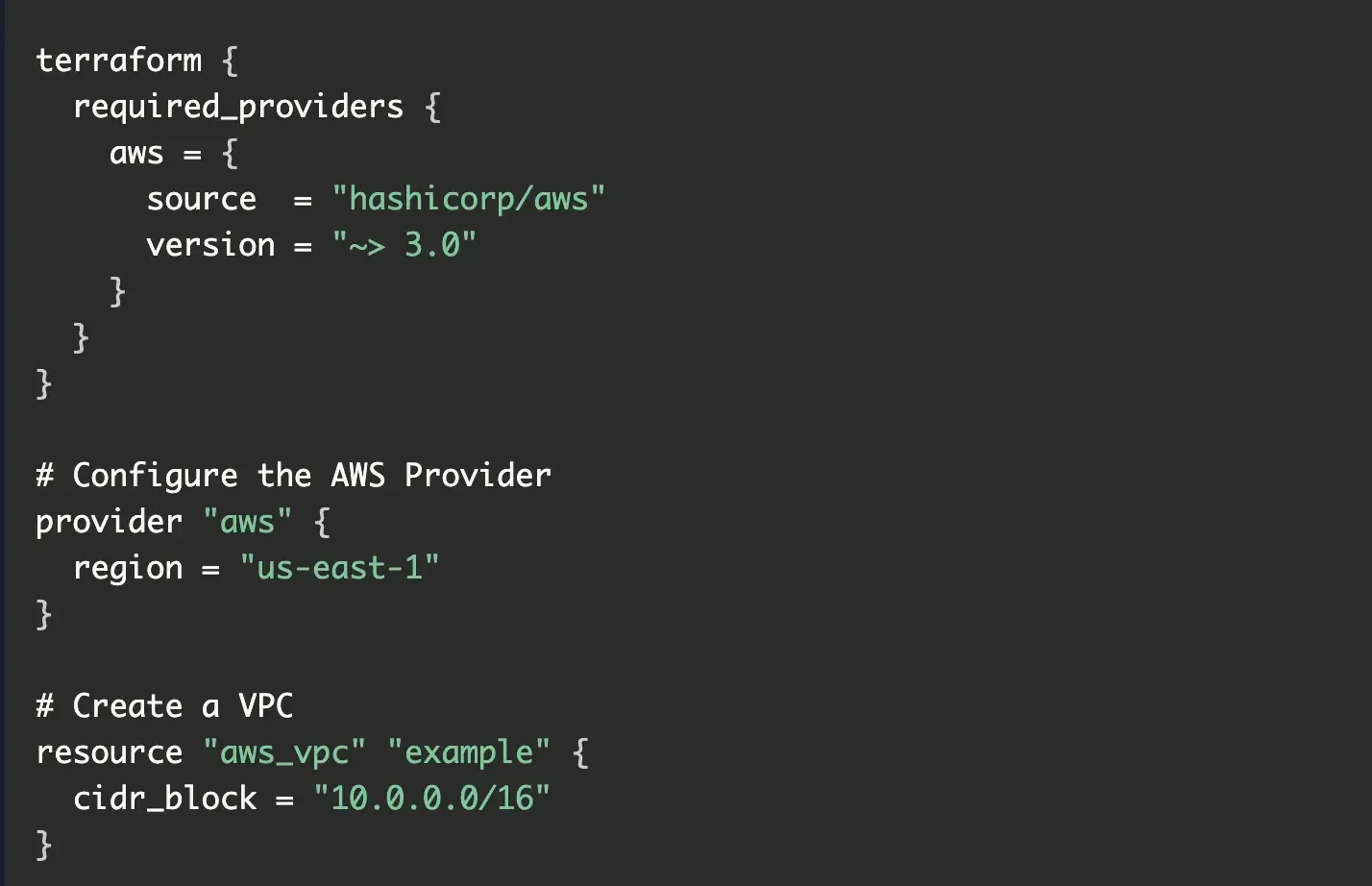
Provider requirements are defined in the required_providers block within the top-level terraform block. This tells Terraform where to find each provider and which versions are acceptable.
terraform {
  required_providers {
    aws = {
      source  = "hashicorp/aws"
      version = "~> 5.0"
    }
    azurerm = {
      source  = "hashicorp/azurerm"
      version = ">= 3.0.0, < 4.0.0"
    }
    google = {
      source  = "hashicorp/google"
      version = "~> 5.0"
    }
  }
}
Each provider entry specifies:
- Local name (e.g.,
aws): How you reference the provider in your configuration - Source: The full address of the provider (format:
[hostname/]namespace/type) - Version constraint: Which versions are compatible with your configuration
Step 2: Configure the Provider
After declaring requirements, configure providers with provider blocks. This is where you specify authentication details and default settings.
# Default AWS provider
provider "aws" {
  region = "us-east-1"
  # Authentication typically handled via environment variables or IAM roles
}

# Azure provider
provider "azurerm" {
  features {}
}

# Google Cloud provider
provider "google" {
  project = "my-gcp-project"
  region  = "us-central1"
}
default_tags and Provider-Level Defaults
The AWS provider's default_tags block applies a tag set to every taggable resource the provider manages, so it's the natural home for cost-allocation and ownership tags:
provider "aws" {
  region = "us-east-1"
  default_tags {
    tags = local.standard_tags
  }
}
Two failure modes show up repeatedly in Scalr's support queue, both involving the gap between what's written in the default_tags block and what actually lands in tags_all.
The first is merge-vs-replace semantics. A platform team we worked with at Scalr defined default_tags { tags = local.standard_tags } in code, with cost-centre, environment, and app-tier tags, while their management platform layered its own default tag on top with duplicate-tag behavior set to "skip". They expected the two layers to merge. Instead, the platform-level tags replaced the code-level block entirely, and the cost-allocation tags vanished from tags_all on every resource. If anything in your toolchain injects default tags above the code level, confirm whether the layers merge or replace before you depend on either.
The second is expressions inside default_tags. One Scalr customer set Project = var.app_name and Environment = var.environment in the block, and their plans showed the literal strings "var.app_name" and "var.environment" in tags_all, alongside the warning Could not auto-resolve dynamic AWS default_tags via Terraform; using statically-parsed tags. Tooling that statically parses provider blocks, like cost estimators and tag-policy checkers, can't resolve variable references the way Terraform itself does. Use plain values in default_tags where you can, and either way, check the resolved tags in plan output rather than trusting the source.
Authentication Best Practices
Never hardcode credentials in your configuration files. Instead:
- Use Environment Variables: Set
AWS_ACCESS_KEY_ID,AWS_SECRET_ACCESS_KEY, etc. before running Terraform - Use IAM Roles: In AWS environments, use instance profiles or EKS service accounts
- Use Service Accounts: In GCP and Azure, use service account keys or managed identities
- Implement OIDC: For CI/CD pipelines, use OpenID Connect for short-lived, credential-free authentication
- Secrets Management: Integrate with HashiCorp Vault, AWS Secrets Manager, or Azure Key Vault
Provider Aliases for Multi-Region and Multi-Account Deployments
When you need more than one configuration of the same provider, use provider aliases. You'll want them for:
- Deploying resources across multiple AWS regions
- Managing resources in different AWS accounts
- Using different API endpoints or authentication methods
- Creating resources in multiple cloud providers simultaneously
Defining Provider Aliases
# Default provider for us-east-1
provider "aws" {
  region = "us-east-1"
}

# Aliased provider for us-west-2
provider "aws" {
  alias  = "west"
  region = "us-west-2"
}

# Aliased provider for eu-west-1
provider "aws" {
  alias  = "europe"
  region = "eu-west-1"
}
Using Aliases in Resources
Resources use the default provider unless explicitly specified:
# Uses default us-east-1 provider
resource "aws_instance" "app_east" {
  ami           = "ami-0c55b31ad20f0c502"
  instance_type = "t3.micro"
  tags = {
    Name = "app-east"
  }
}

# Uses west alias (us-west-2)
resource "aws_instance" "app_west" {
  provider      = aws.west
  ami           = "ami-068f09e03c69f0b76"
  instance_type = "t3.micro"
  tags = {
    Name = "app-west"
  }
}

# Uses europe alias (eu-west-1)
resource "aws_vpc" "europe_vpc" {
  provider   = aws.europe
  cidr_block = "10.0.0.0/16"
  tags = {
    Name = "europe-vpc"
  }
}
Passing Aliases to Modules
When using modules that require specific provider configurations, pass them via the providers argument:
module "vpc_east" {
  source = "./modules/vpc"
  # Uses default provider
}

module "vpc_west" {
  source = "./modules/vpc"
  providers = {
    aws = aws.west
  }
  cidr_block = "10.1.0.0/16"
}
The child module must declare the provider in its required_providers block.
Provider Requirements and Version Constraints
Provider requirements are what make your deployments reproducible. They pin the specific provider versions that get downloaded and used in every environment.
Version Constraint Operators
Terraform supports several operators for expressing version constraints:
| Operator | Description | Example | Effect |
|---|---|---|---|
= |
Exact version | = 5.0.0 |
Only version 5.0.0 |
!= |
Exclude version | != 5.0.1 |
Any version except 5.0.1 |
> |
Greater than | > 5.0.0 |
Version 5.0.1 and newer |
>= |
Greater or equal | >= 5.0.0 |
Version 5.0.0 and newer |
< |
Less than | < 6.0.0 |
Versions before 6.0.0 |
<= |
Less or equal | <= 5.10.0 |
Version 5.10.0 and earlier |
~> |
Pessimistic constraint | ~> 5.0.0 |
Only rightmost version component increments |
Pessimistic Constraint Operator
The ~> operator is handy because it balances stability against automatic updates:
~> 5.0allows any version in the 5.x series (5.0.0, 5.1.0, 5.9.9)~> 5.0.0allows only patch updates (5.0.0, 5.0.1, 5.0.99)~> 5.1.0allows patch updates starting from 5.1.0
Combining Constraints
Create complex version ranges by combining constraints with commas:
terraform {
  required_providers {
    aws = {
      source  = "hashicorp/aws"
      version = "~> 5.0, != 5.5.0"  # Allow 5.x except 5.5.0
    }
    azurerm = {
      source  = "hashicorp/azurerm"
      version = ">= 3.50.0, < 4.0.0"  # Range constraint
    }
  }
}
Versioning Strategy by Use Case
Pinned versions (critical environments): Use exact versions
version = "5.67.1" # Exact version requiredReusable modules (libraries): Use looser constraints for compatibility
version = ">= 5.0.0" # Specify minimum version onlyRoot modules (applications): Use tight constraints for stability
version = "~> 5.67.0" # Allow patch updates onlyDependency Lock Files (.terraform.lock.hcl)
The .terraform.lock.hcl file is how Terraform keeps provider installs secure and consistent. Introduced in Terraform 0.14, it records the exact provider versions and cryptographic checksums used in your configuration.
Why Lock Files Matter
Without lock files, terraform init grabs the newest provider version that matches your constraints every time it runs. That's how you get the "works on my machine" problem: different environments end up on different provider versions and start behaving differently.
Lock files solve three problems:
- Reproducibility: Ensures identical provider versions across all deployments
- Supply Chain Security: Verifies provider package integrity through cryptographic checksums
- Cross-Platform Consistency: Enables smooth collaboration across Linux, macOS, and Windows systems
Lock File Structure
A .terraform.lock.hcl file has this structure:
# This file is maintained automatically by "terraform init".
# Manual edits may be lost in future updates.

provider "registry.terraform.io/hashicorp/aws" {
  version     = "5.38.0"
  constraints = "~> 5.0"
  hashes = [
    "h1:A2B3C4D5E6F7G8H9I0J1K2L3M4N5O6P7Q8R9S0T1U2V3W4X5Y6Z7A8B9C0D1E2F3",
    "zh:0573de96ba316d808be9f8d6fc8e8e68e0e6b614ed4d8d11eed83062c9b60714",
    "zh:37560469042f5f43fdb961eb6c6b7f6e0bccec04c1c7cbf90f5d6d97893e6c3d",
    # Additional platform-specific hashes...
  ]
}

provider "registry.terraform.io/hashicorp/azurerm" {
  version     = "3.85.0"
  constraints = ">= 3.0, < 4.0"
  hashes = [
    # Hashes for this provider...
  ]
}
Each provider block contains:
- version: The exact provider version selected
- constraints: The version constraints from your configuration
- hashes: Cryptographic checksums for provider packages on different platforms
When Lock Files Are Created and Updated
- Initial creation: When running
terraform initfor the first time - During updates: When running
terraform init -upgradeorterraform initwith new providers - Platform additions: When Terraform installs a provider on a new OS/architecture combination
Lock files are NOT updated during terraform plan, terraform apply, or terraform destroy operations.
Platform-Specific Hash Management
Lock files created on one platform (e.g., macOS) only contain checksums for that architecture. To support multi-platform teams, pre-populate checksums:
terraform providers lock \
  -platform=linux_amd64 \
  -platform=darwin_amd64 \
  -platform=darwin_arm64 \
  -platform=windows_amd64
Then the same lock file works on every team member's machine and in your CI/CD pipelines.
Lock File Best Practices
- Always commit to version control: Never add
.terraform.lock.hclto.gitignore - Review lock file changes: Treat lock file updates like code changes in pull requests
- Use intentional upgrades: Only run
terraform init -upgradewhen you explicitly want to update providers - Pre-populate for multiple platforms: Especially critical for teams with mixed OS environments
- Separate lock files per configuration: Each independent Terraform configuration has its own lock file
Lock File Debugging and Troubleshooting
Lock file issues come up a lot, especially on multi-platform teams. Knowing how to diagnose and fix them saves you a bad afternoon.
Checksum Mismatch Errors
The most common error:
ERROR: Failed to install provider
Error while installing hashicorp/null v3.2.4: the current package for
registry.terraform.io/hashicorp/null 3.2.4 doesn't match any of the
checksums previously recorded in the dependency lock file.
Causes:
- Lock file created on one platform (macOS) used on another (Linux CI/CD)
- Provider version constraints updated without updating the lock file
- Corrupted local plugin cache
- Provider binary tampering (security risk)
Solutions:
Delete and reinitialize (last resort):
rm .terraform.lock.hcl
terraform init
Upgrade providers intentionally:
terraform init -upgradeThen commit the updated lock file.
Add checksums for all platforms (most common fix):
terraform providers lock \
  -platform=linux_amd64 \
  -platform=darwin_amd64
Stale Lock Files
Problem: Version constraints updated but lock file not refreshed
Solution:
terraform init -upgrade
git add .terraform.lock.hcl
git commit -m "Update provider versions"
Merge Conflicts in Lock Files
Problem: Multiple developers update different providers simultaneously
Solution: After resolving the merge conflict, run terraform init to validate all entries:
# Manually resolve conflict in .terraform.lock.hcl
terraform init
git add .terraform.lock.hcl
git commit -m "Resolve lock file merge conflict"
Provider Authentication Patterns
Different providers and environments call for different ways to authenticate.
Environment Variables
The simplest method for development:
# AWS
export AWS_ACCESS_KEY_ID="your-key"
export AWS_SECRET_ACCESS_KEY="your-secret"

# Azure
export ARM_CLIENT_ID="your-client-id"
export ARM_CLIENT_SECRET="your-secret"
export ARM_TENANT_ID="your-tenant-id"

# GCP
export GOOGLE_CREDENTIALS='{"type": "service_account", ...}'
Cloud-Native Authentication
AWS IAM Roles (recommended for EC2, ECS, Lambda):
provider "aws" {
  region = "us-east-1"
  # Automatically uses EC2 instance role credentials
}
Azure Managed Identities:
provider "azurerm" {
  features {}
  # Automatically uses managed identity credentials
}
GCP Service Accounts:
provider "google" {
  project = "my-project"
  # Automatically uses default application credentials
}
OIDC for CI/CD Pipelines
The most secure approach for automated deployments. (Note: Terraform Cloud's free tier was discontinued on March 31, 2026. Scalr and Spacelift offer the same OIDC flow.)
terraform {
  cloud {
    organization = "my-org"
    hostname     = "app.terraform.io"
  }
}

provider "aws" {
  region = "us-east-1"
  # Terraform Cloud handles OIDC token exchange for short-lived credentials
}
OIDC gets rid of static credentials, but it moves the failure surface into the IAM trust policy, and trust policies fail in ways that are hard to diagnose from the Terraform side. Two incidents from our own support queue show the patterns to watch for.
In the first, an engineer at a customer removed what looked like a redundant condition from an IAM role's trust policy. Nobody had written down that the role backed both their state storage and their provider authentication, and the two subsystems issue OIDC tokens with different sub formats: scalr:account:<name> for storage, account:<name>:environment:...:workspace:... for provider configurations. With one of the two StringLike patterns gone, every run in the organization failed with two errors that look unrelated:
Cannot download the configuration version due to i/o error
AccessDenied ... Not authorized to perform sts:AssumeRoleWithWebIdentity
The org was blocked until both patterns were restored. Two lessons: token issuers within the same platform can use different sub formats, and sharing one IAM role across state storage and provider auth without documenting it turns a one-line policy edit into an org-wide outage.
In the second, a team in a regulated industry copy-pasted a working commercial-AWS OIDC trust policy into their GovCloud account and got 403s on every assume-role call. GovCloud is a separate AWS partition: it needs its own OIDC identity provider resource registered in that partition, with its own thumbprints and ARNs. A trust policy is a per-partition, per-account artifact, not portable configuration you can lift between accounts.
Assume Role for Cross-Account Access
When one identity needs to manage several accounts, keep the base credentials (an instance role, OIDC, or environment variables) for the runner and have the provider assume a role in the target account. Secrets themselves belong in Vault, AWS Secrets Manager, or Azure Key Vault, read through a data source rather than pasted into HCL.
provider "aws" {
  region = "us-east-1"
  assume_role {
    role_arn = "arn:aws:iam::123456789012:role/terraform-role"
  }
}
Which Providers Do Most Teams Configure?
The six below cover most estates. The source address is what goes in required_providers; the auth column is the credential the provider looks for when nothing is hardcoded.
| Provider | Source | Usual authentication | Deep dive |
|---|---|---|---|
| AWS | hashicorp/aws |
AWS_* environment variables, an instance or task role, or OIDC |
Top 10 providers, AWS provider v6.0 |
| Azure | hashicorp/azurerm |
ARM_* environment variables, a managed identity, or OIDC |
azurerm provider overview |
| Google Cloud | hashicorp/google |
GOOGLE_CREDENTIALS or application default credentials |
Google Cloud provider |
| Kubernetes | hashicorp/kubernetes |
A kubeconfig context, or cluster endpoint plus token | Kubernetes provider deep dive |
| Datadog | DataDog/datadog |
DD_API_KEY and DD_APP_KEY |
Managing Datadog with Terraform |
| Okta | okta/okta |
Org name and base URL plus OKTA_API_TOKEN |
Okta provider |
Two Practices the Sections Above Don't Cover
Automate minor and patch provider updates with a scheduled pipeline (Dependabot handles this), so upgrades arrive as small, tested pull requests instead of one dreaded major bump a year. And if you run a platform, enforce version policy with OPA so a workspace can't pull a major version nobody reviewed. Everything else that usually appears under "best practices" (constraints, lock files, no hardcoded credentials, OIDC, aliases passed explicitly to modules) is covered where it comes up above and in the pitfalls below.
Common Provider Configuration Pitfalls
Unconstrained Provider Versions
Problem: Provider blocks without version constraints allow unexpected major version upgrades
# BAD: No version constraint
terraform {
  required_providers {
    aws = {
      source = "hashicorp/aws"
      # Missing version!
    }
  }
}Solution: Always specify meaningful version constraints
# GOOD: Explicit version constraint
terraform {
  required_providers {
    aws = {
      source  = "hashicorp/aws"
      version = "~> 5.0"  # Allow patch updates only
    }
  }
}
Hardcoded Credentials
Problem: Credentials visible in source code and version control
# BAD: Never do this
provider "aws" {
  access_key = "AKIAIOSFODNN7EXAMPLE"
  secret_key = "wJalrXUtnFEMI/K7MDENG/bPxRfiCYEXAMPLEKEY"
  region     = "us-east-1"
}Solution: Use environment variables or cloud-native authentication
# GOOD: Credentials from environment
provider "aws" {
  region = "us-east-1"
  # Uses AWS_ACCESS_KEY_ID and AWS_SECRET_ACCESS_KEY environment variables
}

# BETTER: Use IAM roles or OIDC
provider "aws" {
  region = "us-east-1"
  # Automatically uses IAM role credentials
}
Missing Lock Files in Version Control
Problem: Lock file ignored or not committed, leading to inconsistent provider versions
Solution:
# Remove from .gitignore if present
git rm --cached .terraform.lock.hcl

# Commit the lock file
git add .terraform.lock.hcl
git commit -m "Add Terraform provider lock file"
Inconsistent Provider Configurations Across Modules
Problem: Root module configures providers but modules redefine them differently
Solution: Configure providers only in root modules, have modules declare requirements without configuration
# In root module
provider "aws" {
  region = "us-east-1"
}

# In child module
terraform {
  required_providers {
    aws = {
      source  = "hashicorp/aws"
      version = "~> 5.0"
    }
  }
}
# No provider block here - inherits from root
Assuming Provider Credentials Reach Subprocesses
Problem: Credentials configured in a provider block authenticate the provider plugin and nothing else. Anything Terraform shells out to, like a local-exec provisioner, starts with the runner's own environment and walks the default credential chain from there.
A storage team we worked with at Scalr hit this with a terraform_data resource running aws storagegateway update-gateway-information through local-exec. The apply itself succeeded, since the provider's assume-role credentials were fine, but the CLI call failed with AccessDeniedException ... assumed-role/<agent>-instance-profile/i-... is not authorized. The AWS CLI had fallen back to the runner's EC2 instance profile, a completely different identity from the one the provider was using. The same configuration had worked in their lab environment and failed in dev, because the two environments differed in whether assumed-role credentials were exported into the shell.
Solution: If a provisioner or external script needs the provider's identity, export the assumed-role credentials into the subprocess environment explicitly (for example, via an assume-role wrapper that sets AWS_ACCESS_KEY_ID, AWS_SECRET_ACCESS_KEY, and AWS_SESSION_TOKEN). Don't assume the provider's auth context leaks downward. It doesn't.
Confusing Provider Configurations with Input Variables
Problem: On IaC platforms, a "provider configuration" object attached to a workspace supplies credentials to the provider. It doesn't populate Terraform input variables. The two are separate delivery mechanisms that happen to carry similar data.
A platform team migrating from Terraform Cloud created a GitHub App provider configuration (with github_app_id, github_app_pem_file, and github_app_installation_ids), linked it to their workspace, and every plan failed with Error: No value for required variable for all three. A pre-plan dump of the environment confirmed it: no TF_VAR_* injection at all, because their module declared those values as input variables, which provider configurations never set. Removing the app_auth block from the provider just moved the failure to 401 Requires authentication. The fix was recreating their old TFC variable-set wiring as workspace and shell variables.
Solution: Check how each value reaches Terraform. Settings consumed inside a provider block can come from a platform provider configuration or environment variables; values declared as variable blocks need TF_VAR_* environment variables, workspace variables, or .tfvars entries. When migrating between platforms, inventory every variable set on the old platform and recreate it through the equivalent mechanism. Linking a provider configuration is not a substitute.
Where to Start
If you only do three things after reading this: pin every provider with a constraint, commit .terraform.lock.hcl and run terraform providers lock for every OS your team and CI use, and never assume a provider's credentials reach anything Terraform shells out to. Those three cover most of the tickets we see. The OIDC and default_tags problems above are rarer, but when they hit they take the whole org down, so it's worth knowing the error strings before you need them.
If you're running Terraform at scale, an IaC management platform like Scalr centralizes provider credentials, enforces policies, and shows you how providers are configured and used across your whole estate. Scalr's pricing is usage-based: you pay only for runs that execute, the free tier covers up to 50 runs a month, and there are no concurrent run slots to reserve in advance.
Frequently asked questions
What is a Terraform provider?
A Terraform provider is a plugin that lets Terraform (or OpenTofu) interact with a specific platform such as AWS, Azure, GCP, Kubernetes, Datadog, Okta, or any service with a REST or gRPC API. It handles authentication, API calls, and the create/update/destroy lifecycle for the resource types it exposes.
How do I pin a Terraform provider version?
Declare the provider in the required_providers block with a version constraint. The pessimistic operator ~> is the usual choice: ~> 5.0 allows any 5.x release, while ~> 5.0.0 allows patch updates only. For critical environments, pin an exact version with =.
Should I commit .terraform.lock.hcl to version control?
Yes, always. The lock file records the exact provider versions and cryptographic checksums selected at init time, which gives you reproducible deployments and supply-chain integrity verification. Never add it to .gitignore.
Why does terraform init fail with a provider checksum mismatch in CI?
Most often because the lock file was created on one platform (for example macOS) and CI runs on another (Linux). Fix it by pre-populating hashes for all platforms with terraform providers lock -platform=linux_amd64 -platform=darwin_amd64 and committing the updated lock file.
How should I authenticate Terraform providers in CI/CD?
Use OIDC for short-lived, credential-free authentication rather than static keys. Treat the trust policy as a per-partition, per-account artifact: verify the exact sub-claim format each token issuer uses, and avoid sharing one IAM role across state storage and provider authentication without documenting it.
What are provider aliases used for?
Aliases let you run multiple configurations of the same provider (different AWS regions, different accounts, or different endpoints) in one configuration. Resources select an alias with the provider argument, and modules receive aliases explicitly through the providers map.
About the author

director of platform engineering at Scalr
Ryan Fee is the director of platform engineering at Scalr, with over 15 years of experience improving infrastructure experiences at companies large and small.
In this guide
15 articles- How to Manage GitLab with Terraform
- How to use the Terraform Okta Provider
- Mastering Kubernetes with Terraform: A Provider Deep Dive
- Top 10 Most Popular Terraform Providers [2026]
- What are Terraform Lock Files
- AzureRM Terraform Provider Overview
- Kubernetes Terraform Provider
- Terraform Random Provider
- How to use the Bitbucket Terraform Provider
- How to use Terraform or OpenTofu to Manage Datadog
- Getting Started with Terraform Providers
- Getting Started with the Google Cloud Terraform Provider
- How to use Terraform to manage Okta
- New Feature: Provider Configurations
- Using A Custom Terraform Provider In Scalr
Related
- Malicious Terraform Providers: Supply Chain Risks and How to Verify What You Install
- Terraform Supply Chain Attacks: Risks, Real Incidents, and How to Defend Against Them
- Terraform Module Supply Chain Attacks: Tag Mutation, Pwn Requests, and How to Pin Safely
- Using Claude Code With Terraform: A Least-Privilege Setup