

Guide · 7 articles branch off this one
Managing Multiple Terraform Environments: A Practical Guide
How to manage dev, staging, and prod with Terraform: workspaces vs directories, state splitting, variable scoping, and promotion pipelines.
Key takeaways
- Terraform CLI workspaces and Terraform Cloud/Scalr workspaces are different things: the CLI feature is a local state-file partition, while cloud workspaces are full execution environments with RBAC, policy enforcement, and run history.
- Use directory-based separation for long-lived environments (dev/staging/prod); reserve CLI workspaces for short-lived feature branches and ephemeral test environments.
- Split state by blast radius and change frequency, not by team or resource count. Resources that change together stay together, and shared foundations like DNS and IAM baselines get their own workspace consumed via remote state.
- Define each Terraform variable in exactly one place. The same variable set in both an explicit -var-file and a *.auto.tfvars file can pass plan and fail apply on OpenTofu 1.8+.
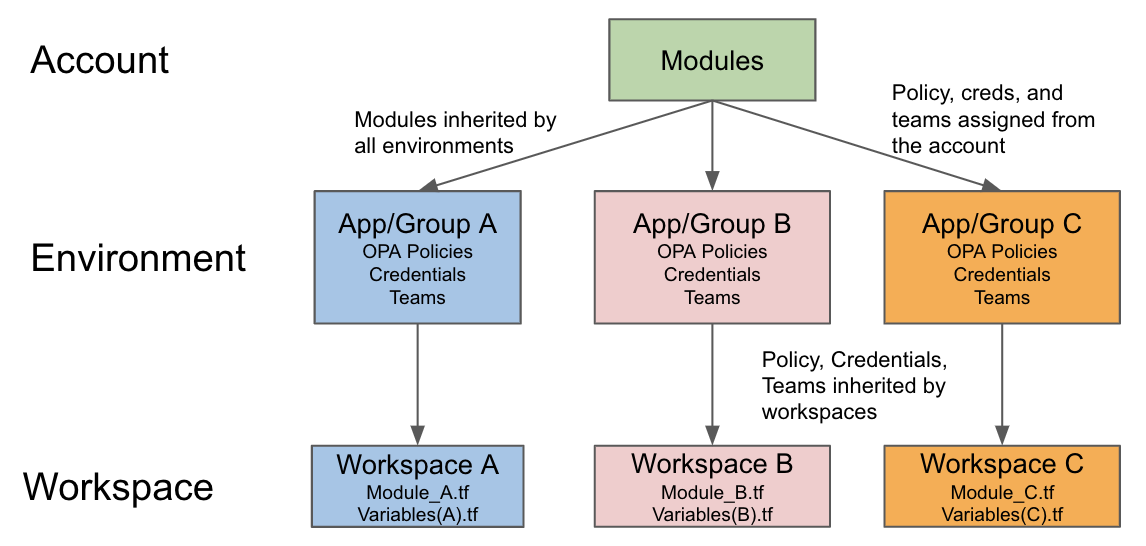
- On remote platforms, variable scoping follows account → environment → workspace inheritance, and lower scopes win. A workspace-level override can pin stale credentials after an org-level rotation.
- Don't name a repo variable file terraform.tfvars if you run on a TACO platform; platforms generate that file to inject managed variables, and your copy is ignored.
Terraform workspaces let you manage several distinct state files for the same configuration. By default, Terraform runs in a workspace named default. When you create a new workspace (e.g., terraform workspace new dev), Terraform creates a separate state file for that workspace (e.g., terraform.tfstate.d/dev/terraform.tfstate). All operations within that workspace read from and write to its dedicated state file.
That lets you deploy the same infrastructure code to different environments (development, staging, production) without changing the code itself. You just switch workspaces.
Key Terraform CLI workspace commands include:
terraform workspace new <workspace-name>: Creates a new workspaceterraform workspace list: Lists existing workspacesterraform workspace select <workspace-name>: Switches to a different workspaceterraform workspace show: Displays the current workspace nameterraform workspace delete <workspace-name>: Removes a workspace
The terraform.workspace interpolation lets a configuration reference the current workspace name at runtime, so you can vary things slightly based on the active environment:
resource "aws_instance" "example" {
  ami           = "ami-0c55b31ad20f0c502"
  instance_type = terraform.workspace == "prod" ? "t2.medium" : "t2.micro"

  tags = {
    Name        = "Server-${terraform.workspace}"
    Environment = terraform.workspace
  }
}
What Is the Difference Between CLI Workspaces and Cloud Workspaces?
The word "workspace" means different things across Terraform's ecosystem. Both depend on a properly configured backend. See our Terraform state and remote backends guide for the underlying state model.
Open-Source Terraform CLI Workspaces
CLI workspaces are a local feature for managing multiple state files from a single Terraform configuration. They give you state isolation for different environments or parallel development. But they have some built-in limits:
- Shared backend configuration: All workspaces use the same backend settings
- Limited access control: No built-in RBAC; relies on underlying system permissions
- Basic isolation: State files are separate, but variable management is manual
- Scalability constraints: Complex conditional logic using
terraform.workspacebecomes unwieldy at scale
CLI workspaces are best suited for:
- Individual developers managing multiple test environments
- Small teams with simple, homogeneous environments
- Temporary feature branch testing where each workspace is ephemeral
- Learning and experimentation
Remote Workspaces (Terraform Cloud, Scalr)
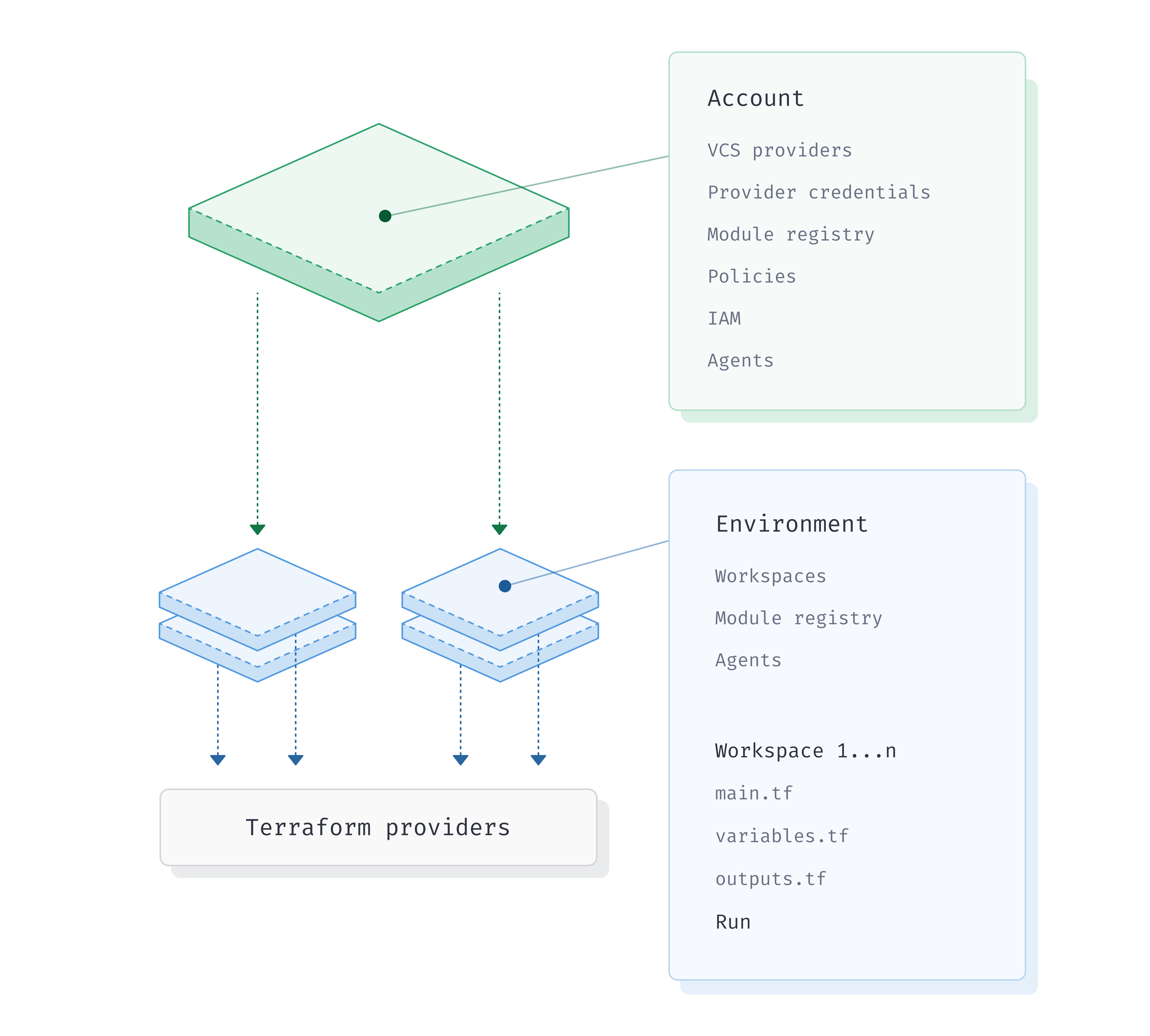
Terraform Automation and Collaboration Software (TACOs) like Terraform Cloud and Scalr grew the workspace idea into a full management unit. These remote workspaces act as distinct deployment targets with:
- Isolated state and variables: Each workspace has its own state file, variable scopes, and credentials
- Granular RBAC: Control who can plan, apply, or approve changes per workspace
- Policy enforcement: Integrate Open Policy Agent (OPA) or Sentinel policies
- VCS integration: Trigger runs automatically based on repository changes
- Remote execution: Terraform runs on the platform's infrastructure
- Run history: Who triggered each run and what it changed
- Environment-scoped variables: Define variables at different hierarchy levels
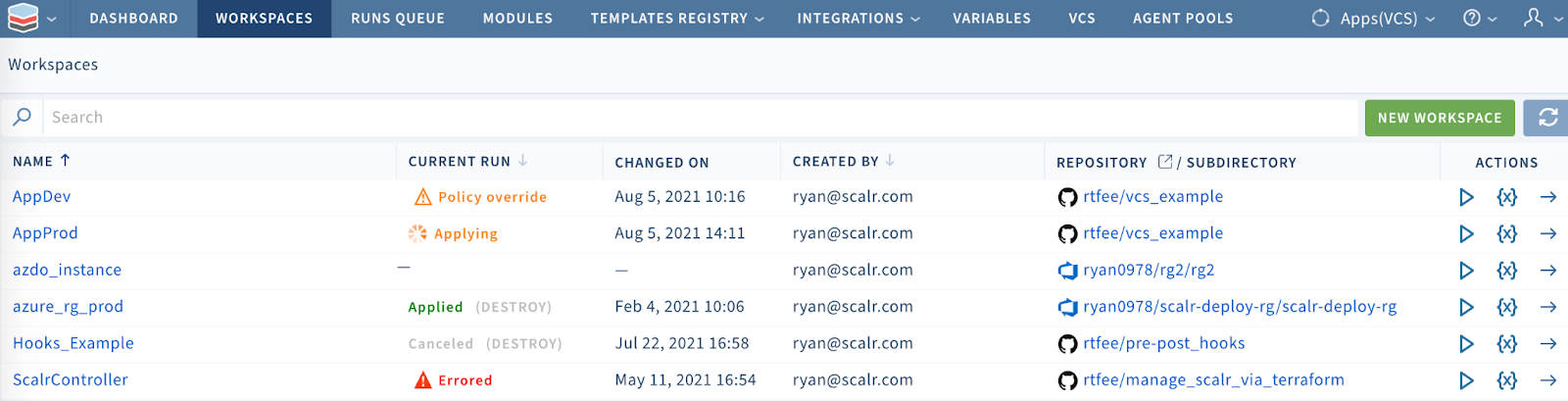
You'll want remote workspaces for:
- Multi-team organizations requiring governance and separation of duties
- Production infrastructure requiring strict controls and audit trails
- Complex deployments spanning multiple cloud providers
- Compliance-heavy environments demanding policy enforcement
The line between the two models can bite you when you mix them. A customer using the CLI-driven workflow against a remote-execution workspace found that a local tofu plan prompted interactively for every variable before handing the run off to the platform, while VCS-triggered runs on the same workspace ran clean. Platform-managed variables are injected into the remote run, but anything the CLI evaluates locally before handoff can still demand values it cannot see. If your team runs both CLI-driven and VCS-driven workflows against the same workspaces, test both paths. They resolve variables at different points.
How Do You Manage Dev, Staging, and Production Environments?
Across development, staging, and production, most environment differences live in input variables and tfvars files. Keep environment-specific values there, not hardcoded across configurations.
Directory-Based Separation Over Workspaces for Major Environments
A widely accepted practice in the Terraform community is to use separate directories for distinct, long-lived environments. This gives you the most isolation:
.
├── environments
│   ├── development
│   │   ├── backend.tf
│   │   ├── main.tf
│   │   └── dev.tfvars
│   ├── staging
│   │   ├── backend.tf
│   │   ├── main.tf
│   │   └── staging.tfvars
│   └── production
│       ├── backend.tf
│       ├── main.tf
│       └── prod.tfvars
├── modules
│   ├── vpc
│   │   ├── main.tf
│   │   ├── variables.tf
│   │   └── outputs.tf
│   └── ec2_instance
│       ├── main.tf
│       ├── variables.tf
│       └── outputs.tf
Benefits of directory-based separation:
- Each environment has its own backend configuration with different state file paths
- Environment-specific provider versions and module versions possible
- Clear isolation prevents accidental cross-environment changes
- Each environment can have tailored access controls
One detail that gets overlooked in this layout: where the tfvars files live relative to what your automation watches. A team we worked with at Scalr kept per-environment values outside the Terraform directory (iac/scalr/prod.tfvars sitting next to iac/infra/) with the workspace's VCS trigger strategy set to Directories, pointed at the infra directory. PRs touching .tofu files triggered plans as expected. PRs that only changed prod.tfvars triggered nothing, so production variable changes were merging without ever being planned. The trigger strategy matched directories, and the tfvars path is a file, so it never matched anything. The fix was gitignore-style trigger patterns listing both the infra directory and the tfvars file explicitly. If your variable files live outside the directory your CI watches, open a tfvars-only PR and confirm it actually produces a plan.
When to use workspaces instead:
Use CLI workspaces for short-term, temporary environments built from the exact same configuration, such as an isolated sandbox for testing a feature branch or a parallel environment for code review. Don't use workspaces for distinct prod/staging/dev environments, because they share backend configuration and tend to push you into tangled conditional logic.
Environment-Specific Variables
Define all variables in variables.tf and use .tfvars files for environment-specific values:
# variables.tf
variable "aws_region" {
  description = "AWS region"
  type        = string
}

variable "instance_count" {
  description = "Number of instances"
  type        = number
}

variable "instance_type" {
  description = "EC2 instance type"
  type        = string
}
Then create environment-specific files:
# environments/production/prod.tfvars
aws_region     = "us-east-1"
instance_count = 5
instance_type  = "m5.large"
# environments/development/dev.tfvars
aws_region = "us-west-2"
instance_count = 1
instance_type = "t2.micro"Critical rule: Never store sensitive data in .tfvars files. Use dedicated secret managers (HashiCorp Vault, AWS Secrets Manager, Azure Key Vault) and integrate them with your CI/CD pipeline or Terraform provider.
A second rule we now state explicitly after seeing it fail in the field: define each variable in exactly one place. One customer running OpenTofu 1.8+ had plans succeed and applies fail with a variable conflict. The same variable was set in an explicit -var-file and again in a *.auto.tfvars file, with different values. During plan, the explicit -var-file wins. During apply of a saved plan, only auto-loaded files are read, and OpenTofu 1.8+ validates apply-time variable values against the saved plan, so the mismatch rejected the apply. Nothing about the configuration was wrong in isolation; the two definitions only collided across the plan/apply boundary.
Environment Parity and Drift Minimization
Strive for staging environments that closely mirror production:
- Use the same versioned modules across environments
- Drive differences via configuration (variables), not forked code
- Implement consistent CI/CD pipelines across environments
- Regularly detect and remediate configuration drift
Promotion Strategy: Dev → Staging → Prod
Establish a clear progression path:
- Use version control (Git) with branching strategies (
develop,staging,main) - Enforce pull/merge requests with mandatory code reviews
- Automate promotions via CI/CD pipelines
- Incorporate manual approval gates for production changes
- Include
terraform planoutput in PRs for visibility
Should You Use Directories or Workspaces Per Environment?
The Problem with Workspace-Centric Approaches
Overreliance on workspaces for environment separation leads to hidden risks:
# ❌ Problematic: Workspace-based environment separation
terraform {
  backend "s3" {
    bucket = "my-terraform-state"
    key    = "terraform.tfstate"
    region = "us-west-2"
  }
}

resource "aws_instance" "example" {
  ami           = "ami-0c55b159cbfafe1f0"
  instance_type = terraform.workspace == "prod" ? "m5.large" : "t2.micro"

  tags = {
    Environment = terraform.workspace
  }
}
Problems with this approach:
- All workspaces share the same backend configuration
- Production and development state files exist in the same bucket path
- Complex conditional logic makes configurations hard to read
- Increased risk of accidental changes to the wrong environment
- Difficult to implement environment-specific policies or provider versions
The Solution: Directory Structure
# ✅ Recommended: Directory-based separation

# ./environments/prod/main.tf
terraform {
  backend "s3" {
    bucket = "my-terraform-state"
    key    = "environments/prod/terraform.tfstate"
    region = "us-west-2"
  }
}

module "application" {
  source = "../../modules/application"

  environment   = "prod"
  instance_type = "m5.large"
}

# ./environments/dev/main.tf
terraform {
  backend "s3" {
    bucket = "my-terraform-state"
    key    = "environments/dev/terraform.tfstate"
    region = "us-west-2"
  }
}

module "application" {
  source = "../../modules/application"

  environment   = "dev"
  instance_type = "t2.micro"
}
Advantages:
- Each environment has complete configuration isolation
- Unique backend paths prevent state file collisions
- Environment-specific provider versions possible
- Clear, easily auditable separation
- Reduces risk of catastrophic cross-environment mistakes
Should You Use a Monorepo or Polyrepo for Terraform Code?
Whether you go with a centralized (monorepo) or distributed (polyrepo) structure shapes how you scale, how you collaborate, and how much operational complexity you take on. The repo-structure decision is tightly coupled to your pipeline design. See CI/CD and GitOps for Terraform & OpenTofu for the trade-offs.
Monorepo: All IaC in One Repository
Architecture:
my-infrastructure-monorepo/
├── environments/
│   ├── dev/
│   ├── staging/
│   └── prod/
├── modules/
│   ├── vpc/
│   ├── database/
│   └── app-tier/
├── policies/
└── docs/
Advantages:
- Unified visibility across all infrastructure
- Atomic cross-component changes (commit once, deploy consistently)
- Easier internal dependency management
- Simplified module discovery and reuse
- Single source of truth for configuration
Disadvantages:
- CI/CD bottlenecks (large repo, slow operations)
- Complex permission management (repo-level access control insufficient)
- Large repository size impacts clone/fetch times
- Risk of unintended changes to unrelated components
- Steep onboarding curve for new team members
Best for:
- Smaller teams (<20 people) with unified infrastructure
- Tightly coupled infrastructure where atomic deployments matter
- Organizations with strong DevOps maturity and reliable CI/CD
Polyrepo: IaC Split Across Multiple Repositories
Architecture:
my-org/
├── infra-networking/ (VPC, subnets, routing)
├── infra-database/ (RDS, data warehouse)
├── infra-app/ (Application tier resources)
├── terraform-modules/ (Shared module library)
└── platform-policies/ (OPA policies)
Advantages:
- Clear ownership (team per repo)
- Faster individual builds and deployments
- Independent lifecycle management
- Granular access control aligned with team structure
- Smaller, more navigable repositories
Disadvantages:
- Discovery challenges (modules scattered across repos)
- Complex cross-repo dependency management
- Potential code duplication without central module governance
- Higher coordination overhead between teams
- Risk of version skew between shared dependencies
Best for:
- Larger organizations (>20 people) with specialized teams
- Loosely coupled infrastructure components
- Multi-tenant or multi-product environments
- Organizations with clear team boundaries and autonomy needs
Decision Factors
Choose based on:
- Team size and structure: Monorepo for unified teams, polyrepo for specialized teams
- Infrastructure complexity: Simple → monorepo, complex multi-component → polyrepo
- Organizational culture: Collaboration-focused → monorepo, autonomy-focused → polyrepo
- CI/CD maturity: Advanced tooling makes both viable; basic tooling favors monorepo
- Deployment model: Atomic → monorepo, independent → polyrepo
Tip: Either way, a centralized platform like Scalr can manage both monorepo and polyrepo structures from one place.
How Should You Structure Terraform Projects for Production?
How you organize Terraform code decides whether you can scale it, keep it secure, and collaborate on it. For a detailed 4-part treatment, see our Structuring Terraform and OpenTofu series, Part 1/4. For module fundamentals, Terraform Modules Explained.
Strategic Code Organization Principles
Standard File Layout:
Every module should follow a consistent structure:
- main.tf: Primary resource definitions
- variables.tf: Input variable declarations with types, descriptions, and defaults
- outputs.tf: Output value definitions for downstream consumption
- versions.tf: Terraform/OpenTofu and provider version constraints
- terraform.tfvars or *.auto.tfvars: Variable value assignments
# versions.tf
terraform {
  required_version = ">= 1.5"
  required_providers {
    aws = {
      source  = "hashicorp/aws"
      version = "~> 5.0"
    }
  }
}
One warning about the terraform.tfvars name specifically. TACO platforms generate terraform.tfvars/terraform.tfvars.json (and opentofu.tfvars) at run time to inject platform-managed variables, so a file by that exact name in your repo is ignored on remote runs. In Scalr's support queue, this shows up repeatedly during platform evaluations: two separate teams hit it weeks apart during their proofs-of-concept, both with Error: No value for required variable on their first remote run, for code that worked fine via the CLI locally. The fix is to rename the file (myproject.tfvars passed with an explicit -var-file) and keep the reserved names out of version control. Scalr has since added validation that flags reserved tfvars filenames, so the failure names the cause instead of surfacing as a generic missing-variable error.
Naming Conventions:
- Resources: Singular names (e.g.,
aws_instance.web_server) - Variables: Descriptive with units (e.g.,
ram_size_gb,enable_monitoring) - Outputs: Descriptive (e.g.,
vpc_id,database_endpoint) - Files: Group related resources logically (e.g.,
network.tf,compute.tf,security.tf) - General: Use underscores for separation; be descriptive and consistent
Designing Reusable Modules
Modules are the foundation for DRY (Don't Repeat Yourself) infrastructure. Bad module design leaves you with duplicated code and a maintenance headache.
Module Design Principles:
- Single responsibility: Each module has one clear purpose
- Clear interface: Well-defined inputs (variables.tf) and outputs (outputs.tf)
- Avoid thin wrappers: Modules should enforce standards or simplify complexity; a wrapper around a single resource adds indirection without value
- Parameterize sparingly: Expose only necessary variables; use sensible defaults
- Documentation: Include README.md with purpose, inputs, outputs, and usage examples
- Semantic versioning: Tag shared modules with meaningful versions for tracking changes
Example well-designed module:
# modules/vpc/main.tf
resource "aws_vpc" "main" {
  cidr_block           = var.cidr_block
  enable_dns_hostnames = var.enable_dns_hostnames

  tags = {
    Name    = "${var.project_name}-vpc"
    Project = var.project_name
  }
}

resource "aws_internet_gateway" "main" {
  vpc_id = aws_vpc.main.id

  tags = {
    Name = "${var.project_name}-igw"
  }
}

# modules/vpc/variables.tf
variable "project_name" {
  description = "The name of the project"
  type        = string
}

variable "cidr_block" {
  description = "The CIDR block for the VPC"
  type        = string
  default     = "10.0.0.0/16"
}

variable "enable_dns_hostnames" {
  description = "Enable DNS hostnames in the VPC"
  type        = bool
  default     = true
}

# modules/vpc/outputs.tf
output "vpc_id" {
  description = "The ID of the VPC"
  value       = aws_vpc.main.id
}

output "internet_gateway_id" {
  description = "The ID of the internet gateway"
  value       = aws_internet_gateway.main.id
}
State Management Best Practices
State Splitting:
Don't keep one monolithic state file. Break state down by environment, region, and component:
production/
  networking/terraform.tfstate
  app-main/terraform.tfstate
  databases/terraform.tfstate
staging/
  networking/terraform.tfstate
  app-main/terraform.tfstate
Benefits:
- Reduces blast radius of errors
- Improves plan/apply performance
- Allows granular access control
- Simplifies team collaboration
The harder question is what to split by. One member of the Scalr community came to us with single workspaces holding state for entire resource groups, several hundred to a few thousand resources each. Plans took long enough to discourage running them, and the diffs were effectively unreviewable. Their instinct was to split per team, but they feared the workspace sprawl that would create. What worked was splitting by blast radius and change frequency instead:
- Resources that change together stay in the same workspace
- Components on different lifecycles (networking vs. applications) get separated
- Shared foundations (DNS zones, IAM baselines) get their own workspace, consumed by everything else via remote state
- Each team gets one environment, which handles RBAC, variable, and provider scoping without multiplying workspaces
- Run triggers chain downstream workspaces so a networking change still propagates
Team boundaries and raw resource counts are poor splitting criteria; how often things change, and what breaks when they do, are the ones that hold up.
Remote Backends:
Always use remote backends (AWS S3, Azure Blob Storage, Google Cloud Storage) with:
terraform {
  backend "s3" {
    bucket         = "my-tf-state-bucket-prod"
    key            = "production/networking/terraform.tfstate"
    region         = "us-east-1"
    dynamodb_table = "my-tf-state-lock-prod"
    encrypt        = true
  }
}
Essential remote backend features:
- State locking: Prevent concurrent modifications (DynamoDB for S3)
- Versioning: Enable rollback capabilities
- Encryption: Encrypt state at rest and in transit
- Access controls: Implement least-privilege IAM policies
Logical Backend Keys:
Structure paths consistently for easy management:
env:/<environment>/<region>/<component>/terraform.tfstate
Example:
env:/production/us-east-1/networking/terraform.tfstate
env:/production/us-east-1/app-tier/terraform.tfstate
env:/staging/us-east-1/networking/terraform.tfstate
Managing Dependencies:
Use terraform_remote_state to read outputs from other isolated state files:
data "terraform_remote_state" "networking" {
  backend = "s3"

  config = {
    bucket = "my-tf-state-bucket"
    key    = "production/networking/terraform.tfstate"
    region = "us-east-1"
  }
}

resource "aws_instance" "app" {
  subnet_id = data.terraform_remote_state.networking.outputs.subnet_id
  # ...
}
Design these dependencies carefully so you don't end up with overly complex or circular relationships.
How Do You Manage Terraform Workspaces at Scale?
Past a certain size, basic workspace management stops keeping up.
Common Sticking Points
- Misunderstanding purpose: Workspaces manage state files, not comprehensive environment configuration
- Overuse of conditional logic: Heavy reliance on
terraform.workspacemakes configurations complex and error-prone - False sense of isolation: Separate state doesn't prevent resource naming conflicts or shared service contention
- Limited governance: CLI workspaces lack RBAC, policy enforcement, and audit trails
Scaling Strategies
- Embrace modularity: Break complex configurations into focused modules with clear responsibilities
- Adopt a TACO platform: For teams managing hundreds of workspaces, platforms like Scalr provide:
- Hierarchical variable scoping
- Federated environment access
- Workspace dependency management
- Run triggers for orchestration
- Integrated policy enforcement
- Usage-based billing. Scalr bills per run with no per-workspace charge, so adding workspaces doesn't cost anything by itself. Only the runs they execute are billed
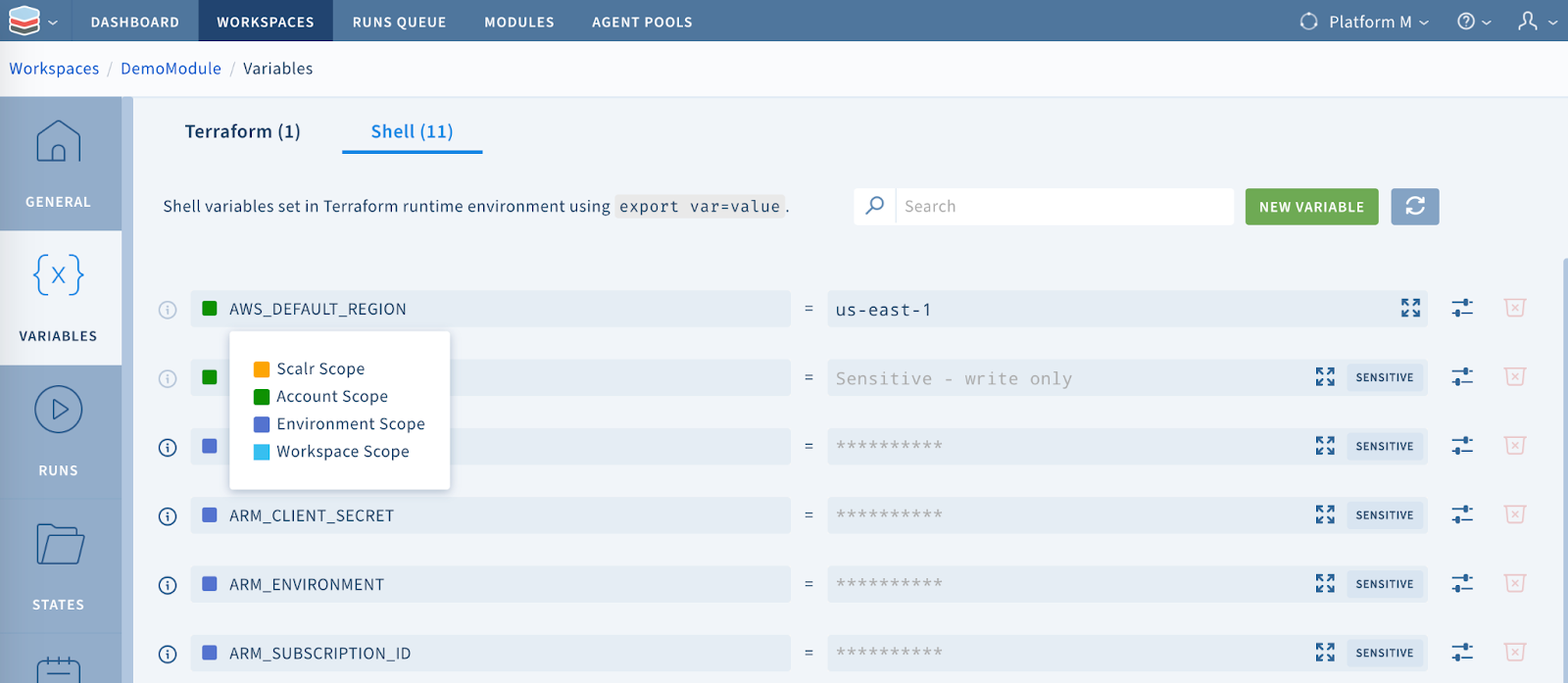
Hierarchical variable scoping cuts both ways, because lower scopes win. A customer rotating credentials updated two secret keys at the organization level, yet one workspace kept authenticating with the old values. "It worked last week" was the entire bug report. Two causes compounded. First, the new values had been set as Terraform-category variables, which the platform writes into a generated terraform.tfvars.json (or opentofu.tfvars.json) file rather than the process environment, so a provider that auto-discovers credentials from environment variables never saw them. Second, the workspace had its own workspace-scoped shell variables with the same names, and in account → environment → workspace inheritance the workspace value overrides everything above it, pinning every run to the stale credentials. The fix was threefold: set credentials as shell-category variables, delete the workspace-level overrides, and mark the upstream values final so lower scopes can no longer override them. If you adopt hierarchical scoping, audit for shadowing overrides before any credential rotation, not after.
- Minimize blast radius: Keep state files small and focused
- One per environment per region per component
- Avoid "kitchen sink" configurations
- Use separate state for shared services
- Use Terragrunt for orchestration: Manage dependencies and reduce boilerplate:
# environments/prod/vpc/terragrunt.hcl
terraform {
  source = "../../../modules/vpc"
}

inputs = {
  cidr_block = "10.0.0.0/16"
  environment = "prod"
}- Implement hierarchical configuration: Use directory structures and configuration inheritance:
global/terraform.tfvars (common to all envs)
environments/prod/terraform.tfvars (prod-specific)
environments/prod/backend.tf (prod backend)
Workspace Dependencies in Remote Platforms
Terraform Cloud / Scalr:
Remote workspaces support structured dependencies through:
- Run Triggers: Automatically queue downstream workspace runs when upstream workspace succeeds
- Output Sharing: Consumer workspaces read producer workspace outputs via
tfe_outputs(TFC) orterraform_remote_state - Federated Access: Manage cross-environment dependencies with unified RBAC
Example dependency flow:
Networking Workspace (creates VPC, subnets)
  ↓ (Run Trigger)
Application Workspace (references networking outputs)
  ↓ (Run Trigger)
Database Workspace (references app outputs)
What Are the Best Practices for Managing Environments in 2026?
Layer in Policy as Code so policies apply per-environment, drift detection to catch out-of-band changes, and audit logs for compliance evidence.
1. Treat IaC as Production Code
- Maintain the same rigor as application code (reviews, testing, CI/CD)
- Use semantic versioning for modules and infrastructure
- Enforce code standards and consistency checks
- Maintain comprehensive documentation
2. Implement Comprehensive Security
Secret Management:
- Never commit secrets to Git
- Use external secret managers with dynamic credential rotation
- Integrate secret injection into CI/CD pipelines
- Mark sensitive outputs with
sensitive = true
Access Control:
- Adhere strictly to least-privilege for Terraform execution roles
- Use separate IAM roles per environment
- Manage IAM policies themselves as code
- Implement RBAC at the platform level (workspace, environment)
Network Security as Code:
- Define all security groups and firewall rules in Terraform
- Enforce policies preventing unintended public exposure
- Use dedicated VPCs per environment
3. Automate Everything
CI/CD Pipeline Stages:
- Checkout code
- Initialize and validate Terraform
- Format check (
terraform fmt) - Static analysis and linting
- Security scanning (Checkov, tfsec)
- Policy as Code evaluation (OPA, Sentinel)
- Plan generation
- Manual approval (for production)
- Apply
Mandatory Approval Gates:
- Require human approval before production applies
- Implement "prevent self-review" for critical changes
- Include
terraform planin PR for visibility
4. Enforce Policy as Code
Use Open Policy Agent (OPA) with Rego or HashiCorp Sentinel to automatically enforce policies:
# Enforce S3 encryption
package terraform.analysis

deny[msg] {
  bucket := input.resource_changes[_]
  bucket.type == "aws_s3_bucket"
  bucket.mode == "managed"
  not bucket.change.after.server_side_encryption_configuration
  msg := sprintf("S3 Bucket '%s' must have server-side encryption", [bucket.name])
}
Policies can enforce:
- Security standards (encryption, public exposure prevention)
- Compliance requirements (tagging, regions, instance types)
- Cost optimization (instance sizing, reserved capacity)
- Operational standards (naming conventions, monitoring)
5. Master Environment Promotion
- Use Git branching for progression (feature → develop → staging → main)
- Automate promotion via CI/CD with manual gates for production
- Test thoroughly in non-production before production deployment
- Maintain environment parity between dev, staging, and prod
6. Use Specialized Tooling
Terragrunt: Wrapper for Terraform that:
- Keeps configurations DRY through inheritance
- Automates backend setup
- Manages inter-module dependencies
- Provides
run-allcommands for bulk operations
Atlantis: Enables GitOps workflows:
- Automates
terraform planon PR creation - Shows plan output in PR comments
- Enables infrastructure review before apply
- Provides approval workflow
TACO Platforms (Scalr, Terraform Cloud, Spacelift, Env0):
- Centralize state and variable management
- Provide built-in governance and RBAC
- Offer integrated CI/CD and policy engines
- Enable team collaboration with audit trails
When you're managing many environments, the platform's pricing model matters as much as its feature list, and it should weigh heavily when you're comparing Terraform Cloud alternatives. Concurrency-based pricing (used by some alternatives) sells a fixed pool of parallel run slots, which locks you into a permanent trade-off: too few slots and dev/staging/prod pipelines queue behind each other during releases, too many and you're renting idle capacity. Usage-based, per-run pricing, which only bills runs that actually executed, sidesteps the trade-off. That matters when environment counts grow non-linearly with team and region count.
7. Implement Drift Detection and Remediation
- Regularly scan infrastructure for drift
- Alert when actual state diverges from declared state
- Establish processes for remediation
- Use drift as an opportunity to update code
8. Continuous Improvement
Key Metrics:
- Lead time for changes
- Deployment frequency
- Change failure rate
- Mean time to recovery (MTTR)
- Code reusability index
- Team onboarding time
Feedback Loops:
- Regular code reviews (including structure)
- Team retrospectives on IaC practices
- Automated testing and validation
- CI/CD pipeline performance monitoring
- Stay current with tooling and best practices
How Do These Practices Fit Together?
Managing Terraform environments well means getting past the basic workspace commands. As teams and regions multiply, CLI workspaces give way to remote platforms that handle the RBAC, policy, and state isolation the CLI can't.
Start with directory-based separation and remote state isolation, then add policy enforcement and run triggers as your environment count climbs. Each step is checkable: open a tfvars-only PR to confirm it plans, audit for shadowing variable overrides before a credential rotation, and keep reserved tfvars filenames out of version control.
Where Can You Learn More About Terraform Environment Structure?
- Beginner's Guide to Terragrunt: the DRY layer that sits between modules and your environment structure.
- CI/CD and GitOps for Terraform & OpenTofu: how environment promotion plugs into the broader pipeline.
- Mastering tfvars: A Concise Guide for Terraform and OpenTofu: the right home for environment-specific values.
- Terraform State Files Best Practices: get state isolation right before you start scaling environments.
- Practical Guide to
terraform initand Backend Config: the backend-per-environment pattern in depth. - Enforcing Policy as Code in Terraform: A Comprehensive Guide: pair per-environment policies with your structure.
- Terraform Drift Detection and Management: A Comprehensive Guide: environment isolation only helps if you catch out-of-band drift.
- A Guide to Terraform Audit Logs: what compliance teams will ask for next.
- Structuring Terraform and OpenTofu: A Platform Engineer's Four-Part Guide: the detailed companion series on code organization.
- Terraform Modules Explained: the unit you'll wrap your environment-specific configs in.
Frequently asked questions
What is the difference between Terraform CLI workspaces and Terraform Cloud or Scalr workspaces?
CLI workspaces are a local feature that partitions multiple state files under a single configuration and shared backend, with no RBAC or audit trail. Remote workspaces in platforms like Terraform Cloud and Scalr are full deployment targets with isolated state and variables, granular RBAC, policy enforcement, VCS integration, and run history.
Should I use Terraform workspaces or separate directories for dev, staging, and prod?
Use separate directories for long-lived environments. Each environment gets its own backend configuration, provider versions, and access controls, which prevents accidental cross-environment changes. CLI workspaces fit short-lived, ephemeral environments built from the exact same configuration, such as per-PR preview environments.
How should I split Terraform state across workspaces?
Split by blast radius and change frequency rather than by team or resource count. Keep resources that change together in the same workspace, separate components with different lifecycles (networking versus applications), give shared foundations like DNS and IAM baselines their own workspace consumed via remote state, and chain downstream updates with run triggers.
Why does my workspace keep using old variable values after I updated them at the account level?
In hierarchical variable inheritance (account → environment → workspace), lower scopes override higher ones, so a workspace-scoped variable with the same name pins the old value. Also check the variable category. Terraform-category variables land in an auto-loaded tfvars file, not the process environment, so providers that read credentials from environment variables never see them.
Why is my terraform.tfvars file ignored on remote runs but works locally?
TACO platforms generate terraform.tfvars (or terraform.tfvars.json / opentofu.tfvars) at run time to inject platform-managed variables, which clobbers a repo file with the same name. Rename your file (for example myproject.tfvars) and pass it explicitly, or use a different auto-loaded name.
Should I use a monorepo or polyrepo for Terraform code?
Monorepos suit smaller teams (under ~20 people) with tightly coupled infrastructure that benefits from atomic cross-component changes. Polyrepos suit larger organizations with specialized teams that need independent lifecycles and per-repo access control. Either way, centralize module governance to avoid duplication and version skew.
How do you keep oversight once you have split infrastructure across many workspaces?
Splitting by blast radius and change frequency produces more workspaces, so the platform team needs a fleet view to keep oversight. Scalr gives every workspace one shared state schema, which lets it aggregate object-native cross-workspace reports: resources, modules, providers, versions, drift, and stale workspaces. From there a platform team can spot a struggling team and step in to raise a quota, fix a policy, or unblock a run. As a drop-in Terraform Cloud alternative, Scalr provides this fleet view without changing how your teams write or run code.
About the author

CEO at Scalr
Sebastian Stadil is the CEO of Scalr with 15+ years of DevOps experience. He started with AWS in 2004 and advised early Microsoft Azure and Google Cloud.
In this guide
7 articles- Terraform Variable Sets: How to Share Variables Across Workspaces
- Structuring Terraform and OpenTofu: Part 2/4
- Structuring Terraform and OpenTofu: Part 3/4
- Structuring Terraform and OpenTofu: Part 4/4
- Structuring Terraform and OpenTofu: Part 1/4
- Using Terraform Workspace Prefixes in a Remote Backend
- How To Structure Terraform Deployments At Scale