

Guide · 24 articles branch off this one
CI/CD and GitOps for Terraform & OpenTofu
Comprehensive guide to building reliable CI/CD pipelines and implementing GitOps workflows for Terraform and OpenTofu infrastructure automation.

Key takeaways
- Separate plan and apply into distinct pipeline stages with human approval between them, and treat the plan output as an immutable artifact so the applied change matches exactly what was reviewed.
- Store state in an encrypted remote backend with locking and access controls. State files hold provider tokens, database passwords, and private keys in plaintext by default.
- Inject secrets at runtime through OIDC, secret managers, or pipeline-native stores; with OIDC, prefer file-based token delivery so tokens are re-issued fresh after long approval waits, and pin cloud trust policies to immutable workspace and environment IDs rather than names.
- Profile slow pipelines with TF_LOG=trace before resizing runners. Pre-plan validation steps and live data-source refresh across many providers are the usual cost, not memory.
- Pick the CI tool that fits your ecosystem (GitHub Actions, GitLab CI, Azure DevOps, Jenkins) and layer IaC-specific patterns on top rather than fighting its defaults.
- Combine policy-as-code for prevention with scheduled drift detection for verification, and tier your testing (static → unit → integration → E2E) to keep feedback loops tight.
Infrastructure as Code (IaC) deployments need a different CI/CD approach than regular software. This guide assumes you've already chosen your engine; if you're still deciding, start with OpenTofu vs Terraform. Teams using Terraform and OpenTofu need pipeline strategies built around state management, security, and environment promotion, without giving up reliability. The implementations that work combine testing frameworks like Terratest with policy-as-code guardrails, secure state storage, and environment-specific approval workflows. More teams are picking up ephemeral environments, state-aware caching, and automated drift detection whether they run on a commercial CI/CD platform like GitHub Actions or an open-source one.
Why CI/CD for Infrastructure as Code Matters
The Unique Challenge of IaC Automation
Infrastructure as Code automation brings security problems that a lot of teams overlook. An application security bug might hit a single service, but a compromised IaC pipeline can compromise your entire cloud environment, for three reasons:
- IaC pipelines typically run with highly privileged credentials
- A single misconfiguration propagates across all environments instantly
- Attackers targeting these pipelines inherit the same elevated access privileges
What sets infrastructure automation apart from regular application deployment is state awareness. Application deployments are stateless, but infrastructure changes carry persistent state you have to manage carefully across pipeline runs. That state buys you consistency, and it bites you if you mishandle it.
Core Principles Driving Successful IaC Pipelines
Good Terraform and OpenTofu pipelines follow principles that look pretty different from regular application CI/CD:
State Awareness: Unlike stateless application deployments, infrastructure changes maintain persistent state that must be carefully managed across pipeline runs.
Separation of Concerns: Good IaC pipelines authenticate to backend providers before doing anything else. Most mature teams split plan and apply completely, treating the plan output as an immutable artifact that gets approved before it's applied. That prevents the "planning twice" problem, where the applied changes differ from what was reviewed.
Principle of Least Privilege: Pipeline service accounts should get narrowly-scoped permissions for exactly the resources they manage, nothing more. If you run multiple environments, you also need a solid promotion strategy.
Environment Promotion Strategies: Teams running multiple environments usually follow one of two models:
- Sequential promotion: Changes flow dev→staging→prod
- Parallel approval: Same code deploys to all environments but with different approvers
Each model has tradeoffs between deployment speed, safety, and operational complexity.
Pipeline Architecture Patterns
Project Structure for Success
Project structure has a big effect on how fast and maintainable your pipeline is. For medium to large deployments, the structure that works best is a modular mono-repo with environment-specific configuration directories:
terraform-infrastructure/
├── modules/          # Reusable infrastructure components
│   ├── networking/
│   ├── compute/
│   └── database/
├── environments/     # Environment-specific configurations
│   ├── dev/
│   ├── staging/
│   └── production/
└── pipelines/        # CI/CD workflow definitions
Larger organizations tend to go with a composition-based approach: small, focused repositories for individual modules, composed through a separate environments repository. That lets specialized teams work independently while the environments repository keeps deployments coordinated.
The Plan-Apply-Approval Pattern
The Terraform pipeline pattern that works best keeps plan and apply in separate stages, with human approval in between:
- Code Validation and Security Scanning (Initial): Syntax checking, linting, and security analysis
- Terraform Plan Generation (Pre-approval): Create and store plan artifact
- Approval Gate with Plan Visualization (Human Intervention): Review proposed changes
- Terraform Apply (Post-approval): Execute using approved plan file
This way changes get reviewed before they run, and you avoid "planning twice" where the applied changes differ from what was reviewed.
Performance Optimization at Scale
Large deployments where performance matters usually add:
- Targeted Planning: Running plans only on modified components
- State-Aware Parallelization: Running non-dependent module deployments concurrently
- Provider Caching: Reducing repeated provider download time
- Plan Caching: Avoiding redundant planning operations
Our Terraform optimization guide covers each of these techniques in more detail.
Before any of that, profile the pipeline. A team Scalr helped migrate off Terraform Cloud hit plans dying with The operation was cancelled after reaching the timeout of 15 minutes and assumed the runner was memory-starved, so their first request was for more RAM. A TF_LOG=trace breakdown said otherwise. Init was cheap: all 10 providers came from cache, plugin initialization took 17.3 seconds, and 31 modules resolved in 1.7 seconds, with zero memory pressure anywhere. The time went to two places nobody had looked: a pre-plan validate integration eating 189.6 seconds (about 3.2 minutes), a step Terraform Cloud had never run for them, and roughly 10.4 minutes of plan time refreshing live data sources across all ten providers (AWS, PagerDuty, Sentry, Coralogix, Checkly, Vercel, and others). Raising the timeout and disabling the redundant validate step brought the run in around 9m40s. The plan had been correct the whole time: 10 to add, 10 to change, 3 to destroy. The instinct to throw hardware at a slow pipeline is usually wrong until a trace log says otherwise. Data-source refresh and bolted-on validation steps are the usual cost, and neither one cares how much RAM you give it.
GitOps Principles for Terraform and OpenTofu
GitOps changes how you manage infrastructure: Git becomes the single source of truth for both application configuration and infrastructure state. For Terraform and OpenTofu, that usually takes one of two workflow models.
GitOps Workflow Models
Merge-Before-Apply Pattern:
- Changes are proposed via pull/merge request
- The platform automatically runs a plan and reports output
- After code review and merge into the main branch, the apply operation proceeds
- This ensures that only approved code is applied to infrastructure
Apply-Before-Merge Pattern (Plan-and-Apply on PR):
- Teams can view the impact of changes and apply them from a feature branch before merging
- Useful for iteration in development environments or validating changes prior to mainline integration
- Similar to the Atlantis workflow pattern
GitOps Benefits for IaC
- Complete Audit Trail: Every infrastructure change is tracked in Git history with full context
- Declarative Infrastructure: Git becomes the source of truth for desired state
- Collaboration and Review: All changes go through code review before execution
- Rollback Capability: Easy rollback by reverting to previous Git commits
- Environment Consistency: Identical processes for development, staging, and production
VCS Integration Points
GitOps platforms usually support several kinds of trigger:
- Push-based triggers: Automatically plan/apply when code is pushed to specific branches
- Pull request triggers: Run speculative plans on PR creation, showing impact before merge
- Tag-based triggers: Deploy when version tags are created
- Manual triggers: Allow on-demand runs via VCS comments or platform UI
Securing State and Sensitive Data
State File Security
The biggest vulnerability in Terraform and OpenTofu deployments is the state file, which stores sensitive information in plaintext by default. State files contain:
- Provider authentication tokens
- Database passwords
- Private keys
- API endpoints and configuration details
Best Practice: Remote backend with encryption and access controls
Remote state storage with encryption at rest is standard practice now, with versioning and access logging turned on. Most major cloud providers offer their own state storage options:
- AWS S3 + DynamoDB: Versioning, server-side encryption, state locking
- Azure Storage: Managed encryption, access control, audit logging
- GCP Cloud Storage: Encryption, versioning, bucket policies
State files should be segmented by environment and bounded context, not by geographic region or arbitrary divisions. This segmentation should align with team boundaries to reduce cross-team dependencies during deployments.
Secrets Management
The consensus is to keep sensitive values out of Terraform variables entirely. Instead, most teams inject them at runtime through:
- Secret Management Systems: HashiCorp Vault, AWS Secrets Manager, Azure Key Vault
- Pipeline-Native Secret Stores: GitHub Actions Secrets, GitLab CI Variables, Azure DevOps Variable Groups
- External Identity Providers: AWS IAM Roles, Azure Managed Identities, OIDC tokens
OIDC removes long-lived secrets from the pipeline, but short-lived tokens interact badly with the long pauses built into plan-approve-apply workflows. A Scalr customer running an AzureRM workspace on OIDC had a custom hook calling az login --federated-token $ARM_OIDC_TOKEN, and it worked for so long nobody remembered the hook existed, until the token environment variable came up empty (echo "${#ARM_OIDC_TOKEN}" printed 0). The platform had moved to file-based token delivery on purpose: handing scripts a path (ARM_OIDC_TOKEN_FILE_PATH) instead of a value means the token is re-read fresh at execution time rather than expiring while a plan sits waiting for a human to approve it. The provider handles the file transparently; the custom hook did not. The fix was one line, --federated-token "$(cat $ARM_OIDC_TOKEN_FILE_PATH)", but the lesson generalizes: any script that captures identity material directly inherits the token-lifetime problem the platform already solved.
On the cloud side, pin OIDC trust policies to immutable identifiers. An enterprise customer building AWS IAM trust policies asked how to match claims on IDs rather than names; the JWT carries claims like "...:scalr_environment_id": "env-xxxx" and "...:scalr_workspace_id": "ws-xxxx" for exactly this reason. Scope trust conditions to those IDs and a workspace rename can no longer widen or break the trust boundary.
Provider Authentication Vulnerabilities
Hard-coded credentials are a serious security risk:
# Dangerous: Hard-coded credentials
provider "aws" {
  access_key = "AKIAIOSFODNN7EXAMPLE"  # Never do this!
  secret_key = "wJalrXUtnFEMI/K7MDENG/bPxRfiCYEXAMPLEKEY"
}

# Better: Use environment variables or IAM roles
provider "aws" {
  # Uses environment variables or instance profile
}
Pipeline-Level Security Controls
IaC management platforms typically provide:
- Centralized state management with encryption and access controls
- Secure credential management without exposing sensitive values
- Policy enforcement that prevents non-compliant infrastructure changes
- Runtime drift detection to identify unexpected changes
GitHub Actions Integration
GitHub Actions plugs straight into your repositories, makes secret management easy, and has a deep marketplace of Terraform-specific actions. It's a great fit if you're already on GitHub Enterprise.
Key Advantages
- Native Repository Integration: Direct access to repository code and pull requests
- Matrix-Based Concurrency: Particularly valuable for organizations deploying to multiple regions or accounts
- Rich Terraform Marketplace: Extensive community actions for Terraform operations
- Secret Management: Built-in GitHub Secrets with automatic injection into workflows
- Free for Public Repositories: Generous free tier for open-source projects
Typical Workflow Structure
name: Terraform CI/CD

on:
  pull_request:
    paths:
      - 'terraform/**'
  push:
    branches:
      - main
    paths:
      - 'terraform/**'

jobs:
  plan:
    runs-on: ubuntu-latest
    steps:
      - uses: actions/checkout@v4
      - uses: hashicorp/setup-terraform@v2
      - run: terraform init
      - run: terraform plan -out=tfplan
      - uses: actions/upload-artifact@v3
        with:
          name: tfplan
          path: tfplan

  apply:
    needs: plan
    runs-on: ubuntu-latest
    if: github.ref == 'refs/heads/main'
    environment: production
    steps:
      - uses: actions/checkout@v4
      - uses: hashicorp/setup-terraform@v2
      - uses: actions/download-artifact@v3
        with:
          name: tfplan
      - run: terraform init
      - run: terraform apply -auto-approve tfplan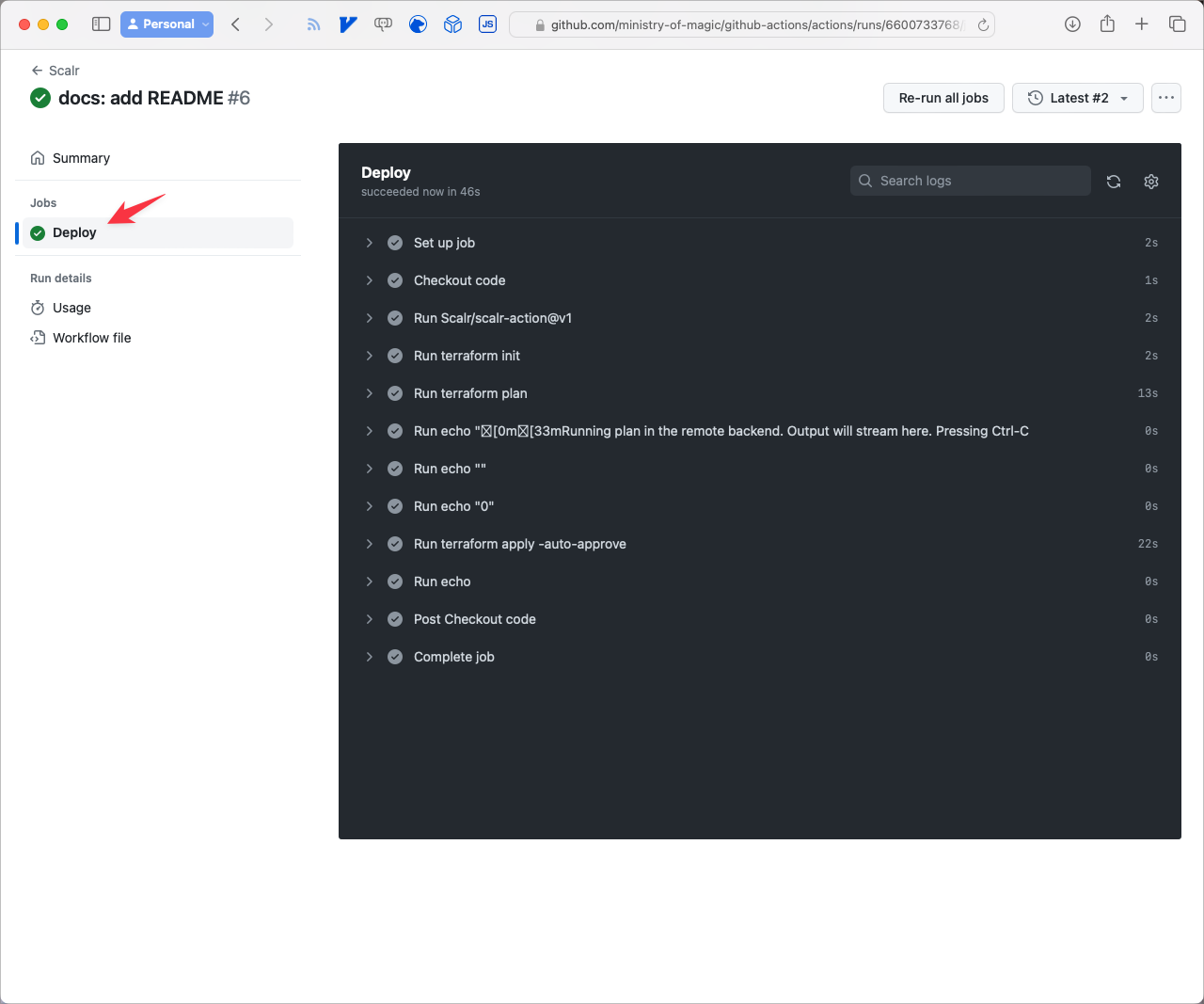
GitLab CI Integration
GitLab CI has stronger built-in branch protection rules and approval workflows. Its directed acyclic graph (DAG) pipeline architecture helps with complex infrastructure deployments that have a lot of interdependencies.
Key Advantages
- Superior Branch Protection: Native integration with merge request workflows
- DAG Pipeline Architecture: Better handling of complex dependencies
- Built-in State Management: Optional managed Terraform state in GitLab
- Policy as Code: Native integration with policy enforcement tools
- Comprehensive Audit Logging: Detailed records of all infrastructure changes
GitLab GitOps Workflow
GitLab handles both merge-before-apply and apply-before-merge patterns through its merge request pipeline system. You can run speculative plans on every MR and show the results right in the MR interface so reviewers can see them.
For more detailed information, see our guides on using Terraform with GitLab and managing GitLab itself with Terraform.
Azure DevOps Pipelines
If you're already deep in the Microsoft ecosystem, Azure DevOps makes authentication simpler and ties in tightly with Azure infrastructure.
Implementation Approach
Azure DevOps uses YAML-based multi-stage pipelines with native support for Terraform. A few things it does well:
- Native Azure Integration: Simplified authentication to Azure resources
- Service Connections: Built-in service principal management
- Variable Groups: Centralized secret management
- Protected Environments: Approval gates with audit logging
- Stage Artifacts: Plan artifacts passed between stages
Multi-Stage Pipeline Pattern
A production-ready pipeline typically implements:
- Validation Stage: Code syntax, formatting, and security scanning
- Plan Stage: Generate and store execution plan as artifact
- Approval Gate: Manual review with protected environment
- Apply Stage: Execute using approved plan artifact
As with the other tools, the part that matters is separating plan and apply into distinct stages with human approval between them, which prevents accidental changes and leaves an audit trail.
Jenkins and Other CI/CD Tools
Jenkins still earns its place for teams with complex, custom deployment needs. It's as flexible as anything out there, but you pay for that in maintenance.
Jenkins Advantages
- Extreme Flexibility: Highly customizable for unique requirements
- Mature Ecosystem: Extensive plugin ecosystem for integration
- Self-Hosted Control: Full control over execution environment
- Complex Workflow Support: Excellent for interdependent infrastructure provisioning
Open-Source Alternatives
Drone CI takes a container-native approach that makes Terraform version management and plugin handling simpler. Being stateless, it fits well with immutable infrastructure principles.
Tekton is a Kubernetes-native pipeline that scales well for large infrastructure deployments.
Concourse CI is good at complex resource dependencies and has a strong Terraform community with a lot of shared pipelines.
Security in CI/CD Pipelines
A compromised IaC pipeline is one of the most dangerous attack vectors in infrastructure, so you want defense in depth.
Key Security Tools
| Security Need | Open-Source Option | Enterprise Solution | Key Capabilities |
|---|---|---|---|
| Static Analysis | tfsec, Checkov | Scalr, Terraform Cloud | Scan IaC templates for vulnerabilities before deployment |
| Policy Enforcement | Open Policy Agent | Scalr, Terraform Enterprise | Prevent non-compliant resources from being created |
| State Management | Remote backends | Scalr, Terraform Cloud | Encrypted state storage with access controls |
| Drift Detection | terraform plan | Scalr, Prisma Cloud | Identify unauthorized infrastructure changes |
| Secrets Management | HashiCorp Vault | Scalr, AWS Secrets Manager | Secure credential management without exposure |
Defense-in-Depth Strategy
Secure CI/CD Pipeline Configuration:
- Isolate build environments
- Use ephemeral credentials
- Validate all external dependencies
- Restrict network access from pipeline runners
Principle of Least Privilege:
- Create purpose-specific service accounts
- Use temporary credentials
- Implement just-in-time access
- Scope permissions to exactly what's needed
Enforce Security Policies as Code:
- Codify compliance requirements in policy frameworks
- Automate policy checks in pipeline stages
- Block deployments that violate security policies
- Maintain audit trail of policy violations
Continuous Monitoring and Verification:
- Regular drift detection across all environments
- Compliance validation at deployment time
- Security posture assessment and reporting
- Alert on anomalies and suspicious activities
Scalr CI/CD Capabilities
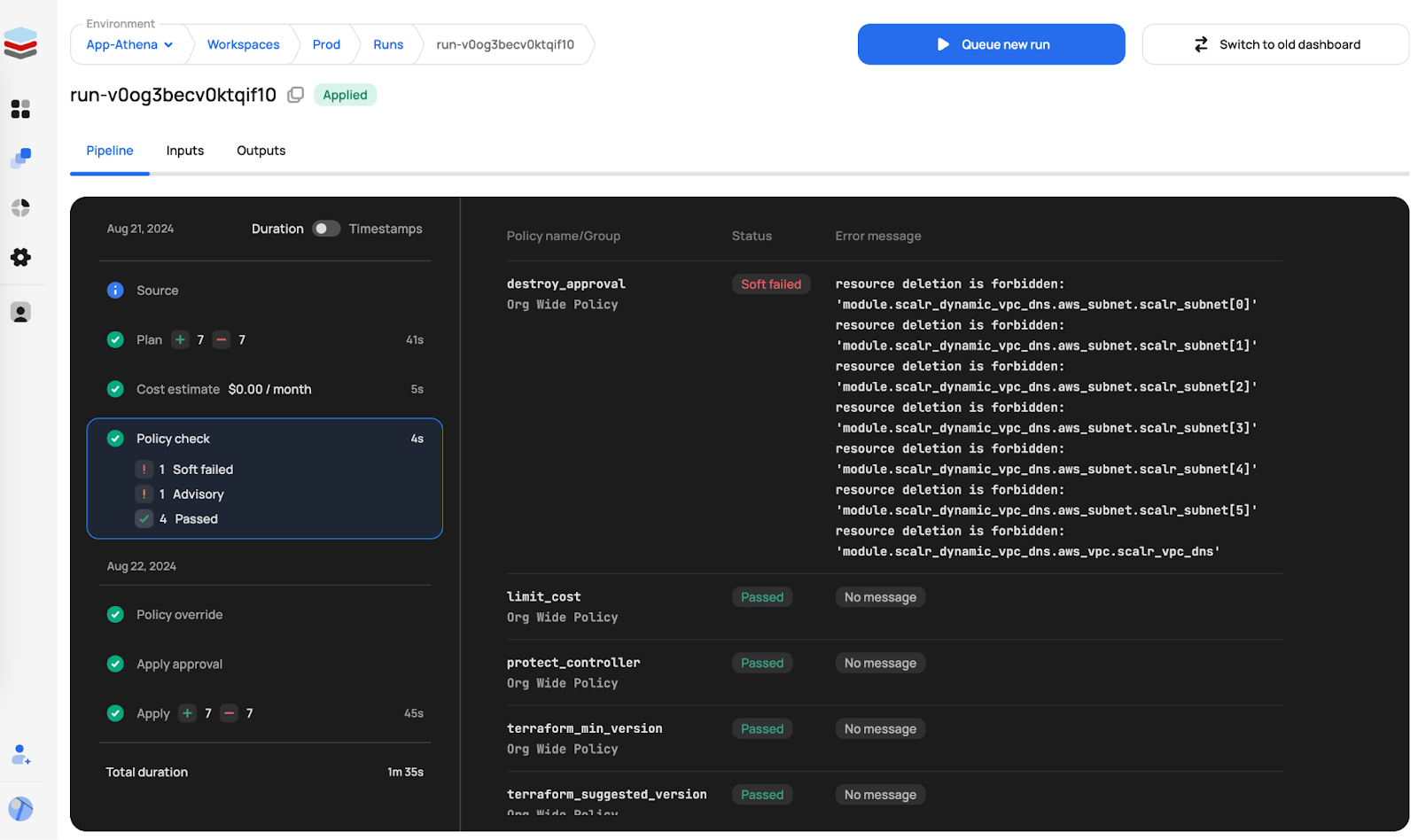
Scalr is a platform designed specifically for Terraform and OpenTofu operations. It isn't a general CI/CD tool, but Scalr has extensive CI/CD-like features for infrastructure automation.
Core CI/CD Functionality
Scalr automates standard Terraform and OpenTofu commands (init, plan, apply), so fewer steps depend on someone running them by hand. It integrates with version control systems, supporting GitOps workflows through two primary models:
Merge-Before-Apply: Changes proposed via PR, reviewed, then applied after merge.
Apply-Before-Merge: Teams validate changes from feature branches before mainline integration, similar to Atlantis.
Custom Hooks for Workflow Extension
Standard IaC workflows often require steps beyond automated plans and applies. Scalr's custom hooks allow integration of custom scripts at various stages:
- Pre-init: Execute scripts before backend initialization
- Pre-plan: Run scripts before plan operation (static analysis, compliance checks)
- Post-plan: Execute after plan generation (cost estimation, notifications)
- Pre-apply: Run before apply operation (final validation, security checks)
- Post-apply: Execute after apply completion (notifications, integration tests, CMDB updates)
Run Triggers and Dependencies
Infrastructure components often have dependencies requiring coordinated provisioning. Scalr's run triggers manage these:
- Workspace Chaining: Successful runs in one workspace trigger runs in dependent workspaces
- Output Dependencies: Workspace B automatically re-plans when Workspace A applies
- Federated Environments: Create dependencies between workspaces in different environments
- VCS Event-Based Triggers: Initiate runs based on branch pushes or tag creation
This cross-workspace run triggering is comparable to features in Terraform Cloud for managing infrastructure dependencies.
Event-Driven Integrations
Scalr has native integrations for event-driven automation:
AWS EventBridge:
- Trigger automated remediation based on run failures
- Orchestrate complex multi-step workflows with Lambda
- Enforce compliance checks on workspace creation
Datadog Integration:
- Correlate infrastructure changes with application behavior
- Monitor IaC pipeline health with custom dashboards
- Audit security-sensitive infrastructure changes
Slack & Teams Integration:
- Route context-aware notifications to appropriate channels
- Streamline code reviews with plan output in PR threads
- Provide stakeholder visibility on deployment progress
Customizable Execution Environments
Scalr supports both managed execution and self-hosted agents:
- Network Access: Deploy agents within private networks for access to internal resources
- Custom Tooling: Install additional binaries, CLI tools, and dependencies
- Compliance and Security: Ensure code and credentials remain in controlled network perimeter
Self-hosted agents add no platform cost: Scalr's per-run pricing includes private agents at no extra charge.
Self-hosted execution comes with failure modes of its own, mostly around container images and isolation semantics. A platform team we worked with at Scalr, running Docker agents on ECS, watched every module pull from public GitHub fail with fatal: unable to access 'https://github.com/...': Problem with the SSL CA cert (path? access rights?), git exit code 128, on every run. Their workaround, GIT_SSL_NO_VERIFY=true, is a flare rather than a fix, and the failures traced to two real bugs: the 1.0.0 Kubernetes agent ran tasks in an execution environment that had no CA certificates, and the slim agent image shipped without the ca-certificates package entirely. The fuller image had the certs, but its bundled tooling tripped the team's security scanners. The tension between slim images and kitchen-sink images bites from both directions. Both bugs were patched in 1.0.1, released the next day. If you build custom runner images, treat the CA bundle as a first-class dependency rather than something the base image probably includes.
Isolation is the other recurring surprise. A Scalr customer customizing self-hosted runners needed runs to read and write a host directory, and found that volume mounts into the agent container never appeared inside runs: with the Docker driver, each operation executes in its own per-run container, by design. Switching the agent to SCALR_AGENT_DRIVER=local runs operations inside the agent container itself, so mounts work, at the cost of a shared environment between runs. If you take that route, the isolation-preserving pattern is concurrency of 1 per agent, scaling out with replicas, so no two runs ever share a filesystem mid-flight. Sandboxed runs versus a shared environment is an explicit trade-off; know which one you have chosen.
Testing in CI/CD Pipelines
Terraform testing has matured, and a layered approach is now the accepted practice.
For more on the unit-testing and integration-testing layers specifically, including terraform test vs. tofu test syntax differences and where Terratest still fits, see Terraform Testing: terraform test, tofu test, Terratest.
Testing Strategy Layers
1. Static Validation: Syntax checking, formatting validation, lint rules
- Fast feedback on every commit
- Catches obvious configuration errors
- Enforces code standards
2. Unit Testing: Individual module validation with mock providers
- Terraform's built-in
terraform testcommand (v1.6+) provides native module testing - Validates module logic without resource creation
- Fast execution for tight feedback loops
3. Integration Testing: Actual resource creation in isolated environments
- Terratest framework enables testing real cloud resources
- Validates behavior in actual cloud environment
- Runs on major branch merges or releases
4. End-to-End Testing: Complete environment provisioning tests
- Full application stack validation
- Integration testing between infrastructure components
- Post-deployment smoke tests
Tiered Testing Strategy
Teams balancing speed and safety tend to tier their tests:
- Lightweight static tests run on every commit
- Comprehensive integration tests run only on main branch merges or release preparations
- This approach keeps feedback loops tight while ensuring thorough validation
Tests should validate behavior, not syntax alone, confirming that networks segment traffic properly, security groups enforce isolation, and data stores apply the right encryption.
Modern 2026 Best Practices
Ephemeral Environments
More teams now spin up temporary environments for testing and validation, then tear them down afterward. Ephemeral environments:
- Reduces costs by not maintaining idle infrastructure
- Improves security by minimizing long-lived credentials
- Enables comprehensive integration testing
- Validates complete deployment workflows end-to-end
State-Aware Caching
Teams managing large infrastructure also cache aggressively:
- Cache provider binaries to reduce download time
- Cache validated plans to avoid redundant operations
- Cache module downloads from private registries
- Intelligent invalidation based on configuration changes
Automated Drift Detection
Continuous verification pipelines regularly check for drift between defined and actual infrastructure state. These checks:
- Run on schedules (e.g., nightly) rather than being triggered by code changes
- Alert on unexpected infrastructure modifications
- Trigger remediation workflows automatically
- Provide visibility into infrastructure compliance
GitOps at Scale
Mature GitOps implementations use:
- Infrastructure as Code Repositories: Single source of truth in Git
- Declarative Desired State: All configuration in version control
- Automatic Reconciliation: Platform automatically corrects drift (ArgoCD is the de-facto choice for Kubernetes workloads)
- Policy Enforcement: Compliance checks embedded in workflows
- Progressive Delivery: Gradual rollout with automated validation
Observability and Continuous Verification
Monitoring infrastructure deployments calls for different metrics than application deployments. The ones that tell you the most:
- Deployment Success Rate: Percentage of successful vs. failed deployments
- Deployment Duration: Time from initiation to completion
- Drift Percentage: How often actual infrastructure differs from defined state
- Resource Change Volume: Number of resources modified per deployment
- Approval Time: How long changes wait for human approval
The teams that do this well wire Terraform outputs straight into their monitoring platforms, so infrastructure metrics feed back into future deployment decisions.
Putting it together
The pipelines that hold up over time treat every Terraform and OpenTofu run as a state transition with privileged credentials, not as a stateless code deploy. That single fact drives the rest of the design. Plan and apply get separated by a human approval gate so the applied change matches what was reviewed. State lives in an encrypted remote backend with locking. Service accounts get scoped down so a compromise can't reach the whole account. Tests run in tiers to keep feedback fast, and scheduled drift detection catches changes that arrive outside the pipeline.
Those patterns work the same on GitHub Actions, GitLab CI, Azure DevOps, Jenkins, Scalr, or an open-source alternative. Which platform fits depends on your existing ecosystem and how much deployment complexity you have to manage.
The diagnostic stories above (the timed-out plan that needed a trace rather than more RAM, the empty OIDC token after a long approval wait, the missing CA bundle in a slim agent image) show what these patterns look like when they break, and how to fix each one.
Key Takeaways
✓ CI/CD for IaC requires state-aware architecture different from application deployment pipelines
✓ Separate plan and apply stages with mandatory human review to prevent accidental changes
✓ Implement defense-in-depth security including state encryption, credential management, policy enforcement, and drift detection
✓ Choose your platform based on ecosystem fit: GitHub Actions for GitHub shops, GitLab CI for GitLab, Azure DevOps for Microsoft environments, or platform-agnostic tools like Scalr
✓ Multi-layer testing strategies (static → unit → integration → E2E) catch issues early and prevent production incidents
✓ Implement comprehensive observability to track deployment metrics, drift percentage, and approval times
✓ GitOps principles (Git as source of truth, declarative configuration, automatic reconciliation) scale infrastructure automation across teams
✓ Continuous drift detection maintains infrastructure integrity over time regardless of manual changes
Frequently asked questions
How is CI/CD for Terraform and OpenTofu different from application CI/CD?
Infrastructure pipelines are state-aware: every run reads and writes persistent state, typically with highly privileged credentials, so a bad apply persists and a compromised pipeline can compromise the whole cloud account. That changes the design. Plan and apply are separated by a human approval gate, state lives in an encrypted remote backend with locking, and secrets are injected at runtime rather than committed.
Why should terraform plan and terraform apply be separate pipeline stages?
Separating them with an approval gate prevents the 'planning twice' problem, where what gets applied differs from what was reviewed. The plan is generated once, stored as an immutable artifact, reviewed by a human, and then applied exactly as approved.
Why is my Terraform plan timing out in CI even though the runner has plenty of resources?
Profile before resizing. In one case we traced with TF_LOG=trace, init was fast and memory pressure was zero. The time went to a pre-plan validate step (over three minutes) and roughly ten minutes of plan time refreshing live data sources across ten providers. Raising the timeout and removing the redundant validate step fixed it; more RAM wouldn't have.
How should secrets be handled in Terraform CI/CD pipelines?
Avoid storing sensitive values in Terraform variables entirely. Inject them at runtime through a secrets manager (Vault, AWS Secrets Manager, Azure Key Vault), pipeline-native secret stores, or short-lived OIDC tokens. If custom scripts consume OIDC tokens, read them from the token file path at execution time so they're fresh after plan-to-apply approval waits.
What should I watch for when running Terraform on self-hosted runners or agents?
Two recurring issues: container image hygiene (a slim image missing the ca-certificates package makes every HTTPS module pull fail with an SSL CA cert error, so fix the image and never set GIT_SSL_NO_VERIFY=true) and isolation semantics (with a Docker driver each operation runs in its own per-run container, so mounts into the agent container don't propagate; a local driver shares the agent environment, best paired with concurrency of one per agent).
What is the difference between merge-before-apply and apply-before-merge GitOps workflows?
Merge-before-apply proposes changes via pull request, runs a speculative plan, and applies only after review and merge, ensuring only approved code reaches infrastructure. Apply-before-merge lets teams apply from a feature branch before merging, useful for iterating in development environments, similar to the Atlantis workflow.
How does a platform team monitor CI/CD health across many Terraform workspaces at once?
Per-pipeline metrics tell you about one workspace. A platform team running dozens needs a fleet view. Scalr gives that view with account-wide reports across every workspace: resources, modules, providers, versions, drift, and stale workspaces. It also surfaces operational signals like queued runs and pending approvals, and can stream run events to Datadog. That lets the team spot a struggling group and step in early: raise a quota, fix a policy, or unblock a stuck run before it becomes a ticket. Because every workspace runs Terraform or OpenTofu and shares one state schema, the data lines up across the fleet and the reports stay object-native rather than generic logs. As a drop-in Terraform Cloud alternative, Scalr makes that fleet view part of the platform.
About the author

CEO at Scalr
Sebastian Stadil is the CEO of Scalr with 15+ years of DevOps experience. He started with AWS in 2004 and advised early Microsoft Azure and Google Cloud.
In this guide
24 articles- Migrating GitHub Actions from an S3 Backend to Scalr
- tofu test and terraform test: Testing OpenTofu and Terraform Modules
- Custom Hooks for Terraform and OpenTofu: Pre-Plan, Post-Apply, and the Hooks Registry
- Integrating Terraform with Backstage
- The No-Nonsense Guide to ArgoCD
- Top 10 Continuous Delivery Tools
- Top 10 GitOps Tools: A Comprehensive Guide
- Everything you need to know about using Terraform or OpenTofu with Slack
- Using Terraform with GitLab
- Key DevOps Metrics You Should Be Tracking
- Terraform and OpenTofu with Dependabot
- Terraform Notifications in Microsoft Teams
- The Complete Guide to DevOps Monitoring Tools: Choosing the Right Solution for Your Infrastructure
- Top Jenkins Alternatives & Specialized IaC Tools
- Why You Should Use Dependabot with Terraform and OpenTofu
- Mastering Terraform at Scale: A Developer's Guide to Reliable Infrastructure
- Integrating Terraform Events w/ AWS EventBridge
- How to use the Azure DevOps Terraform Provider
- Deploying your infrastructure with Scalr and GitHub Actions
- Terraform Configuration Ingestion
- Setting up Scalr & Azure DevOps Part 2 - Add Azure credentials
- Setting up Scalr & Azure DevOps Part 3 - Execute Your Terraform Code and Create a Workspace
- Setting up Scalr & Azure DevOps Part 1 - Picking a Workflow
- Terraform Cost Estimation in 2021: The Definitive Guide