

Article · part of a guide
Everything you need to know about using Terraform or OpenTofu with Slack
How to integrate Terraform and OpenTofu with Slack
Key takeaways
- Integrating Terraform with Slack lets DevOps teams receive run-event notifications and reduce context switching, with the goal of surfacing only actionable alerts.
- Terraform local-exec can call a Slack webhook from within your configuration, but it must be added to every workspace, so it is not a best practice at scale.
- The Scalr Slack app sends run-event notifications and lets users approve runs directly from Slack, configured outside the Terraform files at the environment and workspace level, and it works the same for Terraform and OpenTofu.
- Approvals triggered from Slack still require the underlying Scalr IAM permission for the action; Slack does not bypass Scalr's permission model.
- OpenTofu resolves provider and module sources against its own registry.opentofu.org by default, not Terraform's, so a community Slack provider or module that isn't published there needs an explicit registry.terraform.io host in its source address.
Most DevOps teams already live in Slack, so it makes sense to push operational events there too. An alarm firing in New Relic or a Terraform or OpenTofu apply that just failed will get seen in Slack first. Below are the different ways Slack and Terraform fit together, plus the couple of places where OpenTofu behaves differently.
The general idea is ChatOps: using a chat tool like Slack or MS Teams to run operational work through external integrations. Instead of hunting for status in five different consoles, the relevant information lands in a channel where the team can read it and respond together.
One of the most common cases is wiring Slack up to Terraform so you get a message when specific run events happen. Automated notifications based on Terraform runs keep everyone in the loop and tend to speed up deployments. Everything below applies equally whether your workspaces run Terraform or OpenTofu, since the two tools share the same configuration language and provisioner behavior; the Scalr integration explicitly supports both, and we call out the one place where the two diverge: community provider and module registries.
Why Send Terraform or OpenTofu Events to Slack?
A few reasons to integrate Terraform or OpenTofu with Slack:
- Reduce context switching: If your development teams already work in Slack to review Terraform code and pull requests, why change where they're working? Slack notifications give you real-time updates on key events during the Terraform provisioning process, so everyone hears about changes, successes, or issues right away.
- Reduce noise: Slack notifications only help if they're useful and alert you when action is needed. Most teams will likely want a Slack notification when a Terraform apply fails, but not for every Terraform event.
- Approve or deny applies from the channel: This is similar to context switching, but being able to approve a Terraform apply directly from Slack makes the team more efficient. When you can get a notification that an approval is needed, read the plan output, and act on it all in one place, you cut down on context switching and the whole team can see what's going on. Not all methods below give you the ability to approve directly from Slack, but the Scalr option does.
How Do You Set Up a Slack Webhook?
If you're setting up an integration with Slack that doesn't use a supported Slack app, you'll likely need to create your own app in Slack. To do that, go to api.slack.com, click "Your Apps," and create a new app from scratch. For the features and functionality, you'll likely only need to enable "Incoming Webhooks," which gives you a webhook URL and a sample curl request:
curl -X POST -H 'Content-type: application/json' --data '{"text":"Hello, World!"}' YOUR_WEBHOOK_URL_HEREThis webhook URL is what your custom integrations will call to create the Slack message when triggered. See more on creating Slack webhooks here.
What Are the Two Ways to Integrate Terraform with Slack?
Use the local-exec Provisioner
The most basic way to integrate Terraform with Slack, without a third-party tool, is to use Terraform's local-exec functionality. The local-exec provisioner calls the Slack webhook URL from within your configuration to send a message. This works identically in OpenTofu, since tofu apply uses the same provisioner block syntax as terraform apply:
resource "null_resource" "example" {
  provisioner "local-exec" {
    command = <<-EOT
      curl -X POST -H 'Content-type: application/json' \
        --data '{"text":"The run has completed"}' \
        YOUR_WEBHOOK_URL_HERE
    EOT
  }
}
This works, but it's not a good fit at scale, since the code has to be added to every workspace or configuration file that runs. It's better suited to a one-off use case.
The Scalr Integration with Slack
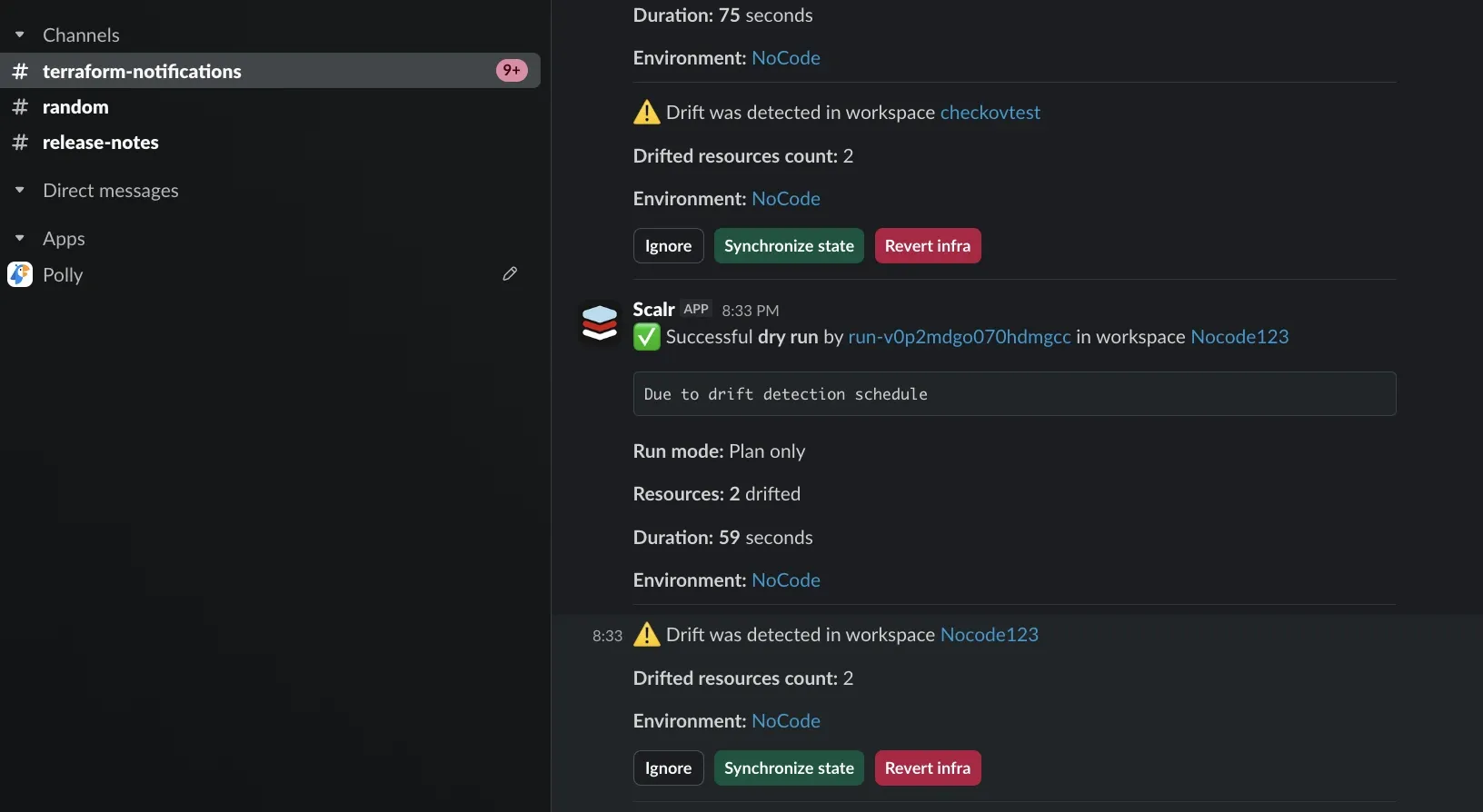
The Scalr app in the Slack app directory sends a Slack notification when Terraform or OpenTofu run events happen and allows users to approve runs directly from Slack. This scales well because you set it up outside the Terraform configuration files. A Scalr admin creates the integration with Slack and defines which Scalr environments and workspaces should trigger a Slack message to a specific Slack channel. Since the setup lives outside the Terraform configuration files, end users don't have to remember to do it when they set up a workspace. Scalr's own documentation describes the integration as pushing notifications for your "Terraform and OpenTofu lifecycle"; there's no separate setup path for OpenTofu workspaces.
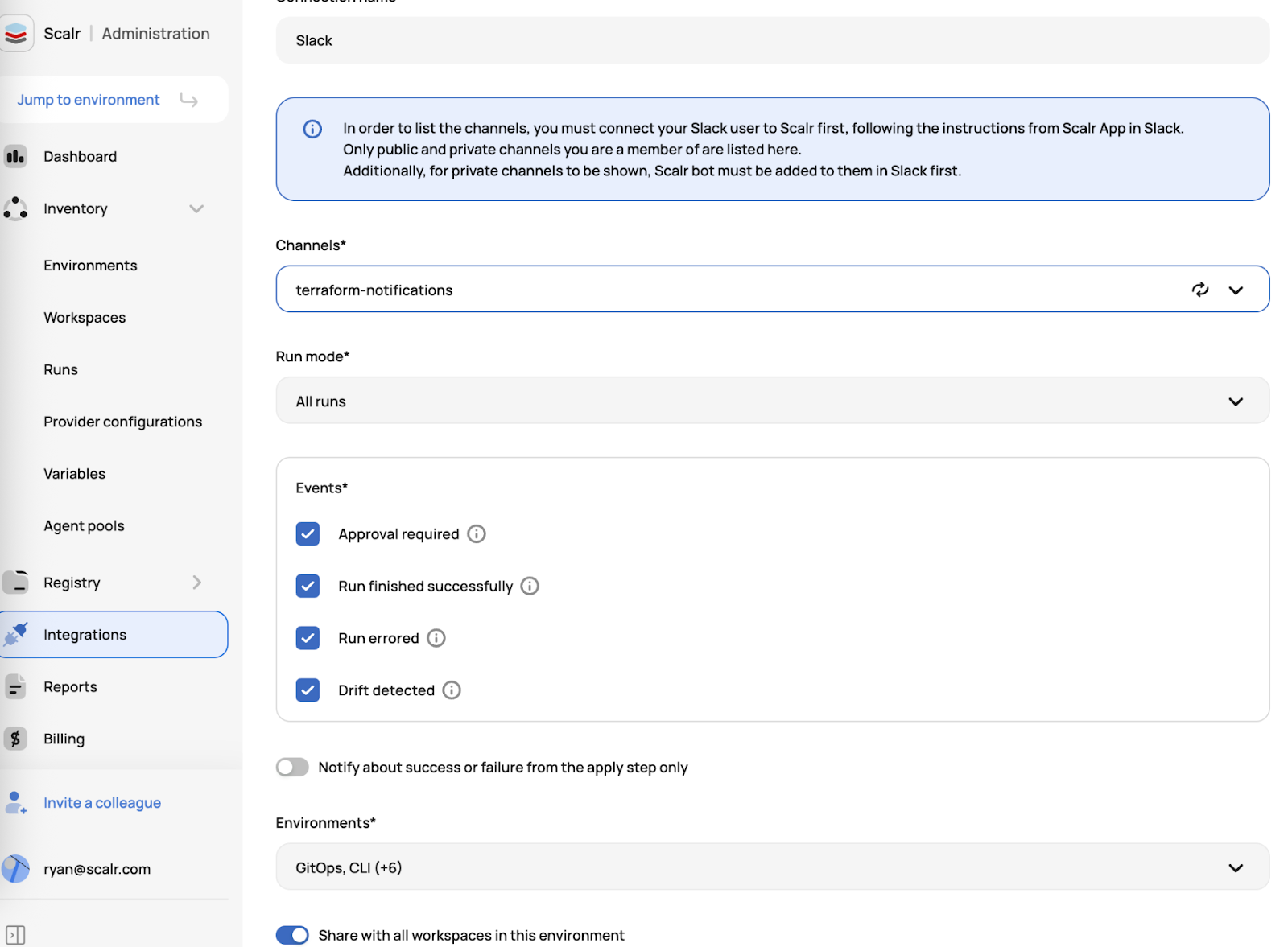
Scalr also provides more granularity by allowing users to choose which run events trigger a Slack notification:
Run mode:
- All runs: notifications are sent for a plan or an apply run.
- Plan & apply runs: notifications are sent for an apply run.
- Plan only runs: notifications are sent for a plan run.
Events:
- Approval required: an approval from a user is required before the apply can run.
- Run finished successfully: the plan or apply finished successfully.
- Run errored: the plan or apply resulted in an error.
- Drift detected: Scalr executed a drift run and found that the workspace had drift.
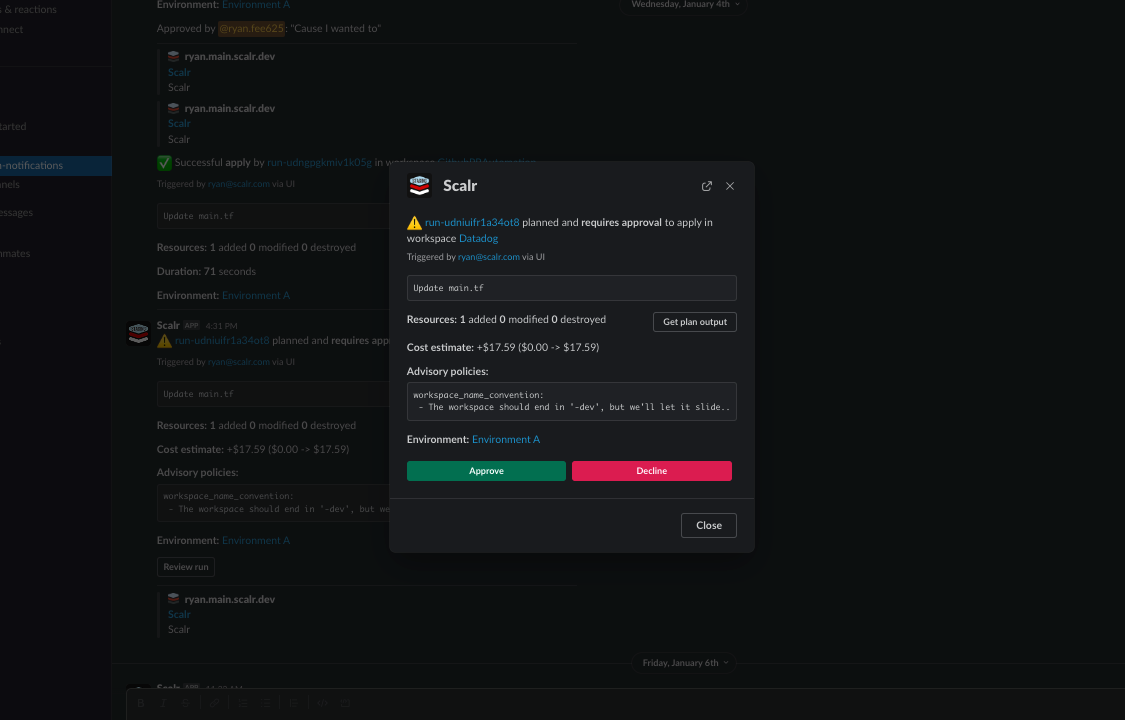
Lastly, the Scalr app for Slack also allows for approvals directly from Slack. Slack users are sent all the information they need to make a decision about whether to approve the run:
- Terraform plan output
- Open Policy Agent results
- Cost estimation
Once the Slack user is ready to approve, they can give an approval reason which is then sent back to Scalr and can be seen prior to the apply event happening. Actions triggered from Slack still require the underlying Scalr IAM permission for that action (for example, runs:create to start a plan or apply); Slack does not bypass Scalr's permission model. The authorization flow links your Slack identity to your Scalr identity so Scalr can check that you hold the right permissions before executing the action.
See more in the Scalr documentation here. Plans and pricing are on the pricing page.
Does Any of This Work Differently in OpenTofu?
Mostly no. OpenTofu is a Terraform fork, so the HCL configuration language, provisioner blocks, and the Scalr integration all behave the same way. The one place things diverge is where community providers and modules come from.
OpenTofu maintains its own registry at registry.opentofu.org, run by the Linux Foundation, and it does not automatically mirror everything published to the Terraform registry. Module and provider authors have to publish to each registry separately. That means:
- If
tofu initcan't find a community Slack provider or module that you know exists on the Terraform registry, it's probably because the author hasn't published it to OpenTofu's registry yet. - You can still use it by adding the registry hostname explicitly in the source address, which tells OpenTofu to pull directly from HashiCorp's registry instead of its own default:
terraform {
  required_providers {
    slack = {
      source  = "registry.terraform.io/pablovarela/slack"
      version = "~> 1.0"
    }
  }
}
Outside of that registry nuance, everything in this post (the webhook approach, the local-exec provisioner, and the Scalr Slack app) works the same for Terraform and OpenTofu workspaces.
Other Slack-Terraform Resources
Is There a Slack Terraform Provider?
The main focus of this post is integrating Slack notifications with Terraform, but you can also manage Slack itself with Terraform. Slack doesn't maintain its own provider, but there's a trusted community provider for Slack resources. At the time of writing, this Terraform provider for Slack has over 1.2M downloads with 13 contributors, based on information pulled from library.tf.
This provider gives you the ability to manage resources like slack_usergroup and slack_conversation. As noted above, confirm it's published to registry.opentofu.org before running tofu init against it unprefixed. Otherwise, add the explicit registry.terraform.io host to the source address.
What Slack Terraform Modules Exist?
While there aren't any modules to actually manage Slack resources, the most popular module involving Slack is terraform-aws-notify-slack, which integrates an AWS SNS topic with Slack channels.
At the time of writing, the module has been downloaded over 2M times and has 43 contributors according to library.tf. The same registry caveat applies here as with providers: confirm the module is published to OpenTofu's registry, or reference it with an explicit host, before pulling it into an OpenTofu configuration.
Where Should You Start?
There are several ways to use Terraform or OpenTofu and Slack together. You can manage Slack itself with the community Slack provider, connect an SNS topic to a Slack channel through Terraform, or use a platform like Scalr to push run events into a channel without touching your configuration files. For a one-off alert, the local-exec webhook is enough; if you want notifications and approvals across many workspaces without editing each configuration, a platform integration is the better starting point.
Key Sources Used
Frequently asked questions
How do I send Terraform run notifications to Slack?
There are two main approaches. The basic one is Terraform's local-exec provisioner calling a Slack incoming-webhook URL from your configuration, which works but has to be added to every workspace. The scalable option is a platform integration like the Scalr Slack app, which a Scalr admin configures once at the environment and workspace level, outside the Terraform files.
Can I approve a Terraform apply directly from Slack?
Yes, with the Scalr app for Slack. It sends the Terraform plan output, Open Policy Agent results, and cost estimation so you can decide in the channel, and you can attach an approval reason that is sent back to Scalr. Approvals still require the underlying Scalr IAM permission for the action, so Slack does not bypass Scalr's permission model.
Does the Slack integration work the same way for OpenTofu?
Yes. Scalr's own integration documentation describes it as pushing notifications for your Terraform and OpenTofu lifecycle, with no separate setup for OpenTofu workspaces. The local-exec webhook approach also works identically, since OpenTofu uses the same provisioner block syntax as Terraform. The one place OpenTofu behaves differently is community providers and modules: OpenTofu resolves an unprefixed source address against its own registry.opentofu.org rather than Terraform's registry, so a provider or module that hasn't been published there needs an explicit registry.terraform.io host in the source address.
Is there a Terraform provider for managing Slack?
Slack does not maintain its own Terraform provider, but there is a trusted community provider for Slack resources with over 1.2 million downloads and 13 contributors as of this writing. It lets you manage resources like slack_usergroup and slack_conversation.
Why integrate Terraform with Slack at all?
Most DevOps teams already work in Slack, so pushing run events there reduces context switching: changes, successes, and failures show up where the team is looking. The key is keeping notifications actionable, for example alerting on a failed apply rather than every Terraform event.
About the author

director of platform engineering at Scalr
Ryan Fee is the director of platform engineering at Scalr, with over 15 years of experience improving infrastructure experiences at companies large and small.
Part of this guide
25 sheets
CI/CD and GitOps for Terraform & OpenTofu
- Migrating GitHub Actions from an S3 Backend to Scalr
- tofu test and terraform test: Testing OpenTofu and Terraform Modules
- Custom Hooks for Terraform and OpenTofu: Pre-Plan, Post-Apply, and the Hooks Registry
- Integrating Terraform with Backstage
- The No-Nonsense Guide to ArgoCD
- Top 10 Continuous Delivery Tools
- Top 10 GitOps Tools: A Comprehensive Guide
- Using Terraform with GitLab
- Key DevOps Metrics You Should Be Tracking
- Terraform and OpenTofu with Dependabot
- Terraform Notifications in Microsoft Teams
- The Complete Guide to DevOps Monitoring Tools: Choosing the Right Solution for Your Infrastructure
- Top Jenkins Alternatives & Specialized IaC Tools
- Why You Should Use Dependabot with Terraform and OpenTofu
- Mastering Terraform at Scale: A Developer's Guide to Reliable Infrastructure
- Integrating Terraform Events w/ AWS EventBridge
- How to use the Azure DevOps Terraform Provider
- Deploying your infrastructure with Scalr and GitHub Actions
- Terraform Configuration Ingestion
- Setting up Scalr & Azure DevOps Part 2 - Add Azure credentials
- Setting up Scalr & Azure DevOps Part 3 - Execute Your Terraform Code and Create a Workspace
- Setting up Scalr & Azure DevOps Part 1 - Picking a Workflow
- Terraform Cost Estimation in 2021: The Definitive Guide