

Article · part of a guide
How to use the Azure DevOps Terraform Provider
Learn about the Azure Devops Terraform Provider

Key takeaways
- The Azure DevOps Terraform provider lets you codify and version-control Azure DevOps resources like projects and repositories directly in your Terraform code.
- The provider supports authentication through a personal access token, an OIDC token, a client certificate, or a client secret, depending on what your organization allows.
- Use library.tf to confirm you are using the original, officially supported Azure DevOps provider rather than a fork.
- Storing Terraform code in Azure DevOps enables code review, change tracking, branching, and rollback for your infrastructure.
- Pairing Azure DevOps with a TACO like Scalr or Terraform Cloud adds a private module registry, GitOps dry-run-on-merge workflows, and OPA policy enforcement.
An infrastructure as code pipeline has two core pieces: an IaC platform like Terraform or OpenTofu, and a version control system (VCS) such as Azure DevOps, the VCS provider managed by Microsoft Azure. Terraform lets you define and provision infrastructure with a declarative configuration language, and putting it together with Azure DevOps gives you more control and a place for teams to collaborate. Most people who pair the two are thinking about pull request automation, which we cover in the second half of this post. Before that, we'll look at how to use Terraform to manage your Azure DevOps configuration itself, and how Scalr integrates with Azure DevOps.
What Is the Azure DevOps Terraform Provider?
Terraform uses providers to talk to endpoint APIs and create resources. The Azure DevOps Terraform provider sits between your infrastructure code and Azure DevOps Cloud. With it, you define and manage Azure DevOps resources like repositories and projects directly in your Terraform modules and code. Your repository configurations end up codified and version-controlled, so you can reproduce them across environments.
One thing that matters when you manage Azure DevOps with Terraform is picking the right provider. There are a lot of forks of the official provider out there, and library.tf shows you which one is the original, officially supported provider versus the ones forked from it, for example:
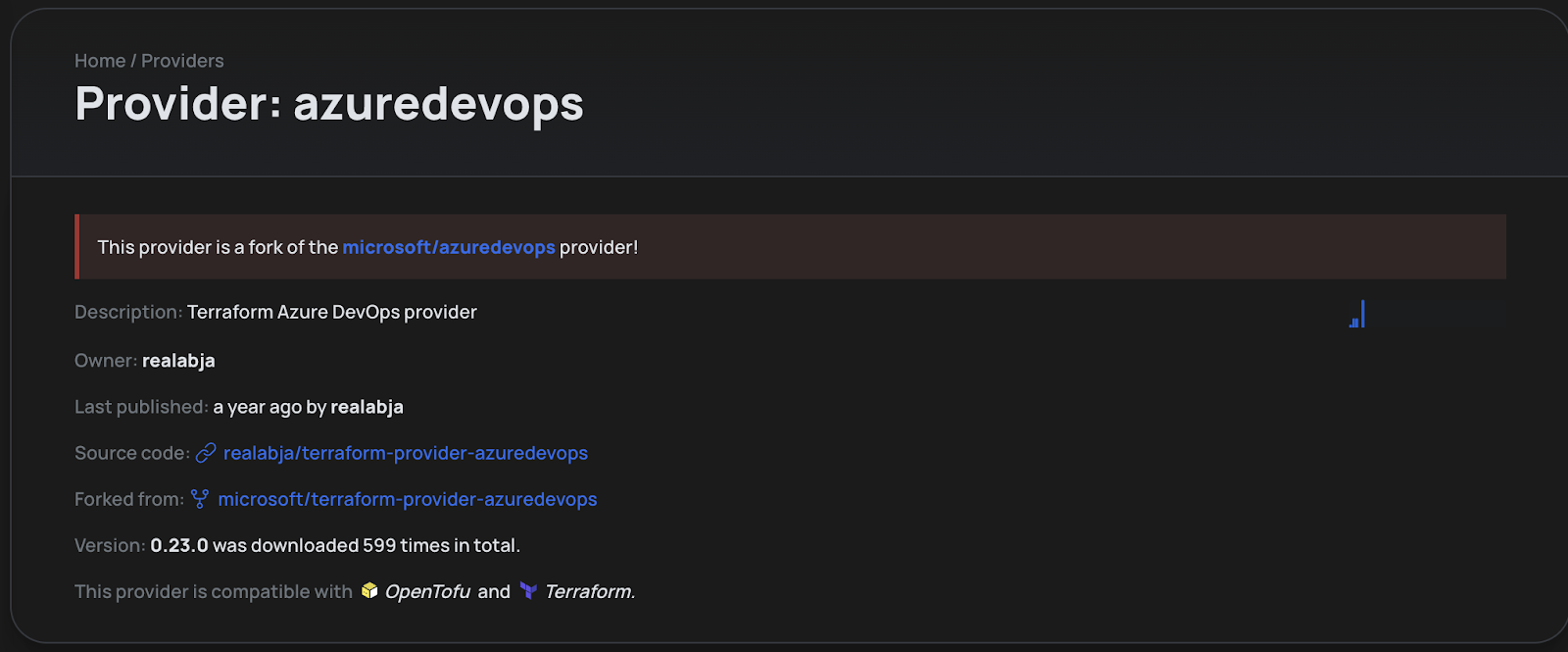
Provider Information on Library.tf
By clicking on the banner at the top we are able to see the supported provider which we know is the one we need to use based on the statistics on the right-hand side:
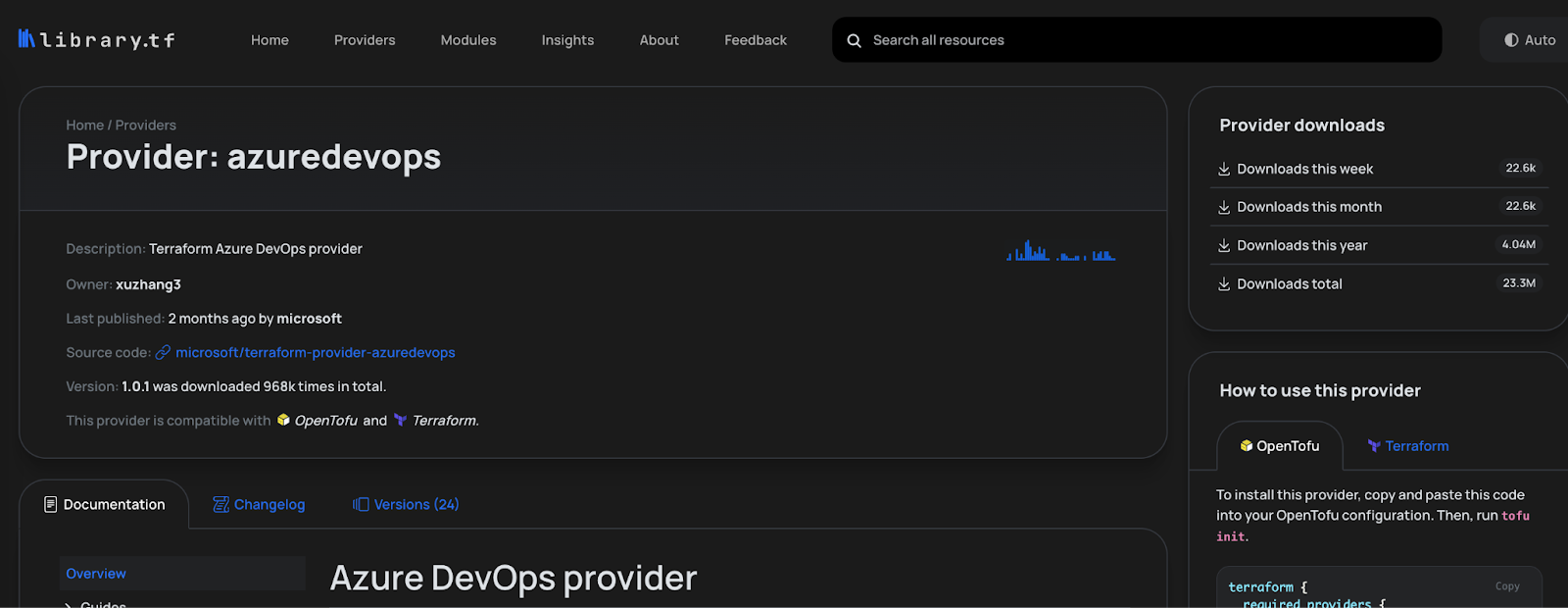
Example of usage data
Prerequisites to use it
Before you use the Azure DevOps Terraform provider, make sure you have these prerequisites in place:
- Terraform or OpenTofu Installed: Make sure you have Terraform or OpenTofu installed on your machine. You can download the latest versions from Terraform or OpenTofu websites.
- Azure DevOps Account: You'll need an Azure DevOps account with the necessary permissions to manage Azure DevOps resources. If you don't have an Azure DevOps account, sign up for one on the Azure DevOps website.
- Azure DevOps Personal Access Token: The provider can authenticate with a personal access token or with a service principal using an OIDC token, a client certificate, or a client secret.
Scalr Account: If you want to use Scalr as the remote backend, sign up for a free account. Feel free to use this as a development environment while you explore Scalr. You can also authenticate to Azure DevOps through the native integration.
How Do You Use the Azure DevOps Terraform Provider?
The steps below cover how to authenticate to the provider, followed by some basic examples of using it.
Define Required Providers and Provider Configuration
Start by configuring the Azure DevOps Terraform provider in your Terraform code. Open your Terraform configuration file (commonly named main.tf) and add the following block:
terraform {
  required_providers {
    azuredevops = {
      source  = "microsoft/azuredevops"
      version = "~> 1.0"
    }
  }
}

provider "azuredevops" {
  org_service_url       = "https://dev.azure.com/your-org"
  personal_access_token = "your-access-token" # prefer the AZDO_PERSONAL_ACCESS_TOKEN env var
}
Replace "your-org" with your actual Azure DevOps organization. You may need to update the complete URL depending on your organization settings. Update "your-access-token" with the access token you use for Azure DevOps. The latest version of the Azure DevOps Terraform provider documentation can be found here.
Depending on your use case, your organization may not allow for the use of personal access tokens and you can use a service principal with OIDC, a client certificate, or a client secret instead.
Create a Project
Next, create a new project in Azure DevOps with the Azure DevOps provider. The resource is documented in detail in the Terraform registry here. Add the following code to your configuration:
resource "azuredevops_project" "example" {
  name               = "scalr-example"
  visibility         = "private"
  version_control    = "Git"
  work_item_template = "Agile"
}
This Terraform code defines an Azure DevOps project resource named "scalr-example" that is set to be private and use the git VCS protocol.
Create a Repository
This example creates a git repository in the Azure DevOps project from the previous step, and uses a data source to pull the project ID:
data "azuredevops_project" "example" {
  name = azuredevops_project.example.name
}

resource "azuredevops_git_repository" "example" {
  project_id = data.azuredevops_project.example.id
  name       = "scalr-example"

  initialization {
    init_type = "Clean"
  }
}
This Terraform code defines a resource that creates a repo in Azure DevOps named "scalr-example". It's a good way to create the git repositories that will eventually store your Terraform files.
Run Terraform Commands
Once you've defined your Azure DevOps resources through the Azure DevOps Terraform provider, navigate to the directory containing your Terraform files and run the following commands:
terraform init
terraform plan
terraform apply
If you are using OpenTofu, use the tofu commands instead:
tofu init
tofu plan
tofu apply
Terraform will initialize the Azure DevOps provider and apply the changes to your Azure DevOps account. Upon a successful Terraform run, the Terraform state file will be created.
What Are Some Best Practices for Advanced Usage?
Variables and Dynamic Configurations
Use Terraform variables instead of hardcoded values so the same configuration can be reused.
Remote State Management
Consider using remote state management to store your Terraform state files securely. Services like Scalr or AWS S3 can be configured as remote backends to store state files. Here is an example of connecting to Scalr:
terraform {
  backend "remote" {
    hostname     = "my-account.scalr.io"
    organization = "env-xxxxxxxxxxxxxxx" # the Scalr environment ID
    workspaces {
      name = "my-workspace"
    }
  }
}
Data Sources
You can also use Azure DevOps data sources in your code to pull information from other resources or workspaces into the run.
This example looks up an Azure DevOps repository by its name:
data "azuredevops_git_repository" "example" {
  project_id = data.azuredevops_project.example.id
  name       = "scalr-example"
}

output "repo_clone_url" {
  value = data.azuredevops_git_repository.example.remote_url
}
What Else Can the Azure DevOps Terraform Provider Do?
The provider supports plenty more than projects and repositories, including branches, groups, and service endpoints. The library.tf documentation has the full list and more examples.
How Does Scalr Integrate With Azure DevOps?
Beyond managing Azure DevOps itself, Azure DevOps also fits into your overall Terraform pipeline, and it integrates with Scalr.
Azure DevOps as a VCS Repo
With Terraform and Azure DevOps, the number one best practice is to keep your Terraform files in a VCS repository like Azure DevOps. Once your configuration files live in an Azure DevOps repository, your infrastructure teams get the following:
- Code Review: Every commit gives reviewers a clear view of what changed in your Terraform files. They can assess the modifications, leave comments, and suggest improvements before anything merges into the main branch.
- Tracking Changes: Each change to your Terraform source files within an Azure DevOps repo is tied to a commit. That commit records who made the change, when it happened, and a description of what they did.
- Collaboration: Multiple developers can work on the same Azure DevOps repository at once. Each one makes changes independently, and the VCS merges those changes while preventing conflicts and keeping the Terraform codebase coherent.
- History and Rollback: VCS maintains a complete history of all changes made to the Terraform code. This allows developers to roll back to previous versions of the Terraform code in case of errors or to investigate when a specific change was introduced.
- Branching and Merging: VCS allows developers to create branches, which are independent lines of Terraform code development. Branches let developers work on new features, bug fixes, or experimental changes without affecting the main Terraform codebase. Opening a merge request can automatically trigger a "Terraform dry run" in tools like Scalr or Terraform Cloud, which executes a Terraform plan and sends the results back into Azure pipelines. If the results come back successful, developers can merge the code, bringing the changes from one branch into another.
Using Azure DevOps with a TACO (Terraform Collaboration and Automation Platform)
If you are looking for a TACO, such as Scalr or Terraform Cloud, to help scale your Terraform operations, the integration with Azure DevOps is a key feature. Integrating these tools with Azure DevOps lets you pull in the Terraform code and also enables the following features:
- Terraform Private Module Registry: On top of storing your Terraform code in Azure DevOps for the reasons stated above, another best practice is to implement a Terraform Private Module Registry to store your Terraform modules. You store your Terraform modules in Azure DevOps repos, integrate Scalr or Terraform Cloud with Azure DevOps, and then pull the Terraform modules in for your DevOps teams to use. Azure DevOps stays the source of truth for the code, and you get a curated list of approved modules for your teams.
- GitOps Workflow: A GitOps workflow for Terraform is usually the goal for most DevOps teams. A GitOps workflow can use the Azure DevOps branching and merging to automatically kick off Terraform dry runs as well as Terraform applies. The flow is typically as follows: A branch, let's call it dev, is created based on the main branch. Terraform code is updated in the dev branch. A merge request is opened up against the main branch from dev. Based on the merge request being opened, the TACO will automatically execute a Terraform dry run and send the results back to Azure DevOps pipelines. Admins can optionally set branch policies (a best practice) to only allow a merge request if all checks come back successfully from the TACO. Once the merge request is approved the Terraform apply will execute in the TACO.
- Open Policy Agent: Open Policy Agent (OPA) with Terraform enables declarative policy enforcement for the Terraform code, allowing admins to define and enforce fine-grained policies to govern the provisioning workflow. Typically, the OPA policies are stored in Azure DevOps and then pulled into Scalr or Terraform Cloud to enforce them in the core workflow.
The TACO products have a full feature set dedicated to Terraform, including the ability to store Terraform state files. See more here.
Frequently asked questions
What is the Azure DevOps Terraform provider used for?
The Azure DevOps Terraform provider sits between your infrastructure code and Azure DevOps Cloud, letting you define and manage resources like projects and repositories directly in Terraform. That means your repository configurations are codified, version-controlled, and reproducible across environments.
How do you authenticate to the Azure DevOps Terraform provider?
The provider supports authentication through a personal access token, an OIDC token, a client certificate, or a client secret. Some organizations do not allow personal access tokens, in which case OIDC or client certificates are the alternatives.
How do you find the official Azure DevOps Terraform provider among forks?
There are many forks of the official Azure DevOps provider. A registry like library.tf flags which provider is the original, officially supported one and shows usage statistics, so you can confirm you are using the supported provider rather than a fork.
Why store Terraform code in Azure DevOps?
Keeping Terraform files in an Azure DevOps repository gives infrastructure teams code review, change tracking tied to commits, collaboration across developers, full history with rollback, and branching. Opening a merge request can also trigger a Terraform dry run in a tool like Scalr or Terraform Cloud, with the plan results sent back into Azure pipelines before the code merges.
About the author

director of platform engineering at Scalr
Ryan Fee is the director of platform engineering at Scalr, with over 15 years of experience improving infrastructure experiences at companies large and small.
Part of this guide
25 sheets
CI/CD and GitOps for Terraform & OpenTofu
- Migrating GitHub Actions from an S3 Backend to Scalr
- tofu test and terraform test: Testing OpenTofu and Terraform Modules
- Custom Hooks for Terraform and OpenTofu: Pre-Plan, Post-Apply, and the Hooks Registry
- Integrating Terraform with Backstage
- The No-Nonsense Guide to ArgoCD
- Top 10 Continuous Delivery Tools
- Top 10 GitOps Tools: A Comprehensive Guide
- Everything you need to know about using Terraform or OpenTofu with Slack
- Using Terraform with GitLab
- Key DevOps Metrics You Should Be Tracking
- Terraform and OpenTofu with Dependabot
- Terraform Notifications in Microsoft Teams
- The Complete Guide to DevOps Monitoring Tools: Choosing the Right Solution for Your Infrastructure
- Top Jenkins Alternatives & Specialized IaC Tools
- Why You Should Use Dependabot with Terraform and OpenTofu
- Mastering Terraform at Scale: A Developer's Guide to Reliable Infrastructure
- Integrating Terraform Events w/ AWS EventBridge
- Deploying your infrastructure with Scalr and GitHub Actions
- Terraform Configuration Ingestion
- Setting up Scalr & Azure DevOps Part 2 - Add Azure credentials
- Setting up Scalr & Azure DevOps Part 3 - Execute Your Terraform Code and Create a Workspace
- Setting up Scalr & Azure DevOps Part 1 - Picking a Workflow
- Terraform Cost Estimation in 2021: The Definitive Guide