

Guide · 5 articles branch off this one
Terraform tfvars: A Practical Guide to .tfvars Files and Variables
How input variables, output values, local values, and tfvars files work in Terraform and OpenTofu, updated for 2026.

Key takeaways
- A .tfvars file assigns values to declared input variables; Terraform and OpenTofu auto-load terraform.tfvars and *.auto.tfvars from the root module's working directory, and -var/-var-file flags take the highest precedence.
- Auto-loading of *.auto.tfvars files is relative to the configuration that actually gets uploaded and executed. In CLI-driven remote execution, a file outside the working directory scope is silently skipped unless passed explicitly with -var-file.
- Remote backends reject -var and -var-file at the CLI with 'Run variables are currently not supported'. On TACO platforms, values must live in *.auto.tfvars files or platform-managed variables.
- Add validation blocks with trimspace and regex checks to every sensitive string variable: sensitive values are redacted on save, so a stray leading space is invisible until something downstream rejects the credential.
- Treat sensitive variables as write-once: keep a secure source of truth (Vault, SOPS) you can re-sync from, because you cannot read values back out to verify them.
- Use input variables for external configuration and locals for internal derivation. Locals cannot be set from tfvars files, the CLI, or calling modules.
A .tfvars file is where you assign values to the input variables that a Terraform or OpenTofu configuration declares. It's usually named terraform.tfvars, *.auto.tfvars, or an environment file like prod.tfvars, so environment-specific settings stay out of your reusable .tf code. Terraform and OpenTofu automatically load terraform.tfvars and every *.auto.tfvars file in the working directory, or you can load one explicitly with terraform apply -var-file="prod.tfvars".
Why Do Variables, Outputs, and Locals Matter in Terraform and OpenTofu?
Variables, outputs, and locals are the parts of a Terraform or OpenTofu configuration that let you:
- Parameterize configurations for different environments without altering core code
- Share data between modules and configurations
- Reduce repetition and improve maintainability
- Create flexible, reusable infrastructure definitions
This pillar covers each one in turn: input variables, output values, local values, and tfvars file management.
How Do Input Variables Work in Terraform?
What Are Input Variables?
Input variables are the parameters of your Terraform module. They let you pass external values into your configuration, so you can reuse it across different environments and scenarios. Think of them as function arguments in programming.
Variable Declaration
Variables are declared in .tf files (commonly variables.tf) using the variable block. Key arguments include:
**type**: Specifies the data type (string,number,bool,list,map,object,set,tuple, orany)description: Documents the variable's purpose (highly recommended for clarity)default: Provides a default value, making the variable optional**nullable**: Whenfalse, preventsnullvalues (Terraform 1.1+)**sensitive**: Whentrue, redacts the value from CLI output (but not from state files)validation: Defines custom rules for validating the variable's value
Basic Variable Example
variable "environment" {
  type        = string
  description = "The environment name (dev, staging, prod)."
  default     = "dev"
}

variable "instance_count" {
  type        = number
  description = "Number of EC2 instances to create."
  default     = 1

  validation {
    condition     = var.instance_count > 0 && var.instance_count <= 100
    error_message = "Instance count must be between 1 and 100."
  }
}

variable "instance_type" {
  type        = string
  description = "The EC2 instance type."
  sensitive   = false  # Set to true to redact from CLI output
}

variable "tags" {
  type        = map(string)
  description = "Common tags to apply to all resources."
  default = {
    ManagedBy = "Terraform"
  }
}
Variable Types in Detail
Terraform supports several variable types:
- Primitive Types:
string,number,bool - Collection Types:
list(type),map(type),set(type) - Structural Types:
object({...}),tuple([...]). For complex objects with optional fields, see optional attributes on complex input variables - Special Type:
any(use sparingly; reduces type safety)
Example: Complex Type (Object)
variable "app_service" {
  type = object({
    name          = string
    instance_type = string
    port          = number
    enabled       = bool
  })
  description = "Configuration for the application service."
}
Variable Validation
Use the validation block to enforce business logic constraints:
variable "aws_region" {
  type        = string
  description = "AWS region."

  validation {
    condition     = contains(["us-east-1", "us-west-2", "eu-west-1"], var.aws_region)
    error_message = "Region must be us-east-1, us-west-2, or eu-west-1."
  }
}
Sensitive Variables
Mark variables as sensitive when they contain passwords, API keys, or other confidential data:
variable "database_password" {
  type        = string
  description = "The database root password."
  sensitive   = true
}Important: sensitive = true redacts values from CLI output but does not encrypt them in the state file. Always secure your state file with encryption and backend access controls.
Redaction has a side effect people underestimate: you can no longer eyeball the value. One team pasted an API key into a write-once sensitive variable with a stray leading space attached. The platform redacted it on save, every plan looked normal, and the corruption stayed invisible until a downstream deployment failed because the credential didn't match. They fixed it with a validation block that runs a trimspace comparison and a regex check on every sensitive string variable, so malformed input fails at plan time instead of at deploy time.
variable "api_key" {
  type      = string
  sensitive = true

  validation {
    condition     = var.api_key == trimspace(var.api_key) && can(regex("^[A-Za-z0-9_-]+$", var.api_key))
    error_message = "API key must not contain leading/trailing whitespace or invalid characters."
  }
}
Validation matters most where you can't inspect the value by hand, so pair every sensitive = true with a check on shape.
How Do You Work with tfvars Files?
What Are tfvars Files?
tfvars files (Terraform variables files) assign concrete values to input variables declared in your configuration. They keep configuration values separate from your infrastructure code, so you can deploy per environment. For a quick syntax reference, see our Terraform & OpenTofu tfvars cheatsheet.
tfvars Syntax
There are two syntax formats for tfvars files:
HCL Format (*.tfvars)
instance_type = "t2.medium"
aws_region    = "us-east-1"
instance_count = 3
enable_monitoring = true

tags = {
  Environment = "production"
  Team        = "platform"
}
JSON Format (*.tfvars.json)
{
  "instance_type": "t2.medium",
  "aws_region": "us-east-1",
  "instance_count": 3,
  "enable_monitoring": true,
  "tags": {
    "Environment": "production",
    "Team": "platform"
  }
}
Complex Types in tfvars
List of Objects Example
Assume variables.tf defines:
variable "app_services" {
  type = list(object({
    name          = string
    instance_type = string
    port          = number
  }))
}
In services.tfvars:
app_services = [
  { name = "frontend", instance_type = "t3.medium", port = 80 },
  { name = "backend", instance_type = "t3.large", port = 8080 },
  { name = "api", instance_type = "t3.large", port = 3000 }
]
Complex types are where copy-paste starts to bite. A platform engineer we worked with at Scalr was migrating a tfvars file into a UI variable store: a deeply nested map of objects along the lines of workload_servers = { standard = { workloads = [...], quantity = 1, vm = {...} } }. The variable editor rejected it with the HCL toggle on, rejected it with the toggle off, and rejected a hand-converted JSON version too. The value itself was fine. The snippet had passed through a document editor on the way over, which had swapped the straight quotes around "session_host" for curly "smart quotes." HCL sees those as invalid characters, but they're nearly invisible on screen. If a structurally correct value keeps failing to parse, pipe it through a hex dump or paste it into a plain-text editor before you question your syntax.
The other failure mode is silence. In April 2026, a team mid-refactor consolidated seven string variables into a single list(object({cloud_account, app_name, department, ...})) and found their platform's variable editor refused the value with no error at all. Nothing saved, no message, reproducible on both self-hosted and SaaS deployments. A complex type that lives happily in a .tfvars file doesn't always survive the trip into a UI text box. When you move nested structures into a platform, save, reload, and confirm the value actually persisted before you depend on it.
Automatic Loading
Terraform automatically loads tfvars files from the root module directory in a specific order:
terraform.tfvars(HCL format) - if presentterraform.tfvars.json(JSON format) - if present*.auto.tfvarsfiles in lexical (alphabetical) order*.auto.tfvars.jsonfiles in lexical order
This automatic loading is handy for default or environment-specific overrides. But the scope is the root module only. Child modules can't read values from tfvars files directly.
"Automatic" also assumes the file is where discovery happens. A monorepo team we worked with at Scalr assumed *.auto.tfvars always means automatic, and it does locally. But in CLI-driven remote execution, the runner discovers auto-tfvars files relative to what gets uploaded and where the configured working directory points. Their opentofu.auto.tfvars sat outside that scope, so remote runs planned without it and produced no warning; the values were just absent. The only thing that reliably loaded the file was passing it explicitly: tofu plan -var-file="opentofu.auto.tfvars". If your repo layout separates tfvars from the working directory, treat auto-loading as a local convenience and -var-file as the contract.
Explicit Loading with -var-file
To load specific tfvars files, use the -var-file command-line option:
terraform plan -var-file="dev.tfvars"
terraform apply -var-file="prod.tfvars"
tofu apply -var-file="environments/staging.tfvars"
You can pass -var-file more than once, and the files load in the order given:
terraform apply -var-file="base.tfvars" -var-file="prod.tfvars"One caveat that surprises nearly everyone moving from local Terraform to a TACO platform: -var and -var-file stop working once your backend executes runs remotely. Run terraform plan -var foo=bar against the remote backend and you get this, verbatim:
Error: Run variables are currently not supported

The "remote" backend does not support setting run variables
at this time. Currently the only way to pass variables to
the remote backend is by creating a '*.auto.tfvars'
variables file...
It reads like a bug the first time, but it's the platform enforcing reproducibility: a value passed as a CLI flag exists only in your shell history, so the next person (or the next automated run) can't reproduce your plan. Values need to live in *.auto.tfvars files inside the uploaded configuration or as platform-managed variables.
Organizing tfvars Files
A recommended directory structure for multi-environment management:
project/
├── main.tf
├── variables.tf
├── outputs.tf
├── terraform.tfvars.example     # Commit this, not secrets
├── environments/
│   ├── dev.tfvars
│   ├── staging.tfvars
│   └── prod.tfvars
└── .gitignore                   # Exclude actual tfvars files
Corresponding .gitignore:
# Exclude actual tfvars files (may contain secrets)
*.tfvars
!*.tfvars.example
Which Variable Source Wins When Values Conflict?
The Variable Precedence Order
If a variable is specified in multiple places, Terraform applies values in order of increasing precedence (later values override earlier ones):
- Environment Variables:
TF_VAR_name(OpenTofu honors the same prefix) terraform.tfvarsfile**terraform.tfvars.json**file (if both.tfvarsand.tfvars.jsonexist, JSON overrides for the same variable)*.auto.tfvarsor*.auto.tfvars.jsonfiles (loaded alphabetically; later files override earlier ones)- Command-line flags (
-varand-var-file): Processed in the order given; highest precedence
OpenTofu Environment Variables
OpenTofu reads the same TF_VAR_name environment variables as Terraform. There is no separate OpenTofu-specific prefix.
Practical Precedence Example
Given this setup:
variables.tf:
variable "region" {
  type    = string
  default = "us-west-2"
}
terraform.tfvars:
region = "us-east-1"auto.tfvars:
region = "eu-west-1"Environment:
export TF_VAR_region="ap-south-1"Command:
terraform plan -var="region=ca-central-1"Result: The final value is ca-central-1 (command-line flag has highest precedence).
Debugging Precedence Issues
Use terraform console to inspect variable values:
terraform console
> var.region
"ca-central-1"
Or examine the plan output:
terraform plan -var-file="dev.tfvars" | grep "region"How Do Output Values Expose Infrastructure Data?
What Are Output Values?
Terraform outputs are named values that expose data from your infrastructure after terraform apply. They serve as the "return values" of your module, so other things can read them:
- End users via CLI display
- Other modules as dependencies
- External tools and CI/CD pipelines
- State files for cross-configuration references
For step-by-step usage walkthroughs, see Terraform outputs: how-to with examples.
Basic Output Example
resource "aws_vpc" "main" {
  cidr_block = "10.0.0.0/16"
}

resource "aws_subnet" "public" {
  vpc_id     = aws_vpc.main.id
  cidr_block = "10.0.1.0/24"
}

output "vpc_id" {
  value       = aws_vpc.main.id
  description = "The ID of the VPC."
}

output "public_subnet_id" {
  value       = aws_subnet.public.id
  description = "The ID of the public subnet."
}
After terraform apply, the outputs are displayed:
Outputs:

public_subnet_id = "subnet-0123456789abcdef"
vpc_id = "vpc-0123456789abcdef"
Output Arguments
value (required)
The expression to expose as an output. Can be a resource attribute, local value, or computed expression.
output "s3_bucket_name" {
  value = aws_s3_bucket.app_data.id
}
description (optional, highly recommended)
Human-readable explanation of what the output represents.
output "database_endpoint" {
  value       = aws_db_instance.main.endpoint
  description = "The endpoint address of the RDS database instance."
}
sensitive (optional, default: false)
When true, the CLI redacts the output value from display (useful for passwords, API keys, etc.). Note: The value is still stored in the state file.
output "db_password" {
  value       = aws_db_instance.main.password
  sensitive   = true
  description = "The database root password. Value is redacted from logs."
}
depends_on (optional)
Explicitly declares dependencies on resources or modules. Rarely needed because Terraform infers dependencies from value references.
resource "aws_instance" "app" {
  # ...
}

resource "aws_security_group_rule" "allow_ssh" {
  type                     = "ingress"
  from_port                = 22
  to_port                  = 22
  protocol                 = "tcp"
  cidr_blocks              = ["0.0.0.0/0"]
  security_group_id        = aws_instance.app.vpc_security_group_ids[0]
}

output "app_public_ip" {
  value       = aws_instance.app.public_ip
  description = "The public IP of the application server."
  depends_on  = [aws_security_group_rule.allow_ssh]
}
ephemeral (optional, Terraform 1.10+)
When true, prevents the output value from being persisted in the state file. Useful for temporary values only needed during a specific run (e.g., bootstrapping credentials).
resource "random_password" "temp_creds" {
  length = 16
}

output "bootstrap_password" {
  value       = random_password.temp_creds.result
  sensitive   = true
  ephemeral   = true
  description = "Temporary password for bootstrapping. Not stored in state."
}
Complex Outputs: Maps and Lists
Outputs can return structured data:
output "instance_details" {
  value = {
    id        = aws_instance.web.id
    public_ip = aws_instance.web.public_ip
    arn       = aws_instance.web.arn
  }
  description = "Details of the web server instance."
}

output "subnet_ids" {
  value       = [aws_subnet.public.id, aws_subnet.private.id]
  description = "List of subnet IDs."
}
Using For Expressions in Outputs
For expressions transform and restructure data before exposing it:
resource "aws_instance" "web" {
  count         = 3
  ami           = "ami-0abcdef1234567890"
  instance_type = "t2.micro"

  tags = {
    Name = "web-server-${count.index + 1}"
  }
}

output "web_server_public_ips" {
  description = "A map of web server names to public IPs."
  value = {
    for instance in aws_instance.web :
      instance.tags.Name => instance.public_ip
  }
}
Result:
web_server_public_ips = {
  "web-server-1" = "192.0.2.101"
  "web-server-2" = "192.0.2.102"
  "web-server-3" = "192.0.2.103"
}
Accessing Outputs with terraform output
The terraform output command retrieves output values programmatically:
# Display all outputs
terraform output

# Get a specific output
terraform output vpc_id

# Get output as JSON
terraform output -json
terraform output -json | jq '.vpc_id.value'

# Get raw output (useful for scripts)
terraform output -raw vpc_id
CI/CD scripts usually read outputs this way:
#!/bin/bash
APP_URL=$(terraform output -raw app_url)
echo "Deploying to $APP_URL"
Child Module Outputs
Access outputs from child modules using the module. syntax:
module "network" {
  source = "./modules/network"
  # ...
}

output "vpc_id_from_module" {
  value = module.network.vpc_id
}
Outputs Across Multiple State Files
Use terraform_remote_state to reference outputs from other Terraform configurations:
Network Configuration (network/main.tf)
output "vpc_id" {
  value = aws_vpc.main.id
}

output "public_subnet_id" {
  value = aws_subnet.public.id
}
Application Configuration (application/main.tf)
data "terraform_remote_state" "network" {
  backend = "s3"  # Or "local", "azurerm", etc.
  config = {
    bucket = "my-terraform-state"
    key    = "network/terraform.tfstate"
    region = "us-east-1"
  }
}

resource "aws_instance" "app" {
  subnet_id = data.terraform_remote_state.network.outputs.public_subnet_id
}
What Are Local Values Used for Internally?
What Are Local Values?
Local values (or "locals") are a way to give a name to an expression within a module. They're internal to the module, not meant for external configuration, and they help you:
- Reduce Repetition (DRY): Define complex expressions once and reuse them
- Improve Readability: Assign meaningful names to "magic strings" or computed values
- Centralize Logic: Encapsulate transformations or conditional logic
For more real-world scenarios where locals shine, see when should you use Terraform locals?.
Declaring Locals
Locals are defined in locals blocks (note the plural). A module can have multiple locals blocks, which Terraform merges.
locals {
  # Simple assignments
  project_prefix = "mycorp"
  environment    = "dev"
  region         = "us-east-1"

  # Derived values (referencing other locals)
  common_name_prefix = "${local.project_prefix}-${local.environment}"

  # Complex structures
  common_tags = {
    Project     = local.project_prefix
    Environment = local.environment
    ManagedBy   = "Terraform"
    CreatedAt   = timestamp()
  }

  # Conditional logic
  instance_type = local.environment == "prod" ? "t3.large" : "t2.medium"
}
Referencing Locals
Access locals using the local.name syntax (note the singular "local"):
resource "aws_instance" "web" {
  ami           = "ami-0c55b31ad20599c04"
  instance_type = local.instance_type  # Use the conditional local

  tags = merge(
    local.common_tags,
    {
      Name = "${local.common_name_prefix}-web-server"
    }
  )
}

resource "aws_s3_bucket" "app_data" {
  bucket = "${local.common_name_prefix}-data-storage"

  tags = local.common_tags
}
Common Use Cases for Locals
Consistent Naming Conventions
Enforce standardized names across resources:
locals {
  app_name = "inventory"
  env      = "prod"
  base     = "${local.app_name}-${local.env}"
}

resource "aws_s3_bucket" "data" {
  bucket = "${local.base}-data"
}

resource "aws_dynamodb_table" "logs" {
  name = "${local.base}-logs"
}
Common Tags
Apply consistent tags to all resources:
locals {
  common_tags = {
    Environment = var.environment
    Project     = var.project_name
    Owner       = "infra-team"
    Terraform   = "true"
  }
}

resource "aws_instance" "web" {
  # ...
  tags = local.common_tags
}

resource "aws_s3_bucket" "assets" {
  # ...
  tags = local.common_tags
}
Conditional Logic
Simplify conditional resource configuration:
locals {
  # Determine instance type based on environment
  instance_type = var.environment == "prod" ? "t3.xlarge" : "t2.medium"

  # Build a list of AZs based on environment
  availability_zones = var.environment == "prod" ? ["us-east-1a", "us-east-1b", "us-east-1c"] : ["us-east-1a"]
}

resource "aws_instance" "app" {
  instance_type         = local.instance_type
  availability_zone     = local.availability_zones[0]
}
Complex Data Transformations
Pre-process data from variables:
variable "server_configs" {
  type = map(object({
    name          = string
    instance_type = string
    enabled       = bool
  }))
}

locals {
  # Filter to only enabled servers
  enabled_servers = {
    for name, config in var.server_configs :
      name => config if config.enabled
  }

  # Create a list of server names (for iteration)
  server_names = keys(local.enabled_servers)
}

resource "aws_instance" "servers" {
  for_each      = local.enabled_servers
  instance_type = each.value.instance_type

  tags = {
    Name = each.value.name
  }
}
When Should You Use a Local Instead of a Variable?
The Core Differences
Locals and input variables solve different problems. Here's how they compare:
| Feature | Local Value | Input Variable | Output Value |
|---|---|---|---|
| Purpose | Internal naming, reduce repetition | Parameterize modules, accept external input | Expose module results, link modules |
| Scope | Internal to the module | Module's input API | Exports from module for external use |
| Assignment | Defined via expression within module | Set via CLI, env vars, tfvars, or calling module | Expression value, usually resource attributes |
| User Input | No direct external input; derived internally | Primary mechanism for external configuration | Not for input; displays/returns data |
| Analogy | Function's temporary local variables | Function arguments | Function return values |
| Reference | local.name |
var.name |
module.child.output_name or resource attributes |
The Common Mistake: Using Locals for Module Configuration
❌ Incorrect: Locals cannot be set externally
# This doesn't work!
locals {
  environment = "production"  # Hardcoded, can't be changed per environment
}

# Or worse:
locals {
  environment_prefix = substr(var.environment, 0, 1)
}

variable "resource_name" {
  default = "${local.environment_prefix}-resource"  # ERROR: Can't reference locals here
}
✅ Correct: Use variables for external configuration
variable "environment" {
  type        = string
  description = "The environment name."
}

variable "resource_name_prefix" {
  type        = string
  description = "Prefix for resource names."
  default     = "resource"
}

locals {
  environment_prefix = substr(var.environment, 0, 1)
  resource_name      = "${local.environment_prefix}-${var.resource_name_prefix}"
}

resource "aws_s3_bucket" "example" {
  bucket = local.resource_name
}
Variable Scope: Root vs. Child Modules
Tfvars files apply only to the root module. Child modules receive values through variable definitions:
Root Module (main.tf)
variable "instance_count" {
  type = number
}

module "app" {
  source = "./modules/app"
  instance_count = var.instance_count  # Pass root module variable to child
}
Child Module (modules/app/main.tf)
variable "instance_count" {
  type = number
}

resource "aws_instance" "web" {
  count = var.instance_count
  # ...
}
terraform.tfvars only sets variables in the root module:
instance_count = 3 # This value flows to root, then to child moduleWhen to Use Each
Use variable when:
- You need to accept external input (from tfvars, CLI, or calling modules)
- You want to make your module reusable across different configurations
- The value might change per environment or deployment
Use local when:
- You're deriving a value from variables or resource attributes
- You want to avoid repetition of complex expressions
- You need to apply conditional logic or transformations internally
- The value is for internal use only and doesn't need external configuration
How Do Locals Handle Loops and Dynamic Data?
Using Locals with for_each
Locals pair well with for_each when you need to filter a collection before iterating over it:
variable "services" {
  type = map(object({
    port    = number
    enabled = bool
  }))
}

locals {
  # Filter to only enabled services
  enabled_services = {
    for name, config in var.services :
      name => config if config.enabled
  }
}

resource "aws_security_group_rule" "service_ingress" {
  for_each                   = local.enabled_services
  type                       = "ingress"
  from_port                  = each.value.port
  to_port                    = each.value.port
  protocol                   = "tcp"
  cidr_blocks                = ["0.0.0.0/0"]
  security_group_id          = aws_security_group.main.id
}
Handling Dynamic Index Issues with count
When using count, reference specific elements explicitly:
resource "aws_instance" "web" {
  count         = 3
  ami           = "ami-0abcdef1234567890"
  instance_type = "t2.micro"

  tags = {
    Name = "web-server-${count.index + 1}"
  }
}

output "first_web_server_ip" {
  value       = aws_instance.web[0].public_ip  # Explicitly index [0]
  description = "The public IP of the first instance."
}

output "all_web_server_ips" {
  value       = [for instance in aws_instance.web : instance.public_ip]
  description = "IPs of all web servers."
}
Complex Outputs with for Expressions
Transform resource collections into user-friendly outputs:
resource "aws_instance" "web" {
  count = 3
  ami   = "ami-0abcdef1234567890"

  tags = {
    Name = "web-${count.index + 1}"
  }
}

output "instance_summary" {
  value = {
    for i, instance in aws_instance.web :
      "server-${i + 1}" => {
        id  = instance.id
        ip  = instance.public_ip
        az  = instance.availability_zone
      }
  }
  description = "Summary of all instances with ID, IP, and AZ."
}
Combining Locals with Conditional Logic
Use locals to centralize complex conditions. If ternaries and conditional expressions are new to you, see understand conditional statements in Terraform in 5 minutes.
variable "environment" {
  type = string
}

variable "enable_detailed_monitoring" {
  type    = bool
  default = false
}

locals {
  # Determine feature flags based on environment
  is_production = var.environment == "prod"

  # Enable detailed monitoring in production or if explicitly requested
  monitoring_enabled = local.is_production || var.enable_detailed_monitoring

  # Scale configuration based on environment
  autoscaling_config = local.is_production ? {
    min_capacity = 5
    max_capacity = 20
  } : {
    min_capacity = 1
    max_capacity = 5
  }
}

resource "aws_autoscaling_group" "app" {
  min_size         = local.autoscaling_config.min_capacity
  max_size         = local.autoscaling_config.max_capacity
  desired_capacity = local.autoscaling_config.min_capacity
}

resource "aws_cloudwatch_metric_alarm" "cpu" {
  count               = local.monitoring_enabled ? 1 : 0
  alarm_name          = "app-cpu-alarm"
  comparison_operator = "GreaterThanThreshold"
  threshold           = local.is_production ? 70 : 80
}
What Are the Best Practices for Variables, Outputs, and Locals?
1. Variable Documentation
Always include detailed descriptions:
variable "instance_type" {
  type        = string
  description = "The EC2 instance type. Examples: t2.micro, t3.small, m5.large."
  default     = "t2.micro"
}
2. Validation for Data Quality
Use validation blocks to catch errors early. For org-wide enforcement of constraints across teams, layer validation blocks with Policy as Code:
variable "environment" {
  type        = string
  description = "Environment name."

  validation {
    condition     = contains(["dev", "staging", "prod"], var.environment)
    error_message = "Environment must be dev, staging, or prod."
  }
}

variable "instance_count" {
  type = number

  validation {
    condition     = var.instance_count >= 1 && var.instance_count <= 100
    error_message = "Instance count must be between 1 and 100."
  }
}
3. Secure Sensitive Data
Never commit plain-text secrets to version control:
# ❌ Don't do this
# prod.tfvars
db_password = "SuperSecretPassword123!"

# ✅ Do this: Use secure secret management
# prod.tfvars
db_password = var.db_password_from_vault

# Inject via environment variable or CI/CD
export TF_VAR_db_password=$(vault kv get -field=password secret/prod/db)
Alternatives for secret management:
- HashiCorp Vault
- AWS Secrets Manager / Parameter Store
- Azure Key Vault
- Google Secret Manager
- Terraform Cloud/Spacelift secure variables
- Mozilla SOPS for file-level encryption
Keep an external source of truth even when your platform stores sensitive variables for you. Sensitive variables are a one-way mirror: you can write them, but you can't read them back to verify. A Scalr customer learned this after a provider major-version upgrade (2.6.0 to 3.x) silently mangled every sensitive variable in their account. With no way to display the stored values, they diagnosed it by watching which downstream APIs started rejecting credentials. Values that should have been alphanumeric apparently no longer were, and the only recovery path was re-keying everything from scratch. Teams that kept secrets in Vault or SOPS-encrypted files could have re-synced in minutes; teams whose only copy lived in the platform could not.
4. Organize tfvars by Environment
One directory for environments, one file per environment:
infrastructure/
├── variables.tf
├── outputs.tf
├── main.tf
├── terraform.tfvars.example
├── environments/
│   ├── dev.tfvars
│   ├── staging.tfvars
│   └── prod.tfvars
└── .gitignore
5. Use Example tfvars Files
Commit example files (not actual ones with secrets):
terraform.tfvars.example:
# Example configuration for development
environment     = "dev"
instance_count  = 2
instance_type   = "t2.micro"
enable_monitoring = false

# Uncomment and update as needed
# aws_region = "us-east-1"
# db_engine_version = "13.7"
6. Clear Naming Conventions
Use consistent, descriptive names:
# ✅ Good: Clear intent
variable "max_retries"
variable "enable_auto_recovery"
variable "db_backup_retention_days"

# ❌ Avoid: Ambiguous or cryptic
variable "max_retry"
variable "ar"
variable "backup"
7. Minimize Output Exposure
Don't output sensitive data unnecessarily:
# ❌ Risky: Exposes plaintext password
output "db_password" {
  value = aws_db_instance.main.password
}

# ✅ Better: Mark as sensitive
output "db_password" {
  value     = aws_db_instance.main.password
  sensitive = true
}

# ✅ Best: Output only the endpoint, not credentials
output "db_endpoint" {
  value       = aws_db_instance.main.endpoint
  description = "Database endpoint for application connection."
}
8. Use Locals to Reduce Duplication
Avoid repeating the same expression:
# ❌ Repetitive
resource "aws_security_group" "web" {
  name = "${var.project}-${var.environment}-web-sg"
  tags = {
    Name = "${var.project}-${var.environment}-web-sg"
  }
}

resource "aws_s3_bucket" "logs" {
  bucket = "${var.project}-${var.environment}-logs"
  tags = {
    Name = "${var.project}-${var.environment}-logs"
  }
}

# ✅ Cleaner with locals
locals {
  name_prefix = "${var.project}-${var.environment}"
  common_tags = {
    Project     = var.project
    Environment = var.environment
  }
}

resource "aws_security_group" "web" {
  name = "${local.name_prefix}-web-sg"
  tags = merge(local.common_tags, { Name = "${local.name_prefix}-web-sg" })
}

resource "aws_s3_bucket" "logs" {
  bucket = "${local.name_prefix}-logs"
  tags   = merge(local.common_tags, { Name = "${local.name_prefix}-logs" })
}
9. Version Control Strategy
.gitignore for sensitive files:
# Terraform files
*.tfstate*
*.tfvars
!*.tfvars.example
*.auto.tfvars

# Secrets
.env
.env.local
secret/
vault/
Commit:
.tffiles (configuration)*.tfvars.example(templates only).gitignore
Do NOT commit:
*.tfvars(unless example).tfstatefiles.terraform/directory- Files with passwords, API keys, or PII
10. Handle Complex Types Carefully
Use object types for clarity:
# ✅ Clear structure
variable "database_config" {
  type = object({
    engine         = string
    version        = string
    instance_class = string
    allocated_storage = number
  })
}

# ❌ Too flexible; loses type safety
variable "database_config" {
  type = any
}
How Does Scalr Handle Variable Management?
Native Variable Management in Scalr
Scalr gives you one place to manage Terraform variables across multiple workspaces and environments, which is part of what teams evaluate while selecting a Terraform Cloud alternative.
Scalr Variable Hierarchy:
- Account Level: Variables available across all environments and workspaces
- Environment Level: Variables specific to an environment (dev, staging, prod)
- Workspace Level: Variables specific to a single workspace
Variables can be:
- Terraform variables: Passed to Terraform as
terraform.tfvars.json - Shell variables: Exported as environment variables during runs
- Environment variables: Set as OS-level environment variables
Workspaces can also name their .tfvars files directly in the workspace configuration (the var_files argument on the scalr_workspace resource, or the equivalent UI setting), so common.tfvars plus a per-environment file travel with the workspace instead of being smuggled in through a TF_CLI_ARGS_plan=-var-file=... shell variable.
The distinction between these categories trips people up. We've seen engineers declare variable "scalr_run_vcs_repository" expecting a platform built-in to populate it, then hit The root module input variable ... is not set at plan time. Platform shell and environment variables are not Terraform input variables. They live in the process environment, and Terraform only bridges that gap for variables named with the TF_VAR_ prefix. To feed a platform-provided value into a declared input variable, export it as TF_VAR_<variable_name> (or define it as a Terraform-type variable in the platform), not as a bare shell variable.
Setting Variables in Scalr
Example: Creating an account-level variable in Scalr
# Variable defined in Scalr UI or API
variable "region" {
  type        = string
  description = "AWS region for all resources"
  default     = "us-east-1"
}
In Scalr, you'd set:
- Type:
terraform - Key:
region - Value:
us-east-1 - Scope:
account(available to all workspaces)
Shared Output Example with Scalr
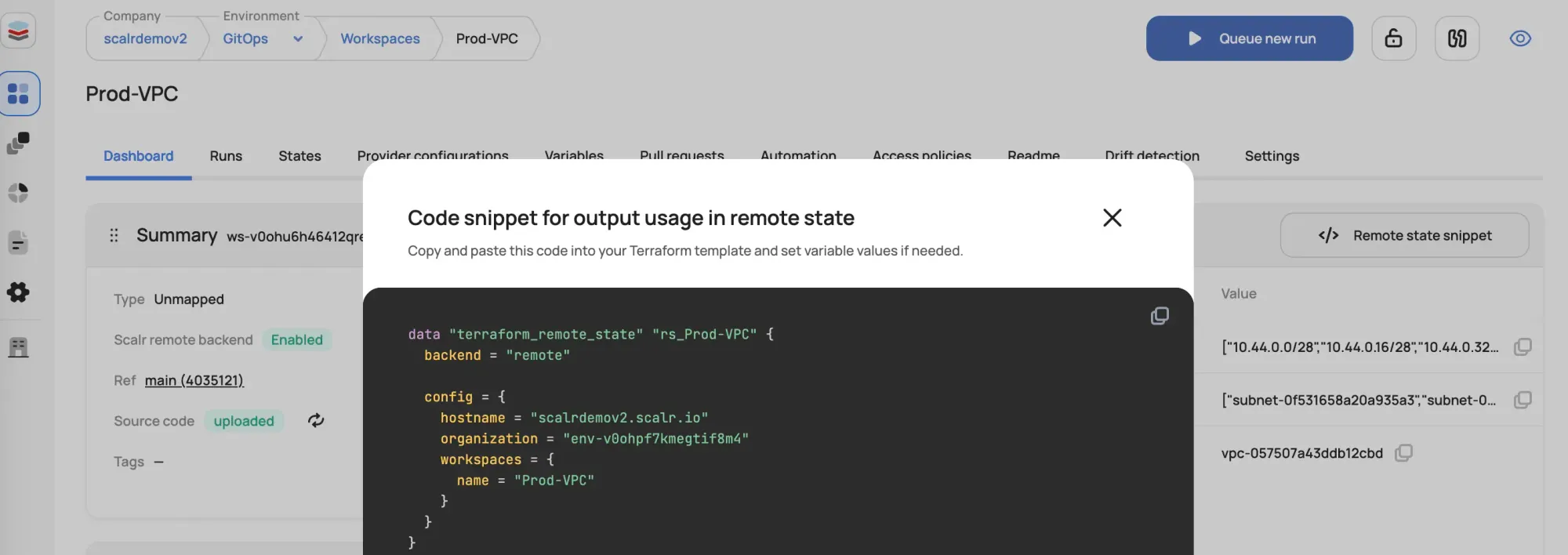
Use terraform_remote_state to reference outputs from other Scalr workspaces. Make sure your remote state backends are properly configured first:
data "terraform_remote_state" "network" {
  backend = "remote"

  config = {
    hostname     = "your-scalr-instance.scalr.io"
    organization = "your-environment"
    workspaces = {
      name = "network-prod"
    }
  }
}

resource "aws_instance" "app" {
  subnet_id = data.terraform_remote_state.network.outputs.public_subnet_id
  # ...
}

output "app_instance_id" {
  value = aws_instance.app.id
}
Scalr Policy Enforcement
Scalr can enforce variable naming conventions and structure validation. For example:
# Scalr policy to enforce variable naming
def check_variable_names(context):
    variables = context.tf_vars
    for var_name in variables:
        if not var_name.islower():
            return False, f"Variable '{var_name}' must be lowercase"
    return True, "All variables follow naming convention"
Benefits of Using Scalr for Variable Management
- Centralized Control: Manage variables across environments from a single interface
- Audit Trail: Track all variable changes with full history
- Sensitive Storage: Securely store and manage sensitive variables without committing to Git
- Hierarchy Support: Define variables at different scopes (account, environment, workspace)
- Policy Enforcement: Use Scalr policies to validate variable structure and values
- No .gitignore Needed: Secrets never leave Scalr; they're injected at run time
What Other Questions Do People Ask About tfvars?
What is a .tfvars file in Terraform?
A .tfvars file assigns values to the input variables your Terraform or OpenTofu configuration declares. Instead of hardcoding values in .tf files or passing many -var flags, you keep environment-specific values (region, instance sizes, tags) in files such as dev.tfvars or prod.tfvars. Terraform automatically loads terraform.tfvars and any *.auto.tfvars file; others are passed with -var-file.
Should I commit .tfvars files to version control?
It depends on their contents. Commit non-sensitive, environment-specific .tfvars files (and an example such as terraform.tfvars.example) so your team shares the same configuration. Never commit .tfvars files that contain secrets. Add them to .gitignore and inject secrets through environment variables or a secrets manager instead. A common pattern is to ignore *.tfvars while keeping *.tfvars.example tracked.
How do I use multiple .tfvars files?
Two options. (1) Auto-loading: name files *.auto.tfvars and Terraform loads them all automatically, in lexical filename order. (2) Explicit: pass -var-file more than once, e.g. terraform apply -var-file="common.tfvars" -var-file="prod.tfvars". When the same variable is set in multiple places, the value from the last -var-file on the command line wins.
What is the difference between terraform.tfvars and .auto.tfvars?
Both are loaded automatically, but terraform.tfvars is loaded only under that exact name, while any file ending in .auto.tfvars (for example prod.auto.tfvars) is auto-loaded regardless of its prefix. Command-line -var-file and -var values take precedence over both, and multiple *.auto.tfvars files are applied in lexical filename order.
How do I pass a .tfvars file to terraform apply?
Use the -var-file flag: terraform apply -var-file="prod.tfvars". The same flag works with terraform plan, and you can pass it multiple times to layer files. If your file is named terraform.tfvars or ends in .auto.tfvars, you don't need the flag. Terraform loads it automatically.
Do .tfvars files work with OpenTofu?
Yes. OpenTofu uses the same variables system and file conventions as Terraform. terraform.tfvars, *.auto.tfvars, and -var-file all behave identically. You can run tofu apply -var-file="prod.tfvars" exactly as you would with Terraform.
How Do Variables, Outputs, and Locals Fit Together?
Here's how the pieces relate in a Terraform or OpenTofu configuration:
- Input Variables parameterize your modules for external configuration
- tfvars Files separate values from code, enabling environment-specific deployments
- Variable Precedence matters: understand the loading order to avoid surprises
- Output Values expose infrastructure data for consumption by other modules or external tools
- Local Values reduce repetition and improve readability within modules
- Locals vs. Variables serve different purposes: use variables for external input, locals for internal organization
- Advanced Patterns like
forexpressions and conditional logic reshape data inside a module - Best Practices include clear naming, validation, secure secret handling, and proper documentation
- Scalr Integration manages variables across multiple environments and workspaces from one place: free up to 50 runs per month
Frequently asked questions
What is a .tfvars file in Terraform?
A .tfvars file assigns values to the input variables your Terraform or OpenTofu configuration declares. Instead of hardcoding values in .tf files or passing many -var flags, you keep environment-specific values (region, instance sizes, tags) in files such as dev.tfvars or prod.tfvars. Terraform automatically loads terraform.tfvars and any *.auto.tfvars file; others are passed with -var-file.
Should I commit .tfvars files to version control?
It depends on their contents. Commit non-sensitive, environment-specific .tfvars files (and an example such as terraform.tfvars.example) so your team shares the same configuration. Never commit .tfvars files that contain secrets. Add them to .gitignore and inject secrets through environment variables or a secrets manager instead. A common pattern is to ignore *.tfvars while keeping *.tfvars.example tracked.
How do I use multiple .tfvars files?
Two options. (1) Auto-loading: name files *.auto.tfvars and Terraform loads them all automatically, in lexical filename order. (2) Explicit: pass -var-file more than once, e.g. terraform apply -var-file="common.tfvars" -var-file="prod.tfvars". When the same variable is set in multiple places, the value from the last -var-file on the command line wins.
What is the difference between terraform.tfvars and .auto.tfvars?
Both are loaded automatically. terraform.tfvars is loaded only under that exact name, while any file ending in .auto.tfvars (for example prod.auto.tfvars) is auto-loaded regardless of its prefix. Command-line -var-file and -var values take precedence over both, and multiple *.auto.tfvars files are applied in lexical filename order.
Why doesn't terraform plan -var work with a remote backend?
The remote backend does not support setting run variables from the CLI; the command fails with 'Error: Run variables are currently not supported'. When runs execute remotely on a TACO platform, put values in a *.auto.tfvars file in the uploaded configuration or define them as platform-managed variables instead of relying on -var flags.
Do .tfvars files work with OpenTofu?
Yes. OpenTofu uses the same variables system and file conventions as Terraform. terraform.tfvars, *.auto.tfvars, and -var-file all behave identically, and it reads the same TF_VAR_name environment variables. You can run tofu apply -var-file="prod.tfvars" exactly as you would with Terraform.
About the author

CEO at Scalr
Sebastian Stadil is the CEO of Scalr with 15+ years of DevOps experience. He started with AWS in 2004 and advised early Microsoft Azure and Google Cloud.