

Article · part of a guide
Terraform Outputs: How to with Examples
Terraform outputs expose infrastructure data, enabling cross-module data sharing and integration with external tools for automation and reporting.
Key takeaways
- Terraform outputs are named values, similar to return values in programming, that expose infrastructure data after terraform apply for display, cross-configuration references, and tool integration.
- Output arguments include description, sensitive (redacts the value from CLI but still stores it in state), depends_on, and ephemeral (Terraform v1.10+, which keeps the value out of state).
- For expressions inside an output block can transform and restructure data, and resources created with count or for_each require explicit indexing to extract a single value.
- The terraform_remote_state data source pulls outputs from another configuration's state file, and both Scalr and Terraform Cloud offer native cross-workspace output sharing.
An output exposes a value from your configuration so you can use it somewhere else. That might be an instance's IP address, a VPC ID, or a database connection string. Once it's defined, Terraform prints it at the end of an apply, other configurations can read it, and you can feed it into a script or a CI pipeline. This guide covers the basics first and then the more awkward cases, including how Scalr and Terraform Cloud share outputs between workspaces.
What Are Terraform Outputs?
Terraform outputs are named values defined in a Terraform configuration. They work a lot like return values in a programming language. You define them in your .tf files so that specific pieces of information about your infrastructure are easy to get at after terraform apply.
terraform apply

Initializing plugins and modules...
.....
....
...
..
.
module.scalr_dynamic_vpc_dns.aws_subnet.scalr_subnet[3]: Creation complete after 13s [id=subnet-0ec8755c
12736013f]
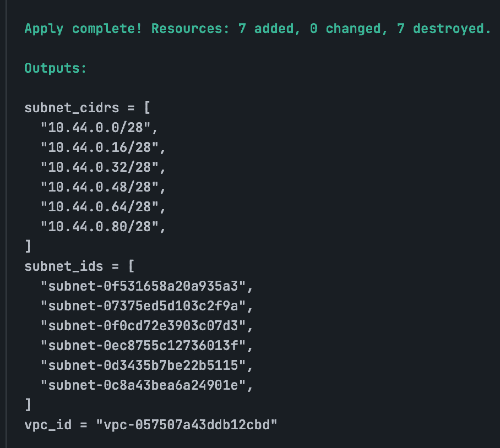
Apply complete! Resources: 7 added, 0 changed, 7 destroyed.
Outputs:
subnet_cidrs = [
  "10.44.0.0/28",
  "10.44.0.16/28",
  "10.44.0.32/28",
  "10.44.0.48/28",
  "10.44.0.64/28",
  "10.44.0.80/28",
]
subnet_ids = [
  "subnet-0f531658a20a93123",
  "subnet-07375ed5d103c2445",
  "subnet-0f0cd72e3903c0467",
  "subnet-0ec8755c127360668",
  "subnet-0d3435b7be22b5890",
  "subnet-0c8a43bea6a249567",
]
vpc_id = "vpc-057507a43ddb12345"
How Are Outputs Used?
Outputs serve several purposes:
- Displaying Information: Show important resource attributes (e.g., IP addresses, DNS names, ARNs) on the command line after an apply.
- Cross-Configuration References: Pass data from one Terraform configuration (and its state file) to another.
- Integration with Other Tools: Provide data to scripts, CI/CD pipelines, or other automation tools.
Examples of Using Terraform Outputs
VPC ID and Subnet IDs:
resource "aws_vpc" "main" {
  cidr_block = "10.0.0.0/16"
}

resource "aws_subnet" "public" {
  vpc_id     = aws_vpc.main.id
  cidr_block = "10.0.1.0/24"
}

output "main_vpc_id" {
  value = aws_vpc.main.id
}

output "public_subnet_id" {
  value = aws_subnet.public.id
}
S3 Bucket Name:
resource "aws_s3_bucket" "my_bucket" {
  bucket = "my-unique-application-bucket-123"
}

output "s3_bucket_name" {
  value       = aws_s3_bucket.my_bucket.id
  description = "The name of the S3 bucket."
}
EC2 Instance Public IP:
resource "aws_instance" "web" {
  ami           = "ami-0abcdef1234567890" # Example AMI
  instance_type = "t2.micro"
  tags = {
    Name = "WebServer"
  }
}

output "web_server_public_ip" {
  value       = aws_instance.web.public_ip
  description = "The public IP address of the web server."
}
After terraform apply, you'll see web_server_public_ip = "X.X.X.X".
Advanced Usage
Maps and Lists: Outputs can return complex data structures.
output "instance_details" {
  value = {
    id        = aws_instance.web.id
    public_ip = aws_instance.web.public_ip
  }
}

output "subnet_ids" {
  value = [aws_subnet.public.id, aws_subnet.private.id]
}
Sensitive Outputs: Mark outputs as sensitive = true to prevent their values from being displayed in plain text in the Terraform CLI or logs. Terraform will still store them in the state file.
output "db_password" {
  value     = aws_db_instance.main.password
  sensitive = true
}
Terraform Output Arguments
The following arguments can be used with outputs:
description (string)
Provides a human-readable explanation of what the output represents. Add one to every output, especially on projects other people work on.
output "web_server_public_ip" {
  value       = aws_instance.web_server.public_ip
  description = "The public IP address assigned to the main web server instance."
}
sensitive (bool)
When set to true, Terraform redacts the output's value in the CLI output (plan, apply, destroy, terraform output). The value is still stored in the state file, but it won't be printed to the console, making it suitable for passwords, API keys, or other confidential information.
output "database_password" {
  value     = aws_db_instance.main.password
  sensitive = true
  description = "The root password for the main database. This value is sensitive and redacted from logs."
}
depends_on (list of references)
Establishes explicit dependencies between the output and other resources or modules. While Terraform usually infers dependencies automatically based on resource references in the value argument, depends_on covers the rare cases where an implicit dependency isn't enough (e.g., if you need to ensure a network rule is applied before trying to connect to an IP exposed by an output, even if the output value itself doesn't directly reference the rule).
resource "aws_instance" "app_server" {
  # ...
}

resource "aws_security_group_rule" "allow_ssh" {
  type        = "ingress"
  from_port   = 22
  to_port     = 22
  protocol    = "tcp"
  cidr_blocks = ["0.0.0.0/0"]
  security_group_id = aws_instance.app_server.vpc_security_group_ids[0]
}

output "app_server_ip" {
  value       = aws_instance.app_server.public_ip
  description = "The public IP of the application server."
  depends_on  = [aws_security_group_rule.allow_ssh] # Ensure SSH rule is active before using IP
}
ephemeral (bool) - Terraform v1.10+ only
Purpose: When true, this argument prevents the output's value from being persisted in the Terraform state file. This is useful for temporary values that are only needed during a specific Terraform run (e.g., for bootstrapping) and shouldn't be permanently recorded in the state.
This argument is primarily intended for child modules. If you set ephemeral = true on a root module output, terraform output might not work as expected because the value isn't stored. Ephemeral outputs can only be referenced in write-only arguments, other child module ephemeral outputs, ephemeral variables, or ephemeral resources.
resource "random_password" "temp_creds" {
  length = 16
}

output "temporary_bootstrap_password" {
  value     = random_password.temp_creds.result
  sensitive = true
  ephemeral = true
  description = "A temporary password generated for bootstrapping. Not stored in state."
}
Between them, these arguments cover the usual needs: saying what an output is for, hiding sensitive values, and keeping throwaway data out of the state file.
Using For Expressions for Complex Outputs
A for expression lets you reshape data inside an output block before it leaves the module. Instead of exporting a resource's raw list or map, you loop over it and keep only the attributes that matter, like the public IP and DNS name, and build a tidier structure for whatever consumes the output. The handy part is that the module controls its own output format, so you can change the resources behind it without forcing every caller to change too.
Imagine your configuration uses count to provision multiple EC2 instances, which results in aws_instance.web being a list of objects.
In your main.tf, you have a list of instances defined:
resource "aws_instance" "web" {
  count         = 2
  ami           = "ami-0abcdef1234567890" # Example AMI
  instance_type = "t2.micro"

  tags = {
    Name = "web-server-${count.index + 1}"
  }
}
In your outputs.tf, you use a for expression to iterate over the list of instances and create a new map:
output "web_server_public_ips" {
  description = "A map of Web Server names to their public IP addresses."
  value = {
    for instance in aws_instance.web :
      instance.tags.Name => instance.public_ip
  }
}
The resulting output is a clean map that is easy for other modules or scripts to consume:
web_server_public_ips = {
  "web-server-1" = "192.0.2.101"
  "web-server-2" = "192.0.2.102"
}
Dynamic Output Indexes
Resources created with count or for_each become a list or map of objects rather than a single resource, so an output has to say which element it means. With count, you index explicitly: value = aws_instance.web[0].public_ip returns the public IP of the first instance. Terraform won't guess which one you mean when several share a name, so you have to point at the index yourself.
resource "aws_instance" "web" {
  count         = 3
  # ... other configuration
}

output "first_web_server_ip" {
  description = "The public IP address of the first instance created."
  # Explicitly reference the element at index [0]
  value       = aws_instance.web[0].public_ip
}
Terraform Outputs Command
The terraform output command extracts information about your deployed infrastructure in a structured, programmatic way. After an apply, you often need specific attributes of the created resources, such as an EC2 instance's public IP address, a load balancer's DNS name, a database connection string, or a storage bucket URL. Outputs make that data easy to get at:
- Inter-module Communication: Outputs are how you pass data between Terraform modules, allowing you to compose complex infrastructure from smaller, reusable components. For instance, a
networkmodule might output thevpc_idandsubnet_ids, which anapplicationmodule then consumes as inputs to deploy instances into the correct network segments. - CI/CD Pipeline Integration: Outputs connect Terraform to automation scripts and CI/CD pipelines. A pipeline might deploy an application, then use
terraform output app_urlto retrieve the deployed application's URL, passing it to a subsequent testing stage to run end-to-end tests.
Child Module Outputs
You access child module outputs by referencing the module block itself, followed directly by the name of the output (module.<name>.<output>). This allows the parent module to consume values exposed by its nested configurations.
For example, if you have a module named network with an output vpc_id, you would access it in your root module like this:
module "network" {
  source = "./modules/network" # Path to your network module
}

output "main_vpc_id_from_module" {
  value = module.network.vpc_id
}
Using Outputs from One State File in Another
Once infrastructure spans several configurations, one of them usually needs values from another. The terraform_remote_state data source handles that. For the architecture-level perspective on security best practices for shared state, federated environments, run triggers, and CI/CD orchestration, see How to Share Terraform State.
Say you have a network Terraform configuration that creates a VPC and subnets, and an application Terraform configuration that deploys EC2 instances into those subnets.
1. Network Configuration (network/main.tf):
resource "aws_vpc" "main" {
  cidr_block = "10.0.0.0/16"
}

resource "aws_subnet" "public" {
  vpc_id     = aws_vpc.main.id
  cidr_block = "10.0.1.0/24"
}

output "vpc_id" {
  value = aws_vpc.main.id
}

output "public_subnet_id" {
  value = aws_subnet.public.id
}
main.tf
Run terraform apply in the network directory to create the Terraform state file.
2. Application Configuration (application/main.tf):
Next, define the remote state in the application Terraform configuration file. Once it's defined, you can use the data.terraform_remote_state.network.outputs.public_subnet_id data source to pull the output from the network state file:
data "terraform_remote_state" "network" {
  backend = "local" # Or "s3", "azurerm", etc., depending on your backend
  config = {
    path = "../network/terraform.tfstate" # Path to the network state file
  }
}

resource "aws_instance" "app" {
  ami           = "ami-0abcdef1234567890" # Example AMI
  instance_type = "t2.micro"
  vpc_security_group_ids = [aws_security_group.app.id]
  subnet_id     = data.terraform_remote_state.network.outputs.public_subnet_id
}

resource "aws_security_group" "app" {
  vpc_id = data.terraform_remote_state.network.outputs.vpc_id
  # ... other security group rules
}
main.tf
Pulling outputs through this data source means you always get the latest values.
How to Use Outputs in Scalr and Terraform Cloud
Both Scalr and Terraform Cloud offer native ways to share outputs between workspaces without manual terraform_remote_state configuration, simplifying dependency management.
Scalr & Terraform Cloud Shared Output Example:
In both Scalr and Terraform Cloud, you can use the same terraform_remote_state code snippet, with one difference. In Scalr, the hostname, environment, and workspace must be supplied so that the workspace pulling the outputs knows where the source is:
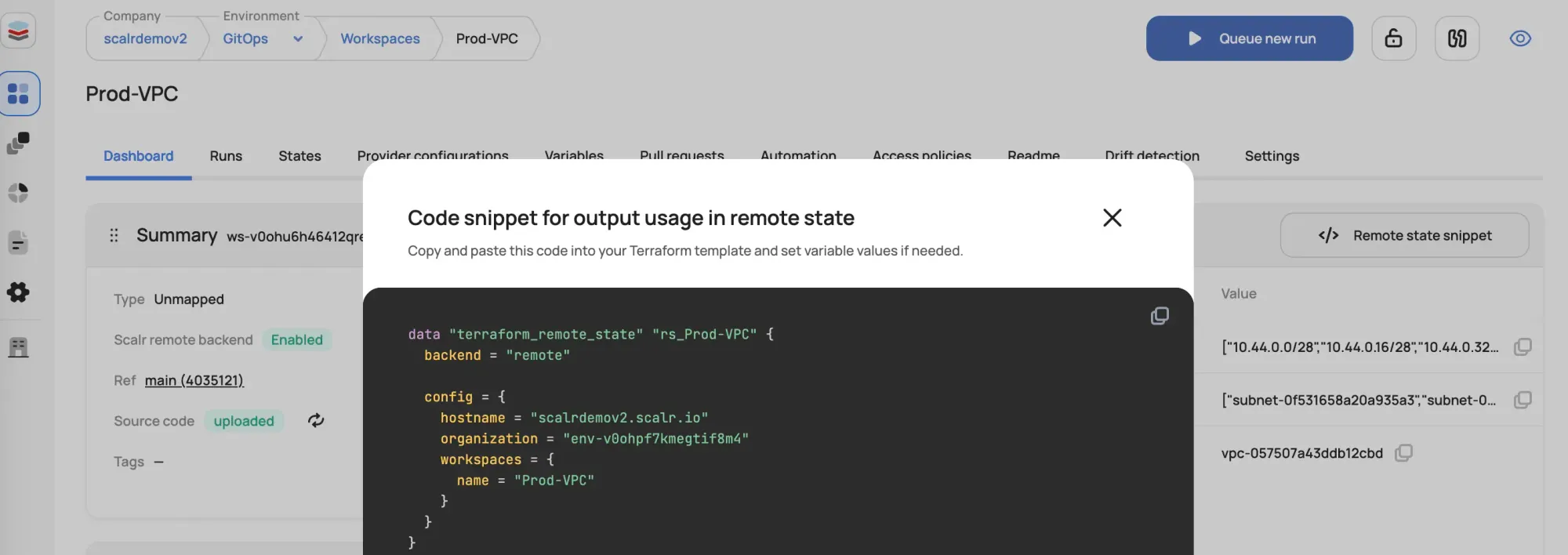
data "terraform_remote_state" "Prod-VPC" {
  backend = "remote"

  config = {
    hostname = "your-account.scalr.io"
    organization = "your-environment"
    workspaces = {
      name = "your-workspace"
    }
  }
}

#locals {
#    subnet_cidrs = data.terraform_remote_state.rs_Prod-VPC.outputs.subnet_cidrs
#    subnet_ids = data.terraform_remote_state.rs_Prod-VPC.outputs.subnet_ids
#    vpc_id = data.terraform_remote_state.rs_Prod-VPC.outputs.vpc_id
#}
Terraform Cloud's version is very similar, with a few small differences:
data "terraform_remote_state" "network" {
  backend = "remote"
  config = {
    organization = "your-organization-name"
    workspaces {
      name = "workspace-name"
    }
  }
}
This approach uses the platform's ability to manage and expose outputs, making cross-workspace dependencies easier. If you're comparing platforms for this kind of cross-workspace wiring, Scalr's pricing is public (free up to 50 runs per month).
This blog has been verified for Terraform and OpenTofu
About the author

director of platform engineering at Scalr
Ryan Fee is the director of platform engineering at Scalr, with over 15 years of experience improving infrastructure experiences at companies large and small.
Part of this guide
9 sheets
The Developer's Guide to HCL
- Terraform moved blocks: refactoring without pain
- Understanding the Terraform ignore_changes Lifecycle Block
- A Concise Guide to terraform_data Resource
- How to Use terraform chdir
- Advanced Terraform Workflows with terraform_data
- Terraform Resource Dependencies Explained
- The Three Stages of Terraform's Lifecycle Meta Argument