

Guide · 8 articles branch off this one
The Developer's Guide to HCL
What is HCL? Learn the basics of HashiCorp Configuration Language, its purpose, design goals, and how it compares to JSON and YAML for Infrastructure as Code.

Key takeaways
- HCL (HashiCorp Configuration Language) is a declarative syntax built around arguments and hierarchical blocks, designed for configuration rather than as a general-purpose programming language.
- Compared with JSON and YAML, HCL is purpose-built for configuration with native support for comments, variables, functions, expressions, and modules, plus better error reporting from the consuming tool.
- HCL is the common language across HashiCorp tools including Terraform, Packer, Vault, and Nomad, so knowledge transfers between them.
- Prefer for_each over count for multiple resources, because for_each gives each resource a stable identity by map key or set value while removing a middle item from a count list recreates every subsequent resource.
- Best practices include using remote state with locking, splitting state to reduce blast radius, running terraform fmt and validate, marking secrets sensitive, and pinning provider, module, and Terraform versions.
HashiCorp Configuration Language (HCL) is the language behind Terraform and the rest of the HashiCorp toolchain. This guide covers HCL from its design philosophy through to best practices and common problems you'll hit in real configurations.
What is HCL? Purpose, Design, and Key Characteristics
HCL, or HashiCorp Configuration Language, is a toolkit and language syntax HashiCorp built for creating structured configuration languages that are both human-readable and machine-friendly. It's aimed mainly at DevOps tools, servers, and similar applications.
HCL's design comes down to a few key characteristics:
- Readability and Writability: HCL syntax is engineered to be easy for humans to read and write, drawing inspiration from existing formats like libucl and nginx configurations. It aims for a balance, avoiding the verbosity of XML or the potential terseness of JSON when used for complex configurations.
- Declarative Approach: HCL uses a declarative syntax. You define the end-state you want for your infrastructure or configuration, and the HCL-processing application (like Terraform) works out the steps to get there. That keeps the underlying complexity out of your way.
- Machine-Friendliness: HCL puts human readability first, but it also has a JSON-based variant, so configurations can be machine-generated and parsed when you need that, which helps with interoperability.
- Structured Configuration: HCL is built around key-value pairs (arguments) and hierarchical blocks, so applications can define clear schemas for their configuration. That structure gives you better error messages and a more convenient way to define things in the calling application.
- Extensibility: The language has an expression syntax that handles basic inline computation, and with application support, variables and functions for more dynamic configurations.
HCL isn't meant to be a general-purpose programming language. It gives you a focused set of constructs for defining configuration in a clear, structured way.
Note on HCL Technologies vs HashiCorp HCL
Don't confuse HashiCorp Configuration Language with products and documentation from HCL Technologies (HCLTech), a separate global technology company. This guide is only about HashiCorp HCL, the kind you use in tools like Terraform, Packer, Vault, and Nomad.
How Does HCL Compare to JSON and YAML?
JSON and YAML are general-purpose data serialization formats, while HCL is designed as a syntax and API for building structured configuration formats. That difference shows up in how you use each one for Infrastructure as Code.
JSON (JavaScript Object Notation)
JSON is popular because it's simple and language-independent, which makes it a good fit for data interchange. It uses a key-value pair format.
- Pros: Highly human-readable in its compact form, quick to parse, and has wide tooling support including JSONPath for queries.
- Cons: Limited data type support, no native support for comments, namespaces, or attributes, which can make complex configurations verbose or less intuitive.
YAML (YAML Ain't Markup Language)
YAML prioritizes human readability even more than JSON, using indentation to denote structure. It is a superset of JSON.
- Pros: Exceptionally human-readable syntax, compact, supports a richer set of language-independent object types, and allows comments. Widely adopted in cloud-native tools like Kubernetes and CI/CD systems.
- Cons: Indentation-sensitive format can be prone to syntax errors, portability of some types can be an issue, and debugging can be difficult.
HCL (HashiCorp Configuration Language)
HCL sits in the middle: it's easier to read than raw JSON for configuration work, and it gives you more structure than YAML for defining application-specific schemas.
- Pros: Designed for configuration, more concise than JSON for this purpose, supports variables, functions, expressions, and modules natively. Its structure allows for better error reporting by the consuming application.
- Cons: Primarily tied to the HashiCorp ecosystem, though parsers exist for other languages. Conversion to and from JSON can have ambiguities for certain constructs.
| Feature | HCL | JSON | YAML |
|---|---|---|---|
| Primary Use | DevOps tool configuration (esp. IaC) | General data interchange, APIs | Configuration files, data serialization |
| Readability | High, designed for humans | Moderate (can be verbose for config) | Very High, indentation-based |
| Comments | Yes (#, //, /* */) | No (officially) | Yes (#) |
| Variables | Native, rich support | Possible but often clunky | Supported, often via templating |
| Modularity | Native (e.g., Terraform modules) | Complex to implement for config | Possible, often via includes |
| Expressiveness | Supports expressions, functions | Limited to data structures | Richer data types than JSON |
Which HashiCorp Tools Use HCL?
HCL is the shared configuration language across HashiCorp's DevOps tools, so you get a consistent experience whether you're working on infrastructure or application management.
- Terraform: Uses HCL to define infrastructure as code, allowing users to provision and manage resources across various cloud providers (AWS, Azure, GCP) and other services via Terraform providers. This is arguably the most prominent use of HCL.
- Packer: Uses HCL (specifically HCL2 templates) to define machine image configurations for various platforms, automating the creation of identical machine images.
- Vault: Uses HCL for writing policies that govern access to secrets and other sensitive data.
- Nomad: Uses HCL for defining job specifications, which describe applications and their resource requirements for scheduling and deployment.
Because the syntax and design are the same across these tools, what you learn in one carries over to the next.
How Do Arguments and Blocks Work in HCL?
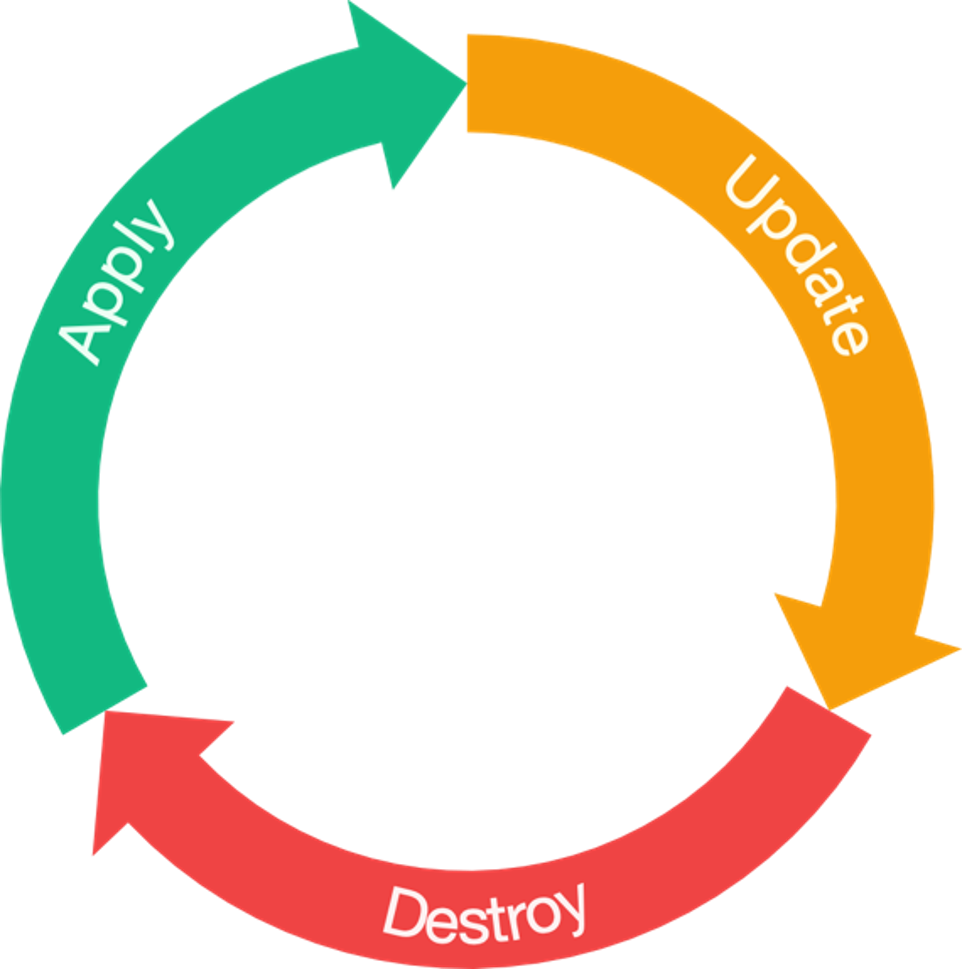
HCL's syntax rests on a few constructs, and arguments and blocks are the two you'll use constantly.
HCL Arguments
An argument assigns a value to a particular name. The syntax is:
name = expression
Example:
image_id = "ami-0c55b31ad54g39a5b"Here image_id is the argument name and "ami-0c55b31ad54g39a5b" is its string value. Where an argument shows up (say, inside a particular resource block) decides which value types are valid and whether it's required or optional. Many arguments take arbitrary expressions, so a value can be literal or generated programmatically.
HCL Blocks
A block is a container for other content, including arguments and potentially other nested blocks, creating a hierarchical configuration structure.
A block has a type (e.g., resource, source, variable) and can have one or more labels. For example:
resource "aws_instance" "web" {
  ami = "ami-12345"
  # ...
}
In this case, resource is the block type, and "aws_instance" and "web" are labels.
The block body, enclosed in curly braces ({ and }), contains the arguments and nested blocks that define the configuration object.
HCL has only a handful of top-level block types (blocks that can appear outside any other block). Most features in tools like Packer and Terraform (resources, input variables, data sources, and so on) are built as top-level blocks.
How Do You Name Identifiers and Write Comments in HCL?
HCL Identifiers
Identifiers are names used for arguments, block types, and most tool-specific constructs like resources and variables.
Identifiers can contain:
- Letters
- Digits
- Underscores (_)
- Hyphens (-)
The first character of an identifier must not be a digit to avoid ambiguity with literal numbers.
Consistent, descriptive identifiers go a long way toward keeping code readable and maintainable.
Documenting Your HCL Code
Comments are how you explain the intent and logic behind HCL configurations. HCL supports three syntaxes:
Hash Symbol (#) - Single-line comment (idiomatic and recommended):
# This is a single-line comment
resource "aws_instance" "example" {
  ami = "ami-12345" # Inline comment
}
Double Slash (//) - Also begins a single-line comment:
// This is also a single-line comment
variable "region" {
  type = string // Describes the AWS region
}
Slash-Star (/* */) - Multi-line comment:
/*
  This is a multi-line comment.
*/
resource "aws_vpc" "main" {
  cidr_block = "10.0.0.0/16" /* Inline comment */
}
Character Encoding and Line Endings
To ensure consistency and avoid parsing issues:
- Character Encoding: HCL configuration files must always be UTF-8 encoded.
- Line Endings: HCL accepts Unix-style (LF) or Windows-style (CRLF) line endings. However, the idiomatic style is Unix (LF), and
terraform fmtwill typically enforce this.
What Data Types Does HCL Support?
HCL has several data types for argument values and expressions. They split into primitive and complex types. For more on how these types show up in input variables and outputs, see our dedicated guide.
Primitive Types
String: A sequence of Unicode characters representing text.
variable "app_name" {
  type    = string
  default = "my-application"
}
Strings can be defined with double quotes or using a "heredoc" syntax for multi-line strings:
locals {
  user_data_script = <<-EOT
    #!/bin/bash
    echo "Hello World"
  EOT
}Number: A numeric value, which can represent both whole numbers and fractional values.
variable "instance_count" {
  type    = number
  default = 15
}

variable "cpu_threshold" {
  type    = number
  default = 0.85
}Boolean: A boolean value, which can be either true or false.
variable "enable_monitoring" {
  type    = bool
  default = true
}
Complex Types (Collections)
List: An ordered sequence of values, identified by consecutive zero-based integer indices.
variable "availability_zones" {
  type    = list(string)
  default = ["us-west-1a", "us-west-1c"]
}
Elements can be of mixed types:
variable "mixed_list" {
  type    = list(any)
  default = ["text", 42, true]
}Map: A collection of key-value pairs, where keys are strings and values can be of any type.
variable "common_tags" {
  type = map(string)
  default = {
    Environment = "production"
    Project     = "Alpha"
    ManagedBy   = "Terraform"
  }
}Set: An unordered collection of unique values where all elements must be of the same type.
variable "allowed_ports" {
  type    = set(number)
  default = [80, 443, 8080]
}
Sets are handy with for_each when iterating over a flat list of strings.
Object: A structured type with named attributes and specific types.
variable "db_config" {
  type = object({
    engine   = string
    version  = string
    instance = string
  })
  default = {
    engine   = "mysql"
    version  = "8.0"
    instance = "db.t3.micro"
  }
}Null: A special value representing the absence or omission of a value.
variable "optional_tag" {
  type    = string
  default = null
}
If you set an argument to null, the HCL-consuming application (like Terraform or Nomad) usually acts as if you never set the argument at all. It might fall back to a default value, or raise an error if the argument is mandatory.
| Type | Description | Example | Key Characteristics |
|---|---|---|---|
| string | Sequence of Unicode characters | "hello", "${var.name}" | Used for names, descriptions. Supports interpolation. |
| number | Numeric value (integer or fractional) | 15, 3.14 | Used for counts, sizes, ports. |
| bool | Boolean value | true, false | Used for flags, conditional logic. |
| list | Ordered sequence of values | ["a", "b", 1] | Zero-indexed. Mixed types possible. |
| map | Collection of key-value pairs | { name = "app", version = "1.2" } | Keys must be unique. Values can be mixed types. |
| object | Structured type with named attributes | (Used in type constraints) | Defines expected attributes and their types. |
| set | Unordered collection of unique values | toset(["a", "b"]) | All elements same type. Required by for_each. |
| null | Represents absence of a value | null | Makes an argument behave as if it wasn't set. |
Applications like Terraform and Nomad will often convert types automatically when they can. For example, if an argument expects a string but gets a number, it usually converts the number to its string form.
What Operators and Expressions Does HCL Provide?
HCL operators cover arithmetic, comparison, and logic, and you'll need them for any configuration that computes values instead of hardcoding them.
Arithmetic Operators
1 + 2        # 3
10 - 3       # 7
3 * 4        # 12
10 / 3       # 3.33333... (floating-point division)
10 % 3       # 1 (modulo)
pow(2, 3)    # 8 (exponentiation via the pow function; HCL has no ^ operator)
Comparison Operators
1 == 1       # true
1 != 2       # true
2 > 1        # true
2 >= 2       # true
1 < 2        # true
1 <= 1       # true
Logical Operators
true && true   # true (AND)
true || false  # true (OR)
!true          # false (NOT)
String Interpolation
String interpolation allows you to embed expressions within strings:
variable "environment" {
  type = string
  default = "production"
}

resource "aws_instance" "web" {
  tags = {
    Name = "Instance-${var.environment}"  # Interpolation
  }
}
Template Directives
For more complex string operations, use template directives:
locals {
  user_list = "%{ for user in var.users }${user}\n%{ endfor }"
}

# Conditional in string:
locals {
  status_message = "%{ if var.enabled }ENABLED%{ else }DISABLED%{ endif }"
}
Which Built-In Functions Should You Know in HCL?
HCL ships with a lot of built-in functions for common operations. Here are some of the ones you'll reach for most:
String Functions
length("hello")                    # 5
upper("hello")                     # "HELLO"
lower("HELLO")                     # "hello"
substr("hello", 1, 3)              # "ell"
startswith("hello", "he")          # true
endswith("hello", "lo")            # true
replace("hello", "l", "x")         # "hexxo"
split(",", "a,b,c")               # ["a", "b", "c"]
join(",", ["a", "b", "c"])        # "a,b,c"
Numeric Functions
min(1, 2, 3)                       # 1
max(1, 2, 3)                       # 3
floor(3.9)                         # 3
ceil(3.1)                          # 4
round(3.7)                         # 4
Collection Functions
length([1, 2, 3])                  # 3
concat(["a"], ["b", "c"])          # ["a", "b", "c"]
contains(["a", "b"], "a")          # true
index(["a", "b", "c"], "b")        # 1
distinct(["a", "b", "a"])          # ["a", "b"]
reverse(["a", "b", "c"])           # ["c", "b", "a"]
sort(["c", "a", "b"])              # ["a", "b", "c"]
Type Conversion Functions
tostring(42)                       # "42"
tonumber("42")                     # 42
tolist(["a", "b"])                 # ["a", "b"] (tolist takes a tuple/set, not a map)
values({"a" = 1})                  # [1]   (use values() to get a map's values as a list)
tomap(["a", "b"])                  # Error (can't convert list to map)
toset(["a", "b", "a"])             # {"a", "b"}
Conditional Functions
# Conditional expression (ternary-like)
var.enabled ? "yes" : "no"

# Lookup with default
lookup(var.config, "key", "default_value")

# Try-catch-like behavior
try(var.optional_value, null)
How Do Conditionals and Loops Work in HCL?
Conditional Expressions
The conditional expression syntax in HCL allows for if-then-else logic:
variable "environment" {
  type = string
}

variable "enable_encryption" {
  type    = bool
  default = true
}

locals {
  kms_key = var.enable_encryption ? aws_kms_key.main.arn : null

  environment_label = var.environment == "prod" ? "Production" : var.environment == "staging" ? "Staging" : "Development"
}
for_each: Iterating Over Collections
for_each is the preferred way to create multiple resource instances from a collection. It provides stable identity for each resource:
variable "subnets" {
  type = map(object({
    cidr_block = string
    az         = string
  }))
  default = {
    public-1  = { cidr_block = "10.0.1.0/24", az = "us-east-1a" }
    public-2  = { cidr_block = "10.0.2.0/24", az = "us-east-1b" }
    private-1 = { cidr_block = "10.1.1.0/24", az = "us-east-1a" }
  }
}

resource "aws_subnet" "main" {
  for_each            = var.subnets
  vpc_id              = aws_vpc.main.id
  cidr_block          = each.value.cidr_block
  availability_zone   = each.value.az

  tags = {
    Name = "subnet-${each.key}"
  }
}
Each iteration provides:
each.key- The key from the map (or value from a set)each.value- The value associated with the key
count: Creating a Specific Number of Resources
count creates a specified number of resources, tracked by a numeric index:
variable "instance_count" {
  type    = number
  default = 3
}

resource "aws_instance" "servers" {
  count         = var.instance_count
  ami           = data.aws_ami.ubuntu.id
  instance_type = "t3.micro"

  tags = {
    Name = "server-${count.index + 1}"
  }
}
for Expressions (Advanced Loops)
for expressions allow you to transform collections within strings or variables:
variable "users" {
  type = list(string)
  default = ["alice", "bob", "charlie"]
}

# Transform list to map
locals {
  user_map = { for user in var.users : user => length(user) }
  # Result: { alice = 5, bob = 3, charlie = 7 }
}

# Filter collection
locals {
  admins = [for user in var.users : user if length(user) > 3]
  # Result: ["alice", "charlie"]
}
Dynamic Blocks (Programmatic Configuration)
Dynamic blocks allow you to generate nested blocks programmatically:
variable "ingress_rules" {
  type = list(object({
    port        = number
    protocol    = string
    cidr_blocks = list(string)
  }))
}

resource "aws_security_group" "web" {
  name = "web-sg"

  dynamic "ingress" {
    for_each = var.ingress_rules
    content {
      from_port   = ingress.value.port
      to_port     = ingress.value.port
      protocol    = ingress.value.protocol
      cidr_blocks = ingress.value.cidr_blocks
    }
  }
}
What Common HCL Problems Will You Run Into, and How Do You Fix Them?
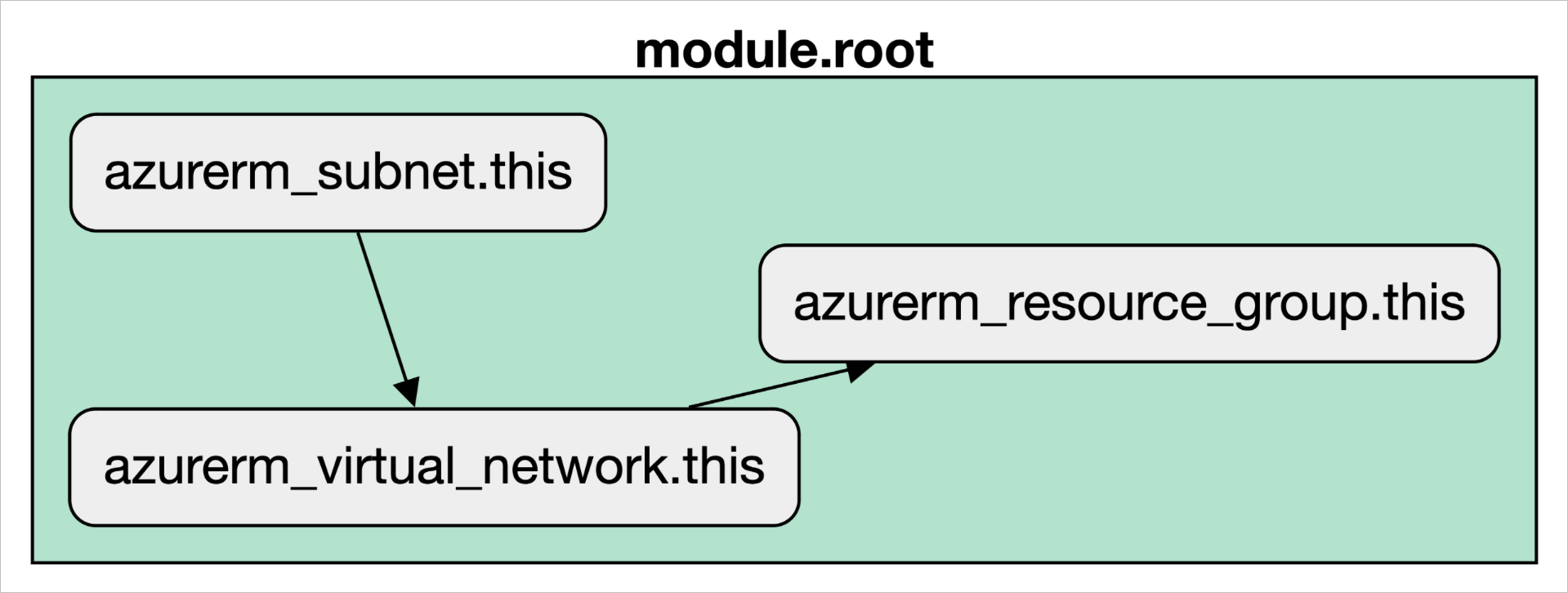
The diagram above illustrates how HCL handles resource dependencies, both implicit (via interpolation) and explicit (via depends_on).
Challenge 1: Choosing Between for_each and count
The Problem: The choice between for_each and count for multiple resources decides how Terraform tracks each one.
count Limitations:
- If you remove an item from the middle of a list used with
count, every subsequent resource will be destroyed and recreated because their indices shift. That's highly disruptive. - Best Use: Use
countonly for creating a specific number of identical, interchangeable resources, or for conditionally creating a single resource (count = var.enabled ? 1 : 0).
for_each Benefits:
- Each resource is tracked by the map key or set value, providing a stable identity.
- Removing an item only affects that specific resource; all others remain untouched. That's much safer and more predictable for managing dynamic collections.
- Best Use: Prefer
for_eachfor almost all scenarios involving multiple resources.
| Feature | count | for_each |
|---|---|---|
| Iteration Basis | Integer | Map or Set of strings |
| Resource Identity | Numeric index | Map key or Set value |
| Behavior on Modification | Can cause unintended recreation | Stable, affects only changed item |
| Verdict | Use with extreme caution | Preferred choice for multiple resources |
Challenge 2: Dynamic Blocks Are Complex
The Problem: Dynamic blocks add a layer of abstraction that can reduce readability if not carefully constructed.
The Solution: Use dynamic blocks judiciously:
- Use them when the nested blocks are driven by data that changes.
- Consider using
for_eachon the resource itself with inline blocks as an alternative. - Always document the expected data structure clearly.
- Review the plan output (locally, or in your CI/CD or IaC platform's run view) to confirm how dynamic blocks expand before applying.
Challenge 3: Handling HCL Syntax Errors and Runtime Issues
Syntax Errors: Caught by terraform validate. These are mistakes in the code itself, like missing braces, unclosed quotes, or misspelled keywords. Use your IDE's HCL extension and run terraform validate frequently to catch these early.
Provider/Runtime Errors: Occur during terraform plan or apply. These aren't HCL errors. They're failures from the cloud provider's API (e.g., "Insufficient Permissions," "Invalid Subnet ID," API rate limiting). The error message from Terraform will typically include details from the provider, which is your key to debugging the issue.
Challenge 4: Managing Variables and Secrets
Best Practices for Variables:
- Always define a
type - Add a
description - Set a
defaultvalue if the variable should be optional - Use
sensitive = truefor secrets to prevent them from being displayed in logs - Add
validationblocks to enforce constraints
variable "db_password" {
  type        = string
  description = "Database password for production"
  sensitive   = true

  validation {
    condition     = length(var.db_password) >= 12
    error_message = "Password must be at least 12 characters."
  }
}
Secrets Management - Never Hardcode Secrets:
- Use a Secrets Manager: Store secrets in a dedicated service like HashiCorp Vault, AWS Secrets Manager, or Azure Key Vault.
- Use Data Sources: Use a Terraform data source to fetch the secret at runtime. That keeps the secret out of your configuration, but Terraform stores data source results in state and plan files, so protect both. An ephemeral resource (Terraform 1.10+, OpenTofu 1.11+) keeps the secret out of state and plan files too.
- Use Environment Variables: For CI/CD, inject secrets as environment variables (e.g.,
TF_VAR_api_key). - Mark Variables as sensitive: Always mark variables that will hold secret data with
sensitive = true.
Challenge 5: Complex Expressions and Interpolations
The Problem: String interpolation and template directives can become difficult to debug.
The Solution:
- Break complex expressions into named locals for clarity:
locals {
  # Instead of complex inline expression
  user_data_content = base64encode(templatefile(
    "${path.module}/user_data.sh",
    { environment = var.environment }
  ))
}

resource "aws_instance" "main" {
  user_data = local.user_data_content
}- Use comments to explain non-obvious logic.
- Test expressions in isolation using
terraform consolefor debugging.
What Are the Best Practices for Writing HCL?
1. Structuring HCL Projects and Modules
A well-organized project is one you can actually maintain. If you're new to writing modules, start with our getting started with Terraform modules guide.
Standard File Layout:
module/
├── main.tf          # Core resource definitions
├── variables.tf     # Input variable declarations
├── outputs.tf       # Output value definitions
├── versions.tf      # Terraform and provider version constraints
└── README.md        # Essential documentation for your module
Module Design Principles:
- Keep Modules Focused: A module should do one thing well (e.g., manage a VPC, deploy a database).
- Use Clear Inputs/Outputs: Define variables and outputs clearly with types and descriptions.
- Avoid Hardcoding: Parameterize everything that might change between environments.
- Don't Hardcode Environment Logic: A module should be environment-agnostic. Pass in environment-specific configuration via variables rather than using conditional logic inside the module.
Managing Multiple Environments (Dev/Staging/Prod):
The most common and recommended approach is directory-based separation:
infrastructure/
├── dev/
│   ├── main.tf
│   ├── terraform.tfvars
│   └── backend.tf
├── staging/
│   ├── main.tf
│   ├── terraform.tfvars
│   └── backend.tf
└── prod/
    ├── main.tf
    ├── terraform.tfvars
    └── backend.tf
Each directory calls the same shared, reusable modules but passes its own variable values and backend state configuration. That gives you strong isolation.
Avoid Terraform Workspaces for Environments: Workspaces are better for feature branches or temporary instances, not for strong isolation between long-lived environments like dev and prod. Using separate directories is safer.
2. Terraform State Management Strategies
Terraform state is the source of truth for your managed infrastructure, so you need to protect it.
Always Use Remote State: For any collaborative or production project, store your state file remotely using remote state backends. Local state is only for solo experiments.
- Benefits: Collaboration, reliability, and most importantly, state locking.
- Common Backends: AWS S3 with a DynamoDB table for locking, Azure Blob Storage, Google Cloud Storage, or Terraform Cloud.
terraform {
  backend "s3" {
    bucket         = "my-terraform-state"
    key            = "prod/terraform.tfstate"
    region         = "us-east-1"
    encrypt        = true
    dynamodb_table = "terraform-locks"
  }
}
State Locking is Mandatory: Remote backends provide locking mechanisms to prevent multiple people from running terraform apply at the same time and corrupting the state file. If your backend doesn't support locking, don't use it.
Split Your State: Don't keep all your infrastructure in one monolithic state file. A big state file is slow, and a single mistake has a massive blast radius.
- Splitting Strategy: Decompose your state by environment, component, or service. For example, have separate state files for your networking, your databases, and your application services.
- Benefits: Faster plans/applies, reduced blast radius for errors, and better security boundaries.
3. Writing Cleaner HCL: Formatting and Validation
Use terraform fmt: Run this command automatically to enforce a canonical, consistent style. Integrate it into a pre-commit hook so code is always formatted before it enters version control.
terraform fmt -recursiveRun terraform validate: Run this command to check for syntax errors and basic consistency. It's fast because it doesn't access the network. This should be the first step in your CI/CD pipeline.
terraform validateUse Clear Naming Conventions: Your resource, variable, and output names should be descriptive and consistent.
- Good:
aws_s3_bucket.customer_billing_reports_prod - Bad:
aws_s3_bucket.bucket
4. Testing HCL Configurations
If you want reliable infrastructure, you have to test it.
Static Analysis: This is your first line of defense.
terraform fmtandterraform validateare basic static analysis tools.- Use third-party tools like TFLint to check for provider-specific best practices, find potential errors, and enforce coding standards.
tflint .terraform plan as a Dry Run: The plan is an essential preview, but it isn't a test. It shows intent without guaranteeing success. Always review plan output carefully before applying.
Integration Testing: For important modules, write automated tests that deploy real infrastructure.
- Terratest: A Go library from Gruntwork is the industry standard for this. It allows you to write tests that run
terraform apply, make assertions about the created infrastructure (e.g., "Is port 443 open?"), and then runterraform destroy. Short of production, it's the strongest evidence you'll get that your module works as expected.
// Example Terratest code
func TestAwsVpc(t *testing.T) {
  opts := &terraform.Options{
    TerraformDir: "../examples/aws-vpc",
  }

  defer terraform.Destroy(t, opts)
  terraform.InitAndApply(t, opts)

  vpcId := terraform.Output(t, opts, "vpc_id")
  assert.NotEmpty(t, vpcId)
}
5. Modern 2026 Best Practices
Use OpenTofu for Stability: Consider adopting OpenTofu, the open-source fork of Terraform, for better control and community governance.
Implement Policy as Code: Use OPA (Open Policy Agent) policies to enforce organizational standards across all Terraform configurations.
Version Everything: Pin provider versions, module versions, and Terraform versions explicitly. Avoid >= latest version constraints.
terraform {
  required_version = ">= 1.6.0, < 2.0.0"

  required_providers {
    aws = {
      source  = "hashicorp/aws"
      version = "~> 5.40.0"
    }
  }
}
Use IaC Management Platforms: Use platforms like Scalr, Terraform Cloud, or Spacelift to add collaboration, policy enforcement, cost estimation, and enhanced auditability to your Terraform workflows. Our guide to selecting a Terraform Cloud alternative breaks down how Scalr, Spacelift, and the others compare on these capabilities.
Implement Comprehensive Cost Management: Always run cost estimation tools in your CI/CD pipeline. Know what your infrastructure will cost before you deploy it.
Where Can You Learn More About HCL?
Official Documentation and Repositories
These are the official references:
- HCL GitHub Repository: https://github.com/hashicorp/hcl - The home of the HCL language itself.
- HCL Native Syntax Specification: https://github.com/hashicorp/hcl/blob/main/hclsyntax/spec.md - The formal specification of the HCL syntax.
- Terraform Language Documentation: https://developer.hashicorp.com/terraform/language - The main entry point for all documentation related to using HCL with Terraform.
- Terraform Language - Types and Values: https://developer.hashicorp.com/terraform/language/expressions/types - The definitive guide to data types in Terraform's implementation of HCL.
- Packer HCL Template Syntax: https://developer.hashicorp.com/packer/docs/templates/hcl_templates/syntax - The official reference for HCL2 syntax in Packer templates.
- Nomad Job Specification: https://developer.hashicorp.com/nomad/docs/job-specification - Documentation on how Nomad uses HCL for job files.
- Vault Policies: https://developer.hashicorp.com/vault/docs/concepts/policies - Information on Vault's use of HCL for writing policies.
- Terraform Input Variables: https://developer.hashicorp.com/terraform/language/values/variables - Comprehensive guide to declaring and using input variables.
- Terraform Modules: https://developer.hashicorp.com/terraform/language/modules - Official documentation on creating and using modules.
- Terraform Backends: https://developer.hashicorp.com/terraform/language/backend - The definitive guide to configuring remote state backends.
Community and Learning
IaC and cloud technologies keep changing, so if you work with HCL, plan to keep learning:
- Stay Updated: Follow releases and updates for HCL itself and the tools that use it (especially Terraform and its providers).
- Explore Provider Documentation: Cloud provider documentation for Terraform resources is invaluable for understanding specific arguments and behaviors.
- Engage with the Community: Platforms like the r/Terraform subreddit, HashiCorp forums, and Stack Overflow are good places to ask questions and see how other people solved the same problem.
Testing and Quality Tools
- Terratest Website: https://terratest.gruntwork.io/ - The homepage for the popular IaC testing library, with links to documentation and examples.
- TFLint: https://github.com/terraform-linters/tflint - A Terraform linter for detecting errors and enforcing coding standards.
What Should You Take Away From This HCL Guide?
HCL gives you a human-readable syntax for defining infrastructure as code across the HashiCorp ecosystem. The practices that matter most in day-to-day work: structure projects so modules stay focused, keep state remote and locked, split state to limit blast radius, run terraform fmt and validate in CI, mark secrets sensitive, and pin your provider, module, and Terraform versions.
To run that HCL across a team without standing up your own backend and run infrastructure, Scalr executes Terraform and OpenTofu on usage-based pricing, free up to 50 runs a month.
About the author

CEO at Scalr
Sebastian Stadil is the CEO of Scalr with 15+ years of DevOps experience. He started with AWS in 2004 and advised early Microsoft Azure and Google Cloud.
In this guide
8 articles- Terraform moved blocks: refactoring without pain
- Terraform Outputs: How to with Examples
- Understanding the Terraform ignore_changes Lifecycle Block
- A Concise Guide to terraform_data Resource
- How to Use terraform chdir
- Advanced Terraform Workflows with terraform_data
- Terraform Resource Dependencies Explained
- The Three Stages of Terraform's Lifecycle Meta Argument