

Article · part of a guide
Getting Started with Terraform Providers
What Terraform providers are and how to use them

Key takeaways
- A Terraform provider is a plugin that transforms your HCL into the format a destination API requires, letting you manage anything with an API through one consistent language.
- Providers come in three tiers: Official (maintained by HashiCorp), Partner (maintained by a HashiCorp partner company), and Community (maintained by individual contributors).
- A provider block is not always required: providers like random need no configuration, while azurerm must always declare at least an empty features block.
- Most provider configuration is about authentication, and credentials can usually be supplied through environment variables instead of being written into the provider block.
- Provider aliases let you declare multiple configurations of the same provider with different credentials or scope, which is useful for managing infrastructure across multiple accounts.
Terraform Providers sit at the foundation of how Terraform works, and they're a big part of why it's so easy to use. This post covers:
- What are they
- How to use them
- Tips/Tricks
What are they
Think of a Terraform Provider as a plugin that adds extra functionality, much like an extension in Visual Studio Code adds functionality to the editor. These Providers let us talk to basically anything that has an API. That's a big part of why Terraform is so useful: you get one consistent language and style for talking to almost anything you can think of.
Providers come in three different flavours (or Tiers):
- Official: owned and maintained by HashiCorp (e.g.
vault) - Partner: owned and maintained by a technology company that is a HashiCorp partner (e.g.
azuredevops) - Community: published and maintained by individual contributors or groups within the Terraform ecosystem (e.g.
scratch)
The diagram below shows where a provider sits in the flow.
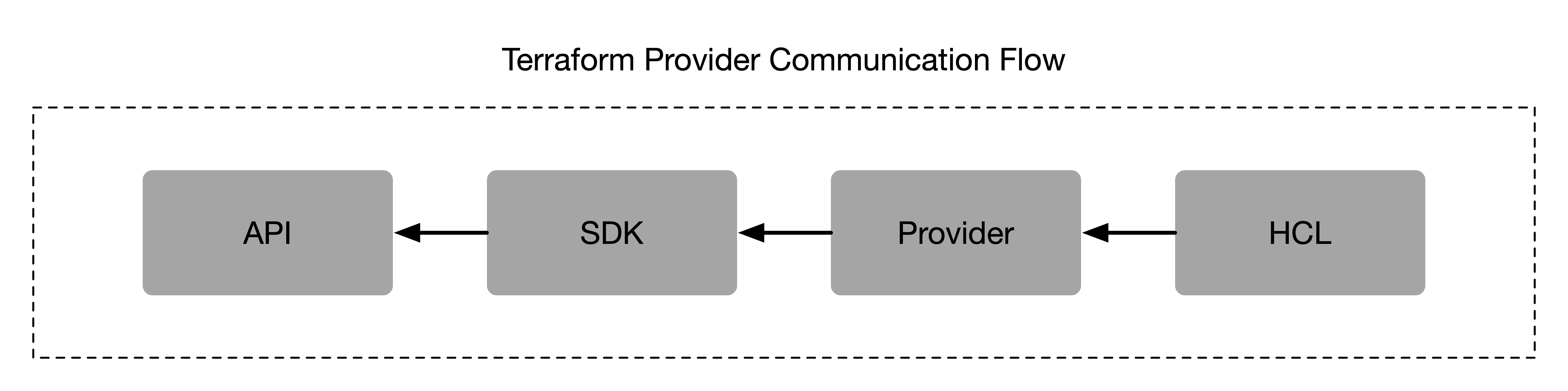
Communication flow
HCL: the Terraform code we write to provision resources on a platform or serviceProvider: the plugin for Terraform that takes the HCL, transforms it into the format required by the destination APISDK: the client library used by the Provider to communicate with the API in GolangAPI: the destination API that we want to communicate with
This pattern makes it easy for us as engineers to talk to an API using Terraform, and it also makes building Providers for new APIs pretty simple. HashiCorp gives you a few ways to develop Providers.
Documentation is another big part of the Provider plugin. The docs about a Provider, its resources, and its data sources live right alongside the Provider code, and webpages can be generated from them automatically. Keeping those two things side by side makes it easy for other engineers to pick up the Provider and start using it.
Providers usually come from a registry, either the one that ships with your TACO (most Terraform Cloud alternatives include a private registry) or the public HashiCorp registry, but you can also source them from the local filesystem. That's great when you're developing providers locally, or when you have internal providers that can't be hosted externally for security reasons.
How to use them
Some basics are the same for every provider, but the attributes you need vary from provider to provider, which is why it's so important to check the provider's documentation.
provider "some_provider" {}Any provider declaration calls the provider block with the name of the provider as the ID, though the block isn't actually always required. If a provider needs no configuration (e.g. scratch, random) then you don't need a provider block at all. There are also cases where the provider has sensible defaults, or can pull its configuration from environment variables, so you don't have to declare a block. The google provider is a good example: if you define nothing, it looks for the configuration in environment variables or the gcloud cli configuration file(s).
It's good practice to keep a dedicated providers.tf file, since that makes it easy to see every provider you're using straight from the code.
Here's an example with the azurerm provider for Microsoft Azure. For the most part this provider will try to pull its configuration from environment variables, but it MUST always have the block defined because of the features block it requires. Let's look at two ways of declaring this provider: one with the minimum requirements, and one with everything you need to get going when you're not sourcing from the environment.
This first example shows the simplest way to declare this provider. It just needs the features {} block to exist. Personally I think this requirement is ridiculous since it doesn't add any value and should be defaulted, but for now it's required.
provider "azurerm" {
	features {}
}
The next example shows what you need to pass into the provider so it can authenticate and access Azure resources. Here we need a Service Principal client_id and a client_secret, and along with those we also need to know which tenant and subscription to operate within.
provider "azurerm" {
	features {}

	client_id       = "00000000-0000-0000-0000-000000000000"
	client_secret   = ""
	tenant_id       = "10000000-0000-0000-0000-000000000000"
	subscription_id = "20000000-0000-0000-0000-000000000000"
}
Next up, let's look at the exact same scenario but for AWS. Thankfully AWS doesn't have something silly like the required features {} block 😃, we just pass an empty provider block and everything else gets sourced from the environment.
provider "aws" {}The environment variables you need are AWS_ACCESS_KEY_ID, AWS_SECRET_ACCESS_KEY, and AWS_REGION. With those defined it can authenticate and talk to AWS. Next, let's look at the provider block with those properties defined in Terraform.
provider "aws" {
	region     = "ap-southeast-2"
	access_key = ""
	secret_key = ""
}
In both examples you can see that configuring providers isn't too cumbersome. For the most part it's about how to authenticate to a given platform or service. Another important part of using a provider is making sure it's up to date and sourced from the right location. Here's what you'd define in the terraform.tf file to constrain the provider.
terraform {
	required_providers {
		azurerm = {
			source  = "hashicorp/azurerm"
			version = "~> 3.0"
		}

		aws = {
			source  = "registry.trust.me/cloud/aws"
			version = "=5.31.0"
		}
	}
}
Here we're using the azurerm provider from the official HashiCorp registry and making sure we have the latest 3.x.x version. For AWS we're sourcing from a third-party trusted registry and asking for a specific version of the provider.
Tips/Tricks
The biggest and most important tip with providers is that you can have aliased versions of a provider. That means you can have a different version of the provider, different credentials, different... anything! This gets super powerful when you're managing infrastructure that spans multiple accounts and so on. Here's an example with two provider definitions for azurerm.
provider "azurerm" {
	features {}
}

provider "azurerm" {
	alias = "network"

	features {}
}
Now that we have our providers declared, we can also make sure they're constrained correctly, like this.
terraform {
	required_providers {
		azurerm = {
			source                = "hashicorp/azurerm"
			version               = "~> 3.0"
			configuration_aliases = [ azurerm.network ]
		}
	}
}
In the example below we're going to get a data source for a resource group using each provider. In a real-world Azure setup it's completely normal to have your networking live somewhere else under a different service account, and provider aliases let us reach both easily.
data "azurerm_resource_group" "app" {
	name = "rg-aue-prd-app"
}

data "azurerm_resource_group" "network" {
	provider = azurerm.network

	name = "rg-aue-prd-network"
}
Where to Go Next
If you remember one thing from this post, make it provider aliases: they give you multiple connections to a single platform or service with different credentials or a different scope. If you want to go deeper, our overview of Terraform provider configurations has more examples and tips.
Frequently asked questions
What is a Terraform provider and how does it work?
A Terraform provider is a plugin that takes the HCL you write and transforms it into the format a destination API requires, using a Go SDK to talk to that API. This lets you manage almost anything that has an API through one consistent language and style.
What are the different tiers of Terraform providers?
Providers come in three tiers. Official providers are owned and maintained by HashiCorp, partner providers are maintained by technology companies in the HashiCorp partner program, and community providers are published and maintained by individual contributors or groups in the Terraform ecosystem.
Do I always need a provider block in Terraform?
No. Providers that need no configuration, like random, work without a provider block, and many providers can pull credentials from environment variables, like the google provider reading environment variables or the gcloud CLI configuration. One exception is azurerm, which must always declare a provider block with at least an empty features block.
What are Terraform provider aliases used for?
Aliases let you declare multiple configurations of the same provider with different credentials, scope, or settings. This is useful when infrastructure spans multiple accounts, such as networking living in a separate Azure subscription, and you reference the alternate configuration with provider = azurerm.network on a resource or data source.
About the author

solutions engineer at Scalr
Brendan Thompson is a solutions engineer at Scalr, specializing in Terraform and cloud infrastructure.
Part of this guide
16 sheets
Terraform Providers: Complete Configuration and Management Guide
- How to Manage GitLab with Terraform
- How to use the Terraform Okta Provider
- Mastering Kubernetes with Terraform: A Provider Deep Dive
- Top 10 Most Popular Terraform Providers [2026]
- What are Terraform Lock Files
- AzureRM Terraform Provider Overview
- Kubernetes Terraform Provider
- Terraform Random Provider
- How to use the Bitbucket Terraform Provider
- How to use Terraform or OpenTofu to Manage Datadog
- Getting Started with the Google Cloud Terraform Provider
- How to use Terraform to manage Okta
- New Feature: Provider Configurations
- Using A Custom Terraform Provider In Scalr