

Article · part of a guide
New Feature: Provider Configurations
Provider Configurations let you manage the configuration of, and access to, every Terraform provider your organization uses from one place.

Do you use more than one Terraform provider? We sure hope you do, so read on, friend!
At Scalr, we're building a great alternative to Terraform Cloud. This Summer we shipped a feature that manages the configuration of every provider you use. It supports role delegation, and it lets you reuse a configuration across workspaces.
We're calling the feature Provider Configurations, 'cause we're a creative bunch.
If you're anything like me, you've got dozens of services managed via Terraform, from AWS to DNS to Kubernetes to AzureAD to VMware, perhaps even hundreds! See the top 20 providers here. That's a lot of configurations, and tracking who has access to each one, rotating its keys, and keeping it all secure turns into a grind.
With Provider Configurations, you write Terraform code to manage the configuration of each provider, and from the same place, define which environments and which workspaces can use the configuration. Here's some sample code to let a "dev" environment use an AWS configuration.
# Create the provider configuration for AWS
resource "scalr_provider_configuration" "scalr_managed" {
  name                   = var.configuration_name
  account_id             = var.scalr_account_id
  export_shell_variables = false

  # Use role delegation as the configuration for AWS
  aws {
    credentials_type    = "role_delegation"
    account_type        = "regular"
    trusted_entity_type = "aws_account"

    role_arn = aws_iam_role.scalr_aws_integration.arn
    external_id = local.external_id
  }
  # Share the provider configuration with the dev environment
  environments = [data.scalr_environment.dev.id]
}

# Enable the provider configuration in the dev workspace.
resource "scalr_workspace" "dev_vpc_prod" {
  name = "dev_vpc_prod"
  environment_id = data.scalr_environment.dev.id
  provider_configuration {
id = scalr_provider_configuration.scalr_managed.id
  }
}
The same setup takes care of the secrets your providers need.
- For providers that support role delegation, you no longer have to think about rotating secrets: the above example configures the provider to use short-lived secrets generated automatically by Scalr and AWS.
- For providers that don't support role delegation, you can get similar convenience from the scheduler.
Provider configurations are a first-class object in Scalr. You can manage and share access to hundreds or thousands of provider configurations across the whole organization. It's also the first of many features we're building to take Scalr beyond Terraform Cloud, so that a central team can set the guardrails and the rest of the company can still move on its own.
How Do I Get Started?
You can manage Provider Configurations from either the Scalr UI or the Scalr Terraform provider. The UI is the quickest way to get started for ad-hoc setup. To manage configurations as code, use the Terraform provider. To open the UI, visit the following link after substituting your account name and id: https://
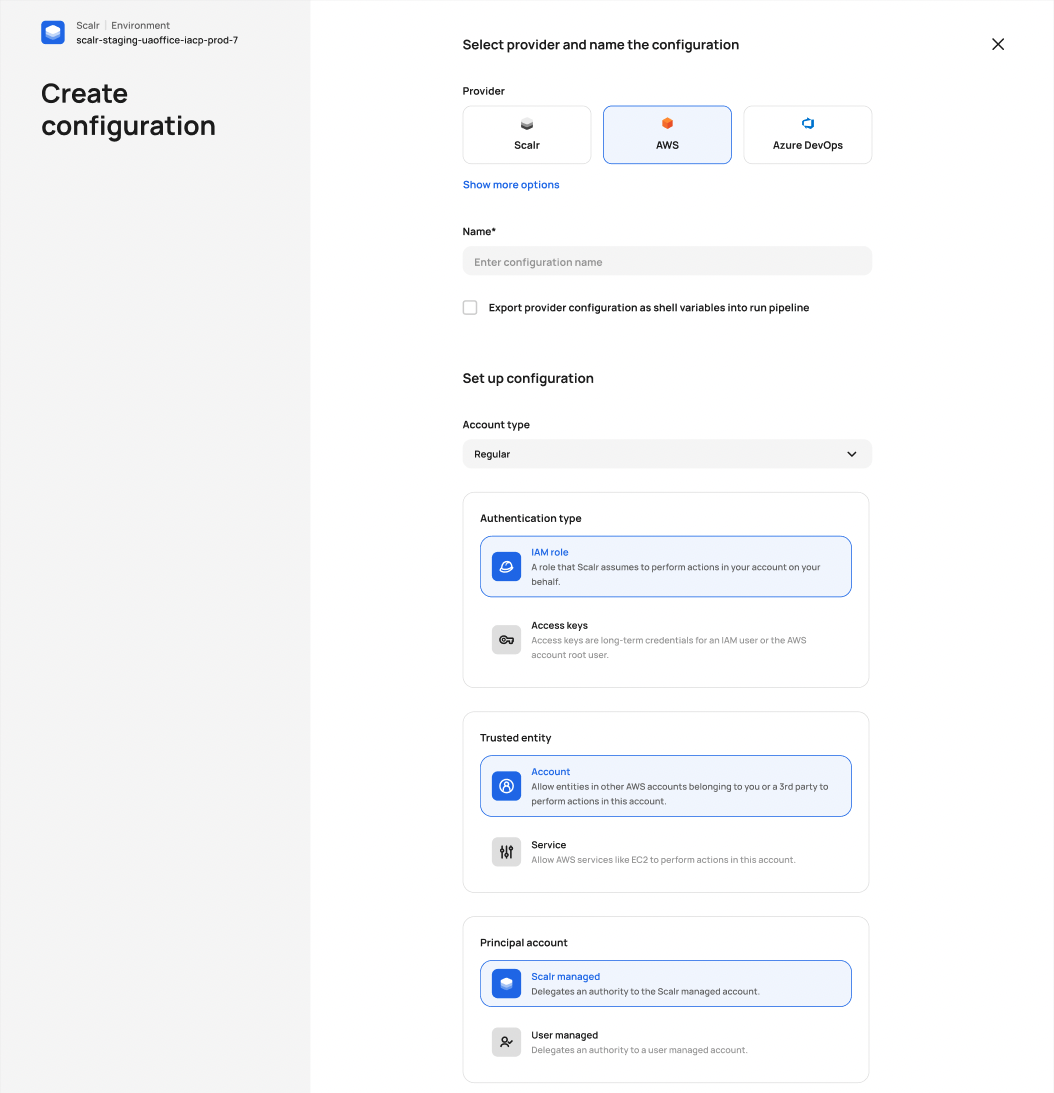
Getting started in the product
Frequently asked questions
What are Provider Configurations in Scalr?
Provider Configurations are a Scalr feature for managing the configuration of every Terraform provider you use from one place. You define a provider's credentials and settings once, then share that configuration with specific environments and workspaces, which makes it easier to track access and keep secrets secure across a large organization.
How does Scalr handle provider credentials and secret rotation?
For providers that support role delegation, such as AWS, Scalr can use short-lived secrets generated automatically, so you no longer need to rotate keys yourself. For providers without role delegation support, you can get similar convenience by using the Scalr run scheduler.
Can you manage Scalr provider configurations with Terraform code?
Yes. Provider configurations can be managed through the Scalr Terraform provider using the scalr_provider_configuration resource, or through the Scalr UI. The UI is quickest for ad-hoc setup, while the Terraform provider suits managing configurations as code at scale.
Can a provider configuration be shared across multiple workspaces?
Yes. A single provider configuration can be shared with chosen environments and enabled in individual workspaces, and organizations can manage and share access to hundreds or thousands of provider configurations. This lets a central team set guardrails while other teams keep working independently.
About the author

CEO at Scalr
Sebastian Stadil is the CEO at Scalr. He has over 15 years of devops experience, and started his career with AWS in 2004.
Part of this guide
16 sheets
Terraform Providers: Complete Configuration and Management Guide
- How to Manage GitLab with Terraform
- How to use the Terraform Okta Provider
- Mastering Kubernetes with Terraform: A Provider Deep Dive
- Top 10 Most Popular Terraform Providers [2026]
- What are Terraform Lock Files
- AzureRM Terraform Provider Overview
- Kubernetes Terraform Provider
- Terraform Random Provider
- How to use the Bitbucket Terraform Provider
- How to use Terraform or OpenTofu to Manage Datadog
- Getting Started with Terraform Providers
- Getting Started with the Google Cloud Terraform Provider
- How to use Terraform to manage Okta
- Using A Custom Terraform Provider In Scalr