

Article · part of a guide
AzureRM Terraform Provider Overview
AzureRM Terraform provider guide: core resources, auth setup, best practices for deploying to Azure with Terraform.

Key takeaways
- The AzureRM provider lets Terraform create, update, and destroy Microsoft Azure resources, and the author recommends it over AzAPI for most day-to-day configuration.
- AzureRM requires the features block and a subscription_id, and supports authentication via Azure CLI, managed identity, service principal with certificate or secret, and OpenID Connect.
- Using environment variables for provider configuration avoids hardcoding credentials and allows an orchestrator or CI/CD tool to manage them at runtime.
- Version constraints in the required_providers block ensure an expected provider version and source, with the pessimistic constraint operator '~>' being the author's usual choice.
The provider is what makes Terraform and OpenTofu useful. It gives engineers a way to talk to a service over the internet so they can create, update, and destroy resources on it. The diagram below shows how that flow works. The service exposes an API, that API is wrapped in an SDK, and a Terraform provider is built on top using the Terraform Plugin Framework. HCL then consumes the provider as the configuration for your infrastructure as code, defining new resources and data sources. Before you can use a provider in your code, it has to be published to the Terraform registry or to a registry that implements the registry interface.
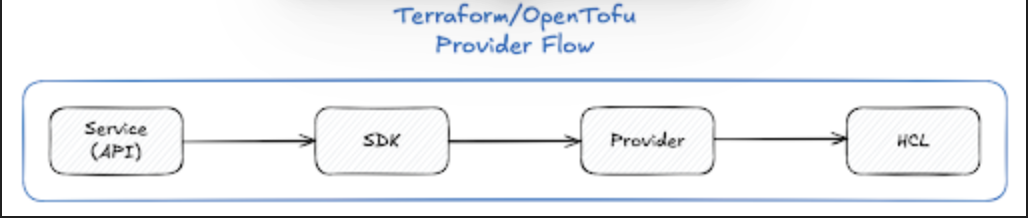
Terraform / OpenTofu Provider Flow
The rest of this article is about the Terraform AzureRM provider, which creates resources on Microsoft Azure from Terraform configuration files. Microsoft offers engineers two providers: the AzureRM provider already mentioned, and AzAPI. AzAPI gives you direct access to the Azure API and can be a good choice when a resource isn't yet available in AzureRM. For day-to-day configuration, though, I'd strongly suggest reaching for AzureRM, because its interface is clear and easy to work with. The AzureRM provider also ships on a weekly cadence and gets great support from HashiCorp, Microsoft, and the community. That cadence means security updates and bug fixes go out quickly, you hit fewer snafus, and you stay close to the latest features in both Azure and the provider framework.
The sections that follow walk through the provider configuration and then show some common Azure resources being deployed.
How Do You Configure the AzureRM Provider?
Here's the most basic provider configuration object you can use for AzureRM:
provider "azurerm" {
  features {}

  subscription_id = "00000000-0000-0000-0000-000000000000"
}
Unfortunately, even with the recent release of Version 4 of the Azure provider, the features block is still required. This block can be used to customize the behaviour of specific Azure Provider resources. (Though I've never seen anyone use it.) The second requirement is the subscription_id argument, which scopes the provider to a specific Azure subscription. Instead of setting the argument directly you can use an environment variable, ARM_SUBSCRIPTION_ID. I generally reach for environment variables since they make it easier to change things at runtime. The piece still missing is authentication. We can't touch resources on the platform without authenticating to it first, and Azure gives us a few ways to do that:
- Azure CLI - this doesn't require any configuration on the provider as long as on the executing machine an
az loginhas been performed and theaz-cliis authenticated to Azure. - Managed Service Identity - configuration can be done via arguments or environment variables, for additional details see: Azure Provider: Authenticating using managed identities for Azure resources
- Service Principal with Client Certificate - one of the most common ways to authenticate to Azure along with Client Secret below, this can be configured with either arguments or environment variables. For additional details see Azure Provider: Authenticating using a Service Principal with a Client Certificate
- Service Principal with Client Secret - similar to the above only the engineer or system provides a secret value instead of a certificate. For additional details see Azure Provider: Authenticating using a Service Principal with a Client Secret
- OpenID Connect - this allows for other applications to connect to Azure using OIDC a good example of this would be a CI/CD solution (e.g. Github, Azure DevOps). For additional details see Azure Provider: Authenticating using a Service Principal with Open ID Connect
Any of these would work in the examples that follow, but I'll demonstrate with the Service Principal with Client Secret, showing it both with environment variables and with arguments.
Which Arguments Does an Authenticated Provider Need?
The example below shows every argument a properly authenticated AzureRM provider instance needs. Whilst for the sake of this example the client_secret has a value this should NEVER be done. At a bare minimum, use the environment variable or an input variable to pass that argument in.
provider "azurerm" {
  features {}

  subscription_id = "00000000-0000-0000-0000-000000000000"
  tenant_id       = "11111111-1111-1111-1111-111111111111"
  client_id       = "22222222-2222-2222-2222-222222222222"
  client_secret   = "do-not-put-a-real-secret-here" # use ARM_CLIENT_SECRET or var.client_secret instead
}
How Do You Authenticate with Environment Variables Instead?
First we set the environment variables. The example below covers both bash and PowerShell, since either one works.
# bash
export ARM_SUBSCRIPTION_ID="00000000-0000-0000-0000-000000000000"
export ARM_TENANT_ID="11111111-1111-1111-1111-111111111111"
export ARM_CLIENT_ID="22222222-2222-2222-2222-222222222222"
export ARM_CLIENT_SECRET="<client-secret>"
# PowerShell
$env:ARM_SUBSCRIPTION_ID = "00000000-0000-0000-0000-000000000000"
$env:ARM_TENANT_ID = "11111111-1111-1111-1111-111111111111"
$env:ARM_CLIENT_ID = "22222222-2222-2222-2222-222222222222"
$env:ARM_CLIENT_SECRET = "<client-secret>"And now the provider configuration itself, which is about as complex as it gets:
provider "azurerm" {
  features {}
}
With environment variables, the provider needs no argument configuration of its own, and an external system such as an orchestrator or CI/CD tool can manage the values for you.
Why Should You Constrain Provider Versions?
Next up is constraining provider versions, which matters more than people expect. You do this in the terraform block of your configuration. The example below uses the pessimistic versioning constraint.
terraform {
  required_version = ">= 1.5.0"

  required_providers {
    azurerm = {
      source  = "hashicorp/azurerm"
      version = "~> 4.0"
    }
  }
}
Keeping these blocks in required_providers makes sure you get the version you expect from the source you expect. It also helps if your organization mirrors providers internally for security and wants the provider pulled from your own instance rather than the public registry. These are the valid operators for version constraints:
=: Only the explicitly defined version can be used. (This behaviour is the same when no operator is provided)!=: Excludes the exact defined version.>,>=,<,<=: Version comparators against the defined version.~>: Ensures only the rightmost element of the defined version may increment (e.g.1.0allows for any1.xbut will not allow2.x)
Nine times out of ten I'll choose the last constraint, known as the pessimistic version constraint. Terraform records the provider versions it resolves in a lock file, which is worth understanding too; see what Terraform lock files are.
What Does a Complete Azure Resource Example Look Like?
With the provider configured, here's an example that creates a few foundational Azure resources:
- Resource Group: the container/group for resources within Azure; a resource cannot exist outside of a Resource Group
- Virtual Network: the networking construct used with Azure
- Virtual Machine: an IaaS instance, this can be Windows or Linux and there are resource blocks for both of these individually.
First off we create a little helper in a locals block. This keeps naming consistent across every resource we provision:
locals {
  environment = "dev"
  location    = "australiaeast"
  short_loc   = "aue"
  app         = "app"
  suffix      = "${local.environment}-${local.short_loc}-${local.app}"
}
Normally you'd drive this with input variables so it stays configurable, but since this is just an example I've opted for static values.
Next is the Resource Group, where all our resources will land. It also gives us a single consistent location for everything.
resource "azurerm_resource_group" "this" {
  name     = "rg-${local.suffix}"
  location = local.location
}
It references local.suffix, which gives us the name rg-dev-aue-app.
Next is the network setup: Virtual Network, Subnet, and Network Interface. Other resources to consider here would be Network Security Groups and Application Security Groups.
The Virtual Network is the foundation of Azure networking, and it will generally have a number of Subnets associated with it. Some of these are very specific, such as the AzureFirewallSubnet which must be named exactly that for it to be consumable by the Azure Firewall.
resource "azurerm_virtual_network" "this" {
  name                = "vnet-${local.suffix}"
  location            = azurerm_resource_group.this.location
  resource_group_name = azurerm_resource_group.this.name
  address_space       = ["10.0.0.0/16"]
}

resource "azurerm_subnet" "this" {
  name                 = "snet-${local.suffix}"
  resource_group_name  = azurerm_resource_group.this.name
  virtual_network_name = azurerm_virtual_network.this.name
  address_prefixes     = ["10.0.1.0/24"]
}

resource "azurerm_network_interface" "this" {
  name                = "nic-${local.suffix}"
  location            = azurerm_resource_group.this.location
  resource_group_name = azurerm_resource_group.this.name

  ip_configuration {
    name                          = "internal"
    subnet_id                     = azurerm_subnet.this.id
    private_ip_address_allocation = "Dynamic"
  }
}
The last resource in the example is the Virtual Machine. I've gone with a Linux Virtual Machine because it's the simplest to configure, and nobody likes Windows anyway 😜.
The Virtual Machine takes on references for all resources that we have previously created. It will provision a Linux (Ubuntu specifically) instance within our given Resource Group and Virtual Network.
resource "azurerm_linux_virtual_machine" "this" {
  name                = "vm-${local.suffix}"
  location            = azurerm_resource_group.this.location
  resource_group_name = azurerm_resource_group.this.name
  size                = "Standard_B2s"
  admin_username      = "azureuser"

  network_interface_ids = [azurerm_network_interface.this.id]

  admin_ssh_key {
    username   = "azureuser"
    public_key = file("~/.ssh/id_rsa.pub")
  }

  os_disk {
    caching              = "ReadWrite"
    storage_account_type = "Standard_LRS"
  }

  source_image_reference {
    publisher = "Canonical"
    offer     = "0001-com-ubuntu-server-jammy"
    sku       = "22_04-lts"
    version   = "latest"
  }
}
What Have You Learned About the AzureRM Provider?
You now know how to configure the AzureRM provider, which authentication option fits your setup, and how the pieces of a basic deployment reference each other. That's enough to stand up your own Azure infrastructure and start adding the resources your project needs.
Frequently asked questions
Should I use the AzureRM or AzAPI provider for Terraform on Azure?
For day-to-day configuration, AzureRM is the better choice because its interface is clear and easy to work with, it ships on a weekly cadence, and it gets strong support from HashiCorp, Microsoft, and the community. AzAPI gives you direct access to the Azure API and can be a good choice when a resource isn't yet available in AzureRM.
What is required to configure the AzureRM Terraform provider?
Two things are required: the features block, which is still mandatory even in version 4 of the provider, and a subscription_id to scope the provider to an Azure subscription. The subscription ID can be set as an argument or through the ARM_SUBSCRIPTION_ID environment variable.
How do you authenticate the AzureRM provider to Azure?
Azure supports several authentication methods: Azure CLI (after an az login on the executing machine), managed service identity, a service principal with a client certificate, a service principal with a client secret, and OpenID Connect for tools like CI/CD systems. Credentials should be passed via environment variables or input variables rather than hardcoded.
Why should you constrain Terraform provider versions?
Version constraints in the required_providers block make sure you get the provider version you expect from the source you expect, which also helps if your organization mirrors providers internally. The pessimistic constraint operator ~> is a common choice because it allows only the rightmost version element to increment.
About the author

solutions engineer at Scalr
Brendan Thompson is a solutions engineer at Scalr, specializing in Terraform and cloud infrastructure.
Part of this guide
16 sheets
Terraform Providers: Complete Configuration and Management Guide
- How to Manage GitLab with Terraform
- How to use the Terraform Okta Provider
- Mastering Kubernetes with Terraform: A Provider Deep Dive
- Top 10 Most Popular Terraform Providers [2026]
- What are Terraform Lock Files
- Kubernetes Terraform Provider
- Terraform Random Provider
- How to use the Bitbucket Terraform Provider
- How to use Terraform or OpenTofu to Manage Datadog
- Getting Started with Terraform Providers
- Getting Started with the Google Cloud Terraform Provider
- How to use Terraform to manage Okta
- New Feature: Provider Configurations
- Using A Custom Terraform Provider In Scalr