

Article · part of a guide
Kubernetes Terraform Provider
Learn about the k8s provider

Key takeaways
- The Kubernetes Terraform provider gives full lifecycle management of cluster resources using HCL, a consistent language across any service regardless of the underlying cloud.
- The provider can be authenticated four ways: file configuration via a kubeconfig path, credentials passed directly, in-cluster configuration, and exec plugins.
- Exec plugin configuration runs an external command at runtime to retrieve cluster credentials, for example pulling the kubeconfig from a managed service like AWS EKS.
- Sensitive details such as keys and tokens should be passed via the CLI or environment variables rather than hardcoded in the provider block to avoid security issues.
- The provider uses versioned resources and data sources aligned to the Kubernetes API version, giving strong backwards compatibility.
There are plenty of ways to deploy and manage what runs inside a Kubernetes cluster: a Helm chart, raw manifests, Kustomize, and so on. But in my experience, if your organization already uses Terraform (or OpenTofu), reaching for the Terraform Kubernetes provider to handle the full lifecycle of your cluster resources is usually the better call. It keeps the experience consistent for the people on your team today and for anyone who joins later. The HashiCorp configuration language (HCL) gives you one common language for describing and building any service or resource in your organization.
This post covers configuring the official Kubernetes provider to build out services across your environment no matter which cloud sits underneath, which is one of the main selling points of Kubernetes in the first place.
How Do You Configure the Kubernetes Terraform Provider?
The Terraform registry is where you'll find the most up to date information about the Kubernetes Provider. One thing that sets the Kubernetes provider apart is that its resources and data sources are versioned. Those versions line up with the Kubernetes API version itself, which gives you strong backwards compatibility. The kubernetes secrets resources below are one example:
# Unversioned alias and the explicit v1 resource both exist; the suffix tracks the Kubernetes API version.
resource "kubernetes_secret" "legacy_style" { ... }
resource "kubernetes_secret_v1" "current" { ... }
Additional information can be found out about the Kubernetes API and its versions here.
The provider gives you several ways to configure it, and they fall into two groups: explicit and implicit. Explicit means you supply configuration arguments directly in the provider block. Implicit means you rely on environment variables. Either way, think carefully about sensitive information like keys and tokens so you don't open up a security issue. I'd strongly encourage passing those sensitive details in via the CLI or environment variables. With those two groups in mind, here are some examples of authenticating the provider against a cluster:
- File configuration
- Credential configuration
- In-cluster configuration
- Exec plugins
File configuration
File configuration is a great way to set up the provider when you're working locally with Terraform, since it just takes a path to the Kubeconf that holds all the relevant details. You can also constrain it to a given context, otherwise the default context is used.
provider "kubernetes" {
  config_path    = "~/.kube/config"
  config_context = "my-cluster-context"
}
This would grab the relevant details from the Kubeconf to authenticate the provider with that particular cluster. Alternatively the environment variables KUBE_CONFIG_PATH and KUBE_CTX can be used.
Credentials configuration
This method lets you pass the file contents in directly for the authentication arguments. It's useful when your Terraform orchestrator hands you those files dynamically, whether for a single environment or several, so you can apply the same configuration across multiple clusters. Here are those arguments:
provider "kubernetes" {
  host                   = "https://my-cluster.example.com:6443"
  client_certificate     = file("~/.kube/client.crt")
  client_key             = file("~/.kube/client.key")
  cluster_ca_certificate = file("~/.kube/ca.crt")
}
These arguments do what they say. We're passing the paths to the file builtin function, which reads the contents as a UTF-8 encoded string. You can also do this with data sources from a given cloud platform, which makes the provider configuration fully dynamic.
In-cluster configuration
If you're running your Terraform commands inside a Kubernetes cluster and that's the cluster you want to execute on, use the in-cluster configuration. It relies on the KUBERNETES_SERVICE_HOST and KUBERNETES_SERVICE_PORT environment variables, which let Terraform configure resources within the cluster.
Exec plugins
When it comes to Kubernetes, cloud providers all let you pull the Kubeconf from their managed clusters with CLI utilities. The Exec plugin type of configuration is built for exactly that case, where you want to run an external command to grab the right details at runtime. The below example uses AWS' EKS service.
data "aws_eks_cluster" "this" {
  name = var.cluster_name
}

provider "kubernetes" {
  host                   = data.aws_eks_cluster.this.endpoint
  cluster_ca_certificate = base64decode(data.aws_eks_cluster.this.certificate_authority[0].data)

  exec {
    api_version = "client.authentication.k8s.io/v1beta1"
    command     = "aws"
    args        = ["eks", "get-token", "--cluster-name", var.cluster_name]
  }
}
The contents of the exec block could easily be subbed out for the Azure variant:
  exec {
    api_version = "client.authentication.k8s.io/v1beta1"
    command     = "kubelogin"
    args        = ["get-token", "--login", "azurecli", "--server-id", var.aks_server_app_id]
  }
In my opinion this is another unique and valuable feature of the Kubernetes Terraform provider. It lets you reach external authentication mechanisms from inside the provider declaration itself.
What Does a Kubernetes Provider Deployment Look Like in Practice?
The example below deploys a simple service into its own namespace using Terraform.
locals {
  labels = {
    app  = "web"
    tier = "frontend"
  }
}

resource "kubernetes_namespace_v1" "web" {
  metadata {
    name = "web"
  }
}

resource "kubernetes_deployment_v1" "web" {
  metadata {
    name      = "web"
    namespace = kubernetes_namespace_v1.web.metadata[0].name
    labels    = local.labels
  }

  spec {
    replicas = 3

    selector {
      match_labels = local.labels
    }

    template {
      metadata {
        labels = local.labels
      }

      spec {
        container {
          name  = "web"
          image = "nginx:1.27"

          port {
            container_port = 80
          }
        }
      }
    }
  }
}

resource "kubernetes_service_v1" "web" {
  metadata {
    name      = "web"
    namespace = kubernetes_namespace_v1.web.metadata[0].name
  }

  spec {
    selector = local.labels

    port {
      port        = 80
      target_port = 80
    }

    type = "ClusterIP"
  }
}
That config creates a service that distributes traffic across the three pods the deployment spins up, as the diagram below shows.
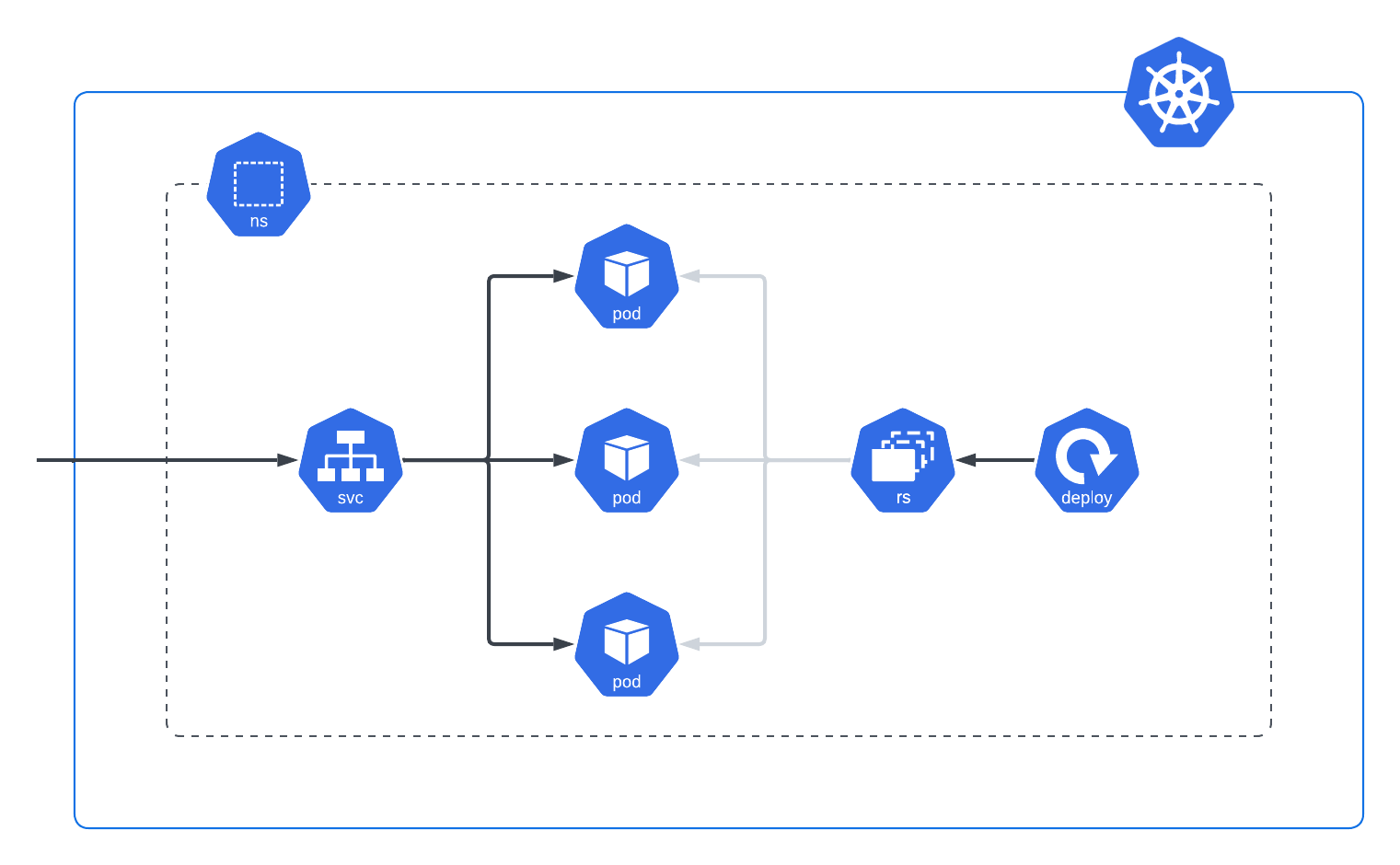
The advantage of provisioning Kubernetes services with OpenTofu/Terraform is that it's a common language teams understand regardless of what they happen to be deploying. You also get the features of OpenTofu/Terraform itself. The example above references the namespace instead of typing it out by hand, and it uses locals for the labels.
What Should You Take Away From the Kubernetes Provider Setup?
The four ways to authenticate the provider (file configuration, credential configuration, in-cluster configuration, and exec plugins) give engineers enough flexibility to wire up Kubernetes however a given situation demands. Pick the one that matches where your Terraform runs: on your laptop, in an orchestrator that hands you credentials, inside the cluster itself, or against a managed cloud cluster.
About the author

solutions engineer at Scalr
Brendan Thompson is a solutions engineer at Scalr, specializing in Terraform and cloud infrastructure.
Part of this guide
16 sheets
Terraform Providers: Complete Configuration and Management Guide
- How to Manage GitLab with Terraform
- How to use the Terraform Okta Provider
- Mastering Kubernetes with Terraform: A Provider Deep Dive
- Top 10 Most Popular Terraform Providers [2026]
- What are Terraform Lock Files
- AzureRM Terraform Provider Overview
- Terraform Random Provider
- How to use the Bitbucket Terraform Provider
- How to use Terraform or OpenTofu to Manage Datadog
- Getting Started with Terraform Providers
- Getting Started with the Google Cloud Terraform Provider
- How to use Terraform to manage Okta
- New Feature: Provider Configurations
- Using A Custom Terraform Provider In Scalr