

Article · part of a guide
How to Share Terraform State
Terraform state sharing centralizes infrastructure deployment data for team collaboration. It enables secure sharing of outputs between configurations so you can manage interconnected infrastructure.
Key takeaways
- Terraform state is a snapshot of your infrastructure that maps configuration to real resources; sharing it lets one deployment consume another's outputs instead of manually copying values.
- With open-source Terraform you configure a remote backend (S3, Azure Blob, or GCS) yourself, including locking, and read outputs across configs using the terraform_remote_state data source.
- Security best practices include keeping state out of version control, using remote backends with encryption and locking, applying least-privilege access, and enabling versioning and auditing.
- Managed platforms like Terraform Cloud and Scalr provide secure remote state, locking, versioning, and run triggers; Scalr adds federated environments for controlled one-way cross-environment state access.
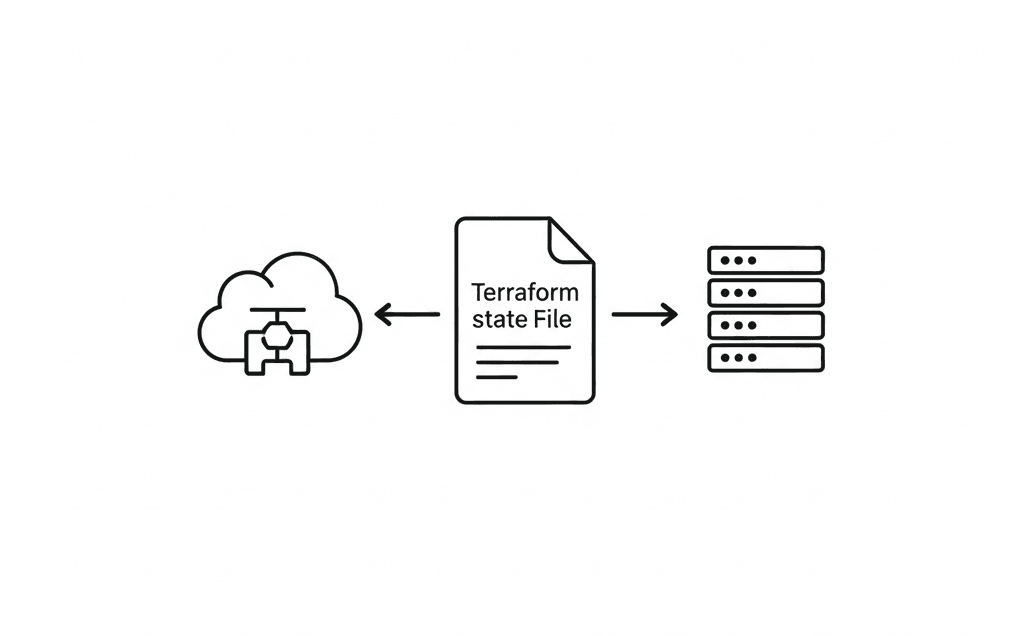
Terraform state is how your code knows about the infrastructure it controls. It's a record of what you've deployed. Once multiple teams or configurations need to talk to each other, you need a safe way to share that state. This article covers what state is, how to share it securely across deployments, and how managed platforms like Scalr and Terraform Cloud make it easier.
What is Terraform State?
Terraform state is a snapshot of your infrastructure. When you run terraform apply, Terraform records the mapping between your configuration and the real-world resources it created. This state file, typically named terraform.tfstate, is essential for Terraform to:
- Track resources: Know which resources it manages.
- Plan changes: Understand the current state of your infrastructure to determine what needs to be created, updated, or destroyed.
- Manage metadata: Store resource attributes and dependencies.
Without a valid state file, Terraform has no idea what it's managing, which can lead to duplicated resources or accidental destruction. A related problem, drift, is when real infrastructure changes outside Terraform and no longer matches what state records.
Dependencies Between Terraform State Files
A single Terraform configuration usually generates a single state file, but real deployments rarely live in isolation. One set of state files often depends on another. For example:
- A networking team might deploy a VPC and subnets, with the details stored in a Terraform state file.
- An application team might then deploy EC2 instances into those subnets, with the details stored in a different state file.
- A database team might deploy an RDS instance, and the application team needs its endpoint, which is stored in the database state file.
In each of these cases, the output of one deployment (a VPC ID, subnet IDs, a database endpoint) becomes an input for another. Without a way to share those outputs, every team has to go find and type in the values by hand, which is error-prone and defeats the point of IaC.
When to Share State Between Terraform Deployments
Sharing Terraform state pays off in a few common situations:
- Modular infrastructure: When you break down your infrastructure into logical, independent Terraform modules (e.g., network, compute, database). Each module manages its own state, but outputs from one are consumed by others.
- Multi-team environments: Different teams own different pieces of infrastructure, but their components need to interact. A network team deploys all network infrastructure, and application teams read the network state files to consume outputs.
- Environments (dev, staging, prod): While each environment typically has its own distinct state, there may be shared foundational elements (e.g., a core shared services VPC) whose state needs to be accessible across environments.
- Centralized data: Common data points like a shared S3 bucket name or an IAM role ARN that multiple deployments need to reference.
Security Best Practices for Sharing State
Sharing state is useful, but it comes with a few things you need to watch:
Sensitive data. Terraform state can contain sensitive information like database passwords, API keys, or private IP addresses.
- Never commit
terraform.tfstatefiles directly to version control. - Use remote backends (S3, Azure Blob Storage, GCS) that encrypt state at rest.
- Use secret management tools (AWS Secrets Manager, Azure Key Vault, HashiCorp Vault) to store and retrieve sensitive values, referencing them in your Terraform configuration rather than hardcoding them.
Access control (least privilege). Not everyone needs access to all state files.
- Implement strict IAM policies (AWS), RBAC (Azure/GCP), or workspace permissions (Terraform Cloud / Scalr) to control who can read, write, and modify state.
- Differentiate read-only access (for consuming outputs) from write access (for managing resources).
State locking. Concurrent operations on the same state file can corrupt it.
- Ensure your remote backend supports state locking. Most cloud storage backends and dedicated Terraform platforms like Terraform Cloud or Scalr offer state locking out of the box.
State history and rollback. Use remote backends that provide versioning for state files. This allows you to revert to a previous working state if a deployment goes wrong.
Auditing. Enable logging and auditing for your state backend to track who accessed and modified state files. Dedicated Terraform platforms make this much easier.
Sharing State with Open-Source Terraform
With open-source Terraform alone, no managed platform, managing and sharing state is on you. The main building block is the remote backend: cloud object storage that holds your terraform.tfstate file in one central, reachable spot.
You'll configure the backend yourself, and you often have to set up extra services for state locking.
Configuring a Remote Backend
The most common approach is cloud object storage, which offers high durability, versioning, and often built-in locking.
General steps:
- Choose a backend: Amazon S3, Azure Blob Storage, or Google Cloud Storage.
- Create the storage resource: manually create the bucket/container before running
terraform init. - Configure the Terraform backend: add a
backendblock to your root module.
AWS S3. Prerequisites:
- An S3 bucket (with versioning enabled).
- A DynamoDB table with a primary key
LockID(string) for state locking. - IAM permissions for the users/roles running Terraform.
terraform {
  backend "s3" {
    bucket         = "my-terraform-state-bucket"
    key            = "path/to/my/terraform.tfstate"
    region         = "us-east-1"
    encrypt        = true
    dynamodb_table = "terraform-lock-table"
  }
}
Azure Blob Storage. Prerequisites: storage account and container, and the "Storage Blob Data Contributor" role on the identity running Terraform. Azure Blob Storage provides its own locking mechanism.
terraform {
  backend "azurerm" {
    resource_group_name  = "tfstate-rg"
    storage_account_name = "myazuretfstateaccount"
    container_name       = "tfstate"
    key                  = "path/to/my/terraform.tfstate"
  }
}
Google Cloud Storage. Prerequisites: a GCS bucket with object versioning enabled, and the "Storage Object Admin" role on the identity running Terraform. GCS provides native state locking.
terraform {
  backend "gcs" {
    bucket = "my-gcs-terraform-state-bucket"
    prefix = "path/to/my/states"
  }
}
After defining the backend block, run terraform init. Terraform detects the backend configuration and prompts you to migrate any existing local state.
Sharing Outputs with terraform_remote_state
Once your state is in a remote backend, other configurations (in different directories or even different Git repos) can read its outputs with the terraform_remote_state data source. For more on the output block itself (arguments, for expressions, sensitive flags, and child-module outputs), see Terraform Outputs: How to with Examples.
data "terraform_remote_state" "network" {
  backend = "s3"
  config = {
    bucket         = "my-terraform-state-bucket"
    key            = "path/to/my/network-terraform.tfstate"
    region         = "us-east-1"
    dynamodb_table = "terraform-lock-table"
  }
}

resource "aws_instance" "app_server" {
  ami           = "ami-0abcdef1234567890"
  instance_type = "t2.micro"
  subnet_id     = data.terraform_remote_state.network.outputs.private_subnet_id
}
The consumer needs the right permissions to read the state files in the bucket.
Important Considerations
- Manual backend management: you create, configure, and manage the lifecycle of buckets, tables, and IAM.
- State locking is critical: without it, concurrent
applyoperations can corrupt state. - Versioning: always enable versioning on state storage to protect against accidental deletions or corruptions.
- Encryption at rest: most cloud providers offer this by default.
- CI/CD integration: pipelines need credentials to access the backend.
- Workspaces:
terraform workspacecommands map each workspace to a distinct key within the bucket.
Sharing State with Terraform Cloud and Scalr
Platforms like Scalr and Terraform Cloud take most of the learning curve out of state management by giving you a central, managed backend. They handle secure remote storage, state locking, and versioning for easy rollbacks out of the box. They also support run triggers, which kick off a run in a downstream workspace whenever its upstream workspace finishes an apply.
Both platforms hide the messy parts of manual state management behind workspaces. A workspace is the basic unit of organization, an isolated container for one set of infrastructure, where the state and all the related deployment artifacts live.
Terraform Cloud
Terraform Cloud is HashiCorp's managed service for a collaborative Terraform workflow. State management is a core feature:
- Workspaces: each Terraform configuration is associated with a workspace, and each workspace has its own remote state.
- Permissions: granular permissions on workspaces let you control who can read, write, and administer each workspace.
- Workspace access: share state across the entire organization, or with specific workspaces regardless of project.
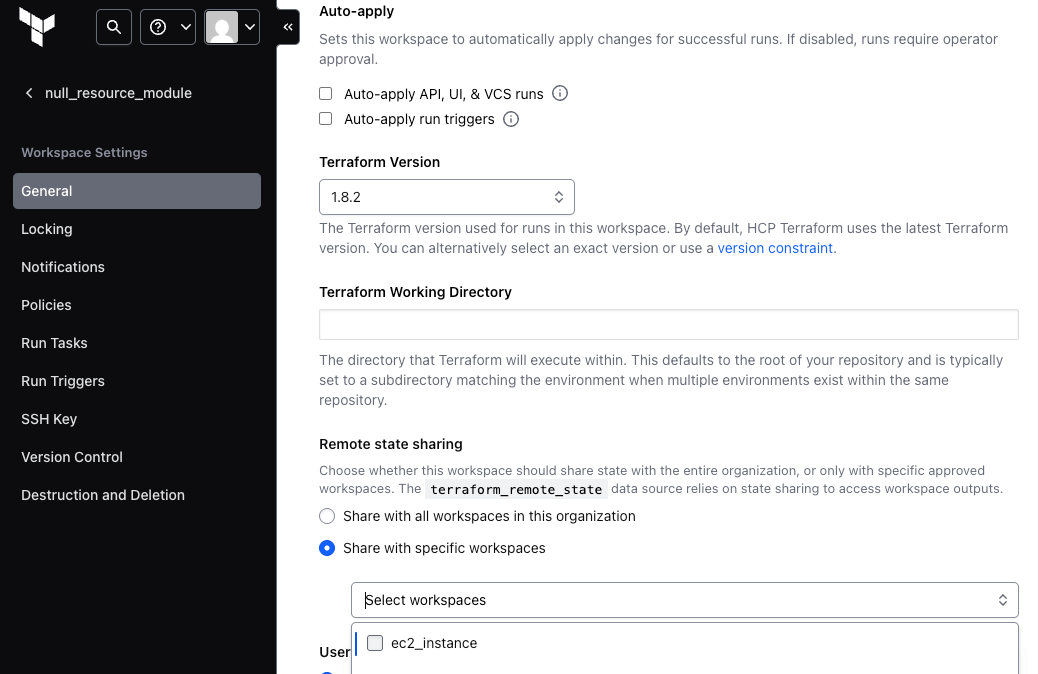
Once state sharing is configured, consumers use the terraform_remote_state data source:
# Workspace A (e.g., networking)
output "vpc_id" {
  value = aws_vpc.main.id
}

output "public_subnet_ids" {
  value = aws_subnet.public.*.id
}

# Workspace B (e.g., compute), consuming outputs from Workspace A
data "terraform_remote_state" "network" {
  backend = "remote"
  config = {
    organization = "your-organization-name"
    workspaces {
      name = "workspace-a-name"
    }
  }
}

resource "aws_instance" "web" {
  ami           = "ami-0abcdef1234567890"
  instance_type = "t2.micro"
  subnet_id     = data.terraform_remote_state.network.outputs.public_subnet_ids[0]
}
Terraform Cloud securely pulls the state from the upstream workspace and hands its outputs to the downstream one.
Scalr
Scalr is another Terraform automation platform with enterprise-grade state management and sharing:
- Environments and workspaces: Scalr organizes deployments into Environments (parents) and Workspaces (children). Each workspace stores its own remote state.
- Permissions: extensive RBAC defines granular permissions on workspaces and environments. In Scalr, roles are built from individual permissions across the account, environment, and workspace scopes, so you can build the exact role each persona needs for state access: a consumer that only reads another workspace's outputs, an app team scoped to its own environment, or an auditor with read-plus-audit access. Least-privilege roles keep state secure and let you onboard more people safely, like a junior engineer who can plan but not apply, or a contractor scoped to a single workspace.
- Federated environments: Scalr gets more fine-grained about sharing state outputs through its federated environments feature. By default, Scalr environments are isolated for security and separation of concerns. Federated environments open up that isolation in a controlled, one-way way, so a workspace in "Development" can get read access to a workspace in "Production" without merging the two.
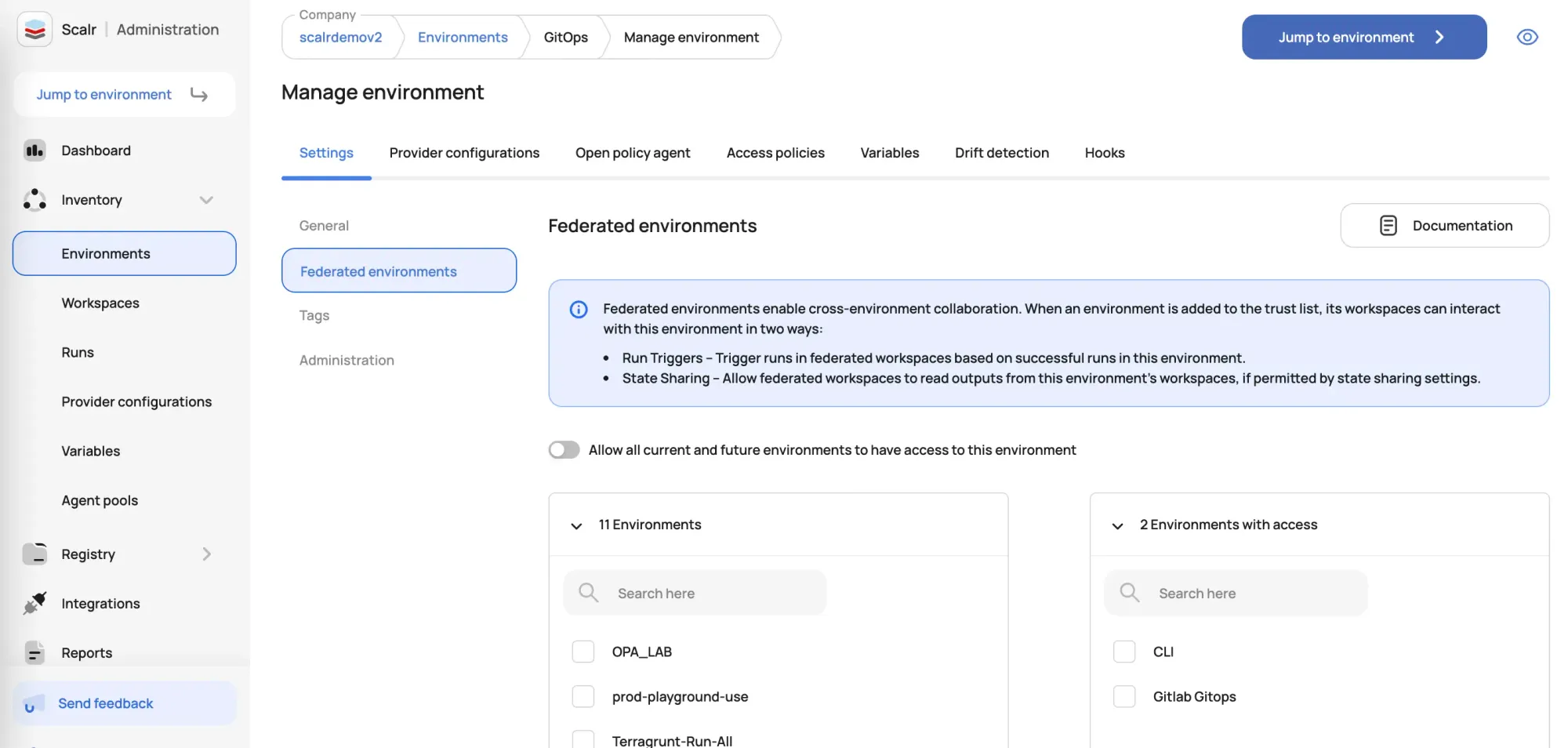
Once a workspace is granted permission to pull outputs from another workspace's state, consumers define the data source.
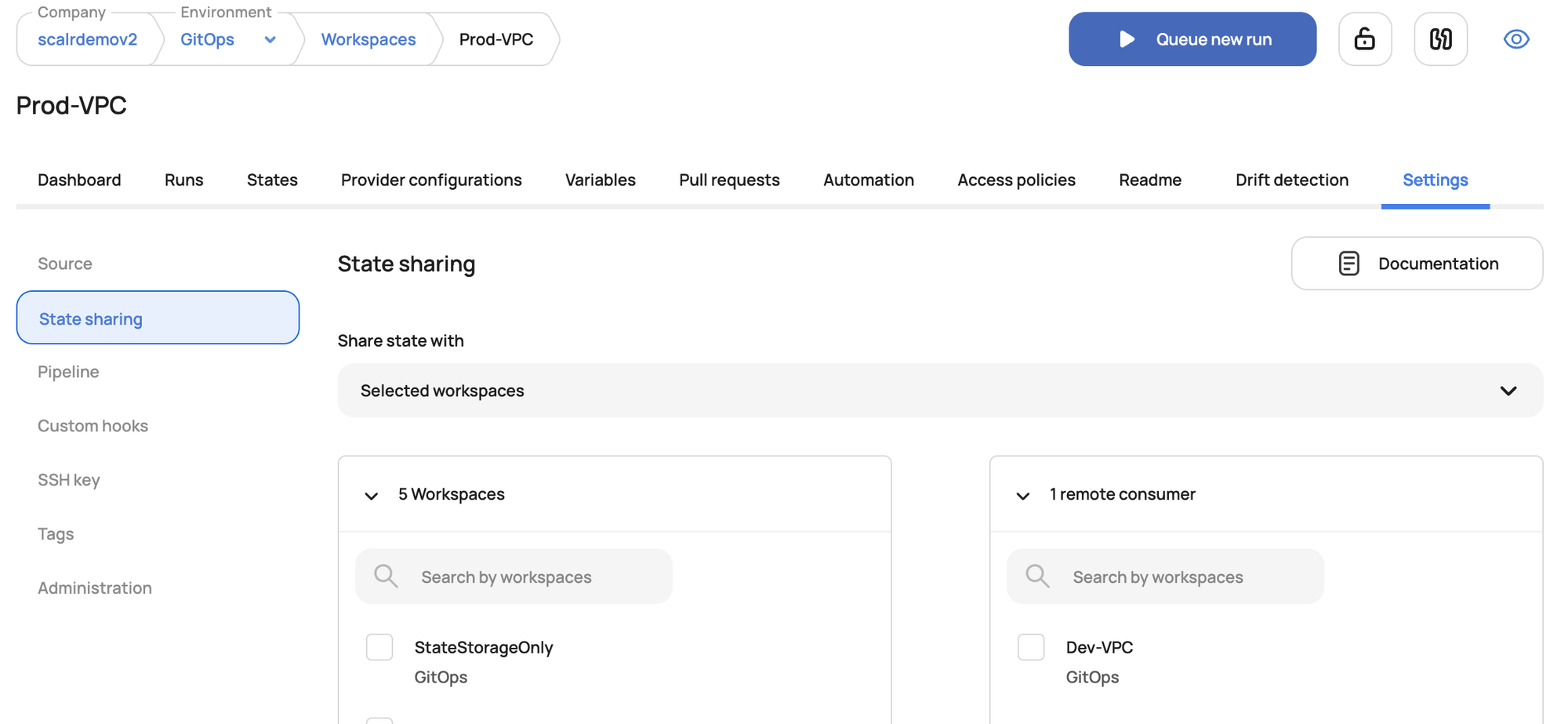
The configuration is very similar to Terraform Cloud:
# Scalr Workspace A (e.g., base-infrastructure)
output "vpc_id" {
  value = aws_vpc.main.id
}

# Scalr Workspace B (e.g., application-deployment)
data "terraform_remote_state" "base_infra" {
  backend = "remote"
  config = {
    organization = "your-scalr-environment-id"
    workspaces {
      name = "base-infrastructure-workspace-name"
    }
  }
}

resource "aws_instance" "app" {
  ami           = "ami-0abcdef1234567890"
  instance_type = "t2.micro"
  subnet_id     = data.terraform_remote_state.base_infra.outputs.public_subnet_ids[0]
}
Note: the organization value in terraform_remote_state for Scalr will be your Scalr environment ID. See the Scalr documentation for the precise value.
Workspace Orchestration with Run Triggers
Reading outputs is one part of the job. A successful apply changes the state file's outputs, and those changes also need to reach the workspaces that consume them, automatically.
Run triggers, available in both Terraform Cloud and Scalr, chain workspace runs together. They set up an explicit dependency: when terraform apply finishes in an "upstream" workspace, it kicks off a new run in a "downstream" one.
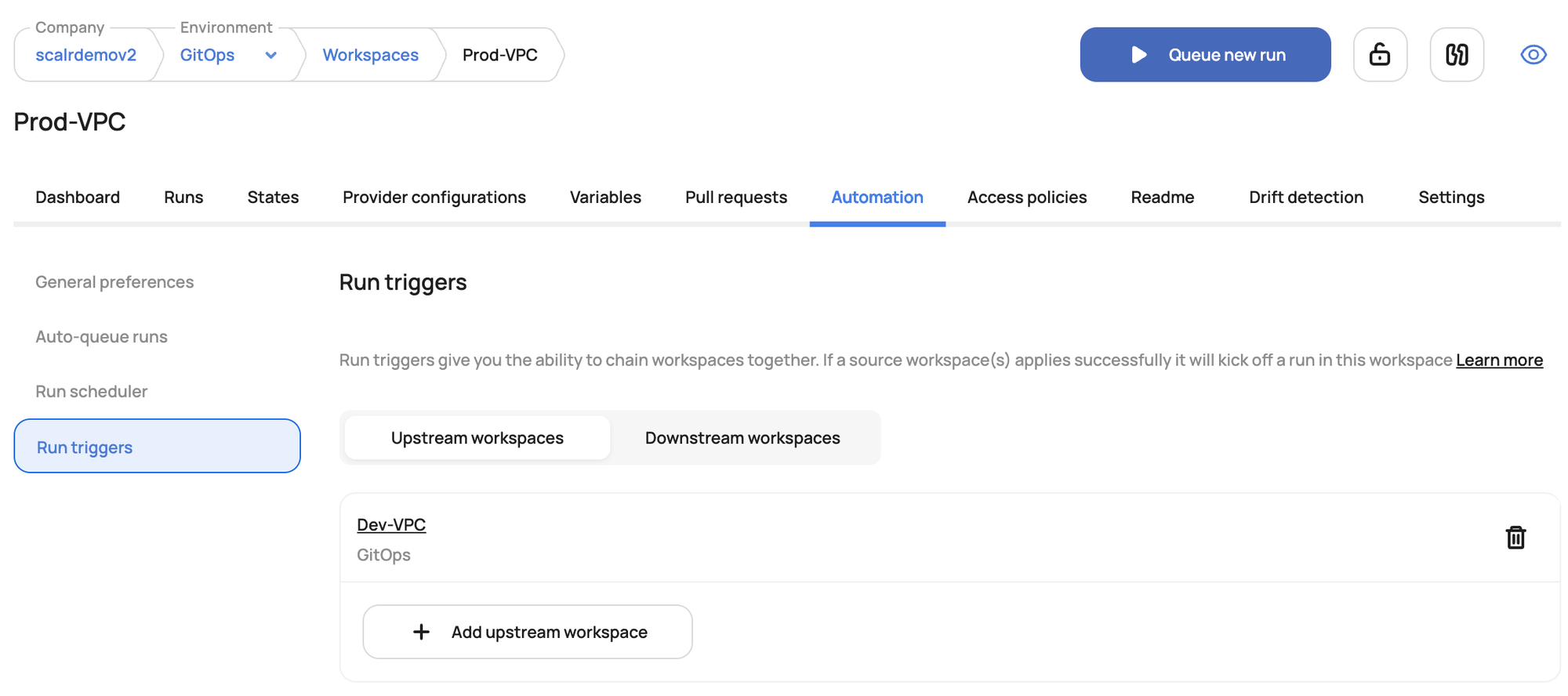
Run triggers let you orchestrate deployments and skip the monolithic config, breaking things into smaller workspaces that depend on each other. That's much easier to manage and nicer to work with.
If you're rolling your own with open-source Terraform, you can get close to this with CI/CD glue. Here's a GitHub Actions sketch that uses repository_dispatch to chain a network-infra repo to an app-servers repo:
# network-infra/.github/workflows/deploy-network.yml
name: Deploy Network Infrastructure
on:
  push:
    branches: [main]
    paths: ['network-infra/**']
env:
  AWS_ACCESS_KEY_ID: ${{ secrets.AWS_ACCESS_KEY_ID }}
  AWS_SECRET_ACCESS_KEY: ${{ secrets.AWS_SECRET_ACCESS_KEY }}
  AWS_REGION: us-east-1
jobs:
  deploy:
    runs-on: ubuntu-latest
    steps:
      - uses: actions/checkout@v4
      - uses: hashicorp/setup-terraform@v3
      - run: terraform init -backend-config="bucket=my-tf-states" -backend-config="key=prod/network/terraform.tfstate" -backend-config="region=${{ env.AWS_REGION }}" -backend-config="dynamodb_table=terraform-locks"
        working-directory: network-infra
      - run: terraform apply -auto-approve
        working-directory: network-infra
      - name: Trigger app-servers
        if: success()
        uses: peter-evans/repository-dispatch@v3
        with:
          token: ${{ secrets.PAT_TOKEN }}
          repository: your-org/app-servers
          event-type: deploy-app-servers
# app-servers/.github/workflows/deploy-app-servers.yml
name: Deploy Application Servers
on:
push:
branches: [main]
paths: ['app-servers/**']
repository_dispatch:
types: [deploy-app-servers]
jobs:
deploy:
runs-on: ubuntu-latest
steps:
- uses: actions/checkout@v4
- uses: hashicorp/setup-terraform@v3
- run: terraform init -backend-config="bucket=my-tf-states" -backend-config="key=prod/app-servers/terraform.tfstate"
working-directory: app-servers
- run: terraform apply -auto-approve
working-directory: app-serversThis gets the job done, but the glue and the credentials it needs add real maintenance work. That's where built-in Scalr federated environments, run triggers, and state sharing come in.
Sharing state without breaking it
Whether you wire up your own remote backend or use a managed platform, the same practices keep shared state safe: keep state files out of version control, turn on encryption and locking, scope access to least privilege, and enable versioning so you can roll back. Platforms like Terraform Cloud and Scalr handle that plumbing for you, and Scalr's federated environments and run triggers add controlled cross-environment access on top.
Try Scalr for free.
About the author

director of platform engineering at Scalr
Ryan Fee is the director of platform engineering at Scalr, with over 15 years of experience improving infrastructure experiences at companies large and small.
Part of this guide
19 sheets
Terraform State & Backends: The Complete Guide
- How to Update State in a Remote Backend
- HashiCorp GPG Key Expired: Fixing Terraform Download Errors
- Terraform State Files Best Practices
- Using the AWS S3 Backend Block in Terraform
- Using the AzureRM Backend Block in Terraform
- Using the GCS Backend Block in Terraform
- Dynamic Backend Blocks with OpenTofu
- Scalr Terraform State Management: Features and Functionality
- A beginner's guide to the terraform init command
- Understanding OpenTofu Remote Backends
- Updating Terraform State, with Great Power comes Great Responsibility
- Why Use A Remote Operations Backend Over A Standard Backend
- How To Use Terraform Remote Backends
- Get Started With Scalr & Terraform CLI on AWS
- Get Started With Scalr & Terraform CLI on Azure
- Get Started With Scalr & Terraform CLI on GCP
- How To: Migrate Terraform State Into Scalr