Article · part of a guide
How To Structure Terraform Deployments At Scale
Learn to decouple Terraform administration and operations, driving autonomy and standards with the help of Scalr.
Key takeaways
- Before you structure anything, decide where runs execute: plain remote state (S3) only moves the state file, while a remote operations backend like Scalr or Terraform Cloud also runs plans and applies centrally, which is what makes collaboration, multi-tenancy, and fleet reporting possible.
- Structuring Terraform at scale starts with decoupling administration from operations so the central DevOps team is not a bottleneck and blast radius is reduced.
- Scalr uses a three-scope hierarchy of Account, Environment, and Workspace, centralizing administration while decentralizing Terraform operations.
- The central DevOps team manages objects like VCS providers, credentials, modules, and OPA policies at the account scope and shares them with environments.
- Reusable code is the recommended way to standardize and scale Terraform, with the Scalr module registry following the same account or environment scope model.
- Many customers structure Scalr environments to mirror their cloud provider tenancy model, reducing blast radius and enabling per-environment policies.
Once Terraform usage hits a certain scale, most teams run into the same question: how should the deployments be structured?
From an administrator's perspective... Do you have a defined way of creating repositories? Do you create a list of approved modules? How do you keep up with what the teams are doing? Do you give engineers autonomy? Do you enforce policy?
From an engineer's perspective... Should I put all resources in a single monolithic deployment? How do I reuse code? Should I break the deployment up into small components or modules? Am I following standards?
There isn't one "right" way to do this, but there are plenty of "wrong" ones, and the answer depends on your use case. What helps is a common framework that can accommodate different workflows and the requirements that will keep changing on you.
Where Should Your Terraform Runs Execute?
Settle this before you touch the org chart. Most teams we talk to are running Terraform locally or from a CD pipeline such as GitHub Actions. Wherever it runs, the state should live in a remote backend, and there are two kinds.
Remote state storage, S3 being the usual example, gets the state file off laptops and into a place the right admins can reach. The plans and applies themselves still run wherever they ran before.
A remote operations backend, such as Scalr or Terraform Cloud, stores the state and also executes the runs. The configuration is pulled into the backend, goes through plan and apply there, and the state is written back. That's the difference that matters at scale: once runs happen in one place you can collaborate on workspaces, separate tenants, and report across the whole fleet. The rest of this guide assumes a remote operations backend; the Terraform Cloud alternatives guide covers how Scalr differs from HCP Terraform if you're choosing between them.
Step #1: How Do You Decouple Terraform Administration and Operations?
As you scale Terraform across your organization, you have to keep the central DevOps team from becoming a bottleneck. That means giving developers more autonomy, and it means reducing blast radius at the same time.
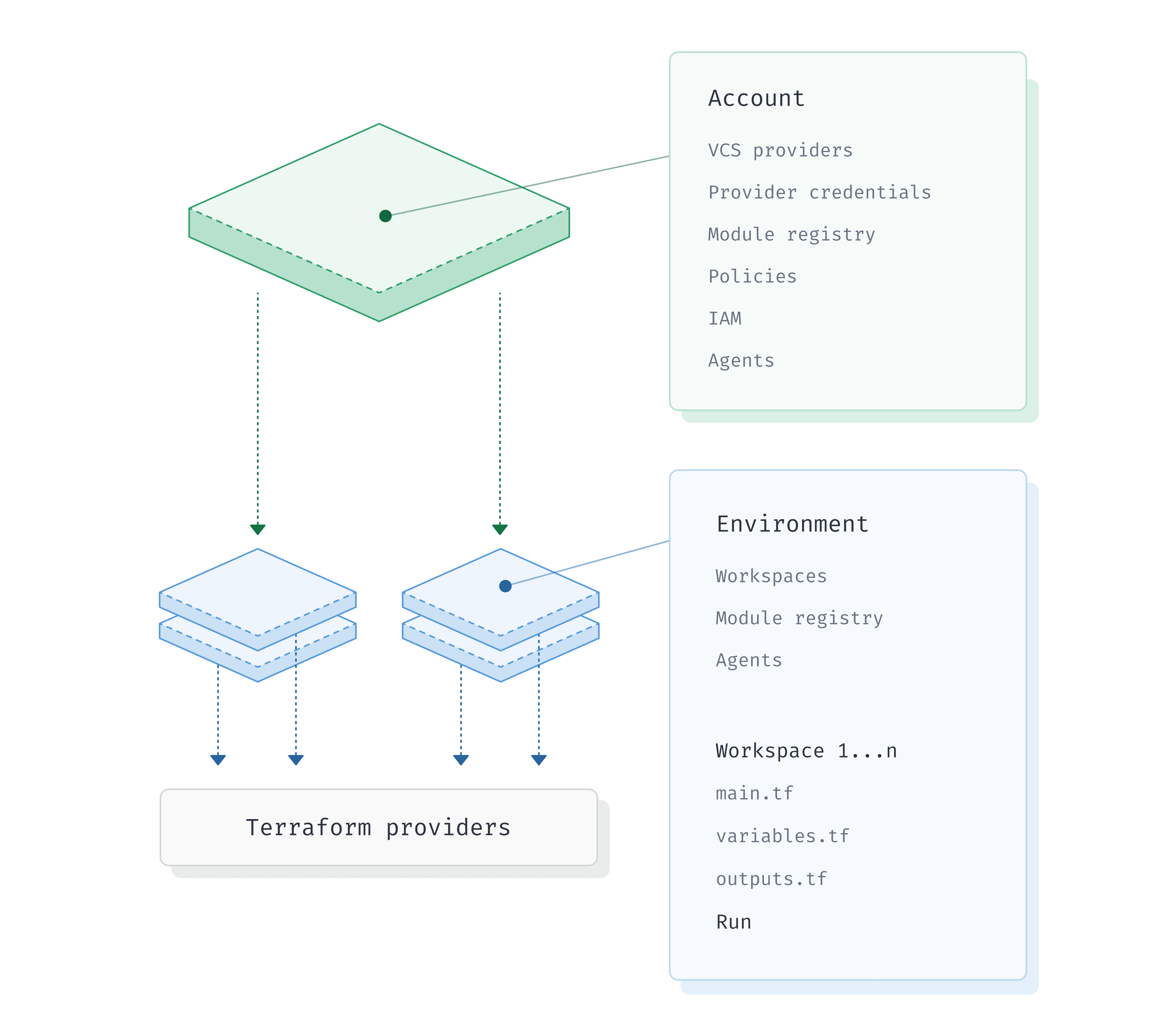
To make this easier, at Scalr we've built a flexible hierarchical model that fits different personas and business needs. There are three scopes in the hierarchy:
- Account Scope - Think of this as an administrative control plane for your central DevOps team.
- Environment Scope - Think of this as a landing zone, an organizational unit, or similar to a cloud provider account.
- Workspace Scope - The individual workspace where a Terraform/OpenTofu configuration is managed and runs execute, with its own variables and settings.
If you were to compare this to AWS, the Scalr account would be an AWS master account and the Scalr environments would be similar to the AWS sub accounts where infrastructure is provisioned. The hierarchy makes it easy to centralize the Terraform administration while decentralizing the Terraform operations.
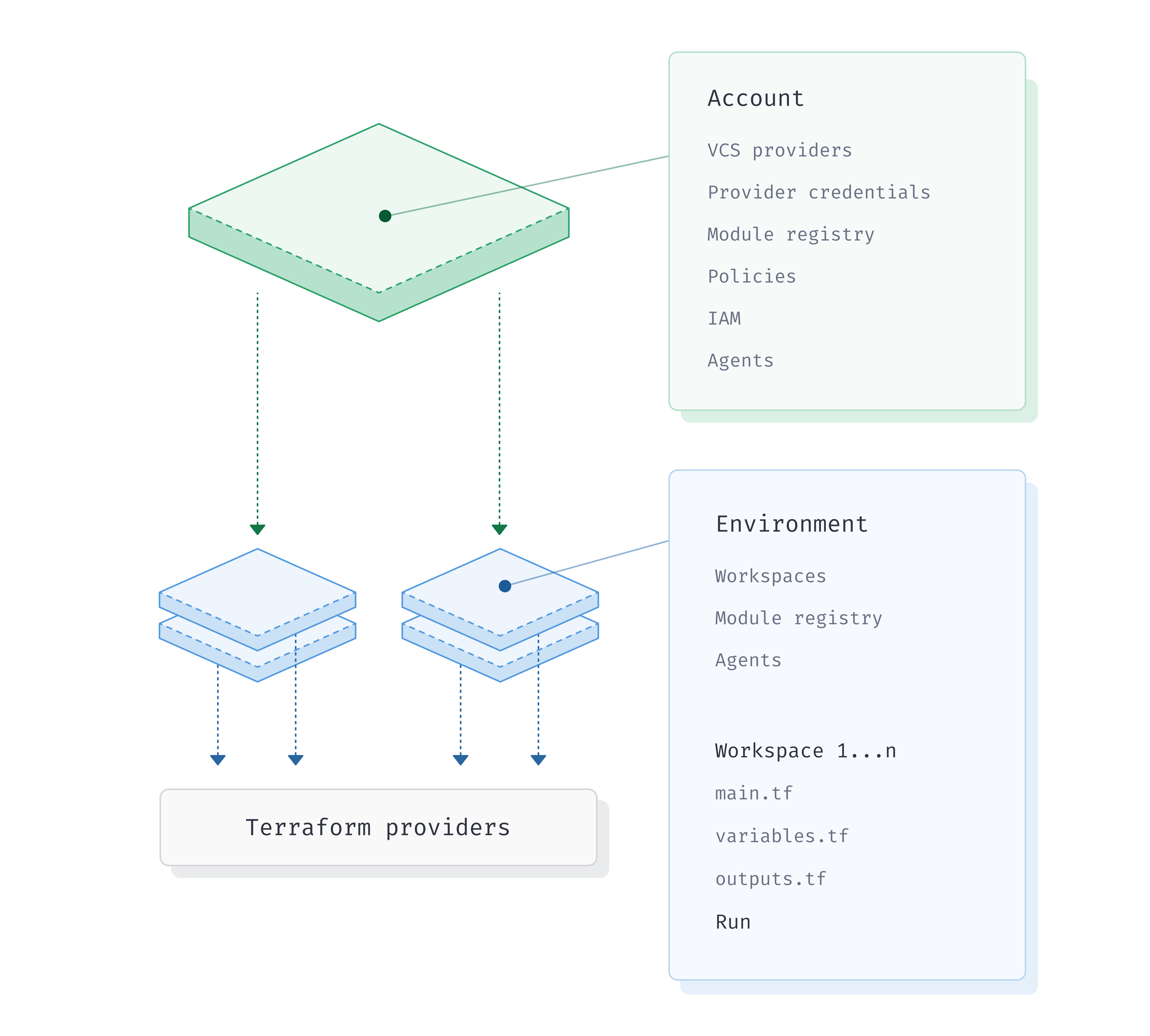
The Scalr hierarchy
Centralizing Terraform administration
The DevOps team, who creates and maintains Scalr environments, VCS providers, provider credentials, module registries, OPA policies, teams, and agents, mostly works at the account scope. You manage all of these objects from the account scope and assign or share them with environments as needed (note: the Scalr provider can manage these objects too). The DevOps team adds any of these from the account scope without flipping back and forth between contexts to make changes.
On top of managing objects from one place, the administrator also gets operational views across all environments and workspaces in a single dashboard. That observability pays off most in large deployments, as the OPA dashboard below shows:
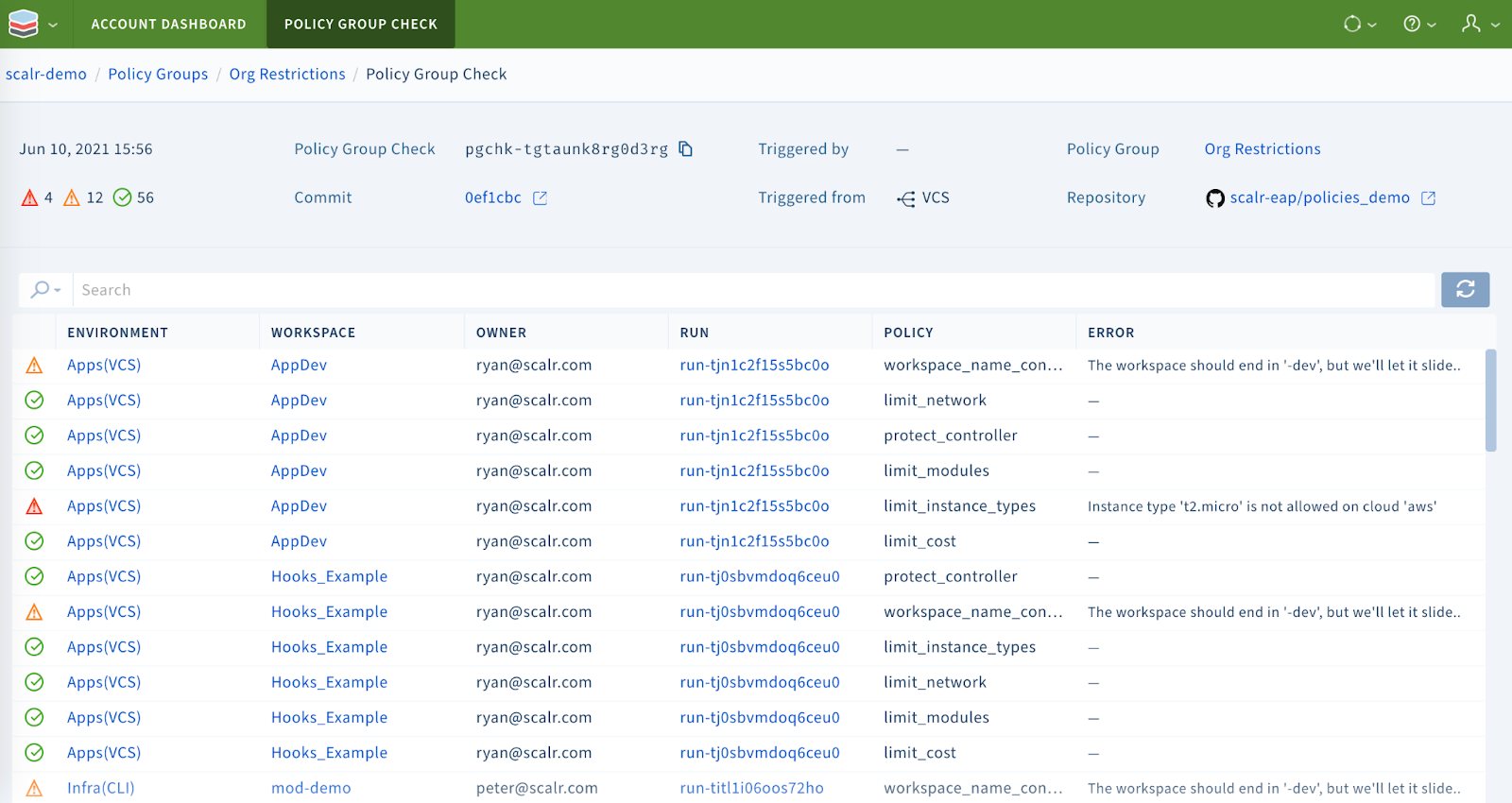
The Open Policy Agent dashboard
In the example, you can see OPA checks across all environments and workspaces from one dashboard, which saves you from going into each workspace individually.
The same account-scope view covers Terraform objects. The module report lists every module deployed across the account, its version, and where it was pulled from, so you can spot modules due for deprecation or sourced from somewhere you don't trust. The same reports exist for providers, Terraform versions, and resources, and a stale-workspaces view finds the workspace somebody ran once and forgot.
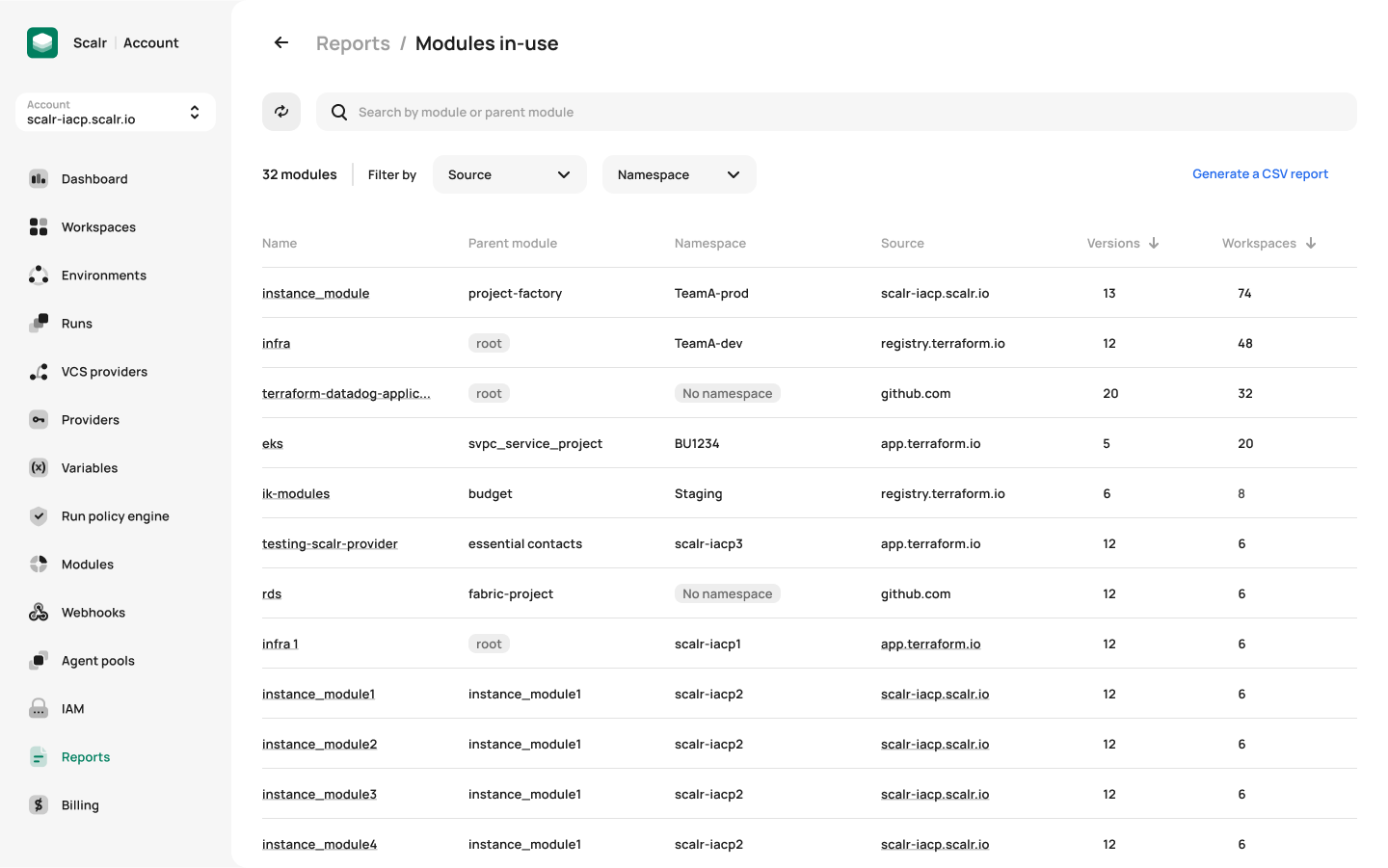
Module registry report
Run visibility works the same way. During a maintenance window with hundreds of runs across many environments, the account-level run dashboard shows all of them in one place instead of making you hop between workspaces.
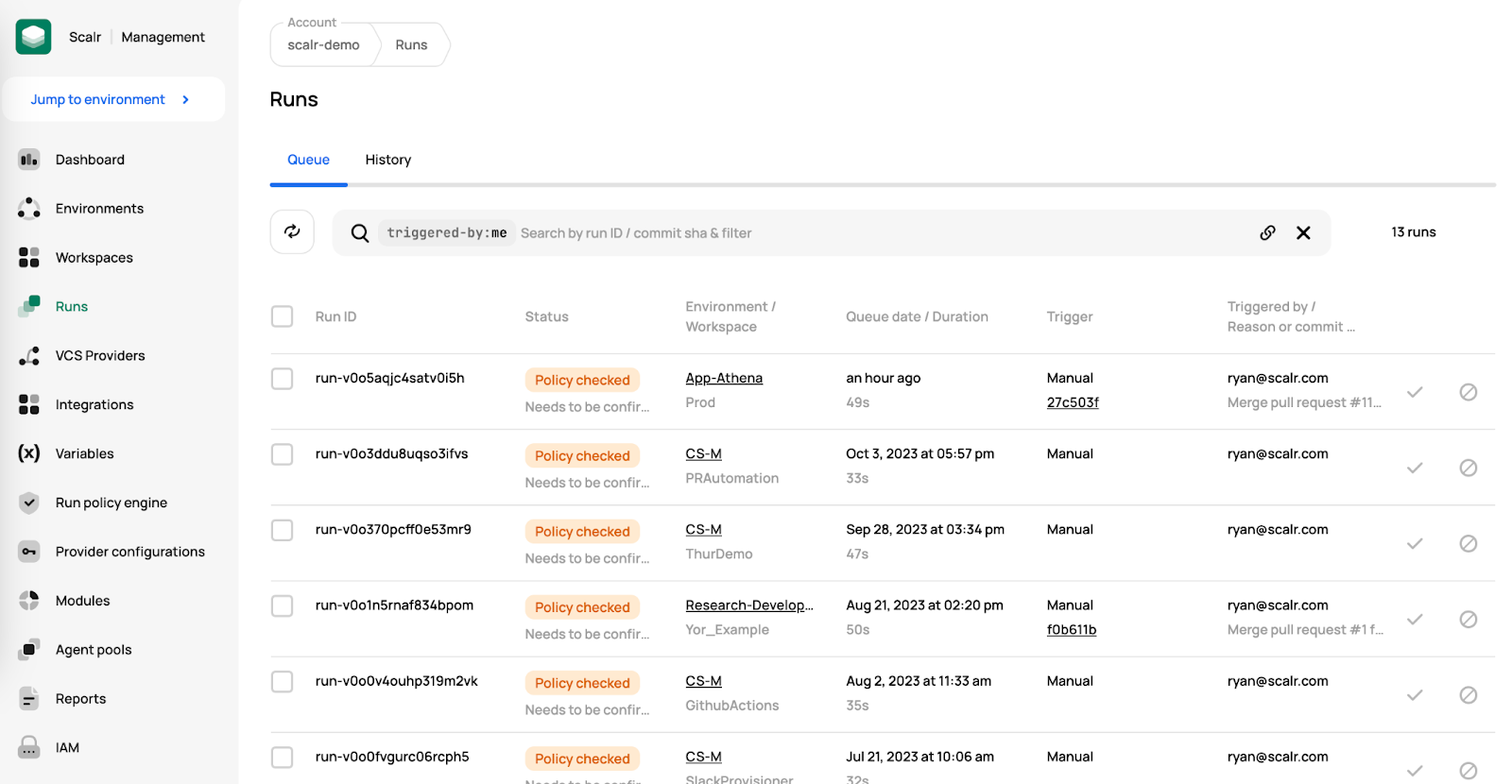
Run dashboard
You might also want to know which workspaces are using the most runs or taking the longest, so you can spot trends across your teams. Usage reports show you that:
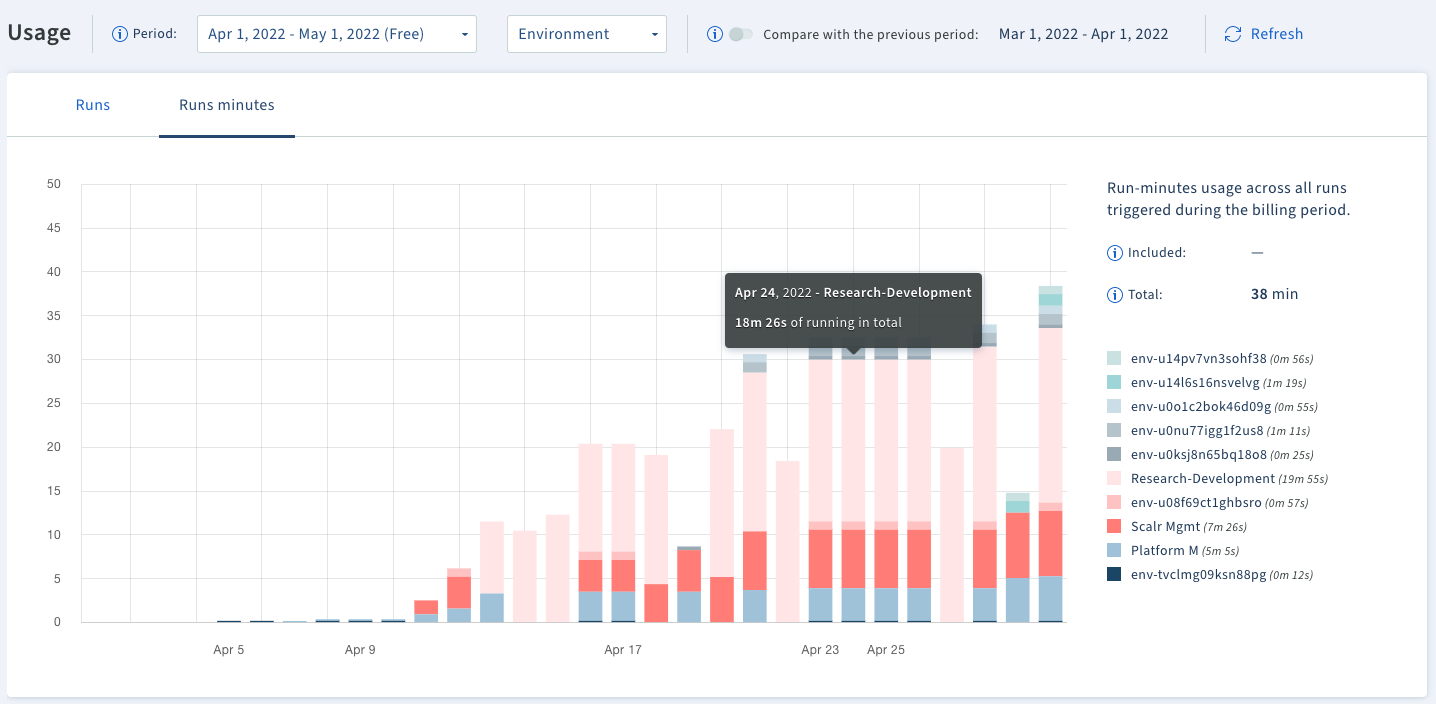
Observe environment/workspace usage
Decentralizing Terraform operations
A Scalr environment is a logical grouping of Terraform workspaces that have a common set of policies, provider credentials, and teams assigned to it. We usually see environments aligned to applications, functions, or cloud accounts. A workspace, the child of an environment, is the result of a Terraform deployment. In the simplest terms, a workspace holds the Terraform state, variables, and run history.
Engineers mostly work at the environment level, where they create workspaces and run Terraform through their own workflows, whether that's the Terraform CLI or VCS driven.
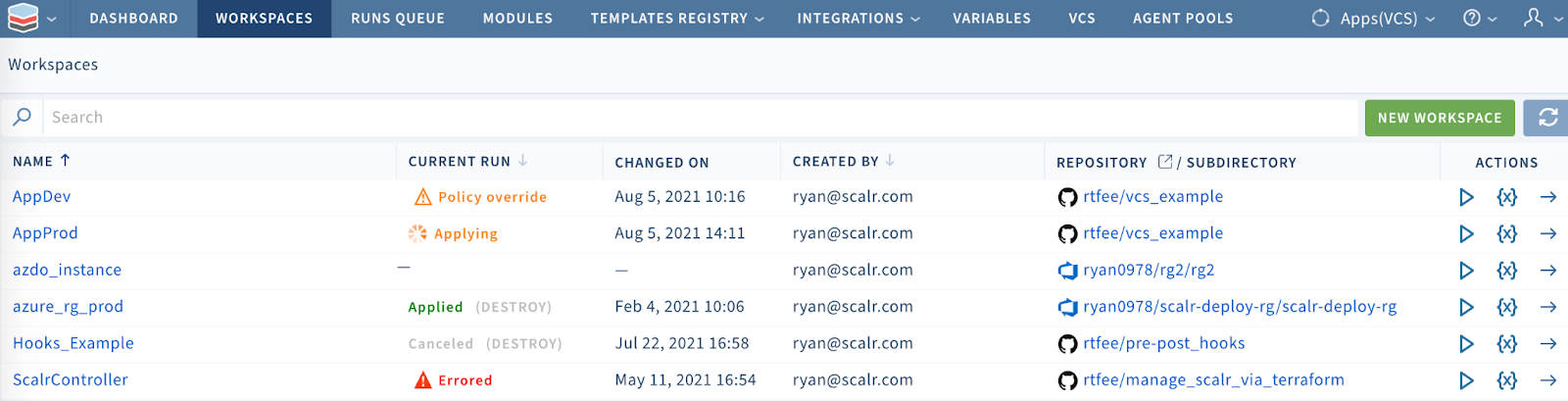
The workspace list
Much like isolated cloud accounts, Scalr environments are isolated areas where teams and users can work without stepping on each other. Every environment and workspace inherits the objects assigned to it from the account scope. A good example is setting a variable, like a tag or region, at the environment scope and having all child workspaces inherit it automatically. The engineers in that environment don't have to think about the standard variables; they just focus on their deployments.
Step #1 takeaway
The Scalr hierarchy gives engineering teams isolated environments while the central DevOps team keeps control and visibility from the account structure. The same structure also helps you reuse Terraform code.
Step #2: How Does Reusable Code Drive Autonomy and Standards?
People have different opinions on how to structure Terraform, but we're convinced reusable code is the easiest way to standardize modules and scale Terraform. As we said in step #1, a hierarchy helps with standardization and autonomy, and the Scalr module registry helps with the reusable code. The module registry follows the same hierarchical model we already outlined. You can place a module at the account or environment scope. Put it at the account scope and every environment inherits it automatically, so any workspace can use it. Put it at the environment scope and only workspaces in that environment can use it. This lets engineers easily find and consume approved modules. The module registry itself is straightforward. The harder question is how to set up Scalr environments so code reuse works.
Following your cloud provider model
As we said earlier, you can structure environments many ways, but for most customers it makes sense to follow the same tenancy model you already use in your cloud providers. Most of our customers have cloud accounts or subscriptions that map to a group, an app, and so on. If that works for you in the cloud, set up Scalr environments the same way. Breaking out environments like this reduces the blast radius of changes and lets you put the right policies on non-prod and prod environments. You can also manage and vend environments through the Scalr Terraform provider, just like you would any other cloud provider.
Next, you need to figure out what a workspace means to you. This one's more of a judgment call, but we've seen a growing trend toward more workspaces with fewer resources each, which makes for quick deployments and easy troubleshooting. The code in the workspaces points to your modules from the registry, and the only thing that changes per workspace is the variable file(s), which is what makes the code reusable.
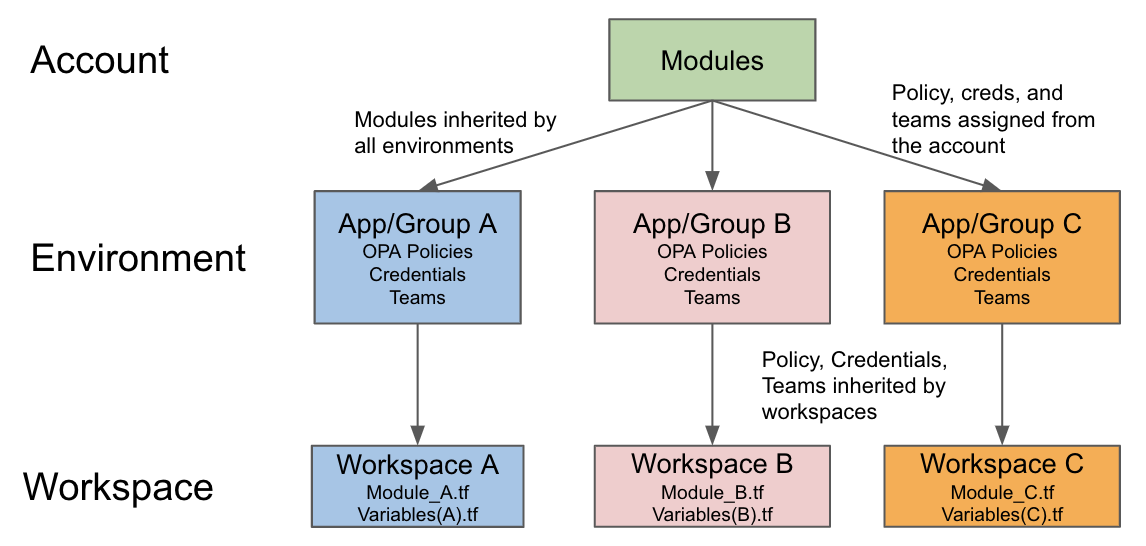
Each app and its environment has a dedicated Scalr environment
In the example above, each group has its own Scalr environment to deploy their Terraform workspaces. Each environment inherits modules, credentials, OPA policies, and variables automatically, depending on which group it is. If the team is using the standard modules from the account scope, they can inject their own extra variables right into the workspace configuration to reuse the code. They also have complete autonomy over their environment and workspaces, which decentralizes the Terraform operations.
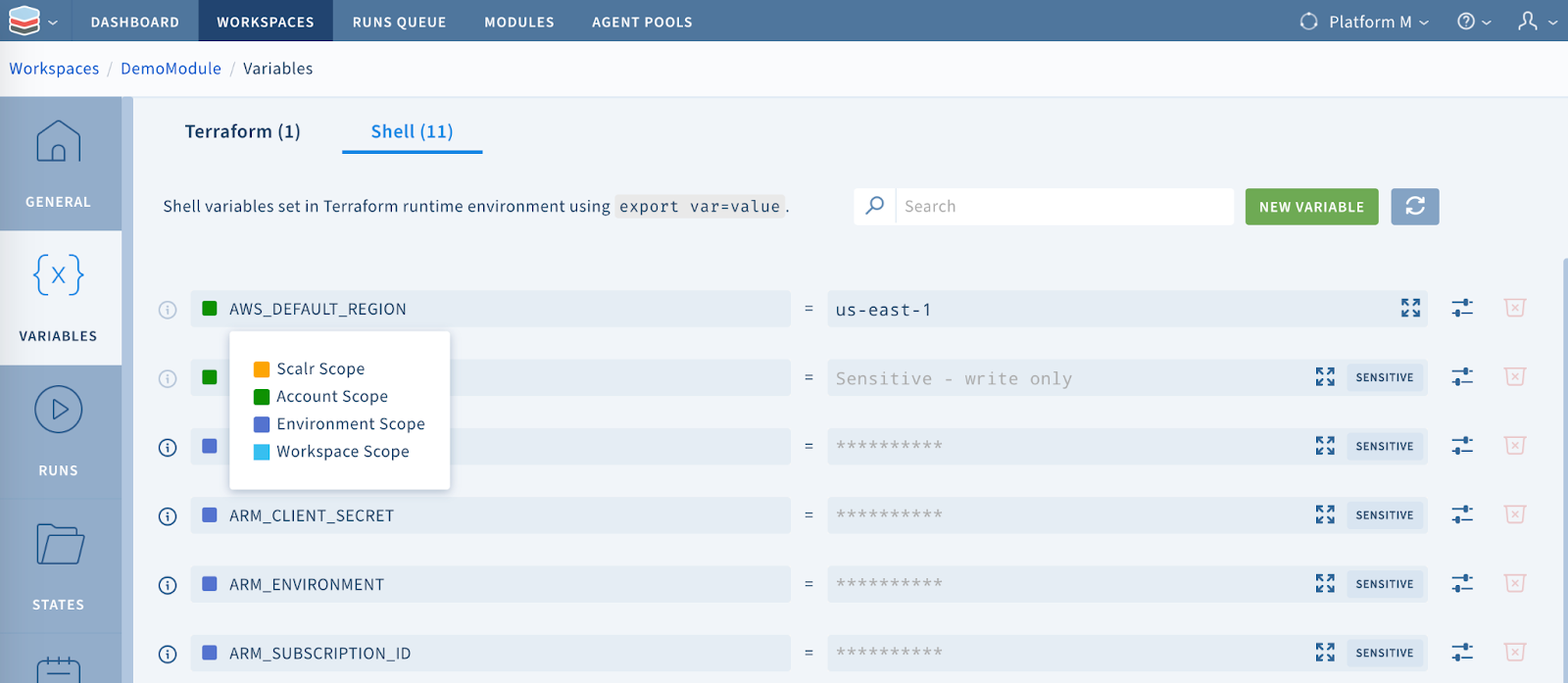
Variables in the workspace are automatically inherited from the account scope
Step #2 takeaway
The Scalr account and environment structure isolates your teams without adding operational overhead. And because the module registry follows the same tiered approach, the central DevOps team gets a framework to promote code reuse and give engineering teams more autonomy.
How Do You Structure Terraform Deployments at Scale?
Scaling the operations around Terraform is usually harder than writing the code, and a structure that's wrong on day one gets patched with one stop-gap after another. Four things hold up: run Terraform in a remote operations backend rather than only storing state remotely; use an organizational model where objects are shared or inherited instead of copied; pick one that rolls operational data (module usage, run health) up to the platform team; and don't over-engineer it. If your cloud provider model already gives engineers autonomy while the platform team keeps control, mirror that model.
Most of the rest comes down to setting up modules so they're easy to find and reuse. The Scalr hierarchy does that for organizations of any size through its inheritance model and its administrative control plane. If you want to try it out, current plans are on the pricing page.
Frequently asked questions
What is the difference between remote state storage and a remote operations backend?
With remote state storage like S3, the state lives remotely but Terraform applies still run locally or in a CD pipeline. A remote operations backend like Scalr or Terraform Cloud stores state remotely and also executes the runs remotely, which adds team collaboration on workspaces, multi-tenancy, and integration with the wider Terraform ecosystem.
How should you structure Terraform deployments at scale?
There isn't one right way, but the key is decoupling Terraform administration from operations so the central DevOps team doesn't become a bottleneck. A hierarchical model with account, environment, and workspace scopes centralizes administration while giving engineering teams autonomy over their own environments, and reusable modules keep everything standardized.
What are the account, environment, and workspace scopes in Scalr?
The account scope is an administrative control plane for the central DevOps team, where objects like VCS providers, credentials, modules, and OPA policies are managed. An environment is a logical grouping of workspaces sharing common policies, credentials, and teams, similar to a cloud provider account. A workspace is where an individual Terraform or OpenTofu configuration runs, holding its state, variables, and run history.
How should Scalr environments map to cloud accounts?
For most organizations it makes sense to mirror the tenancy model already used in the cloud, where accounts or subscriptions map to a group or application. Structuring environments this way reduces the blast radius of changes and lets you apply different policies to non-prod and prod environments.
How do reusable modules help standardize Terraform?
Reusable code is the easiest way to standardize and scale Terraform. In Scalr, a module placed at the account scope is inherited by every environment automatically, while one at the environment scope stays limited to that environment's workspaces, so engineers can easily find and consume approved modules while only the variable files change per workspace.
About the author

director of platform engineering at Scalr
Ryan Fee is the director of platform engineering at Scalr, with over 15 years of experience improving infrastructure experiences at companies large and small.
Part of this guide
8 sheets