Article · part of a guide
Using Terraform Workspace Prefixes in a Remote Backend
How to use a prefix in a remote backend

Key takeaways
- Terraform workspaces let you create separate state-isolated instances of infrastructure for different environments while sharing the same Terraform configuration files.
- The workspace prefix option in a remote backend sets a common name across workspaces so you only change the appended value, like dev, stage, or prod.
- After setting the remote backend, terraform workspace new and terraform init create the workspace, which then appears in a backend such as Scalr.
- In a remote backend like Scalr, run execution happens in the platform, enabling features such as integrations, remote state sharing, and RBAC beyond local workspaces.
Terraform workspaces let you organize your deployments and keep state isolated between environments. This post covers what workspaces are, then shows how the workspace prefix feature lets you manage several workspaces from a single Terraform configuration.
What Are Terraform Workspaces?
Workspaces let you create separate instances of your infrastructure for different environments (e.g., development, staging, production) or for experimentation. Each workspace keeps its own Terraform state file, so the state of one environment stays separate from the others. They all share the same Terraform configuration files, which keeps the environments consistent.
You can use workspaces with open-source Terraform locally, or in a remote backend such as Scalr or Terraform Cloud. The idea is the same in both cases: they isolate Terraform state files. Workspaces in a remote backend do more, though, because the runs execute inside Scalr, which is what makes integrations, remote state sharing, and RBAC possible.
How Do You Create a New Terraform Workspace?
The terraform workspace command works with workspaces locally or in a remote backend. Terraform creates a default workspace automatically, and you can't delete it. These are the commands for creating and managing more workspaces:
terraform workspace new <name>      # create and switch to a workspace
terraform workspace list            # list workspaces, * marks the current one
terraform workspace select <name>   # switch workspaces
terraform workspace show            # print the current workspace
terraform workspace delete <name>   # delete an empty workspace
How Does workspace_key_prefix Work in a Remote Backend?
The workspace prefix option sets a shared name across your workspaces, so all you change is the value tacked on the end. Say you have an application, call it "application-a", with a dev, stage, and prod workspace. The core Terraform configuration files stay the same, but some variable values might differ. Here's the code you'd set in the Terraform remote backend configuration file:
terraform {
  backend "remote" {
    hostname     = "my-account.scalr.io"
    organization = "env-xxxxxxxxxxxxxxx" # the Scalr environment ID

    workspaces {
      prefix = "application-a-"
    }
  }
}
With prefix in place, terraform workspace new prod creates a remote workspace called application-a-prod, and dev and stage follow the same pattern.
With the remote backend set, create a new workspace:
terraform workspace new prod
After you run terraform init, the new workspace shows up in Scalr:
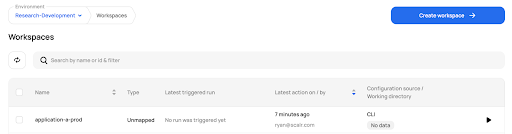
Example of a workspace in Scalr
You can run all the standard Terraform commands on this workspace, but it's a good idea to run terraform workspace show or terraform workspace list so you always know which workspace you're in, especially if one of them is production:
$ terraform workspace list
  dev
* prod
  stage

$ terraform workspace show
prod
That covers the setup for the Terraform workspace prefix option in a remote backend such as Scalr or Terraform Cloud. A similar workspace_key_prefix option exists if you use the AWS S3 backend block instead.
What's the Difference Between Remote and Local Terraform Workspaces?
Whether you run them remotely or locally, Terraform workspaces let you isolate the state file while reusing the same Terraform code. With a remote backend, the prefix option in the backend block makes it easy to switch between your Scalr or Terraform Cloud workspaces while you develop.
Frequently asked questions
What are Terraform workspaces?
Terraform workspaces let you create separate instances of your infrastructure for different environments, such as development, staging, and production. Each workspace keeps its own Terraform state file, so environments stay isolated, while all workspaces share the same configuration files for consistency.
How does the workspace prefix option work in a Terraform remote backend?
The workspace prefix sets a shared name across your workspaces so all you change is the value appended to the end, like dev, stage, or prod. After configuring the remote backend, you create a workspace with terraform workspace new and it appears in the backend after terraform init.
What is the difference between local and remote Terraform workspaces?
Both isolate the state file while reusing the same Terraform code. In a remote backend such as Scalr or Terraform Cloud, the runs execute inside the platform, which unlocks extra features like integrations, remote state sharing, and RBAC.
How do you create a new Terraform workspace?
Use the terraform workspace command, which works locally or against a remote backend. Terraform automatically creates a default workspace that cannot be deleted, and you create additional ones with terraform workspace new. Run terraform workspace show or list to confirm which workspace you're in.
About the author

director of platform engineering at Scalr
Ryan Fee is the director of platform engineering at Scalr, with over 15 years of experience improving infrastructure experiences at companies large and small.
Part of this guide
8 sheets