

Guide · 7 articles branch off this one
What Are Terraform TACOs?
Learn how a Terraform TACO helps you scale your Terraform usage
Key takeaways
- A TACO (Terraform Automation and Collaboration Software) is a category of platform purpose-built for Terraform and OpenTofu workflows: remote state, RBAC, policy-as-code, run orchestration, and audit in one place.
- The category roster as of June 2026 spans commercial platforms (Scalr, Terraform Cloud/Enterprise, Spacelift, env0), the open-source pioneer Atlantis, and newer or OSS-leaning entrants (Digger, Terrateam, Terramate).
- TACOs split into pure-play and multi-IaC. Scalr runs only Terraform and OpenTofu; Spacelift and env0 also run Pulumi, CloudFormation, Ansible, and Kubernetes (verified September 2026). Multi-IaC fits teams standardized on several IaC tools; pure-play fits Terraform/OpenTofu-only teams.
- TACOs solve what general-purpose CI/CD leaves you to wire up: state locking, policy enforcement, drift detection, private registries, and per-scope RBAC.
- Pricing models differ widely. Scalr's Free plan allows up to 50 runs/month, and Scalr gives new accounts five concurrent runs by default, raised free of charge on request; Spacelift offers a free tier for small teams; env0's free tier allows 250 runs/month across up to 30 environments as of August 2026. Compare the billing unit (runs vs. workers vs. concurrency) before the sticker price.
A Terraform TACO (Terraform Automation and Collaboration Software) is a platform that runs and governs Terraform and OpenTofu for a team: remote state with locking, RBAC, policy-as-code, VCS-triggered runs, a private registry, drift detection, and an audit trail in one place. As of June 2026 the category covers Scalr, Terraform Cloud/Enterprise, Spacelift, and env0 on the commercial side, Atlantis as the open-source original, and CI-layer entrants like Digger, Terrateam, and Terramate. Solo developers and 2-3 person teams usually don't need one; multi-team shops with compliance requirements usually do. This page defines the category and helps you tell which kind you need; the head-to-head comparisons live in the linked spokes.
What are Terraform TACOs?
Terraform TACOs (Terraform Automation and Collaboration Software) are platforms purpose-built to run and govern Terraform and OpenTofu workflows. Each pulls the pieces a growing team has to manage anyway into one place: remote state with locking and history, role-based access control, policy-as-code, run orchestration triggered from version control, a private module and provider registry, drift detection, and an audit trail. A TACO is the layer that turns Terraform from a CLI tool into something multiple teams can operate together.
What does TACOS stand for?
TACO stands for Terraform Automation and COllaboration Software (the plural, TACOS, drops the trailing apostrophe-s). The acronym describes the category, not a single product. Any platform that automates Terraform or OpenTofu runs and adds the collaboration and governance layer on top fits the label, commercial or open source.
Do you need a TACO at all?
Plenty of teams don't. A solo developer or a 2-3 person team can usually run the Terraform or OpenTofu CLI against a remote backend, or wire up plan and apply in GitHub Actions, without paying for a platform. Teams that want pull-request-driven workflows but no vendor relationship can run Atlantis and manage the surrounding pieces themselves; the Atlantis versus managed platform comparison walks through that tradeoff. A TACO earns its place once you have multiple teams, several environments, or compliance requirements that make manual coordination expensive.
When you do reach that point, managing Terraform at scale without a TACO tends to break down in predictable places. Teams struggle with:
State Management: Storing, locking, and versioning Terraform state files securely across distributed teams is hard, and manual fixes lead to conflicts and inconsistent state.
Collaboration: Coordinating changes, reviewing plans, and approving deployments across engineers and teams gets slow.
Governance and Security: Nobody reviews every plan by hand, so a public S3 bucket or an open security group gets through.
Self-Service: Developers want to provision their own infrastructure, and the platform team still needs guardrails and oversight.
Visibility and Auditing: You need to know who changed what, when, and why, both for accountability and for debugging.
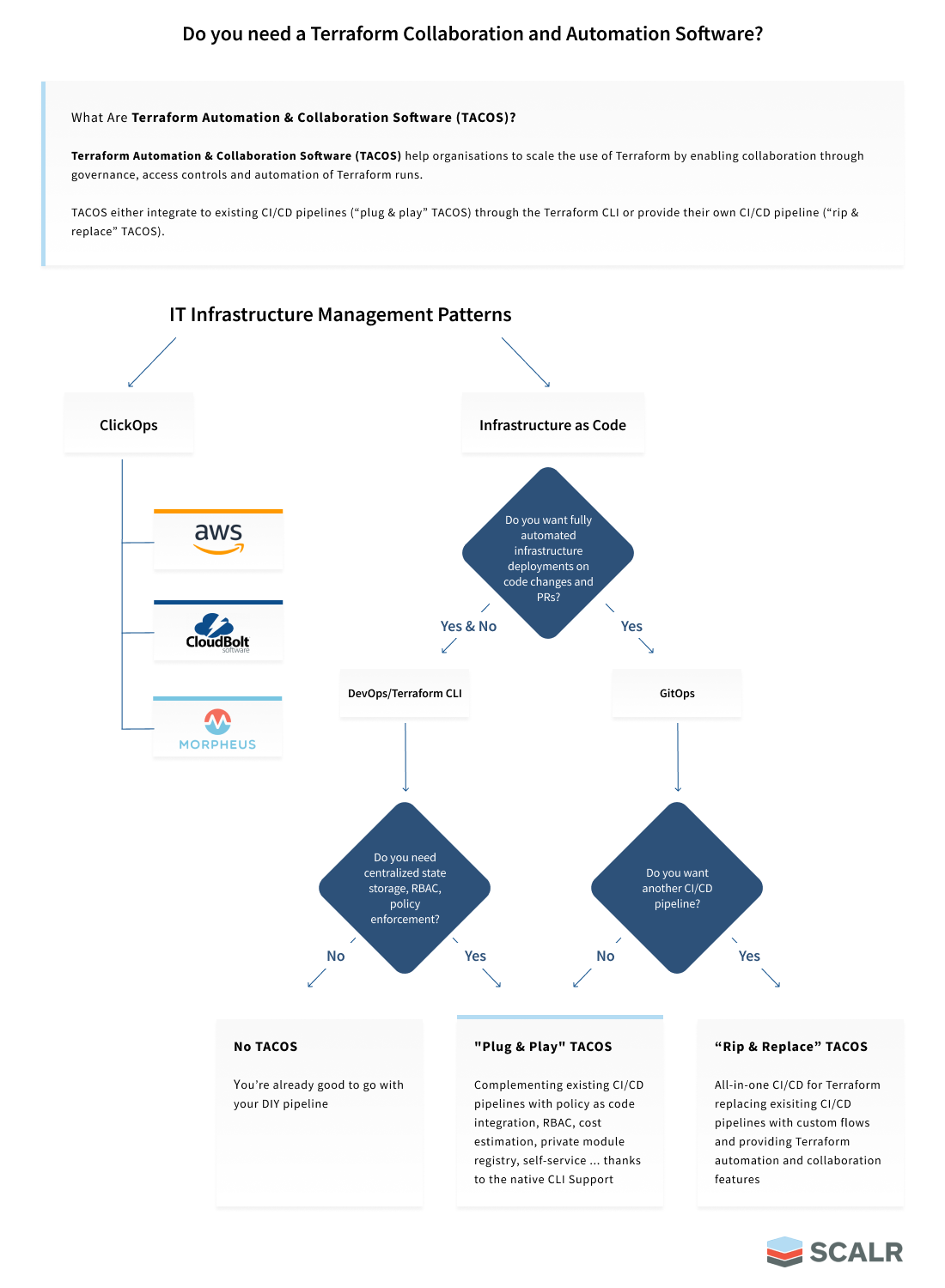
Not sure if you need a TACO? This decision tree can help:
Core Features of a Terraform TACO
A full Terraform TACO usually includes these features:
- Remote State Management: Securely stores Terraform state files, providing locking mechanisms to prevent concurrent modifications and maintaining a history of changes.
- Version Control System (VCS) Integration: Tightly integrates with popular VCS platforms like GitHub, GitLab, and Bitbucket, enabling GitOps-driven workflows where infrastructure changes are triggered by pull requests.
- Role-Based Access Control (RBAC): Granular control over who can perform which actions (e.g., plan, apply) on specific environments or projects, ensuring adherence to the principle of least privilege.
- Policy as Code: Allows organizations to define and enforce policies using languages like Open Policy Agent (OPA) or proprietary engines. These policies can block non-compliant deployments, ensure security standards, and manage costs.
- Automated Runs: Automates Terraform
planandapplyoperations, often triggered by VCS events or on a schedule, reducing manual errors and speeding up deployments. - Drift Detection: Continuously monitors your deployed infrastructure against your Terraform code, alerting you to any discrepancies and even offering automated or guided remediation options.
- Private Module Registry: Provides a centralized repository for reusable Terraform modules, promoting standardization, reducing duplication, and enabling self-service for developers.
- Private Provider Registry: Hosts custom, forked, or internally approved providers, consumed with the standard
required_providerssyntax. - OCI-Sourced Modules: Lets OpenTofu workspaces pull modules from a Docker-compatible OCI registry with the native
oci://scheme. - Cost Estimation: Integrates with cost analysis tools (e.g., Infracost) to provide cost estimates during the planning phase, helping teams make informed decisions and manage budgets.
- Audit Trails and Observability: Offers comprehensive logs and dashboards to track all Terraform activities, providing visibility into infrastructure changes and aiding in troubleshooting.
- Custom Hooks and Integrations: Allows for the injection of custom scripts or integration with external tools (e.g., Slack, ITSM) at various stages of the Terraform workflow.
- MCP Server: Exposes the platform to AI assistants over the Model Context Protocol so engineers can query workspaces, runs, and drift in natural language.
- Bring Your Own Key (BYOK): Encrypts sensitive configuration data with a customer-managed KMS key.
- Self-Hosted Agents: Agents allow users to execute runs on their own infrastructure due to networking or security reasons.
How do TACOs differ from CI/CD for Terraform?
Many organizations start automating Terraform with a DIY approach, using general-purpose CI/CD pipelines like GitHub Actions, GitLab CI/CD, Jenkins, or similar. General-purpose CI/CD can run terraform plan and terraform apply, but it leaves you to build state locking, policy enforcement, drift detection, per-scope RBAC, a private registry, cost estimation, and an audit trail yourself. A TACO ships those out of the box, purpose-built for infrastructure. Note that the newer OSS entrants above (Digger, Terrateam, Terramate) sit between the two: they add Terraform-aware orchestration on top of the CI you already run, rather than replacing it.
What you build yourself, and what a TACO ships
The DIY case is real: your team already knows the CI system, the licence is paid for, and you can script anything. The cost shows up later, when you're maintaining state locking, credential rotation, policy checks, drift detection, and audit logging across a growing number of teams and workspaces, none of which the CI system understands.
A TACO and GitHub Actions can both run terraform apply. The difference is what's already there on day one: state locking, a policy gate before apply, per-workspace permissions, a module registry, drift checks, and a record of who changed what. In a pipeline you build each of those yourself, then keep them working as teams and workspaces multiply. A TACO ships them. Whether that's worth paying for depends on how many teams you're coordinating, which is the question the earlier section answers.
Which tools are TACOs?
The roster below is the full category as of June 2026, listed neutrally. This page describes each in a clause; for the actual side-by-side evaluation, follow the comparison spokes linked at the end.
Commercial platforms:
- Scalr: A pure-play Terraform and OpenTofu TACO. Free, Business, and Enterprise plans. Free allows up to 50 runs/month; as of September 2026 every new account starts with five concurrent runs by default, raised free on request, plus five per self-hosted agent; Business adds higher run quotas; Enterprise adds controls over data location, encryption keys, identity, and audit trail.
- HCP Terraform / Terraform Enterprise (HashiCorp, now part of IBM): The original commercial offering. The Free plan covers up to 500 managed resources with one concurrent remote run and one agent run; the legacy free tier was retired on March 31, 2026 and those organizations moved to resource-based pricing. New HCP accounts also get a $500 platform credit that spans HCP services rather than Terraform alone. Runs Terraform (verified September 2026).
- Spacelift: A multi-IaC platform. Its docs list stacks for Terraform, OpenTofu, Terragrunt, Pulumi, CloudFormation, Ansible, and Kubernetes (verified September 2026). Pricing is worker-based, with a free tier for small teams plus paid plans.
- env0: A multi-IaC platform supporting Terraform, OpenTofu, Pulumi, Terragrunt, Helm, and Kubernetes (verified September 2026). Added a free-forever tier on August 5, 2026: 250 runs/month, up to 30 active environments, unlimited users, full Cloud Navigator feature set, community support only. Paid tiers are quote-based.
Open-source pioneer:
- Atlantis: The tool that started the pattern of automating Terraform through pull requests, running
planandapplyfrom PR comments. It's a legitimate choice for teams that want PR-driven workflows without a vendor relationship and are willing to assemble the management plane (state, RBAC, policy, registry) themselves.
Newer and OSS-leaning entrants (as of June 2026):
- Digger (also known as OpenTaco): Orchestrates Terraform and OpenTofu runs inside your existing CI (GitHub Actions and others) rather than running its own compute, with an optional self-hosted state backend.
- Terrateam: Open-source GitOps orchestration that integrates with GitHub to automate Terraform, OpenTofu, CDKTF, Terragrunt, and Pulumi through pull requests.
- Terramate: Open-source orchestration and code-generation engine for Terraform, OpenTofu, and Terragrunt that runs on top of GitHub Actions, GitLab CI/CD, and Bitbucket Pipelines (verified September 2026).
Pure-play vs multi-IaC TACOs: which do you need?
Start with one question: how many IaC technologies does your team actually run? If you have standardized on Terraform and OpenTofu, a pure-play TACO models a single state schema and can report across your whole fleet. If you also run Pulumi, CloudFormation, Ansible, or Kubernetes and want one control plane over all of them, a multi-IaC TACO is the better fit.
That split runs cleanly through the roster. Scalr is pure-play: it runs only Terraform and OpenTofu. Spacelift and env0 are multi-IaC, each documenting support for several other tools (Spacelift adds Pulumi, CloudFormation, Ansible, and Kubernetes; env0 adds Pulumi, Helm, and Kubernetes, both verified September 2026). Neither approach is better in the abstract. They answer different questions.
The case for multi-IaC is direct. If your platform team supports application teams that pick Pulumi for one service, Terraform for another, and Kubernetes manifests for a third, a multi-IaC TACO gives you one place to govern all of them instead of stitching together separate tools. For that situation, Spacelift or env0 is the recommendation we'd give you.
The case for pure-play is about depth rather than coverage. A platform that runs one IaC tool has one state schema to reason about, so there are no dissimilar systems to paper over with a shared abstraction. Joel Spolsky's Law of Leaky Abstractions captures the cost a multi-tool platform pays here: the more different the things you hide behind one interface, the more the differences leak through. Because every Scalr workspace shares the Terraform or OpenTofu state model, Scalr can report on resources, modules, providers, versions, and drift as first-class objects across all workspaces in an account. That fleet-level inventory is the payoff of staying within one model. (It covers inventory and counts, not run timing.) If you are weighing the two against named vendors, the guide to selecting a Terraform Cloud alternative, Terraform Cloud vs Spacelift, and Spacelift alternatives carry the head-to-head detail.
Checklist When Selecting a TACO
If you're weighing options, our guide to selecting a Terraform Cloud alternative walks through the side-by-side comparison. The biggest hidden cost in this checklist is the billing unit itself, because it varies across the category. Some platforms bill by workers, some by fixed concurrency, and some by executed runs. As of June 2026, Spacelift bills by workers, env0 prices by apply or environment, and Scalr's usage-based pricing charges per executed run (Free up to 50 runs/month). Worker and concurrency models sell capacity you provision in advance, so you tend to pay the wrong amount: too little and engineers queue during releases, too much and you rent idle slots. Map the unit to your own run volume before comparing sticker prices; the Scalr vs Terraform Cloud pricing breakdown shows how the math plays out against one incumbent.
- How much concurrency is included on the paid plan, and does it cost extra for more?
- How many self-hosted agents are included on the paid plan, and does it cost extra for more?
- Where is state stored? Can you store it in your own bucket if needed?
- How granular is the RBAC? Can you create custom roles or are you forced into "system" roles?
- Is there a hierarchical model put in place so objects like credentials, variables, and more can be applied to lower level workspaces?
- Can you use the Terraform or Tofu CLI by setting the TACO as the remote backend?
- Is the TACO focused on Terraform/OpenTofu, or is it a one-size-fits-all CI/CD?
- The ease of the integrations: is it as simple as dropping in an API key to integrate with Datadog or Slack, or do you have to deal with a "plug-in"?
- Is there reporting on module, provider, version, etc, usage to help manage the operations at scale?
- For GitOps workflows, does it post back the plan details to the pull request?
- Will the TACO satisfy the various workflows your customers use? For example, using GitOps, the Terraform CLI, No Code, etc.
- Does the platform offer a private provider registry, or only a module registry? Both are needed once teams start writing or forking their own providers.
- For OpenTofu shops: does the TACO support OCI-sourced modules via the native
oci://scheme? - Does the platform offer customer-managed encryption keys (BYOK) for sensitive configuration data, or only for state storage?
- Is there an MCP server for AI-assisted infrastructure management, so platform and dev teams can query and act on the TACO in natural language?
Where Scalr fits among TACOs
Scalr is the pure-play Terraform/OpenTofu option in the category: it centralizes administration while decentralizing operations, so platform teams keep control and governance while development teams provision their own infrastructure.
What that looks like in practice:
- Usage-Based Pricing Model: Scalr offers a transparent pricing model based on "runs" (Terraform/OpenTofu apply or dry run), with no hidden costs for support, more concurrency, agents, etc. This allows for predictable billing and scalability.
- Support for Every Team's Workflow - GitOps, CLI, No Code: Scalr accommodates diverse operational models, supporting native Terraform/OpenTofu CLI workflows, GitOps-driven infrastructure management, and "No Code" provisioning for non-technical users via a module catalog.
- Governance Without Bottlenecks: Scalr provides granular, composable permissions assignable at the account, environment, and workspace scopes, with custom roles, so users of any skill level can be onboarded with the right access and self-service reaches more developers. RBAC mechanics are their own topic; the granular RBAC guide covers the permission model in depth.
- Inheritance Model for All Objects: Scalr's hierarchical structure (account, environments, workspaces) enables object inheritance. Admins can create and assign objects like variables, credentials, and modules at higher scopes, which are then inherited by lower scopes, simplifying management and ensuring consistency.
- State Storage Options: Store in Scalr or Bring Your Own Bucket: Users have the flexibility to store Terraform/OpenTofu state files in Scalr's managed storage or, on the Enterprise plan, in their own cloud storage buckets (AWS S3, GCP, Azure Storage). This caters to data residency and corporate policy requirements.
- Bring Your Own Key (BYOK): Enterprise accounts can supply their own AWS KMS or GCP Cloud KMS key to encrypt sensitive configuration data stored in Scalr's database, including workspace names, variables, provider configurations, and other account metadata. Uses envelope encryption so the key encryption key never leaves your KMS. Revoking the key immediately prevents Scalr from accessing that account's data, satisfying strict data sovereignty and compliance requirements.
- Private Provider Registry: Scalr now hosts custom, forked, or internally approved Terraform and OpenTofu providers alongside its module registry. Workspaces consume private providers with the same
required_providerssyntax as the public registry, where the source address points at your Scalr host. The registry implements the OpenTofu provider registry protocol, so any standard Terraform or OpenTofu CLI can resolve providers from Scalr without extra plugins. Each release is GPG-signed and audited. - OCI-Sourced Modules: Scalr supports OpenTofu's native
oci://module source scheme, letting workspaces pull modules from registries that implement the Docker Registry HTTP API V2 with username, password, or personal access token authentication, including Docker Hub, GitHub Container Registry, GitLab Container Registry, and JFrog Artifactory. Registries that require provider-specific authentication flows, namely Amazon ECR, Azure Container Registry, and Google Artifact Registry, are not supported by this integration yet (verified September 2026). Registry credentials are stored encrypted in Scalr and injected at run time, keeping them out of code and environment variables entirely. - Increased Concurrency and Agents Quotas for Free: Scalr offers generous concurrency limits, with the ability to increase them for free by opening a support ticket or by deploying self-hosted agents, which add additional concurrent runs.
- Centralized Credential Management with OIDC: Scalr supports OpenID Connect (OIDC) authentication for providers like AWS, Azure, and GCP. This centralizes credential management and enhances security.
- MCP Server for Platform and Dev Teams: The Scalr MCP Server connects AI assistants directly to the Scalr API via the Model Context Protocol. Platform engineers can query workspaces, inspect runs and drift reports, review policy check results, and manage variables in natural language, without scripting API calls. Developers get the same access scoped to their own permissions. The remote server requires no infrastructure: enable it in account settings and point Claude, Cursor, or any MCP-compatible client at
https://your-account.scalr.io/mcp, substituting your own Scalr account name in the host. - Integrations: Scalr integrates with a variety of popular tools for enhanced functionality, including Datadog, AWS EventBridge, Slack, Teams, and more for monitoring and observability.
- Top Security Tools with OPA and Checkov: Scalr incorporates security and policy enforcement:
- Open Policy Agent (OPA): For policy-as-code enforcement, allowing organizations to define and apply custom policies.
- Checkov: For static code analysis to scan Terraform deployments for vulnerabilities and compliance violations before runs are executed.
- Reporting: Scalr provides comprehensive reporting and dashboards for:
- Centralized Operations Dashboard: A unified dashboard that shows all Terraform/OpenTofu operations across your organization, with filtering capabilities for quick issue identification.
- Terraform & OpenTofu Providers Report: Available at the account or environment scope, shows which providers and their versions are being used across all workspaces. Useful for standardizing provider usage and checking that all workspaces pull from approved sources.
- Terraform & OpenTofu Modules Report: Displays the modules and their versions from remote sources (module registry or Git) being used across all workspaces in the account.
- Terraform & OpenTofu Resources Report: A centralized report at the account scope that aggregates all resources managed by Terraform/OpenTofu across all state files into a single dashboard.
- Drift Detection Reports: Automated scanning to identify discrepancies between actual infrastructure state and Terraform code, with detailed reports and remediation options.
- Stale Workspace Reports: Identifies workspaces that haven't had a run executed recently, helping to pinpoint potential drift or unmanaged infrastructure.
- Security Reports: Via OPA and Checkov policy reports.
- Compatibility with Terragrunt and Ability to Use the Atlantis Workflow: Scalr supports Terragrunt for managing complex Terraform configurations and provides an "Atlantis-style" workflow, offering a familiar experience for users accustomed to pull-request-driven infrastructure deployments.
For platform teams treating the TACO as the foundation of an internal developer platform, the fleet reporting and self-service pieces are covered in the guide to streamlining Terraform and OpenTofu with an internal developer platform. Which TACO fits comes down to how many IaC tools you run and how you want to be billed; the comparison spokes above carry the vendor-by-vendor detail once you've narrowed the field.
Frequently asked questions
What does TACO stand for in Terraform?
TACO stands for Terraform Automation and COllaboration software. It refers to platforms purpose-built to manage Terraform workflows including state management, policy enforcement, and team collaboration at scale.
Do I need a TACO for Terraform?
Not always. For solo developers or 2-3 person teams, the Terraform or OpenTofu CLI with a remote backend is often enough, and GitHub Actions can cover basic plan and apply. Atlantis suits small teams that want pull-request-driven workflows without a vendor relationship. Once you have multiple teams, environments, or compliance requirements, a TACO provides the governance, automation, and collaboration features that are difficult to build and maintain with DIY CI/CD.
Which tools are considered TACOS?
As of June 2026 the category includes commercial platforms Scalr, Terraform Cloud and Terraform Enterprise (HashiCorp), Spacelift, and env0; the open-source pioneer Atlantis, which started the pull-request-driven pattern; and newer or OSS-leaning entrants such as Digger (now also known as OpenTaco), Terrateam, and Terramate, which orchestrate Terraform and OpenTofu runs through your existing CI. Scalr runs only Terraform and OpenTofu; Spacelift and env0 are multi-IaC and also run tools like Pulumi, CloudFormation, Ansible, and Kubernetes.
What is the difference between a pure-play and a multi-IaC TACO?
A pure-play TACO runs only Terraform and OpenTofu. Scalr is pure-play. A multi-IaC TACO also runs other tools: Spacelift documents stacks for Terraform, OpenTofu, Terragrunt, Pulumi, CloudFormation, Ansible, and Kubernetes, and env0 documents Terraform, OpenTofu, Pulumi, Terragrunt, Helm, and Kubernetes (both verified September 2026). If your org has standardized on several IaC tools and wants one control plane over all of them, a multi-IaC TACO is the better fit. If you are Terraform or OpenTofu only, a pure-play platform models a single state schema and can report across your whole fleet on resources, modules, providers, versions, and drift.
What is the difference between Terraform Cloud and a TACO?
Terraform Cloud is one specific TACO product made by HashiCorp. Other TACO platforms include Scalr, Spacelift, and env0, each with different approaches to pricing, governance, and workflow flexibility.
Is Atlantis a TACO?
Yes. Atlantis is the open-source pioneer of the TACO category. It introduced the concept of automating Terraform via pull requests, triggering plan and apply directly from PR comments. What it doesn't include is the full management plane: state storage, RBAC, policy enforcement, drift detection, and a module registry all require separate tooling or custom configuration on top. Commercial TACOs built on the pattern Atlantis established and added the governance and collaboration layer that most organizations need at scale.
Do TACOs support OpenTofu, or just Terraform?
Most modern TACOs support both; Terraform Cloud only supports Terraform. OpenTofu is a drop-in compatible fork of Terraform, so TACOs that run the CLI directly can typically switch between the two with a configuration change. Scalr, Spacelift, and env0 all support OpenTofu explicitly. On Scalr, OpenTofu drives roughly 63% of runs and 72% of newly created workspaces as of mid-2026. Some newer TACO features, such as OCI-sourced modules, are currently OpenTofu-specific, since HashiCorp has not added equivalent functionality to Terraform.
What's the difference between a TACO and using CI/CD for Terraform?
General-purpose CI/CD tools like GitHub Actions or GitLab CI can run terraform plan and terraform apply, but they leave you to build everything else yourself: state locking, policy enforcement, drift detection, per-workspace RBAC, a private module registry, cost estimation, and an audit trail. A TACO ships all of that out of the box, purpose-built for infrastructure workflows. The difference shows up at scale: CI/CD becomes a maintenance burden as the number of workspaces, teams, and environments grows, while a TACO is designed to handle that complexity from day one.
Does a TACO replace my version control system?
No. TACOs integrate tightly with your existing VCS (GitHub, GitLab, Bitbucket, Azure DevOps) but don't replace it. Your Terraform code still lives in your repos. The TACO connects to those repos to trigger runs when pull requests are opened or merged, post plan output back to PRs, and enforce policies before changes land. Think of the TACO as the execution and governance layer that sits alongside your VCS.
What is drift detection and do all TACOs include it?
Drift detection compares your live infrastructure against the Terraform or OpenTofu state that describes it, and flags any discrepancies. Drift happens when someone makes a change directly in the cloud console, when a resource is modified by another tool, or when an external process alters infrastructure outside of Terraform. Not all TACOs include drift detection. Some treat it as an add-on or Enterprise-only feature. Scalr includes drift detection on all plans.
Can I use Terragrunt with a TACO?
Yes, most commercial TACOs support Terragrunt. Terragrunt is a thin wrapper around Terraform that adds DRY configuration, module composition, and dependency management across workspaces. TACOs like Scalr support Terragrunt natively, meaning you can trigger Terragrunt-driven runs from VCS events, apply policies across the dependency graph, and get the same audit trail and drift detection you would with plain Terraform.
Do all TACOs support Terraform equally deeply?
Not all TACOs cover Terraform the same way. Some are multi-IaC platforms that also run Pulumi, CloudFormation, Ansible, and Kubernetes. Others, like Scalr, run only Terraform and OpenTofu. Both kinds run Terraform with full fidelity, so the difference is depth versus breadth. Because every Scalr workspace shares one Terraform or OpenTofu state schema, Scalr can report on resources, modules, providers, versions, and drift as objects across all your workspaces. A multi-IaC platform spans more tools, which helps if you run several of them. If you are Terraform or OpenTofu only, the single-model depth is what pays off.
About the author

director of platform engineering at Scalr
Ryan Fee is the director of platform engineering at Scalr, with over 15 years of experience improving infrastructure experiences at companies large and small.
In this guide
7 articles- Terraform vs GitOps for Kubernetes: Where the Line Should Fall
- Choosing Your Engine: Top Continuous Delivery Tools and Trends
- Building an IDP with Terraform & OpenTofu
- Cloud Orchestration Tools and Platforms
- New Finding: Companies Without Platform Engineering Teams Suffer Lower Developer Velocity and Operational Stability
- Streamlining Terraform and OpenTofu with an Internal Developer Platform
- The Fallacy of