

Guide · 5 articles branch off this one
What is Terraform?
Learn what Terraform is, when to use it, and what the core components are.
Key takeaways
- Terraform is HashiCorp's source-available Infrastructure as Code tool (BSL 1.1 since version 1.6) that reads declarative HCL configuration and provisions cloud and SaaS resources through providers.
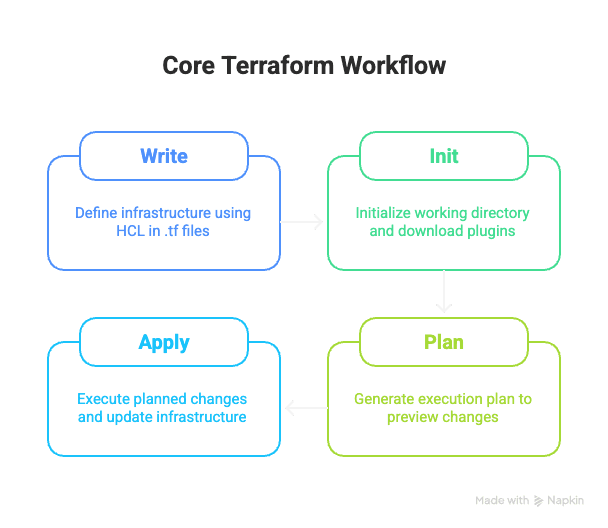
- The core workflow is four commands: 'init' to download providers, 'plan' to preview changes, 'apply' to make them, and 'destroy' to tear infrastructure down.
- The state file is the source of truth that Terraform compares to your code on every run; beyond solo learning, store state remotely with locking and encryption.
- Key building blocks include providers, resources, data sources, input variables and outputs, and modules for reusable configuration; prefer for_each over count for refactoring safety.
- OpenTofu is the community-maintained open-source fork of Terraform with the same syntax and workflow, fully compatible with everything in this guide.
Terraform has become the standard tool for Infrastructure as Code (IaC): you manage your servers, networks, and databases with code instead of setting them up by hand. Below: what Terraform is, how to install it, how to write a configuration, and how to run the core workflow.
What is Terraform and Infrastructure as Code?
Understanding Infrastructure as Code (IaC)
Infrastructure as Code means writing code to set up your infrastructure instead of configuring it by hand. Rather than clicking through console dashboards, you describe what you want in files you can read, version in Git, and run again whenever you need to. Servers, networks, databases, the lot of it lives in code.
Writing it this way pays off in a few ways:
- Automation: Reduces manual effort and speeds up deployments
- Consistency & Reproducibility: Ensures that environments are provisioned identically every time, eliminating "it works on my machine" issues
- Version Control: Allows you to track changes to your infrastructure, revert to previous states, and collaborate with teams using tools like Git
- Reduced Risk: Automated processes and the ability to preview changes minimize human error
- Scalability: Makes it easier to manage infrastructure at scale across multiple environments
What is Terraform?
Terraform is a leading Infrastructure as Code tool created by HashiCorp. It was open source under MPL 2.0 until August 2023; releases from 1.6 on use the source-available Business Source License (BSL) 1.1. It allows you to define and provision an entire infrastructure using a declarative configuration language called HCL (HashiCorp Configuration Language). Since HashiCorp's license change in 2023, the community-maintained OpenTofu fork has emerged as a drop-in open-source alternative. Everything in this guide applies to both.
Terraform works with the big cloud providers (AWS, Azure, Google Cloud), on-premises setups, and plenty of SaaS services through its provider ecosystem. Working across all of them from one tool is a big part of the appeal.
Why Choose Terraform?
A few things make Terraform stand out:
- Cloud Agnostic: Works across multiple cloud providers and services, allowing you to manage diverse infrastructure from a single tool and avoiding vendor lock-in
- Declarative Syntax: You define the desired state of your infrastructure, and Terraform figures out how to achieve it
- Extensibility: The provider model allows integration with virtually any platform that exposes an API
- State Management: Maintains a state file tracking real-world infrastructure, enabling intelligent updates and drift detection
- Version Control Integration: By treating infrastructure like source code, you gain complete change history and team collaboration benefits
How Terraform Works: Core Components
Terraform is made of a handful of pieces that work together.
Terraform Core Binary
Terraform Core is the main executable, the part that does the thinking. It reads your configuration, works out the state you asked for, and talks to providers to make it happen. It also keeps the state file up to date.
Providers
Providers are plugins that serve as the bridge between Terraform Core and your infrastructure. Each provider translates your HCL configuration into API calls for a specific cloud platform or service. For example:
- The AWS provider knows how to create and manage resources in Amazon Web Services
- The Azure provider (azurerm) handles resources in Microsoft Azure
- The Google provider manages Google Cloud Platform resources
That plug-in design is why Terraform can talk to so many different services.
Resources
Resources are the fundamental building blocks in Terraform, representing individual infrastructure objects:
- Virtual machine instances
- Databases and storage buckets
- Network subnets and security groups
- DNS records and load balancers
- Any other infrastructure component managed by a provider
Each resource block defines the desired properties and configuration for that specific infrastructure component.
Data Sources
Data sources allow Terraform to fetch information about existing infrastructure or external data not managed by your current configuration. For example, you might use a data source to:
- Get the ID of an existing VPC to deploy resources into
- Retrieve a list of available machine images
- Look up information about your cloud provider's availability zones
Variables and Outputs
Input Variables are like function arguments that allow you to parameterize your configurations, making them reusable and avoiding hardcoded values. You can pass different values for different environments without modifying core configuration files.
Output Values expose information about your infrastructure after it's created. These are useful for displaying important values (like IP addresses) or for other Terraform configurations to consume.
Modules
Modules are self-contained, reusable packages of Terraform configuration. They let you bundle up a common pattern once and use it everywhere. Instead of writing the same resource blocks over and over, you define them once in a module and call it from each project.
State File
The Terraform state file (by default, terraform.tfstate) records the mapping between your configuration and real-world infrastructure, tracking:
- Current state of your resources and their attributes
- Dependencies between resources
- Metadata about your infrastructure
Terraform uses the state file to understand what changes are needed during plan and apply operations and to detect configuration drift.
Installing Terraform
macOS
Using Homebrew (Recommended):
# Add the HashiCorp tap
brew tap hashicorp/tap

# Install Terraform
brew install hashicorp/tap/terraform
Manual Installation:
- Download the appropriate package from the Terraform downloads page
- Unzip the package to get the
terraformbinary - Move it to a directory in your PATH (e.g.,
/usr/local/bin)
Windows
Using Chocolatey:
choco install terraformManual Installation:
- Download from the Terraform downloads page
- Create a folder (e.g.,
C:\Terraform) - Unzip the package into this folder to get
terraform.exe - Add this folder to your system's PATH environment variable:
- Search for "environment variables" in the Start Menu
- Click "Edit the system environment variables"
- Click "Environment Variables..." button
- Find the Path variable and click "Edit..."
- Click "New" and add your Terraform folder path
- Restart your command prompt
Linux (Debian/Ubuntu)
# Add HashiCorp repository
curl -fsSL https://apt.releases.hashicorp.com/gpg | sudo apt-key add -
sudo apt-add-repository "deb [arch=amd64] https://apt.releases.hashicorp.com $(lsb_release -cs) main"

# Install Terraform
sudo apt-get update
sudo apt-get install terraform
Verify Installation
After installation, verify Terraform is working:
terraform -vThis should display your installed Terraform version:
Terraform v1.8.0
on darwin_amd64
Your First Configuration: Core Building Blocks
Understanding HCL (HashiCorp Configuration Language)
Terraform configurations are written in HCL, a language meant to be easy to read. The main pieces are:
Blocks: Containers for other content with a type, labels, and body:
resource "aws_instance" "web_server" {
  # Arguments go here
}Arguments: Assign values to names within a block:
instance_type = "t2.micro"
ami = "ami-0abcdef1234567890"Expressions: Values assigned to arguments (literals, references, or function calls):
instance_type = var.instance_type  # Reference to a variable
subnet_id     = aws_subnet.main.id # Reference to a resource
count = 3 # Literal numberComments:
# Single-line comment
// Also valid single-line comment
/* Multi-line comment
   spanning multiple lines */
The Terraform Block: Configuration Foundation
The terraform block configures Terraform itself rather than your infrastructure. Resource blocks describe what to build; this block sets how Terraform runs.
terraform {
  required_version = ">= 1.0"

  required_providers {
    aws = {
      source  = "hashicorp/aws"
      version = "~> 5.0"
    }
  }
}
Key elements:
required_version: Specifies acceptable Terraform CLI versionsrequired_providers: Declares which providers your configuration needs and their version constraintsbackend: Configures where state files are storedexperiments: Enables experimental features (advanced use)
Declaring Providers
Providers must be declared in the required_providers block and then configured:
terraform {
  required_providers {
    aws = {
      source  = "hashicorp/aws"
      version = "~> 5.0"
    }
  }
}

provider "aws" {
  region = "us-west-2"
}
Defining Resources
Resources are the core of your infrastructure:
resource "aws_instance" "app_server" {
  ami           = "ami-0abcdef1234567890"
  instance_type = "t2.micro"

  tags = {
    Name = "MyApplicationServer"
  }
}
Structure:
resource: Keywordaws_instance: Resource type (provider_type)app_server: Local name (used to reference this resource in your code)- Body: Arguments specific to that resource type
Terraform automatically understands dependencies. For example, if an EC2 instance needs a specific subnet, Terraform creates the subnet before the instance.
Variables and Outputs: Making Configurations Reusable
Input Variables
Input variables are like function arguments. They parameterize your configurations, making them reusable across different environments and deployments.
Declaration (typically in variables.tf):
variable "instance_type" {
  description = "The EC2 instance type to use"
  type        = string
  default     = "t2.micro"
}

variable "aws_region" {
  description = "The AWS region to deploy resources in"
  type        = string
  # No default, so Terraform will prompt for this value
}

variable "environment_tags" {
  description = "Common tags for all resources"
  type        = map(string)
  default = {
    Environment = "dev"
    ManagedBy   = "terraform"
  }
}
Usage in resources:
resource "aws_instance" "app_server" {
  ami           = "ami-0abcdef1234567890"
  instance_type = var.instance_type

  tags = merge(
    var.environment_tags,
    { Name = "AppServer" }
  )
}
Providing values:
Variables can be provided through multiple methods:
- Command line:
terraform apply -var="instance_type=t3.small" - Environment variables:
export TF_VAR_instance_type="t3.small" - Interactive prompts: If no value is provided and no default exists, Terraform prompts you
- Defaults: Specified in the variable block
Variable files: Create terraform.tfvars:
instance_type = "t3.medium"
aws_region    = "eu-central-1"
Output Values
Outputs expose information about your infrastructure after deployment:
output "instance_public_ip" {
  description = "The public IP address of the web server instance"
  value       = aws_instance.app_server.public_ip
}

output "instance_id" {
  description = "The ID of the web server instance"
  value       = aws_instance.app_server.id
  sensitive   = false
}
After terraform apply, outputs are displayed. Query them later with:
terraform output instance_public_ipUnderstanding Terraform State
What is State?
The Terraform state file (terraform.tfstate) is a JSON file that maps your configuration to real-world resources. It tracks:
- Current state of each resource and its attributes
- Dependencies between resources
- Metadata and timestamps
Important: The state file contains sensitive information, so treat it like a secret.
Local vs. Remote State
Local State (default):
- Good for: Learning and small single-person projects
- Risks:
- File loss or corruption
- Sensitive data in plain text
- Difficult for team collaboration
- No state locking (concurrent operations can corrupt state)
Remote State (recommended for teams):
Store state files remotely and securely using backends:
terraform {
  backend "s3" {
    bucket         = "my-terraform-state-bucket"
    key            = "global/s3/terraform.tfstate"
    region         = "us-east-1"
    encrypt        = true
    dynamodb_table = "terraform-state-lock"
  }
}
Benefits:
- Shared access for teams
- State locking prevents concurrent modifications
- Encryption at rest
- Versioning and audit trails
The Core Terraform Workflow
The typical Terraform workflow follows four main steps:
1. Initialize with terraform init
Purpose: Prepares your working directory for Terraform operations.
Actions:
- Downloads provider plugins specified in your configuration
- Initializes the backend for state management
- Downloads modules if your configuration uses them
- Creates a lock file (
.terraform.lock.hcl) recording exact provider versions
Command:
terraform initRun this once when starting a new project or after cloning an existing one. Rerun if you change provider versions or backend configuration.
2. Plan with terraform plan
Purpose: Creates an execution plan showing what changes Terraform will make.
Actions:
- Refreshes current state of existing infrastructure
- Compares your configuration to the current state
- Determines what needs to be created, updated, or destroyed
Output symbols:
+(green): Resource will be created~(yellow): Resource will be updated in-place-(red): Resource will be destroyed-/+: Resource will be destroyed and recreated
Command:
terraform planSave plans to files for later review:
terraform plan -out=myplan.tfplan3. Apply with terraform apply
Purpose: Executes the planned changes to provision or update infrastructure.
Actions:
- Shows the execution plan (if no saved plan file provided)
- Prompts for confirmation (type
yes) - Makes API calls to create, update, or destroy resources
- Updates the state file
Command:
terraform applyOr apply a saved plan:
terraform apply myplan.tfplanUse -auto-approve to skip confirmation (use with caution):
terraform apply -auto-approve4. Destroy with terraform destroy (When Needed)
Purpose: Destroys all infrastructure managed by your configuration.
Caution: This is destructive. Use only when you intend to remove all resources.
terraform destroyComplete Workflow Example
Here's a simple but complete first example using the null provider (no credentials needed):
main.tf:
resource "null_resource" "example" {
  provisioner "local-exec" {
    command = "echo 'Terraform is working!'"
  }
}
Run the workflow:
# Initialize
terraform init

# Plan
terraform plan

# Apply
terraform apply

# View state
terraform show

# Clean up
terraform destroy
Resource Lifecycle Management
Understanding Resource Lifecycle
Resources have a lifecycle that Terraform manages. The basic flow is:
- Create: New resources are created when first applied
- Update: Existing resources are modified when their configuration changes
- Delete: Resources are destroyed when removed from configuration
Lifecycle Meta-Arguments
Fine-tune how resources are managed using lifecycle blocks:
resource "aws_instance" "example" {
  ami           = "ami-0c55b31ad29f52381"
  instance_type = "t2.micro"

  lifecycle {
    create_before_destroy = true
    ignore_changes        = [ami]
    prevent_destroy       = true
  }
}
Common options:
create_before_destroy: Create replacement resource before destroying the old one (useful for zero-downtime updates)prevent_destroy: Prevent accidental destruction of critical resourcesignore_changes: Ignore specific attribute changes after creationreplace_triggered_by: Trigger replacement based on other resource changes
Managing Multiple Resources: count vs. for_each
Using count
The count meta-argument creates a fixed number of identical resources:
resource "aws_instance" "servers" {
  count         = 3
  ami           = "ami-0c55b31ad29f52381"
  instance_type = "t2.micro"

  tags = {
    Name = "server-${count.index}"
  }
}
When to use:
- You need a specific, predetermined number of resources
- Resources are functionally identical
- Simple indexed list is sufficient
Reference resources:
- First server:
aws_instance.servers[0] - All servers:
aws_instance.servers[*].id
Drawback: If you remove an item from the middle of a list, Terraform sees all subsequent resources as changed, which can cause unintended destruction.
Using for_each
The for_each meta-argument creates resources based on a map or set of strings:
locals {
  vms = {
    "web" = {
      instance_type = "t2.micro"
    },
    "db" = {
      instance_type = "t2.medium"
    },
    "app" = {
      instance_type = "t2.large"
    }
  }
}

resource "aws_instance" "servers" {
  for_each      = local.vms
  ami           = "ami-0c55b31ad29f52381"
  instance_type = each.value.instance_type

  tags = {
    Name = each.key
  }
}
When to use:
- You need unique, user-defined identifiers for each resource
- Using maps or sets to define properties
- The number of resources is dynamic
- You need to reference specific resources by their key
Reference resources:
- Web server:
aws_instance.servers["web"] - All instance IDs:
values(aws_instance.servers)[*].id
Advantage: Resources maintain identity based on their key, so removing an item only destroys that item, not all subsequent ones.
Choosing Between count and for_each
| Aspect | count | for_each |
|---|---|---|
| Unique identifiers | Numeric index | Map key or set value |
| Best for | Simple, fixed lists | Maps with unique keys |
| Refactoring safety | Risky (index shifts) | Safe (key-based) |
| Dynamic numbers | Good | Better |
| Readability | Simple | More explicit |
General recommendation: Prefer for_each for most use cases due to its stability when refactoring.
State Management Best Practices
Securing Your State
- Use remote backends: Store state remotely with encryption
- Enable state locking: Prevent concurrent modifications
- Restrict access: Use IAM policies or backend permissions
- Encrypt sensitive data: Mark sensitive variables and outputs
- Regular backups: Ensure state file backups exist
Never commit state files to Git: Add to .gitignore:
*.tfstate
*.tfstate.*
Managing Multiple Environments
Use separate state files for different environments:
Directory-based approach:
terraform/
├── dev/
│   ├── main.tf
│   ├── terraform.tfvars
│   └── backend.tf
├── staging/
│   ├── main.tf
│   ├── terraform.tfvars
│   └── backend.tf
└── prod/
    ├── main.tf
    ├── terraform.tfvars
    └── backend.tf
Workspace-based approach (simpler for teams):
terraform workspace new dev
terraform workspace new prod
terraform workspace select prod
terraform apply
Next Steps and Learning Path
Immediate Next Steps
- Install Terraform: Get it running on your machine
- Create your first configuration: Use a simple provider like Docker or the null provider
- Practice the workflow: Run init, plan, apply, and destroy
- Experiment with variables: Make your configurations reusable
- Add outputs: Extract useful information from your infrastructure
Key Topics to Master
Once the basics feel familiar, these are the next areas to learn:
- Modules: Organize and reuse configurations
- State management: Understand remote backends and state locking
- Advanced providers: Learn AWS, Azure, or GCP providers deeply
- Policy as Code: Enforce governance with OPA or Sentinel
- CI/CD integration: Automate Terraform workflows in pipelines
Best Practices to Adopt Early
- Version control everything: Commit all
.tffiles and.terraform.lock.hclto Git - Use modules: Organize resources into logical groups
- Follow naming conventions: Use consistent, clear naming
- Manage secrets carefully: Never hardcode sensitive data; use variable files or secret managers
- Review plans before applying: Always read
terraform planoutput carefully - Test configurations: Validate syntax with
terraform validate - Format consistently: Use
terraform fmtto maintain code style
Resources for Continued Learning
- Official Documentation: HashiCorp Developer Portal
- Terraform Registry: Discover modules and providers
- Community Support: Join the HashiCorp Community
- Certification: The Terraform Associate Certification validates foundational knowledge
Where to go from here
Start simple. Build small projects in a safe environment, run the workflow until it's second nature, and add more advanced features as you need them.
Next, you can explore modules for code reusability, set up remote state for team collaboration, integrate with CI/CD pipelines, or move to a Terraform TACO for governance at scale.
When running plans by hand stops scaling, Scalr runs both Terraform and OpenTofu on usage-based pricing, free up to 50 runs a month.
About the author

director of platform engineering at Scalr
Ryan Fee is the director of platform engineering at Scalr, with over 15 years of experience improving infrastructure experiences at companies large and small.