

Article · part of a guide
Scalr offers a free private module registry
Learn how to use the private module registry

Key takeaways
- Scalr includes a private module registry on its free plan, and using it is not required to execute runs through Scalr.
- A private module registry provides security and compliance guardrails, reusable code across projects, and access control the public registry lacks.
- Modules are pulled from a VCS repository and can be published at the account scope, where all environments inherit them, or at the environment scope for that environment only.
- To use a registry module outside Scalr or in local execution, authenticate with terraform login <account>.scalr.io, then add the module code and run terraform init.
- HCP Terraform retired its legacy free plan on March 31, 2026 (a 500-resource free tier remains), and Scalr positions its free registry as an alternative to Terraform Enterprise and HCP Terraform.
Terraform modules let you package a set of resources and configuration into something reusable, which makes infrastructure easier to manage and cuts down on copy-pasted code. You usually store modules in a version control system like GitHub, since git tags give you version constraints to pin against. Most Terraform users meet the public Terraform registry first, and it's the common starting point for sourcing modules.
A private module registry is the alternative when the public one doesn't give you enough control over your Terraform and OpenTofu code. It matters most in enterprise settings, where several teams work on the same critical infrastructure and need modules kept private. Plenty of tools charge for a private registry, but Scalr includes it on the free plan, and you don't have to execute runs through Scalr to use it. For example, as of September 2026 HCP Terraform's free plan doesn't include team management or no-code provisioning (HashiCorp gates them to Essentials and Standard respectively), and no HCP Terraform tier shares registry modules across organizations; HashiCorp's docs have you add the module to each organization's registry. HCP Terraform retired its legacy free plan on March 31, 2026, and the free tier that remains is capped at 500 managed resources. Scalr includes all of that on the free plan.
Main Benefits of a Module Registry
Here are the main benefits our customers get out of a module registry:
Security & Compliance: A private module registry allows you to enforce standards instead of having your Terraform users use public modules. The public registry doesn't have any guardrails or verification of code before Terraform modules are posted.
Reusable code: Creating and maintaining reusable modules is one of the key principles of Terraform. A private module registry allows for the distribution of Terraform modules across projects within a small or large organization. This promotes consistency through module sharing and reduces duplication of the Terraform configurations.
Access Control: A private module registry allows you to control who can access and modify modules. That matters in larger organizations where multiple teams or individuals work on the code. You can restrict specific modules to authorized Terraform users or teams only.
Setting up the Registry
The Scalr module registry works by pulling in the modules from a VCS repository. The first step is to make the connection with your VCS repo of choice. Next, if you haven't done so, create a module in your VCS provider and ensure it follows the standard Terraform or OpenTofu naming conventions of terraform-<provider_name>-<module_name>, e.g. terraform-aws-s3-bucket. If you need an example to start with, try forking this S3 module.
Import the module into Scalr once you have connected the VCS provider and created a module in a repo. A module can be created in the Scalr module registry in two places, the account or environment scope. Read more about the Scalr scopes here.
If a module is created at the account scope, all Scalr environments will automatically inherit it and all teams will be able to consume it. If a module is created at the environment scope, only that environment and its teams can use it.
To publish private modules, go to the module registry, select publish module, and then select the VCS provider and the repo that contains the module:
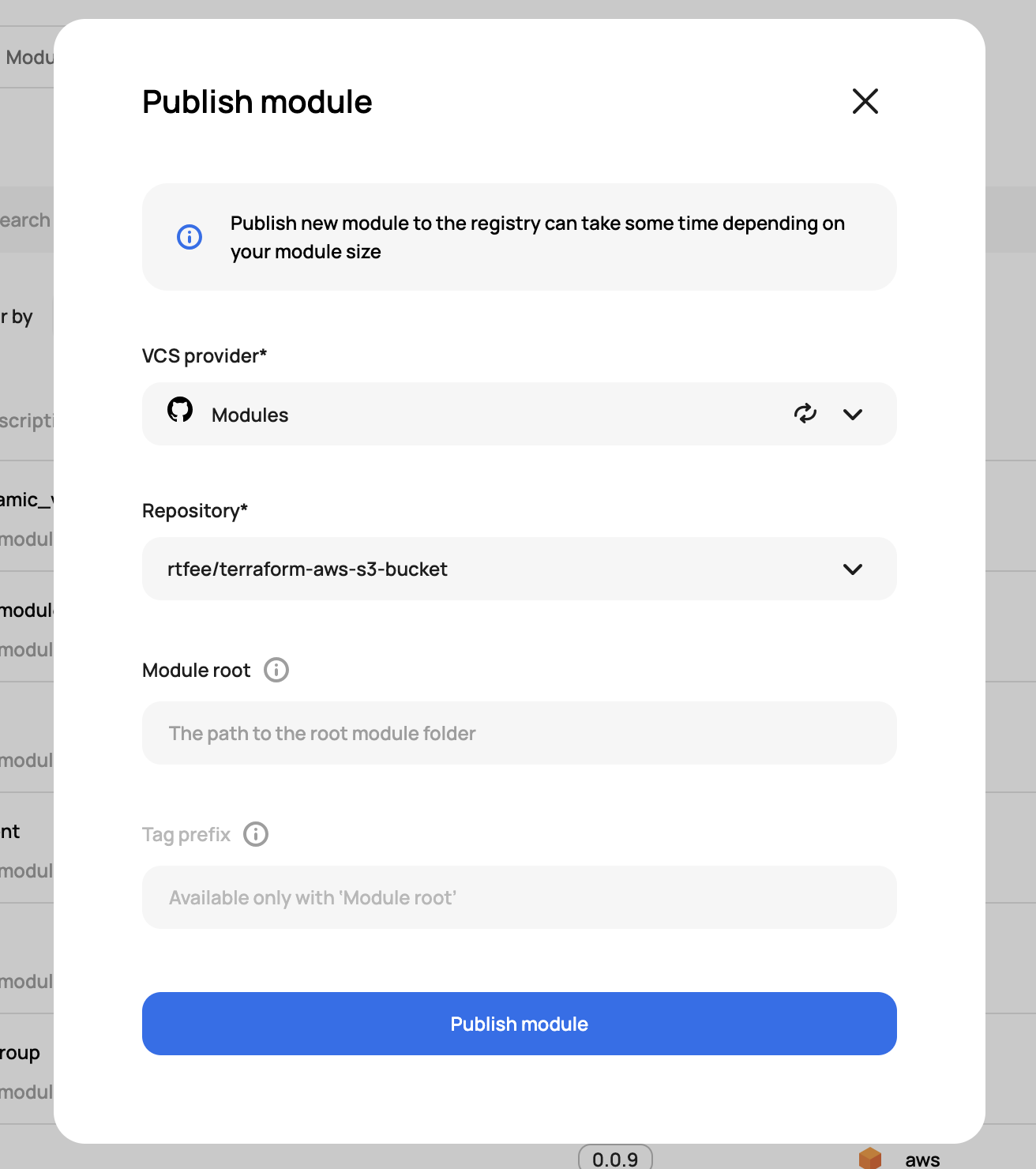
If you have multiple modules in the same repo you can define the path to the root.
Using the Registry
Using the modules in the registry comes down to one thing: being authenticated to Scalr. If you're using the module in a Scalr workspace that has Scalr set as the remote backend, that authentication is handled for you.
If you're using the module outside of Scalr or in a run that is using local execution, you'll need to make sure your user is authenticated to Scalr. To authenticate, you can run the following:
terraform login <account>.scalr.ioThis creates and stores the credentials in a local credentials.tfrc.json file.
Next, you'll want to grab the module code from Scalr. Go to the registry in Scalr, click on the module that was published, and copy the code:
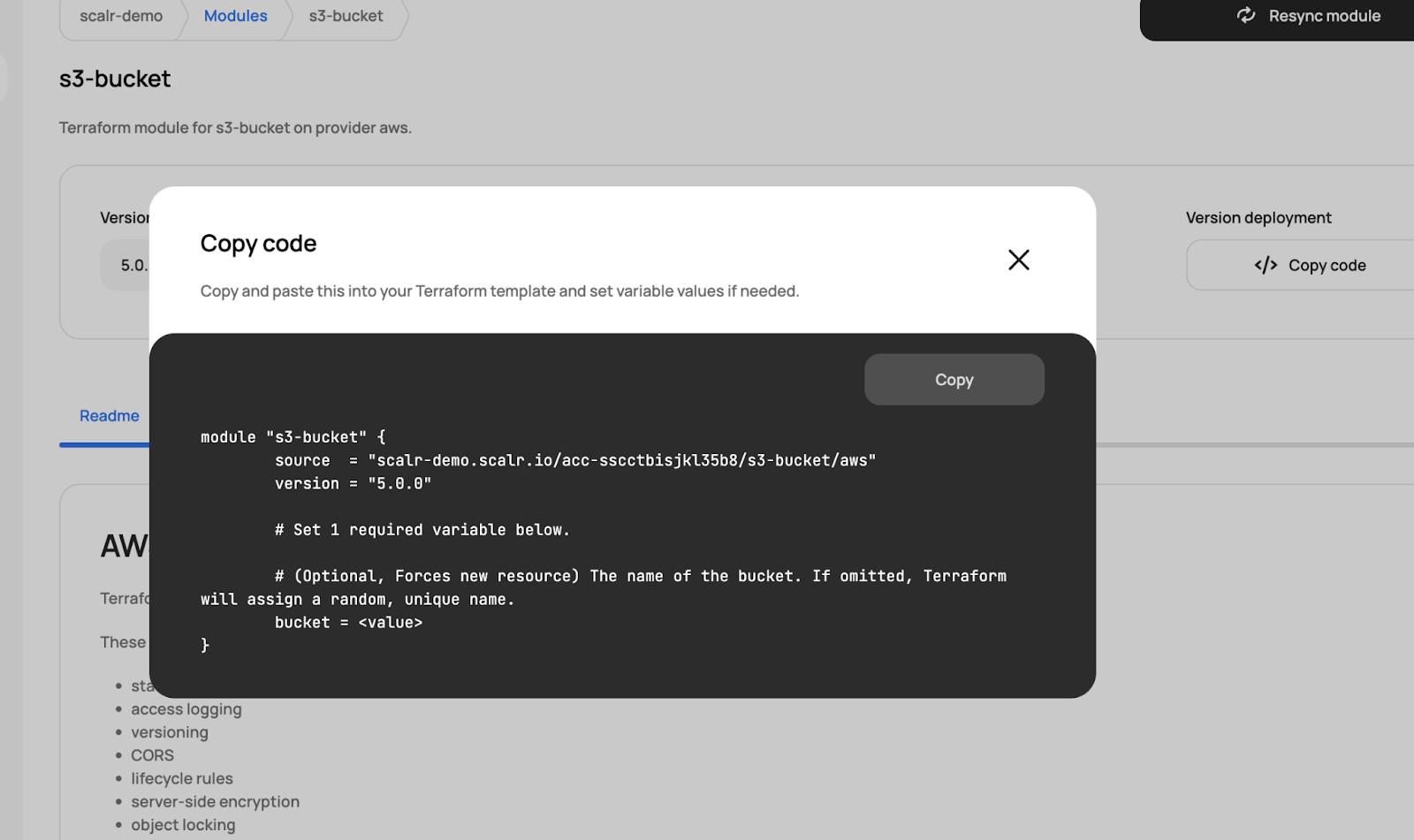
Add the code to your Terraform configuration files and then run a terraform init:
terraform init

Initializing the backend...
Initializing modules...
Downloading scalr-demo.scalr.io/acc-sscctbisjkl35b8/s3-bucket/aws 5.0.0 for s3-bucket...
- s3-bucket in .terraform/modules/s3-bucket
The module is now pulled from the Scalr private module registry, and you can run Terraform plan and apply.
Wrapping Up
Most teams start with the public registry, and it handles distributing modules well. What it doesn't give you is the control and visibility a large organization needs once that code is deploying real infrastructure.
A private module registry adds that control, along with a safer path for getting infrastructure code into production. Scalr's private module registry is completely free to use and is an alternative to products like Terraform Enterprise or HCP Terraform, whose legacy free plan ended on March 31, 2026 and whose remaining free tier is capped at 500 managed resources. Try it for free.
About the author

director of platform engineering at Scalr
Ryan Fee is the director of platform engineering at Scalr, with over 15 years of experience improving infrastructure experiences at companies large and small.
Part of this guide
13 sheets
Terraform Modules Explained
- Terraform Registry: Public vs Private Module Registries Explained
- New Feature: Private Module Registry Namespaces
- Top 10 Most Popular Terraform Modules [2026]
- Dependabot for Terraform Modules: The Complete Setup Guide
- Use local execution mode for free with Scalr
- Scaling Terraform Modules
- Terraform Modules - Define, Enforce, Report
- Don't Build a Service Catalog
- Getting Started with Terraform Modules
- Terraform Credential Helper With Scalr
- New Feature: Deploy Terraform Modules From A Service Catalog