

Article · part of a guide
Dependabot for Terraform Modules: The Complete Setup Guide
Dependabot for Terraform Modules: The Complete Setup Guide

Key takeaways
- Dependabot's terraform package-ecosystem checks modules from the public Terraform Registry and public Git repositories with zero extra configuration; it also updates provider version constraints.
- A private module registry (Scalr, HCP Terraform's private registry, or a self-hosted Git-based registry) needs a registries block in dependabot.yml with a token, since Dependabot can't authenticate to it otherwise.
- versioning-strategy isn't supported for the terraform ecosystem, unlike npm or bundler; groups, ignore, open-pull-requests-limit, and target-branch all work normally.
- Most 'Dependabot isn't updating my modules' cases trace back to an expired or mis-scoped registry token, not a broken integration.
Terraform modules age like any other dependency: security advisories land, cloud provider APIs shift underneath them, and the version you pinned a year ago becomes the version nobody wants to touch. Dependabot handles this the same way it handles npm or pip dependencies, by watching module and provider version constraints and opening a pull request when a newer release exists. This post covers how the terraform package-ecosystem works, how to configure it, what to do when it stops finding updates, and how to point it at a private module registry once you outgrow the public one.
What Is Dependabot for Terraform Modules?
Dependabot is GitHub's dependency-update bot. Since 2022, it has shipped a terraform package-ecosystem that scans .tf files for module source and version constraints and provider version constraints, checks the relevant registry for newer releases, and opens a pull request bumping the constraint when one exists. It works against modules hosted on the public Terraform Registry and against modules hosted on a publicly reachable Git repository with no extra configuration required.
Private registries are the exception. If your modules live behind authentication, whether that's Scalr, HCP Terraform's private registry, or something self-hosted, Dependabot needs a registries block in dependabot.yml and a token to read from it. The basic setup below covers the public case; the private-registry section further down covers the rest.
How Do You Set Up Dependabot for Terraform Modules?
For modules on the public registry or a public Git repository, the setup is just a dependabot.yml file:
version: 2
updates:
  - package-ecosystem: "terraform"
    directory: "/"
    schedule:
interval: "weekly"- Add
.github/dependabot.ymlto your repository with the block above. - Adjust
directoryif your Terraform code lives in a subdirectory, or add another entry underupdatesfor each additional directory. - Commit and push.
- Check Pull Requests > Dependabot in GitHub to confirm it's picking up your modules.
That's the entire setup for public modules: there's no token, registry block, or secret to store. The next time a module you reference ships a new version, Dependabot opens a pull request with the version bump.
How Do You Configure Dependabot for Terraform Modules?
A few options beyond schedule.interval are worth knowing:
version: 2
updates:
  - package-ecosystem: "terraform"
    directory: "/"
    schedule:
      interval: "weekly"
    open-pull-requests-limit: 10
    target-branch: "main"
    groups:
      aws-modules:
        patterns:
          - "*aws*"
    ignore:
      - dependency-name: "terraform-aws-modules/vpc/aws"
        versions: ["4.x"]
    cooldown:
default-days: 3groupscombines updates that match a pattern into one pull request instead of one PR per module, which matters once a repo references more than a handful of modules.ignoreskips specific modules or version ranges, useful for a module you're deliberately holding back.open-pull-requests-limitcaps how many version-update PRs Dependabot keeps open at once (default is 5); set it to 0 to pause version updates for the ecosystem without removing the config.target-branchpoints Dependabot at a branch other than your default, for PRs.cooldown.default-daysdelays a newly published version from triggering a PR for a set number of days, though Terraform doesn't support the per-SemVer-level cooldown settings (semver-major-days, etc.) that some other ecosystems get.
One option that does not apply here: versioning-strategy. It's supported for ecosystems with a lockfile-driven workflow (npm, bundler, pip, and a handful of others), but Terraform isn't on that list, so setting it has no effect.
Why Does Terraform Module Health Matter?
Terraform module health is the maintainability and reliability of the infrastructure-as-code components your teams build on. Modules accumulate debt the same way any dependency does, and an outdated one can introduce compatibility problems or security exposure that spreads through everything built on it. Skip the maintenance and the cost tends to show up as an emergency fix during an incident rather than a planned update during a maintenance window.
A versioned module registry, whether that's the public Terraform Registry or a private one, is what makes tracking that debt possible. Once modules carry versions in one place, you can see which workspaces run an outdated version and test an upgrade before shipping it, instead of guessing. Dependabot is what turns that visibility into something that happens automatically instead of during a quarterly audit.
What Do You Do When Dependabot Isn't Updating Terraform Modules?
Most problems come down to one of these:
- No pull requests appear at all. Check the job logs under Insights > Dependency graph > Dependabot in the repository. Parse errors and authentication failures surface there first.
- Authentication errors against a private registry. Confirm the registry token hasn't expired and that the secret name in GitHub matches the
tokenfield independabot.ymlexactly. - No updates detected even though you expect one. Confirm the module actually has a newer version published in its registry (public or private). Dependabot only opens a PR when the registry reports a version above the one currently referenced, and it won't flag a module pinned with a version constraint that already allows the latest release.
- A PR opens but for the wrong module. Check
groups.patternsif you're using grouping; an overly broad pattern can pull an unrelated module into the same PR.
How Do You Connect Dependabot to a Private Terraform Module Registry?
Everything above assumes public modules. Once modules move behind authentication, whether in Scalr, HCP Terraform's private registry, Artifactory, or a self-hosted option, Dependabot needs a registries block and a token with read access. The shape is the same across providers; the example below walks through it with Scalr's private module registry.
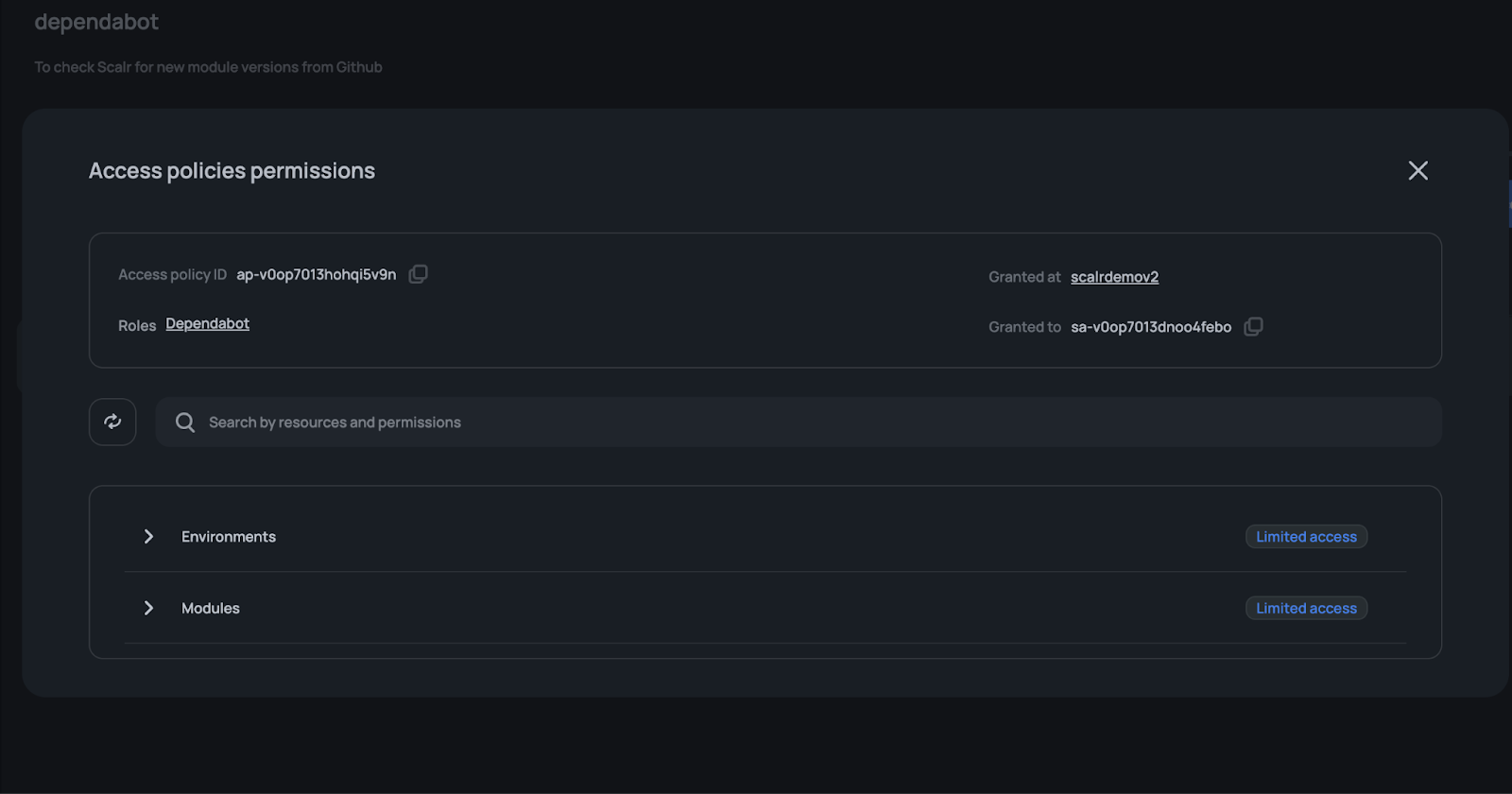
Step 1: Create a fine-grained Scalr API access token
- Go to Security > IAM > Roles, click "New role," and name it (e.g.
dependabot). - Add permissions
environments:readandmodules:read. Those two cover every module in the account and environment scopes; nothing broader is needed. - Go to Security > IAM > Service Accounts, click "New service account," name it, and grant it the role you just created with "Grant On" set to "Account."
- Generate the API access token from the service account page. Optionally assign owners to the service account; more on that in Scalr's IAM docs.
Step 2: Store the token in GitHub secrets
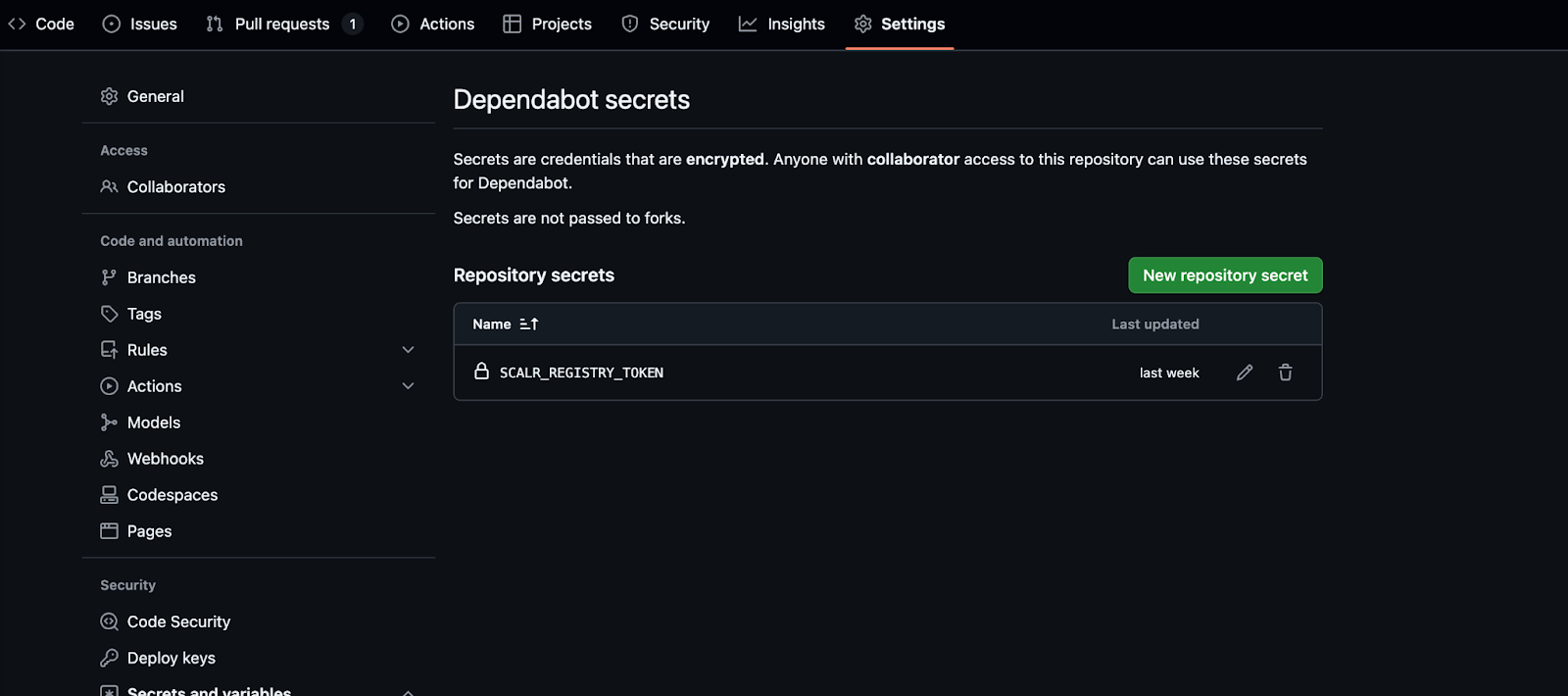
Go to Settings > Secrets and variables > Dependabot in your repository, click "New repository secret," and add SCALR_REGISTRY_TOKEN with the token from Step 1.
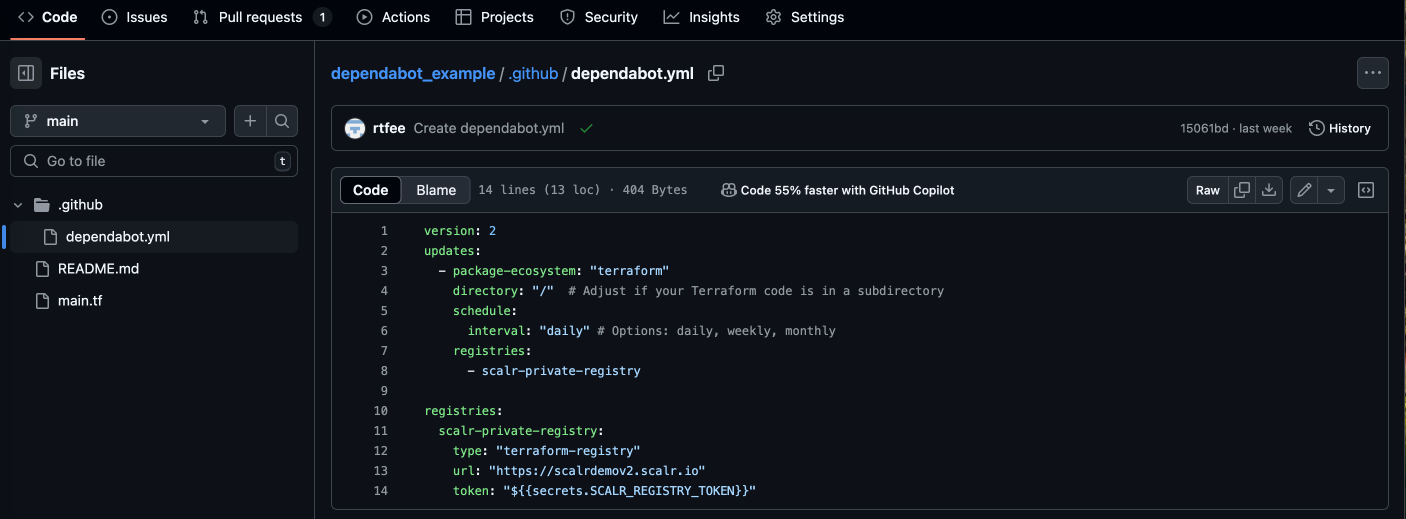
Step 3: Add the registries block
version: 2

updates:
  - package-ecosystem: "terraform"
    directory: "/"
    schedule:
      interval: "weekly"
    registries:
      - scalr-private-registry

registries:
  scalr-private-registry:
    type: "terraform-registry"
    url: "https://your-account.scalr.io"
    token: "${{secrets.SCALR_REGISTRY_TOKEN}}"
The registries block under updates tells Dependabot which registry definition to use; the top-level registries block defines it, including the URL and the token from your GitHub secret.
Step 4: Commit, push, and confirm
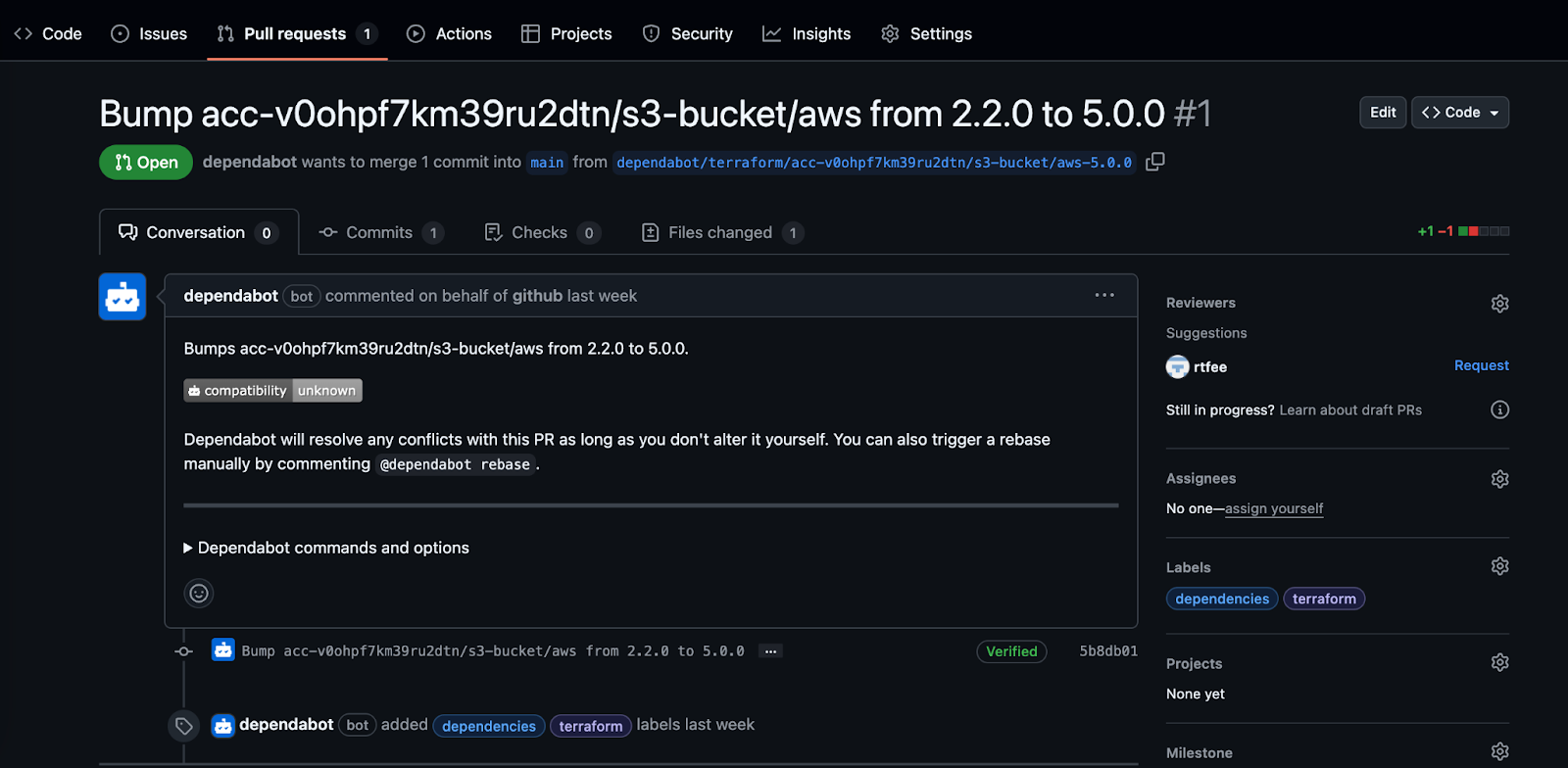
Commit .github/dependabot.yml, push, and check Pull Requests > Dependabot in GitHub. The next time a module you reference gets a new release in the registry, Dependabot opens a pull request with the version bump:
If you're standardizing on Scalr's registry, its module usage reporting is a useful cross-check on top of Dependabot: it shows which workspaces reference outdated versions, which is the fastest way to spot a repo that skipped this setup entirely.
Summary
Dependabot's terraform package-ecosystem covers public modules with a four-line dependabot.yml and no credentials at all. Private registries, Scalr's included, add one registries block and a scoped token on top of that same base config. In both cases, module updates show up as reviewable pull requests instead of a version check someone has to remember to run.
Frequently asked questions
Does Dependabot support Terraform modules?
Yes. Dependabot has had a terraform package-ecosystem since 2022 that scans .tf files for module source and version constraints, checks the registry for newer releases, and opens a pull request when it finds one. It works against the public Terraform Registry and public Git-hosted modules out of the box, and against private registries once you add a registries block to dependabot.yml.
Does Dependabot work with a private Terraform module registry?
Yes, if you add a registries block to .github/dependabot.yml with type: terraform-registry, the registry's URL, and an authentication token stored as a GitHub secret. This applies to any private registry that implements the Terraform registry protocol, including Scalr, HCP Terraform's private registry, and self-hosted options.
Does Dependabot update Terraform providers too, or only modules?
Both. The terraform package-ecosystem checks version constraints for providers as well as modules, using the same dependabot.yml configuration.
Why isn't Dependabot opening PRs for my Terraform modules?
The most common causes are an expired or incorrectly scoped registry token, a registries block that doesn't match the token's secret name, or a module that genuinely has no newer version published yet. Check the Dependabot job logs under Insights > Dependency graph > Dependabot in the repository before assuming the integration is broken.
How often does Dependabot check Terraform modules for updates?
On whatever schedule you set in dependabot.yml under schedule.interval: daily, weekly, or monthly. Weekly is a common default for modules, since they change less often than application dependencies.
About the author

director of platform engineering at Scalr
Ryan Fee is the director of platform engineering at Scalr, with over 15 years of experience improving infrastructure experiences at companies large and small.
Part of this guide
13 sheets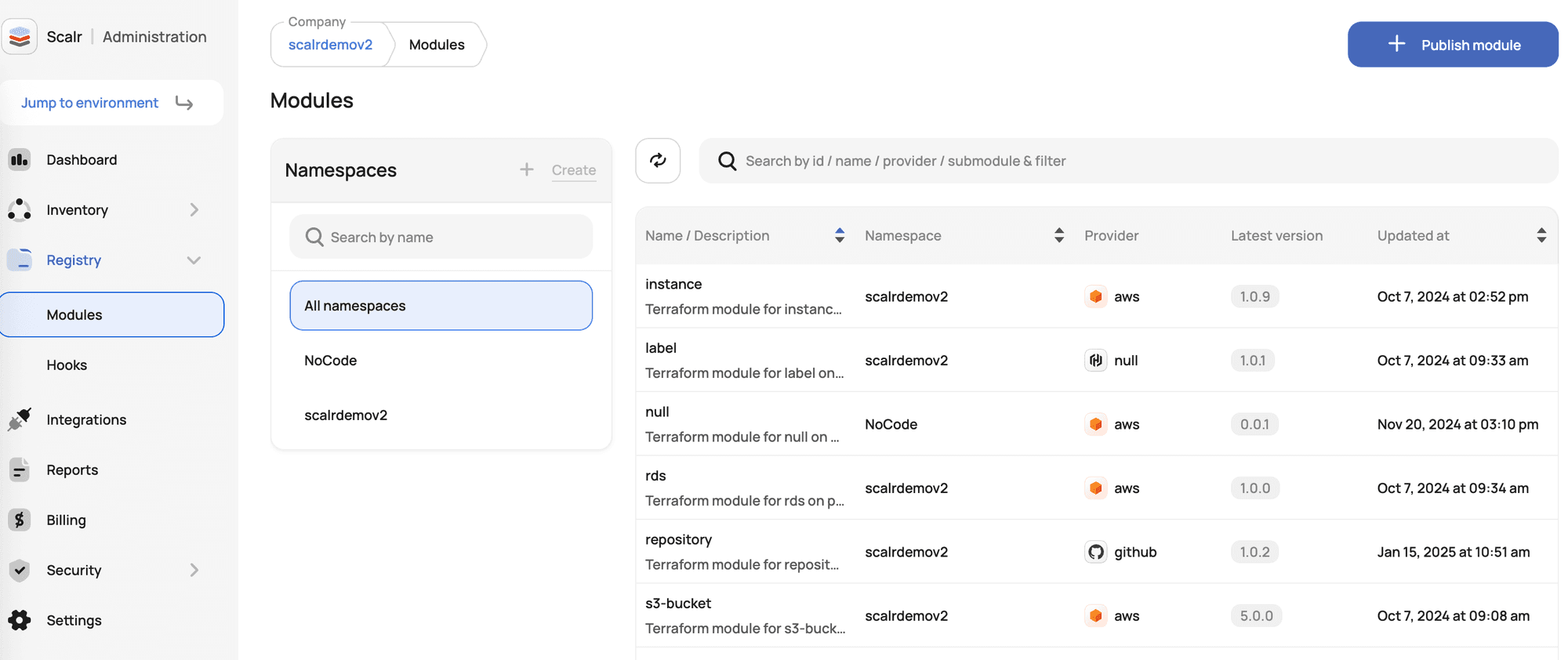
Terraform Modules Explained
- Terraform Registry: Public vs Private Module Registries Explained
- New Feature: Private Module Registry Namespaces
- Top 10 Most Popular Terraform Modules [2026]
- Use local execution mode for free with Scalr
- Scaling Terraform Modules
- Scalr offers a free private module registry
- Terraform Modules - Define, Enforce, Report
- Don't Build a Service Catalog
- Getting Started with Terraform Modules
- Terraform Credential Helper With Scalr
- New Feature: Deploy Terraform Modules From A Service Catalog