

Article · part of a guide
Terraform Wiz: How to Scan, Secure, and Enforce Policy on Your IaC
How to use Wiz to scan Terraform and OpenTofu code, enforce policy, and map IaC to running cloud resources.
Key takeaways
- Wiz scans Terraform and OpenTofu code in three places: your VCS repository, the Wiz CLI (locally or in CI/CD), and as a run task against the plan output.
- Wiz's main differentiator versus scanners like Checkov or tfsec is code-to-cloud mapping: it uses the Terraform state file to connect a line of HCL to the live resource it deployed, so a runtime finding traces back to the exact code and author.
- The most common Terraform misconfigurations Wiz flags are open security groups, unencrypted storage, over-permissive IAM policies, and hardcoded secrets.
- Wiz's policy engine is unified across code, CI/CD, and runtime, so the same rule (like blocking public S3 buckets) applies at every stage instead of needing separate policies per tool.
- Scalr has a native Wiz integration that scans after the Terraform plan and can enforce results either through Scalr's OPA policies or a Wiz auto-fail mode, with no CI/CD wiring required.
Terraform Wiz is one of the more common searches from teams trying to close the gap between the infrastructure they define in code and the infrastructure running in their cloud accounts. Wiz is best known as a cloud security platform, but it also scans Terraform and OpenTofu code directly, and its bigger differentiator is connecting that code back to the live resources it deploys.
Wiz scans in three places: your VCS repo, the Wiz CLI, and CI/CD or run task integrations. If you run Terraform through Scalr, there's also a native Wiz integration, covered at the end, which runs the scan automatically after a Terraform plan with no CI/CD wiring needed.
What Is Wiz?
Wiz is a cloud-native application protection platform (CNAPP) that gives security teams a single view across cloud misconfigurations, vulnerabilities, identity risk, and exposed secrets. It connects to your cloud accounts (AWS, Azure, GCP, and others) using an agentless, API-based approach, then builds what Wiz calls a Security Graph: a map of every resource, how it's configured, what it's connected to, and who or what can reach it.
For Terraform, the relevant part is that Wiz doesn't stop at runtime. It also connects to your source code, so the same graph that shows a publicly exposed database can trace that database back to the Terraform resource block, the pull request, and the engineer who merged it.
Why Pair Wiz with Terraform?
Most cloud security incidents don't start with a sophisticated exploit. They start with a misconfigured resource: a security group open to the internet, a storage bucket without encryption, an IAM role with far more access than it needs. Terraform is how most teams provision that infrastructure now, which means Terraform code is also where those mistakes get introduced.
Scanning Terraform before it deploys is cheaper than fixing it after. A misconfiguration caught in a pull request is a one-line diff. The same misconfiguration caught after it's live in production is an incident, a remediation ticket, and possibly a compliance finding. That's the general case for Terraform vulnerability scanning, and it's what Wiz is built to do for teams that already use it for cloud security posture management and want the same policy engine covering their IaC.
How Does Wiz Scan Terraform Code?
Wiz scans Terraform and OpenTofu in three places, and most teams end up using more than one.
Use Case 1: Scanning Terraform in Your VCS Repository
Wiz connects to VCS providers like GitHub, GitLab, and Bitbucket and continuously scans the Terraform and OpenTofu files in the repositories you import. As Wiz indexes a repo, it resolves variables and modules so it understands the configuration as a whole rather than one file at a time, then flags misconfigurations directly against the code. This is the earliest point you can catch a problem, since it happens independent of any specific pipeline or plan.
Use Case 2: Scanning with the Wiz CLI
The Wiz CLI (wizcli) runs the same scanning engine from a laptop, a CI/CD job, or any automation pipeline. It's the option to reach for when you want Terraform scanning enforced as a build step rather than relying on the VCS connector alone, or when your code lives somewhere Wiz doesn't have a native connector.
To get started, authenticate the CLI with a Wiz service account:
wizcli auth --id <client_id> --secret <client_secret>
Then run an IaC scan against a directory containing Terraform or OpenTofu files:
wizcli iac scan --path . --name <scan-name>
This works against a working directory of .tf files, and it also works against a Terraform plan converted to JSON, which lets you catch issues that only show up once variables and modules are resolved, not just in the raw HCL. Because the CLI is just a binary, it drops into any CI/CD system (GitHub Actions, GitLab CI, Jenkins) or any Terraform automation platform, including Scalr, the same way.
Use Case 3: Code-to-Cloud Mapping
This is where Wiz differs from a pure static scanner like Checkov or tfsec. Once a Wiz connector is attached to your cloud account, Wiz uses the Terraform state file as a bridge between what's deployed and the code that deployed it. It resolves the resources in state back to the module and file that declared them, so when the Security Graph shows a live security finding, like an S3 bucket with public access, it also shows the exact Terraform file, line number, module, and commit author responsible.
That matters because most CNAPPs treat "code" and "runtime" as two separate problems with two separate tools. Wiz applies a single policy, like "S3 buckets must have Block Public Access enabled," consistently across code review, CI/CD, and the live environment, so a violation is caught the same way no matter which stage it's found in, and a runtime finding always has a remediation path back to a pull request instead of a manual console change.
Common Terraform Misconfigurations Wiz Flags
The specific rule set is large, but most findings fall into a handful of recurring categories.
Overly Permissive Network Access
Security groups or firewall rules that expose a sensitive port to the entire internet are one of the most common and most severe findings.
# This security group allows SSH access from ANY IP address.
resource "aws_security_group" "allow_ssh" {
  name        = "allow-all-ssh"
  description = "Allow SSH inbound traffic"

  ingress {
    from_port   = 22
    to_port     = 22
    protocol    = "tcp"
    cidr_blocks = ["0.0.0.0/0"] # DANGEROUS
  }
}
Unencrypted Storage
Resources that hold data, like S3 buckets, RDS instances, or EBS volumes, without encryption configured are flagged as a default risk, and the fix is usually a single missing block.
resource "aws_s3_bucket" "unencrypted_data" {
  bucket = "my-company-sensitive-data-bucket"
  acl    = "private"
  # Missing server-side encryption configuration
}
Over-Permissive IAM
IAM roles and policies that grant * actions or * resources instead of a scoped set of permissions show up constantly, especially in code copied from tutorials or generated quickly to unblock a deployment.
resource "aws_iam_policy" "overly_broad" {
  name = "broad-access"

  policy = jsonencode({
    Version = "2012-10-17"
    Statement = [{
      Action   = "*"
      Effect   = "Allow"
      Resource = "*" # DANGEROUS: grants access to everything
    }]
  })
}
Hardcoded Secrets
API keys, passwords, and tokens written directly into a .tf file or a variable default get stuck in version control history permanently, even if they're removed in a later commit. Wiz's secrets detection flags high-entropy strings and known key formats in both the VCS scan and the CLI scan.
Terraform Wiz Best Practices
These practices come up again and again among teams that pair Wiz with Terraform:
- Treat policy as code. Use Wiz's policy engine, HashiCorp Sentinel, or Open Policy Agent to enforce rules before provisioning, not after. The earlier a violation is caught, the cheaper it is to fix.
- Secure the state file. Terraform state can contain sensitive values in plaintext. Store it in a remote backend with encryption enabled, and treat access to state the same way you'd treat access to production secrets. See our guide on Terraform state file best practices for more detail.
- Validate in CI/CD, not just on a laptop. A scan that only runs when someone remembers to run it locally isn't a control. Wire scanning into the pipeline so every pull request gets checked the same way.
- Pair scanning with drift detection. Scanning catches problems in the code before it deploys. It won't catch a manual console change made after the fact. Run both scanning and drift detection so code-level and runtime-level divergence are both covered.
- Standardize on reviewed modules. A small number of well-audited, reusable modules with secure defaults baked in ("golden modules") reduces the surface area any scanner has to catch problems in, since fewer people are writing security-sensitive resource blocks from scratch.
- Tag for ownership. Runtime findings are only actionable if you know who owns the resource. Enforcing tagging standards in Terraform makes it possible to route a Wiz finding to the right team automatically instead of a security engineer having to track down an owner manually.
Integrating Wiz with Scalr
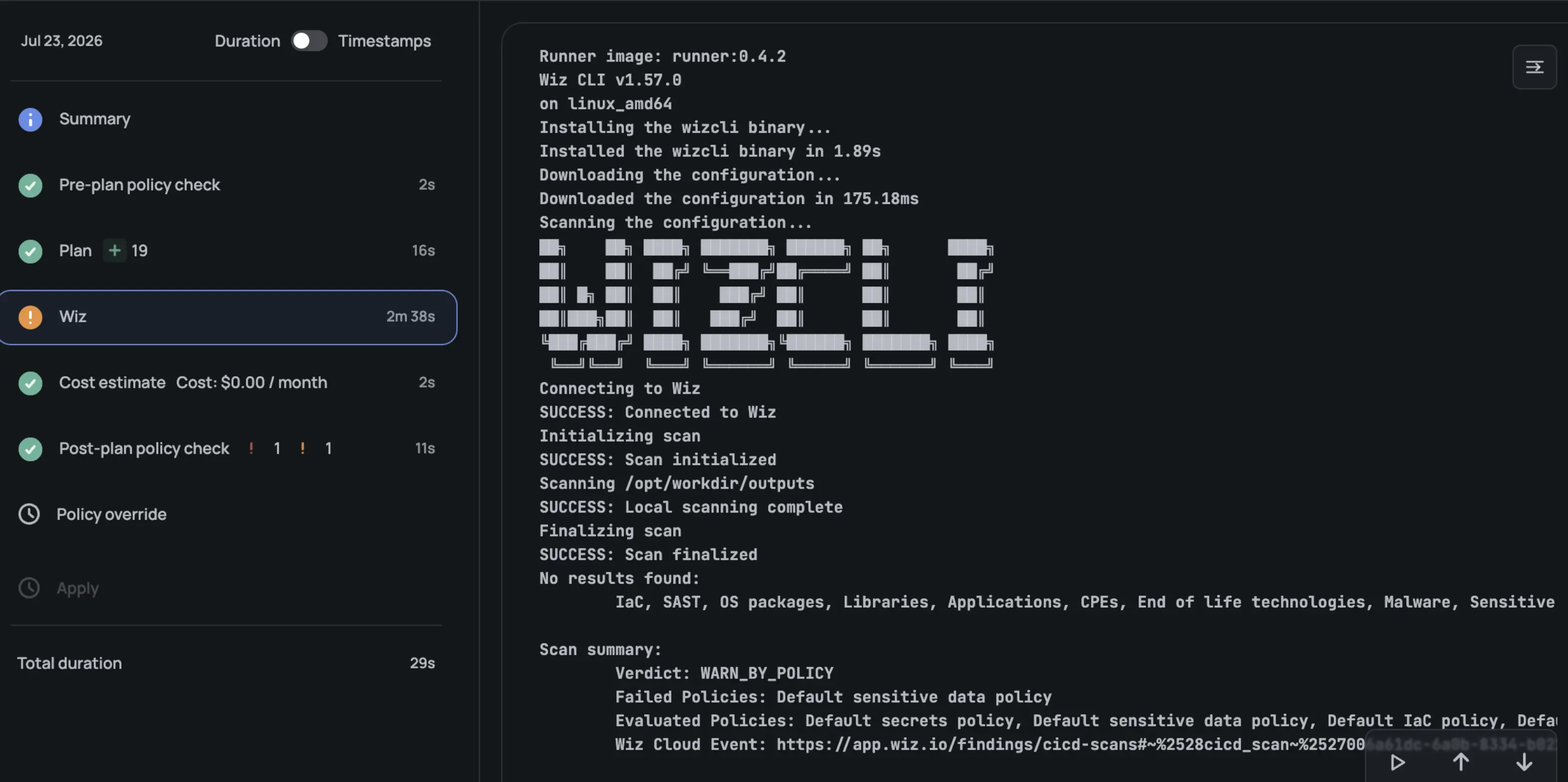
If you're running Terraform or OpenTofu through Scalr, you don't need to wire the Wiz CLI into a separate CI/CD job. Scalr has a native Wiz integration that runs as a step in the run pipeline after the Terraform plan completes, and it can either route results to Scalr's own OPA policies or block the run automatically.
Prerequisites
Before connecting Wiz to Scalr, you'll need:
- A Wiz service account with the
create:security_scanspermission - That service account's client ID and secret
- The display names of any Wiz CI/CD scan policies you want applied by default
- Scalr Agent version 1.3.0 or later if you're running self-hosted agents
Setting Up the Connection
- In Scalr, go to account-level Integrations and select Wiz.
- Enter the Wiz client ID and client secret, and choose the correct endpoint (Default, GovCloud, or FedRAMP) depending on your Wiz environment.
- Configure the scan settings, including the enforcement mode and any default policy names you want applied.
- Choose which environments the integration applies to, either all current and future environments or a specific selection.
- Save the connection.
Note that Scalr supports one Wiz connection per account, and setting it up requires the integrations:manage permission.
Enforcement Modes
Scalr's Wiz integration gives you two ways to act on scan results:
- Policy Check: Wiz's findings are routed into Scalr's Open Policy Agent policies. The full, validated Wiz result is available at
input.run_tasks.wizin the post-plan policy input, so you can write custom OPA logic around it instead of relying on a simple pass/fail. - Auto-fail: Scalr blocks the run automatically if a Wiz policy fails or if the scan itself can't complete, without requiring a custom OPA policy at all.
Once enabled, the Wiz scan shows up as its own step in the run pipeline, and results are visible directly in the Scalr UI without leaving the platform to check a separate dashboard. Because the integration runs after the plan, it fits the same code-to-cloud model Wiz uses everywhere else: the plan output it scans reflects exactly what's about to be deployed.
Where to Go From Here
Wiz puts Terraform scanning in the same place you already track cloud security posture, and its biggest advantage over a pure static scanner is that a runtime finding maps back to the exact code and author that created it, so nobody has to reverse-engineer the source. The VCS connector, the CLI, and a run task all serve one goal: catching a misconfiguration before it becomes a live resource.
If you want to go deeper on the surrounding topics:
- IaC Security: Securing Your Terraform and OpenTofu Infrastructure: the pillar guide this post belongs to.
- Getting Started with Terraform Vulnerability Scanning: a broader look at scanning tools beyond Wiz, including tfsec, Checkov, and Trivy.
- Enforcing Policy as Code in Terraform: A Comprehensive Guide: how to move from "scan and flag" to "block at the policy layer."
- Terraform Drift Detection and Management: the runtime counterpart to code scanning.
- Terraform State Files Best Practices: the file Wiz's code-to-cloud mapping depends on, and a common source of plaintext secret exposure on its own.
Key Sources Used
- Wiz + HCP Terraform: Close the IaC-to-Cloud Infrastructure Security Gap
- IaC Scanning: A Practical Guide for DevSecOps Teams
- 6 Essential Terraform Security Best Practices
- Wiz CLI
- Scalr Documentation: Integrations
- Scalr Documentation: Wiz
This blog has been verified for Terraform and OpenTofu
Frequently asked questions
What does Wiz do for Terraform?
Wiz scans Terraform and OpenTofu configurations for security misconfigurations, such as open security groups, unencrypted storage, and over-permissive IAM roles. Beyond static scanning, Wiz's Security Graph maps deployed cloud resources back to the Terraform code and state file that created them, so a runtime security finding can be traced to the exact file, line, module, and commit author.
How do you scan Terraform code with the Wiz CLI?
Install the Wiz CLI (wizcli), authenticate with a service account using wizcli auth --id <client_id> --secret <client_secret>, then run wizcli iac scan --path . --name <scan-name> against a directory containing Terraform files. The CLI can also scan a converted Terraform plan and works the same way from a laptop, a CI/CD pipeline, or a Terraform automation platform like Scalr.
How is Wiz different from Checkov or tfsec for Terraform security?
Checkov and tfsec are static analysis tools that scan Terraform code and plan output against a rules library. Wiz does that too, but its main differentiator is code-to-cloud mapping: it correlates the Terraform state file with live cloud resources in its Security Graph, so a misconfiguration found at runtime can be traced back to the specific Terraform code and author that created it, not just flagged as an isolated cloud finding.
How does the Scalr and Wiz integration work?
Scalr's native Wiz integration runs as a step in the run pipeline after the Terraform plan completes. You connect a Wiz service account with client ID and secret credentials, choose an enforcement mode, and pick which environments it applies to. In Policy Check mode, the full Wiz result is passed to Scalr's OPA policies as input.run_tasks.wiz so you can write custom logic; in Auto-fail mode, Scalr blocks the run automatically if the Wiz scan fails or can't complete.
Can Wiz scan Terraform and OpenTofu in a CI/CD pipeline?
Yes. The Wiz CLI runs in any CI/CD pipeline, and Wiz also supports connecting directly to VCS providers like GitHub and GitLab to scan repositories continuously, plus a run task style integration with platforms like HCP Terraform and Scalr that scans the plan output before or after the apply step.
About the author

director of platform engineering at Scalr
Ryan Fee is the director of platform engineering at Scalr, with over 15 years of experience improving infrastructure experiences at companies large and small.
Part of this guide
15 sheets
IaC Security: Securing Your Terraform and OpenTofu Infrastructure
- Terraform Module Supply Chain Attacks: Tag Mutation, Pwn Requests, and How to Pin Safely
- Malicious Terraform Providers: Supply Chain Risks and How to Verify What You Install
- Terraform Supply Chain Attacks: Risks, Real Incidents, and How to Defend Against Them
- Secrets in Terraform State: Why They Leak, and the Fix
- Bring Your Own Key (BYOK): Customer-Managed Encryption for Terraform Platforms
- Getting Started with Terraform Vulnerability Scanning
- Streamlining AWS IAM Role Creation with Terraform: A Practical Guide
- Using Checkov with Terraform - Integrations, Features, Examples
- Bridgecrew Terraform: Pricing, Use Cases, Best Practices & Alternatives
- A Guide to Terraform Audit Logs
- How to Use Snyk with Terraform: Securing Your Infrastructure as Code
- Using Scalr Hooks with Bridgecrew Yor
- Automating Terraform Security in Scalr Deployments with Regula