

Article · part of a guide
How to Use Snyk with Terraform: Securing Your Infrastructure as Code
How to scan Terraform and OpenTofu code with Snyk, in VCS repos, in plan output, and from a Scalr custom hook.

Key takeaways
- Snyk can scan both static Terraform and OpenTofu code in VCS repositories and the Terraform plan output, giving you two phases to catch security issues.
- Unlike Open Policy Agent, which is built for custom policies, Snyk scans against a predefined list of known vulnerabilities.
- The Snyk CLI runs from any laptop, CI/CD tool, or platform like Scalr or HashiCorp Terraform Cloud, scanning Terraform files or a converted plan JSON.
- To integrate Snyk with Scalr, use a post-plan custom hook to install the CLI and run the test, and add the Snyk API token as a sensitive SNYK_TOKEN shell variable.
As Terraform and OpenTofu have grown more popular with DevOps teams, so have the security platforms that scan IaC code for problems.
You have plenty of tools to choose from. Some of the most popular are Open Policy Agent (by Styra), Sentinel (by HashiCorp), Checkov (by Palo Alto), Terrascan (by Tenable), and Snyk. A few are built only for static code analysis and plug into your code review through something like GitHub Actions. Others, like Open Policy Agent, review the Terraform code during the actual deployment, since they need the Terraform plan output to do their work.
This post focuses on Snyk. It can scan the static code in your VCS repository and also the Terraform plan files, which gives you two phases in which to catch security issues. We'll also walk through a Snyk integration in Scalr, which runs from a short script and Scalr custom hooks.
What is Snyk?
Snyk is a developer-first security platform that helps you find and fix security vulnerabilities in your application code, dependencies, containers, and infrastructure as code. It works with a number of IaC tools, including Terraform and OpenTofu.
Snyk scans your Terraform files in VCS repositories such as GitHub or GitLab, so you catch security issues early in development, before they reach production. Developers see the problem at code-review time instead of after a deployment.
Static code won't catch everything, though. You also want to scan the Terraform plan output for vulnerabilities before the Terraform apply runs, and Snyk can do that too.
The difference between Snyk and some other tools, like OPA, is that Snyk has a predefined list of vulnerabilities it scans for, where OPA is built more for custom policies that match your organization's requirements.
Getting Started with Snyk and Terraform
First, sign up for a free account with Snyk, where you can get an API token and import the repositories you want scanned.
Use Case 1: Scan Static Code in VCS Repositories
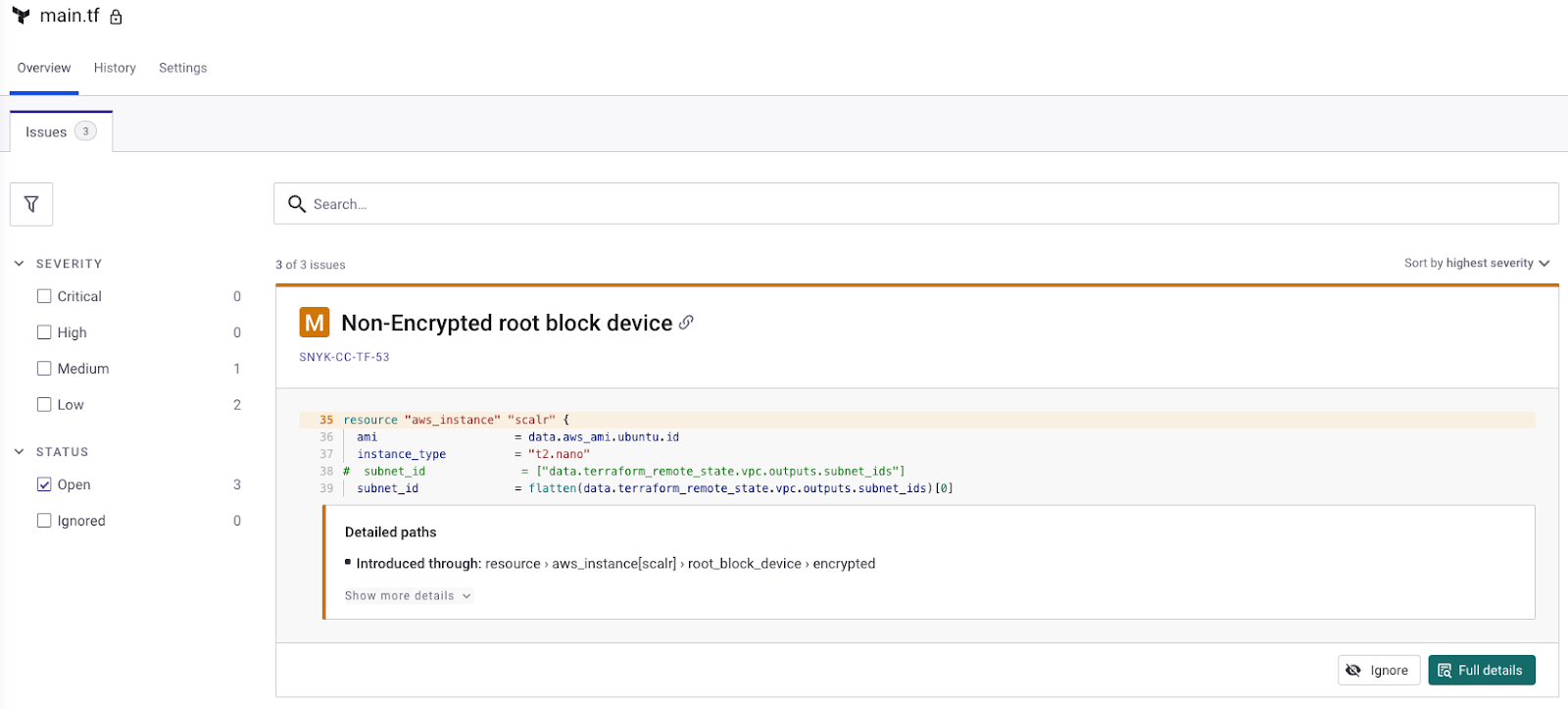
To turn on static code scanning, you grant Snyk access to your VCS provider and then pick the repositories you want to scan. As Snyk imports the repositories containing the Terraform configuration files, they're turned into Snyk projects where you see the vulnerability reports. In this example, Snyk imports the Terraform configuration files and reviews the main.tf file that has code to create an AWS EC2 instance, and identifies a few vulnerabilities:
Enabling Snyk in your VCS provider
Use Case 2: Using the Snyk CLI
The next use case is catching vulnerabilities in the Terraform plan. Some teams do early development locally before pushing code into a VCS repository, so the Snyk CLI fits here to keep vulnerable code out of repos.
You can run the Snyk CLI from any laptop, CI/CD tool, automation pipeline, or Terraform automation and collaboration platform, such as Scalr or HashiCorp Terraform Cloud. Linking a VCS repository to those tools is recommended but not required, which is why the extra step of enforcing the Snyk CLI is helpful.
Setting up the CLI
There are several ways to install the Snyk CLI, depending on where it'll run. For example, you can use npm or Homebrew (official docs):
Using npm:
npm install -g snykOr using Homebrew on macOS:
brew tap snyk/tap
brew install snyk
Authentication
Once installed, authenticate to the Snyk SaaS service with the following command:
snyk authThis opens a browser window where you can log in or sign up for a Snyk account.
Scanning
You now have two options for what to scan. The first is the Terraform files in your working directory. Run this from that directory:
snyk iac testIf you don't have the Terraform files locally (in a CI/CD tool or automation pipeline, for example), scan the Terraform plan output instead:
terraform plan -out=tfplan.binary
terraform show -json tfplan.binary > tf-plan.json
Then run snyk iac test on the JSON:
snyk iac test tf-plan.jsonUse Case 3: Integrating with Scalr
Integrating Snyk with Scalr follows the same steps outlined in the CLI section above, but requires Scalr custom hooks to install the CLI and then run the test since all runs are executed remotely.
First, create the following script in a VCS repository or working directory that is linked to your Scalr workspace:
#!/bin/bash
# snyk-scan.sh - runs as a Scalr post-plan custom hook
set -euo pipefail

npm install -g snyk

# Convert the plan Scalr just produced to JSON and scan it.
# Adjust the plan file path if your workspace writes it somewhere else.
terraform show -json tfplan.binary > tf-plan.json
snyk iac test tf-plan.json
Note: To use with OpenTofu, change terraform show to tofu show
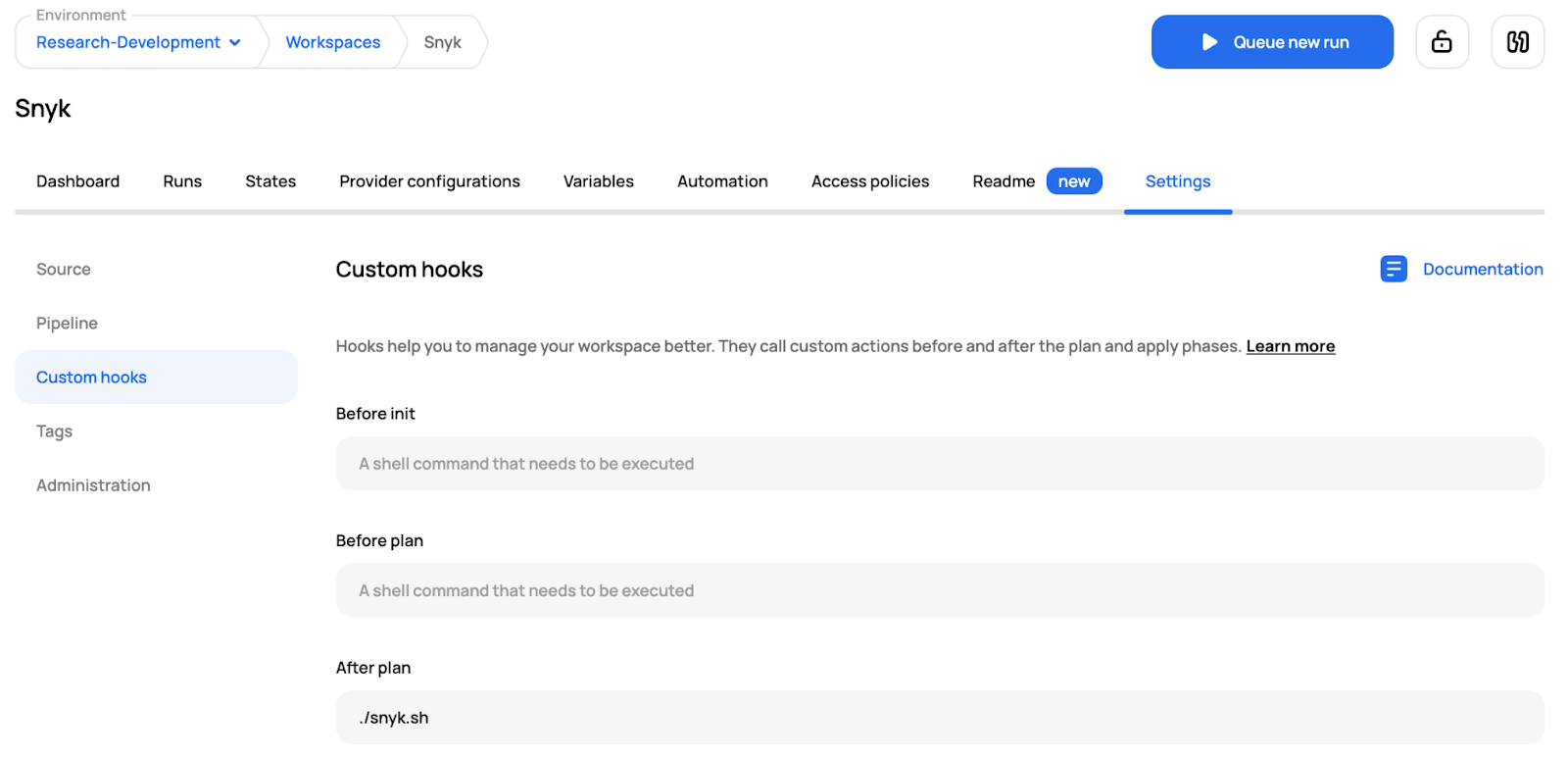
In Scalr, link the repository to the workspace you're using and reference the script in a post-plan custom hook:
Scalr Custom Hooks setup
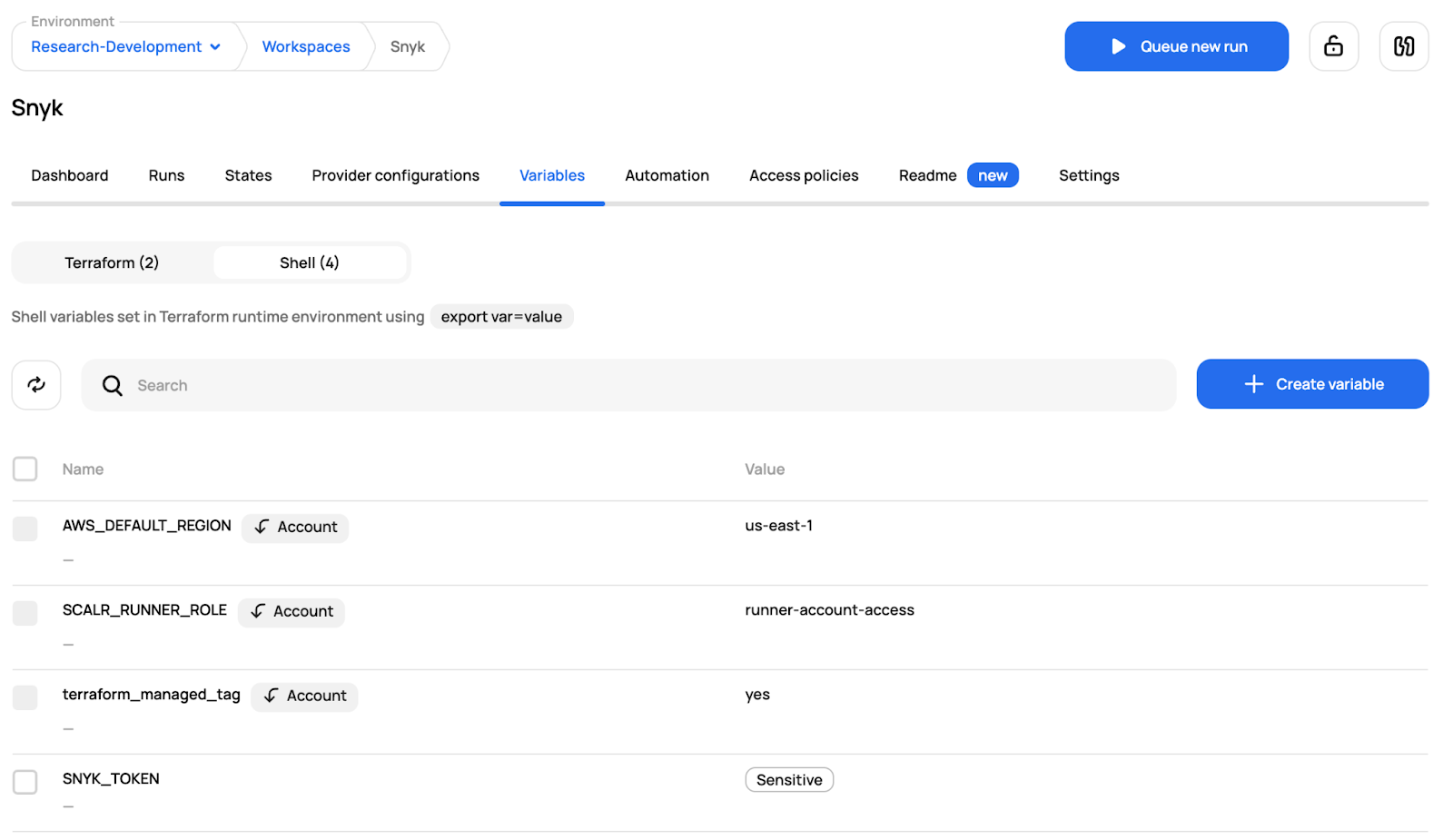
Next, click on the variables tab and add the Snyk API token as a sensitive shell variable (SNYK_TOKEN) so the Scalr container can authenticate:
Scalr Variable Creation
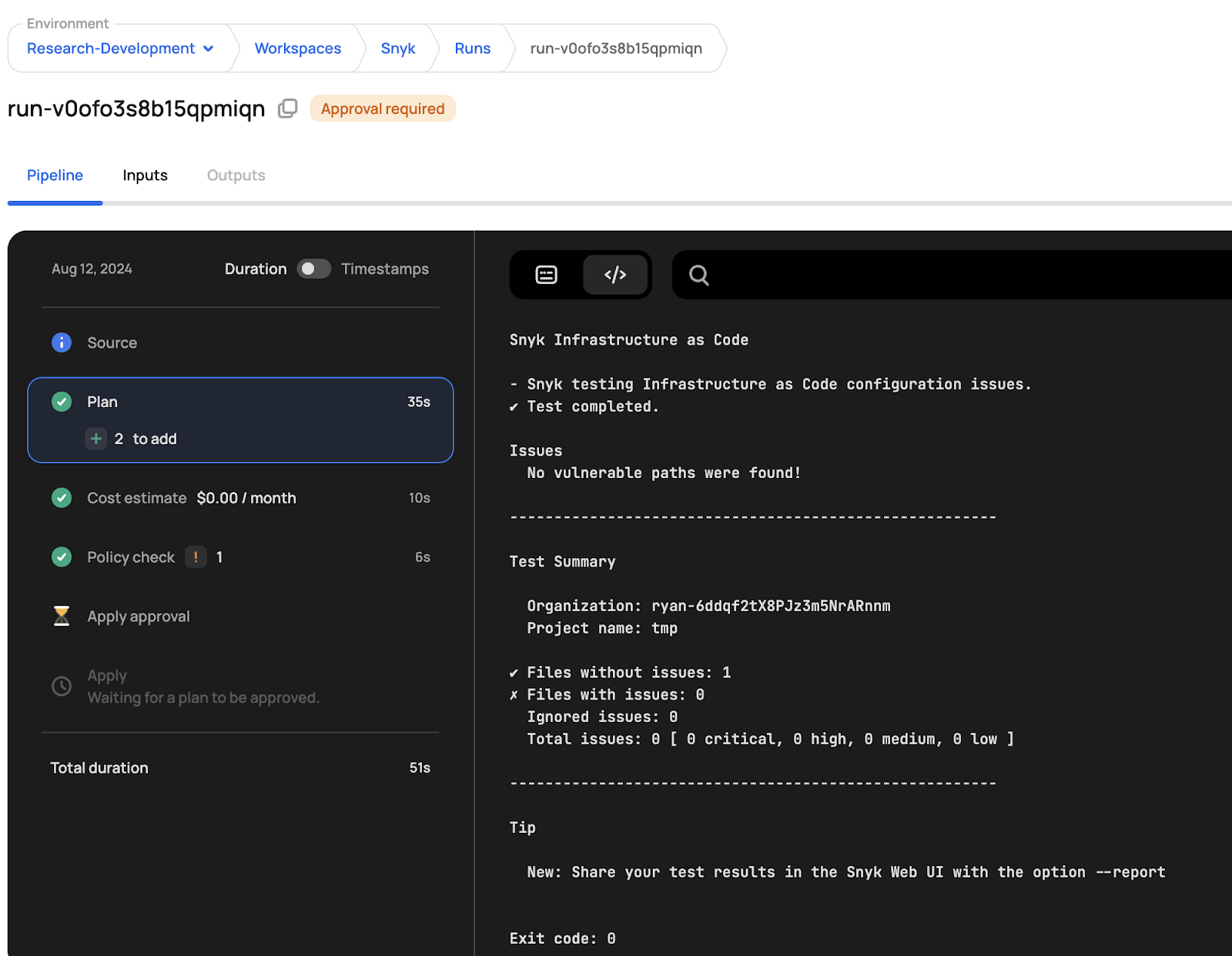
Now execute a run, and you'll see the Snyk results directly in the Scalr UI:
Scalr Run Dashboard
Where to plug Snyk in
Where Snyk fits depends on your IaC process. You can scan static code in the repo, scan plan output in a pipeline, or do both, and either way you catch vulnerabilities before they reach production. For a Terraform-native option, check out the Snyk Provider on library.tf.
Frequently asked questions
Can Snyk scan Terraform and OpenTofu code?
Yes. Snyk works with Terraform and OpenTofu and can scan in two phases: the static code in your VCS repository, such as GitHub or GitLab, and the Terraform plan output before the apply runs. That gives you a chance to catch security issues both at code-review time and during deployment.
How is Snyk different from Open Policy Agent for IaC scanning?
Snyk scans against a predefined list of known vulnerabilities, while Open Policy Agent is built more for custom policies that match your organization's requirements. OPA also needs the Terraform plan output to do its work, whereas Snyk can scan static code in the repo as well.
How do you scan Terraform code with the Snyk CLI?
Install the Snyk CLI with npm or Homebrew, authenticate to the Snyk SaaS service, then either scan the Terraform files in your working directory or convert the Terraform plan output to JSON and run a snyk iac test on it. The CLI runs from any laptop, CI/CD tool, or platform like Scalr or HashiCorp Terraform Cloud.
How do you integrate Snyk with Scalr?
Since Scalr runs execute remotely, you use a post-plan custom hook that installs the Snyk CLI and runs the test from a script in a repository linked to your workspace. You also add your Snyk API token as a sensitive SNYK_TOKEN shell variable so the Scalr container can authenticate, and the results show up in the Scalr UI.
About the author

director of platform engineering at Scalr
Ryan Fee is the director of platform engineering at Scalr, with over 15 years of experience improving infrastructure experiences at companies large and small.
Part of this guide
15 sheets
IaC Security: Securing Your Terraform and OpenTofu Infrastructure
- Terraform Module Supply Chain Attacks: Tag Mutation, Pwn Requests, and How to Pin Safely
- Malicious Terraform Providers: Supply Chain Risks and How to Verify What You Install
- Terraform Supply Chain Attacks: Risks, Real Incidents, and How to Defend Against Them
- Terraform Wiz: How to Scan, Secure, and Enforce Policy on Your IaC
- Secrets in Terraform State: Why They Leak, and the Fix
- Bring Your Own Key (BYOK): Customer-Managed Encryption for Terraform Platforms
- Getting Started with Terraform Vulnerability Scanning
- Streamlining AWS IAM Role Creation with Terraform: A Practical Guide
- Using Checkov with Terraform - Integrations, Features, Examples
- Bridgecrew Terraform: Pricing, Use Cases, Best Practices & Alternatives
- A Guide to Terraform Audit Logs
- Using Scalr Hooks with Bridgecrew Yor
- Automating Terraform Security in Scalr Deployments with Regula