

Article · part of a guide
Using Checkov with Terraform - Integrations, Features, Examples
Learn the basics of how and when to use Checkov
Key takeaways
- Checkov is an open-source static analysis tool that scans IaC such as Terraform, CloudFormation, and Kubernetes to catch misconfigurations and security vulnerabilities before deployment.
- It ships with hundreds of built-in policies covering frameworks like CIS, HIPAA, PCI DSS, and SOC2, and supports custom policies written in YAML.
- You install Checkov via pip or brew and run it with commands like checkov -f main.tf, with flags to skip checks, target specific checks, set output formats, or soft-fail.
- Scalr has a native Checkov integration that scans Terraform or OpenTofu code before the plan runs and can hard-fail to block non-compliant runs.
- Scalr also supports enforcing custom Checkov policies from VCS repositories and running multiple Checkov versions on one environment to plan upgrades safely.
What Is Checkov?
Checkov is an open-source static code analysis tool for infrastructure-as-code (IaC) security. Bridgecrew built it, and Palo Alto Networks later acquired Bridgecrew. It scans cloud infrastructure configurations written in Terraform, CloudFormation, Kubernetes, Dockerfile, and ARM templates, then flags misconfigurations and security vulnerabilities before deployment. The checks run against predefined policies that catch the usual problems: unencrypted storage, too many permissions, open security groups, publicly exposed resources. Since it plugs into CI/CD pipelines and tells you how to fix what it finds, teams use it to move security earlier in development instead of auditing after the fact.
This post focuses on the Terraform and OpenTofu side of Checkov. Scalr has a native integration with Checkov, which we cover near the bottom.
Why Do You Need Checkov for Terraform?
Most infrastructure-as-code security incidents start with a misconfigured resource: an unencrypted database, an IAM role that grants too much, a storage bucket left open. As more teams adopt IaC, those gaps multiply. Checkov scans your configuration files early in development and catches the problems before they reach production, where a single misconfiguration can turn into a data breach or a compliance violation. Fixing an issue in a pull request is also far cheaper than fixing it after it ships. Running the same checks on every change keeps your infrastructure aligned with standards like CIS, HIPAA, and SOC2 over time.
What Are Checkov's Key Features?
- Multi-IaC support: Checkov scans infrastructure as code across multiple platforms including Terraform, CloudFormation, Kubernetes, Dockerfile, ARM templates, and Serverless Framework. That way one set of security policies covers whichever IaC tools your teams use.
- Extensive policy library: Out of the box, Checkov includes hundreds of pre-built policies covering security best practices, compliance frameworks (CIS, HIPAA, PCI DSS, SOC2), and cloud provider-specific guidelines. These policies are continuously updated to address new security threats and cloud service features, which helps if you're finding it hard to write your own policy as code.
- Custom policy framework: Organizations can define their own security policies, letting security teams codify company-specific requirements for their Terraform deployments.
- CI/CD integration: Checkov can be integrated with CI/CD platforms like GitHub Actions, GitLab CI, Jenkins, and Azure DevOps, though this requires some effort from the platform team depending on the use case. Scalr, a Terraform Automation and Collaboration platform, has an out-of-the-box integration with Checkov, covered below. Failed security checks can automatically block Terraform plans from executing.
How Do You Run Checkov Against Terraform Code?
First, install Checkov using pip or brew. The full instructions are here.
To see how Checkov works, create a small Terraform module with a few deliberate security holes in it. Save the following as main.tf:
provider "aws" {
  region = "us-west-2"
}

resource "aws_s3_bucket" "example" {
  bucket = "my-example-bucket"
}

resource "aws_s3_bucket_public_access_block" "example" {
  bucket = aws_s3_bucket.example.id

  block_public_acls       = false
  block_public_policy     = false
  ignore_public_acls      = false
  restrict_public_buckets = false
}
This configuration creates an AWS S3 bucket but deliberately leaves every public-access control disabled. Now run Checkov against it:
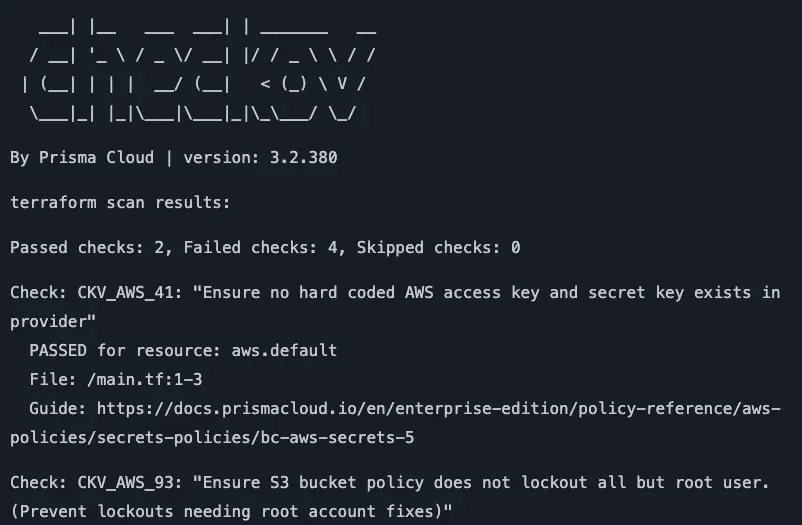
checkov -f main.tfThe output looks something like this:
terraform scan results:

Passed checks: 2, Failed checks: 4, Skipped checks: 0

Check: CKV_AWS_41: "Ensure no hard coded AWS access key and secret key exists in provider"
    PASSED for resource: aws.default
    File: /main.tf:1-3

Check: CKV_AWS_93: "Ensure S3 bucket policy does not lockout all but root user"
    PASSED for resource: aws_s3_bucket.example
    File: /main.tf:5-7

Check: CKV_AWS_53: "Ensure S3 bucket has block public ACLs enabled"
    FAILED for resource: aws_s3_bucket_public_access_block.example
    File: /main.tf:9-16
    Guide: https://docs.prismacloud.io/en/enterprise-edition/policy-reference/aws-policies/s3-policies/bc-aws-s3-19

Check: CKV_AWS_54: "Ensure S3 bucket has block public policy enabled"
    FAILED for resource: aws_s3_bucket_public_access_block.example
    File: /main.tf:9-16
    Guide: https://docs.prismacloud.io/en/enterprise-edition/policy-reference/aws-policies/s3-policies/bc-aws-s3-20

Check: CKV_AWS_55: "Ensure S3 bucket has ignore public ACLs enabled"
    FAILED for resource: aws_s3_bucket_public_access_block.example
    File: /main.tf:9-16
    Guide: https://docs.prismacloud.io/en/enterprise-edition/policy-reference/aws-policies/s3-policies/bc-aws-s3-21

Check: CKV_AWS_56: "Ensure S3 bucket has 'restrict_public_buckets' enabled"
    FAILED for resource: aws_s3_bucket_public_access_block.example
    File: /main.tf:9-16
    Guide: https://docs.prismacloud.io/en/enterprise-edition/policy-reference/aws-policies/s3-policies/bc-aws-s3-22
Every failed check points back to the same block:
resource "aws_s3_bucket_public_access_block" "example" {
  bucket = aws_s3_bucket.example.id

  block_public_acls       = false
  block_public_policy     = false
  ignore_public_acls      = false
  restrict_public_buckets = false
}
Checkov flagged several security issues in the Terraform code: public access isn't blocked, public ACLs aren't blocked, and public policies aren't blocked. To fix them, update the Terraform file:
provider "aws" {
  region = "us-west-2"
}

resource "aws_s3_bucket" "example" {
  bucket = "my-example-bucket"
}

resource "aws_s3_bucket_versioning" "example" {
  bucket = aws_s3_bucket.example.id
  versioning_configuration {
    status = "Enabled"
  }
}

resource "aws_s3_bucket_logging" "example" {
  bucket        = aws_s3_bucket.example.id
  target_bucket = aws_s3_bucket.example.id
  target_prefix = "log/"
}

resource "aws_s3_bucket_public_access_block" "example" {
  bucket = aws_s3_bucket.example.id

  block_public_acls       = true
  block_public_policy     = true
  ignore_public_acls      = true
  restrict_public_buckets = true
}
Run Checkov against main.tf again to verify the updates worked.
What Are Some Advanced Checkov Commands?
Here are some advanced Checkov commands for finer control over what you scan and how Checkov reports it, for both Terraform and OpenTofu.
Filtering and Targeting
# Skip specific checks
checkov -f main.tf --skip-check CKV_AWS_18,CKV_AWS_21

# Check only specific checks
checkov -f main.tf --check CKV_AWS_53,CKV_AWS_54

# Specify a custom policy directory
checkov -f main.tf --external-checks-dir /path/to/custom/checks
Custom Policies and Rules
# Create and use custom policies
checkov -f main.tf --external-checks-git https://github.com/your-org/custom-policies.git

# Use a specific branch for custom policies
checkov -f main.tf --external-checks-git https://github.com/your-org/custom-policies.git --branch dev
Output Formats
# Generate JSON output
checkov -f main.tf --output json

# Generate JUnit XML for CI integration
checkov -f main.tf --output junitxml

# Save results to a file
checkov -f main.tf --output json > results.json

# Generate SARIF format (for GitHub code scanning)
checkov -f main.tf --output sarif
Blocking Behavior
# Soft-fail (return code 0 even with failures)
checkov -f main.tf --soft-fail
Advanced Scanning
# Scan a Terraform plan file
terraform plan -out=tfplan.binary
terraform show -json tfplan.binary > tfplan.json
checkov -f tfplan.json

# Scan for secrets in your code
checkov -f main.tf --framework secrets

# Scan with multiple frameworks at once
checkov -d . --framework terraform,secrets,dockerfile

# Scan specific variables
checkov -f main.tf --var-file prod.tfvars
Integration with Platforms
# Integrate with the Bridgecrew / Prisma Cloud platform
checkov -f main.tf --bc-api-key <your_api_key>
How Do You Create a Custom Checkov Policy?
Checkov supports custom policies in YAML format through its policy-as-code (PaC) framework, using a simplified YAML syntax. Custom policies require a metadata section that identifies the general information about the policy, and a definition section that defines the actual rules. Inside definition, cond_type tells Checkov what kind of check this is (attribute, connection, or a logical operator like and/or/not), and resource_types, attribute, and operator sit alongside it, not nested underneath it.
AWS provider v4 split S3 server-side encryption out of the aws_s3_bucket resource and into its own aws_s3_bucket_server_side_encryption_configuration resource, the same split this post already used above for versioning and logging. A custom policy needs to target that resource directly, not an attribute on aws_s3_bucket itself. Here's a policy that checks a default encryption algorithm is set:
metadata:
  id: "CUSTOM_AWS_001"
  name: "Ensure S3 bucket server-side encryption specifies a default algorithm"
  category: "encryption"
  severity: "MEDIUM"

definition:
  cond_type: "attribute"
  resource_types:
    - "aws_s3_bucket_server_side_encryption_configuration"
  attribute: "rule.apply_server_side_encryption_by_default.sse_algorithm"
  operator: "exists"
Save this as s3_encryption_policy.yaml in a directory structure like:
custom_policies/
└── yaml/
    └── s3_encryption_policy.yaml
Then run Checkov against your custom policy:
checkov -f main.tf --external-checks-dir custom_policiesHow Does Checkov Compare to Other Terraform Scanners?
Checkov isn't the only static scanner in the IaC security space. tfsec, Terrascan, Trivy, and Snyk all catch overlapping sets of misconfigurations, so which one fits depends on how much you value multi-framework compliance coverage versus Terraform-native speed.
| Feature | Checkov | tfsec | Terrascan | Snyk |
|---|---|---|---|---|
| Primary focus | Multi-framework IaC security | Terraform-specific security | Multi-framework IaC & compliance | Code, dependency, and IaC security |
| Backing vendor | Palo Alto Networks | Aqua Security | Tenable | Snyk |
| Built-in checks written in | Python | Go | Rego | Proprietary rule engine |
| Custom policy language(s) | Python or YAML | Rego (or JSON/YAML for simple checks) | Rego | Rego (via OPA) |
| Scans Terraform plan output? | Yes | Yes | Yes | Yes |
Checkov's edge is its graph-based analysis, which follows resource references across a module instead of checking each block in isolation, plus one of the largest built-in policy libraries of the group.
One caveat on tfsec: Aqua Security announced in February 2023 that it's consolidating tfsec's engineering effort into Trivy, and tfsec shipped its final standalone release in May 2025. It still runs and still works, but if you're picking a scanner today, Trivy is the actively developed option going forward.
For a broader rundown of how these tools stack up, see our guide to Terraform vulnerability scanning, and for a deeper look at Snyk specifically, see using Snyk with Terraform.
How Does Scalr Integrate with Checkov?
Scalr has a native integration with Checkov that automatically scans the Terraform or OpenTofu code before the Terraform plan runs. To use Checkov in Scalr, enable the integration, pick the version, and pass any custom parameters you need.
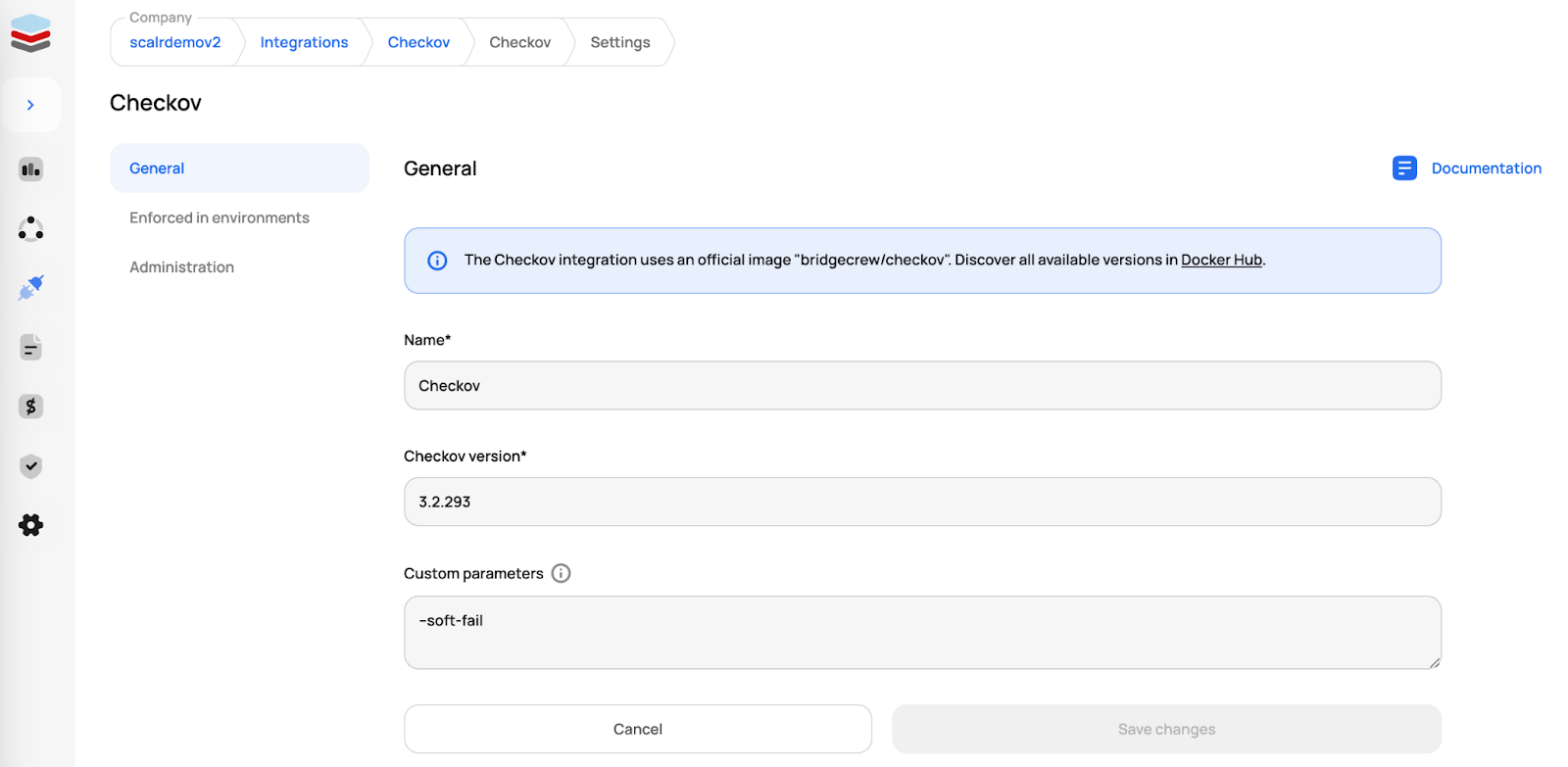
Enabling the Checkov integration in Scalr, with version and parameter settings
After you enable it, Checkov can be enforced on all Scalr environments or on select ones. On an enforced environment, every run is forced to go through a Checkov scan before the Terraform plan executes:
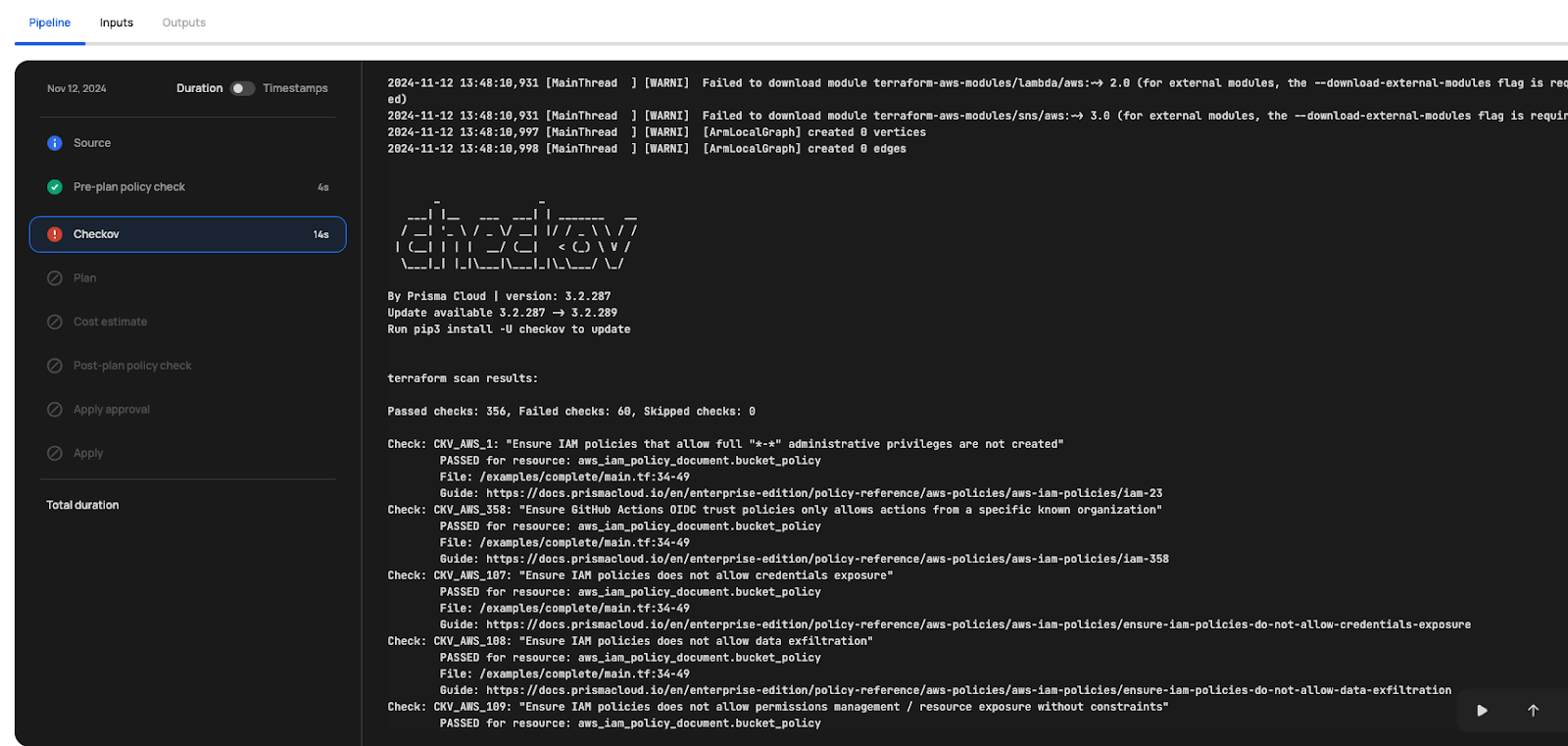
Checkov scan enforced on a Scalr environment, running before the Terraform plan executes
If the Checkov scan is in hard-failure mode, the Terraform run automatically stops before the plan can execute.
Optionally, custom parameters can be passed to change Checkov's behavior in Scalr. For example, the --soft-fail parameter returns a code of 0, which allows the run to continue. Other options like --skip-check or --external-checks can also be passed as custom parameters. See all available parameters here.
Customization
Scalr supports importing and enforcing custom Checkov policies from external repositories. Users specify a VCS provider, repository, branch, and folder containing their custom Checkov checks, which are evaluated as part of policy enforcement in designated environments.
- Custom policy enforcement: Define and enforce security and compliance rules beyond Checkov's built-in policies.
- VCS integration: Import policies from GitHub, GitLab, Bitbucket, or other supported VCS providers.
- Granular control: Specify the repository, branch, and folder for Checkov policies.
- Automatic policy evaluation: Checkov runs the external policies as part of the Terraform plan and apply process.
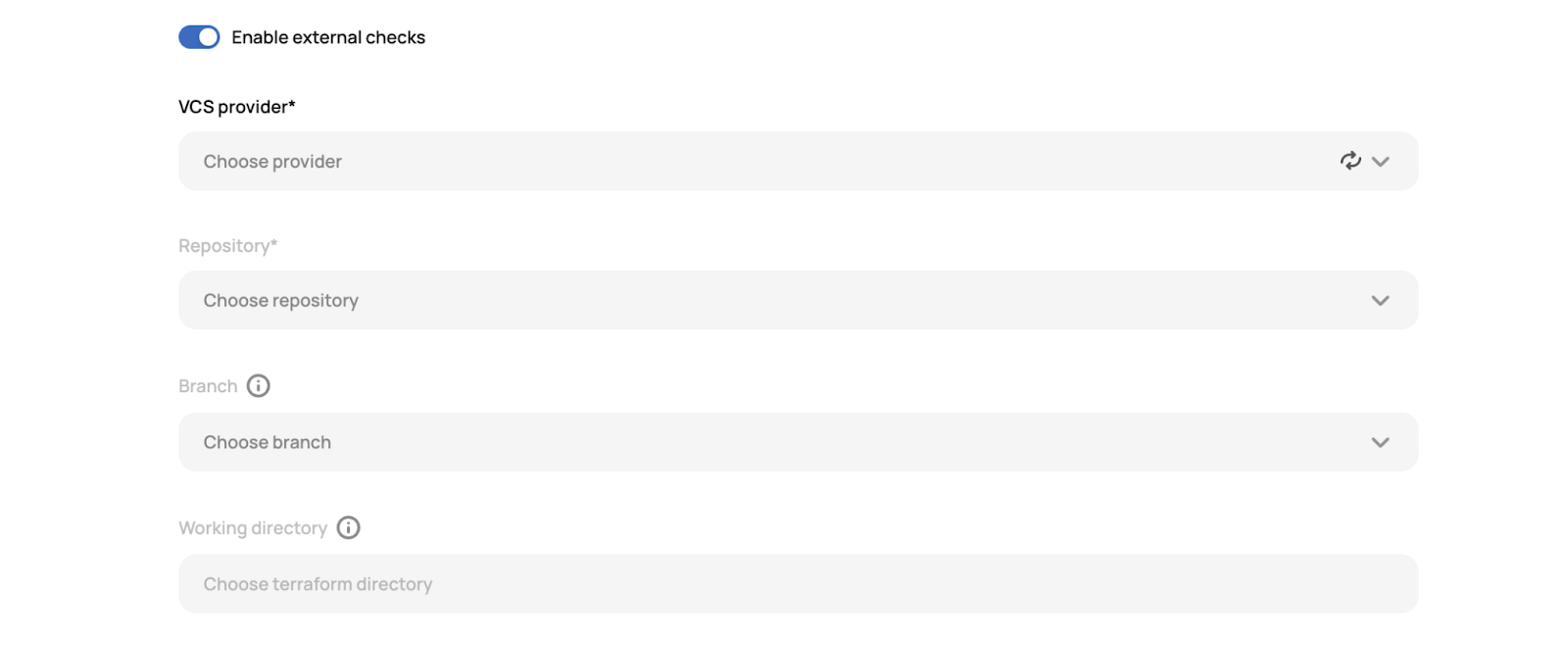
Scalr's custom Checkov policy configuration, with VCS repository settings
Testing
Anyone who has used Checkov knows that jumping from one version to another can take planning. Scalr lets you run multiple versions of Checkov on a single environment so you can stage the upgrade. Keep your current version on its strict setting and add the new version in soft-fail mode, so anything the newer version flags won't block runs yet. That gives your team time to review whatever the new version finds in their Terraform code and fix it before the upgrade is enforced.
Where Should You Start with Checkov?
Checkov catches Terraform misconfigurations automatically before they reach production, when a fix is a quick code change instead of a production incident. Running it on every change also keeps your configurations consistent with frameworks like CIS, HIPAA, and SOC2.
If you want the quickest path, the Scalr integration runs Checkov during development without any CI/CD wiring on your side.
This blog has been verified for Terraform and OpenTofu.
Key Sources Used
Frequently asked questions
What is Checkov and what does it do for Terraform?
Checkov is an open-source static analysis tool for infrastructure-as-code security, built by Bridgecrew and now owned by Palo Alto Networks. It scans Terraform, CloudFormation, Kubernetes, Dockerfile, and ARM templates against predefined policies and flags misconfigurations like unencrypted storage, over-permissive IAM roles, and publicly exposed resources before they get deployed.
How do you run Checkov against a Terraform file?
Install Checkov with pip or brew, then run checkov -f main.tf against a single file or checkov -d . against a directory. The output lists passed and failed checks with the check ID, the affected resource, and a link to remediation guidance. Flags like --skip-check, --check, --output json, and --soft-fail control which checks run and how results are reported.
Can you write custom policies for Checkov?
Yes. Checkov supports custom policies in YAML through its policy-as-code framework. A policy has a metadata section with an ID, name, category, and severity, plus a definition section with the actual rules, such as requiring server-side encryption on S3 buckets. You point Checkov at your policy directory with --external-checks-dir, or pull policies from a Git repository with --external-checks-git.
How does Scalr integrate with Checkov?
Scalr has a native Checkov integration that scans Terraform or OpenTofu code before the plan runs, with no CI/CD wiring needed. In hard failure mode a failed scan stops the run before the plan executes. You can also enforce custom Checkov policies pulled from a VCS repository, and run multiple Checkov versions on one environment to stage upgrades safely.
About the author

director of platform engineering at Scalr
Ryan Fee is the director of platform engineering at Scalr, with over 15 years of experience improving infrastructure experiences at companies large and small.
Part of this guide
15 sheets
IaC Security: Securing Your Terraform and OpenTofu Infrastructure
- Terraform Module Supply Chain Attacks: Tag Mutation, Pwn Requests, and How to Pin Safely
- Malicious Terraform Providers: Supply Chain Risks and How to Verify What You Install
- Terraform Supply Chain Attacks: Risks, Real Incidents, and How to Defend Against Them
- Terraform Wiz: How to Scan, Secure, and Enforce Policy on Your IaC
- Secrets in Terraform State: Why They Leak, and the Fix
- Bring Your Own Key (BYOK): Customer-Managed Encryption for Terraform Platforms
- Getting Started with Terraform Vulnerability Scanning
- Streamlining AWS IAM Role Creation with Terraform: A Practical Guide
- Bridgecrew Terraform: Pricing, Use Cases, Best Practices & Alternatives
- A Guide to Terraform Audit Logs
- How to Use Snyk with Terraform: Securing Your Infrastructure as Code
- Using Scalr Hooks with Bridgecrew Yor
- Automating Terraform Security in Scalr Deployments with Regula