

Article · part of a guide
Automating Terraform Security in Scalr Deployments with Regula
Regula enables cloud teams to evaluate Infrastructure-as-Code (IaC) for security and compliance violations.

Key takeaways
- Regula is an open source tool that scans Terraform, CloudFormation, ARM, and Kubernetes IaC for security and compliance violations before deployment.
- Regula maps policies to CIS Benchmarks for AWS, Azure, Google Cloud, and Kubernetes, and is built on Rego, the Open Policy Agent query language.
- Scalr custom hooks run a 'before plan' script that executes Regula and an 'after plan' script that validates Terraform, blocking the build on a non-zero exit code.
- Regula supports waiving specific rules for specific resources or disabling rules entirely through a waivers.rego configuration file.
Introduction to Regula and Scalr Integration
Regula
Regula enables cloud teams to evaluate Terraform, CloudFormation, Azure Resource Manager, and Kubernetes Infrastructure-as-Code (IaC) for security and compliance violations before deployment. Regula is an open source implementation of Rego, the query language used by the Open Policy Agent (OPA) project. Where relevant, Regula's policies have been mapped to the Center for Internet Security (CIS) Amazon Web Services (AWS), Azure, Google Cloud, and Kubernetes Foundation Benchmarks to allow users to enforce these policies on IaC prior to deployment.
Because Regula catches misconfigurations before deployment, security and compliance checks move into the hands of the developers writing the code. That removes the bottleneck of waiting on a security review after the fact. Regula is maintained by Fugue engineers.
Scalr
Scalr is a Terraform Automation and Collaboration (TACO) software that has support for pull request automation, native Terraform CLI, or module-driven workflows. Scalr uses a hierarchical model that centralizes admin operations such as RBAC, policy control through OPA, operational views, and a private module registry. Admins keep that control at the top while developers run Terraform workflows independently within their own environments.
Goal
This post pairs Regula's IaC scanning with Scalr's Terraform automation to show how a team can deploy cloud infrastructure securely without slowing down.
Prerequisites
If you want to follow along, you'll need the following:
- A Scalr account with custom hooks enabled. See below for how to configure these.
- A workspace configured in your Scalr account. A workspace is where all objects related to Terraform-managed resources are stored and managed.
- Cloud provider credentials added to your Scalr account (for this demonstration, I will be using AWS)
- A version control system (VCS) provider configured in your Scalr account (for this demonstration, I will be using GitHub)
- Assign scripts/security.bash as the "Before plan" custom hook and scripts/validate.bash as the "After plan" custom hook
- The latest version of Regula in your /usr/local/bin directory (our security.bash script will pull this and run it within the Scalr pipeline, but having it locally will allow you to evaluate your code prior to committing)
- (Optional, and requires a Fugue account) Generate Fugue API ID and Fugue API Secret and set as workspace variables in Scalr
Optionally, you can also clone my repository to save yourself some work by executing the following command in your Terminal:
git clone https://github.com/fugue/fugue-scalr-integration.git
What's in the repo?
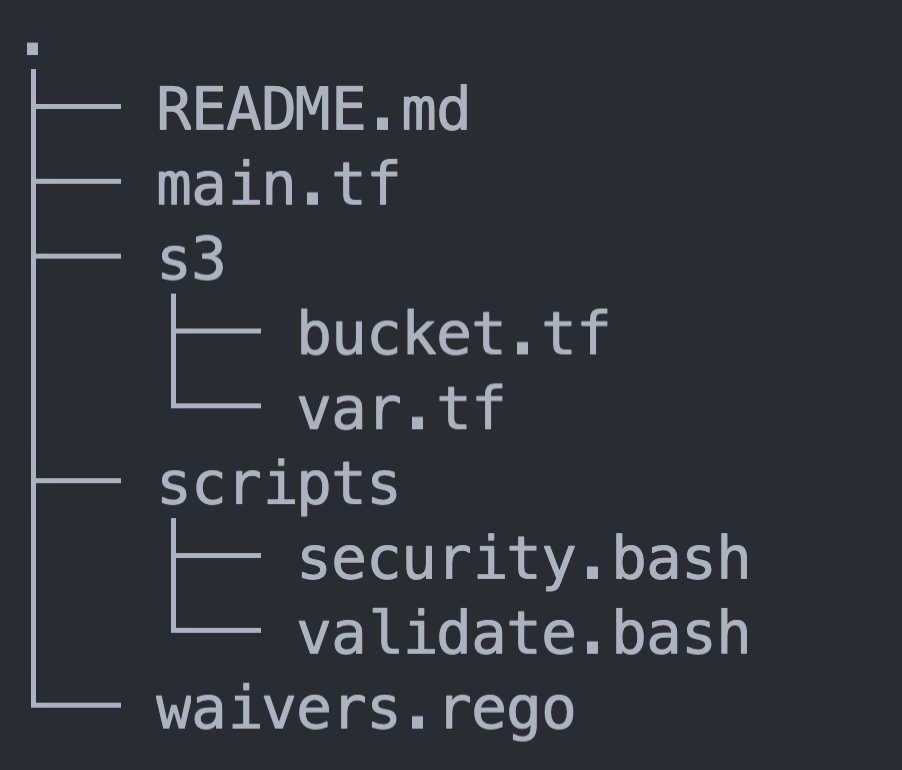
The screenshot above shows the file structure of my repository. The parts that matter here:
- main.tf: A Terraform file that declares provider and module information
- s3/: A subdirectory that holds Terraform files that contain intentional vulnerabilities
- waivers.rego: A file that waives and disables select rules
- .regula.yaml: A Regula configuration file that declares how I want Regula to be run in this repository
- scripts/: A subdirectory that contains the custom hook described above
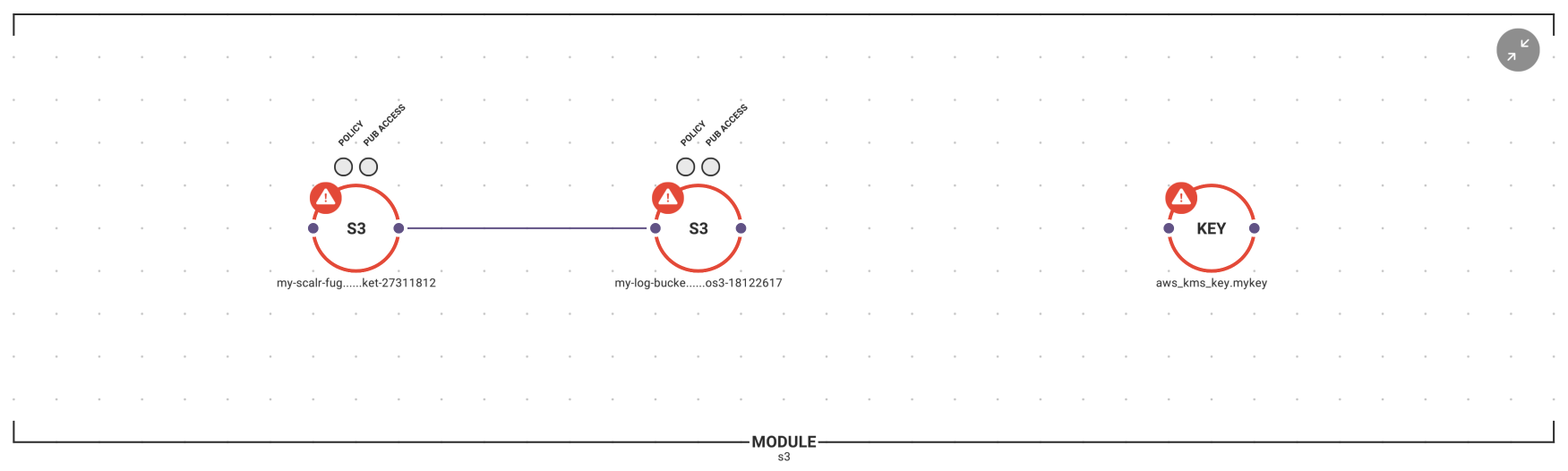
Here is a better view of the contents of the S3 module, along with an overlay of the configuration status of all infrastructure (violations of CIS Benchmarks are in red):
Configuring Scalr custom hooks
Custom hooks let you customize the core Terraform workflow with commands, scripts, or API calls. The shell scripts in this demonstration use Regula for security and compliance scanning, and they also check Terraform formatting and validation.
You can add custom hooks when you create a workspace, or any time after that in the workspace settings, by specifying what should run before and after plan, and before and after apply. Here's how to set them up:
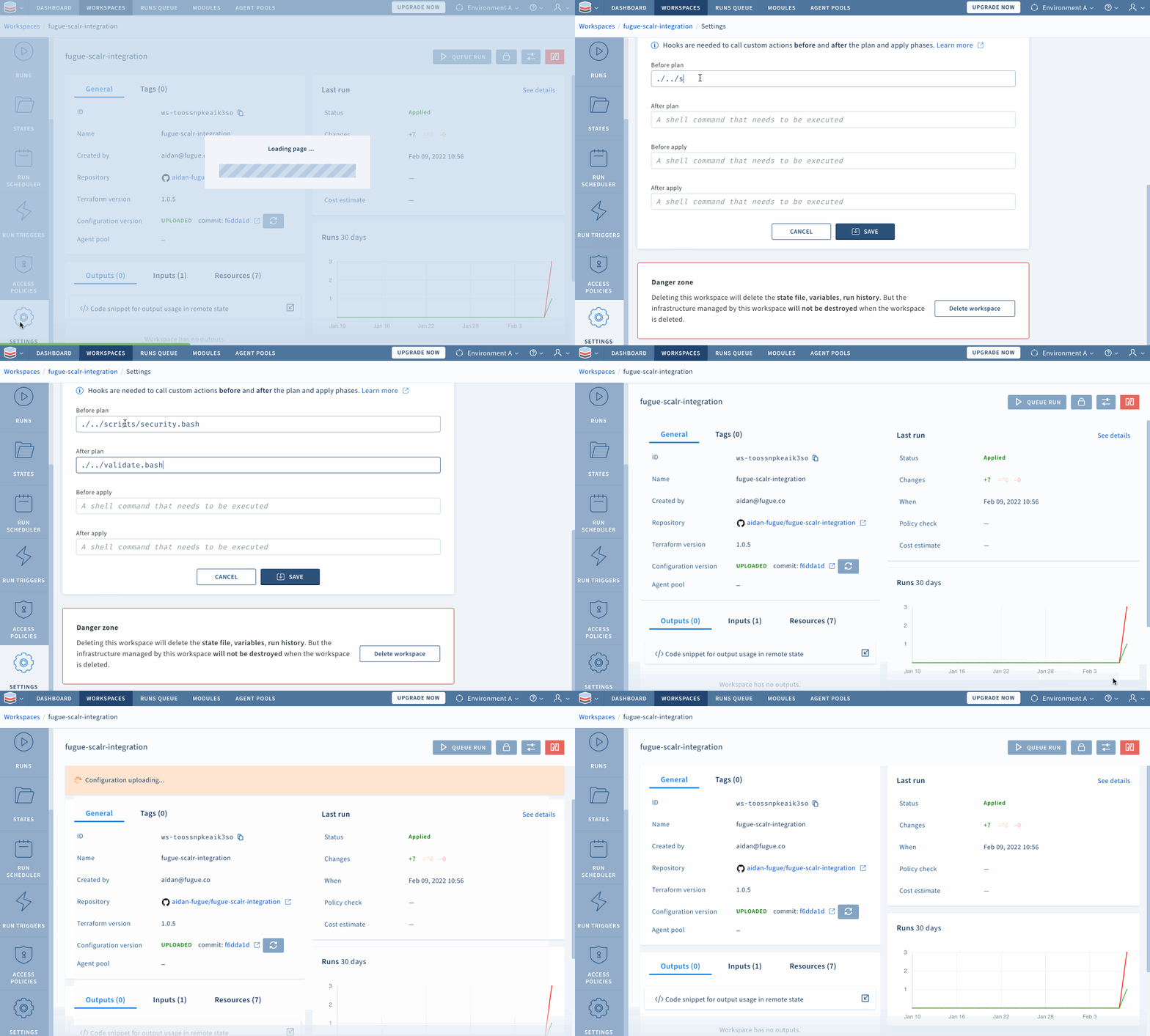
Within the "Advanced" options on the "Settings" page, Scalr lets you choose the relative path in which Terraform commands will execute (I selected the s3/ directory for this example), which is why the path to the scripts is preceded by "./../".
Automating security scans along the path of least resistance
When you need infrastructure fast, the easiest move is to grab Terraform code off the internet or from a colleague and assume it's secure. Beginners and experienced engineers both do it. That code often passes every formatting, linting, and validation check you throw at it while still carrying serious vulnerabilities.
Exposing latent vulnerabilities: scanning infrastructure with Regula
For this demonstration, I deliberately took that shortcut and looked for Terraform code that would deploy an S3 bucket as fast as possible. To show how vulnerable that code is, I'll run regula run against the repository locally:
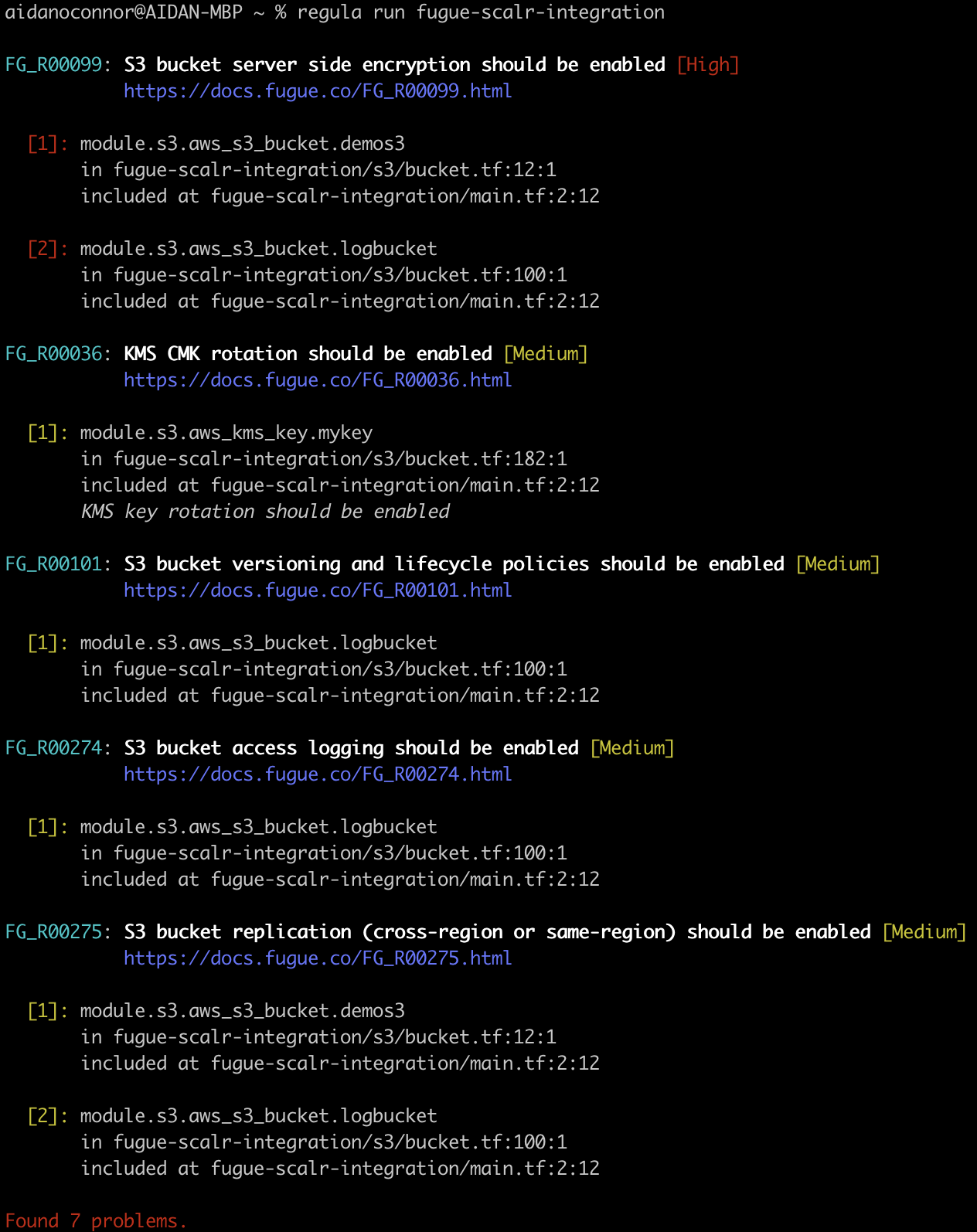
When you execute this command, Regula will:
- automatically detect supported IaC files throughout the entire repository
- run a security and compliance scan against all detected, supported IaC files
- Output the results of that scan in descending order of severity, with the following information:
- Fugue rule ID (e.g. FG_R00099) and title
- Rule severity (e.g. [High])
- Hyperlink to rule remediation steps (e.g. https://docs.fugue.co/FG_R00099.html)
- Location of rule violation listed by IaC file
These results should worry DevOps and security engineers alike. Copy, paste, and deploy vulnerable code, and you expose yourself to attackers who use automation to find and exploit exactly these gaps. And notice that I ran this scan by hand, outside any pipeline (Scalr's included), which is more effort than the shortcut I took to get here. Past breaches show the pattern: attackers scan for misconfigurations like an open S3 bucket, then use them as a foothold to reach the data that matters most. If you aren't using the same kind of automation to catch those problems before they reach the cloud, you're counting on the attackers not finding them first.
Let's look closer at one of these violations with a snippet of the code (if you're following along, the code below is from lines 18 - 26 of s3/bucket.tf, and the indentation is adjusted left for easier viewing):
server_side_encryption_configuration {
  rule {
    apply_server_side_encryption_by_default {
      #Un-comment below to satisfy FG_R00099
      #kms_master_key_id = aws_kms_key.mykey.arn
      #sse_algorithm     = "aws:kms"
    }
  }
}
I've paired each intentional vulnerability with a comment showing where to revise the code so it satisfies the numbered rules that ship with Regula. As written, the code above violates rule FG_R00099 (a high severity violation according to CIS Benchmarks): if deployed as-is, this AWS Simple Storage Service (S3) bucket would expose data at rest. If you're new to this, picture leaving a bank vault and a safety deposit box wide open. You can move the deposit in an armored truck (transit encryption in this analogy), but if the vault stays unlocked (server side encryption never applied), the data is still exposed.
The unsettling part is where I got this code. The Terraform documentation I copied it from shows how to deploy an S3 bucket in the simplest possible way, the way documentation usually does. It leads with the required parameters and pushes optional ones, server side encryption included, into the later sections most people skim past. Configuring your cloud resources securely is on you. The cloud provider just hands you the building blocks.
Applied flexibility: waiving and disabling rules
Sometimes a real business need conflicts with a low or medium severity rule. Take a company that serves content from an S3 bucket hosting a static website. That bucket has to be public, so flagging it for violating FG_R00229 (S3 buckets should have all "block public access" options enabled) gets old fast. Regula lets you waive a specific rule for a specific resource, or disable a rule entirely. For this demonstration, I waive FG_R00274 for my logging bucket and disable Fugue rule FG_R00275 outright, both through my waivers document (waivers.rego). Here is how waiving and disabling rules looks:
package fugue.regula.config

waivers[waiver] {
  waiver := {
    #Waiving bucket logging (for the logging bucket)
    "rule_id": "FG_R00274",
    "resource_id": "module.s3.aws_s3_bucket.logbucket"
  }
}

rules[rule] {
  rule := {
    #Disabling cross region replication (budgetary purposes)
    "rule_id": "FG_R00275",
    "status": "DISABLED"
  }
}
Operationalizing IaC security: stopping misconfigurations from getting to the cloud
This section puts the pieces together: Regula running inside Scalr's remote state and operations backend, so misconfigured infrastructure never reaches the cloud.
The first custom hook script (security.bash) pulls, extracts, moves, and runs the latest version of Regula, then scans all Terraform files (HashiCorp language (HCL) or Terraform JavaScript Object Notation (JSON) plans). If it finds a problem, it produces a non-zero exit code and a message that stops the Scalr build. If everything checks out, it exits zero and the build continues.
The next custom hook script (validate.bash) ensures that the Terraform in this repository is valid and properly formatted according to HCL canonical standards. If the Terraform is not valid, this script produces a non-zero exit code. If the Terraform is valid, Scalr executes the rest of the build, automatically running terraform plan and terraform apply, which deploys your infrastructure to the cloud and keeps the Terraform state in Scalr.
Trying (and failing) a build
Next, I'll show you what it looks like when I commit vulnerable Terraform code to my GitHub repository. I begin by executing the following commands (
git add <files>
git commit -m "initiating the scalr terraform pipeline"
git push
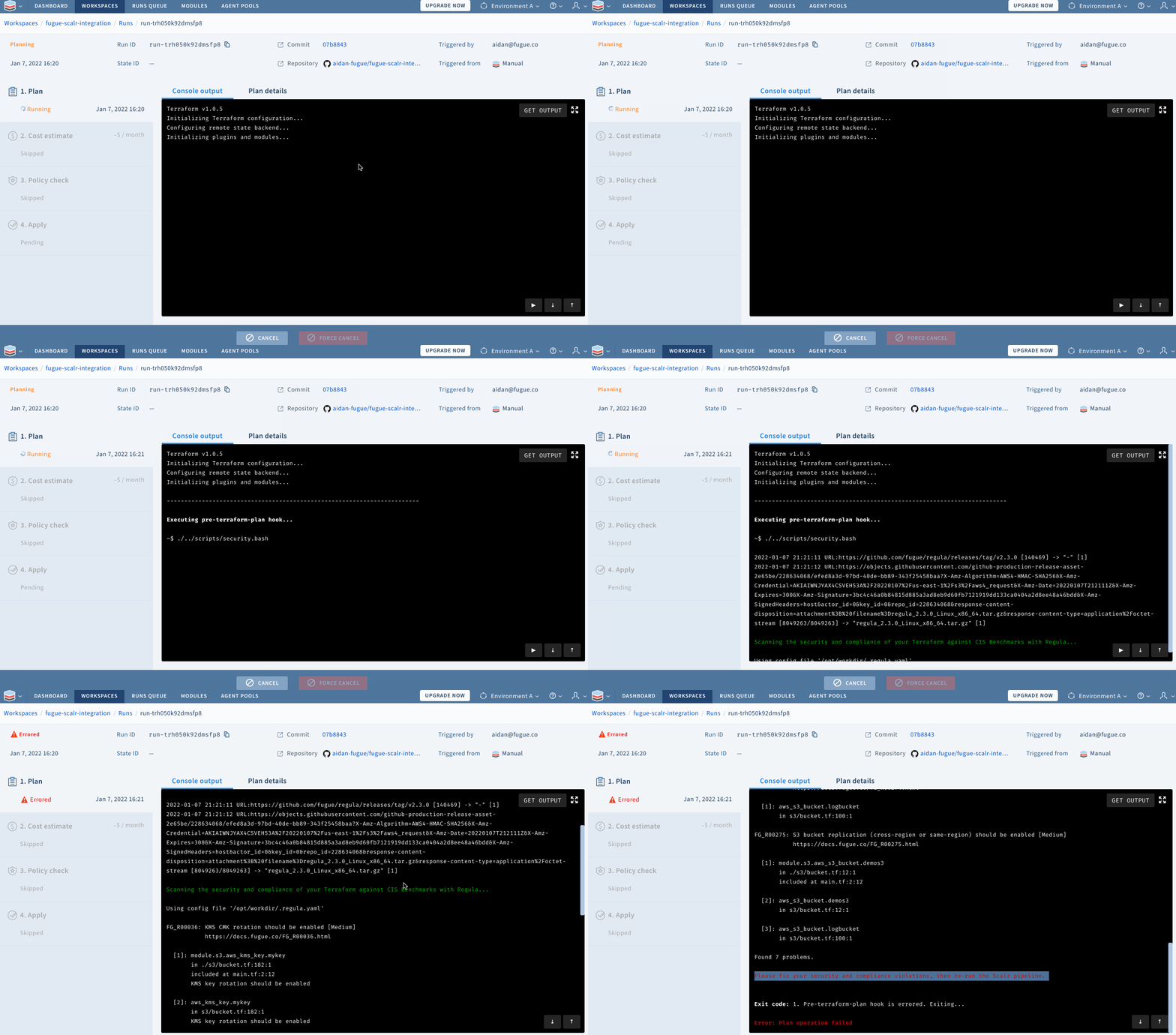
Scalr detects that I've committed changes to my repository and uses the scripts I've provided to scan my Terraform for security and compliance issues:
Resolving configuration issues with Regula
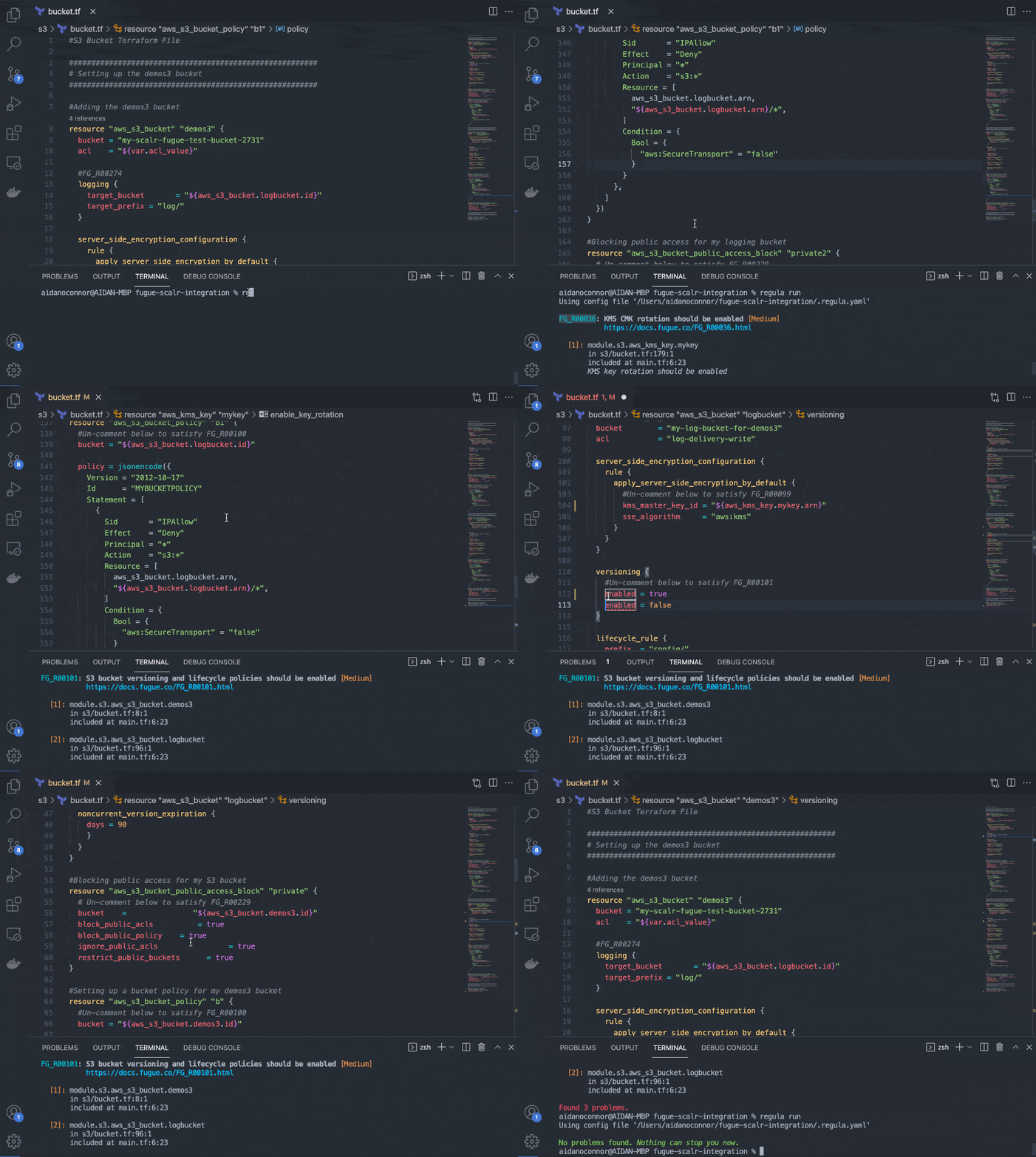
Now that I know my Terraform files have misconfigurations, I can open the repository in VSCode and run regula run locally to work through them (or I could export the output from the regula run that already happened in my Scalr run). I built this repository so I can un-comment the corrections quickly, but in practice fixing the infrastructure is mostly a matter of clicking the link Regula prints next to each rule. Both rules I'm fixing (FG_R00036 and FG_R00101) are single lines of code, pulled straight from the remediation steps behind that link.
Trying (and succeeding!) a build
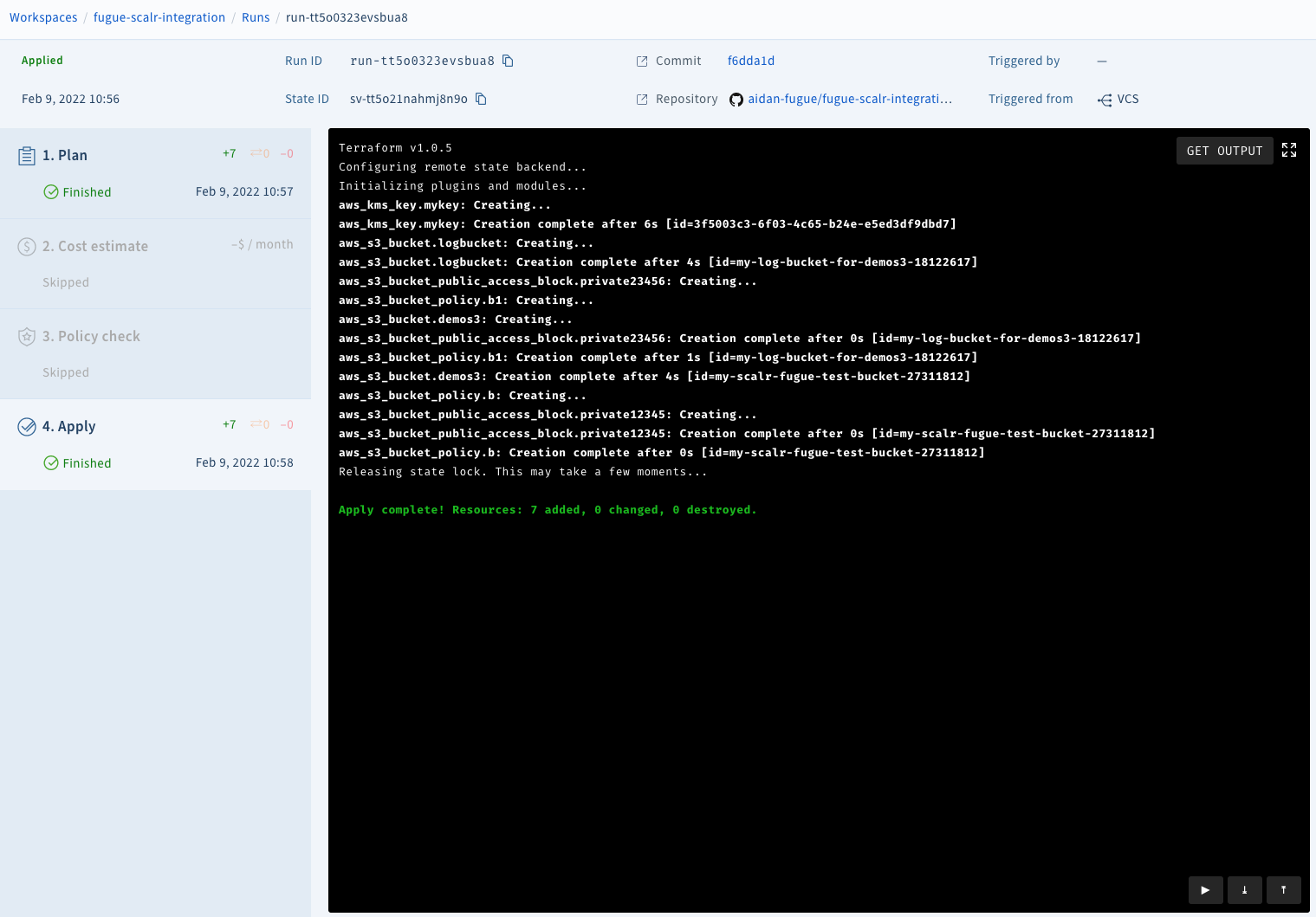
With my infrastructure properly configured, I'll commit to my GitHub repository again. That runs my custom hook scripts, and if they pass, Scalr runs terraform plan and terraform apply.
To demonstrate this, I'll re-run the commands I ran initially:
git add <files>
git commit -m "initiating the scalr terraform pipeline"
git push
...resulting in a successful build!
And that's it. Regula and Scalr now give us a pipeline that deploys cloud infrastructure with Terraform and checks its security on the way out.
Next steps
The example above shows how to secure your IaC according to CIS Benchmarks, but for those who need other compliance families (such as HIPAA, SOC2, ISO 27001, NIST 800-53, GDPR, PCI DSS, AWS WAF, or CSA), see www.fugue.co. The example above also uses custom hooks; if you want more quality-of-life features such as cloud infrastructure cost estimation, self-hosted agents, SSO, or policy previews, see the Scalr pricing page for current plans.
Want to learn more about Regula? See our GitHub repo and documentation. Regula evaluates Terraform HCL, Terraform plan JSON, CloudFormation YAML/JSON, Kubernetes YAML manifests, and Azure Resource Manager templates for security and compliance. Regula also supports waivers, custom rules, enabling or disabling rules, and more.
Regula also integrates with CI systems such as Travis CI and Bitbucket Pipelines, so the same checks shown here can run on every commit.
You can also use Regula with Fugue for security and compliance across the software development lifecycle, from development through runtime. For more information about Fugue, visit www.fugue.co.
About the author

DevOps engineer
Aidan O'Connor is a DevOps engineer specializing in infrastructure automation and security, writing about Terraform, OpenTofu, and CI/CD best practices.
Part of this guide
15 sheets
IaC Security: Securing Your Terraform and OpenTofu Infrastructure
- Terraform Module Supply Chain Attacks: Tag Mutation, Pwn Requests, and How to Pin Safely
- Malicious Terraform Providers: Supply Chain Risks and How to Verify What You Install
- Terraform Supply Chain Attacks: Risks, Real Incidents, and How to Defend Against Them
- Terraform Wiz: How to Scan, Secure, and Enforce Policy on Your IaC
- Secrets in Terraform State: Why They Leak, and the Fix
- Bring Your Own Key (BYOK): Customer-Managed Encryption for Terraform Platforms
- Getting Started with Terraform Vulnerability Scanning
- Streamlining AWS IAM Role Creation with Terraform: A Practical Guide
- Using Checkov with Terraform - Integrations, Features, Examples
- Bridgecrew Terraform: Pricing, Use Cases, Best Practices & Alternatives
- A Guide to Terraform Audit Logs
- How to Use Snyk with Terraform: Securing Your Infrastructure as Code
- Using Scalr Hooks with Bridgecrew Yor