

Guide · 14 articles branch off this one
IaC Security: Securing Your Terraform and OpenTofu Infrastructure
How to secure Terraform, covering threat modeling, state file security, secret management, static analysis tools, DevSecOps practices, and best practices for 2026.

Key takeaways
- Most cloud security incidents come from misconfiguration, so shift-left scanning with tools like Checkov, tfsec, KICS, or Snyk on every pull request is the foundation of IaC security.
- Terraform state files are the source of truth for infrastructure and must be encrypted at rest and in transit, access-restricted, versioned, and never committed to Git.
- Terraform v1.10 ephemeral resources and v1.11 write-only arguments let sensitive values exist only during execution without being persisted in state or plan files.
- Short-lived dynamic credentials via OIDC and assume-role chains are preferred over long-lived static API keys for cloud provider authentication.
- Static analysis should be layered with runtime policy-as-code (OPA, Sentinel), drift detection, and comprehensive audit logs so violations cannot deploy even if they pass review.
Why IaC security matters
Infrastructure as Code (IaC) runs most modern cloud operations now, and teams reach for Terraform and OpenTofu to define and provision their infrastructure. Because that code defines your infrastructure, securing it matters as much as securing the infrastructure itself. Many cloud security incidents trace back to misconfigurations rather than sophisticated attacks.
This guide covers threat models, state and secret handling, scanning tools, and CI/CD enforcement for Terraform and OpenTofu deployments. Most examples use AWS, with OIDC setups for Azure and Google Cloud as well.
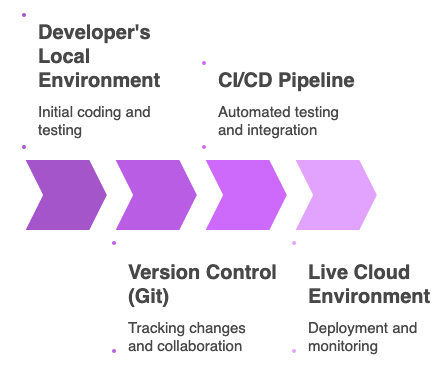
Where does IaC security happen: before deploy or after?
Understanding the Shift-Left Security Model
Modern IaC security runs on the "shift-left" idea: catch problems as early as you can in the development lifecycle instead of finding them in production. That takes a layered approach that handles security at several stages:
Development Time: Developers identify and prevent security issues in their IDEs before code commits.
Pre-Deployment: Automated scanning in CI/CD pipelines catches misconfigurations before infrastructure changes are applied.
Runtime: Continuous monitoring and compliance validation ensure deployed infrastructure remains secure and drift-free.
Operational: Policy enforcement and compliance reporting maintain security standards across environments.
The Static vs. Dynamic Analysis Dichotomy
Two primary methods exist for IaC security analysis:
Static Analysis (SAST) examines your HCL code before deployment:
- Advantages: Early detection, faster fixes, lower remediation costs, covers entire codebase
- Limitations: May produce false positives, lacks runtime context, cannot detect issues from live environment interactions
- Tools: Checkov, tfsec, KICS, Snyk
Dynamic Analysis & Runtime Validation (DAST/CSPM) assesses infrastructure after deployment:
- Advantages: Validates actual security state, detects configuration drift, verifies real-world compliance
- Limitations: Issues found later, remediation more complex, challenges correlating findings to IaC code
- Tools: Cloud Security Posture Management (CSPM) solutions, AWS Security Hub, native cloud provider tools
Best Practice: These methods work together. SAST is your preventative control, while runtime validation keeps things secure over time and catches unauthorized changes.
What are you defending Terraform and OpenTofu against?
Common Threat Vectors
Six threats account for most IaC incidents. The controls for each are in the sections that follow.
| Threat | What it looks like in practice | Where this guide covers the control |
|---|---|---|
| Misconfiguration | An unencrypted bucket, an IAM policy with *, a database with public access, a flat network |
Static analysis, AWS practices |
| Secrets exposure | An API key in HCL, a password persisted in state, a token printed in plan output or CI logs | Secrets and ephemerality |
| State file compromise | State in Git, a backend bucket without encryption or access controls, anyone on the team able to read it | State security |
| Supply chain | A module from an untrusted registry, a tampered provider binary, an unverified plugin | Static analysis, Scalr's private registries |
| Access control | No RBAC on who can apply, no approval before production changes, no audit trail, an over-privileged CI service account | CI/CD enforcement, Scalr |
| Drift | Manual console changes, resources that no longer match code, no way to detect non-compliant configuration | CI/CD enforcement, drift detection |
How do you secure Terraform state?
The Critical Importance of Terraform State
Terraform state files are the source of truth for your infrastructure. If someone compromises a state file, they've compromised your whole infrastructure, so state security isn't optional.
State File Security Best Practices
1. Enable Encryption at Rest
# Using AWS S3 for state backend with encryption
terraform {
  backend "s3" {
    bucket         = "my-terraform-state"
    key            = "prod/terraform.tfstate"
    region         = "us-east-1"
    encrypt        = true
    dynamodb_table = "terraform-locks"
  }
}
2. Enable Encryption in Transit
# Force HTTPS for all communication
terraform {
  backend "s3" {
    bucket                         = "my-terraform-state"
    key                            = "prod/terraform.tfstate"
    region                         = "us-east-1"
    encrypt                        = true
    dynamodb_table                 = "terraform-locks"
    skip_credentials_validation    = false
    skip_metadata_api_check        = false
    skip_requesting_account_id     = false
  }
}
3. Implement State Locking
# Use DynamoDB for distributed state locking
terraform {
  backend "s3" {
    bucket         = "my-terraform-state"
    key            = "prod/terraform.tfstate"
    region         = "us-east-1"
    encrypt        = true
    dynamodb_table = "terraform-locks"
  }
}
State locking prevents concurrent operations from corrupting state and is essential in team environments.
4. Restrict Access to State Storage
# AWS S3 bucket policy for state file access
resource "aws_s3_bucket_policy" "terraform_state" {
  bucket = aws_s3_bucket.terraform_state.id

  policy = jsonencode({
    Version = "2012-10-17"
    Statement = [
      {
        Effect = "Deny"
        Principal = "*"
        Action = "s3:*"
        Resource = [
          aws_s3_bucket.terraform_state.arn,
          "${aws_s3_bucket.terraform_state.arn}/*"
        ]
        Condition = {
          Bool = {
            "aws:SecureTransport" = "false"
          }
        }
      }
    ]
  })
}
5. Enable Versioning and MFA Delete
# Enable S3 versioning and MFA delete protection
resource "aws_s3_bucket_versioning" "terraform_state" {
  bucket = aws_s3_bucket.terraform_state.id

  versioning_configuration {
    status     = "Enabled"
    mfa_delete = "Enabled"
  }
}
6. Never Store State in Git
Always use remote backends (S3, Azure Storage, Terraform Cloud) rather than committing state files to version control. Add to .gitignore:
terraform.tfstate
terraform.tfstate.*
.terraform/
7. Audit State Access
# Enable CloudTrail logging for state access
resource "aws_s3_bucket_logging" "terraform_state" {
  bucket = aws_s3_bucket.terraform_state.id

  target_bucket = aws_s3_bucket.log_bucket.id
  target_prefix = "terraform-state-logs/"
}
How do you keep secrets out of state and plan output?
The Challenge of Sensitive Data in IaC
Terraform has to deal with sensitive information (database passwords, API keys, OAuth tokens) while it provisions infrastructure. This used to be a real problem: you either stored those values in state files or worked around it in ways that weren't secure.
Ephemeral Values: A Security Breakthrough
Ephemeral resources, introduced in Terraform v1.10 (November 2024), fix this by keeping sensitive information alive only during execution so it's never written to state or plan files.
Core Principles of Ephemerality:
- Temporary existence: Values exist only during current Terraform operation
- Non-persistence guarantee: Never written to state files or plan artifacts
- Security by design: Addresses the longstanding sensitive data management challenge
- Runtime-only visibility: Values accessible only during execution in specific contexts
Ephemeral Blocks: Syntax and Functionality
ephemeral "<resource_type>" "<resource_name>" {
  <attributes>
  <meta-arguments>
}
Ephemeral resources participate in Terraform's dependency graph, but they have their own lifecycle:
- Opening: Terraform "opens" the resource by executing its logic to fetch or generate data
- Renewing: For ephemeral resources that may expire during operation (like temporary tokens), Terraform can periodically renew them
- Closing: Once no longer needed, Terraform explicitly "closes" the resource, allowing proper cleanup
Write-Only Arguments
Terraform v1.11 introduced write-only arguments, which let you pass ephemeral values into regular resource blocks without storing them in state:
resource "aws_db_instance" "example" {
  instance_class      = "db.t3.micro"
  allocated_storage   = "5"
  engine              = "postgres"
  username            = "example"
  skip_final_snapshot = true

  # Write-only password argument (never persisted in state)
  password_wo         = ephemeral.random_password.db_password.result
  password_wo_version = 1
}
Write-only arguments follow a naming convention with the _wo suffix and include a versioning mechanism for controlled updates.
Terraform shipped ephemeral resources in v1.10 and write-only arguments in v1.11; OpenTofu did not ship its own equivalent until v1.11.0 in December 2025. For that version history, why sensitive = true alone never protected these values, and a checklist for migrating secrets that are already sitting in existing state, see Secrets in Terraform State.
Practical Example: Secure Database Password Management
# Generate ephemeral random password
ephemeral "random_password" "db_password" {
  length            = 16
  override_special  = "!#$%&*()-_=+[]{}<>:?"
}

# Store the password in AWS Secrets Manager
resource "aws_secretsmanager_secret" "db_password" {
  name = "db_password"
}

# Set the secret value using write-only argument
resource "aws_secretsmanager_secret_version" "db_password" {
  secret_id              = aws_secretsmanager_secret.db_password.id
  secret_string_wo       = ephemeral.random_password.db_password.result
  secret_string_wo_version = 1
}

# Retrieve the password from Secrets Manager (ephemeral)
ephemeral "aws_secretsmanager_secret_version" "db_password" {
  secret_id = aws_secretsmanager_secret_version.db_password.secret_id
}

# Use the password to configure the database
resource "aws_db_instance" "example" {
  instance_class      = "db.t3.micro"
  allocated_storage   = "5"
  engine              = "postgres"
  username            = "example"
  skip_final_snapshot = true

  # Use the ephemeral password (write-only argument)
  password_wo         = ephemeral.aws_secretsmanager_secret_version.db_password.secret_string
  password_wo_version = 1
}
Best Practices for Secret Management
- Use ephemeral resources for sensitive values that should never be persisted
- Integrate with secret managers (AWS Secrets Manager, Azure Key Vault, HashiCorp Vault)
- Enable secret rotation by managing versions of write-only arguments
- Never hardcode secrets in HCL or environment variables
- Use temporary credentials wherever possible instead of long-lived static credentials
- Implement least-privilege access to secrets based on workload requirements
How do you authenticate providers without static credentials?
Moving Beyond Long-Lived Static Credentials
Security practice is shifting toward short-lived, dynamically generated credentials instead of static API keys and secrets. OpenID Connect (OIDC) lets workload identities grab temporary credentials without you having to manage long-lived secrets.
OIDC for Cloud Provider Authentication
AWS OIDC Integration:
# Configure AWS provider with OIDC
provider "aws" {
  assume_role_with_web_identity {
    role_arn            = aws_iam_role.terraform_role.arn
    web_identity_token  = var.oidc_token
    duration_seconds    = 3600
  }
}

resource "aws_iam_role" "terraform_role" {
  name = "terraform-oidc-role"

  assume_role_policy = jsonencode({
    Version = "2012-10-17"
    Statement = [
      {
        Effect = "Allow"
        Principal = {
          Federated = "arn:aws:iam::ACCOUNT_ID:oidc-provider/token.actions.githubusercontent.com"
        }
        Action = "sts:AssumeRoleWithWebIdentity"
        Condition = {
          StringEquals = {
            "token.actions.githubusercontent.com:aud" = "sts.amazonaws.com"
          }
        }
      }
    ]
  })
}
Azure OIDC Integration:
provider "azurerm" {
  features {}
  use_oidc = true
}
Google Cloud OIDC Integration:
provider "google" {
  project = var.gcp_project

  # OIDC configuration handled automatically
  # when running in a workload identity context
}
Scalr and OIDC Integration
Scalr handles the OIDC token exchange inside each run, so the provider gets short-lived cloud credentials and no static key is stored anywhere in the platform or the code.
Provider Configurations in Scalr
Scalr's Provider Configurations feature centralizes the management of cloud credentials:
# Provider configuration stored securely in Scalr
# and automatically injected into Terraform runs
resource "scalr_provider_configuration" "aws_prod" {
  account_id    = var.account_id
  name          = "aws-production"
  provider_name = "aws"

  # Credentials managed securely by Scalr
  # with OIDC-based authentication
}
Security Benefits of OIDC
- No static credentials stored or transmitted
- Automatic credential rotation with short-lived tokens
- Auditability of which workload obtained credentials and when
- Revocability through identity provider configuration
- Integration with CI/CD pipeline identity management
Which static analysis tools should you run on Terraform code?
Checkov: Comprehensive IaC Scanning
Checkov is one of the most widely used static analysis tools for Terraform and OpenTofu, and its graph-based scanning gives you higher accuracy with fewer false positives. For setup walkthroughs, see our guide on using Checkov with Terraform and our broader guide to Terraform vulnerability scanning.
Key Capabilities:
- Scans HCL code, JSON, and Terraform plan files
- Supports Terraform, OpenTofu, CloudFormation, and other IaC frameworks
- Provides 1000+ built-in policies covering security and compliance
- Supports custom policies using Python
- Integrates with CI/CD pipelines, IDEs, and VCS providers
- Detects configuration drift by analyzing terraform plan output
Integration in CI/CD:
# GitHub Actions example
name: IaC Security Scan
on: [pull_request]

jobs:
  checkov:
    runs-on: ubuntu-latest
    steps:
      - uses: actions/checkout@v3
      - name: Run Checkov
        uses: bridgecrewio/checkov-action@master
        with:
          directory: .
          framework: terraform
          quiet: false
          soft_fail: false
          compact: false
tfsec: Fast Terraform Security Scanning
tfsec is a Terraform-specific scanner written in Go, optimized for speed while maintaining comprehensive coverage.
Key Capabilities:
- Fast scanning of large Terraform codebases
- Cloud-agnostic checks for Terraform security best practices
- Supports custom checks with plugin system
- Minimal false positives through precise rule definitions
- IDE integration for immediate developer feedback
Configuration Example:
# .tfsec/config.json
{
  "checks": {
    "aws-s3-enable-bucket-encryption": "error",
    "aws-s3-block-public-access": "error",
    "aws-iam-require-mfa": "error"
  }
}
KICS: Infrastructure as Code Security
KICS (Keeping Infrastructure as Code Secure) offers support for multiple IaC frameworks and cloud platforms.
Supported Formats:
- Terraform / OpenTofu
- CloudFormation
- Kubernetes
- Docker
- Ansible
- And 20+ additional frameworks
Snyk: Developer-Centric Security
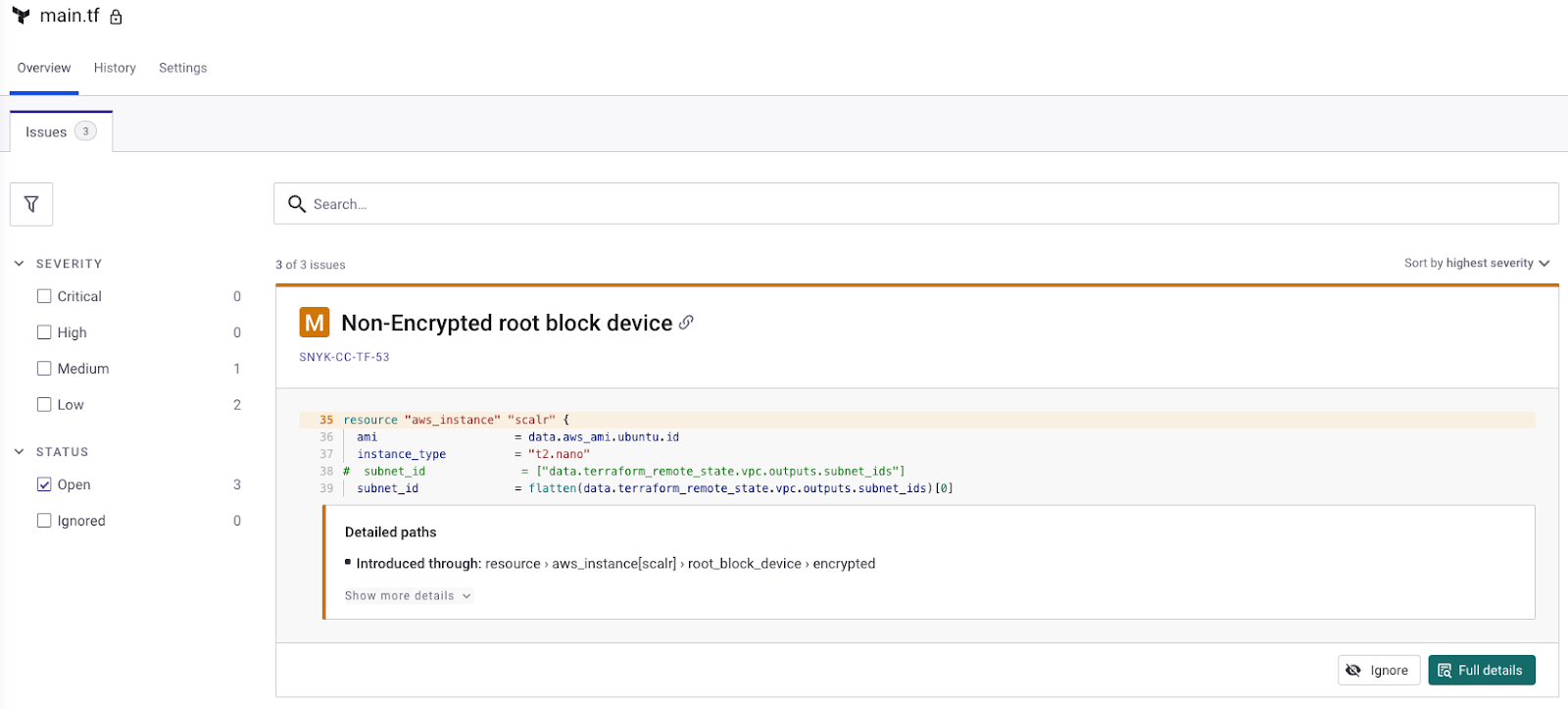
Snyk provides a developer-first approach to IaC security with strong IDE integration and actionable remediation guidance.
Key Features:
- Real-time scanning in development IDEs
- Detailed remediation suggestions with code examples
- Integration with GitHub, GitLab, Azure DevOps
- Support for both code and supply chain vulnerabilities
- Automatic pull request creation for fixes
Making an Informed Choice
When selecting IaC security tools, consider:
- OpenTofu Support: Tools must understand OpenTofu's independent features including check blocks, client-side state encryption, and .tofu file discovery
- Accuracy: Graph-based scanning provides higher fidelity than simple HCL parsing
- Integration: CI/CD and IDE integration enables shift-left security
- Plan File Scanning: Analyzing terraform/tofu plan JSON output provides higher-fidelity pre-deployment checks
- Policy Management: Ability to use pre-built and custom policies tailored to organizational needs
- Performance: Scanning speed matters for large codebases and frequent CI/CD runs
What does secure AWS look like in Terraform?
Critical AWS Security Risks
Misconfiguration remains one of the most common causes of AWS security incidents.
IAM Issues are another major risk area: overly broad roles and long-lived keys turn a small foothold into a large breach. See our practical guide on streamlining AWS IAM role creation with Terraform for least-privilege patterns.
Data Exfiltration from improperly configured S3 buckets remains a persistent threat.
Supply Chain Attacks through compromised CI/CD pipelines and third-party packages are a growing threat.
AWS Security Best Practices in Terraform
1. Identity and Access Management
# Implement least-privilege IAM policies
resource "aws_iam_policy" "limited_s3_access" {
  name = "s3-read-only"

  policy = jsonencode({
    Version = "2012-10-17"
    Statement = [
      {
        Effect = "Allow"
        Action = [
          "s3:GetObject",
          "s3:ListBucket"
        ]
        Resource = [
          aws_s3_bucket.app_data.arn,
          "${aws_s3_bucket.app_data.arn}/*"
        ]
      }
    ]
  })
}

# Use temporary credentials instead of long-term access keys
resource "aws_iam_role" "app_role" {
  name               = "app-execution-role"
  assume_role_policy = jsonencode({
    Version = "2012-10-17"
    Statement = [
      {
        Effect = "Allow"
        Principal = {
          Service = "ec2.amazonaws.com"
        }
        Action = "sts:AssumeRole"
      }
    ]
  })
}
2. Data Protection
# Encrypt S3 buckets with KMS
resource "aws_kms_key" "s3_encryption_key" {
  description             = "KMS key for S3 bucket encryption"
  deletion_window_in_days = 10
  enable_key_rotation     = true
}

resource "aws_s3_bucket_server_side_encryption_configuration" "secure_bucket" {
  bucket = aws_s3_bucket.app_data.id

  rule {
    apply_server_side_encryption_by_default {
      sse_algorithm     = "aws:kms"
      kms_master_key_id = aws_kms_key.s3_encryption_key.arn
    }
  }
}

# Block public access
resource "aws_s3_bucket_public_access_block" "app_data" {
  bucket = aws_s3_bucket.app_data.id

  block_public_acls       = true
  block_public_policy     = true
  ignore_public_acls      = true
  restrict_public_buckets = true
}
3. Network Security
# Implement VPC Flow Logs
resource "aws_flow_log" "main" {
  log_destination      = aws_s3_bucket.flow_logs.arn
  log_destination_type = "s3"
  traffic_type         = "ALL"
  vpc_id               = aws_vpc.main.id
  log_format           = "${version} ${account-id} ${interface-id} ${srcaddr} ${dstaddr} ${srcport} ${dstport} ${protocol}"
}

# Create security groups with minimal access
resource "aws_security_group" "web" {
  name        = "web-sg"
  description = "Allow TLS inbound traffic"
  vpc_id      = aws_vpc.main.id

  ingress {
    description = "TLS from anywhere"
    from_port   = 443
    to_port     = 443
    protocol    = "tcp"
    cidr_blocks = ["0.0.0.0/0"]
  }

  egress {
    from_port   = 0
    to_port     = 0
    protocol    = "-1"
    cidr_blocks = ["0.0.0.0/0"]
  }
}

# Use VPC endpoints for service connections
resource "aws_vpc_endpoint" "s3" {
  vpc_id            = aws_vpc.main.id
  service_name      = "com.amazonaws.us-east-1.s3"
  vpc_endpoint_type = "Gateway"
}
4. Continuous Monitoring and Response
# Configure CloudTrail for audit logging
resource "aws_cloudtrail" "main" {
  name                          = "main-trail"
  s3_bucket_name                = aws_s3_bucket.cloudtrail_logs.id
  include_global_service_events = true
  is_multi_region_trail         = true
  enable_log_file_validation    = true
  kms_key_id                    = aws_kms_key.cloudtrail.arn

  event_selector {
    read_write_type           = "All"
    include_management_events = true

    data_resource {
      type   = "AWS::S3::Object"
      values = ["arn:aws:s3:::"]
    }
  }
}

# Enable GuardDuty for threat detection
resource "aws_guardduty_detector" "main" {
  enable            = true
  finding_publishing_frequency = "FIFTEEN_MINUTES"
}
How do you enforce all of this in CI/CD?
Integrating IaC Security Scanning
Modern CI/CD pipelines should include automated security scanning at multiple stages:
Pre-Commit Hooks: Prevent secrets and misconfigurations from entering the repository.
Build Stage: Run comprehensive static analysis on all IaC code.
Plan Stage: Analyze terraform/tofu plan output for security issues.
Policy Evaluation: Enforce organizational security policies before deployment.
Post-Deployment Validation: Verify deployed resources match intended configuration.
Example CI/CD Pipeline with Security
# GitHub Actions workflow
name: Terraform Security Pipeline

on:
  pull_request:
    paths:
      - 'terraform/**'
  push:
    branches:
      - main

jobs:
  terraform_validation:
    runs-on: ubuntu-latest
    steps:
      - uses: actions/checkout@v3

      - name: Terraform Format Check
        run: terraform fmt -check -recursive terraform/

      - name: Terraform Validate
        run: terraform -chdir=terraform/prod validate

      - name: Run Checkov
        uses: bridgecrewio/checkov-action@master
        with:
          directory: terraform/
          framework: terraform
          quiet: false

      - name: Run tfsec
        uses: aquasecurity/[email protected]
        with:
          working_directory: terraform/

      - name: Terraform Plan
        run: terraform -chdir=terraform/prod plan -json -out=tfplan.json

      - name: Analyze Plan with Snyk
        run: |
          npm install -g snyk
          snyk iac test tfplan.json --json-file-output=snyk-results.json

      - name: Upload SARIF Results
        uses: github/codeql-action/upload-sarif@v2
        if: always()
        with:
          sarif_file: snyk-results.sarif

  terraform_apply:
    needs: terraform_validation
    if: github.event_name == 'push' && github.ref == 'refs/heads/main'
    runs-on: ubuntu-latest
    steps:
      - uses: actions/checkout@v3

      - name: Terraform Apply
        run: |
          cd terraform/prod
          terraform init
          terraform apply tfplan.json
Where does Scalr fit?
Scalr as an IaC Governance Platform
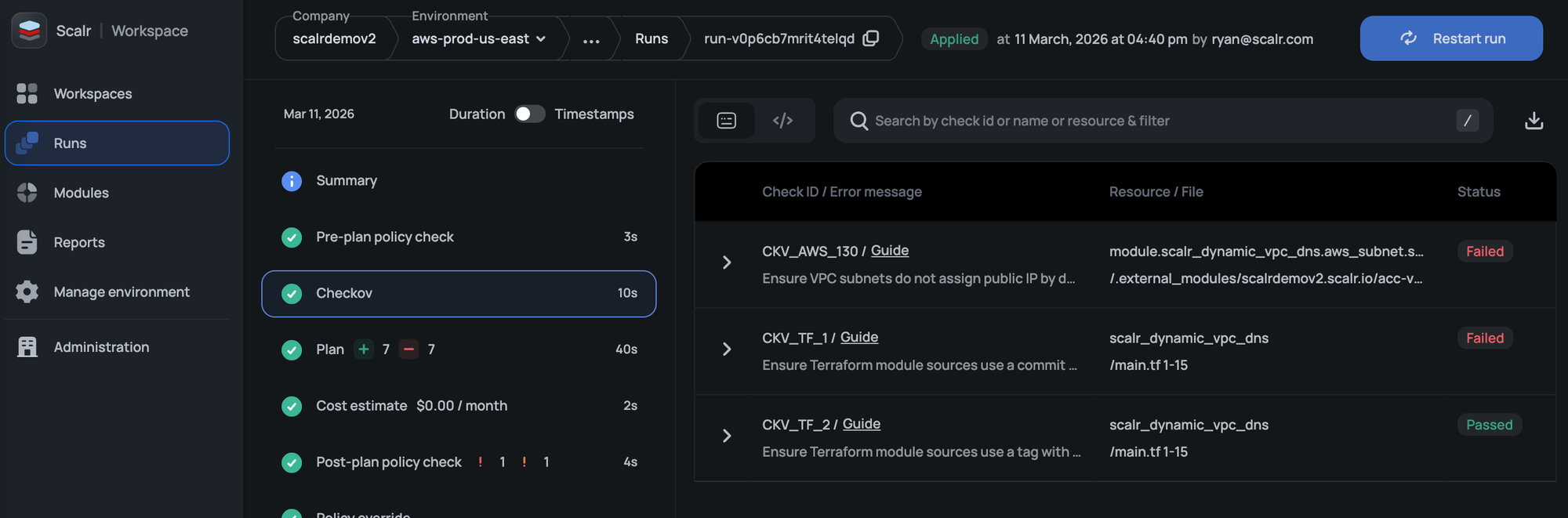
Scalr adds enterprise governance to Terraform and OpenTofu, covering identity, policy enforcement, credential management, and fleet-wide reporting. For audit and compliance evidence, see Terraform audit logs; for runtime scanning integrations, see automating Terraform security in Scalr deployments with Regula and using Scalr hooks with Bridgecrew Yor.
Identity and Access Management
Scalr authenticates users through your identity provider over SAML 2.0, and SCIM (Enterprise plan) adds and removes them as they change there. API access can use OIDC tokens from GitHub, GitLab, AWS, or Azure instead of static personal tokens.
Policy Enforcement
Open Policy Agent (OPA) Integration:
# Scalr enforces OPA policies before infrastructure changes
package terraform.policies

deny[reason] {
    resource := input.resource_changes[_]
    resource.type == "aws_s3_bucket"
    not resource.change.after.server_side_encryption_configuration

    reason := sprintf("S3 bucket '%s' must have encryption enabled", [resource.name])
}
Checkov Integration: Checkov runs as a pre-plan custom hook, so a configuration that fails the scan never gets planned, let alone applied.
Credential Management
Provider Configurations:
Scalr centrally manages and securely stores credentials for cloud providers and other services, then automatically injects them into Terraform runs.
OIDC for Dynamic Cloud Credentials: Provider configurations can use OIDC to obtain temporary credentials from AWS, Azure, and GCP at run time, so there are no long-lived cloud keys to rotate or leak.
Infrastructure and Data Security
VCS Agents for Internal Repositories:
If you run a self-hosted version control system, Scalr's VCS Agents set up secure connections without exposing your internal repositories to the public internet.
Self-Hosted Agents: Runs execute on agents inside your own network, so cloud credentials and private endpoints never have to be reachable from the SaaS control plane.
State Encryption:
- Scalr-managed state files are encrypted at rest
- Customer-managed backends use provider-native encryption
- Sensitive variables are encrypted and never exposed
For how Scalr's Bring Your Own Key and storage profiles fit together (and how BYOK differs from OpenTofu's own state-encryption feature), see Secrets in Terraform State.
Comprehensive Reporting
OPA Policy Violation Reporting:
Tracks which workspaces violate policies and provides remediation guidance.
Resource and Configuration Tracking:
Aggregates all resources across state files for visibility and audit purposes.
Drift Detection Reports:
Identifies discrepancies between intended and actual infrastructure configuration.
Version Management Reports:
Tracks Terraform/OpenTofu, module, and provider versions to identify outdated components with known vulnerabilities.
These fleet-wide reports read a single object model across every workspace in your estate. A platform team can scan every workspace in one view for a vulnerable provider version, an unencrypted resource, or unresolved drift, instead of checking each workspace by hand. Scalr is a drop-in alternative to Terraform Cloud, so a team running HCP Terraform today can move to this kind of fleet-wide reporting without re-tooling.
Stale Workspace Reports:
Identifies workspaces with active resources that haven't been recently updated, which may not reflect current security policies.
API Token Management:
Tracks token rotation and usage patterns to enforce security best practices.
Audit Logs:
Comprehensive activity logs with first-party integrations to both AWS EventBridge and Datadog. Audit logs and run events stream directly to Datadog for centralized security analysis, while EventBridge remains available for AWS-native event routing. Governance features like audit logs and SCIM vary by plan; the pricing page lists what each tier includes.
Where to start
No single control secures Infrastructure as Code on its own. Terraform and OpenTofu also keep shipping answers to old problems, like ephemeral resource handling and dynamic credentials, so it pays to revisit your setup when you upgrade.
Start by wiring static analysis into every pull request, then add runtime policy-as-code, drift detection, and audit logging so violations cannot reach production even if they pass review. Each layer you add closes off a class of misconfiguration that scanning alone would miss.
About the author

CEO at Scalr
Sebastian Stadil is the CEO of Scalr with 15+ years of DevOps experience. He started with AWS in 2004 and advised early Microsoft Azure and Google Cloud.
In this guide
14 articles- Terraform Module Supply Chain Attacks: Tag Mutation, Pwn Requests, and How to Pin Safely
- Malicious Terraform Providers: Supply Chain Risks and How to Verify What You Install
- Terraform Supply Chain Attacks: Risks, Real Incidents, and How to Defend Against Them
- Terraform Wiz: How to Scan, Secure, and Enforce Policy on Your IaC
- Secrets in Terraform State: Why They Leak, and the Fix
- Bring Your Own Key (BYOK): Customer-Managed Encryption for Terraform Platforms
- Getting Started with Terraform Vulnerability Scanning
- Streamlining AWS IAM Role Creation with Terraform: A Practical Guide
- Using Checkov with Terraform - Integrations, Features, Examples
- Bridgecrew Terraform: Pricing, Use Cases, Best Practices & Alternatives
- A Guide to Terraform Audit Logs
- How to Use Snyk with Terraform: Securing Your Infrastructure as Code
- Using Scalr Hooks with Bridgecrew Yor
- Automating Terraform Security in Scalr Deployments with Regula