

Enforcing Policy as Code in Terraform: A Comprehensive Guide
Master Policy as Code in Terraform—use OPA, Sentinel & Scalr to automate compliance, prevent drift, and enforce cloud governance without slowing dev teams.

- Policy as Code expresses governance rules — required tags, allowed regions, encryption standards — as version-controlled files evaluated automatically against every Terraform or OpenTofu plan.
- The decision that matters most is the enforcement level, not the tool: the same Rego policy behaves completely differently as advisory, soft-mandatory, or hard-mandatory, and most rollout pain traces back to getting this wrong.
- Native Terraform features (variable validation, precondition/postcondition, check blocks) catch roughly 30% of policy issues before you adopt any external tool.
- OPA/Rego is the closest thing to a universal policy language — one engine for Terraform, OpenTofu, Kubernetes, and CI/CD — while Sentinel is tied to Terraform Cloud/Enterprise and Checkov/tfsec cover static analysis.
- Roll new policies out gradually: advisory mode first to gather violation data, then soft-mandatory with overrides, then hard-mandatory once false positives are fixed.
- The enforcement layer is itself infrastructure that can fail, and its failure mode is governance-off — plan for how you keep shipping when policy checks themselves break.
Policy as Code (PaC) means writing your governance rules — required tags, allowed regions, encryption standards, cost limits — as version-controlled files that are evaluated automatically against every Terraform or OpenTofu plan. The decision that matters most is not which tool you pick but the enforcement level you assign each policy: the same Rego file behaves completely differently as an advisory warning, a soft-mandatory gate with overrides, or a hard-mandatory block, and most of the rollout pain we see in Scalr's support queue traces back to getting that assignment wrong.
This guide covers the full implementation path for Terraform and OpenTofu environments — native HCL validation, OPA, Sentinel, Checkov, and tfsec; CI/CD integration; policy lifecycle management; and the failure modes teams actually hit in production.
Part 1: Understanding Policy as Code
What is Policy as Code?
Policy as Code is an approach that manages and enforces governance policies by expressing them through a programmable, machine-readable language rather than through manual processes or human-readable documents. These policies—covering security, compliance, cost management, and operational standards—are defined in formats such as JSON, YAML, or specialized domain-specific languages (DSLs) like:
- Rego (for Open Policy Agent / OPA)
- Sentinel HSL (for HashiCorp Sentinel)
- Python or YAML (for Checkov)
- HCL (Terraform's native validation features)
Once defined, policies are treated like application code: version-controlled, tested, audited, and automatically deployed. This transforms governance from a reactive, manual process into a proactive, automated system.
The Business Case for Policy as Code
Security and Compliance
Misconfigurations represent a notorious weak link in cloud security. PaC allows you to codify security standards—such as data encryption, least-privilege access, and adherence to industry benchmarks like CIS—and apply them automatically across all infrastructure deployments. This proactive stance helps prevent vulnerabilities and ensures consistent compliance with regulatory mandates (PCI DSS, HIPAA, GDPR, SOC 2, etc.).
Operational Consistency
Manual policy application is a recipe for inconsistency and drift. Different teams interpret guidelines differently, leading to unpredictable outcomes. PaC establishes a single source of truth for operational rules, applied uniformly from development through production. This minimizes manual errors and produces more reliable, resilient infrastructure.
Cost Control
Cloud bills escalate quickly without governance. PaC serves as a financial guardian by automatically enforcing rules on resource sizing, mandating cost-allocation tags, restricting deployments to cost-effective regions, and preventing wasteful configurations. These automated checks can save organizations significant budget while maintaining agility.
Compliance Automation
Audits become less painful with version-controlled policies and comprehensive enforcement logs. PaC provides the audit trail and documentation that regulators demand, reducing the burden of manual compliance verification.
Core Components of a PaC Framework
A mature PaC implementation consists of interconnected, cyclical components:
Policy Definition Policies are written in a structured, machine-readable format and stored in version control. Clear policies explicitly state what is allowed and what is not (e.g., "All S3 buckets must have versioning enabled"). Version control provides history, enables collaboration, and ensures auditability.
Policy Enforcement Defined policies need active enforcement mechanisms. PaC tools automatically evaluate configurations or plans against policies, with actions ranging from blocking deployments to sending alerts. Enforcement can occur at various stages—from a developer's local machine to CI/CD pipelines to platform-level gates.
Policy Testing Just as you wouldn't deploy application code untested, policies require rigorous testing before going live. Testing ensures policies work correctly and don't accidentally block legitimate operations. Simulating enforcement in controlled environments is essential.
Policy Monitoring and Auditing Monitoring tracks configurations, logs violations, and generates compliance reports. This data provides feedback loops for refining policies over time. Version-controlled policies and enforcement logs make audits significantly less painful and more defensible.
Part 2: Native Terraform Validation & Getting Started
Terraform's Built-in Guards
Terraform itself provides mechanisms to validate configurations directly within HCL code. These native features act as an initial line of defense, helping module authors enforce contracts and catch basic errors early. For the full input-variable validation reference, see our Terraform variables and outputs guide.
Preconditions and Postconditions
Terraform allows custom validation rules using precondition and postcondition blocks:
Preconditions are evaluated before processing an object (resource, data source, or output). They validate assumptions before an action is taken:
resource "aws_instance" "example" {
  ami           = var.ami_id
  instance_type = var.instance_type

  lifecycle {
    precondition {
      condition     = can(regex("^ami-", var.ami_id))
      error_message = "The provided AMI ID must start with 'ami-'."
    }
    precondition {
      condition     = var.instance_type == "t3.micro" || var.instance_type == "t2.micro"
      error_message = "Only t3.micro or t2.micro instance types are allowed."
    }
  }
}
Postconditions are evaluated after an object has been processed. They verify guarantees about the resulting state:
resource "aws_s3_bucket" "example" {
  bucket = "my-unique-bucket-12345"

  lifecycle {
    postcondition {
      condition     = self.versioning[0].enabled == true
      error_message = "S3 bucket versioning was not enabled as expected."
    }
  }
}
Check Blocks and Assertions
Introduced in Terraform v1.5.0, check blocks offer validation focused on overall state rather than individual resource lifecycles:
check "all_s3_buckets_have_logging" {
  assert {
    condition     = alltrue([
      for bucket in aws_s3_bucket.all : bucket.logging != null
    ])
    error_message = "Not all S3 buckets have server access logging configured."
  }
}
Check blocks typically produce warnings if assertions fail without automatically stopping operations, making them suitable for ongoing validation and health checks. Terraform Cloud can continuously validate these checks.
Limitations of Native Validation
While valuable, Terraform's built-in features have inherent limitations:
- Limited Scope: Best for validating individual resources or simple conditions, not complex cross-cutting organizational rules
- Lack of Centralization: Policies embedded in Terraform files are hard to manage consistently across many modules and teams
- Blurred Separation: Policy logic becomes mixed with infrastructure code, violating separation of concerns
- Incomplete Context: No native way to halt an entire apply based on an evaluation of all the proposed infrastructure against a comprehensive policy suite
These limitations necessitate more powerful, dedicated PaC tools for mature governance.
Part 3: Dedicated Policy as Code Tools
Open Policy Agent (OPA) and Rego
Open Policy Agent (OPA) is an open-source, CNCF-graduated, general-purpose policy engine that decouples policy decision-making from policy enforcement. For a hands-on intro, see OPA Series Part 1: Open Policy Agent and Terraform.
How OPA Works
The core workflow involves three steps:
Evaluate with OPA: Feed the JSON plan and your policies to OPA
conftest test --policy ./policy/ tfplan.jsonConvert to JSON: OPA evaluates JSON data, so convert the binary plan
terraform show -json tfplan.binary > tfplan.jsonGenerate a Terraform Plan: Create a binary Terraform execution plan
terraform plan -out=tfplan.binaryOPA produces a decision (allow, deny, or a set of violations), which your CI/CD pipeline acts upon.
Rego: The Policy Language
Policies in OPA are written in Rego, a declarative language designed for querying complex, hierarchical data structures and expressing policies:
package terraform.aws.s3_versioning

# This rule generates a message for each S3 bucket
# being created without versioning enabled
deny[msg] {
    resource := input.resource_changes[_]
    resource.type == "aws_s3_bucket"
    resource.mode == "managed"
    action := resource.change.actions[_]
    action == "create"
    not resource.change.after.versioning
    msg := sprintf("S3 bucket '%s' must have versioning enabled.", [resource.address])
}

deny[msg] {
    resource := input.resource_changes[_]
    resource.type == "aws_s3_bucket"
    resource.mode == "managed"
    action := resource.change.actions[_]
    action == "create"
    resource.change.after.versioning
    not resource.change.after.versioning[0].enabled
    msg := sprintf("S3 bucket '%s' has versioning but it is not enabled.", [resource.address])
}
In this example:
package terraform.aws.s3_versioningorganizes the policydeny[msg] { ... }defines rules that generate violation messagesinput.resource_changes[_]iterates through proposed resource changes- Conditions filter for specific resources and configurations
sprintf()creates readable violation messages
conftest: Local Policy Testing
conftest is a CLI tool that bundles OPA and simplifies policy testing:
conftest test --policy ./policy/ tfplan.jsonOutput shows whether policies pass or lists violations:
FAIL - tfplan.json - terraform.aws.s3_versioning - S3 bucket 'aws_s3_bucket.my_bucket' must have versioning enabled.
OPA Advantages and Considerations
Advantages:
- Highly expressive Rego language for complex policies
- General-purpose (use OPA beyond Terraform)
- Vendor-neutral and open-source
- Strong community and tooling ecosystem
- Excellent for plan-based validation
Considerations:
- Rego has a learning curve, especially for those unfamiliar with declarative logic programming
- Requires scripting the plan → JSON → conftest → action sequence in CI/CD
HashiCorp Sentinel
Sentinel is HashiCorp's embedded Policy as Code framework, tightly integrated into Terraform Cloud and Terraform Enterprise.
How Sentinel Works
Sentinel policies are evaluated as an integral part of the run workflow, specifically after terraform plan and before terraform apply. Sentinel receives rich context:
- tfplan: Proposed infrastructure changes
- tfstate: Current infrastructure state
- tfconfig: The HCL configuration itself
- tfrun: Run metadata and cost estimates
This rich context enables highly sophisticated policy decisions.
Sentinel Policy Language (HSL)
Policies are written in HSL (HashiCorp Sentinel Language), a dynamically typed language designed for approachability:
import "tfplan/v2" as tfplan

# Function to find all EC2 instances being created or updated
find_ec2_instances = func() {
    instances = {}
    for tfplan.resource_changes as address, rc {
        if rc.type is "aws_instance" and
           (rc.change.actions contains "create" or rc.change.actions contains "update") {
            instances[address] = rc
        }
    }
    return instances
}

# Rule: All instances must have the 'Owner' tag
all_instances_have_owner_tag = rule {
    all find_ec2_instances() as _, instance {
        instance.change.after.tags contains "Owner"
    }
}

# Main policy rule
main = rule {
    all_instances_have_owner_tag
}
Enforcement Levels in TFC/TFE
Sentinel policies support three enforcement levels:
- Advisory: Policy failures log warnings but allow the run to proceed. Ideal for introducing new policies and observing impact
- Soft-Mandatory: Failures halt the run, but authorized users can override. Provides safety with operational flexibility
- Hard-Mandatory: Failures halt the run with no overrides allowed. For critical, non-negotiable policies
Sentinel Advantages and Considerations
Advantages:
- Native integration with TFC/TFE
- Rich context (plan, state, config, run data)
- Three enforcement levels offer operational flexibility
- Managed GitOps-style policy distribution via VCS
Considerations:
- Primarily tied to HashiCorp's commercial offerings for full enforcement
- HSL is specific to Sentinel (not transferable to other systems)
Static Analysis Tools: tfsec and Checkov
While OPA and Sentinel operate on Terraform plans (intended state), static analysis tools inspect raw HCL code (defined state) to catch common misconfigurations early.
tfsec: Fast Security Scanning
tfsec is an open-source static analysis tool specifically designed to find security misconfigurations in Terraform code.
How it works:
- Parses
.tffiles directly without requiring Terraform initialization or plan generation - Uses a large library of built-in checks based on security best practices
- Supports custom checks using JSON, YAML, or Rego
- Focuses on security: S3 bucket encryption, public access, database security, IAM configurations
Strengths:
- Extremely fast
- Minimal setup required
- Excellent for pre-commit hooks and early CI stages
- Rich built-in security checks
Note: tfsec development is being consolidated into Aqua Security's Trivy, a broader container and IaC security scanner.
Checkov: Comprehensive IaC Scanning
Checkov, by Bridgecrew (now Palo Alto Networks), is a broader static analysis tool supporting Terraform, CloudFormation, Kubernetes, Helm, Dockerfile, and more.
Capabilities:
- Static HCL Analysis: Scans raw
.tffiles - Plan Scanning: Analyzes JSON plan output for more context about final configuration
- Graph-Based Policies: Understands relationships between resources for sophisticated checks (e.g., "Is this EC2 instance in a public subnet exposed via an overly permissive security group?")
- Custom Rules: Write checks in Python or YAML
- Extensive Integrations: CLI, CI/CD, pre-commit hooks, IDE extensions
One caution on severity-based gating. A public-sector team we worked with at Scalr wanted Checkov to fail runs on MEDIUM and HIGH findings while letting LOW findings pass, and tried --skip-check LOW and then --soft-fail-on LOW. Neither flag had any effect — every LOW finding still failed the run. The reason is that when Checkov runs offline, its built-in checks carry no severity metadata at all: severity is None unless you authenticate against the Prisma Cloud API, so a severity-based threshold matches nothing. The configuration that actually worked listed exact check IDs instead — --soft-fail-on CKV2_AWS_41,CKV_AWS_79,CKV_AWS_126 — which exits 0 only when every failing check appears on that list. If you are building tiered enforcement on open-source Checkov, plan to maintain explicit check-ID lists rather than severity tiers.
See related articles for deeper coverage:
- Using Checkov with Terraform: Integrations, Features & Examples
- Getting Started with Terraform Vulnerability Scanning
Static Analysis Advantages and Considerations
Advantages:
- Very fast execution
- Minimal setup and configuration
- Extensive built-in security and compliance rule libraries
- Early feedback directly in HCL catches issues quickly
- Checkov's plan and graph analysis provide additional depth
Considerations:
- Static HCL analysis may miss context visible in the plan
- Custom rule logic might be less expressive than full Rego/HSL for complex scenarios
Part 4: Policy as Code with Scalr
Scalr is a Terraform/OpenTofu management platform with native Policy as Code integration, enabling organizations to implement governance at scale. Scalr includes OPA enforcement in its per-run pricing, with no per-user fees.
Supported Frameworks
Scalr integrates with established open-source policy frameworks:
Open Policy Agent (OPA) with Rego
Scalr has native OPA integration. Policies written in Rego evaluate Terraform and OpenTofu run data with fine-grained control. Scalr expects Rego policies to define a deny set where each item represents a policy violation. For deeper structural patterns, see OPA Series Part 2: OPA Logic and Structure for Scalr and Part 3: How to Analyze the JSON Plan; for ready-made starters, Part 4: Simple Policies for Scalr.
Checkov
For static analysis and vulnerability scanning, Scalr integrates Checkov to identify misconfigurations before infrastructure is provisioned. Scans occur before Terraform initialization.
Enforcement Points and Levels
Scalr OPA policies enforce at two distinct stages:
Pre-plan Enforcement
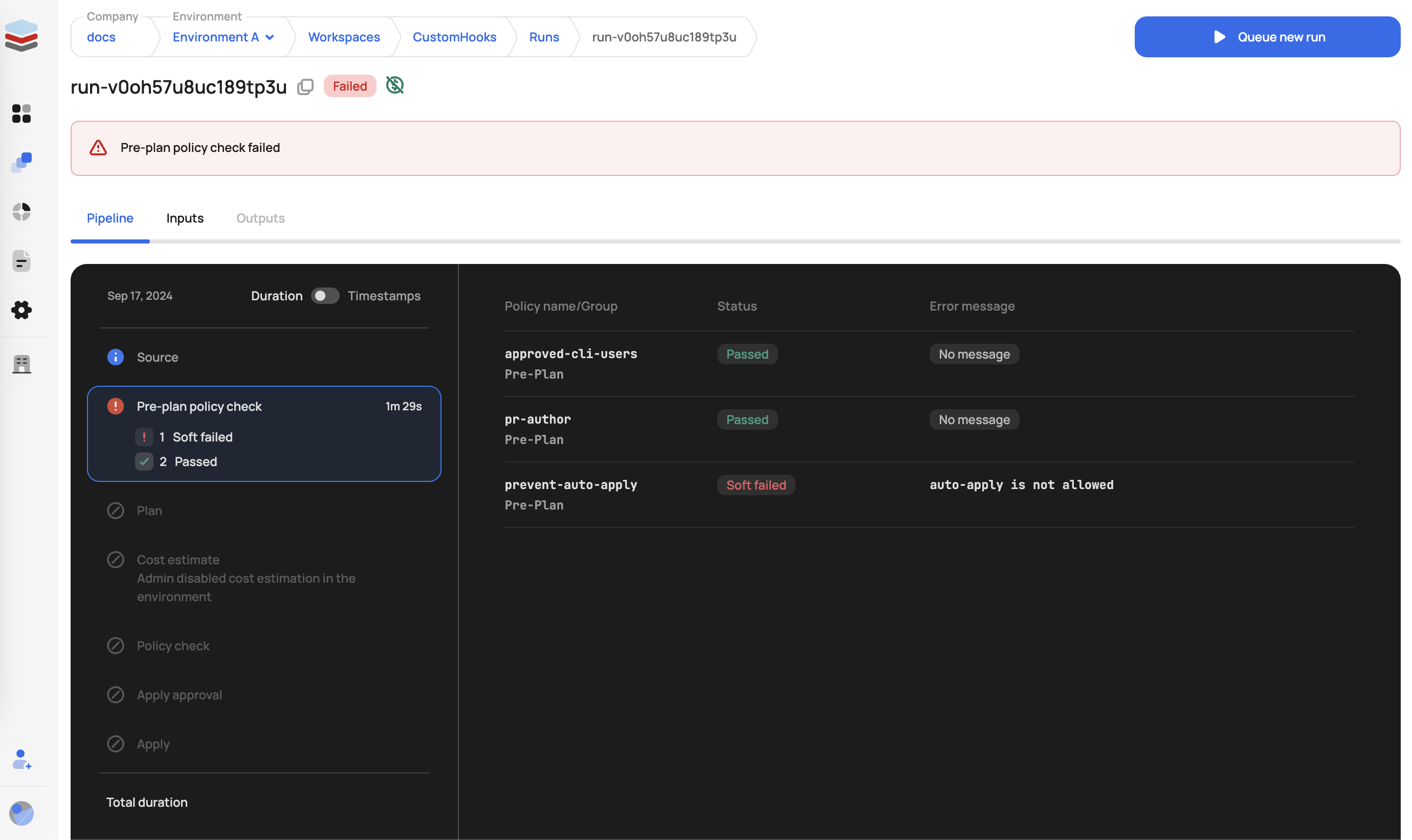
Policies evaluated before the Terraform plan is generated. The tfrun input data includes:
- VCS details and run source
- Workspace configuration
- User information
- Cost estimation data (if available)
Post-plan Enforcement
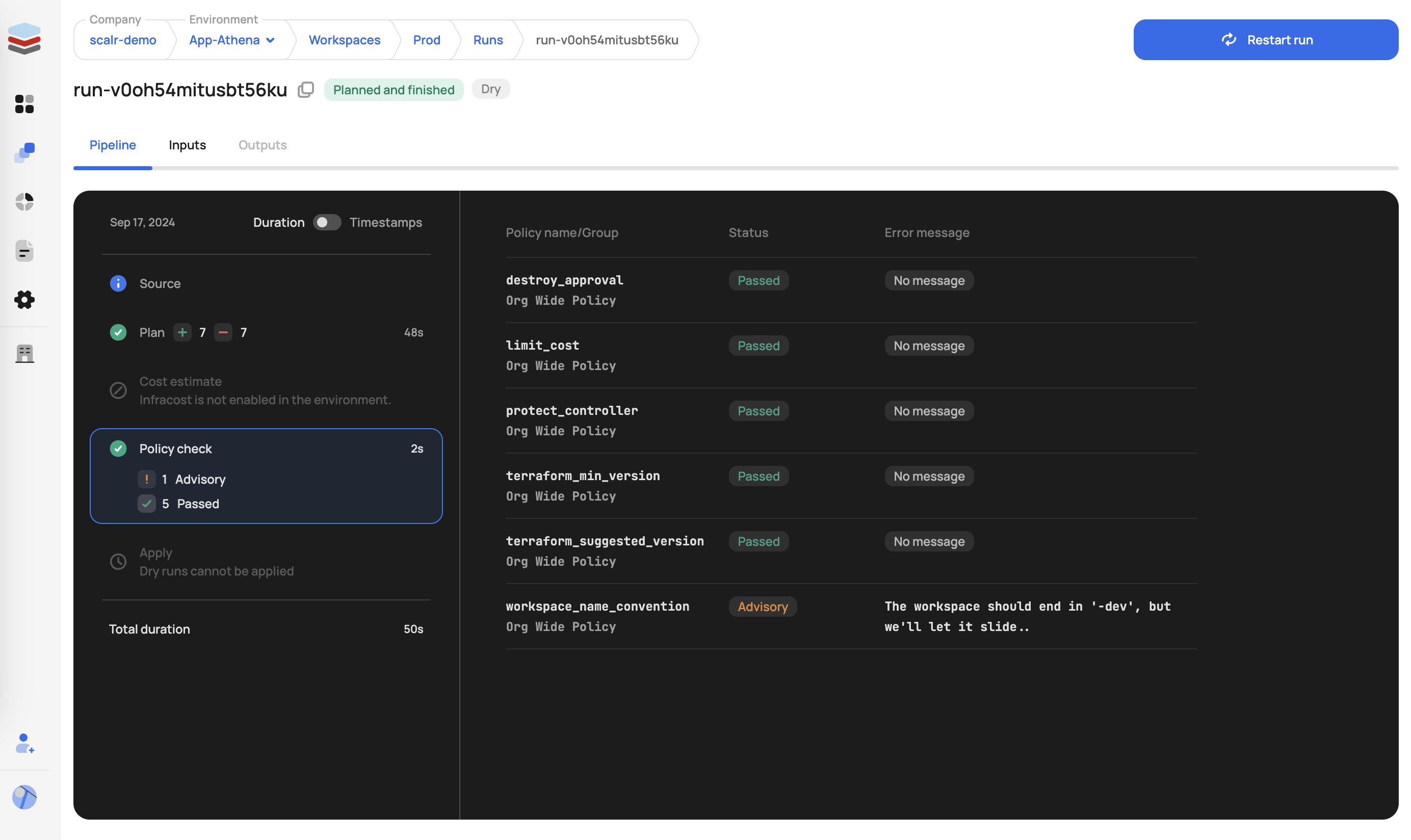
Policies evaluated after plan generation. The tfplan input data includes all tfrun data plus the full JSON representation of the plan, allowing inspection of proposed resource changes.
Three Enforcement Levels
Hard Mandatory:
- Pre-plan: Run immediately stopped and marked as errored
- Post-plan: Run stopped; apply phase cannot proceed
Soft Mandatory:
- Pre-plan: Same as hard mandatory
- Post-plan: Run enters "approval needed" state; authorized users can review, approve, or deny
Advisory:
- Pre-plan & Post-plan: Warning logged; run proceeds normally
Two practical notes from teams running this in production. First, enforcement levels are set per policy, not per environment — if you want the same tag policy hard-mandatory in production but soft-mandatory in dev, today that means maintaining two policy groups with duplicated Rego and a different scalr-policy.hcl in each. One customer standardizing tag enforcement ended up duplicating an entire policy directory to vary a single enforcement_level line; budget for that structure up front if your environments need different strictness.
Second, advisory mode is more useful than it looks. A customer in a regulated industry had a FinOps team that wanted alerts whenever large EC2 instances appeared in dev plans — but explicitly never wanted to block a developer. Rather than fighting over enforcement, they shipped it as an advisory policy and wired the violation events into EventBridge for email notification. The policy never gates a run, and the FinOps team gets exactly the signal they asked for. Not every policy needs to be a gate; some are sensors.
Policy Management with GitOps
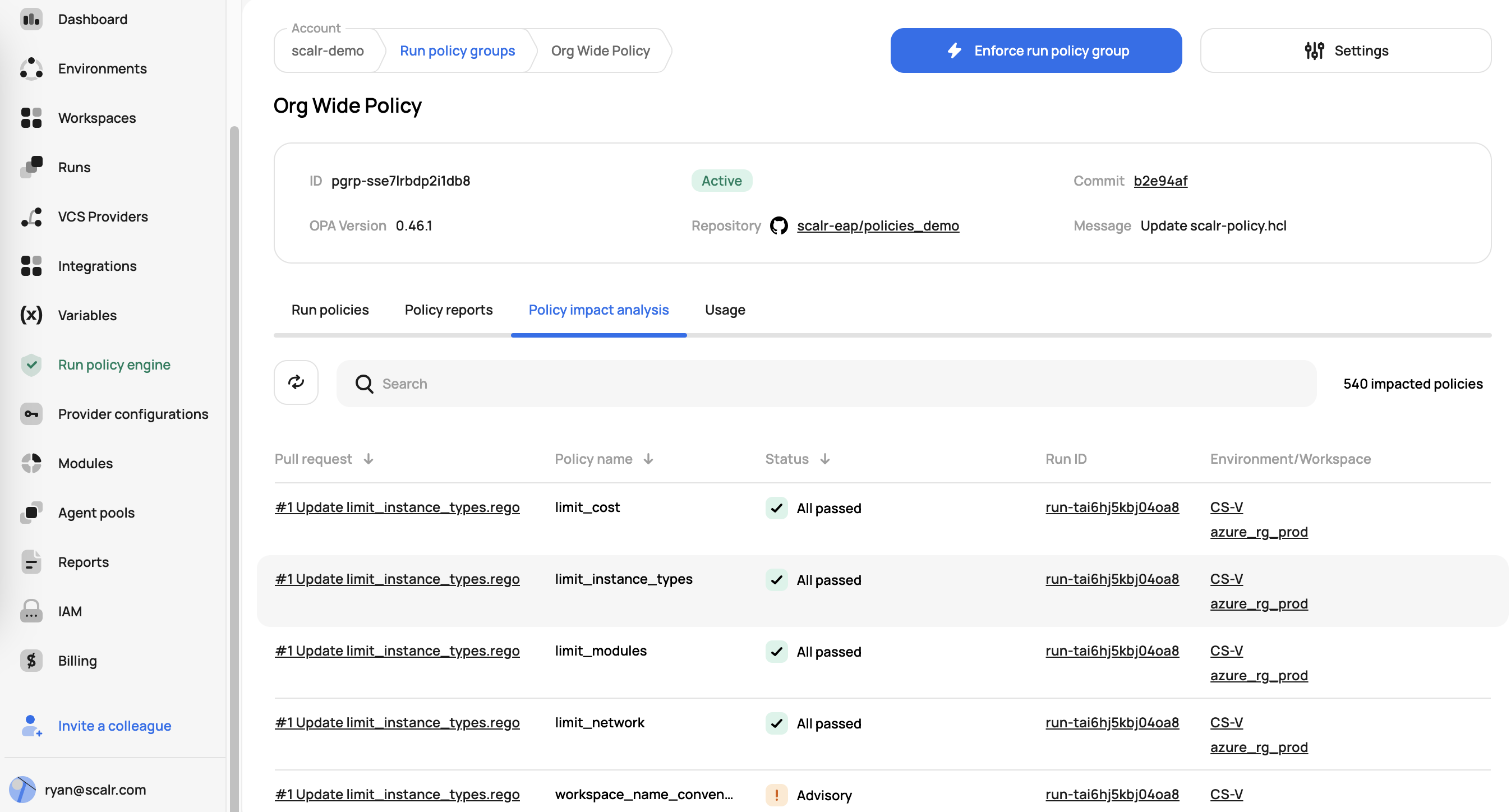
Scalr promotes a GitOps model for policy management:
- Policies in Version Control: OPA Rego policies stored in Git repositories for auditability and change tracking
- Environment Enforcement: Administrators enforce OPA policies across specific environments
- Speculative Runs: When policy changes are proposed (via PR), Scalr triggers speculative runs to analyze impact before policies go live
- Terraform Provider: Scalr's Terraform provider enables policy group configuration as code
- Policy Groups: Collections of policies from a VCS repository, configured via
scalr-policy.hcl
Example scalr-policy.hcl:
version = "v1"

policy "terraform_min_version" {
  enabled = true
  enforcement_level = "hard-mandatory"
}

policy "limit_modules" {
    enabled = false
    enforcement_level = "soft-mandatory"
}

policy "workspace_name_convention" {
    enabled = true
    enforcement_level = "advisory"
}
OPA Functions: Reusable Code Across Policies
Scalr is the only product in the market that supports OPA functions, which allow reusing code across multiple OPA policies. It is common for many policies to share the same OPA code, which is where the import function is valuable. For example, a utility file can define shared helper functions:
utils.rego:
package utils

array_contains(arr, elem) {
    arr[_] = elem
}

get_basename(path) = basename {
    arr := split(path, "/")
    basename := arr[count(arr)-1]
}
That file can then be imported into any policy:
main.rego:
package terraform

import input.tfplan as tfplan
import data.utils

not_allowed_provider = ["null"]

deny[reason] {
    resource := tfplan.resource_changes[_]
    action := resource.change.actions[count(resource.change.actions) - 1]
    utils.array_contains(["create", "update"], action)
    provider_name := utils.get_basename(resource.provider_name)
    utils.array_contains(not_allowed_provider, provider_name)
    reason := sprintf("%s: provider type %q is not allowed", [resource.address, provider_name])
}
In Scalr, the OPA administrator defines the path to the shared functions directory in the policy group configuration, and the import data.utils statement pulls the contents of the utility file into any policy that references it. This eliminates code duplication and makes policy maintenance easier at scale.
Shared functions come with one easy-to-miss configuration detail. A team we worked with at Scalr during an environment-wide OPA rollout had two policies in one repository — enforce_aws_tag set to advisory and enforce_tf_min_version set to hard-mandatory in scalr-policy.hcl. Whenever the advisory tag policy failed, the hard-mandatory version policy failed with it, blocking applies that should have sailed through with a warning. Both policies passed locally and in Docker against openpolicyagent/opa:1.3.0, so the team burned hours on the wrong hypotheses: swapping OPA versions (1.0.0, 1.4.2, 1.6.0), rewriting rules between the deny[msg] if and deny contains msg if syntaxes, and asking the reasonable question of how the platform knows which deny set belongs to which policy (answer: the policy names in scalr-policy.hcl must match the .rego filenames).
The actual cause was none of that. The policy group had the shared-functions option enabled but pointed at a directory with no shared functions in it — and with that option set, the per-policy enforcement separation collapsed, so every policy's violations were evaluated together and the strictest enforcement level won. Clearing the functions dropdown in the policy group configuration fixed it immediately. The takeaway: only enable the shared-functions path when you actually have shared code, and when two policies seem entangled, check the policy group configuration before you start rewriting Rego.
OPA as a Universal Policy Language
Just as Terraform brought a universal declarative language for infrastructure automation, OPA provides a universal declarative language for policy automation. OPA can be used to enforce policies not only in Terraform and OpenTofu but also across Kubernetes, CI/CD pipelines, API gateways, and many other systems. This means organizations can invest in learning a single policy language (Rego) and apply it consistently across their entire cloud ecosystem, increasing efficiency for both DevOps and SecOps teams.
Scalr Policy Examples
Example 1: Cost Control
package terraform

import input.tfrun as tfrun

deny[reason] {
    cost = tfrun.cost_estimate.proposed_monthly_cost
    cost > 100
    reason := sprintf("Plan exceeds $100 limit: $%.2f", [cost])
}
Example 2: S3 Bucket Security
package terraform

import input.tfplan as tfplan

deny[reason] {
    r = tfplan.resource_changes[_]
    r.mode == "managed"
    r.type == "aws_s3_bucket"
    r.change.after.acl == "public"
    reason := sprintf("S3 bucket %s must not be PUBLIC", [r.address])
}
Example 3: Multi-Cloud Instance Types
package terraform

import input.tfplan as tfplan

allowed_types = {
    "aws": ["t2.nano", "t2.micro"],
    "azurerm": ["Standard_A0", "Standard_A1"],
    "google": ["n1-standard-1", "n1-standard-2"]
}

instance_type_key = {
    "aws": "instance_type",
    "azurerm": "vm_size",
    "google": "machine_type"
}

get_basename(path) = basename {
    arr := split(path, "/")
    basename := arr[count(arr)-1]
}

get_instance_type(resource) = instance_type {
    provider_name := get_basename(resource.provider_name)
    instance_type := resource.change.after[instance_type_key[provider_name]]
}

deny[reason] {
    resource := tfplan.resource_changes[_]
    instance_type := get_instance_type(resource)
    provider_name := get_basename(resource.provider_name)
    not array_contains(allowed_types[provider_name], instance_type)
    reason := sprintf("%s: instance type %q not allowed", [resource.address, instance_type])
}
Pre-built Policy Libraries
Scalr provides the Scalr/sample-tf-opa-policies GitHub repository with example policies covering:
- Cost Management: Monthly cost limits, expensive instance type restrictions
- Tagging: Enforce required tags (owner, cost-center, environment)
- Security: Prohibit public S3 buckets, restrict IAM policies, enforce encryption
- Naming Conventions: Enforce resource naming patterns
- Resource Restrictions: Control deployment regions and instance types
Part 5: Tool Comparison and Selection
Side-by-Side Comparison
| Feature | OPA/conftest | Sentinel | tfsec | Checkov |
|---|---|---|---|---|
| Language | Rego | HSL | Built-in/JSON/YAML/Rego | Built-in/Python/YAML |
| Evaluation Type | Plan-based | Plan/State/Config-based | Static HCL | Static HCL + Plan |
| Learning Curve | Moderate | Easy | Low | Low |
| Vendor | Open-source | HashiCorp | Open-source | Palo Alto Networks |
| Integration | CI/CD tools | TFC/TFE native | CLI/pre-commit | CLI/pre-commit/IDE |
| Expressiveness | Very high | High | Medium | Medium |
| Customization | Highly flexible | Good | Good | Good |
When to Use Each Tool
Choose OPA/conftest when:
- You need highly expressive, complex policy logic
- You want vendor-neutral, general-purpose policy enforcement
- You plan to use the same policy engine across multiple systems (Kubernetes, APIs, etc.)
- Your organization values the flexibility of a powerful DSL
Choose Sentinel when:
- Your organization is invested in Terraform Cloud/Enterprise
- You need native integration with TFC/TFE workflows
- You want enforcement levels (advisory, soft-mandatory, hard-mandatory)
- You need access to current state and configuration data
Choose tfsec when:
- You want the fastest, lightest-weight static analysis
- Security scanning is your primary goal
- You need minimal setup and quick pre-commit integration
- Your use cases align with tfsec's built-in check library
Choose Checkov when:
- You need comprehensive IaC scanning across multiple platforms
- You want graph-based policy analysis for complex relationships
- You need to support multiple IaC tools (Terraform, CloudFormation, Kubernetes)
- You want extensive built-in compliance frameworks
Layered Approach
The most effective organizations often use a layered approach:
- Pre-commit: TFLint (HCL best practices) + tfsec/Checkov (security scanning)
- PR/Branch: GitHub Actions running tfsec/Checkov for rapid HCL feedback
- Plan-time: OPA/conftest or Sentinel for complex organizational policies
- Platform-level: Native platform enforcement (Scalr, TFC/TFE) for additional gates
Part 6: Implementing PaC in CI/CD Pipelines
For the broader CI/CD context that this section plugs into, see our CI/CD and GitOps for Terraform & OpenTofu pillar.
The Complete Policy Enforcement Workflow
Stage 1: Pre-Commit (Local Development)
Integrate tools into pre-commit hooks to catch issues before code is pushed:
# .pre-commit-config.yaml
repos:
  - repo: https://github.com/terraform-linters/pre-commit-terraform
    rev: v1.81.0
    hooks:
      - id: terraform_fmt
      - id: terraform_validate
      - id: tfsec
      - id: checkov
Benefits: Fastest feedback loop; developers catch issues immediately on their machines.
Stage 2: Pull/Merge Request (CI Phase - Static Analysis)
Trigger automated checks when a PR is opened:
# .github/workflows/terraform-checks.yml
name: Terraform Validation
on: [pull_request]
jobs:
  tfsec:
    runs-on: ubuntu-latest
    steps:
      - uses: actions/checkout@v3
      - uses: aquasecurity/[email protected]
        with:
          working_directory: ./terraform/
  checkov:
    runs-on: ubuntu-latest
    steps:
      - uses: actions/checkout@v3
      - uses: bridgecrewio/checkov-action@master
        with:
          directory: ./terraform/
Benefits: Enforces coding standards; catches static misconfigurations before merge; provides PR feedback.
Stage 3: Plan-Time Validation (Critical Gate)
After terraform plan, convert to JSON and validate against organizational policies:
# In CI/CD pipeline
terraform plan -out=tfplan.binary
terraform show -json tfplan.binary > tfplan.json
conftest test --policy ./policies/ tfplan.json

# Exit with failure if violations found
if [ $? -ne 0 ]; then
  echo "Policy violations detected"
  exit 1
fi
Benefits: Validates intended state with full context; catches issues requiring resolved values; final gate before apply.
Stage 4: Before Apply (CD Phase - Policy Gate)
Prevent deployment of non-compliant infrastructure:
# Plan-time validation failure blocks this stage
if [ "$PLAN_VALIDATION_STATUS" == "FAILED" ]; then
  echo "Cannot proceed to apply due to policy violations"
  exit 1
fi

terraform apply tfplan.binary
Benefits: Hard enforcement; prevents non-compliant infrastructure from being deployed.
Complete CI/CD Example
name: Terraform Deployment
on:
  pull_request:
    paths:
      - 'terraform/**'
  push:
    branches:
      - main
    paths:
      - 'terraform/**'

jobs:
  validate:
    runs-on: ubuntu-latest
    steps:
      - uses: actions/checkout@v3

      - name: Setup Terraform
        uses: hashicorp/setup-terraform@v2
        with:
          terraform_version: 1.6.0

      - name: Terraform Format
        run: terraform fmt -check -recursive ./terraform/

      - name: Terraform Validate
        run: |
          cd terraform
          terraform init -backend=false
          terraform validate

      - name: Run tfsec
        uses: aquasecurity/[email protected]
        with:
          working_directory: ./terraform/

      - name: Run Checkov
        uses: bridgecrewio/checkov-action@master
        with:
          directory: ./terraform/
          framework: terraform

  plan:
    needs: validate
    runs-on: ubuntu-latest
    if: github.event_name == 'pull_request'
    steps:
      - uses: actions/checkout@v3

      - name: Setup Terraform
        uses: hashicorp/setup-terraform@v2

      - name: Terraform Plan
        run: |
          cd terraform
          terraform init
          terraform plan -out=tfplan.binary

      - name: Convert Plan to JSON
        run: |
          cd terraform
          terraform show -json tfplan.binary > tfplan.json

      - name: Setup conftest
        run: |
          wget https://github.com/open-policy-agent/conftest/releases/download/v0.49.0/conftest_0.49.0_Linux_x86_64.tar.gz
          tar xf conftest_0.49.0_Linux_x86_64.tar.gz

      - name: Run Policy Checks
        run: |
          cd terraform
          ../conftest test --policy ../policies/ tfplan.json

  apply:
    needs: plan
    runs-on: ubuntu-latest
    if: github.ref == 'refs/heads/main' && github.event_name == 'push'
    steps:
      - uses: actions/checkout@v3

      - name: Setup Terraform
        uses: hashicorp/setup-terraform@v2

      - name: Terraform Apply
        run: |
          cd terraform
          terraform init
          terraform apply -auto-approve
Part 7: Policy Lifecycle Management
Authoring Policies
Collaborate Across Teams Define policy requirements with security, compliance, operations, and development teams to ensure policies are practical and effective.
Document Thoroughly For each policy, document:
- Purpose and business justification
- Policy logic and conditions
- Remediation steps for violations
- Examples of compliant and non-compliant configurations
Modularize and Reuse Write reusable policy functions and modules:
# reusable function for tagging checks
required_tags(resource) {
    resource.change.after.tags["Owner"]
    resource.change.after.tags["Environment"]
    resource.change.after.tags["CostCenter"]
}

# use the function across multiple resource checks
deny[msg] {
    resource := input.resource_changes[_]
    resource.type == "aws_instance"
    not required_tags(resource)
    msg := sprintf("%s missing required tags", [resource.address])
}
A common authoring mistake is assuming the policy engine will load arbitrary data files sitting next to your .rego code. One customer building workspace-level access policies kept a workspace_configs.json file — an allow_users/deny_users map per workspace — in the policy repository alongside the Rego, expecting to reference it as external data. It never loaded: a hosted OPA integration typically evaluates only the policy input document, not repository data files, so the JSON sat there inert while the policies evaluated against an empty map.
The fix was to encode the data as Rego itself. They moved the map into a shared package:
package common.access

access_map := {
    "prod-network": {"allow_users": ["[email protected]"]},
    "prod-db":      {"deny_users":  ["[email protected]"]}
}

ws_access(ws) = access {
    access := access_map[ws]
} else = {} { true }
Then imported data.common.access.ws_access into the main package terraform policy, matched input.tfrun.workspace.name against the map, and checked the requesting user via created_by.email and created_by.teams — with the policy declared as policy_type = "workspace" in a v2 scalr-policy.hcl. An alternate pattern, useful when the data changes more often than the policies: inject the map through non-sensitive shell variables and read it from input.tfrun.shell_variables. Either way, the rule of thumb is that everything a policy needs must arrive through the input document or be compiled into the policy bundle — there is no third channel.
Testing Policies
Unit Test Individual Rules OPA supports testing with _test.rego files:
package terraform.aws.s3_versioning

test_s3_bucket_without_versioning {
    deny["S3 bucket 'aws_s3_bucket.bad' must have versioning enabled."] with input as {
        "resource_changes": [
            {
                "type": "aws_s3_bucket",
                "mode": "managed",
                "address": "aws_s3_bucket.bad",
                "change": {
                    "actions": ["create"],
                    "after": {}
                }
            }
        ]
    }
}

test_s3_bucket_with_versioning {
    deny[_] == false with input as {
        "resource_changes": [
            {
                "type": "aws_s3_bucket",
                "mode": "managed",
                "address": "aws_s3_bucket.good",
                "change": {
                    "actions": ["create"],
                    "after": {
                        "versioning": [{"enabled": true}]
                    }
                }
            }
        ]
    }
}
Run tests:
opa test policies/Use Representative Mock Data Create realistic tfplan.json snippets based on actual plans from your infrastructure.
Automate Testing in CI Integrate policy tests into your policy repository's CI pipeline so every change triggers tests.
Deployment and Versioning
Store in Git All policies, tests, and documentation belong in Git:
policy-repository/
├── policies/
│   ├── security/
│   │   ├── s3_encryption.rego
│   │   ├── iam_policies.rego
│   │   └── s3_encryption_test.rego
│   ├── cost/
│   │   ├── instance_size_limits.rego
│   │   └── instance_size_limits_test.rego
│   └── compliance/
│       ├── tagging.rego
│       └── tagging_test.rego
├── scalr-policy.hcl
├── README.md
└── CHANGELOG.md
Use Semantic Versioning Tag releases in Git using MAJOR.MINOR.PATCH:
- MAJOR: Breaking changes to policy behavior
- MINOR: New policies or non-breaking enhancements
- PATCH: Bug fixes and documentation
Gradual Rollout Strategy Introduce new policies in advisory or soft-mandatory mode first. Monitor impact, fix false positives, then escalate to hard-mandatory enforcement.
Version Timeline Example
- Week 1: Advisory mode—gather data, observe violations
- Week 2-3: Review violations, fix false positives, document remediation paths
- Week 4: Soft-mandatory mode—allow overrides for exceptions
- Week 5+: Hard-mandatory mode—enforce strictly
Maintenance and Review
Continuous Improvement Policies aren't static. Regularly review and update based on:
- New security vulnerabilities and threats
- Compliance requirement changes
- Cloud provider service updates
- Organizational feedback and violations
Monitor Policy Performance Track:
- Policy violation rates over time
- Override requests and approvals
- Time to remediation
- Policy evaluation performance impact on CI/CD
Establish Policy Review Cadence Schedule quarterly or semi-annual reviews to retire obsolete policies, refine overly broad ones, and add new governance requirements.
Plan for the Enforcement Layer Failing The policy engine is itself infrastructure, and it can break in ways your policies never anticipated. One customer running self-hosted agents had every run in their policy-targeted environments start failing — sometimes with Policy Check task contains checks for multiple OPA version: [...], more often with a generic agent error that pointed nowhere. Their policies had not changed; a platform regression had. The emergency workaround was the uncomfortable one: detach every environment from every policy group so teams could keep shipping, which meant running with governance off until the regression was fixed (about a day). That failure mode deserves a runbook. Decide in advance who is authorized to disable enforcement during an outage, how long governance-off is acceptable, and how you re-verify compliance for anything applied during the window — because the default failure mode of a broken policy gate is either "nobody ships" or "nothing is checked," and you want to choose deliberately rather than at 2 a.m.
Part 8: Exception Handling and Governance
Managing False Positives
When policies wrongly flag compliant resources, the problem lies with the policy, not the infrastructure:
- Identify the False Positive: Collect examples of resources triggering the policy
- Analyze the Logic: Review the policy conditions to understand the incorrect match
- Refine the Policy: Update conditions to exclude legitimate cases
- Test the Fix: Add test cases to prevent regression
- Roll Out Carefully: Update the policy and monitor impact
Example: Policy flagging S3 buckets as unversioned when versioning is managed elsewhere:
# BEFORE: Overly broad
deny[msg] {
    r = input.resource_changes[_]
    r.type == "aws_s3_bucket"
    not r.change.after.versioning
    msg := sprintf("%s must have versioning", [r.address])
}

# AFTER: Refined to exclude lifecycle rules
deny[msg] {
    r = input.resource_changes[_]
    r.type == "aws_s3_bucket"
    not r.change.after.versioning
    not r.change.after.lifecycle # exclude if managed by lifecycle
    msg := sprintf("%s must have versioning", [r.address])
}
The inverse problem — a "false negative" that turns out to be a pass — wastes time too. One customer writing deny-list Checkov policies built custom YAML checks (CKV2_* IDs with cond_type: resource and operator: not_exists) to block azuread_* resources and azurerm_role_assignment outside designated workspaces. The checks lived in .checkov/custom_policies/, and because runs produced no output for them, the team concluded the policies "weren't loading." They tried --external-checks-dir, pointed at an external checks repository, and started converting the YAML to Python before opening a support case. Nothing was broken: a not_exists check only produces output when an offending resource actually appears in the plan, so silence was the pass. The lesson generalizes — before debugging a policy that "isn't firing," write a deliberately violating configuration and confirm the policy catches it. A policy with no failing test case has never been proven to load.
Exception Management
Establish a formal, audited process for exceptions:
- Request: Developer or team submits exception request with justification
- Review: Security/compliance team evaluates the request
- Approval: Authorized approvers grant or deny the exception
- Documentation: Record the exception, approver, and expiration date
- Review: Periodically review exceptions to prevent them from becoming permanent workarounds
Exception Policy Template
Exception Request:
  Resource: aws_instance.legacy_system
  Policy: instance_size_limit
  Reason: Legacy system requires t3.xlarge for compatibility
  Duration: 90 days (until Q3 migration)
  Approved by: [email protected]
  Approved date: 2026-02-11
  Review date: 2026-05-12
Policy Suppressions
Some tools allow in-code suppressions for legitimate exceptions:
Checkov skip comments:
# Suppress specific checks
resource "aws_s3_bucket" "legacy" {
  # checkov:skip=CKV_AWS_21:This bucket intentionally allows public read for legacy reasons. Review by 2026-06-01.
  bucket = "legacy-public-bucket"
  acl    = "public-read"
}
Guidelines for Suppressions:
- Use sparingly
- Require mandatory justification
- Include expiration/review dates
- Monitor suppression usage trends
- Treat suppressions as technical debt to be resolved
Part 9: Building a Policy as Code Culture
Shared Responsibility (DevSecOps)
Transform from security as a centralized function to shared responsibility:
- Everyone's Job: Security and compliance are responsibilities of developers, operations, and security teams
- Support Developers: Provide tools, training, and documentation so developers can understand and fix violations
- Break Down Silos: Encourage collaboration between teams in policy design and refinement
- Celebrate Wins: Highlight infrastructure improvements driven by PaC
Effective Collaboration
Cross-functional Policy Definition Involve:
- Security Team: Define security requirements and threat models
- Compliance Team: Articulate regulatory and audit requirements
- Operations Team: Specify operational standards and runbook requirements
- Development Team: Ensure policies are practical and not overly restrictive
Regular Policy Reviews Schedule monthly or quarterly meetings to:
- Review recent violations and patterns
- Discuss false positives and policy refinements
- Introduce new policies and get feedback
- Share policy wins and improvements
Education and Training
Invest in Team Development Provide comprehensive training on:
- Chosen PaC tools (OPA/Rego, Sentinel/HSL, Checkov, tfsec)
- Organization-specific policies and their rationale
- Remediation techniques and troubleshooting
- Integration with existing development workflows
Create Documentation Develop and maintain:
- Policy purpose and rationale documents
- Remediation guides for common violations
- Examples of compliant and non-compliant configurations
- FAQ addressing common questions
Starting Small and Iterating
Avoid Boiling the Ocean Don't try to implement comprehensive governance immediately:
- Identify High-Impact Policies: Start with policies addressing clear pain points:
- Critical security gaps (e.g., public S3 buckets)
- Compliance violations
- Cost overruns
- Frequent operational errors
- Demonstrate Early Wins: Show value quickly to build momentum:
- Number of security issues prevented
- Cost savings from resource restrictions
- Reduced compliance audit time
- Faster incident resolution
- Iterate Based on Feedback:
- Gather input from teams on policy effectiveness
- Refine policies based on violation patterns
- Expand to additional domains as maturity grows
Establishing Feedback Loops
Clear Error Messages Provide actionable violation messages:
# POOR: Vague message
deny[msg] {
    r = input.resource_changes[_]
    r.type == "aws_instance"
    not r.change.after.tags["Owner"]
    msg := "Missing tags"
}

# GOOD: Actionable message with remediation
deny[msg] {
    r = input.resource_changes[_]
    r.type == "aws_instance"
    not r.change.after.tags["Owner"]
    msg := sprintf(
        "%s: missing required 'Owner' tag. Add tags = { Owner = \"your-name\" } to fix.",
        [r.address]
    )
}
Documentation Links in Violations Include documentation and policy justification:
deny[msg] {
    r = input.resource_changes[_]
    r.type == "aws_instance"
    r.change.after.instance_type == "t3.2xlarge"
    msg := sprintf(
        "%s: instance type t3.2xlarge exceeds limits. See policy at https://wiki.company.com/policies/instance-sizing",
        [r.address]
    )
}
Developer Feedback Channels
- Dedicated Slack channel for policy questions
- Monthly office hours with policy team
- Survey for policy feedback and improvement suggestions
- Regular retrospectives on policy effectiveness
Securing Leadership Buy-in
Demonstrate ROI Present metrics showing value:
- Security incidents prevented
- Compliance audit time reduced
- Cost savings from policy enforcement
- Development velocity improvements
- Risk reduction
Address Concerns Proactively address common objections:
- "Will policies slow down development?" → Show pre-commit integration speeds up feedback
- "Are policies too restrictive?" → Present override/exception mechanisms
- "Do we need another tool?" → Demonstrate cost of non-compliance
- "Who manages policies?" → Clarify governance model and ownership
Start with Pilot Launch PaC with a single team or environment to:
- Validate approach before broad rollout
- Gather feedback from early adopters
- Refine processes and policies
- Build case studies for broader adoption
Part 10: Advanced Topics and Best Practices
Writing Effective Policies
Policy Principles
- Single Responsibility: Each policy should check one thing
- Clear Purpose: Policy name and documentation should explain what it enforces
- Minimal False Positives: Policies should rarely or never flag legitimate configurations
- Understandable Logic: Policies should be readable by non-experts
- Testable: Policies should have comprehensive test coverage
Anti-patterns to Avoid
# ANTI-PATTERN: Too broad, many false positives
deny[msg] {
    r = input.resource_changes[_]
    r.type == "aws_instance"
    msg := "EC2 instances must follow org standards"
}

# BETTER: Specific, testable
deny[msg] {
    r = input.resource_changes[_]
    r.type == "aws_instance"
    not r.change.after.monitoring[0].enabled
    msg := sprintf("%s: detailed monitoring must be enabled", [r.address])
}
Policy Performance Optimization
Evaluate Policy Impact Monitor CI/CD performance:
- Policy evaluation time
- Memory usage
- Impact on overall pipeline duration
Optimize Heavy Policies For policies that evaluate many resources:
# INEFFICIENT: Evaluates all resources every time
deny[msg] {
    r = input.resource_changes[_]
    # ... complex conditions ...
}

# EFFICIENT: Pre-filter resources first
deny[msg] {
    resources := [r | r := input.resource_changes[_]; r.type == "aws_instance"]
    count(resources) > 0
    r := resources[_]
    # ... conditions on r ...
}
Cross-Platform Policy Enforcement
Use OPA for policy consistency across infrastructure tools:
# Single policy engine for Kubernetes and Terraform
package compliance.pod_security

deny[msg] {
    # This rule can evaluate both k8s pods and terraform containers
    container := input.containers[_]
    not container.securityContext.runAsNonRoot
    msg := sprintf("Container %s must run as non-root", [container.name])
}
Compliance Reporting
Generate compliance artifacts from policy data:
#!/bin/bash
# Generate compliance report from policy violations

conftest test --output json --policy ./policies/ tfplan.json > violations.json

# Convert to compliance report format
python3 << 'EOF'
import json
import sys
from datetime import datetime

with open('violations.json') as f:
    violations = json.load(f)

report = {
    'timestamp': datetime.now().isoformat(),
    'summary': {
        'total_violations': len(violations),
        'high_severity': len([v for v in violations if v.get('severity') == 'high']),
        'medium_severity': len([v for v in violations if v.get('severity') == 'medium']),
        'low_severity': len([v for v in violations if v.get('severity') == 'low']),
    },
    'violations': violations
}

print(json.dumps(report, indent=2))
EOF
The Path Forward
Policy as Code represents a fundamental shift in how organizations govern infrastructure. By codifying policies, automating enforcement, and fostering a culture of shared responsibility, you transform governance from a constraint on velocity into an enabler of it.
Adopting it involves:
- Assessment: Understand your current governance gaps and pain points
- Tool Selection: Choose tools appropriate for your organization's needs and existing platform (OPA/Sentinel/static analyzers)
- Implementation: Start with high-impact policies and expand iteratively
- Integration: Embed PaC into CI/CD pipelines at all critical stages
- Culture: Foster collaboration, provide training, and celebrate wins
Remember that successful PaC depends on building an organizational culture where security, compliance, and operational excellence are shared responsibilities, embedded directly into the infrastructure delivery process.
Recommended Next Steps
For more detail on specific tools and approaches, see:
- Using Checkov with Terraform: Integrations, Features & Examples
- Getting Started with Terraform Vulnerability Scanning
- Bridgecrew Terraform Pricing, Use Cases, Best Practices & Alternatives
Additional Resources
- Open Policy Agent Documentation: https://www.openpolicyagent.org/
- Terraform Language Documentation: https://developer.hashicorp.com/terraform/language
- OpenTofu Project: https://opentofu.org/
- Checkov Documentation: https://www.checkov.io/
- tfsec Documentation: https://aquasecurity.github.io/tfsec/
- HashiCorp Sentinel: https://developer.hashicorp.com/terraform/cloud-docs/workspaces/policy-enforcement
- Scalr Policy as Code: https://scalr.com/
Frequently asked questions
What is Policy as Code in Terraform?
Policy as Code (PaC) expresses governance rules — security, compliance, cost, and operational standards — as machine-readable files stored in version control and evaluated automatically against Terraform plans and applies, replacing manual reviews and checklists.What is the difference between OPA and Sentinel for Terraform?
OPA is an open-source, CNCF-graduated, general-purpose policy engine using the Rego language, usable across Terraform, Kubernetes, and CI/CD. Sentinel is HashiCorp's proprietary framework, tightly integrated with Terraform Cloud and Enterprise, written in HSL, with rich access to plan, state, and config data.What are the three policy enforcement levels?
Advisory logs a warning and lets the run proceed; soft-mandatory halts the run but lets authorized users override; hard-mandatory halts the run with no override. New policies should start advisory and escalate only after false positives are fixed.Can Terraform enforce policies without external tools?
Partially. Variable validation blocks, precondition/postcondition lifecycle checks, and check blocks (Terraform 1.5+) handle per-resource rules, but they cannot centralize cross-cutting organizational policy or halt an apply based on an evaluation of the proposed infrastructure as a whole, which requires a dedicated PaC tool.How does Checkov differ from OPA for Terraform policy?
Checkov is a static analysis tool that scans raw HCL (and optionally plan JSON) against a large built-in check library, with custom rules in Python or YAML. OPA evaluates the JSON plan with fully custom Rego logic. Most teams layer both: Checkov for fast misconfiguration scanning, OPA for organizational rules.How should new Terraform policies be rolled out?
Gradually: run the policy in advisory mode for a week to gather violation data, spend two to three weeks fixing false positives and documenting remediation, move to soft-mandatory with overrides, then escalate to hard-mandatory once the policy is trusted.Does it matter whether a policy platform supports multiple IaC tools?
It depends on how many provisioning engines you run. Spacelift and env0 are multi-IaC, so one platform can govern Terraform alongside Pulumi, CloudFormation, or Ansible. Scalr runs Terraform or OpenTofu only. The tradeoff is breadth versus depth: multi-IaC platforms cover more engines, while a pure-play platform like Scalr shapes every policy and report to one Terraform and OpenTofu object model. If you are all Terraform and OpenTofu, pick depth; if you provision through several IaC tools, breadth matters more.