Article · part of a guide
OPA Series Part 3: How to analyze the JSON plan
We explain the input data available to OPA from the Terraform Plan (tfplan) and the run time environment (tfrun).

Key takeaways
- The JSON plan from terraform show -json has two main sections: tfplan, the representation of the plan itself, and tfrun, the run context created by Scalr.
- tfplan consists of six sections, with resource_changes being the most commonly used for OPA policies because it holds the before, after, and after_unknown attribute values for each resource.
- tfplan.prior_state is used to check data source attributes and dependencies, while tfplan.configuration can enforce that attribute values come from a specific data source.
- tfrun exposes run-context data like workspace, environment, VCS details, cost estimates, source, and is_destroy, which OPA can use to enforce naming, prohibit auto-apply, or block expensive plans.
Open Policy Agent (OPA) is a declarative policy language you can use across your cloud ecosystem to keep deployments under control. It's gotten popular with the Terraform community as a way to check Terraform plans and make sure DevOps teams are deploying according to organizational standards.
Parts one and two in this series provided an overview of developing and testing OPA policies and a detailed guide to writing OPA policies for Terraform and Scalr.
In part four, we provide a series of simple templates that implement a number of common policy requirements.
This article walks through the input data OPA receives from the Terraform plan (tfplan) and from the run time environment (tfrun).
NOTE: Some of the JSON in this article is excerpted from a larger plan, so a block may show only part of the full structure. In some places screenshots are used to show collapsed JSON structures.
What Terraform Configuration Generated This terraform show -json Output?
The JSON file used in this article was generated by running terraform plan --out=FILENAME on the following configuration and then extracting the plan in JSON format using terraform show -json FILENAME.
variable size {
  default     = "t3.micro"
  description = "Instance size"
}

provider aws {
  region = "us-east-1"
}

data aws_ami ubuntu {
  most_recent = true

  filter {
    name   = "name"
    values = ["ubuntu/images/hvm-ssd/ubuntu-focal-20.04-amd64-server-*"]
  }

  filter {
    name   = "virtualization-type"
    values = ["hvm"]
  }

  owners = ["099720109477"] # Canonical
}

module vpc {
  source      = "./vpc_module"
  cidr        = "10.1.2.0/24"
  prefix      = "blog"
  public      = true
  max_subnets = 2
}

resource aws_instance my_instance {
  count         = length(module.vpc.subnet_ids)
  ami           = data.aws_ami.ubuntu.id
  instance_type = var.size
  subnet_id     = module.vpc.subnet_ids[count.index]
  vpc_security_group_ids = ["sg-0ea350df2425f8749"]
}

output instance_id {
  value = aws_instance.my_instance[*].id
}
This configuration includes most of the common Terraform elements:
- Provider
- Input variable
- Data source
- Module call
- Resource (with count =)
- Output
All of these show up in the plan output, so you can use any of them in OPA policies. The JSON that terraform show creates has two main sections. tfplan is the plan itself. tfrun holds details of the current run context created by Scalr.

What Data Does Tfplan Contain?
tfplan is the JSON representation of the plan itself and consists of 6 sections.
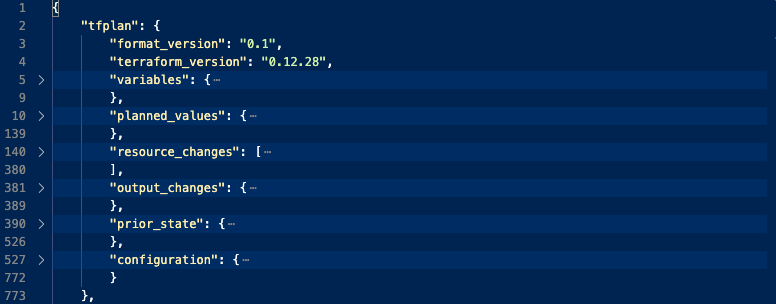
The sections used most often with OPA are described in detail below. The rest get a shorter summary.
tfplan.resource_changes
The resource_changes section contains an array of all resources declared by the root and child modules. Each element of the array specifies the action(s) (create, update, delete, no-op) on each resource, and the before, after and after_unknown attribute values. The no-op action appears when before and after are identical and can be used to validate existing infrastructure against a new or changed policy.
Example JSON: Resource changes
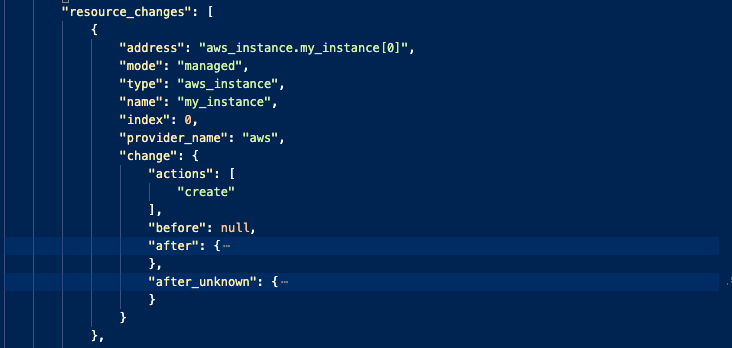
change.actions can be [ "delete", "create" ], i.e. 2 actions. This happens when Terraform is going to completely replace a resource as opposed to update in place.
{
  "resource_changes": [
    {
      "address": "aws_instance.my_instance[1]",
      "mode": "managed",
      "type": "aws_instance",
      "name": "my_instance",
      "index": 1,
      "provider_name": "aws",
      "change": {
        "actions": [
          "create"
        ],
        "before": null,
        "after": {
          "ami": "ami-0dba2cb6798deb6d8",
          "user_data_base64": null,
          "vpc_security_group_ids": [
            "sg-0ea350df2425f8749"
          ]
        },
        "after_unknown": {
          "arn": true,
          "volume_tags": true
        }
      }
    },
    {
      "address": "module.vpc.aws_subnet.scalr_subnet[0]",
      "module_address": "module.vpc",
      "mode": "managed",
      "type": "aws_subnet",
      "name": "scalr_subnet",
      "index": 0,
      "provider_name": "aws",
      "change": {
        "actions": [
          "create"
        ],
        "before": null,
        "after": {
          "assign_ipv6_address_on_creation": false,
          "tags": {
            "Name": "blog-scalr-subnet-0"
          },
          "timeouts": null,
          "vpc_security_group_ids": [
            "sg-0ea350df2425f8749"
          ]
        },
        "after_unknown": {
          "vpc_id": true
        }
      }
    }
  ]
}
OPA Usage
Policies can check for specific attribute settings and check values against allowed lists from the after sections, or check whether specific attributes have been given a value using the after_unknown sections.
Example OPA: Check for an allowed value using change.after. This policy will pass because the required security group is in the vpc_security_group_ids array above.
deny[reason] {
  r := tfplan.resource_changes[_]
  vsg := r.change.after.vpc_security_group_ids[_]
  not array_contains(vsg, required_sg)

  reason := sprintf(
    "%-40s :: security group %s must be included in list",
    [r.address,required_sg]
  )
}
tfplan.prior_state
This prior_state section shows the state of existing resources prior to the plan being generated. It also shows the state of any data sources that were evaluated during terraform plan.
This section also shows the dependencies between the various resources and data sources.
Normally you'll only use this section to check data source attributes and dependencies. Resource checks belong in the before/after sections of resource_changes.
{
  "prior_state": {
    "format_version": "0.1",
    "terraform_version": "0.12.28",
    "values": {
      "outputs": {
        "instance_id": {
          "sensitive": false,
          "value": [
            "i-09e3c2252a3d86f30",
            "i-0ad8b353061e5be59"
          ]
        }
      },
      "root_module": {
        "resources": [
          {
            "address": "aws_instance.my_instance",
            "index": 0,
            "values": {
              "ami": "ami-0dba2cb6798deb6d8",
              "instance_state": "running"
            },
            "depends_on": [
              "module.vpc.aws_subnet.scalr_subnet",
              "module.vpc.aws_vpc.scalr_vpc_dns"
            ]
          },
          {
            "address": "aws_instance.my_instance",
            "index": 1,
            "depends_on": [
              "module.vpc.aws_subnet.scalr_subnet",
              "module.vpc.aws_vpc.scalr_vpc_dns"
            ]
          },
          {
            "address": "data.aws_ami.ubuntu",
            "mode": "data",
            "type": "aws_ami",
            "name": "ubuntu",
            "provider_name": "aws",
            "schema_version": 0,
            "values": {
              "architecture": "x86_64",
              "arn": "arn:aws:ec2:us-east-1::image/ami-0dba2cb6798deb6d8",
              "id": "ami-0dba2cb6798deb6d8",
              "image_id": "ami-0dba2cb6798deb6d8"
            }
          }
        ],
        "child_modules": []
      }
    }
  }
}
OPA Usage
Use OPA here to check the attribute values of data sources, since this is the only place they appear in tfplan data.
tfplan.configuration
The configuration section gives you a JSON representation of the actual configuration in your Terraform config, so you can see how values were set for the attributes.
Configuration consists of 5 sections:
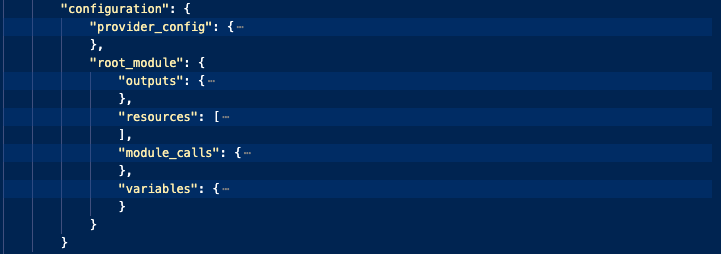
Example JSON: Expressions showing variables and constant values.
{
  "expressions": {
    "cidr_block": {
      "references": [
        "var.cidr"
      ]
    },
    "enable_dns_hostnames": {
      "constant_value": true
    },
    "enable_dns_support": {
      "constant_value": true
    }
  }
}
Example JSON: Expression showing value derived from data source
{
  "resources": [
    {
      "address": "aws_ebs_volume.pg-vol-1",
      "mode": "managed",
      "type": "aws_ebs_volume",
      "name": "pg-vol-1",
      "provider_config_key": "aws",
      "expressions": {
        "availability_zone": {
          "constant_value": "us-east-1a"
        },
        "encrypted": {
          "constant_value": true
        },
        "kms_key_id": {
          "references": [
            "data.aws_kms_key.by_alias"
          ]
        }
      }
    }
  ]
}
OPA Usage
OPA can be used to enforce the use of data sources to set attribute values.
Example OPA: The customer needed to mandate the use of a specific, pre-created KMS key. The key id had to be obtained from a data source and on the resources the policy needed to ensure a data source was being used. This policy will pass because it's pulling the kms key from a data source.
deny[reason] {
  tfrun.is_destroy == false
  r := tfplan.configuration.root_module.resources[_]
  r.type == "aws_ebs_volume"
  r.mode == "managed"
  kms_key := eval_expression(tfplan, r.expressions.kms_key_id)
  not startswith(kms_key, "data.aws_kms_key.")
  reason := sprintf("%-40s :: KMS Key not derived from data source (%s=%s) :: ",
    [concat(".",[r.type,r.name]),a,kms_key])
}
tfplan.variables
You can check a variable's value here, but these values have already been evaluated in tfplan.resource_changes, so this section is rarely used.
tfplan.output_changes
The output_changes section shows change of values for any outputs in the root module.
tfplan.planned_values
This planned_values section shows all of the outputs, resources, and their attributes for which the value is known at the time of the plan, as opposed to values that will be set during apply. These are values specified through literals, variables and data sources and also values that have known defaults.
What Run-Time Details Does Tfrun Expose?
The tfrun section gives you details about the run time environment where the Terraform plan was created.
{
  "tfrun": {
    "workspace": {
      "name": "xxxxx-kms-keys",
      "description": null,
      "auto_apply": false,
      "working_directory": null,
      "tags": {}
    },
    "environment": {
      "id": "env-t2daq8tprsifel8",
      "name": "pg-opa-dev"
    },
    "vcs": {
      "repository_id": "xxxxxx/vcs_example",
      "path": "",
      "branch": "master",
      "commit": {
        "sha": "4xxxxxxxxxxxxxx",
        "message": "Merge pull request #60 from scalr-eap/Staging\n\nUpdated instance",
        "author": {
          "name": "xxxx",
          "email": "[email protected]",
          "username": null
        }
      }
    },
    "cost_estimate": {
      "prior_monthly_cost": 0.0,
      "proposed_monthly_cost": 0.0,
      "delta_monthly_cost": 0.0
    },
    "credentials": {
      "ec2": "cred-stsfnc76g3pknk8"
    },
    "source": "cli",
    "message": "Queued manually using Terraform",
    "is_destroy": false,
    "is_dry": true,
    "created_by": {
      "name": "",
      "email": "[email protected]",
      "username": "[email protected]"
    }
  }
}
The table below describes the tfrun elements you'll typically find useful.
| Attribute | Description | OPA Usage |
|---|---|---|
| "workspace": | Workspace details, including tags | Enforce naming conventions Prohibit auto-apply Mandate tags |
| "environment": | Name and ID | Naming conventions |
| "vcs": | Details of the VCS repo the workspace is linked to, if any | Check allowed repos Check author to prohibit unauthorized runs |
| "cost_estimate": | Summary of the cost estimates created by Scalr | Prevent expensive plans |
| "source": | E.g. cli, vcs, manual | Allow or prohibit run types |
| "is_destroy": | True or false | Useful for disabling policy checks during a destroy |
What Should You Read Next in This OPA Series?
If you haven't read part one or two yet, please check them out. If you're interested in more examples, Scalr maintains a growing library of OPA policy examples in our Github repository. Feel free to make a PR and contribute or create an issue if there's an example you'd like to see.
In the next article in the series, you'll find a series of simple templates that implement a number of common policy requirements.
Where Can You Learn More About OPA and Scalr?
Frequently asked questions
How do I get a Terraform plan in JSON format for OPA policies?
Run terraform plan --out=FILENAME to save the plan, then terraform show -json FILENAME to extract it as JSON. In Scalr, the resulting input has two main sections: tfplan, the JSON representation of the plan itself, and tfrun, the run context created by Scalr.
What data does tfplan contain in a Terraform JSON plan?
tfplan consists of six sections: resource_changes, prior_state, configuration, variables, output_changes, and planned_values. resource_changes is the one OPA policies use most, since it lists every resource with its planned actions (create, update, delete, no-op) and the before, after, and after_unknown attribute values.
When should an OPA policy use prior_state or configuration instead of resource_changes?
Use tfplan.prior_state to check data source attributes and dependencies, since that is the only place data source values appear. Use tfplan.configuration to see how attribute values were set in the config, for example to enforce that a value like a KMS key ID comes from a specific data source. Resource checks themselves belong in the before/after sections of resource_changes.
What is tfrun in Scalr and how do OPA policies use it?
tfrun is the run-context data Scalr adds alongside the Terraform plan, covering the workspace, environment, VCS repo and commit, cost estimates, run source, and flags like is_destroy. OPA policies use it to enforce naming conventions, prohibit auto-apply, restrict allowed repos or run types, block expensive plans, and skip checks during destroys.
About the author

director of platform engineering at Scalr
Ryan Fee is the director of platform engineering at Scalr, with over 15 years of experience improving infrastructure experiences at companies large and small.
Part of this guide
7 sheets