Article · part of a guide
Terraform Variable Sets: How to Share Variables Across Workspaces
A variable set is a named group of Terraform or shell variables you attach to many workspaces at once. How they differ from account and environment scopes, where they land in precedence, and how conflicts between two sets resolve.
Key takeaways
- A variable set is a named group of variables attached to workspaces explicitly, rather than inherited by position in a hierarchy. That makes it the right tool when a group of workspaces spans several environments.
- In Scalr, variable precedence runs account, environment, variable sets, workspace, run, from broadest to narrowest. A workspace variable with the same key beats a linked set.
- A Scalr variable set reaches a workspace in two steps: grant the set access to the environment (or share it with all of them), then link it to the workspace. The workspace link is what injects the variables into runs.
- When two linked sets define the same key and category, Scalr picks the set whose name sorts alphabetically first. Renaming a set can change which value a run receives, and nothing warns you.
- Marking a variable final inside a set stops narrower scopes from overriding it, which is how you enforce a value rather than suggest one.
- Credentials a Terraform or OpenTofu provider consumes belong in a Scalr provider configuration, not a variable set. A set can hold a credential, but provider configurations handle the cloud auth flows and support OIDC, so there is no long-lived key to rotate.
Most platform teams hit the same wall around the thirtieth workspace. Thirty of your forty workspaces need the same OTel collector endpoint, the same TF_LOG setting, and the same three cost-allocation tags. So you paste them in thirty times. Then the key rotates and you do it again, and you miss two.
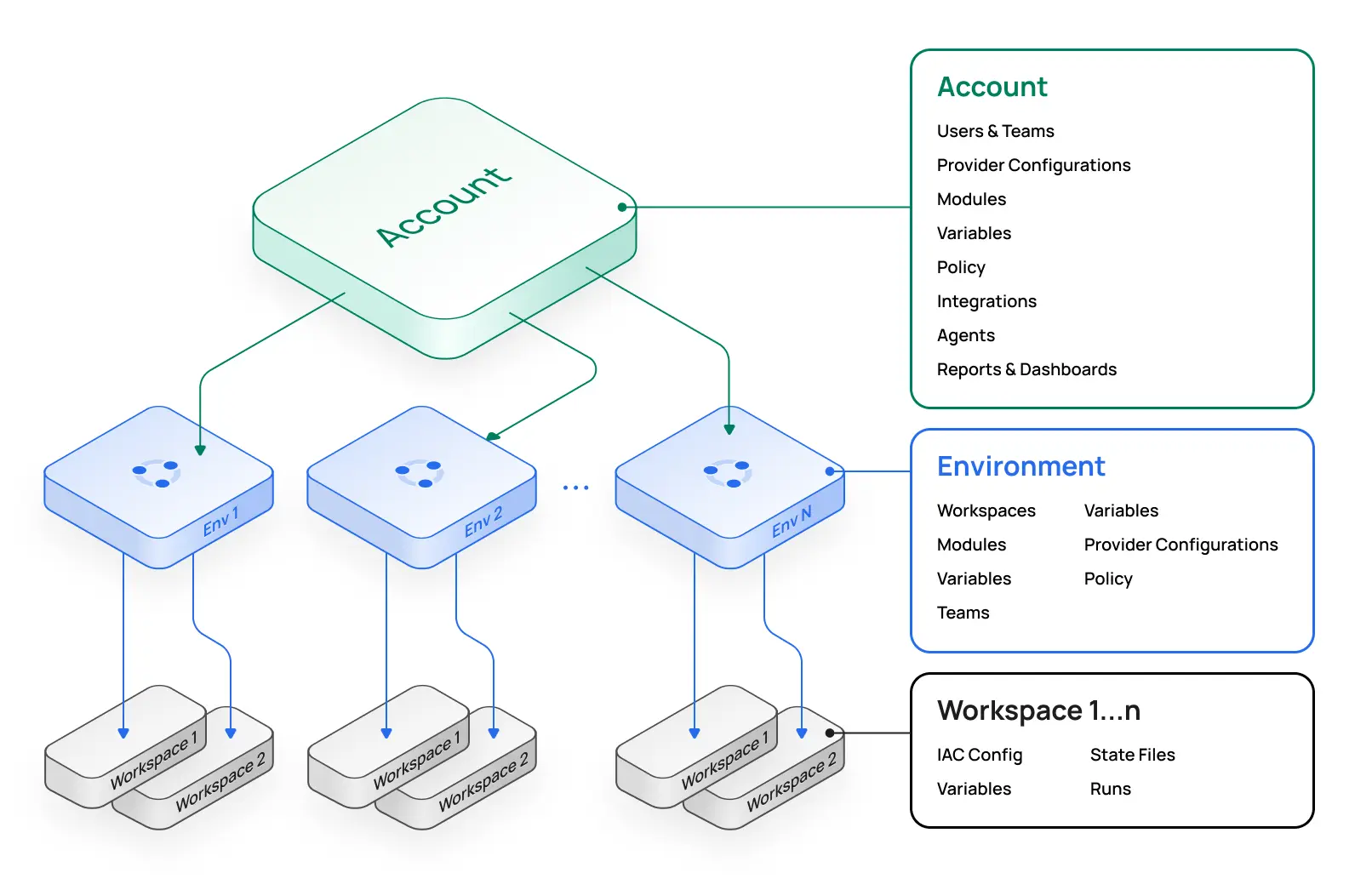
Account and environment scopes solve part of this. They don't solve all of it, because they're positional. A variable at the account scope reaches every workspace in the account, and an environment variable reaches every workspace in that environment. Neither can express "these nine workspaces, which happen to sit in four different environments, all talk to the same observability stack."
Variable sets are the answer to that specific shape of problem.
What is a Terraform variable set?
A variable set is a named group of Terraform or shell variables that you define once and attach to many workspaces. It's a platform feature, not a Terraform language feature, so you won't find a variable_set block in HCL. Once a set is attached to a workspace, every variable in that set is injected into runs on that workspace alongside the workspace's own variables.
The difference that matters is how a workspace acquires the variables. An account or environment variable arrives by inheritance, because of where the workspace sits. A variable set arrives because somebody linked it. That makes sets explicit, auditable, and easy to forget about, all at the same time.
When should you use a variable set instead of an account or environment variable?
Use a variable set when the same group of variables applies to a subset of workspaces that doesn't line up with an environment boundary. Use an account or environment variable when the value genuinely applies to everything at that level. The second case is simpler, because inherited scopes have nothing to link and nobody can forget to apply them to a new workspace.
A rough test: if you'd end up linking the set to every workspace in the account anyway, you wanted an account variable.
| Situation | Reach for |
|---|---|
| Every workspace in the company needs the same telemetry endpoint | Account variable |
Every workspace in prod needs the same alerting channel |
Environment variable |
| Nine workspaces across four environments report to the same observability stack | Variable set |
| Two teams share a set of cost-allocation tags, other teams use different ones | Variable set |
One workspace needs a bigger -parallelism value |
Workspace variable |
| Any workspace needs AWS, Azure or Google credentials to run | Provider configuration |
The two variable-set rows are the ones that used to force copy-paste, and they're the reason the feature exists.
The last row is the one worth dwelling on. A variable set can hold credentials, and nothing stops you putting a cloud access key in one. You shouldn't. Credentials that a Terraform or OpenTofu provider consumes belong in a provider configuration, which is built for exactly that: it handles the cloud auth flows, supports OIDC so there's no long-lived key to rotate, links to workspaces on its own terms, and keeps the secret out of the variable surface entirely. Reach for a variable set when the shared thing is configuration. Reach for a provider configuration when it's provider auth.
How do variable sets work in Scalr?
In Scalr a variable set lives at the account, and it reaches a workspace in two steps. First you grant the set access to one or more environments. Then you link it to individual workspaces inside those environments. The workspace link is the part that actually injects variables into runs.
Granting access has two modes, and they're mutually exclusive:
- Per-environment. Link the set to specific environments through the set's
environmentsrelationship. The set is then available to workspaces in those environments and nowhere else. - Shared. Set
is-sharedtotrueand the set becomes available in every environment in the account. A shared set can't also carry explicit environment links.
Removing a workspace link stops the set contributing variables to subsequent runs. Runs that already finished aren't touched, which is what you want when you're unpicking a bad link under time pressure.
Each variable inside a set has the same shape as a workspace or environment variable: a key, a value, a category of either terraform or shell, plus optional hcl, sensitive, final, and description flags. Two of those are one-way doors. key and category are immutable after creation, and once sensitive is true you can't revert it to false or read the value back through the API. Plan for that before you bulk-load a set from a script.
Creating, editing, or deleting sets requires the var-sets:update permission, so this is a capability you can hand to a platform team without handing over the whole account. Scalr's granular RBAC model treats it like any other permission.
Where do variable sets sit in Scalr's variable precedence?
Variable sets sit between environment and workspace. The full order in Scalr, broadest to narrowest, is account, environment, variable sets, workspace, run. A narrower scope overrides the same key from a broader one, so a workspace variable beats a linked set, and a run variable beats everything but isn't reused on the next run.
That ordering has a practical consequence people trip over. A set is not a way to force a value onto a workspace. If a team has already defined otel_endpoint at the workspace scope, linking your shiny new observability set changes nothing for them, and the workspace keeps winning.
The tool for enforcement is the final flag. A variable marked final at any scope can't be overridden at a narrower scope, and that flag is available on variables inside a set. So if you need every linked workspace to use the value you published, mark it final in the set rather than hoping nobody has a local override. If you're wiring up a service account token this way, the Scalr docs recommend setting it both sensitive and final so end users can neither read it nor replace it.
Worth knowing before you debug this: the workspace Variables tab shows the effective list, one row per unique key, with an origin label saying whether each value came from a set, the account, the environment, or the workspace. Scalr resolves precedence server side, so what you see in that table is what the run receives.
What happens when two variable sets define the same variable?
When two sets linked to the same workspace define the same key and category, Scalr picks the set whose name sorts alphabetically first. Resolution is deterministic across runs. The uniqueness key is key plus category, so a terraform variable and a shell variable with the same name in different sets don't collide, and both apply.
This is the design decision I'd push back on. Deterministic is good, but alphabetical-by-name means renaming a set can silently change which value your runs receive, and nothing tells you it happened. The alternative design is to reject the duplicate outright, which fails loudly at configuration time instead of surprising you at plan time.
Neither behavior is wrong, but they ask for different discipline. On Scalr, keep your key namespaces disjoint across sets and treat an intentional collision as a smell rather than a feature.
How do you manage variable sets as code?
The Scalr provider covers the whole object graph, which matters if you're building the platform itself with Terraform. Three resources do the work:
# The set itself, scoped to two environments
resource "scalr_var_set" "observability" {
  name         = "observability"
  description  = "Shared OTel endpoint and log settings"
  environments = ["env-xxxxxxxxxx", "env-yyyyyyyyyy"]
  owners       = ["team-platform000"]
}

# A variable inside the set
resource "scalr_variable" "otel_endpoint" {
  key        = "OTEL_EXPORTER_OTLP_ENDPOINT"
  value      = "https://otel.internal.example.com:4317"
  category   = "shell"
  final      = true
  var_set_id = scalr_var_set.observability.id
}

# The link that injects it into a workspace's runs
resource "scalr_workspace_var_set" "app_observability" {
  workspace_id = scalr_workspace.app.id
  var_set_id   = scalr_var_set.observability.id
}
Two details to get right. var_set_id on scalr_variable can't be combined with workspace_id or environment_id, because a variable belongs to exactly one owner. And to share a set with every environment, pass environments = ["*"] rather than enumerating them, which is the provider's spelling of the shared mode described above.
If the value is a real secret, Terraform 1.11 and later support write-only arguments, and scalr_variable exposes value_wo and value_wo_version so the value never lands in state. That's worth the extra line, for the reasons covered in our piece on secrets in Terraform state.
Three mistakes to avoid
Sharing everything by default. Setting a variable set to shared is one checkbox, and it's tempting when you're not sure which environments need it. The result is a set that anyone with access to any environment in the account can link, including values you meant for one team. Grant per-environment access until you have a reason not to.
Treating a set as a secrets manager. Sets encrypt sensitive values at rest and mask them in output, which covers a shared token an application needs. It isn't a vault, there's no rotation, and the sensitive flag can't be undone once set. And as above, provider credentials don't belong here at all; that's what provider configurations are for.
Expecting a set to cascade on its own. Granting a set access to an environment doesn't apply it to the workspaces in that environment, and this catches people out often enough that it reaches our support queue. Access and application are two separate steps, by design. If a set exists, holds the right variables, and has access to the right environment but still isn't showing up in runs, the workspace link is the thing to check. The workspace's Variables tab has an origin column telling you what the run will actually receive.
Where to start
Pick the single worst case of copy-paste in your account, usually a shared endpoint or a block of tags sitting in a dozen workspaces. Build one set, grant it to the environments involved, link it to those workspaces, and delete the per-workspace copies once a run confirms the set's value is landing. Then mark it final so the copies don't come back.
Variable sets won't restructure your account for you. If the sprawl you're fighting is really about how workspaces and environments are laid out, that's a different problem, and our guide to managing multiple Terraform environments is the better place to start. For the mechanics of the variables themselves, the tfvars guide covers what happens to these values once Terraform gets hold of them.
Frequently asked questions
What is a Terraform variable set?
A variable set is a named group of Terraform or shell variables, defined once at the organization or account level and attached to multiple workspaces. It is a platform feature rather than a Terraform language feature, so you will not find it in HCL, and the platform you run on decides how sets are scoped and how they rank against other variables.
When should I use a variable set instead of an account or environment variable?
Use a variable set when the same group of variables applies to a subset of workspaces that does not match an environment boundary, such as every workspace that talks to the same observability stack across four environments. Use an account or environment variable when the value genuinely applies to everything at that level, since inherited scopes need no linking and cannot be forgotten.
Should I put cloud provider credentials in a variable set?
No. Credentials that a Terraform or OpenTofu provider consumes belong in a Scalr provider configuration, which is purpose-built for them: it handles the AWS, Azure and Google auth flows, supports OIDC so no long-lived key has to be stored or rotated, and links to workspaces on its own terms. A variable set can technically hold a credential, and that is the right home for something like a shared application token, but provider authentication should not go through variables.
What is the variable precedence order in Scalr?
From broadest to narrowest: account, environment, variable sets, workspace, and run. A narrower scope overrides the same key from a broader one, so a workspace variable beats a linked variable set, and a run variable beats everything. A variable marked final at any scope cannot be overridden at a narrower scope.
What happens if two variable sets define the same variable?
In Scalr, when two sets linked to the same workspace define the same key and category, the set whose name sorts alphabetically first wins, and resolution is deterministic across runs. The uniqueness key is key plus category, so a terraform variable and a shell variable with the same name in different sets do not conflict.
Can I manage Scalr variable sets with Terraform?
Yes. The Scalr provider has a scalr_var_set resource for the set itself, scalr_workspace_var_set for the workspace link, and a var_set_id attribute on scalr_variable for the variables inside the set. The var_set_id attribute cannot be combined with workspace_id or environment_id on the same variable resource.
About the author

director of platform engineering at Scalr
Ryan Fee is the director of platform engineering at Scalr, with over 15 years of experience improving infrastructure experiences at companies large and small.
Part of this guide
8 sheets