

Article · part of a guide
Terraform and OpenTofu Pull Request Comments The Right Way
Scalr, Atlantis & Terraform Cloud, using them in conjunction with your pull requests.
Key takeaways
- In the GitOps workflow, opening a pull request triggers a TACO to run a speculative plan and send the results back to the VCS provider as PR comments or status checks.
- Atlantis posts the complete plan output to the pull request, which is information-rich but can be noisy and run into VCS comment limits.
- Terraform Cloud reports only general plan information through a status check, so developers must log into the tool for plan details or errors.
- Scalr takes a hybrid approach, staying quiet on successful runs and posting full plan output only on errors, using flags for success, warning, important, and error.
- Scalr also provides summary and per-workspace comment views so developers can review many runs from a single pull request in one place.
Automated pull request (PR) comments let developers and reviewers discuss a Terraform or OpenTofu change without leaving the pull request to go hunting for plan results in another tool. This post covers the options for automating them and how to set them up well.
The GitOps flow comes first, since it's the reason PR comments exist at all. After that, we'll look at how each of the main Terraform automation and collaboration tools handles them (Scalr, HCP Terraform or TFC, and Atlantis).
How do PR comments work?
Many Terraform and OpenTofu users work with the GitOps workflow, which has a few standard steps:
- Terraform code is created in a main branch of a VCS provider, such as a GitHub repository. (This same process applies to a Gitlab merge request and Azure DevOps pull request)
- A developer checks the code into a different branch, changes the Terraform configuration files, and then opens a new pull request against the main branch.
- Upon opening the pull request, a Terraform automation and collaboration tool (TACO), such as Scalr, Terraform Cloud (TFC), or Atlantis, will execute a speculative/dry run. Depending on the tool you're using, this run will go through the Terraform plan step and check other things, like OPA policies.
- After the Terraform run has finished, the results are sent back to the VCS provider as PR comments or status checks.
- Developers will review the comments and decide whether or not to merge the proposed changes; if merged, a Terraform
applywill be executed to make the infrastructure changes. - The above process will repeat after every new pull request as long as the VCS webhook is linked to the Terraform automation tool.
Note: The flows differ slightly depending on the tool used. For example, Atlantis applies before the merge and TFC applies after it, while Scalr supports both orderings, including /scalr apply from a PR comment before merging. That's a debate for another post.
Solutions for PR Comments
That's the general flow. How each tool turns it into actual PR comments varies quite a bit.
Atlantis:
PR comments are a core feature that draws users to Atlantis. Atlantis provides the complete plan output to the VCS provider, making it rich with information but sometimes overwhelming and noisy.
The other main issue in this scenario is that the VCS providers have comment limits. As any Terraform developer knows, plan outputs can be very lengthy, so with Atlantis, you'll be ingesting a ton of information and still won't see all of it because of comment limits.
Terraform Cloud:
Terraform Cloud only supplies general information about the Terraform plan through a status check and doesn't report any of the Terraform plan details. The users will see if the plan is successful, how many resources will be added/changed/destroyed, and if the run passes the OPA policy checks. For any further information, like the error of a plan output or to see the Terraform changes, the developer will have to log into Terraform Cloud, which then slows down the development process because they are switching contexts.
Scalr:
Scalr aims to keep PR comments quiet when runs succeed and loud when a Terraform run fails. It works the same way as monitoring: get flooded with alerts every day and you start tuning them out, and then they stop doing their job.
Scalr takes a hybrid approach and posts the Terraform plan output only when errors occur. Developers will receive the following flags after a plan is executed depending on the result:
- Successful: The plan was successful; there were no OPA failures or destructive changes, so there is nothing to review further.
- Warning - There are destructive changes that the developer needs to be aware of.
- Important - There are OPA policy failures that the developer needs to be aware of.
- Error - The Terraform or OpenTofu run failed, and the error logs were sent back to the pull request comment.
Scalr also has a summary view or per workspace view in the comments. Many developers have a single repository linked to multiple workspaces, resulting in many runs kicking off based on a pull request. Reviewing every Terraform run takes a lot of time, so Scalr reports a summary of all the changes across all runs in a single place:
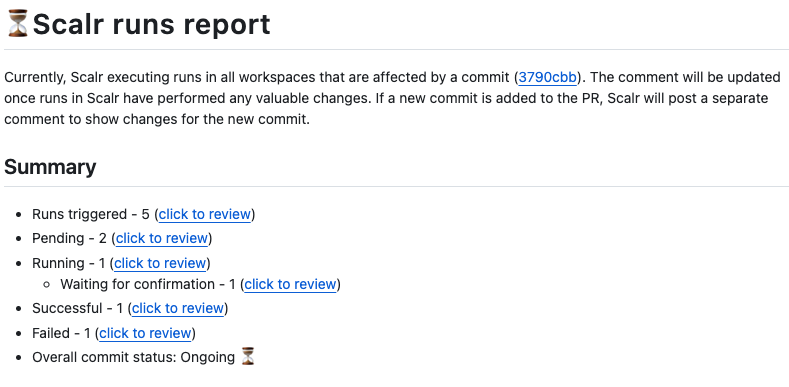
Example of Comments posted in Github
Based on the summary, you can view the per-workspace report, which will break down each run in that workspace, whether it was successful or not, and provide the detail you need to decide whether to merge the pull request.
This fleet-wide visibility extends beyond a single pull request. Because every Scalr workspace runs against one shared state schema, its fleet reports read across all workspaces at once: drift, stale workspaces, pending approvals, and queued runs. A platform team can spot a group whose runs keep failing and step in to unblock them. So you get one place to see the state of every workspace, including the ones that have nothing to do with the pull request in front of you.
Here are the scenarios Scalr reports on and the information each one includes:
Scenario 1: The Terraform plan is successful
In this case, Scalr will report back a successful run with general information about the run and workspace:
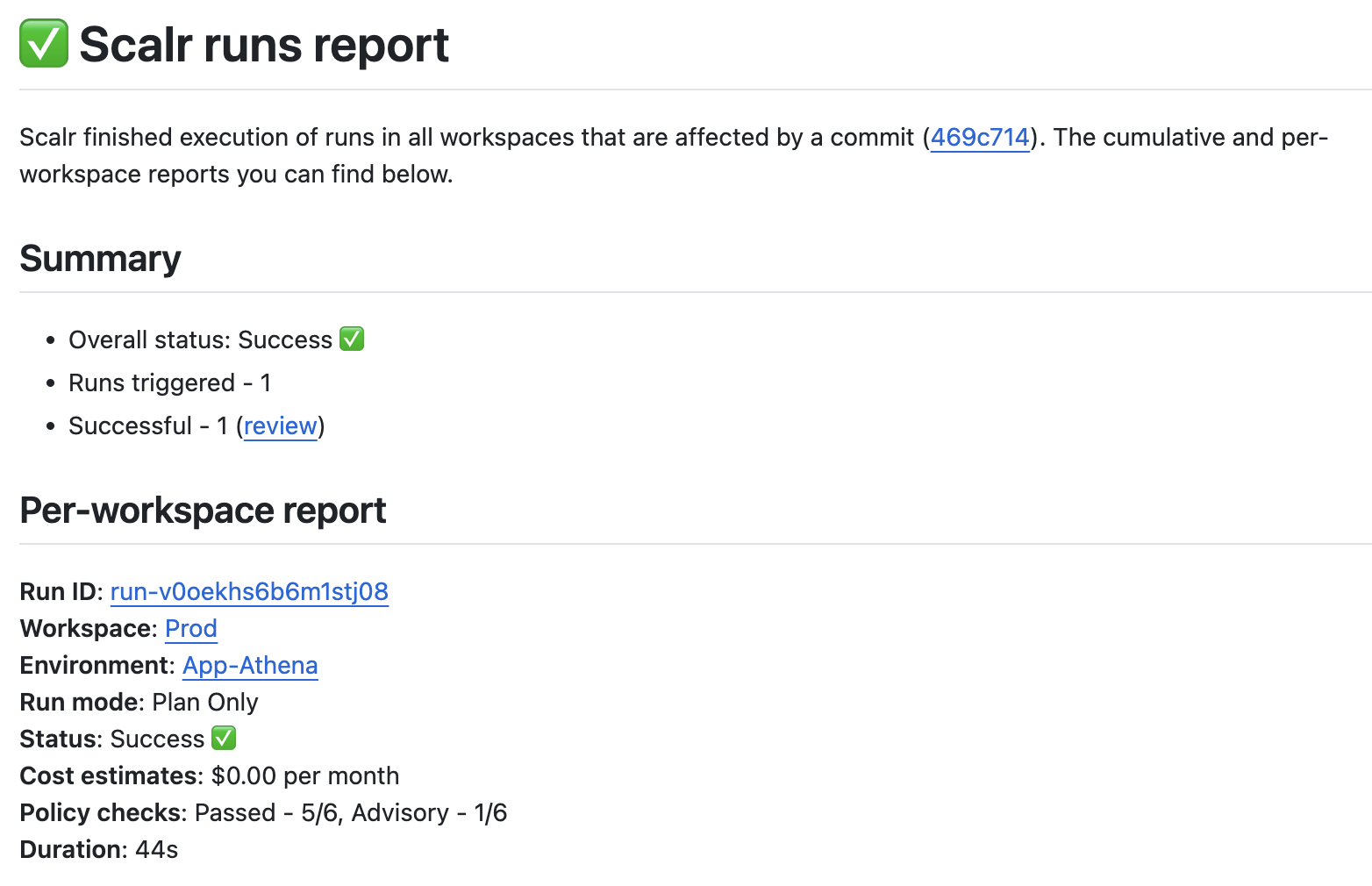
Example of a successful Terraform plan
Scenario 2: The plan is successful, but there are OPA policy violations
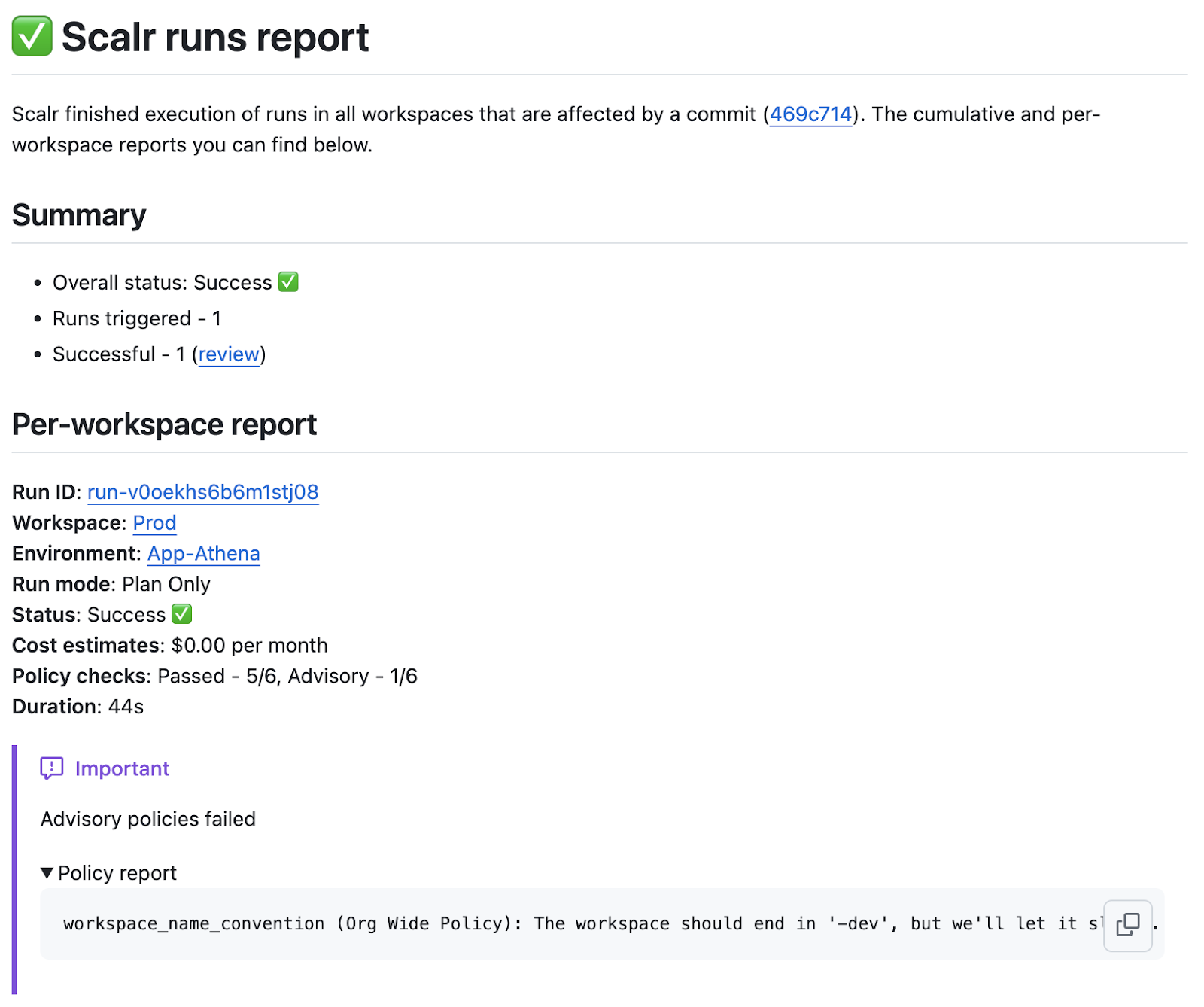
Example of successful plan with OPA violations
Scenario 3: The plan is successful, but there are destructive changes
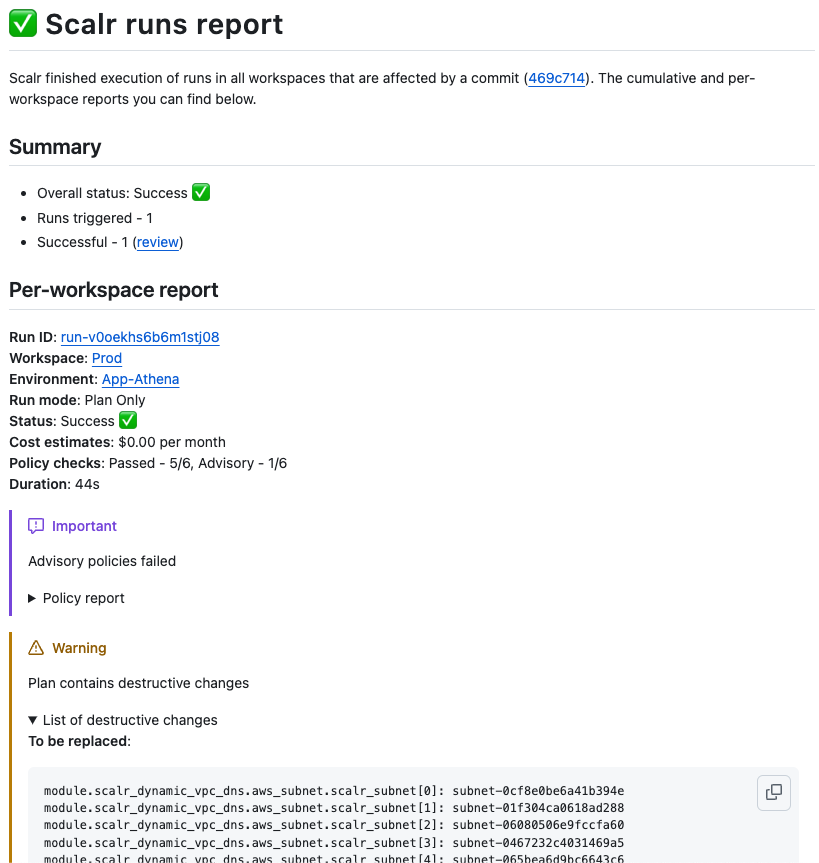
Example of plan with destructive changes
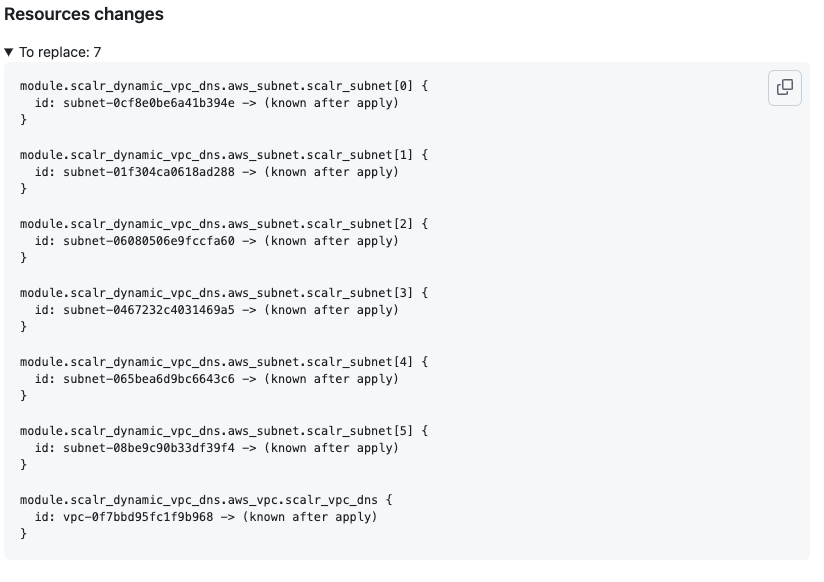
Example of resources to be destroyed
Scenario 4: The Terraform plan has failed with an error; the Terraform error logs are sent back to the pull request comment
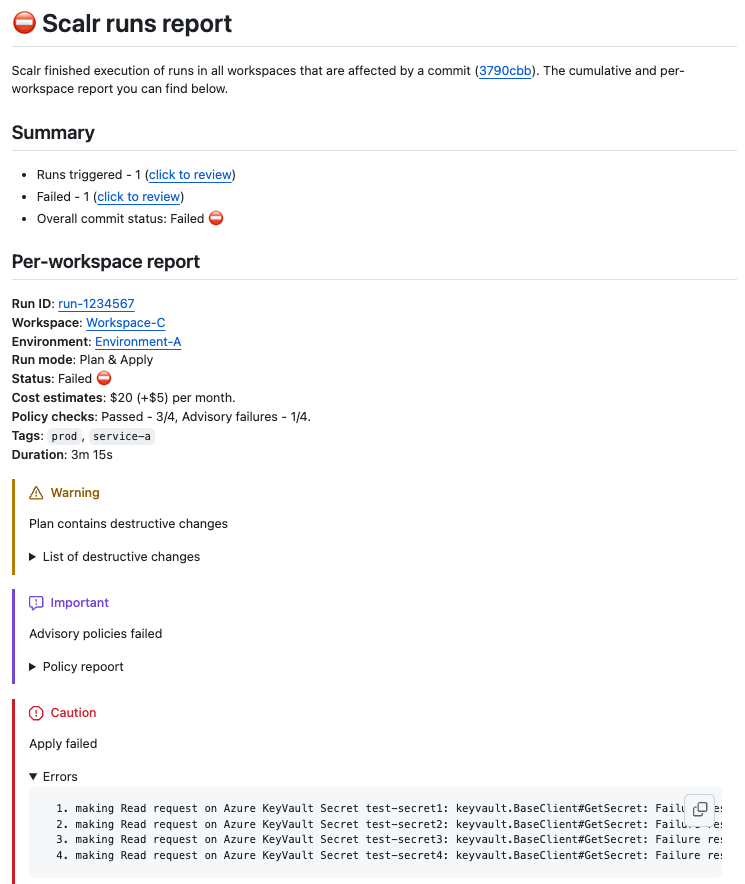
Example of failed runs with error logs
Summary
Scalr's PR comments are built to point developers at the runs that need a look. A plan that succeeds cleanly doesn't need the wall of detail you'd send on an error. Matching the detail to the situation cuts the noise, so the real problems stand out when they happen. PR comments also let several people review the Terraform changes without each of them needing access to the tool running the deployment. If you want to try Scalr's approach, current plans are on the pricing page.
About the author

director of platform engineering at Scalr
Ryan Fee is the director of platform engineering at Scalr, with over 15 years of experience improving infrastructure experiences at companies large and small.
Part of this guide
2 sheets
Terraform Pull Request Automation: A Complete Guide
Related
- OpenTofu + Atlantis vs a Managed Platform: When Self-Hosting Costs More
- Spacelift Alternatives: Spacelift vs Scalr, Terraform Cloud, env0, and Atlantis (2026)
- Terraform Module Supply Chain Attacks: Tag Mutation, Pwn Requests, and How to Pin Safely
- Terraform Wiz: How to Scan, Secure, and Enforce Policy on Your IaC