

Guide · 1 article branch off this one
Terraform Pull Request Automation: A Complete Guide
Comprehensive guide to implementing pull request-based Terraform workflows, from basic automation to enterprise-scale governance.

Key takeaways
- Merge-before-apply is the default recommendation: plan on PR, review, merge, then apply from main. Apply-before-merge needs PR-level locking and platform tooling like Atlantis or Scalr to be safe.
- Diff semantics decide your run bill. Evaluating the whole PR diff (head vs. base) re-plans on every review commit, even ones that touch no Terraform files; previous-commit strategies fix the cost but can miss changes buried in multi-commit pushes.
- Trigger patterns fail in non-obvious ways at scale: VCS API pagination limits on large monorepo merge commits can drop changed paths, leaving a majority of affected workspaces untriggered.
- PR automation dies when VCS tokens expire. Webhooks stop processing and plans stop appearing, with no error raised. Monitor for the absence of expected runs, not only for failed ones.
- Atlantis suits 10-50 person teams; at enterprise scale, governance needs like OPA policies, RBAC, audit trails, and hierarchical inheritance push teams toward platforms like Scalr, Spacelift, or env0.
- Test comment commands (/scalr plan, /atlantis plan) against your trigger settings before relying on them: they can respect disabled auto-plans, skip mid-batch commits, or plan a stale commit on draft PRs.
Why PR-Based Workflows for Infrastructure as Code
Large platform teams have made reviewed, automated Terraform the standard path for everyone else. HashiCorp's Deutsche Bank case study says the bank's Terraform Enterprise platform lets more than 3,000 developers consume cloud resources on their own, backed by more than 350 infrastructure policies (as of September 2026).
Most of the hard decisions sit in the details: which files trigger which workspaces, which commit gets planned when a PR has five of them, and what happens when the webhook pipeline stops processing without an error. This guide covers the tooling choices, from open-source options you run yourself to managed platforms, alongside the failure modes we've watched teams hit in production.
PR-based workflows give you:
- Visibility: All infrastructure changes are visible in pull requests before deployment
- Collaboration: Teams discuss changes in a familiar VCS context
- Auditability: Complete history of who changed what and why
- Safety: Automated checks prevent problematic changes from reaching production
- Parallelism: Multiple teams can work simultaneously without conflicts
Understanding PR Workflow Architecture
Terraform pull request automation typically follows one of two patterns: merge-before-apply or apply-before-merge.
Merge-Before-Apply (Apply After Merge)
This is the safest approach and the one most often recommended:
- Developers create feature branches and submit PRs
- Automated checks and
terraform planruns - Peers review the plan
- Only after PR approval and merge into main,
terraform applyexecutes via CI/CD - This keeps main as the source of truth and changes linear
Benefits:
- Low risk of state corruption
- High main branch integrity
- Simple mental model
Trade-offs:
- Slower feedback loop (apply happens post-merge)
- Issues discovered after merge require another fix PR
There's a third, less obvious trade-off: the post-merge trigger itself can fail in ways nobody notices until production lags behind main. A team we worked with at Scalr running a large Azure DevOps monorepo found that after merges to main, roughly 60% of affected workspaces didn't auto-trigger, and only on large merges. One offending commit touched 72 folders and 234 files. Webhooks were delivered, and config-as-code drift was ruled out; the root cause was a pagination limit in the Azure DevOps commit file-list API that dropped some changed paths on very large commits, so workspaces whose directories fell past the cutoff never saw a trigger. The bug took weeks to fix, but the diagnostic lesson is durable: when post-merge runs go missing in a monorepo, check whether your VCS API actually returns the full file list for the merge commit before you start second-guessing trigger patterns. The same team had disabled plan-on-PR entirely because it "generated triple the number of runs" across their workspace fan-out. Monorepo trigger scoping is a cost decision as much as a correctness one.
Apply-Before-Merge (Plan-on-PR Pattern)
Some teams apply before merging to check changes in a real environment. This approach leans heavily on tooling like Atlantis or Scalr.
Key requirements:
- PR-level locking to prevent concurrent applies
- Automated plan/apply commands via PR comments
- Reliable state management with remote backends
Benefits:
- Faster feedback (detect issues before merge)
- Test changes in real environment
Trade-offs:
- Higher complexity
- Requires powerful tooling to manage safely
Plan-on-PR Patterns: Best Practices
Every pull request should trigger an automatic terraform plan so reviewers can see what's coming. Don't skip it.
What teams routinely underestimate is how the trigger evaluates the diff. A customer running Terraform out of a /terraform directory hit this directly: the dry run on PR open worked as expected, but every review-fix commit after that re-triggered a full dry run, even when the commit touched zero files under /terraform. They described it as "racking up a number of runs, and cost." Most platforms evaluate the entire PR diff (head vs. base) on every push, so the original /terraform change keeps matching the trigger no matter what the new commit contains. GitHub Actions' on: pull_request: paths filter behaves the same way, which surprises teams who assume it scopes to the latest push. That customer's feature request became a product setting about six months later: a selectable commit strategy that evaluates only the files changed since the previous commit.
The previous-commit strategy has its own edge cases, found by another customer who stress-tested it. A push containing multiple commits only evaluated the last one, so a relevant change buried mid-batch triggered nothing, and /scalr plan comment commands only produced runs when the most recent commit matched the trigger patterns, because the -force flag overrides disabled dry runs but not pattern matching. The shipped fix makes comment commands bypass the commit strategy entirely and run for any workspace affected by any commit in the PR. Whichever diff-evaluation strategy you choose, test it with a multi-commit push and a review-only commit before depending on it.
GitHub Actions Implementation
Here's a production-ready workflow:
name: Terraform PR Automation
on:
  pull_request:
    paths:
      - 'terraform/**'
      - '.github/workflows/terraform.yml'

permissions:
  id-token: write
  contents: read
  pull-requests: write

jobs:
  terraform-check:
    runs-on: ubuntu-latest
    strategy:
      matrix:
        environment: [dev, staging, prod]

    steps:
      - uses: actions/checkout@v4

      - name: Configure AWS Credentials
        uses: aws-actions/configure-aws-credentials@v4
        with:
          role-to-assume: arn:aws:iam::${{ secrets.AWS_ACCOUNT_ID }}:role/github-actions
          aws-region: us-east-1

      - name: Setup Terraform
        uses: hashicorp/setup-terraform@v3
        with:
          terraform_version: 1.6.0
          terraform_wrapper: false

      - name: Terraform Format Check
        run: terraform fmt -check -recursive

      - name: Terraform Init
        working-directory: terraform/${{ matrix.environment }}
        run: |
          terraform init \
            -backend-config="bucket=${{ secrets.TF_STATE_BUCKET }}" \
            -backend-config="key=${{ matrix.environment }}/terraform.tfstate"

      - name: Terraform Validate
        working-directory: terraform/${{ matrix.environment }}
        run: terraform validate

      - name: Run Security Scan
        uses: aquasecurity/tfsec-pr-commenter-action@v1
        with:
          working_directory: terraform/${{ matrix.environment }}
          github_token: ${{ github.token }}

      - name: Terraform Plan
        id: plan
        working-directory: terraform/${{ matrix.environment }}
        run: |
          terraform plan -out=tfplan -no-color 2>&1 | tee plan_output.txt
          echo "exitcode=$?" >> $GITHUB_OUTPUT
GitLab CI Implementation
GitLab's native Terraform integration simplifies state management:
stages:
  - validate
  - plan

variables:
  TF_ROOT: ${CI_PROJECT_DIR}/terraform
  TF_STATE_NAME: ${CI_ENVIRONMENT_NAME}

.terraform-base:
  image: hashicorp/terraform:1.6
  before_script:
    - cd ${TF_ROOT}/${CI_ENVIRONMENT_NAME}
    - terraform init

validate:
  extends: .terraform-base
  stage: validate
  script:
    - terraform fmt -check -recursive
    - terraform validate
  rules:
    - if: $CI_MERGE_REQUEST_ID

plan:dev:
  extends: .terraform-base
  stage: plan
  environment:
    name: development
  script:
    - terraform plan -out=tfplan
    - terraform show -json tfplan > plan.json
  artifacts:
    paths:
      - ${TF_ROOT}/${CI_ENVIRONMENT_NAME}/tfplan
      - ${TF_ROOT}/${CI_ENVIRONMENT_NAME}/plan.json
    reports:
      terraform: ${TF_ROOT}/${CI_ENVIRONMENT_NAME}/plan.json
  rules:
    - if: $CI_MERGE_REQUEST_ID
Apply Strategies: Merge-Before-Apply vs Apply-Before-Merge
Merge-Before-Apply (Manual CI/CD)
name: 'Terraform Apply on Merge'
on:
  push:
    branches: [ main ]
jobs:
  apply:
    runs-on: ubuntu-latest
    steps:
    - uses: actions/checkout@v4
    - uses: hashicorp/setup-terraform@v3
    - run: terraform init
      working-directory: ./terraform
    - run: terraform plan -input=false -out=tfplan
      working-directory: ./terraform
    - run: terraform apply -auto-approve tfplan
      working-directory: ./terraform
When to use:
- Small teams (1-10 developers)
- Risk-averse organizations
- Strict change control requirements
Apply-Before-Merge (Specialized Tooling Required)
Platforms like Scalr (or tools like Atlantis) manage apply triggers based on workspace settings and PR interactions:
- On PR creation, a plan is generated and posted
- After approvals, workflows diverge:
- Apply After Merge (Scalr default): Merge triggers platform apply from target branch
- Apply Before Merge (common in Atlantis): PR comment (e.g.,
/atlantis apply,/scalr apply) triggers controlled apply with platform managing locks and state
When to use:
- Medium to large teams (50+ developers)
- Need for fast feedback loops
- Mature infrastructure practices
Atlantis: PR Automation Fundamentals
Atlantis established the pattern most Terraform PR automation now follows: plan and apply driven by comments, directly inside the pull request.
How Atlantis Works
- Open a PR with your Terraform changes
- Comment
atlantis plan - Atlantis runs the plan, dumps the output back in the PR
- Team reviews; looks good?
- Comment
atlantis apply; Atlantis runs the apply, done
Configuration Example
version: 3
projects:
- name: production
  dir: environments/prod
  terraform_version: v1.5.0
  autoplan:
    when_modified: ["*.tf", "*.tfvars"]
    enabled: true
  apply_requirements: ["approved", "mergeable"]

- name: staging
  dir: environments/staging
  terraform_version: v1.5.0
  autoplan:
    when_modified: ["*.tf", "*.tfvars"]
    enabled: true
Strengths of Atlantis
- Developer-friendly: Git workflows teams already know
- Quick feedback: See the plan right away
- Collaboration: All discussion happens in one place
- Transparency: Everyone sees what's happening
- Open source: Full control, no licensing costs
Limitations at Scale
- Operational overhead: Self-hosted, requires maintenance and security management
- Governance gaps: OPA policies require custom integrations
- Scaling challenges: Single server becomes a bottleneck with many repos
- State management: Getting locking right across many operations needs careful setup
- Audit complexity: Compliance features may need additional tooling
Scalr: Enterprise PR Automation
Scalr takes the Atlantis-style PR workflow and wraps it in a complete enterprise platform.
VCS-Driven Workflows
Link a workspace to a repo branch, and Scalr gets notified of PRs and merges. It supports two main GitOps flows:
- Merge-Before-Apply: Plan on PR, review, merge, then Scalr applies from main (classic)
- Apply-Before-Merge: Plan and apply right from the PR before it hits main (Atlantis-style)
PR Comment Commands
# See the plan
/scalr plan

# Approve a waiting run
/scalr approve -workspace-id=ws-xxxxxxxxxx

# Apply changes (requires permission)
/scalr apply

# Target specific workspace
/scalr apply -workspace-id=ws-xxxxxxxxxx
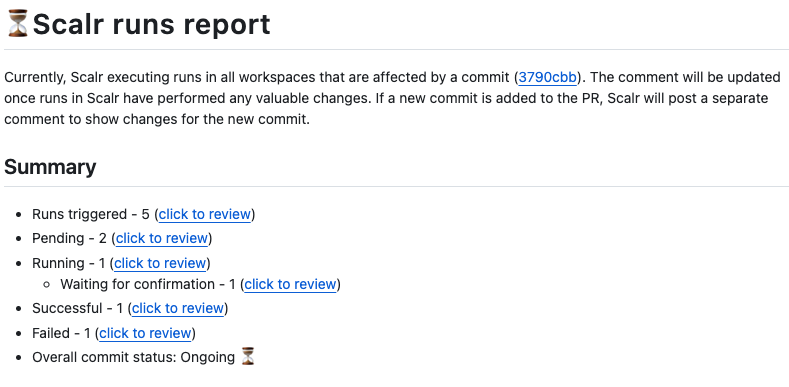
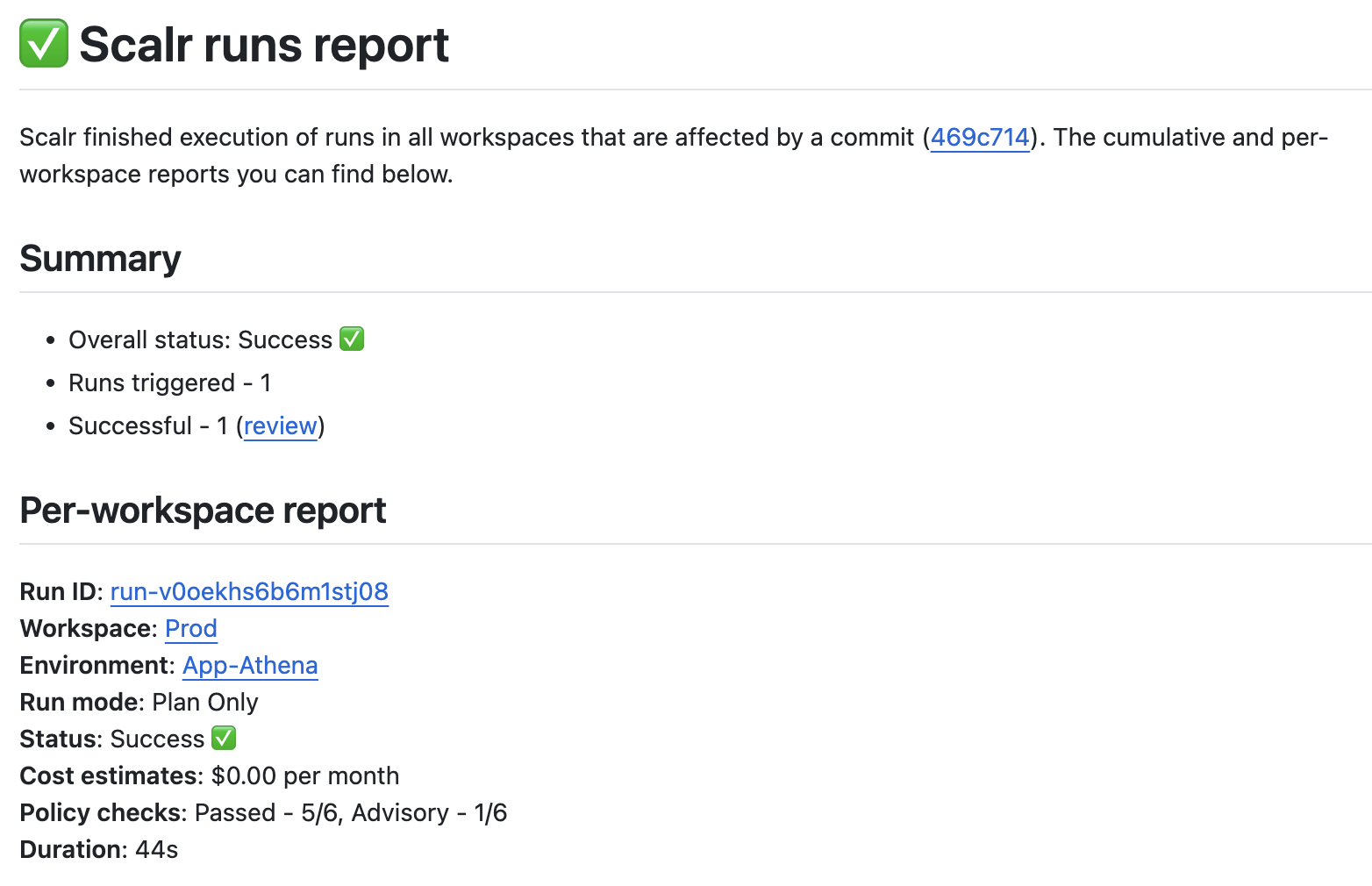
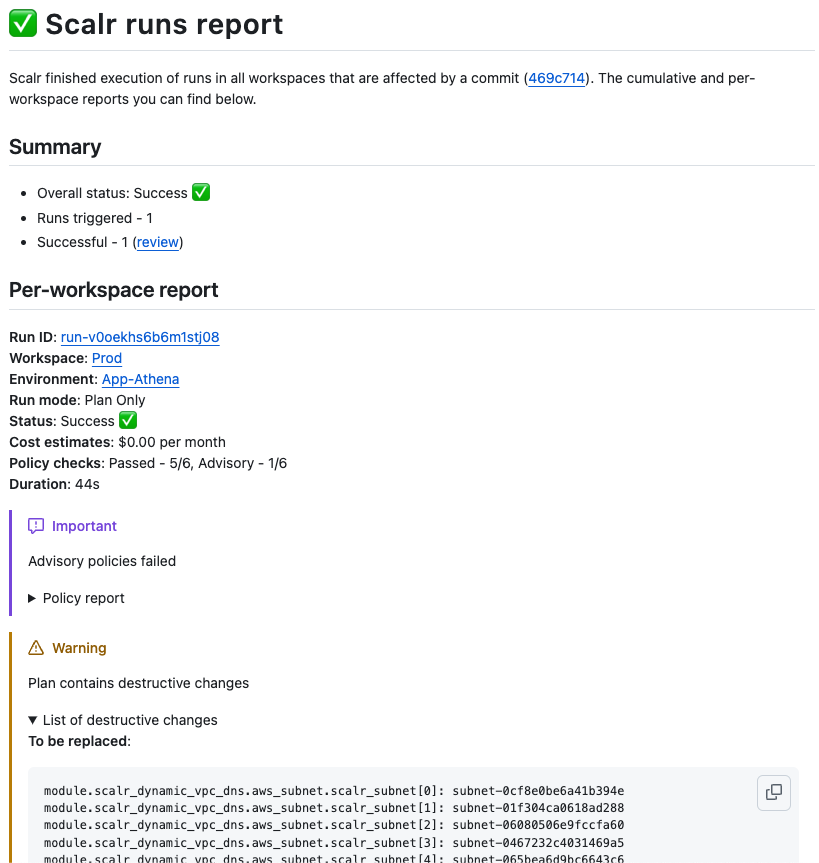
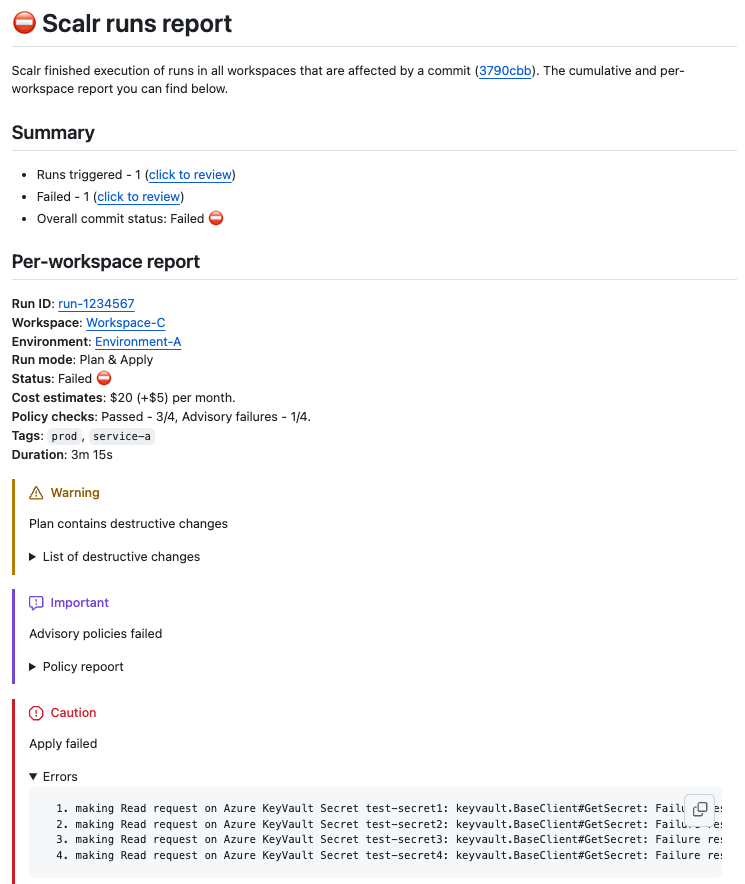
Feedback comes right back into the PR with smart summaries for clean plans and detailed reports for errors.
Comment commands interact with workspace trigger settings, and the interactions deserve a test run before you depend on them. A team we worked with at Scalr running an Atlantis-style workflow on tag-based workspaces hit two at once. First, /scalr plan stopped producing runs after they disabled plan-on-PR-open, by design, since the command respects that setting unless you pass -force. Second, and more confusing, plans fired for workspaces whose trigger patterns didn't match the changed files at all: a workspace scoped to core-eks-manifests/config/**, profiles/k8s/**, and services/*/core-eks-service.yaml triggered on a commit that touched only profiles/local/README.md and a root main.tf. The root cause was that tag-based workspaces computed the PR diff against the commit SHA of the workspace's current state version, correct for tag-pushed applies but wrong for plan-only PR runs, and broad patterns shared across many workspaces fanned that one miscomputed diff out into a pile of zero-change runs. Scalr fixed the diff computation and credited the account 2,000 runs to cover the plans it should never have generated.
Safety Features
Branch-aware protection:
- Warns if trying to change state from unmerged PR branch
- Prevents auto-applies if branch differs from workspace's main configuration
- Ensures state changes originate from main or verified PR workflows
Controlled applies:
- Requires PR approval and branch protection checks
- Skip post-merge apply with
[skip scalr]or[skip ci]in merge message - RBAC controls: only users with
runs:applypermission can execute
These safeguards exist because the failure modes are real, including in Scalr itself. One we caught and fixed ourselves: with draft-PR triggers disabled, commenting /scalr plan on a draft PR planned the last commit made before the PR was marked draft, producing a green check against code that no longer matched the branch. We shipped a fix in May 2026 so the command always plans the latest commit. If your tooling treats draft PRs differently from open ones, check which commit SHA appears in the run metadata before trusting the status check.
Custom Hooks for Workflows
Scalr lets you inject scripts at different run phases: pre-init, pre-plan, post-plan, pre-apply, post-apply.
Example pre-plan hook to run tflint:
#!/bin/bash
echo "--- Running TFLint ---"

if ! command -v tflint &> /dev/null; then
    mkdir -p /tmp/bin
    curl -s https://raw.githubusercontent.com/terraform-linters/tflint/master/install_linux.sh | TFLINT_INSTALL_PATH=/tmp/bin bash
    export PATH="$PATH:/tmp/bin"
fi

if [ -f ".tflint.hcl" ]; then
    tflint --config=.tflint.hcl --recursive .
else
    tflint --recursive .
fi
OPA Policy Integration
Write policies in Rego, store in Git, and Scalr checks them pre-plan and post-plan:
package terraform

import input.tfrun as tfrun

# Deny if estimated monthly cost delta exceeds $100
deny[reason] {
    cost_delta := tfrun.cost_estimate.delta_monthly_cost
    max_allowed_cost_delta := 100.00

    cost_delta > max_allowed_cost_delta
    reason := sprintf("Cost increase is $%.2f. We allow up to $%.2f.",
        [cost_delta, max_allowed_cost_delta])
}
Policies can be advisory (warning only), soft-mandatory (requires approval), or hard-mandatory (blocks run).
Hierarchical Organization Model
Account (top level)
├── Environment (groups of workspaces)
│   └── Workspace (where Terraform runs)
Standards set at the Account or Environment level flow down to every workspace, so governance stays consistent across teams.
Preventing State Updates from Unmerged PRs
One of the hardest problems in Terraform PR automation is keeping changes applied before a PR merges from corrupting your state.
The Risks of Pre-Merge Applies
State Corruption and Conflicts: Multiple developers applying from unmerged PRs to shared state causes race conditions, overwrites, and inconsistent state.
Infrastructure Drift: The main branch becomes the single source of truth. Applying from unmerged PRs creates divergence where live infrastructure doesn't match main's definition.
Compromised Main Branch Integrity: Hidden issues in pre-applied changes, provider errors, or API limits can cause actual infrastructure to differ from intended state.
Traceability Challenges: Audit trails become obscured, and rollbacks become complex when changes weren't merged into main first.
Mitigation Strategies
"Apply After Merge" Gold Standard: Ensures main is source of truth and changes remain linear.
"Apply Before Merge" with Sophisticated Tooling: Requires PR-level locking, automated plan/apply via comments, and remote state backends with locking.
Essential Supporting Practices:
- Remote state backends with locking (S3 + DynamoDB, GCS, Azure Blob)
- Automated
terraform planin all PRs - Platform-level enforcement of branch awareness
Platform Enforcement
Modern platforms like Scalr provide built-in safeguards:
- Branch awareness: Understands implications of code branches for your state
- Risk warnings: Flags risky operations and unmerged PR changes
- Auto-apply prevention: Stops auto-applies if state branch differs from workspace's main configuration
- Controlled state modifications: Ensures changes originate from main or verified PR workflows
PR Review Best Practices
Plan Review Checklist
- No unexpected resource destruction: Verify
-and~changes are intentional - Cost implications: Check for expensive instance types or resource scaling
- Security: Look for public access, open security groups, unencrypted storage
- Naming conventions: Verify resources follow team standards
- Tagging: Ensure all resources have required tags
- State locking: Confirm remote backend is properly configured
Approval Workflows
# GitHub branch protection rules
Required reviewers: 2
Require status checks to pass before merging:
  - Terraform Plan (all environments)
  - Security Scan (tfsec, checkov)
  - OPA Policy Checks
Common Issues to Watch
- Implicit provider credentials: Use IAM roles instead
- Hard-coded values: Extract to variables
- Overly broad permissions: Apply principle of least privilege
- Missing dependencies: Verify module versions and providers
- State file exposure: Ensure backend is encrypted and access-controlled
Tool Comparison Matrix
| Feature | Atlantis | Spacelift | Terraform Cloud | Scalr |
|---|---|---|---|---|
| Apply-Before-Merge (Native) | Yes (PR Comments) | Yes (Proposed Runs) | Limited | Yes (PR Comments) |
| Merge-Before-Apply | No | Yes (Default) | Yes (Primary) | Yes (Default) |
| Workflow Customization (Hooks) | Limited | Extensive | Limited | Extensive (5 hooks) |
| OPA Policy Depth | Manual Integration | Deep OPA | Sentinel (Proprietary) | Deep OPA |
| State Backend Choice | User's Choice | Managed or User's | TFC Managed Only | Scalr or User's |
| PR Comment Quality | Basic Plan Output | Detailed, Customizable | Basic Status Checks | Rich & Contextual |
| Multi-IaC Support | Terraform | Multiple Tools | Terraform, OpenTofu | Terraform, OpenTofu, Terragrunt |
| Self-Hosted Execution | Yes (Default) | Yes (Worker Pools) | Yes (TFE Agents) | Yes (Custom Images) |
| RBAC Granularity | Auth-dependent | Granular | Limited System Roles | 147 Permissions |
The matrix above intentionally leaves pricing out, because each platform's model differs enough that lining them up as a single column would mislead. The three approaches in this space are concurrency-based pricing, resource-based pricing (HCP Terraform's RUM model), and usage-based, per-run pricing (the model Scalr uses; current plans are on the pricing page). The concurrency model has a structural problem worth flagging for PR-heavy workflows: you buy a fixed number of parallel run slots, and there's no setting that's right. Too few and PRs queue during a release; too many and you're renting idle capacity. The slot cap bites hardest during incident response, when many fixes ship in parallel across workspaces. How to evaluate IaC platform pricing models walks through each model across six evaluation dimensions.
Best Practices for 2026
Foundation Requirements
- Remote State with Encryption: Use S3 + DynamoDB, GCS, or Azure Blob with encryption enabled
- Automatic Plan on PR: Every PR must trigger
terraform planautomatically - Branch Protection: Require status checks and reviews before merge
- Audit Logging: Track who changed what and when
Scale Considerations
Small Teams (1-10):
- GitHub Actions + S3 backend
- Manual coordination acceptable
- Focus on state locking
Growing Teams (10-50):
- Atlantis for PR automation
- Basic OPA policies
- Shared module library
- ~$500-1000/month operational cost
Enterprise (50-200+):
- Enterprise platform (Scalr, Spacelift, env0)
- Deep OPA governance
- Hierarchical organization
- Self-service platform for teams
- $1500+/month for platform + engineering time saved
Workflow Maturity Progression
Most teams move through five stages. At Stage 1 (Manual), Terraform runs locally with shared credentials and state locking done by hand. Stage 2 (Basic Automation) adds a CI/CD pipeline, GitHub Actions, and remote state. Stage 3 (PR-Driven) introduces Atlantis-style automation with plan-on-PR and policy checks run manually. By Stage 4 (Enterprise Governance), OPA policies, RBAC, cost management, and compliance controls are in place. Stage 5 (Self-Service Platform) brings a module marketplace, policy as code, and team autonomy.
Avoiding Common Pitfalls
- Don't apply from local machines in production: All production applies must go through the pipeline
- Don't bypass branch protection: Every change must follow the same review process
- Don't mix manual and automated state changes: One source of truth only
- Don't ignore state conflicts: Implement state locking and monitoring
- Don't assume plan correctness: Always verify plan output in PR comments
One more pitfall deserves its own paragraph because it produces no error to ignore: PR automation dies when a VCS token expires. Webhook processing stops, plans stop appearing on PRs, and nothing pages anyone. The absence of a status check is far easier to miss than a red one. Across Scalr's own fleet, in a single 30-day window as of mid-2026, we measured 121 broken VCS connections, including 79 fully-broken VCS providers among paid customers. Treat the VCS connection as production infrastructure: monitor for the absence of expected runs, alert on webhook delivery failures, and put token rotation on a calendar rather than waiting for the first PR that goes unplanned.
Where to start
Most teams begin with basic CI/CD checks, move to Atlantis-style PR-based automation, and adopt a governed platform like Scalr once they reach the scale where self-hosting and custom policy integration cost more than they save.
Whichever stage you're at, start with merge-before-apply unless you have a specific need for pre-merge validation, get plan output onto every PR, and turn on branch protection so nobody can bypass reviews and checks. Atlantis suits 10-50 person teams. Past that, OPA policies, RBAC, and audit trails stop being optional, so plan for them early.
If you run a handful of workspaces, GitHub Actions with an S3 backend will carry you a long way. Reach for a platform like Scalr, Spacelift, or env0 when policy enforcement, RBAC, and audit trails across many teams start eating engineering time you'd rather spend elsewhere.
Frequently asked questions
What is the difference between merge-before-apply and apply-before-merge in Terraform workflows?
Merge-before-apply runs terraform plan on the PR, applies only after merge, and keeps main as the source of truth. It's the safest default. Apply-before-merge applies from the PR branch before merging for faster feedback, but requires PR-level locking, comment-driven commands, and remote state locking to avoid corruption.
Should terraform plan run automatically on every pull request?
Yes. Automatic plan-on-PR visibility is the foundation of safe infrastructure review. But scope the trigger carefully: if your tooling evaluates the entire PR diff on every push, review-fix commits that touch no Terraform files will keep re-triggering plans and inflating run costs.
Why does my Terraform automation re-plan on every commit to a pull request?
Most platforms (and GitHub Actions' on: pull_request: paths filter) evaluate the full head-vs-base diff on each push, so the original Terraform change keeps matching the trigger even when the new commit touches nothing relevant. Some platforms offer a previous-commit strategy that only evaluates files changed since the last push.
How do I prevent Terraform state changes from unmerged PR branches?
Use apply-after-merge as the default, enforce branch protection with required status checks, and use platform-level branch awareness that warns on or blocks applies from branches that differ from the workspace's configured branch.
Is Atlantis enough for enterprise Terraform PR automation?
Atlantis works well for 10-50 person teams but is self-hosted, needs custom OPA integration, and a single server becomes a bottleneck with many repositories. Enterprises typically move to platforms with built-in policy engines, RBAC, and hierarchical governance.
Why did my pull requests stop triggering Terraform plans?
The most common failure mode here is an expired VCS token: webhook processing stops and no error surfaces in the PR. Other causes include disabled auto-plan settings that comment commands respect by design, trigger patterns that no longer match, and VCS API limits that truncate file lists on very large commits.
Does it matter whether my PR automation platform supports multiple IaC tools or only Terraform?
It depends on your toolchain. If your teams run Pulumi, CloudFormation, or Ansible alongside Terraform, a multi-IaC platform covers more ground, and that breadth is a real benefit. Spacelift and env0 both support several IaC tools while running Terraform first-class; you pick the IaC vendor per stack or environment. Scalr takes the other path. It's pure-play Terraform and OpenTofu, so a workspace runs one or the other and nothing else. Because every workspace shares one state schema, plan-on-PR comments, OPA policies, and the module registry are all shaped to Terraform's object model. Pick breadth if you run several IaC tools. Pick Terraform-shaped depth if your fleet is Terraform or OpenTofu.
About the author

CEO at Scalr
Sebastian Stadil is the CEO of Scalr with 15+ years of DevOps experience. He started with AWS in 2004 and advised early Microsoft Azure and Google Cloud.