Article · part of a guide
How to Find Resources Not Managed by Terraform or OpenTofu
Native methods for finding cloud resources that were never brought under Terraform or OpenTofu management: tag-based cross-referencing, state-diffing scripts, and Terraform's built-in search-and-import workflow.
Key takeaways
- Unmanaged resources are a different problem than drift: drift is a known resource whose live config diverges from state, while an unmanaged resource was never recorded in any state file at all, so terraform plan can't see it.
- The most reliable native method is tag-based: apply a consistent ManagedBy tag to everything Terraform or OpenTofu creates, then query your cloud provider's tagging API for resources missing it.
- AWS's Resource Groups Tagging API GetResources only returns resources that have or had at least one tag; genuinely untagged resources need a separate AWS Resource Explorer tag:none query to surface.
- A jq-based diff of terraform show -json state against a live cloud inventory that includes untagged resources (AWS Config list-discovered-resources or az resource list) works without any tagging convention, at the cost of a script to maintain per provider.
- Terraform 1.14 (released November 2025) added a native search-and-import workflow: list blocks in a .tfquery.hcl file plus the terraform query command list live resources of a given type and generate the import and resource blocks to bring them into state, no third-party tool required. The CLI output doesn't flag which results are already managed, so diff it against state before importing.
- Terraform search runs through the plain Terraform CLI (v1.12+ for resource-identity search) independent of backend, so it works the same way against Scalr-run workspaces as it does against any other remote-operations backend.
This post is part of a series on Terraform Drift Detection and Management: A Comprehensive Guide.
An engineer spins up an RDS instance from the console to unblock an incident. A script provisions a load balancer during a migration and nobody wires it into Terraform afterward. A teammate on a different team stands up an S3 bucket for a one-off export and forgets about it. None of these show up in terraform plan, because plan only compares your configuration against resources already in state. A resource nobody ever imported isn't drift; it's invisible.
This is a different problem from the drift this guide otherwise covers, and it needs a different fix. Drift detection tells you when a known resource changed underneath you. Finding unmanaged resources means going the other direction: starting from what actually exists in your cloud account and working out what Terraform or OpenTofu never touched. There are three native ways to do that without adopting a third-party scanning tool, and a tagging discipline that keeps the list from growing back.
How do you use tags to find unmanaged resources?
Tag every resource your configuration creates with a ManagedBy key, then ask the cloud which resources lack it. In AWS, the Resource Groups Tagging API's GetResources action lists resources with their tags but never returns one that has never been tagged, so pair it with an AWS Resource Explorer tag:none search to catch those. In Azure, a policy assignment requiring the tag flags every resource missing it, untagged ones included, and Resource Graph lists them by ID.
No IDs get compared here, which keeps the method cheap. It's only as good as the tagging convention behind it, though, so start there.
Set the convention
Add a ManagedBy = "terraform" (or "opentofu") tag to every resource your configuration creates. In the AWS provider, the default_tags block on the provider configuration applies it automatically without touching every resource block:
provider "aws" {
  region = "us-east-2"
  default_tags {
    tags = {
      ManagedBy = "terraform"
    }
  }
}
The azurerm provider has the same mechanism.
Query for what's missing it
With AWS, the Resource Groups Tagging API's GetResources action returns every resource matching a filter, along with its tags, so you can flag anything missing ManagedBy:
aws resourcegroupstaggingapi get-resources \
  --resource-type-filters ec2:instance rds:db s3 \
  --query "ResourceTagMappingList[?!contains(Tags[].Key, 'ManagedBy')].ResourceARN"
The API reference says plainly that GetResources does not return untagged resources, whatever filter you pass, and sends you to AWS Resource Explorer with a tag:none query for those. Every Resource Explorer search runs against a view (the Region's default view unless you name one), so set that up first, and one search returns at most 1,000 results, so in a large account narrow the tag:none query by resource type.
If your account uses AWS Organizations Tag Policies, GetResources also accepts IncludeComplianceDetails and ExcludeCompliantResources, which returns a MissingTagKeys list per resource, a useful shortcut if you've already codified your tagging requirement as an org-wide policy.
Azure's equivalent is Azure Policy's built-in "Require a tag and its value on resources" definition. Its effect is hard-coded to deny, so assign it with enforcement mode set to Disabled (DoNotEnforce): Azure then evaluates existing resources for compliance without blocking anyone's deploys. The definition skips resource groups themselves, so scope it to the subscriptions or resource groups Terraform manages and query the compliance results with Azure Resource Graph to get the noncompliant resource IDs.
How do you diff Terraform state against live cloud inventory?
Export the resource IDs Terraform manages with terraform show -json, export a live inventory from the cloud provider, and diff the two: anything in the cloud but missing from state is unmanaged. Because this method exists to catch what tagging misses, build the inventory from a source that sees untagged resources, such as AWS Config or az resource list, rather than the tagging API.
On AWS, list-discovered-resources returns every resource AWS Config has discovered for a given type, tagged or not. It takes one resource type per call and only returns what Config has discovered, so Config has to be set up in every Region you want covered.
# Export every resource ID Terraform currently manages
terraform show -json | jq -r '.values.root_module.resources[].values.id' | sort -u > managed_ids.txt

# Export every live resource ID AWS Config has discovered, tagged or not
for type in AWS::EC2::Instance AWS::S3::Bucket; do
  aws configservice list-discovered-resources --resource-type "$type" \
    --query "resourceIdentifiers[].resourceId" --output text
done | tr '\t' '\n' | sort -u > live_ids.txt

# Whatever's in live_ids.txt but not managed_ids.txt is unmanaged
comm -23 live_ids.txt managed_ids.txt > unmanaged_ids.txt
Run terraform show -json per workspace (state only covers what that workspace manages), and swap in az resource list --query "[].id" for Azure. Config returns each resource's native ID rather than an ARN, which lines up with what Terraform stores as id for many resource types but not all of them, so spot-check each type before trusting an exact match. Resource Explorer (aws resource-explorer-2 search) also sees untagged resources, but it returns ARNs and stops at 1,000 results per search, which makes it the better fit for the tag method above than for a full diff.
This method scales about as well as any hand-rolled script: fine for a handful of workspaces, tedious once you're running it across dozens.
Can Terraform find and import unmanaged resources natively?
Yes. Since Terraform 1.14 (November 2025), you can describe what to look for in a list block inside a .tfquery.hcl file, run terraform query, and have Terraform write the matching import and resource blocks for you. The query goes from the plain Terraform CLI straight to your cloud provider's API, so it works the same way whichever backend holds your state.
Terraform search is HashiCorp's first-party answer to this problem, and the difference from the two methods above is that the query itself is HCL, with no tagging convention or diff script to maintain.
Create a .tfquery.hcl file with a list block describing what to search for. A resource nobody tagged won't match a tag filter, so this one asks for every running EC2 instance in the Region:
# search.tfquery.hcl
list "aws_instance" "all_running" {
  provider = aws
  limit    = 500 # the default is 100 results per list block

  config {
    region = "us-east-2"
    filter {
      name   = "instance-state-name"
      values = ["running"]
    }
  }
}
Run terraform query to print the matches. The results include every instance the filter catches, managed or not, and the CLI doesn't mark which ones already sit in a state file (HashiCorp only offers that comparison in the HCP Terraform UI). Treat the output as a live inventory: run terraform query -json and check the returned IDs against the managed_ids.txt you built from terraform show -json in the diff above, across every workspace. Then add -generate-config-out=generated.tf to have Terraform write the import and resource blocks for every result:
terraform query -generate-config-out=generated.tfDelete the generated blocks for anything the diff showed is already managed, since applying them would pull the same resource into a second state file. Copy what's left into your configuration, review it (generated config often needs edits for conflicting or computed arguments), and run terraform apply to bring those resources into state in one pass.
Two things worth knowing before you reach for it. First, searching by resource identity requires Terraform v1.12 or newer, and provider support for the resources you want to query varies, so check your provider's documentation. Second, HCP Terraform isn't required. Connecting through a cloud block adds an optional comparison against resources other workspaces already manage, but nothing about the search depends on it, which is why a Scalr-run workspace gets the same results as any other.
As of this writing, the OpenTofu community is investigating the equivalent of this feature.
How do you stop unmanaged resources from reappearing?
Apply the ManagedBy tag through the provider's default_tags block instead of trusting each resource block to carry it, and re-run the tag query on a schedule so anything created outside Terraform surfaces within a cycle rather than at the next audit.
Finding unmanaged resources once is a cleanup project. Keeping the list empty is a policy, and a policy that relies on engineers remembering it won't hold for long.
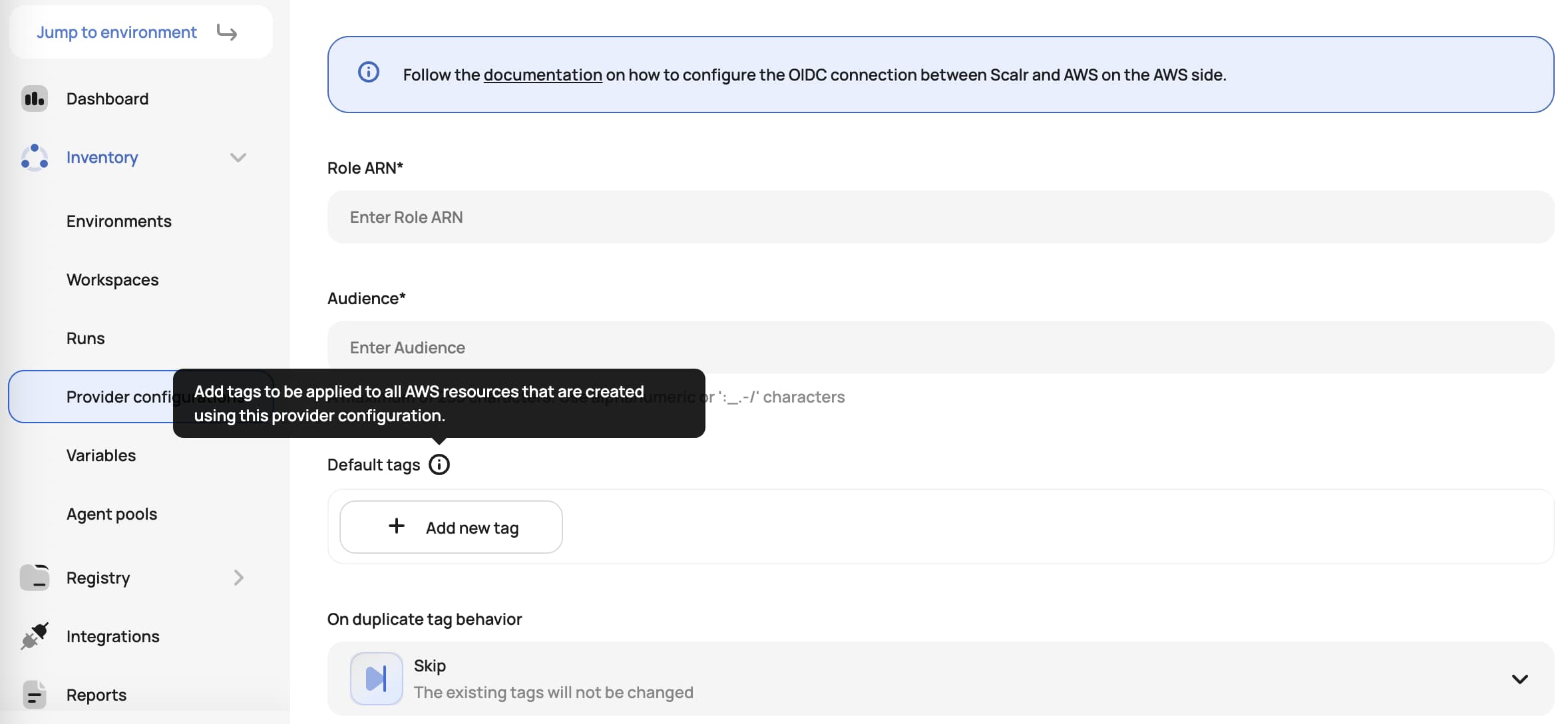
Scalr's AWS provider configuration supports the same default-tags mechanism directly: set a ManagedBy tag (and a merge strategy for handling conflicts with resource-level tags) once on the provider configuration, and every workspace that uses it inherits the tag automatically going forward. It's scoped to the AWS provider today and needs agent version 0.50.0 or higher for agent-based runs; check the Scalr AWS provider docs for current provider coverage.
One practical note on the cleanup itself. Importing a backlog of newly discovered resources grows the number of resources a platform manages, which matters on a platform that charges for them. As of September 2026, Scalr's pricing is per run, with no charge for users, workspaces, resources under management, private agents, or SAML. Scalr doesn't meter the imported resources, but the runs that perform the imports count as billable runs: each apply that brings a batch into state is one, and so is each dry run (a plan-only run) you use to review it, so importing in a few large batches uses fewer runs than importing one resource per run. Runs that fail during terraform init aren't billed, which covers one of the more common failures while you're still iterating on import blocks: a broken provider configuration.
Further Reading
- Terraform Drift Detection and Management: A Comprehensive Guide: the pillar guide this post belongs to.
- Terraform Import: How to Import Existing Resources Into Terraform: once you've found an unmanaged resource, this is how you bring a single one in by hand.
- How to Set Up Scheduled Drift Detection for Terraform and OpenTofu: once resources are under management, this is how you keep them that way.
- Enforcing Policy as Code in Terraform: A Comprehensive Guide: use OPA to require the ManagedBy tag on every apply, not just report on its absence after the fact.
- What is OpenTofu?: every method above applies the same way whether you're running Terraform or OpenTofu.
Frequently asked questions
What's the difference between drift and an unmanaged resource?
Drift is a resource already recorded in your Terraform or OpenTofu state whose live configuration has diverged from what's declared in code. An unmanaged resource was never recorded in state at all, so there's no baseline for terraform plan to compare against. Detecting drift means running a plan; finding unmanaged resources means cross-referencing your cloud inventory against state from the outside.
How do I find AWS resources that Terraform didn't create?
Tag everything Terraform creates with a consistent key like ManagedBy = "terraform", then call the Resource Groups Tagging API's GetResources action and filter for resources missing that tag or value. One gap: GetResources only returns resources that currently have, or previously had, at least one tag. For resources with zero tags ever, use AWS Resource Explorer with a tag:none query instead.
Can Azure Policy detect resources without a Terraform tag?
Yes. Assign the built-in "Require a tag and its value on resources" policy definition to your Terraform-managed subscriptions or resource groups with enforcement mode set to Disabled (DoNotEnforce). The definition's effect is fixed to deny, so this setting is what makes it report noncompliant resources, including ones with no tags at all, instead of blocking deploys. Then query the compliance results with Azure Resource Graph to list every noncompliant resource by ID.
What is Terraform search and how is it different from terraform import?
terraform import (or an import {} block) brings a specific, already-identified resource into state one at a time. Terraform search, which shipped in Terraform 1.14 (November 2025), finds resources you haven't identified yet: you write a list block in a .tfquery.hcl file describing what to search for, run terraform query, and Terraform generates the import and resource blocks for every match so you can bulk-import them. The matches can include resources already in state, so check them against terraform show -json and drop the managed ones before you apply.
Does Terraform search require HCP Terraform?
No. The underlying list block and terraform query command are core Terraform CLI functionality (resource-identity search requires Terraform v1.12+; list blocks and terraform query shipped in 1.14), and they run the same way through the plain CLI regardless of backend. An HCP Terraform account is only needed for the optional UI comparison against resources other workspaces already manage, not for running the query itself.
How do I keep newly discovered resources from going unmanaged again?
Enforce the tag at the provider level instead of relying on every engineer to hand-tag resources. Both the AWS and azurerm Terraform providers support a default_tags block that auto-applies a tag to everything created through that provider configuration. Scalr's AWS provider configuration supports the same default-tag enforcement centrally, so every workspace using that provider configuration inherits it without per-workspace setup.
About the author

director of platform engineering at Scalr
Ryan Fee is the director of platform engineering at Scalr, with over 15 years of experience improving infrastructure experiences at companies large and small.
Part of this guide
4 sheets