

Terraform Drift Detection and Management: A Comprehensive Guide
Learn how to manage Terraform drift, automated drift detection, safe remediation options, and the tools to keep your infrastructure secure.
- Terraform drift is the gap between your .tf files, your state file, and what's actually running in the cloud, and it accumulates from manual console changes, overlapping automation, emergency hotfixes, and GitOps pipelines that stop running.
- terraform plan -detailed-exitcode on a schedule is the foundational detector: exit code 2 means drift, and a cron job piping plan output to Slack covers small fleets for free.
- There are three remediation paths (revert infrastructure to match code, align code to match reality, or deliberately ignore with lifecycle.ignore_changes), and choosing the wrong one can be worse than the drift itself.
- Automated reconciliation is the dangerous part: pairing -auto-approve with a one-way-door attribute change can destroy a live production resource to make reality match code.
- Drift detectors produce both false positives (provider-managed read-only fields, cross-stack run-all artifacts) and false negatives (a green dashboard while a live plan shows resources pending destruction). Verify what your detector actually compares.
- Past roughly 10-20 workspaces, manual drift scripts break down on credentials, state locks, and per-workspace config; environment-level platform scheduling covers new workspaces automatically.
Your CI/CD pipeline is a loaded gun. You know drift happens. What's easy to underestimate is what your automation does the instant it meets a change it didn't make. Put -auto-approve in the chain and "reconcile to code" can mean destroying live production to get there. This post walks through that failure mode in detail, showing how a routine commit turns an out-of-band change into an outage, then covers the detection telemetry worth building before it does, for both Terraform and OpenTofu.
What Is Terraform Drift?
Infrastructure drift, or configuration drift, happens when the live state of your deployed infrastructure no longer matches the state you defined in your Infrastructure as Code configuration files and state. Your code no longer accurately represents what's running in your cloud environment.
In a Terraform context, drift means the difference between:
- Your Terraform configuration files (.tf files) - the desired state
- Your state file (terraform.tfstate) - the last known good state
- Your live infrastructure - the actual current state in AWS, Azure, GCP, etc.
Real-World Example: The One-Way Door
Here's how a single manual click can take down a production database for an hour.
Imagine a team that can't restore a week-old backup of an Azure Cosmos DB instance: it's on Periodic backup, which caps retention at 24 hours. An operator opens the Azure Portal, switches the account to Continuous backup (30-day point-in-time restore), and hits Save. Azure accepts it. The console goes green. Problem solved, or so it looks.
What they don't realize: Azure makes the Periodic-to-Continuous upgrade irreversible. There is no path back to Periodic.
Weeks later, an unrelated, application-only PR merges and triggers a routine terraform apply -auto-approve. Terraform refreshes state, sees that the live account returns Continuous while the state file expects Periodic, and tries to reconcile the difference. Because the provider can't downgrade the attribute, the only plan it can compute to make reality match the code is a destroy and recreate of the live production database. The pipeline executes instantly. Engineers scramble to cancel the GitHub Actions runner, but the API call has already reached Azure Resource Manager. Production is down for an hour until Azure Support recovers the data.
This is a one-way door attribute: some cloud settings, once changed, have no API path back. Pair one with -auto-approve and Terraform's only way to reconcile the drift is to destroy and recreate the resource. The outage came from the automated reconciliation of the drift, not from the drift sitting there on its own.
Why Drift Happens: Common Culprits
Drift isn't usually malicious; it creeps in through everyday operational realities:
Manual Interventions ("ClickOps")
The most common cause. Engineers make quick changes directly via cloud provider consoles to fix urgent issues or test something, bypassing the IaC workflow entirely. Emergency security patches, performance tuning, and debugging often trigger manual changes. It's not always a change, either. A subnet or IAM role deleted by hand in the console shows up on the next plan as a resource Terraform wants to recreate.
Overlapping Automation
Multiple tools managing the same resources without proper coordination cause conflicting changes. Terraform provisions a server while Ansible later modifies its network configuration independently, or a security tool like AWS Config or Security Hub auto-remediates a finding (re-enabling S3 default encryption, resetting a wide-open security group) and writes straight to the cloud API without ever touching Terraform's state. (More on why that specific collision is so vicious in the remediation section below.)
Emergency Hotfixes
Critical incidents sometimes force an immediate manual change to restore service. If you don't backport those changes to the IaC code, they turn into persistent drift that diverges further over time.
Ad-hoc Scripts
Operations teams or developers run custom scripts to change resources outside the primary IaC tool, often with no documentation or version control.
Lack of IaC Adherence
Team members who don't know IaC principles might make direct changes without realizing how far the impact cascades through infrastructure consistency.
Dead GitOps Pipelines
Drift doesn't require anyone touching the cloud at all. When a VCS access token expires, webhook processing stops. Pull requests stop triggering plans, merges keep landing in Git, and nothing reaches the cloud. Code and reality diverge with every commit, and there's no failed run to alert on because no runs are happening. Across Scalr's own fleet we measured 121 broken VCS connections in a single 30-day window, 79 of them fully broken providers on paid accounts. Drift by silence is one of the most common patterns in Scalr's support queue: the GitOps pipeline dies without an error anyone sees, and the gap only surfaces weeks later when someone runs a plan by hand. Monitor your VCS connection health the same way you monitor the infrastructure itself.
Dynamic Cloud Services
Auto-scaling groups replace instances, managed databases perform automated maintenance, cloud providers change default settings (forcing TLS 1.2 on storage accounts, flipping default S3 encryption). These provider-initiated changes can alter resource configurations dynamically, and Terraform may then try to downgrade them back to your now-stale config.
The High Stakes of Unchecked Drift
Ignoring drift introduces serious business risks:
| Risk | Impact |
|---|---|
| Security Gaps | Drift can undo carefully configured security settings (altered firewall rules, S3 bucket policies, IAM permissions), inadvertently opening vulnerabilities to attacks |
| Compliance Violations | Unauthorized changes can breach PCI DSS, HIPAA, SOC 2, or GDPR requirements, resulting in failed audits and potential fines |
| Budget Blowouts | Unmanaged resources or unintended scaling lead to surprise cost increases and operational overhead in tracking "ghost" infrastructure |
| Stability & Reliability | When code isn't the source of truth, troubleshooting becomes guesswork, leading to unpredictable behavior and downtime |
| Reduced Agility | Teams hesitant to deploy changes slow down innovation and increase deployment friction |
Native Drift Detection: Terraform and OpenTofu Commands
Terraform and OpenTofu give you the basic tools for detecting drift. These native commands are your first line of defense, but they only work as well as your state file and remote backend setup allows.
The terraform plan Command
The terraform plan command is your primary drift detection tool. When executed, Terraform performs a four-step process:
- Refreshes the State: Queries your cloud provider to get the actual state of all managed resources
- Compares States: Compares the current state with what's recorded in your state file and defined in your .tf files
- Generates an Execution Plan: Outlines changes necessary to bring live infrastructure in line with your configuration
- Reports on Drift: Shows exactly what changes would be applied, where any unintended changes indicate drift
terraform planInterpreting Plan Output
An execution plan has been generated and is shown below.
Resource actions are indicated with the following symbols:
  ~ update in-place

Terraform will perform the following actions:

  # aws_s3_bucket.example will be updated in-place
  ~ resource "aws_s3_bucket" "example" {
      id = "my-example-bucket"

      ~ versioning {
          ~ enabled = false -> true
        }
    }

Plan: 0 to add, 1 to change, 0 to destroy.
The ~ symbol indicates drift. The versioning attribute shows the actual state differs from your code.
terraform refresh
terraform plan refreshes for you under the hood, but you can also run terraform refresh on its own. It updates your state file to match the real-world state of resources without changing any infrastructure.
terraform refreshImportant: OpenTofu has deprecated the standalone tofu refresh command due to safety concerns. Instead, use tofu apply -refresh-only or terraform apply -refresh-only, which perform the same refresh but allow review of changes before committing them to state.
# Recommended approach (works for both Terraform and OpenTofu)
terraform apply -refresh-only
tofu apply -refresh-only
Automated Detection with Exit Codes
For CI/CD pipeline integration, use the -detailed-exitcode flag:
terraform plan -detailed-exitcode
# Returns:
# 0 - No changes (no drift)
# 1 - Error occurred
# 2 - Changes present (drift detected)
That exit code is the whole detection mechanism, and you don't need an expensive SaaS scanner to act on it. Run the plan on a cron, catch exit code 2, and pipe the raw plan output straight to Slack:
import subprocess, requests

SLACK_WEBHOOK = "https://hooks.slack.com/services/XXX/YYY/ZZZ"

result = subprocess.run(
    ["terraform", "plan", "-detailed-exitcode", "-no-color"],
    capture_output=True, text=True,
)

# 0 = no drift, 1 = error, 2 = drift detected
if result.returncode == 2:
    requests.post(SLACK_WEBHOOK, json={
        "text": f":rotating_light: *Drift detected*\n```{result.stdout[-3000:]}```"
    })
elif result.returncode == 1:
    requests.post(SLACK_WEBHOOK, json={
        "text": f":warning: *Drift check failed*\n```{result.stderr[-3000:]}```"
    })
A cron entry running this against each workspace gives you the bones of a detection system for the cost of a few lines of Python. Where it stops scaling (credentials, state locks, per-workspace config) is exactly what the platform section below covers.
Native Detection Limitations
They're essential, but native commands have real limits:
- Manual Execution Required: You must remember to run them regularly; scaling across many workspaces is cumbersome
- Managed Resources Only: Cannot detect resources existing in your cloud but not managed by Terraform (unmanaged/shadow resources)
- No Centralized View: Output is local to your terminal; no dashboard or central notification system
- State File Dependency: Accuracy depends entirely on state file health and integrity
- Verbose Output: Sifting through lengthy plan outputs in large environments is difficult
- No Automatic Remediation: Identifies drift but doesn't fix it
The Stateful Blind Spot
The state-file dependency creates failures that plan will never warn you about. AWS EventBridge Rules, for example, don't have a naturally stateful API model. If two separate Terraform workspaces deploy distinct resources but happen to share the same rule name, they overwrite each other's parameters. Each workspace's terraform plan keeps reporting "No changes" (because each state file believes it owns the rule) while the live configuration gets stomped back and forth out-of-band. The thing that's supposed to detect drift is structurally blind to it.
Don't Trust the Green Badge
False negatives happen at the dashboard layer too. A Scalr customer came to us after their drift dashboard reported no drift on a workspace where a live terraform plan showed 7 resources pending destruction. The detector and the plan were comparing different things, and the discrepancy only surfaced because someone happened to run a plan manually. Whatever you use for drift detection, know exactly what it compares (Git vs. last applied state vs. live cloud API) and when it last ran. A green badge tells you the detector found nothing the last time it looked, with the inputs it had; it does not tell you the next apply is safe.
Drift That Isn't: Tooling Artifacts
A nonzero plan isn't always evidence of an out-of-band change. A team we worked with at Scalr during a Terraform Cloud migration ran a controlled experiment: they built fresh infrastructure in TFC, applied until the plan showed zero pending changes, confirmed zero drift, then migrated the workspace by moving the state file. The first post-migration plan reported 11 changes on infrastructure that was verifiably drift-free both before and after the move, with nobody touching the cloud in between. The "drift" was an artifact of the state handoff between tools, not a real divergence. When a plan lights up immediately after a migration, refactor, or provider upgrade, read the diff before treating it as drift: tooling transitions generate phantom changes, and reverting them can do real damage.
Measure What You Can't See: The Infrastructure Coverage Ratio (ICR)
Native commands can only reason about resources in your state file. Everything else is invisible: manually created resources, another team's stack, shadow infrastructure. The Infrastructure Coverage Ratio quantifies that blind spot:
ICR = (R_managed / R_total) × 100

  R_managed = resources defined in your version-controlled IaC
  R_total   = total active resources scanned live via cloud provider APIs
A low ICR means a large share of your footprint can be changed out-of-band and never show up in a plan at all. Track it over time: a falling ICR is a leading indicator that ClickOps is outrunning your codebase.
Strategic Drift Prevention: Building Organizational Guardrails
Catching drift is reactive; stopping it from happening is cheaper. Prevention takes both technical controls and team habits. Add Policy as Code to block guardrail-violating changes before they reach apply, and pair it with IaC security scanning on every PR.
Enforce GitOps
Make Git your single source of truth. All infrastructure changes must flow through pull requests with required reviews before being applied. This creates an audit trail, ensures all changes are codified, and enables automatic rollback.
Key practices:
- All changes require PR review before application
- Automated CI/CD pipelines enforce consistent deployments
- Git history provides complete audit trail
- Code review catches problematic changes before deployment
Restrict Who Can Write to Production
Mature platform teams treat production as having exactly one writer: the pipeline. A human writing directly to prod is an exception that has to be accounted for.
They don't pretend the exception never happens; incidents force someone into the console eventually. So they bound it. Manual access goes through short-lived break-glass credentials, every session is logged, and there's a hard reconciliation window: whatever you changed by hand has to land back in HCL before the clock runs out, or it gets flagged. The manual change is allowed; leaving it un-codified is what trips the alarm.
In practice:
- The pipeline is the only standing identity with production write access
- Humans get short-lived break-glass credentials, not permanent console rights
- Every break-glass session is logged and tied to a reconciliation deadline
- Service account permissions are scoped to specific Terraform workflows
"Just lock down IAM write permissions in prod and your drift problems disappear" ignores org reality. If 40+ engineers are used to ClickOps portal access, revoking it isn't a config change. It's a political project. Most platform teams are 12 to 18 months from a full console lockdown, so they live in a hybrid state where manual edits and declarative code constantly collide. One writer is the goal; break-glass access with a tight reconciliation window is how you survive the years before you get there.
Implement Continuous Checks
Regularly schedule drift detection to catch unauthorized changes quickly. Detection frequency depends on your risk tolerance and operational tempo.
Scheduling strategies:
- Daily checks for production environments
- Weekly checks for staging environments
- Immediate checks after major deployments
- Event-driven checks when critical resource changes occur
Schedule around your runner capacity, too. Drift checks consume the same execution slots as production plans and applies. A customer in APAC had their scheduled drift detection fire in the middle of the business day and saturate all 5 of their concurrent run slots for about 30 minutes. Every normal plan and apply queued behind the drift sweep until it finished. The fix was unglamorous: move the schedule to 3 AM local time and budget capacity for the sweep. If your drift checks run while engineers are shipping, you've traded drift risk for deployment latency.
Policy as Code (PaC)
Define and enforce policies automatically using Open Policy Agent (OPA) or Sentinel. Policies are checked before terraform apply runs, preventing non-compliant changes.
# Example OPA policy
package terraform.aws.s3

deny[msg] {
  input.resource_changes[_].type == "aws_s3_bucket"
  not input.resource_changes[_].change.after.server_side_encryption_configuration
  msg := "S3 buckets must have server-side encryption configured."
}
This policy prevents creation of unencrypted S3 buckets, preventing a common source of drift and security violations.
Drift Remediation: Three Distinct Approaches
Once you've detected drift, you have two main philosophies and several tactical approaches. Making the wrong call can be worse than the drift itself: blindly reverting an emergency scaling event could cause an outage, and ignoring a changed security group could leave you exposed.
Revert Infrastructure (Enforce Desired State)
Prioritize your Terraform code as the source of truth. Run terraform apply to revert the infrastructure to match your coded state. This is the right call when drift is unauthorized or unintentional: someone opened a security group port that shouldn't be open, or a manual change broke the expected configuration.
When to revert:
- Security-sensitive changes (modified IAM policies, opened ports, disabled encryption)
- Changes that violate compliance requirements
- Unintentional modifications from ad-hoc debugging sessions
- Changes that break dependent infrastructure or deployment pipelines
When NOT to revert:
- Emergency scaling events that are still needed
- Hotfixes applied during an active incident
- Changes made by other automation tools (auto-scaling, self-healing systems)
Process:
- Identify the drifted resource
- Review the configuration in your code
- Apply Terraform to revert the infrastructure
- Ensure the change is properly documented
The risk with reverting is timing. If you revert automatically at 3 AM without understanding the context, you might undo an emergency change that's keeping production running.
The 2 AM SSH reflex. During a high-severity outage, an on-call engineer couldn't reach a critical server. They opened the AWS console and edited a security group to allow SSH on port 22 from 0.0.0.0/0, got back in, resolved the incident, and went back to sleep. The hotfix was never written into the HCL or even logged in Jira. Three months later, a routine deployment ran terraform plan, saw the unauthorized port-22 rule, and did exactly what it was built to do: it closed it. By then the team had wired that open port into downstream admin automation, so closing it triggered a fresh production outage that took half a day to trace back to a security group nobody remembered touching.
Why we don't auto-remediate. The industry reflex is "detect drift → auto-apply to fix it." On paper it's clean; in practice an automated revert can't tell an attack from an emergency change that's the only thing keeping the service up. It gets worse when another system is the one writing: a security tool (AWS Config, Security Hub) auto-remediates a finding, writes to the cloud API without updating state, and on the next run Terraform flags the security fix as drift and tries to revert it back to the non-compliant HCL. Now your pipeline and your security automation are in a continuous, resource-burning tug-of-war, each undoing the other (a loop other teams have hit with AWS Config). That auto-remediation collision loop is why platforms like Scalr deliberately keep a human in the loop. They surface the drift and the three paths and let an engineer decide, rather than blindly applying.
Update Code (Align Configuration)
Accept the drifted state as the new desired state. Update your Terraform .tf files to match the live infrastructure. This fits intentional changes like emergency hotfixes that need to be codified. As other teams have learned the hard way, you have to align the code to the live state before the next apply, or Terraform reverts the fix.
When to align:
- Legitimate emergency changes that should become permanent
- Infrastructure changes driven by business decisions (new scaling requirements, new regions)
- Changes from other IaC tools or automation that are authoritative for those resources
- Resources that were manually created and now need to be brought under Terraform management
Process:
- Document why the manual change was necessary
- Update the Terraform configuration to match
- Test the updated configuration
- Commit changes to Git with clear documentation
For simple attribute changes, you update the .tf file and run terraform plan to confirm a zero diff. For resources that were created outside Terraform entirely, you'll need terraform import to bring them into state.
Acknowledge and Ignore
Not all drift needs action. Some changes are expected, temporary, or managed by other systems. The trick is to acknowledge them on purpose instead of leaving them as unreviewed noise in your drift reports.
When to ignore:
- Auto-generated tags or metadata added by cloud providers
- Temporary scaling changes that will revert on their own
- Changes to resources managed by another team's Terraform configuration
- Known discrepancies in dynamic resources (Lambda function hashes, ECS task definitions)
The danger of ignoring drift is that it becomes a habit. If your team starts waving off every drift alert, you'll miss the one that actually matters. Good drift hygiene means reviewing every detection, making an explicit call, and writing down why you chose to ignore it.
Decision Framework for Drift Remediation
When you detect drift, run through these questions in order:
1. Is the change security-sensitive? If an IAM policy, security group, encryption setting, or access control was modified, treat it as high-priority. Revert immediately unless you can confirm the change was authorized and intentional.
2. Was the change intentional? Check with your team. If someone made a deliberate change during an incident or as part of a planned activity, the right path is usually to align your code rather than revert.
3. Is the change still needed? Emergency scaling events are intentional but temporary. If the incident is resolved and the extra capacity isn't needed, revert. If it is, align your code.
4. Is it managed by another system? Auto-scaling groups, Kubernetes operators, and other automation tools legitimately modify resources. If another system is authoritative for that resource attribute, consider using lifecycle { ignore_changes } in your Terraform configuration to prevent false positives going forward.
5. Can you explain why you're ignoring it? If you can't articulate a clear reason, don't ignore it. The inability to explain drift is itself a signal that something unexpected happened.
Tactical Remediation Steps
For Expected Changes: Sync State
When drift represents intentional changes that should be captured, update your state file without modifying infrastructure:
# Terraform - validate non-destructive changes first
terraform plan -target=aws_instance.example

# Update state to match actual infrastructure
terraform apply -refresh-only
For Unauthorized Changes: Revert Infrastructure
When drift represents unauthorized changes, generate and apply a plan to revert:
# Create specific target plan
terraform plan -target=aws_security_group.web_sg -out=tf.plan

# Review the plan carefully
terraform show tf.plan

# Apply if correct
terraform apply tf.plan
For External Resources: Import into Terraform
When resources were created outside Terraform, import them to bring them under IaC management:
# Import existing resource
terraform import aws_s3_bucket.data bucket-name

# For Terraform 1.5+, use import blocks
import {
  to = aws_instance.web
  id = "i-1234567890abcdef0"
}
Drift Prioritization Framework
Not all drift requires immediate attention. Establish a prioritization framework based on business impact and risk:
| Type | Priority | Example | Approach |
|---|---|---|---|
| Security-critical | P0 | Modified security groups, IAM policies | Immediate remediation |
| Business-critical | P1 | Changes to production databases, load balancers | Scheduled remediation |
| Configuration drift | P2 | Instance type changes, tag modifications | Batch remediation |
| Informational | P3 | Comment changes, cosmetic differences | Document for next update |
You don't need invented job titles for this. In practice, drift duties sit with the platform team and run on a rotation: whoever holds the drift pager that week triages new detections against the priority table above, decides revert/align/ignore, and makes sure any manual change gets reconciled into HCL before its reconciliation window closes. Ownership of a given workspace's drift follows whoever owns that workspace's code; the rotation just guarantees someone is always looking.
Advanced Drift Detection Platforms
Native Terraform commands give you a foundation, but a mature IaC management platform does a lot more, and the difference changes how you operate. For a hands-on look at scheduled drift checks, see how to set up scheduled drift detection; for the integrated platform approach, see our deep dive into Scalr's platform architecture.
The Operational Overhead of Manual Drift Detection
Before reaching for a platform, look at what manual drift detection actually takes at scale. The shell script running terraform plan -detailed-exitcode is the easy part. The hard part is everything around it:
Credential management. Every drift check needs valid cloud provider credentials. For AWS, that means IAM roles or access keys for each account. For multi-cloud setups, you're managing credentials across AWS, Azure, GCP, and whatever else you run. These credentials need rotation, and if they expire, your drift detection stops working with no error raised.
State locking. When your drift detection script runs terraform plan, it acquires a state lock. If a developer triggers a real plan at the same time, one of them fails. At scale, this contention becomes a real problem: your drift checks start interfering with production deployments.
Per-workspace configuration. Each Terraform workspace needs its own script invocation with the right backend config, variable files, and provider configuration. Adding a new workspace means updating your drift detection setup. Teams inevitably forget, and new workspaces go unmonitored.
Alerting and reporting. A cron job that prints "DRIFT DETECTED" to a log file isn't actionable. You need to parse the plan output, send structured alerts, track which workspaces have unresolved drift, and give someone a way to act on the findings. This is effectively building a dashboard from scratch.
Maintenance. Terraform CLI updates, provider version changes, backend configuration changes, and CI/CD platform migrations all break drift detection scripts. These scripts are never anyone's primary responsibility, so they break unnoticed and stay broken for weeks.
If you're running fewer than 10 workspaces, all in one cloud provider, with a small team, the manual approach is fine. Beyond that, the operational cost justifies a platform.
Scalr: Comprehensive Drift Management
Scalr is an Infrastructure as Code management platform that gives you drift detection, reporting, and remediation options for both Terraform and OpenTofu. It treats drift detection as a first-class platform feature instead of something you bolt on with scripts.
Detection Methodology
Scalr gives you a couple of detection strategies:
- Git as Source of Truth: Compare live environment against code committed in Git (classic IaC desired state)
- Last Known Applied State: Compare against the "last known applied state" within Scalr, catching drift that occurred between deployments
Comparing against both sources catches more deviations than plan-based detection on its own.
Environment-Level Scheduling
In Scalr, drift detection is enabled per environment, not per workspace. When you turn it on for your production environment and set a daily schedule, every workspace in that environment is automatically covered. New workspaces inherit the drift detection policy the moment they're created, so there's no separate configuration step to forget.
This is a real architectural difference. Manual approaches make you opt in per workspace. Scalr's environment-level model is opt-out: you'd have to go out of your way to exclude a workspace from drift detection. The default is coverage, not gaps.
That coverage now extends to Terragrunt run-all workspaces. Multi-module stacks orchestrated through run-all are checked on the same environment schedule as your standard Terraform and OpenTofu workspaces, so drift in a Terragrunt-managed deployment surfaces in the Drift Detection tab alongside everything else, with no separate tooling for your Terragrunt stacks.
To set it up:
- Navigate to your environment settings in the Scalr UI
- Enable drift detection and set your preferred schedule (daily or weekly)
- All workspaces within that environment will be checked on the defined schedule
There's no script to maintain, no credentials to manage separately, and no state lock conflicts: Scalr coordinates drift checks with regular runs automatically.
Reporting and Visibility
- Dedicated Drift Detection Tab: Centralized view of all drift detection runs, separate from regular run history so drift findings don't get buried
- Slack & Microsoft Teams Notifications: Real-time alerts when drift is detected with workspace name and direct link to review changes
- Custom Dashboards: Organization-wide overview of drift status across every workspace, in a single view for platform teams
- Drift Reports: Account or environment-level analysis for compliance and communication
User-Controlled Remediation
Scalr deliberately doesn't do fully automated remediation. The platform makes you step in, which keeps things safe and deliberate:
- Ignore: Acknowledge drift but take no action. The decision is recorded, creating an audit trail of acknowledged drift. Appropriate for intentional or external changes.
- Sync State: Update state file to match actual infrastructure (refresh-only run). This is the "align" path when the infrastructure change is correct but state is stale.
- Revert Infrastructure: Generate and apply plan to revert to previous state. Scalr shows you what will change before applying, so you're not reverting blind.
Handling remediation through a platform instead of CLI commands buys you visibility. When an engineer reverts drift from Scalr, the action is logged, tied to a user, and visible to the team. When someone runs terraform apply from their laptop to fix drift, nobody else knows it happened.
Scalr vs Manual Approaches
| Capability | Manual (cron/CI) | Scalr |
|---|---|---|
| Setup per workspace | Script + config per workspace | None; inherits from environment |
| New workspace coverage | Manual opt-in (often forgotten) | Automatic |
| Credential management | Separate service accounts | Reuses existing credentials |
| State lock handling | Contention with prod runs | Coordinated automatically |
| Alerting | Build your own | Native Slack integration |
| Org-wide visibility | Build your own dashboard | Built-in dashboards |
| Remediation | Separate CLI step | Integrated in same UI |
| Audit trail | CI/CD logs (if retained) | Full audit of detections + actions |
| Maintenance burden | Scripts break with TF/provider updates | Zero; managed by platform |
| Best for | <10 workspaces, single cloud | 10+ workspaces, multi-team |
The inflection point is usually around 15-20 workspaces, or when a second team starts managing infrastructure. Past that, the cost of maintaining per-workspace scripts, managing credentials, and aggregating alerts is higher than the cost of adopting a platform.
The Drift Detection Ecosystem: Comparing Tools
Several tools tackle drift detection, each with its own philosophy and strengths.
Integrated IaC Management Platforms
Scalr
- Primary Focus: User-controlled drift management with automated detection
- Strengths: Explicit OpenTofu support, flexible detection sources, user-controlled remediation
- Remediation: Ignore, Sync State, or Revert Infrastructure
- Best For: Organizations prioritizing control and safety with OpenTofu support
env0
- Primary Focus: AI-powered drift analysis and flexible remediation
- Strengths: Advanced root cause analysis (who, what, when, why), flexible policies
- Remediation: Auto-policies, code sync, manual options
- Best For: Organizations wanting deep insights into drift causes
Terramate
- Primary Focus: IaC orchestration with automated reconciliation
- Strengths: DRY configurations, CI/CD integration, automated remediation options
- Remediation: Automated option with reconcile capability
- Best For: Organizations comfortable with high automation
Spacelift
- Primary Focus: IaC platform with optional automated remediation
- Strengths: Comprehensive platform features, automation options
- Remediation: Optional automated fixes
- Best For: Enterprise-scale IaC management
Standalone and Open-Source Tools
driftive
- Type: CLI-based, open-source drift detection
- Strengths: Explicit Terraform, OpenTofu, and Terragrunt support
- Focus: Detection and notification (Slack, GitHub Issues)
- Best For: Teams needing lightweight, self-hosted detection
Snyk IaC (with Driftctl engine)
- Type: Commercial with free tier
- Strengths: API-based detection (unmanaged resources focus), security-oriented
- Focus: Detecting drift including unmanaged/shadow resources
- Best For: Organizations concerned with shadow IT and unmanaged resources
Tool Comparison Matrix
| Feature | Scalr | env0 | Terramate | Driftive | Snyk IaC |
|---|---|---|---|---|---|
| Primary Focus | User-controlled drift mgmt | AI-powered analysis | Orchestration + auto-remediate | Notification-first detection | Unmanaged resources |
| Scheduled Detection | Yes (Native) | Yes (Native) | Yes (CI/CD config) | Manual/scripted | Yes (Integrated) |
| Unmanaged Resources | Not prioritized | Not prioritized | Limited | Limited | Yes (Primary) |
| Remediation | Ignore/Sync/Revert | Auto-policies & more | Automated reconcile | Manual via notifications | Manual |
| OpenTofu Support | Yes (Founding member) | Yes (Founding member) | Yes | Yes | Unconfirmed |
| Reporting & Alerts | UI/Dashboard/Slack | UI/Notifications/AI | Cloud UI/Slack | Slack/GitHub Issues | CLI/Snyk UI |
| Best For | Control-focused orgs | Deep analysis needs | High automation orgs | OSS/self-hosted | Shadow IT concerns |
Scaling Drift Management: Multi-Account and Multi-Workspace Strategies
In a large AWS or multi-cloud environment, manual detection stops being practical. Set up automated detection that scales:
Automated CI/CD Integration
Schedule regular drift detection in your CI/CD pipeline:
# GitHub Actions example
name: Terraform Drift Detection
on:
  schedule:
    - cron: '0 8 * * *'  # Daily at 8 AM
jobs:
  detect_drift:
    runs-on: ubuntu-latest
    steps:
      - uses: actions/checkout@v3
      - name: Setup Terraform
        uses: hashicorp/setup-terraform@v2
      - name: Terraform Init
        run: terraform init
      - name: Check Drift
        run: |
          terraform plan -detailed-exitcode
          if [ $? -eq 2 ]; then
            echo "Drift detected!"
            # Send notification to Slack/email
          fi
Multi-Account Architecture
For AWS Organizations:
- Account Segmentation: Dedicated Terraform workspaces per account
- Centralized Reporting: Aggregate findings across accounts
- Automated Remediation: Low-risk drift fixes via pipelines
- Policy-Based Prevention: AWS Organizations policies combined with Terraform
{
  "Version": "2012-10-17",
  "Statement": [
    {
      "Effect": "Deny",
      "Action": [
        "ec2:ModifyInstanceAttribute",
        "rds:ModifyDBInstance"
      ],
      "Resource": "*",
      "Condition": {
        "StringEquals": {"aws:ResourceTag/ManagedBy": "Terraform"}
      }
    }
  ]
}
This policy prevents modification of Terraform-managed resources, preventing drift at the source.
Common Drift Scenarios and Solutions
Scenario 1: Console Cowboys
Problem: Team members make emergency changes via the AWS console
Prevention:
- Implement read-only console access with break-glass procedures
- Require documentation of emergency changes
- Schedule regular drift detection to catch and remediate
Recovery:
- Regular
terraform importoperations to bring resources under IaC - Automated detection coupled with remediation workflows
Scenario 2: AWS Automated Modifications
Problem: Auto Scaling Groups, managed services automatically modify resources, one of the most common drift questions on r/terraform
Solution:
- Document expected AWS-initiated changes
- Monitor drift reports to distinguish expected from unexpected changes
Use lifecycle blocks to ignore expected changes:
lifecycle {
  ignore_changes = [instance_type, tags]
}
Watch for false positives. Not everything a detector flags is real drift. Tools that compare raw cloud state against your last apply can surface provider-managed read-only fields that terraform plan never shows as a diff. One team kept getting paged because their detector flagged latest_restorable_time on an aws_db_instance every scan, a timestamp AWS bumps on its own, not something anyone changed. Acknowledge fields like this once and filter them out; if you treat provider-generated noise as drift, people start ignoring the report, and then they miss the change that matters.
Scenario 3: Partial Applies and Failures
Problem: terraform apply operations fail midway, leaving partial state
Solution:
- Use
-targetcarefully with state locking
Implement recovery procedures:
terraform apply -refresh-only  # Synchronize state
terraform plan -detailed-exitcode  # Validate state
Scenario 4: External Integrations
Problem: Other systems modify AWS resources independently
A common version: a platform team ran org-wide automation that stamped every AWS resource with cost-allocation tags (prefixes like auto: and cpf-). Those tags lived in the cloud but never in the Terraform, so every plan reported drift on resources nobody had touched in code, and a blind apply would have stripped the tags their finance team depended on for chargeback. This is the textbook ignore, don't revert case: the out-of-band change is intentional and authoritative, so the fix is to make Terraform blind to it rather than fight it. The AWS provider can ignore whole tag families at the source:
provider "aws" {
  ignore_tags {
    key_prefixes = ["auto:", "cpf"]
  }
}Solution:
- Tag resources with ownership information
- Establish integration contracts defining which resources each tool manages
- Filter drift reports to distinguish expected from unexpected changes
- Use
ignore_tags(or scopedignore_changes) for fields another system legitimately owns - Use import blocks to bring external resources under management
Scenario 5: Terragrunt run-all Cross-Stack Drift
Problem: With run-all, applying one stack re-plans its dependencies, and shared provider configuration can surface as drift across stack boundaries
A team with separate VPC and VPN stacks shared a provider default_tags block that set managedBy. The VPC stack was clean on its own, but running the dependent VPN stack via run-all re-planned the VPC and reported drift, proposing to remove the managedBy tag from VPC resources. The change was never real; it was an artifact of cross-stack re-planning.
Solution:
- Remember that
run-allevaluates dependencies, so a clean stack can show drift only when reached through a dependent one - Keep provider configuration (default tags, region, aliases) consistent across stacks that reference each other
- Where a shared attribute legitimately differs between stacks, scope it with
ignore_changesrather than letting arun-allreconcile it away
Best Practices for 2026
For compliance-grade evidence of who-changed-what, layer Terraform audit logs into the workflows below.
Establish a Drift Culture
Leadership & Documentation:
- Document approved processes for emergency changes
- Maintain Terraform module usage guidelines
- Create resource tagging standards for tracking ownership
- Establish clear escalation procedures for drift remediation
Team Training:
- Regular IaC workshops and knowledge sharing
- Post-mortems on significant drift incidents
- Documentation of lessons learned and prevention strategies
Implement Layered Detection
Combine native commands with platform-based detection:
- Development: Pre-commit hooks with
terraform plan - CI/CD: Automated drift detection on every PR merge
- Operations: Scheduled platform-based detection (daily or more frequently)
- Compliance: Regular drift reports for audit trails
Define Clear Remediation Pathways
Create decision trees for different drift types:
- Security drift: Immediate remediation, no delay
- Configuration drift: Scheduled remediation in next deployment window
- Informational drift: Document and address in next planned update
- Expected drift: Codify as accepted state changes
Invest in Prevention
Every dollar you spend stopping drift before it happens is a dollar you don't spend chasing it down at 3 AM. Route all changes through Git and CI/CD so nothing reaches the cloud without a pull request behind it. Block non-compliant changes at the gate with OPA policies, and use RBAC to keep humans from writing directly to infrastructure in the first place. Where automation does write, keep those practices consistent and documented so two tools don't fight over the same resource.
Monitor and Report
Maintain visibility into drift patterns:
- Weekly drift reviews: Identify and address patterns
- Trend analysis: Track drift frequency and types
- Cost impact: Quantify costs of drift remediation vs. prevention
- Stakeholder reporting: Executive visibility into infrastructure health
Go deeper: For a hands-on implementation guide, see how to set up scheduled drift detection.
Where to start
If you do nothing else this week, get terraform plan -detailed-exitcode running on a schedule against your production workspaces and pipe exit code 2 to Slack. That gives you a baseline and a name for the problem. If recurring drift is pushing you to evaluate a managed platform, it is one of the criteria in our guide to selecting a Terraform Cloud alternative.
From there, write down which of the three remediation paths (revert infrastructure, align code, or ignore with lifecycle.ignore_changes) applies to each kind of drift you see, and who decides. Doing that before an incident is far cheaper than deciding while a 3 AM alert is open. Tighten prevention in parallel: require pull requests for every infrastructure change, and add OPA or Sentinel policies that block non-compliant changes at the gate.
The cron script holds up to roughly a dozen workspaces. Past that, credential rotation, state-lock contention, and per-workspace config turn it into a maintenance liability, and a platform that coordinates detection, alerting, and remediation in one place starts paying for itself. Scheduled drift detection is built into Scalr, where drift-detection runs don't count against the run allowance and plans start free at up to 50 runs per month.
Frequently asked questions
What is Terraform drift?
Drift occurs when the live state of your deployed infrastructure diverges from the desired state defined in your Terraform configuration files and recorded in your state file. Common causes include manual console changes (ClickOps), overlapping automation tools, emergency hotfixes that never get codified, and provider-initiated changes to managed services.How do I detect drift in Terraform?
Run terraform plan with the -detailed-exitcode flag: exit code 0 means no drift, 1 means an error, and 2 means changes are present. Schedule this in a cron job or CI/CD pipeline and alert on exit code 2. At scale, platforms like Scalr run scheduled drift checks per environment with centralized dashboards and Slack notifications.Should Terraform drift remediation be automated?
Generally no. An automated revert cannot distinguish an attack from an emergency change keeping the service up, and it can collide with security automation like AWS Config in a continuous tug-of-war where each system undoes the other. Keep a human in the loop to choose between reverting, aligning code, or ignoring.How often should I run Terraform drift detection?
Daily checks for production environments, weekly for staging, plus immediate checks after major deployments. Schedule them outside business hours, since drift checks consume the same runner capacity as production plans and applies, and a mid-day sweep can block normal deployments.Can Terraform drift detection produce false positives?
Yes. Detectors that compare raw cloud state against your last apply can flag provider-managed read-only fields like latest_restorable_time on RDS instances, Terragrunt run-all can report phantom drift across stack boundaries, and a state-file migration between platforms can produce a nonzero plan on infrastructure nothing touched. Inspect the diff before treating it as real drift.What is the difference between terraform refresh and terraform apply -refresh-only?
Both update your state file to reflect real-world resource state without changing infrastructure, but apply -refresh-only lets you review the changes before committing them to state. OpenTofu has deprecated the standalone refresh command for safety, so use apply -refresh-only in both tools.How do I monitor drift across a whole fleet of workspaces?
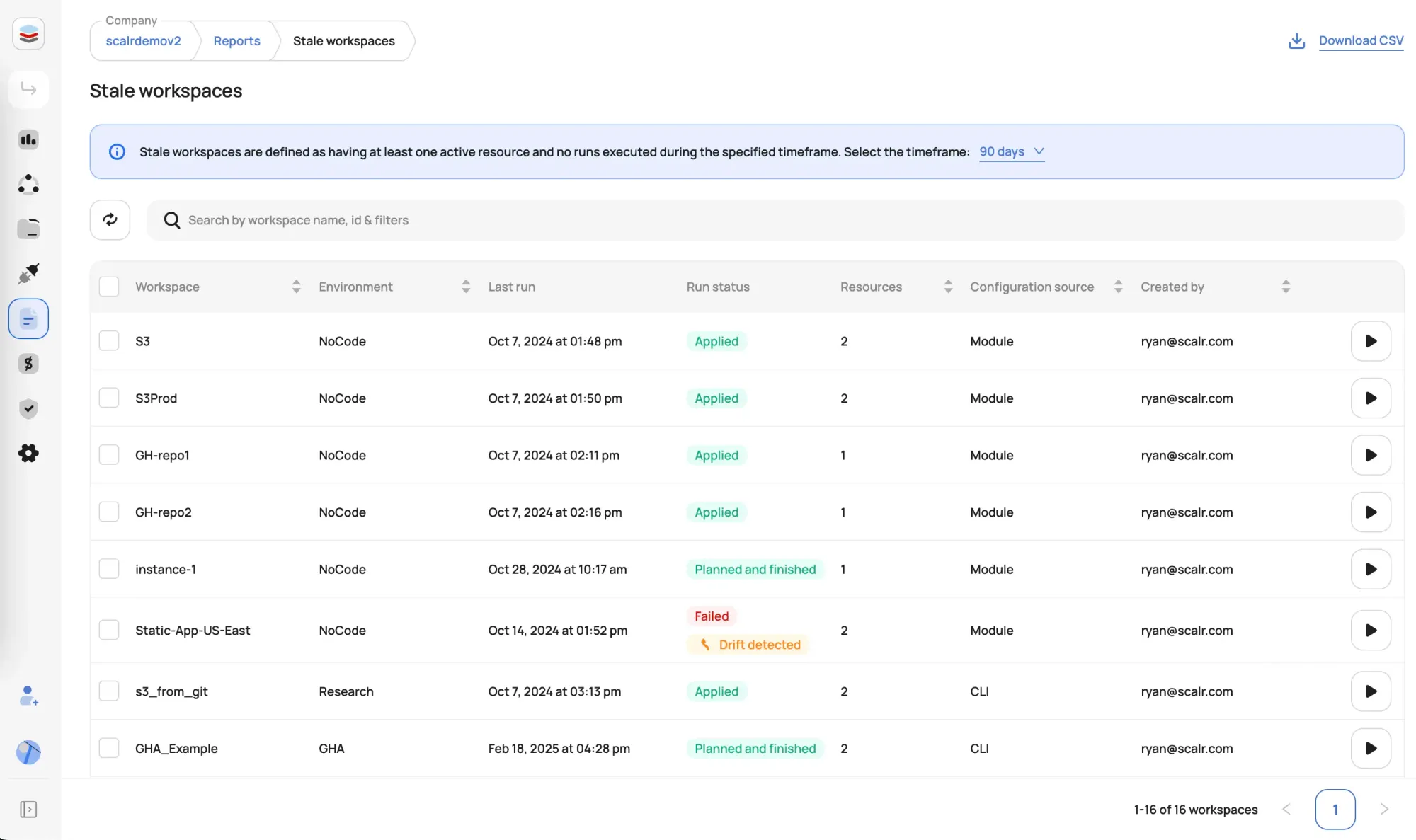
Per-workspace plan output does not give a platform team the bird's-eye view. Scalr adds fleet-level reports: a Drift report and a Stale Workspaces report alongside Resources, Modules, Providers, and Versions. One team can see which workspaces are drifting or going untouched across the whole account and step in. Those object-native reports work because every workspace shares one state schema the reports can read across the whole fleet. Scalr is a drop-in Terraform Cloud alternative, so you get this fleet view without changing how your workspaces run.