

Article
Deep Dive into Scalr's Platform Architecture
Explore how Scalr’s Terraform automation platform scales with microservices, event-driven workflows, and strict security to streamline IaC.
Key takeaways
- Scalr is a SaaS remote state and operations backend for Terraform and OpenTofu, built on a three-tiered hierarchy of Account, Environment, and Workspace scopes.
- Variables, OPA policies, and provider credentials defined at higher scopes are inherited by lower scopes, and can be locked as 'final' to prevent overrides.
- Scalr supports three state models: Scalr-managed storage, bring-your-own bucket, and standard non-Scalr backends like S3 or Azure Blob.
- Self-hosted agents run Terraform jobs and connect to private VCS providers using only outbound HTTPS, so Scalr.io never needs network access to internal systems.
- Scalr itself can be managed as code through its Terraform provider, CLI, and REST API, and billing is run-based with nothing else factoring into cost.
Reviewed for accuracy by Ryan Fee on June 6, 2025.
Once you have more than a handful of workspaces, running Infrastructure as Code securely gets hard for platform teams. Scalr is a platform for Terraform and OpenTofu operations that takes on a lot of that work. This post covers how it's built: the SaaS architecture, the three-tiered hierarchy, how objects are inherited, the backend options for state, how agents run jobs inside your own network, and how you can manage Scalr itself as code, with a working example for each.
Scalr Overview
Scalr is a Software-as-a-Service (SaaS) platform that acts as a remote state and operations backend for Terraform and OpenTofu. Because Scalr hosts and runs it, you don't have to stand up or maintain the management tool's own infrastructure. Scalr runs on IaaS platforms and secures the workloads it deploys there. The underlying cloud providers handle continuous monitoring and auditing, holding certifications like SOC2, ISO 27001, and PCI DSS. All data in Scalr is encrypted in transit and at rest.
The SaaS model has a few practical advantages. Because Scalr runs the platform, your team works on IaC instead of maintaining the tool itself. It scales as your IaC needs grow without anyone provisioning capacity for it, and since it's cloud-based, distributed teams can reach it. Scalr secures the platform on top of the underlying cloud providers' security.
Scalr offers features like Role-Based Access Control (RBAC), Open Policy Agent (OPA) integration, a private module registry, and full Terraform/Tofu CLI support. Billing is run-based, with nothing else factoring into the cost.
Platform Architecture
Scalr's architecture is built on a three-tiered hierarchy: Account, Environment, and Workspace. This is the structure you organize objects in, enforce policies through, and report against. It also sets where central control ends and team-level operations begin.
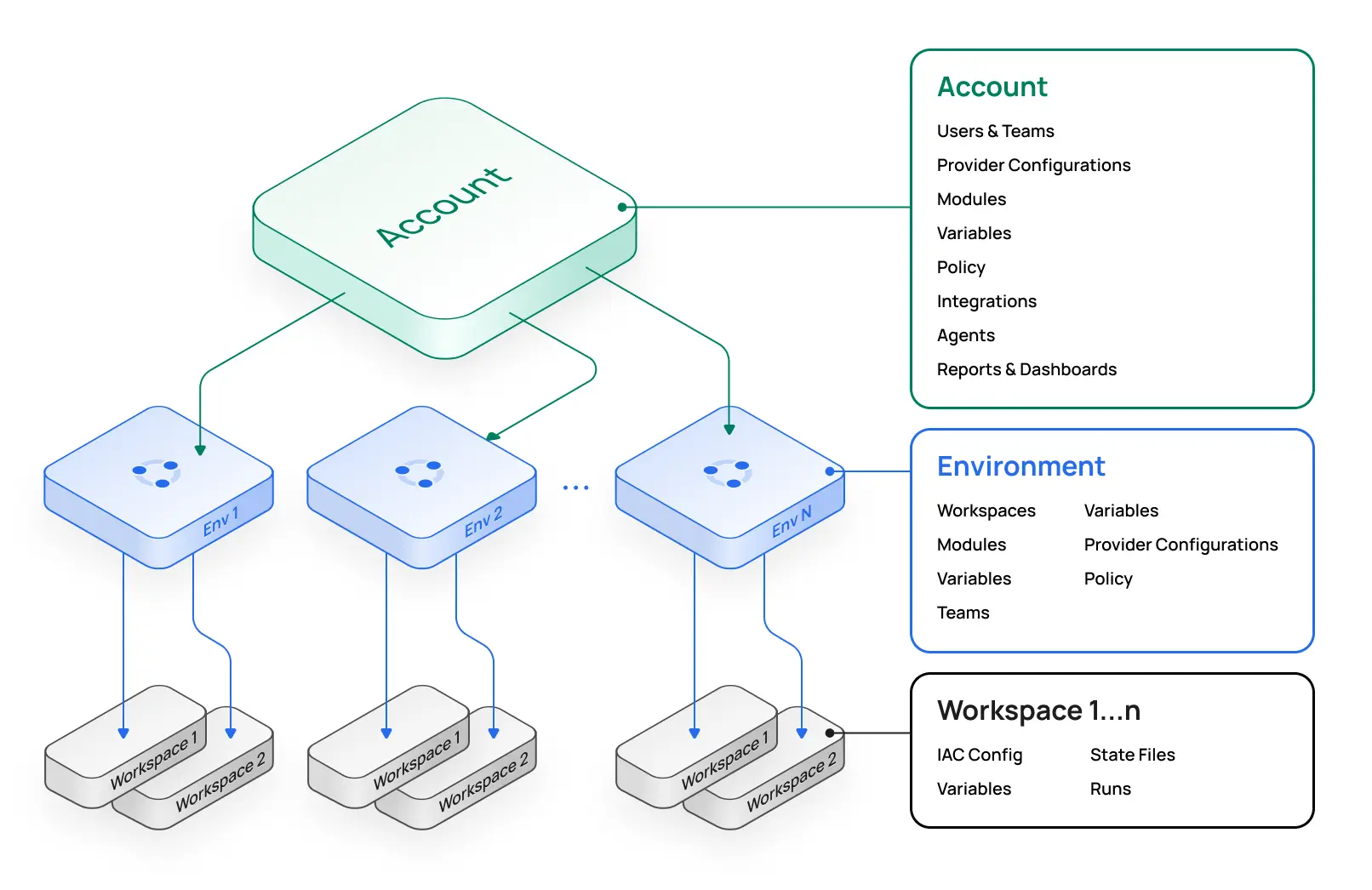
- Account Scope: The highest administrative level, typically managed by central platform teams. It handles global configurations like IAM, OPA policies, module registry, provider credentials, VCS providers, and shared variables. The account scope offers unified reporting and dashboards for all workspaces and runs across environments. Objects defined here can cascade down, so the whole organization works from the same settings.
- Environment Scope: Nested under Accounts, environments enable self-service by decentralizing operations. They work as logical groupings (e.g., "production," "development"), much like cloud sub-accounts, isolating workspaces, teams, and configurations. Access requires explicit permissions, separating concerns and reducing change impact.
- Workspace Scope: The most granular level, children of an Environment, where Terraform/OpenTofu runs execute and state files are stored. Each workspace links to a single state file and related objects like variables and run history. Engineers interact here via CLI, VCS, or Scalr's no-code module deployments.
If you've used AWS Organizations, this hierarchy works in a similar way: central teams set guardrails at the top while individual teams keep autonomy lower down.
Managing the Hierarchy with the Scalr Terraform Provider
The best way to manage this structure is with the Scalr Terraform provider, which fits how GitOps works.
Conceptual example:
terraform {
  required_providers {
    scalr = {
      source  = "registry.scalr.io/scalr/scalr"
      version = "~> 1.5" # Check for the latest compatible version
    }
  }
}

provider "scalr" {
  hostname = var.scalr_hostname
  token    = var.scalr_api_token
}

variable "scalr_hostname" {
  type        = string
  description = "Scalr account hostname (e.g., myaccount.scalr.io)."
}

variable "scalr_api_token" {
  type        = string
  sensitive   = true
  description = "Scalr API token."
}

variable "scalr_account_id" {
  type        = string
  description = "Your Scalr Account ID (e.g., acc-xxxxxxxxxxxx)."
}

# Define an Environment
resource "scalr_environment" "production_env" {
  name       = "production"
  account_id = var.scalr_account_id
}

# Define a Workspace within the Production Environment
resource "scalr_workspace" "app_server_prod" {
  name           = "app-server-prod"
  environment_id = scalr_environment.production_env.id
  vcs_provider_id = data.scalr_vcs_provider.github.id
  vcs_repo {
    identifier = "your-org/infra-repo"
    branch     = "main"
    path       = "terraform/app-server/prod"
  }
  terraform_version = "1.5.7"
}

data "scalr_vcs_provider" "github" {
  name       = "My-GitHub-Connection"
  account_id = var.scalr_account_id
}
This example creates a "production" environment and an "app-server-prod" workspace. Automating Scalr setup via Terraform (a "Scalr vending machine") reduces operational overhead.
Inheritance for Variables, Policies, and Credentials
The hierarchy lets objects inherit: configurations at higher scopes (Account/Environment) flow down to lower scopes (Environment/Workspace), so things stay consistent.
Variable Inheritance
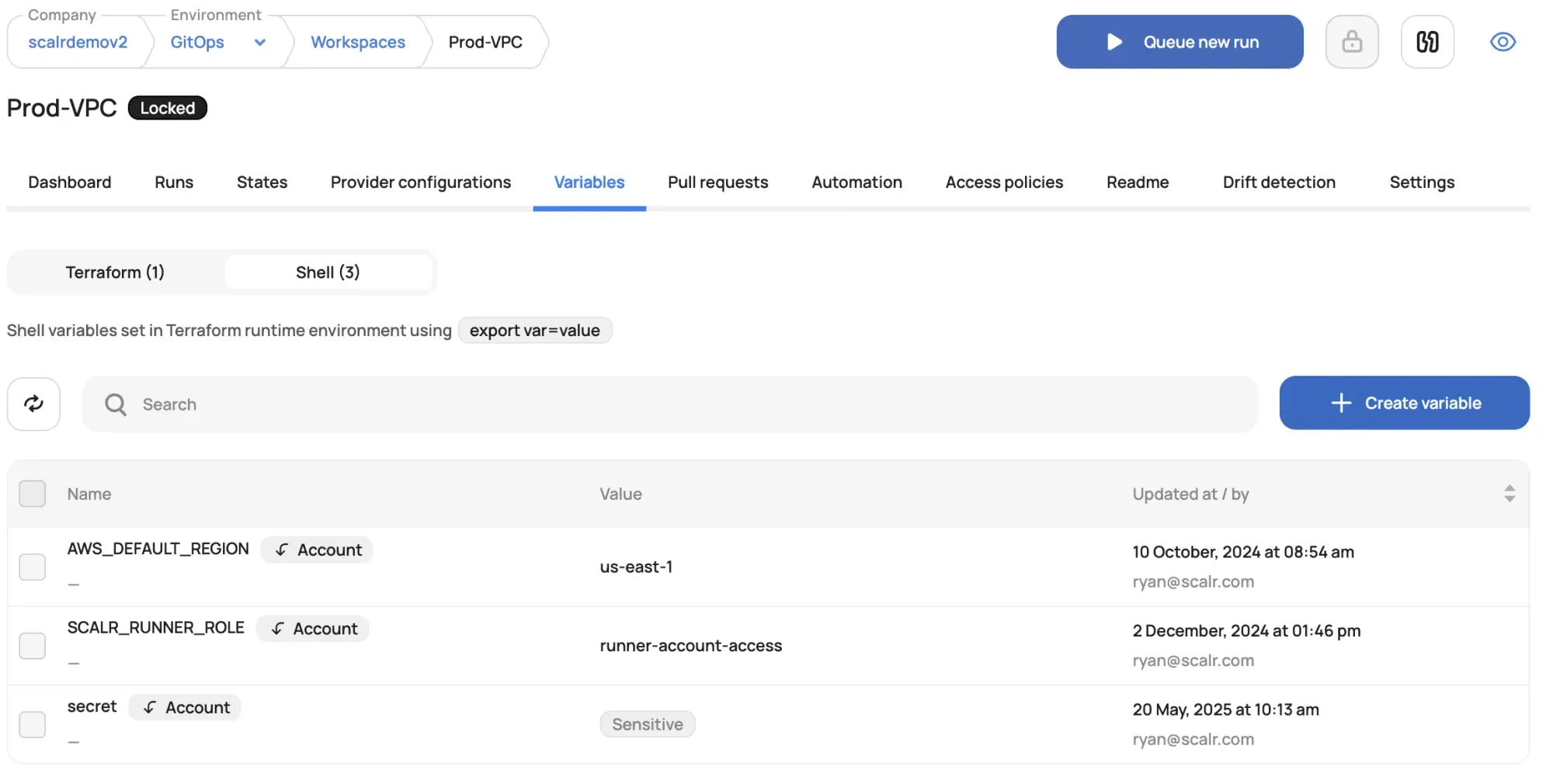
Scalr supports Terraform input variables (passed as .tfvars.json) and shell variables (exported to the runtime). Both are inheritable: Account -> Environment -> Workspace. Variables can be overridden at lower scopes unless marked "final." Sensitive variables are masked.
Example: Defining and Inheriting Variables with the Scalr Terraform Provider
The scalr_variable resource manages variables programmatically.
# In your Scalr Account configuration
variable "scalr_account_id" {
  type = string
}

resource "scalr_variable" "global_region" {
  key        = "aws_region"
  value      = "us-east-1"
  category   = "shell"
  account_id = var.scalr_account_id
  final      = true
  description = "Global default AWS region, non-overridable."
}

resource "scalr_variable" "default_instance_type_tf_var" {
  key        = "TF_VAR_instance_type"
  value      = "t3.micro"
  category   = "shell"
  account_id = var.scalr_account_id
  description = "Default EC2 instance type, can be overridden."
}
aws_region is final at account level. All workspaces will inherit it.
Policy Inheritance (OPA)
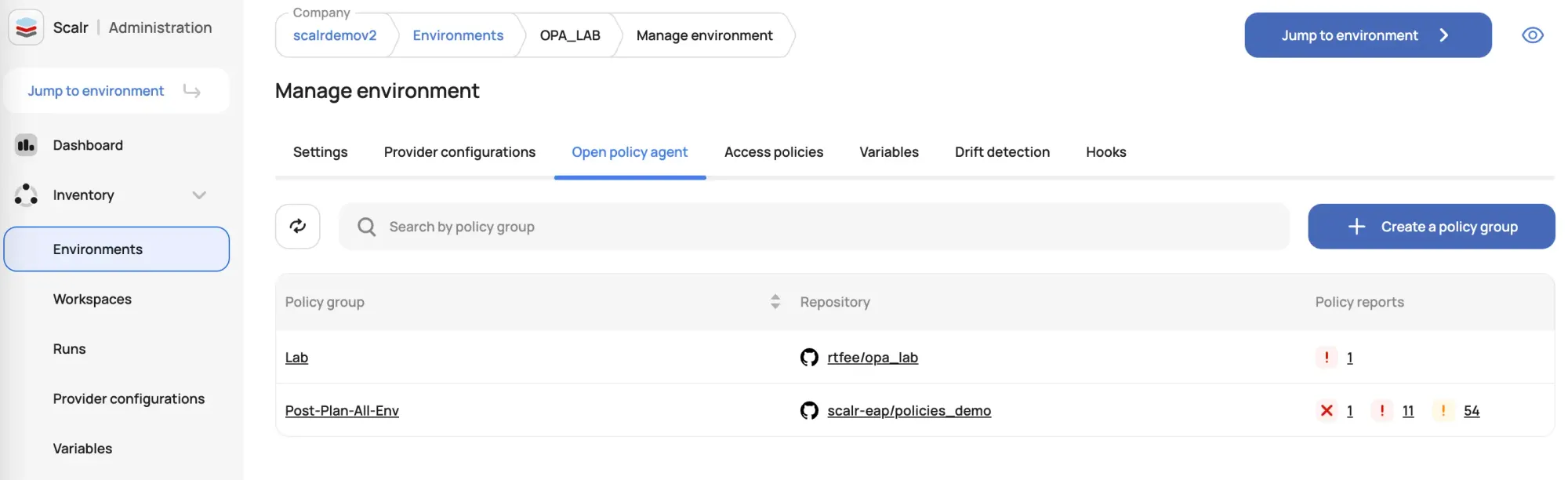
Scalr uses Open Policy Agent (OPA) for policy-as-code. OPA policy groups, created at the account scope, are assigned to environments and inherited by their workspaces. Policies evaluate at pre-plan (run context) or post-plan (Terraform plan output) stages.
Example: Defining an OPA Policy and Linking it
An OPA policy (Rego code) in VCS, e.g., to ensure S3 buckets are private:
#s3_private.rego
package terraform
import input.tfplan as tfplan

deny[reason] {
    r := tfplan.resource_changes[_]
    r.mode == "managed"
    r.type == "aws_s3_bucket"
    r.change.after.acl == "public-read" # Example check
    reason := sprintf("%s: S3 bucket ACL must not be public-read.", [r.address])
}
Using the Scalr Terraform provider:
data "scalr_vcs_provider" "main_vcs" {
  name       = "My-GitHub-Enterprise"
  account_id = var.scalr_account_id
}

resource "scalr_policy_group" "s3_security_policies" {
  name            = "s3-security-best-practices"
  account_id      = var.scalr_account_id
  vcs_provider_id = data.scalr_vcs_provider.main_vcs.id
  vcs_repo {
    identifier = "your-org/opa-policies"
    path       = "policies"
    branch     = "main"
  }
  environments = ["*"] # Link to all environments
}
This policy group applies to all environments.
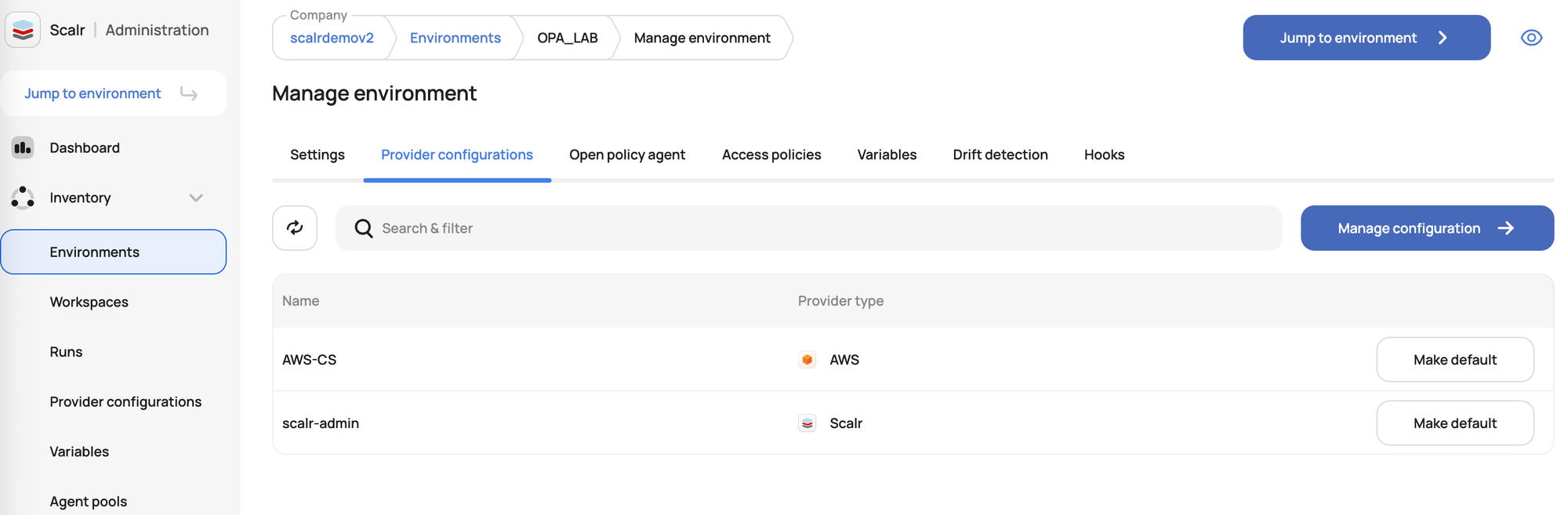
Credential Inheritance (Provider Configurations)
Provider configurations in Scalr manage cloud provider authentication. Created at the account scope, they can be assigned to environments (often as default) or workspaces. Workspaces inherit the environment's default if set.
Example: Defining and Setting Default Provider Configuration
resource "scalr_provider_configuration" "aws_prod_credentials" {
  name       = "aws-production-role"
  account_id = var.scalr_account_id
  aws {
    account_type     = "regular"
    credentials_type = "role_delegation"
    trusted_entity_type = "aws_service"
    role_arn         = "arn:aws:iam::YOUR_AWS_ACCOUNT_ID:role/ScalrProdExecutionRole"
  }
}

resource "scalr_environment" "production_env" {
  name                            = "production"
  account_id                      = var.scalr_account_id
  default_provider_configurations = [scalr_provider_configuration.aws_prod_credentials.id]
}
Workspaces in production_env use aws_prod_credentials by default.
Flexible State Management: Scalr-Managed vs. Customer-Managed Backend
Scalr supports three models for Terraform state storage:
Scalr Remote Backend w/ Customer Managed State Storage ("Bring Your Own Bucket"): Scalr is the remote backend for operations, but state files, artifacts, plans, and logs are in the customer's AWS S3 or GCP bucket. Variables and provider configs remain in Scalr. Offers data location control. Requires creating a "storage profile" in Scalr (an Enterprise-plan feature).
Non-Scalr Backend w/ Customer Managed State Storage: Users configure standard backends (e.g., S3, Azure Blob) in Terraform code. Scalr can orchestrate runs, but state/locking is by the chosen backend. Customer handles state encryption.
terraform {
  backend "s3" {
    bucket         = "my-terraform-state-bucket-name"
    key            = "path/to/my/app.tfstate"
    region         = "us-west-2"
    encrypt        = true
  }
}
Scalr Remote Backend w/ Scalr State Storage (Default): Scalr manages state storage in a Scalr-managed, encrypted Google Cloud Storage bucket. This model supports every feature and is the simplest to set up.
terraform {
  backend "remote" {
    hostname     = "<your-account>.scalr.io"
    organization = "<your-environment-id>"
    workspaces {
      name = "<your-workspace-name>"
    }
  }
}
Secure and Flexible Execution: Self-Hosted Agents
When you need extra security, access to a private network, or custom tooling, Scalr gives you self-hosted agents that run Terraform/OpenTofu jobs and handle VCS traffic inside your own infrastructure. That matters if your organization can't expose internal systems directly. Agents only need outbound HTTPS to Scalr.io.
Agents for Runs
Self-hosted agents execute runs on customer-controlled infrastructure. The agent polls Scalr.io for jobs, executes operations, and reports results. Scalr.io never needs network access to the agent. Each agent handles multiple concurrent runs (default 5), separate from Scalr.io's shared runners. Prerequisites include supported OS (Linux, Docker, Kubernetes), network access to *.scalr.io and *.docker.io, and appropriate sizing. ARM64 is supported.
Kubernetes Deployment (Helm): Scalr offers an official Helm chart.
helm repo add scalr-agent-helm https://scalr.github.io/agent-helm/
helm repo update
kubectl create secret generic scalr-agent-token-secret --from-literal=SCALR_TOKEN='<your-agent-token>' --namespace scalr-agents
# values-run-agent.yaml:
# agent:
#   type: "run"
#   scalr_url: "https://<your-account>.scalr.io"
#   scalr_token_secret_name: "scalr-agent-token-secret"
helm install scalr-run-agent scalr-agent-helm/agent-local -f values-run-agent.yaml --namespace scalr-agents --create-namespace
This uses the agent-local chart.
Docker Deployment Example:
docker run \
  -v /var/run/docker.sock:/var/run/docker.sock \
  -v /var/lib/scalr-agent:/var/lib/scalr-agent \
  -e SCALR_URL="https://<your-account>.scalr.io" \
  -e SCALR_TOKEN="<your-agent-token>" \
  -e SCALR_DATA_HOME="/var/lib/scalr-agent" \
  --rm -it --pull=always --name=scalr-run-agent scalr/agent:latest run
Agents for Private VCS Providers
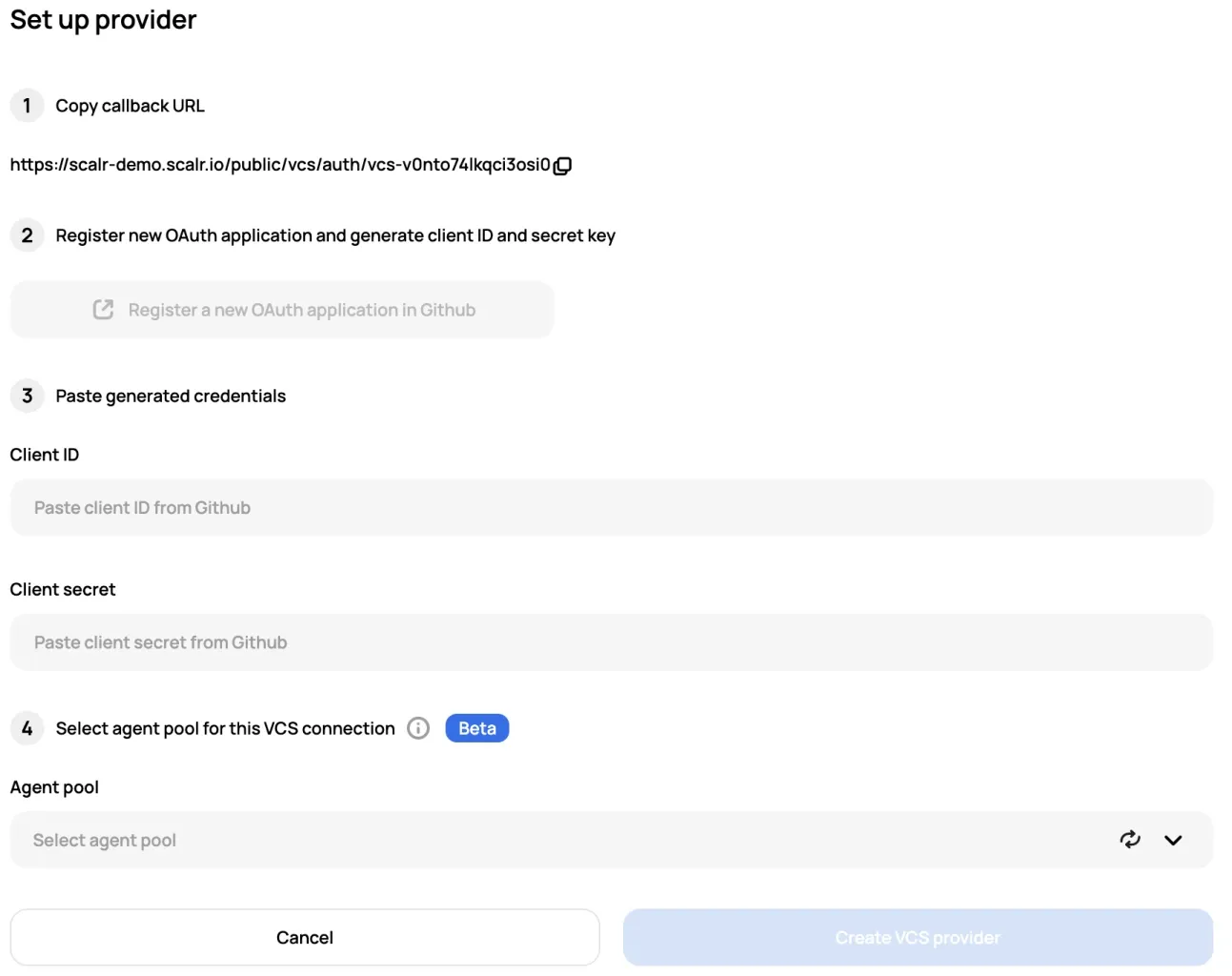
For internal VCS providers (e.g., GitHub Enterprise, GitLab Self-Managed) not publicly accessible, Scalr VCS agents enable secure integration. The agent relays communication: private VCS connects to the agent internally; the agent uses outbound HTTPS to Scalr.io for syncing repo data. Run and VCS agents should be on separate infrastructure. VCS agent pools are configured at Account scope in Scalr. Deployment is similar to Run agents, specifying type: "vcs" in configuration.
Scalr supports various deployment methods (VM, Docker, Kubernetes via Helm) for agents.
Managing Scalr as Code: Automation and Control
You can manage Scalr itself programmatically, which follows the same "platform as code" idea and keeps things consistent and auditable. It also cuts down on manual configuration and the errors that come with it.
Scalr Terraform Provider
The Scalr Terraform provider manages Scalr resources (Accounts, Environments, Workspaces, variables, policies, etc.) declaratively using HCL. It automates Scalr setup, enabling "Scalr vending machines." Authentication uses a Scalr API token or service account for runs within Scalr.
Basic Provider Configuration:
terraform {
  required_providers {
    scalr = {
      source  = "registry.scalr.io/scalr/scalr"
      version = "~> 1.5" // Check registry for latest [6, 20, 21]
    }
  }
}

provider "scalr" {
  hostname = var.scalr_hostname
  token    = var.scalr_api_token
}

variable "scalr_hostname" {
  type        = string
}

variable "scalr_api_token" {
  type        = string
  sensitive   = true
}
The Scalr Ignite repository (https://github.com/sierra-cedar/scalr-ignite) offers comprehensive examples.
Scalr CLI
The Scalr CLI allows direct API interaction for scripting, ad-hoc tasks, and CI/CD integration. Configure with scalr -configure or environment variables (SCALR_HOSTNAME, SCALR_TOKEN). Syntax: scalr COMMAND. Create/update operations can use JSON blobs.
Example: Creating an Environment (flags):
export SCALR_HOSTNAME="myaccount.scalr.io"
export SCALR_TOKEN="your_cli_api_token"
scalr create-environment -name="cli-demo-env" -account-id="acc-your-account-id"
Scalr API
The Scalr REST API gives you programmatic control for custom automation. Authenticate with a Bearer token. Exposes CRUD operations for most Scalr objects.
How the pieces fit together
The pieces covered here work as one system. The Account, Environment, and Workspace hierarchy is where you organize objects and enforce policy, and variables, OPA policies, and provider credentials inherit down it, so the same rules apply everywhere without anyone copying them by hand. State can live wherever you need the data to be, and self-hosted agents keep runs and private VCS traffic inside your own network. Because Scalr can be managed through its Terraform provider, CLI, and API, you can stand all of this up as code and keep it under version control.
About the author

CEO at Scalr
Sebastian Stadil is the CEO of Scalr with 15+ years of DevOps experience. He started with AWS in 2004 and advised early Microsoft Azure and Google Cloud.