

Guide · 3 articles branch off this one
Terraform & Terragrunt with Atlantis: The Complete Guide
Terraform Atlantis brings infrastructure automation into your PR workflows. This guide covers implementing, securing, and scaling Atlantis in prod.

Key takeaways
- Atlantis brings terraform plan and apply into pull request comments, but you self-host it: webhook secrets, repo allowlists, TLS, credential management, and upgrades are all on your team.
- Terragrunt integration requires a custom Docker image with the Terragrunt binary plus custom workflows; terragrunt-atlantis-config can generate atlantis.yaml from your dependency tree automatically.
- A unit-per-statefile Terragrunt layout determines your project count in Atlantis and your workspace count on any managed platform. Count the leaf directories before committing to a structure.
- Codebases that depend on terragrunt run-all need restructuring before migrating to a managed platform; the run-all dependency graph conflicts with one-workspace-per-unit models.
- OpenTofu is a drop-in replacement in Atlantis via terraform_distribution: opentofu, set per project or server-wide.
- Atlantis's mergeable apply requirement is a single config keyword; on managed platforms like Scalr the equivalent gate is an explicit OPA policy, and VCS-provider parity varies, so verify each gate for your VCS before migrating.
Atlantis runs terraform plan and apply from pull request comments, on a server you host. To use it with Terragrunt you need three things it doesn't ship with: a Docker image that includes the Terragrunt binary, a custom workflow that calls terragrunt instead of terraform, and terragrunt.hcl in the autoplan file list. All three are in the Terragrunt Integration section. The rest of this guide covers setting up and hardening the server for production, cost checks in the PR, OpenTofu, and the point where self-hosting stops being worth it.
What is Atlantis?
Atlantis is an open-source automation tool that runs your Terraform workflows from pull requests. Instead of making developers run Terraform commands on their laptops or through a separate CI/CD interface, Atlantis brings plan and apply into version control. Your team reviews, discusses, and approves infrastructure changes right in the pull request, every operation runs on one server rather than someone's machine, and the PR becomes the audit trail.
Pros and Cons of Using Atlantis
Pros
GitOps for Infrastructure: Atlantis integrates directly with your version control system (GitHub, GitLab, Bitbucket, Azure DevOps), enabling teams to manage infrastructure changes using familiar pull request workflows with a clear audit trail.
Automation of plan and apply: Automatic plan generation on PR creation and one-command applies cut manual effort and speed up deployments.
Consistency and Standardization: Terraform commands run in a consistent server environment, eliminating "works on my machine" issues and standardizing how changes are reviewed and implemented.
Improved Security: Developers may not need direct cloud provider credentials on their local machines, and changes are reviewed and explicitly approved before being applied.
State Locking: Atlantis automatically locks Terraform states during plan and apply operations, preventing concurrent modifications that could lead to state corruption.
Open Source: Free to use and customizable. Self-hosting gives organizations complete control over the Atlantis instance, its configuration, and credential storage.
Cons
Self-Hosting and Maintenance Overhead: Your team is responsible for deploying, maintaining, securing, and upgrading the Atlantis server, which requires ongoing operational effort.
Single Point of Failure: Unless configured for high availability (which adds complexity), the Atlantis server can become a single point of failure that stalls automated workflows.
Concurrency Limitations: By default, Atlantis processes operations sequentially for a given instance. High volumes of concurrent PRs across many teams may lead to queues and delays without scaling strategies such as multiple instances with sharding logic.
Limited Native Integrations Beyond VCS: Compared to commercial platforms (Terraform Cloud, Scalr, env0, Spacelift), Atlantis has fewer built-in integrations for advanced policy checking, cost estimation, or security scanning. These can be added with custom workflows but require more setup.
Basic UI/UX: Atlantis primarily operates via PR comments and has a basic web UI for viewing logs and locks. It lacks the dashboards and reporting features of commercial alternatives.
Workflow Rigidity: The core workflow is tied to pull requests. Complex scenarios not fitting this model may be harder to implement.
No Built-in Advanced RBAC: Role-based access control is primarily managed through VCS repository permissions and Atlantis's own configuration. More granular RBAC within Atlantis is limited.
Architecture and Core Concepts
Deployment Model
Atlantis operates as a self-hosted service that you deploy and manage on your infrastructure. Unlike a managed service, that leaves you in control of the environment and responsible for keeping it running.
Common deployment approaches:
- Docker containers on any container host
- Kubernetes using Helm charts for scalability
- Cloud VMs on AWS EC2, Azure VMs, or Google Compute Engine
- Binary deployment on dedicated servers
The service listens for webhook events from your version control system and responds to pull request activity and comment commands.
How Atlantis Works
The basic Atlantis workflow goes like this:
- Developer Creates PR: Engineer pushes Terraform changes and opens a pull request
- Webhook Notification: VCS sends webhook event to Atlantis server
- Automatic Planning: Atlantis detects changed files and runs
terraform plan - Result Posting: Plan output appears as a comment in the pull request
- Review Phase: Team members review the proposed infrastructure changes
- Apply via Comment: Authorized user comments
atlantis applyto execute changes - Completion: Atlantis applies the plan and posts results
- PR Merge: Team merges the PR, completing the cycle
Essential PR Commands
atlantis plan [-d dir] [-w workspace] [-p project_name]: Manually trigger a planatlantis apply [-d dir] [-w workspace] [-p project_name]: Apply a planned changeatlantis unlock: Release a stuck lockatlantis help: Show available commands
Getting Started: Setup and Deployment
Prerequisites
Before deploying Atlantis, ensure you have:
Server Infrastructure: A dedicated server, VM, or container cluster with:
- 1-2 vCPUs minimum
- 2-8GB RAM depending on workload
- 5-50GB disk space for Git clones and plan files
- Public IP or domain name for webhook access
Git and Terraform:
- Git client installed and accessible
- Terraform installed (Atlantis can manage versions)
- Remote Terraform state backend (S3, Azure Blob, GCS, etc.)
Version Control System:
- Repository access configured
- GitHub, GitLab, Bitbucket, or Azure DevOps account
- Personal Access Token or GitHub App credentials
Cloud Provider Credentials:
- AWS credentials, Azure service principal, GCP service account, etc.
- IAM roles/permissions for infrastructure operations
Docker Deployment
The quickest way to get started is using Docker:
docker run --name atlantis -d -p 4141:4141 \
  -e ATLANTIS_ATLANTIS_URL="https://atlantis.example.com" \
  -e ATLANTIS_GH_USER="your-github-user" \
  -e ATLANTIS_GH_TOKEN="your-github-pat" \
  -e ATLANTIS_GH_WEBHOOK_SECRET="your-webhook-secret" \
  -e ATLANTIS_REPO_ALLOWLIST="github.com/your-org/*" \
  -v /path/to/atlantis-data:/atlantis-data \
  ghcr.io/runatlantis/atlantis:latest server
Kubernetes Deployment with Helm
For production Kubernetes environments:
helm repo add runatlantis https://runatlantis.io
helm install atlantis runatlantis/atlantis \
  --set atlantisURL=https://atlantis.example.com \
  --set github.user=your-github-user \
  --set github.token=your-github-token \
  --set github.webhook_secret=your-webhook-secret \
  --set repoAllowlist="github.com/your-org/*"
VCS Integration: GitHub Authentication
Atlantis requires GitHub credentials to interact with your repositories. You have two options:
Personal Access Token (simpler but less granular):
- Generate token with
reposcope - Less secure due to broad permissions
- Easier to set up initially
GitHub App (recommended for production):
- More granular permissions
- Better security posture
- Atlantis can guide setup via
/github-app/setupendpoint
For the GitHub App approach:
- Navigate to your Atlantis server's
/github-app/setupendpoint - Follow the guided setup to create an app in your organization
- Grant specific permissions (Contents, Pull Requests, Commit Statuses)
- Atlantis will handle app registration and private key management
Webhook Configuration
After deploying Atlantis, configure webhooks in your version control system:
Webhook Settings:
- URL:
https://your-atlantis-domain.com/events(note the/eventssuffix) - Content Type:
application/json - Secret: The same value as
ATLANTIS_GH_WEBHOOK_SECRET - Events: Pull requests, Issue comments, Pushes, Pull request reviews
The /events suffix is critical. Missing it is a common setup error that prevents Atlantis from receiving notifications.
Configuration in depth
The atlantis.yaml File
Every Terraform repository using Atlantis should have an atlantis.yaml file at its root. This file tells Atlantis how to handle infrastructure projects in your repository.
Basic Structure
version: 3
automerge: false
parallel_plan: true
parallel_apply: true

projects:
  - name: my-app-staging
    dir: infra/staging
    workspace: staging
    terraform_version: v1.5.0
    autoplan:
      when_modified: ["**/*.tf", "**/*.tfvars", ".terraform.lock.hcl"]
      enabled: true
    apply_requirements: [approved]
Key Configuration Options
Projects Array: Defines Terraform projects Atlantis manages
name: Unique identifier for the projectdir: Directory path (relative to repo root)workspace: Terraform workspace to useterraform_version: Pin specific Terraform versionautoplan: Configure automatic planning behaviorapply_requirements: Conditions that must be met before applyingexecution_order_group: Numeric priority for execution orderdepends_on: List of projects this depends on
Autoplan Configuration: Controls when plans automatically trigger
enabled: Whether autoplan is activewhen_modified: File patterns that trigger planning
Apply Requirements: Enforce approval conditions
approved: PR must be approved by a reviewermergeable: PR must be mergeable (no conflicts)undiverged: PR branch must be up-to-date with base branch
Repository Structure for Optimal Workflows
Monorepo Pattern
Useful when all infrastructure code lives in a single repository:
Configuration for monorepo structure:
version: 3
projects:
  - name: network-dev
    dir: environments/dev/network
  - name: compute-dev
    dir: environments/dev/compute
    depends_on: [network-dev]
  - name: network-prod
    dir: environments/prod/network
  - name: compute-prod
    dir: environments/prod/compute
    depends_on: [network-prod]
Multi-Repo Pattern
Separate repositories for different infrastructure components:
networking-repo/
├── atlantis.yaml
├── modules/
└── environments/

compute-repo/
├── atlantis.yaml
├── modules/
└── environments/
Optimizing when_modified Patterns
The when_modified setting determines which file changes trigger plans. Poor patterns cause unnecessary operations.
Inefficient Pattern (too broad):
autoplan:
  when_modified: ["**/*.tf"]  # Triggers for any .tf file anywhere
Optimized Pattern (targeted):
projects:
  - name: networking
    dir: networking
    autoplan:
      when_modified:
        - "networking/*.tf"
        - "networking/*.tfvars"
        - "modules/network/**/*.tf"
Remember that paths are relative to the project's dir, not the repository root.
Custom Workflows and Advanced Automation
Beyond Default Plan and Apply
Atlantis ships default plan and apply workflows, and custom workflows let you add your own steps around them.
Defining Custom Workflows
version: 3
projects:
  - name: production
    dir: environments/production
    workflow: prod-workflow
    apply_requirements: [approved]

workflows:
  prod-workflow:
    plan:
      steps:
        - run: terraform fmt -check
        - run: tflint .
        - init
        - plan:
            extra_args: ["-var-file=prod.tfvars"]
    apply:
      steps:
        - apply
        - run: ./scripts/post-deploy-validation.sh
Advanced Workflow Patterns
Pre-Deployment Validation:
workflows:
  secure-workflow:
    plan:
      steps:
        - run: tfsec --no-color .
        - run: checkov -d . --quiet
        - init
        - plan
Cost Estimation Integration:
workflows:
  cost-aware:
    plan:
      steps:
        - init
        - plan
        - show
        - run: |
            infracost breakdown --path $SHOWFILE \
              --format json \
              --out-file /tmp/infracost.json
Multi-Module Orchestration with Environment Variables:
workflows:
  multi-env:
    plan:
      steps:
        - env:
            name: AWS_REGION
            value: us-east-1
        - env:
            name: TF_VAR_environment
            value: production
        - init
        - plan
Available Environment Variables in Workflows
$PLANFILE: Path to generated plan file$WORKSPACE: Terraform workspace name$PROJECT_NAME: Project name from atlantis.yaml$DIR: Project directory$PULL_NUM: Pull request number$BASE_REPO_OWNER: Repository owner$BASE_REPO_NAME: Repository name
Security in Production
Server Security Fundamentals
The Atlantis server executes infrastructure changes with elevated permissions, so it needs to be locked down.
Network Security
Firewall Configuration:
# Allow webhook traffic only from VCS provider IPs
iptables -A INPUT -p tcp -s <GITHUB_IPS> --dport 4141 -j ACCEPT
# Deny all other incoming traffic to Atlantis port
iptables -A INPUT -p tcp --dport 4141 -j DROP
Best Practices:
- Place Atlantis behind a reverse proxy with TLS termination
- Restrict incoming traffic to VCS provider IP ranges
- Configure egress rules limiting outbound connectivity
- Use IP allowlisting for webhook sources
TLS/SSL Configuration
atlantis server \
  --ssl-cert-file=/path/to/cert.pem \
  --ssl-key-file=/path/to/key.pem \
--atlantis-url="https://atlantis.example.com"Requirements:
- Valid certificates from trusted CAs
- Strong TLS ciphers with old protocols disabled
- Automatic certificate renewal
OS-Level Hardening
# Create dedicated non-root user
sudo useradd -r -m -s /bin/false atlantis

# Set restrictive directory permissions
sudo mkdir -p /var/lib/atlantis
sudo chown atlantis:atlantis /var/lib/atlantis
sudo chmod 700 /var/lib/atlantis
Container Security
docker run --name atlantis \
  --user atlantis \
  --read-only \
  --cap-drop=ALL \
  --security-opt=no-new-privileges \
  --mount type=volume,source=atlantis-data,target=/var/lib/atlantis \
  -p 4141:4141 \
  ghcr.io/runatlantis/atlantis:latest server
Webhook Security
Strong Webhook Secrets
# Generate cryptographically secure webhook secret
webhook_secret=$(openssl rand -hex 32)

# Set in Atlantis configuration
export ATLANTIS_GH_WEBHOOK_SECRET="$webhook_secret"Requirements:
- Minimum 24 characters with high entropy
- Stored securely in environment variables or secrets manager
- Rotated periodically
- Never committed to version control
IP Allowlisting
server {
    listen 443 ssl;
    server_name atlantis.example.com;

    # GitHub webhook IP ranges
    allow 192.30.252.0/22;
    allow 185.199.108.0/22;
    allow 140.82.112.0/20;

    deny all;

    location / {
        proxy_pass http://localhost:4141;
    }
}
Repository Allowlist
atlantis server \
  --repo-allowlist="github.com/yourorg/*" \
  --gh-webhook-secret="$WEBHOOK_SECRET"
Cloud Provider Credential Management
Least Privilege IAM Roles
resource "aws_iam_role" "atlantis" {
  name = "atlantis-terraform-role"

  assume_role_policy = jsonencode({
    Version = "2012-10-17"
    Statement = [{
      Action = "sts:AssumeRole"
      Effect = "Allow"
      Principal = {
        Service = "ec2.amazonaws.com"
      }
    }]
  })
}

resource "aws_iam_role_policy" "atlantis" {
  role = aws_iam_role.atlantis.name

  policy = jsonencode({
    Version = "2012-10-17"
    Statement = [
      {
        Effect = "Allow"
        Action = [
          "s3:GetObject",
          "s3:PutObject",
          "s3:ListBucket"
        ]
        Resource = [
          "arn:aws:s3:::${var.terraform_state_bucket}",
          "arn:aws:s3:::${var.terraform_state_bucket}/*"
        ]
      }
    ]
  })
}Principles:
- Use IAM roles instead of static access keys
- Implement principle of least privilege
- Create separate roles for different environments
- Regularly audit permissions
OIDC Workload Identity
For Kubernetes deployments:
resource "aws_iam_openid_connect_provider" "atlantis" {
  url             = "https://your-atlantis-domain"
  client_id_list  = ["atlantis"]
  thumbprint_list = ["<certificate-thumbprint>"]
}

resource "aws_iam_role" "atlantis_oidc" {
  name = "atlantis-oidc-role"

  assume_role_policy = jsonencode({
    Version = "2012-10-17"
    Statement = [{
      Action = "sts:AssumeRoleWithWebIdentity"
      Effect = "Allow"
      Principal = {
        Federated = aws_iam_openid_connect_provider.atlantis.arn
      }
      Condition = {
        StringEquals = {
          "${aws_iam_openid_connect_provider.atlantis.url}:sub": "system:serviceaccount:atlantis:atlantis"
        }
      }
    }]
  })
}
Secret Management
Use external secret managers instead of hardcoding credentials:
provider "vault" {
  address = "https://vault.example.com"
}

data "vault_aws_access_credentials" "aws" {
  backend = "aws"
  role    = "atlantis"
}

provider "aws" {
  access_key = data.vault_aws_access_credentials.aws.access_key
  secret_key = data.vault_aws_access_credentials.aws.secret_key
  region     = var.aws_region
}
Repository-Level Security with atlantis.yaml
Server-Side Configuration
Use repos.yaml to enforce organization-wide policies:
repos:
  - id: /.*/  # Applies to all repositories
    allowed_overrides: [workflow]
    allow_custom_workflows: false
    apply_requirements: [approved, mergeable]
    pre_workflow_hooks:
      - run: terraform fmt -check
      - run: tflint
Security Controls:
- Restrict which configurations repositories can override
- Disable custom workflows for untrusted repos
- Enforce approval requirements
- Run validation steps before Terraform operations
API Authentication
# Enable basic authentication for web interface
atlantis server \
  --web-basic-auth=true \
  --web-username=admin \
  --web-password=secure-password
Deployment Behind a Reverse Proxy
server {
    listen 443 ssl;
    server_name atlantis.example.com;

    ssl_certificate /path/to/cert.pem;
    ssl_certificate_key /path/to/key.pem;

    # Security headers
    add_header Strict-Transport-Security "max-age=31536000; includeSubDomains" always;
    add_header X-Content-Type-Options "nosniff" always;
    add_header X-Frame-Options "DENY" always;
    add_header Content-Security-Policy "default-src 'self'" always;

    location / {
        proxy_pass http://localhost:4141;
        proxy_set_header Host $host;
        proxy_set_header X-Real-IP $remote_addr;
        proxy_set_header X-Forwarded-For $proxy_add_x_forwarded_for;
        proxy_set_header X-Forwarded-Proto $scheme;
    }
}
See "securing Terraform Atlantis in production" for deeper security configurations and advanced threat mitigation.
Terragrunt Integration
New to Terragrunt? Start with our beginner's guide to Terragrunt.
Why Combine Atlantis with Terragrunt
Terragrunt gives you one small terragrunt.hcl per unit and inherits the rest, so forty units don't mean forty copies of your backend config. Atlantis knows nothing about that. What it does know is directories, and a Terragrunt unit is a directory, so the two fit once you tell Atlantis where the terragrunt binary lives and which files should trigger a plan. Each unit becomes an Atlantis project, the dependency blocks in terragrunt.hcl map onto depends_on, and run-all is still there when you need it. The next three subsections are those three steps.
Setup for Terragrunt Projects
Custom Docker Image
The default Atlantis image doesn't include Terragrunt, so create a custom image:
FROM ghcr.io/runatlantis/atlantis:latest

ARG TERRAGRUNT_VERSION=v0.55.0
RUN curl -Lo /usr/local/bin/terragrunt \
    "https://github.com/gruntwork-io/terragrunt/releases/download/${TERRAGRUNT_VERSION}/terragrunt_linux_amd64" && \
    chmod +x /usr/local/bin/terragrunt
Server Configuration
atlantis server \
  --repo-allowlist="github.com/your-org/*" \
  --atlantis-url="https://your-atlantis-server.com" \
  --gh-user="your-github-user" \
  --gh-token="your-github-token" \
  --gh-webhook-secret="your-webhook-secret" \
  --autoplan-file-list="**/*.tf,**/*.tfvars,**/terragrunt.hcl,**/.terraform.lock.hcl"
Project Structure
Optimal structure for Terragrunt with Atlantis:
.
├── terragrunt.hcl          # Root configuration
├── environments
│   ├── dev
│   │   ├── terragrunt.hcl
│   │   ├── us-east-1
│   │   │   ├── terragrunt.hcl
│   │   │   ├── vpc
│   │   │   │   └── terragrunt.hcl
│   │   │   ├── rds
│   │   │   │   └── terragrunt.hcl
│   │   │   └── eks
│   │   │       └── terragrunt.hcl
│   ├── staging
│   └── prod
└── modules
    ├── vpc
    ├── rds
    └── eks
This unit-per-statefile layout is the standard Terragrunt recommendation, and it shapes every platform decision downstream. One team running vanilla OpenTofu and considering Terragrunt asked us at Scalr, as their first adoption question, whether a layout like the one above would explode into hundreds of workspaces on a managed platform or whether one top-level workspace per environment could work instead. Their decision hinged on workspace-count architecture and on whether comment-driven applies worked on their VCS provider, "a huge plus over what we are doing today," as they put it. Before you commit to a structure, count the leaf directories: that number becomes your project count in Atlantis and your workspace count anywhere else.
atlantis.yaml for Terragrunt
Using terragrunt-atlantis-config
The terragrunt-atlantis-config tool automatically generates Atlantis configuration from Terragrunt dependencies:
terragrunt-atlantis-config generate --output atlantis.yaml \
  --autoplan --parallel --create-workspace --cascade-dependencies
This generates an atlantis.yaml that respects your Terragrunt dependency tree.
Manual Configuration
version: 3
projects:
  - name: dev_us_east_vpc
    dir: environments/dev/us-east-1/vpc
    workflow: terragrunt
    autoplan:
      enabled: true
      when_modified:
        - "*.hcl"
        - "*.tf*"
        - "../../../modules/**/*.tf*"
    workspace: dev_us_east_vpc

  - name: dev_us_east_rds
    dir: environments/dev/us-east-1/rds
    workflow: terragrunt
    depends_on:
      - dev_us_east_vpc
    workspace: dev_us_east_rds

workflows:
  terragrunt:
    plan:
      steps:
        - env:
            name: TERRAGRUNT_TFPATH
            command: 'echo "terraform${ATLANTIS_TERRAFORM_VERSION}"'
        - env:
            name: TF_IN_AUTOMATION
            value: 'true'
        - run: terragrunt plan -input=false -no-color -out=$PLANFILE
    apply:
      steps:
        - env:
            name: TERRAGRUNT_TFPATH
            command: 'echo "terraform${ATLANTIS_TERRAFORM_VERSION}"'
        - run: terragrunt apply -input=false $PLANFILE
Managing Dependencies
Handling Mock Outputs
When dependencies haven't been applied yet, use mock outputs:
dependency "vpc" {
  config_path = "../vpc"

  mock_outputs = {
    vpc_id = "mock-vpc-id"
  }
  mock_outputs_allowed_terraform_commands = ["plan", "validate"]
}
Using run-all for Multi-Module Operations
workflows:
  terragrunt-run-all:
    plan:
      steps:
        - run: cd $DIR && terragrunt run-all plan -out atlantis.tfplan
    apply:
      steps:
        - run: cd $DIR && terragrunt run-all apply atlantis.tfplan
A warning if you ever plan to move off self-hosted automation: run-all semantics become the hard constraint. One enterprise migrating a heavily run-all-dependent Terragrunt codebase off an in-house PR-automation setup hit the trade-off directly in their proof of concept. Option one: keep run-all semantics by disabling the managed backend, losing drift detection in the process. Option two: split every Terragrunt unit into its own workspace and absorb the sprawl, which produced scalability problems even at their small POC size. They landed on a refactor rather than a rejection, but the refactor was real work. If your dependency graph only resolves through run-all, budget for restructuring before any platform migration, managed or otherwise.
Dependency Cascade
Configure execution order in atlantis.yaml:
version: 3
parallel_plan: true
parallel_apply: true
projects:
  - name: network
    dir: infrastructure/network
    execution_order_group: 1

  - name: security
    dir: infrastructure/security
    execution_order_group: 2
    depends_on:
      - network

  - name: database
    dir: infrastructure/database
    execution_order_group: 3
    depends_on:
      - security
Cost Awareness in the PR
The plan output in the PR is already a cost checkpoint: deletions are as visible as creations, and a reviewer can ask why before anything is provisioned. Infracost makes the number explicit. Add it as a plan step and a post-workflow hook and every PR gets an estimated cost delta as a comment:
workflows:
  terraform-infracost:
    plan:
      steps:
        - init
        - plan
        - show
        - run: |
            infracost breakdown --path $SHOWFILE \
              --format json \
              --out-file /tmp/infracost-$PULL_NUM.json

repos:
  - id: /.*/
    workflow: terraform-infracost
    post_workflow_hooks:
      - run: |
          infracost comment github \
            --path /tmp/infracost-*.json \
            --repo $BASE_REPO_OWNER/$BASE_REPO_NAME \
            --pull-request $PULL_NUM \
            --github-token $GITHUB_TOKEN \
            --behavior update
        commands: plan
Pair it with default_tags on the provider so every resource lands with the cost-allocation tags your finance team filters on:
provider "aws" {
  region = "us-east-1"
  default_tags {
    tags = {
      Environment = var.environment
      Project     = "phoenix"
      CostCenter  = "engineering-123"
      ManagedBy   = "Terraform-Atlantis"
      CreatedDate = timestamp()
    }
  }
}
OpenTofu Support
OpenTofu, the open-source Terraform fork, has become an important alternative for teams that want vendor-neutral infrastructure automation, and Atlantis fully supports OpenTofu workloads.
Atlantis and OpenTofu: Vendor Neutrality
Atlantis was designed from the start to be VCS-agnostic, and it now takes the same approach to IaC tools. The project supports both Terraform and OpenTofu, allowing organizations to choose their preferred tool without switching automation platforms.
Using OpenTofu with Atlantis
Project-Level Configuration
Specify OpenTofu for specific projects in atlantis.yaml:
projects:
  - name: project-terraform
    dir: project-terraform
    terraform_version: 1.5.0

  - name: project-opentofu
    dir: project-opentofu
    terraform_distribution: opentofu
    terraform_version: 1.6.0
Server Configuration
Set default distribution via server flags:
atlantis server \
  --terraform-distribution=opentofu \
  --default-tf-version=1.6.0
What to check before switching a project to OpenTofu
Terraform and OpenTofu share the same state format and the same providers, so you can move one project at a time and mix both in one repository. Confirm the providers you use are published to the OpenTofu registry, run tofu plan on a non-production project and compare it with the Terraform plan before you flip production, and pin the OpenTofu version the same way you pin Terraform's.
Alternatives and Comparisons
Atlantis vs. GitHub Actions
GitHub Actions offers a general-purpose CI/CD platform that can run Terraform, while Atlantis is purpose-built for infrastructure automation.
| Aspect | Atlantis | GitHub Actions |
|---|---|---|
| Setup Complexity | Host service, configure webhooks | Configure YAML workflows |
| Infrastructure Cost | Server hosting + maintenance | GitHub plan + compute minutes |
| Terraform Integration | Purpose-built, native PR experience | Custom workflow configuration needed |
| State Management | Built-in locking and management | Manual state backend setup |
| Customization | Focused on IaC operations | Extensive third-party action ecosystem |
| Team Learning Curve | Lower for IaC teams | Higher for multi-purpose CI/CD |
Choose Atlantis if: Your team prioritizes a focused Terraform workflow, you want centralized execution, or you value native PR integration.
Choose GitHub Actions if: You need multi-purpose CI/CD beyond infrastructure, prefer managed services, or use GitHub exclusively.
Other Alternatives
The broader ecosystem includes several commercial and open-source platforms:
- Scalr: A managed IaC platform providing infrastructure automation, policy enforcement, and team governance with integrated cost estimation and role-based access control
- Terraform Cloud/Enterprise: HashiCorp's managed solution with workspace isolation, policy as code, and VCS integration
- Spacelift: A modern IaC management platform with sophisticated policy enforcement and GitOps workflows
- env0: A collaborative IaC platform focusing on governance, cost management, and compliance
Each alternative approaches different organizational needs around scale, governance, support requirements, and cost structure. The pricing models split along a clear line: some alternatives use concurrency-based pricing (fixed parallel run slots that you pay for whether or not engineers are running plans) while Scalr uses usage-based pricing that charges only for runs that actually executed. The trade-off matters most during incidents and release peaks, when concurrency caps throttle the parallel fixes you most need to ship.
Best Practices
1. Version Control Your Atlantis Configuration
Keep atlantis.yaml in the repository it governs so configuration changes go through the same review as the infrastructure code. The file's structure is covered in Configuration in depth above.
2. Implement Reliable State Locking and Backend Configuration
Always use remote state backends with locking mechanisms:
terraform {
  backend "s3" {
    bucket         = "terraform-state-bucket"
    key            = "path/to/my/key"
    region         = "us-east-1"
    encrypt        = true
    dynamodb_table = "terraform-lock-table"
  }
}
For complex backends, use custom workflows:
workflows:
  custom_backend:
    plan:
      steps:
      - run: rm -rf .terraform
      - init:
          extra_args: [
            "-backend-config=bucket=terraform-state-bucket",
            "-backend-config=key=${WORKSPACE}/state.tfstate",
            "-backend-config=dynamodb_table=terraform-lock-table"
          ]
      - plan
3. Use Dedicated Least-Privilege IAM Roles
Give the Atlantis server its own IAM role with only the permissions its projects need, and prefer role assumption over static keys. The role definition and the OIDC alternative are in Cloud Provider Credential Management above.
4. Keep Atlantis and Terraform Versions Updated
Maintain a version upgrade strategy:
projects:
  - name: legacy
    dir: legacy
    terraform_version: 0.14.11  # Pinned for backward compatibility

  - name: modern
    dir: modern
    terraform_version: 1.5.0    # Current version
Upgrade Strategy:
- Test new versions in non-production environments
- Document compatibility matrix of tested versions
- Schedule upgrades during low-activity periods
- Prepare rollback plans for each upgrade
- Communicate changes to all team members
5. Structure Repositories for Efficient Planning
Organize code to reduce unnecessary plans and conflicts:
terraform-repo/
├── atlantis.yaml
├── modules/
│   ├── networking/
│   ├── compute/
│   └── storage/
├── environments/
│   ├── dev/
│   │   ├── network
│   │   ├── compute
│   │   └── database
│   ├── staging/
│   └── production/
└── README.md
Benefits: Reduced plan frequency, clearer responsibility boundaries, easier dependency management.
6. Optimize when_modified Patterns
Trigger plans only when files that affect a project change, including the modules it depends on. Patterns and a worked example are in Optimizing when_modified Patterns above; test them with a sample PR before relying on them.
7. Implement Pre-Plan Validation and Security Scanning
Integrate validation before Terraform operations:
workflows:
  validate-and-plan:
    plan:
      steps:
        - run: terraform fmt -check
        - run: terraform validate
        - run: tfsec --no-color .
        - run: checkov -d . --quiet
        - init
        - plan
Recommended tools:
terraform fmtandterraform validate: Built-in syntax checkstflint: Extended lintingtfsec: Security vulnerability scanningcheckov: Policy-based security scanningconftest/OPA: Custom policy enforcementterrascan: Compliance and security violation scanner
For organization-wide scanning, use the server-side repos.yaml:
repos:
  - id: /.*/
    pre_workflow_hooks:
      - run: terraform fmt -check
      - run: tflint
      - run: tfsec . --no-color
Integrate with policy-as-code tools like OPA/Conftest for custom policy enforcement. Example OPA policy (save as policy/terraform.rego):
package terraform

deny[msg] {
  input.resource.aws_s3_bucket[name].acl == "public-read"
  msg = sprintf("S3 bucket '%v' is publicly readable", [name])
}

deny[msg] {
  input.resource.aws_security_group_rule[name].cidr_blocks[_] == "0.0.0.0/0"
  input.resource.aws_security_group_rule[name].type == "ingress"
  port = input.resource.aws_security_group_rule[name].to_port
  msg = sprintf("Security group rule '%v' allows ingress from internet to port %v", [name, port])
}
8. Monitor Atlantis Server Health and Logs
Implement comprehensive monitoring:
atlantis server --metrics-prometheus-endpoint="/metrics"Key Metrics:
atlantis_project_plan_execution_success/error: Plan success/failureatlantis_project_apply_execution_success/error: Apply success/failureatlantis_project_plan/apply_execution_time: Execution duration
Alerting:
- High error rates
- Unusually long execution times
- Server resource constraints
- Lock contention
For Kubernetes deployments, configure health probes:
livenessProbe:
  httpGet:
    path: /healthz
    port: 4141
  initialDelaySeconds: 30
  periodSeconds: 30
readinessProbe:
  httpGet:
    path: /healthz
    port: 4141
  initialDelaySeconds: 30
  periodSeconds: 30
Grafana Dashboard Recommendations: Visualize command execution success/failure rates, execution times, project plan/apply success rates, lock statistics, and server resource utilization.
Centralized Log Forwarding: Forward Atlantis logs to a centralized system (ELK, CloudWatch, etc.) for analysis and retention:
# Filebeat configuration example
filebeat.inputs:
- type: log
  paths:
    - /var/log/atlantis/atlantis.log
output.elasticsearch:
  hosts: ["elasticsearch:9200"]
9. Secure Webhooks and Atlantis Endpoints
Use strong webhook secrets and HTTPS:
atlantis server \
  --ssl-cert-file=/path/to/cert.pem \
  --ssl-key-file=/path/to/key.pem \
  --gh-webhook-secret="$(openssl rand -hex 32)"
Deploy behind a reverse proxy with additional security headers and IP allowlisting.
10. Train Teams and Establish Clear Workflows
Successful adoption requires team alignment:
Documentation:
- Basic Atlantis commands and workflow
- Repository-specific configurations
- Troubleshooting guides
- Project-specific procedures
Training:
- Hands-on workshops with real examples
- Role-specific training (developer vs. approver)
- Record sessions for future reference
- Assign Atlantis champions to assist teams
Rollout Strategy:
- Pilot with small, low-risk project
- Gradually expand to more projects
- Make Atlantis the standard workflow
- Continuously refine based on team feedback
11. Use Execution Order Groups and Dependencies
For layered infrastructure, set execution_order_group and depends_on so network applies before security and security before database, while unrelated projects still run in parallel. The full example is under Managing Dependencies above.
Troubleshooting Common Issues
Problem 1: Credential Misconfigurations
Symptoms: AccessDenied, NoCredentialProviders, or VCS authentication errors
Common Causes:
- Incorrect IAM roles or permissions
- Missing or incorrect environment variables
- Expired or insufficiently scoped VCS tokens
- Misconfigured assume_role policies
Diagnosis:
# Check Atlantis logs with debug level
docker logs atlantis --tail 100

# Verify credentials in the container
docker exec atlantis aws sts get-caller-identity
docker exec atlantis env | grep AWSResolution:
- Verify IAM permissions using AWS Policy Simulator
- Ensure environment variables are exported correctly
- Regenerate VCS tokens with appropriate scopes
- Use least-privilege IAM roles instead of broad access
- Prefer cloud-native mechanisms like instance profiles
Prevention: Use centralized secret management (Vault, AWS Secrets Manager) and rotate credentials regularly.
Problem 2: Webhook Delivery Failures
Symptoms: Atlantis doesn't comment on PRs or respond to commands
Common Causes:
- Incorrect webhook URL (missing
/eventssuffix is common) - Mismatched webhook secrets
- Firewall blocking VCS IPs
- Incorrect event subscriptions
Diagnosis: Check VCS webhook delivery logs first. Then verify:
# Test webhook connectivity
curl -X POST https://atlantis.yourcompany.com/events \
     -H "Content-Type: application/json" \
     -H "X-GitHub-Event: ping" \
     -d '{"zen": "test"}' -v

# Check Atlantis server logs
docker logs atlantis 2>&1 | grep "webhook"Resolution:
- Verify webhook URL ends with
/events - Ensure webhook secret matches
ATLANTIS_GH_WEBHOOK_SECRET - Configure correct event subscriptions (Pull requests, Issue comments)
- Allow VCS provider IP ranges through firewall
- Fix any TLS/SSL misconfigurations
Problem 3: Plan/Apply Lock Contention
Symptoms: "Project locked by PR #XYZ" message, operations blocked
Common Causes:
- Legitimate concurrent operations on same project
- Stuck plans/applies not releasing locks
- Long-running Terraform operations
- Overly broad project definitions
Diagnosis:
- Check Atlantis PR comments for lock information
- Use Atlantis UI to view active locks
Resolution:
# For stale locks, manually unlock via PR comment
atlantis unlock

# For performance issues, consider running Terraform more efficiently
# Refine atlantis.yaml to split broad projects into more granular ones
Problem 4: Plan Inconsistencies
Symptoms: Atlantis plan differs from local plan, unexpected resource changes
Common Causes:
- Terraform version mismatch
- Provider version differences
- Inconsistent
.terraform.lock.hclfiles - Different environment variables
- Backend configuration discrepancies
Diagnosis:
# Check Terraform version in Atlantis
atlantis version -p <project_name>

# Compare lock files
diff local/.terraform.lock.hcl remote/.terraform.lock.hcl

# Verify environment variables
docker exec atlantis env | grep TF_VARResolution:
- Pin Terraform versions in
atlantis.yaml - Always commit
.terraform.lock.hclto version control - Standardize environment variable injection
- Ensure backend configuration consistency
Problem 5: atlantis.yaml Syntax Errors
Symptoms: Autoplan failures, wrong workflow execution, project not found errors
Common Causes:
- YAML syntax errors (indentation, colons)
- Incorrect
when_modifiedpatterns - Misconfigured custom workflows
- Server-side restrictions
Diagnosis:
# Validate YAML syntax locally
yamllint atlantis.yaml

# Check server logs with debug level
docker logs atlantis --tail 200 | grep -i errorResolution:
- Validate YAML syntax before committing
- Remember that
when_modifiedpaths are relative to projectdir - Test patterns with sample PRs
- Verify server-side
repos.yamlallows desired overrides
Problem 6: Performance Bottlenecks
Symptoms: Slow plan/apply operations, high server CPU/memory, lock contention
Common Causes:
- Large Terraform state files
- Complex configurations with many modules
- Insufficient server resources
- Suboptimal parallel pool size
- Slow disk I/O
Diagnosis:
# Monitor server resources
docker stats atlantis

# Check Terraform state size
ls -lh terraform.tfstate

# Enable Atlantis profiling
curl http://localhost:4141/debug/pprof/Resolution:
- Split large Terraform projects into smaller ones
- Increase server CPU and RAM
- Tune
--parallel-pool-sizebased on capacity - Use SSD storage for
--data-dir - Enable Terraform plugin cache
Problem 7: Security Oversights
Symptoms: Unauthenticated UI, HTTP webhooks, overly broad permissions
Diagnosis: Security audit covering:
- Atlantis server configuration flags
- VCS webhook settings
- IAM permissions
- Secret management practices
- Custom workflow controls
Resolution:
- Enable UI authentication:
--web-basic-auth=true - Enforce HTTPS with valid certificates
- Use IP allowlisting for webhooks
- Implement least-privilege IAM
- Secure secrets with external managers
- Disable or restrict custom workflows
Problem 8: Stale Plans and Diverged Branches
Symptoms: Apply fails due to state drift, undiverged requirement blocks apply
Causes:
- Base branch updated after plan generation
- PR behind base branch
- Delayed PR merging
Resolution:
# Configure merge checkout strategy with undiverged requirement
apply_requirements: [approved, undiverged]
Use branch protection rules requiring branches to be up-to-date, and implement automatic PR updates with external tools.
See the linked spoke article "Troubleshooting Common Terraform Atlantis Issues" for more detailed diagnostic procedures and resolution steps.
The Atlantis Workflow in Scalr
For teams that want the Atlantis-style PR comment workflow without the self-hosting burden, Scalr provides a managed alternative (priced per run, with no per-user fees) that reproduces core Atlantis patterns with additional governance features.
1. Enable PR Comment Features for Your VCS Provider
In addition to existing VCS features such as "Trigger runs for draft pull requests" and "Send the plan summary back to pull request comments", Scalr offers "Allow triggering plan-only runs from the PR comments" and "Allow triggering plan & apply runs from the PR comments". Once admins enable these, users can trigger runs directly from PR comments.
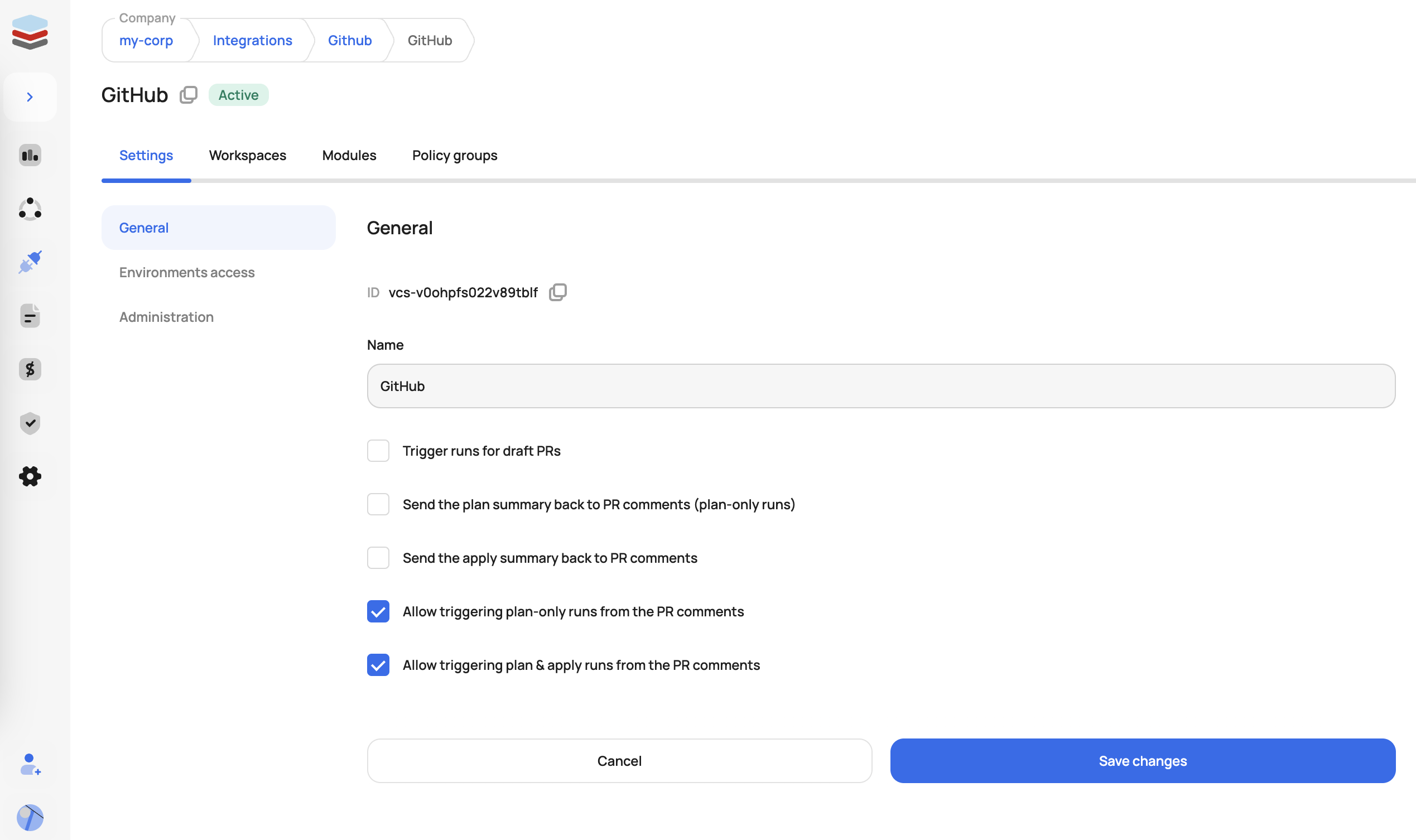
Connect the VCS you want to use for your Atlantis workflow
2. Execute a Run From a Pull Request
Once VCS admins enable end-users to trigger plans and applies from the PR, users can add the following comments to trigger runs in Scalr:
- /scalr plan - triggers plan-only Terraform runs in all affected workspaces with VCS-driven dry runs enabled
- /scalr plan -force - triggers plan-only runs, ignoring the workspace dry runs setting
- /scalr apply - triggers apply Terraform runs in all workspaces affected by the PR
- /scalr apply -workspace-id=ws-12345678 - limits apply to a specific workspace
- /scalr approve (and /scalr decline) - approves or declines runs waiting for approval (GitHub and Azure DevOps)
The breadth of this vocabulary matters more than it looks. One customer coming from a comment-driven workflow asked for /confirm-run and /cancel-run equivalents because, when a run hit an apply-approval gate, the PR comment read "waiting for approval," but the admins who could approve it had to leave the PR and open the platform UI to do so. They flagged the security implication themselves: any comment-driven approval must verify that the commenter is actually authorized to approve the run, not merely that they can comment on the PR. Atlantis trains teams to expect the entire run lifecycle to be drivable from comments, and that expectation follows them to whatever platform they evaluate next.
3. Output and Feedback
Once the plan is completed, the result (success/failure, resource changes, etc.) is automatically posted as a comment in the pull request thread, so code review and infrastructure changes stay in one place.
Audit what that comment actually contains before you choose a platform. As of June 2026, the most pointed feedback we've seen on this came from a platform engineer migrating off Atlantis who sent side-by-side screenshots of GitLab MR comments from a competing TACO platform: roughly 90% of each comment was run metadata (run ID, workspace, environment, status) with the plan diff buried underneath. Atlantis conditions teams to expect terse, diff-first rendering with the plan output front and center. When you evaluate a managed alternative, read an actual sample comment and check what it leads with, rather than only confirming that one appears.
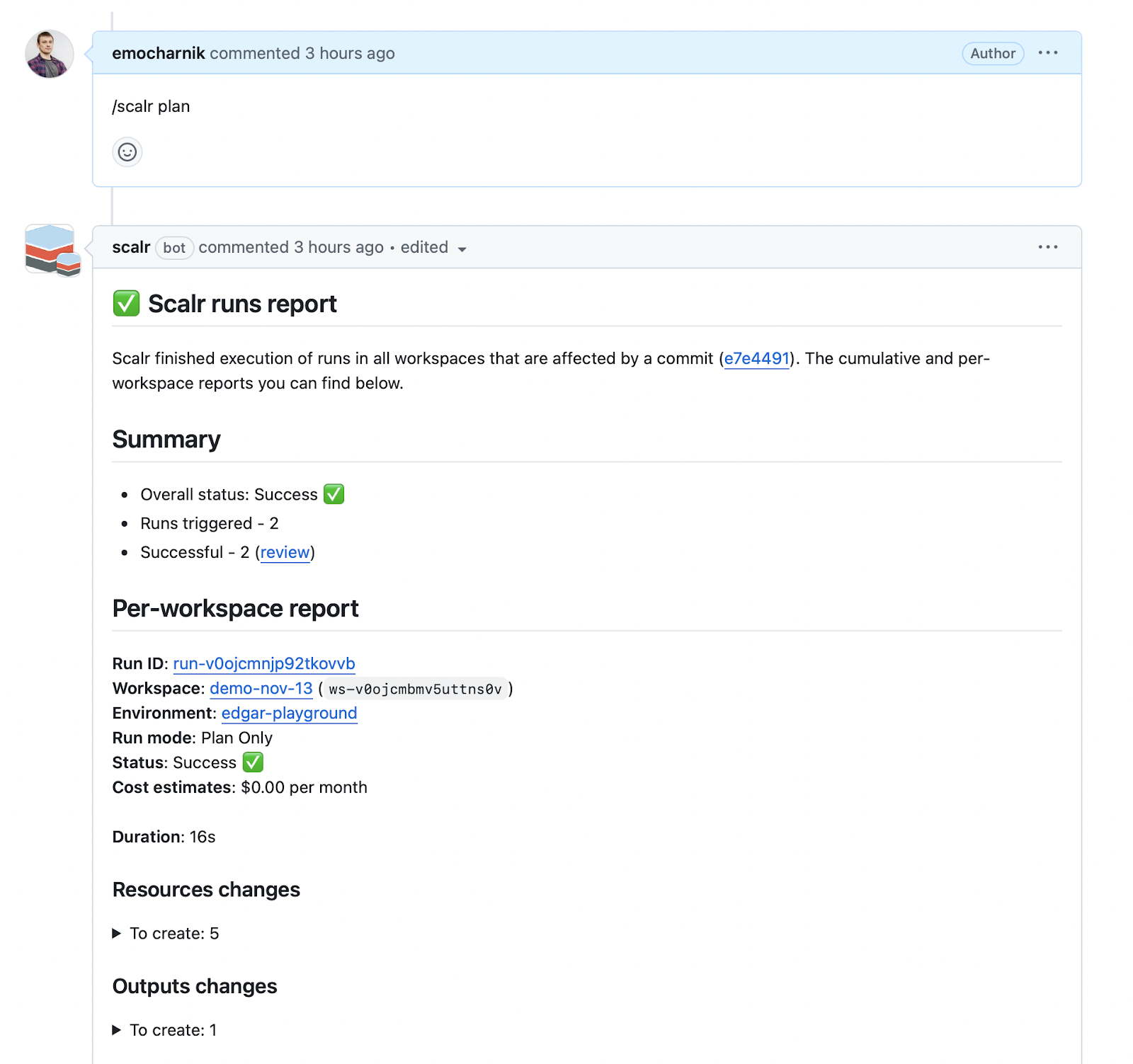
You can now use comments to trigger Terraform / OpenTofu plan and apply
4. Control Runs Through OPA (Optional)
Want to limit which Scalr environments can have runs executed from PR comments? Scalr's integration with Open Policy Agent (OPA) can prevent various run sources, including PR comments. An OPA policy can deny runs whose source is a PR comment (comment-github, comment-gitlab, or comment-azure), or deny every run that doesn't come from one. A common use case is allowing PR-driven runs from lab and development environments but not production.
5. Additional Scalr Features for PR Workflows
Avoid State Updates by Unmerged PRs: Scalr displays warnings when changes are attempted from branches with unmerged pull requests and automatically prevents auto-apply operations when the state-generating branch differs from your run's configuration branch.
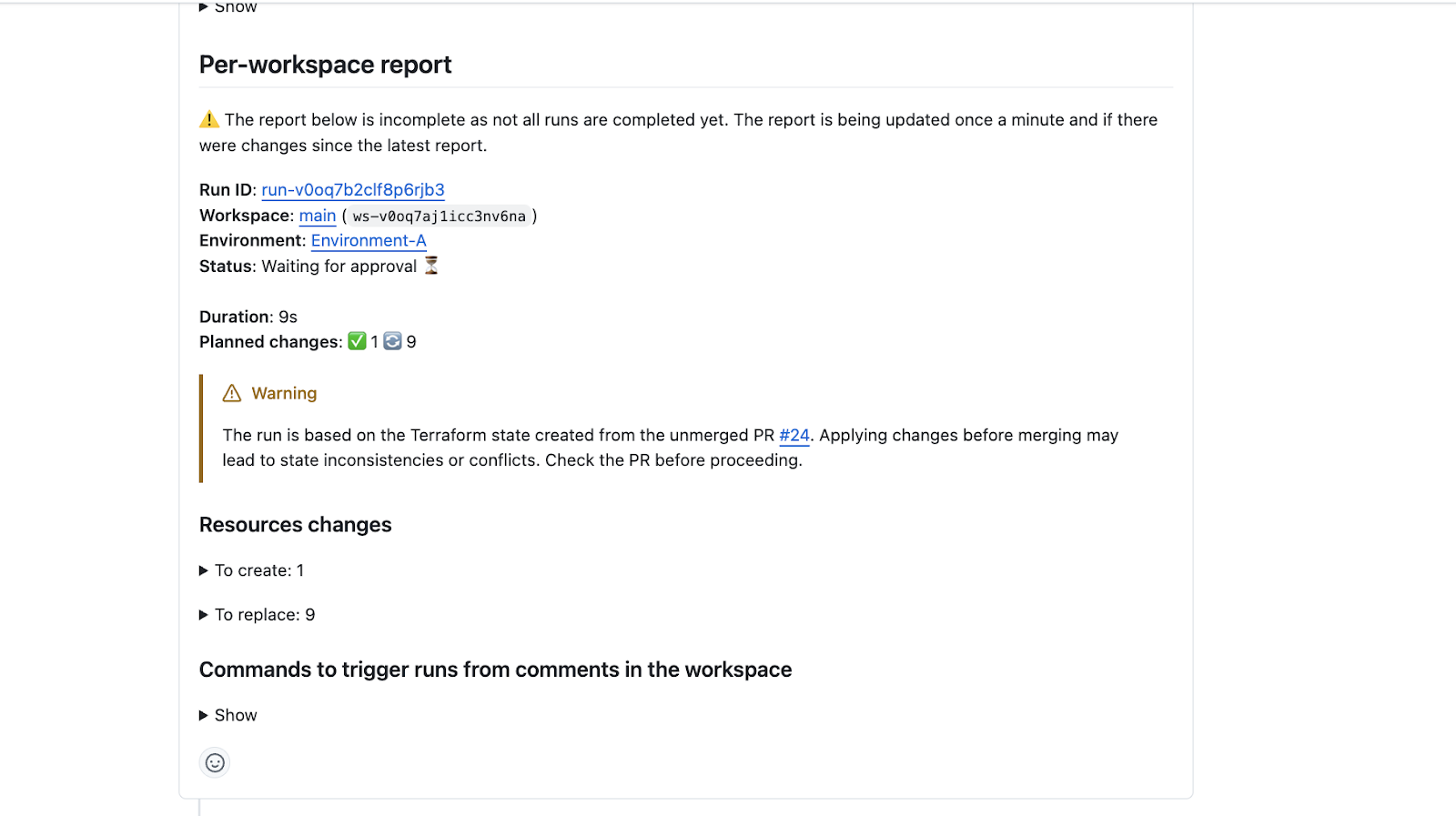
Prevent Apply from a Non-Mergeable PR: Using the apply-before-merge workflow, the /scalr apply command can be restricted to only execute after a PR is approved and passes branch protection checks, enforced through the merge_error attribute in the run input.
This is the migration question Atlantis teams ask most often. One team moving off Atlantis wanted to replicate the mergeable apply requirement exactly (block apply unless the PR is approved and branch protection passes), and the answer was an explicit OPA policy inspecting that merge_error attribute. Atlantis bakes the gate into a single apply_requirements keyword; on a managed platform it's a policy you write. Parity also varies by VCS provider: an infrastructure team on GitLab found that Scalr's OPA example then covered only GitHub and Azure DevOps, and offered to pass GitLab API credentials into OPA to implement the check themselves. GitLab is covered now. If your Atlantis setup leans on apply_requirements: [approved, mergeable], verify each gate exists for your specific VCS before you migrate.
Automatic Base Branch Merge Before Run Execution: VCS-driven workspaces can automatically merge the base branch into the head branch before triggering a run, ensuring runs execute against the latest code and reducing false-positive results.
Wrapping up
Atlantis puts Terraform plan and apply into pull requests, so infrastructure changes get reviewed and approved where application code already is, and teams keep centralized control over what runs and when. With version pinning, server-side policy enforcement, and Prometheus metrics in place, you can run it in production.
The cost is operational. Running Atlantis at scale means owning credential management, webhook configuration, version upgrades, and performance tuning yourself, so decide whether your team has the capacity for that work before you commit to self-hosting.
If you'd rather not run the server yourself, platforms like Scalr take on the operational burden while keeping the PR-driven workflow, policy enforcement, and team collaboration that Atlantis provides. Our comparison of Terraform Cloud alternatives covers how Atlantis, Scalr, Spacelift, and env0 differ on pricing, policy enforcement, and migration effort.
Whichever route you pick, send infrastructure changes through the same review and approval that application code already gets. That's where a reliable audit trail and predictable applies come from.
Additional Resources
- Troubleshooting Common Terraform Atlantis Issues
- Terraform Atlantis vs. GitHub Actions: Comprehensive IaC Automation Comparison
- Securing Atlantis
- Selecting a Terraform Cloud Alternative: Scalr, Spacelift, env0, and Atlantis Compared
External Resources:
Frequently asked questions
What is Atlantis and how does it work?
Atlantis is an open-source, self-hosted automation tool that runs Terraform from pull request comments. Your VCS sends webhook events to the Atlantis server, which runs terraform plan on changed files, posts the output as a PR comment, and applies changes when an authorized user comments atlantis apply.
How do I use Terragrunt with Atlantis?
Build a custom Docker image that adds the Terragrunt binary on top of the official Atlantis image, define a custom workflow that sets TERRAGRUNT_TFPATH and runs terragrunt plan/apply, and add terragrunt.hcl to your autoplan file list. The terragrunt-atlantis-config tool can generate atlantis.yaml projects from your Terragrunt dependency tree.
Does Atlantis support OpenTofu?
Yes. Set terraform_distribution: opentofu per project in atlantis.yaml or pass --terraform-distribution=opentofu as a server flag. Terraform and OpenTofu projects can coexist in the same repository, and the two tools can share state files for gradual migration.
How do I fix a stuck Atlantis lock?
Comment atlantis unlock on the pull request holding the lock, or release it from the Atlantis web UI. Persistent lock contention usually means projects are defined too broadly in atlantis.yaml and should be split into more granular ones.
How do I replicate Atlantis's mergeable apply requirement on a managed platform?
On Scalr, write an OPA policy that blocks apply unless the PR is approved and passes branch protection, using the merge_error attribute in the run input. Atlantis expresses this as one apply_requirements keyword; elsewhere it is a policy you write. Scalr supports the merge_error check on GitHub, GitHub Enterprise, GitLab, and Azure DevOps.
What are the alternatives to self-hosting Atlantis?
GitHub Actions for general-purpose CI/CD, or managed TACO platforms: Scalr, Terraform Cloud/Enterprise, Spacelift, and env0. Scalr reproduces the comment-driven workflow with /scalr plan and /scalr apply commands (on GitHub, GitLab, and Azure DevOps) plus OPA policy enforcement, without the server operations.
About the author

CEO at Scalr
Sebastian Stadil is the CEO of Scalr with 15+ years of DevOps experience. He started with AWS in 2004 and advised early Microsoft Azure and Google Cloud.