Article · part of a guide
Getting Started with the Azure Terraform Export Tool
Learn all about the Azure Terraform Export Tool and how to use it.

Key takeaways
- Microsoft's aztfexport tool brings existing Azure resources under Terraform management by automatically generating configuration and import blocks.
- aztfexport runs through a Text User Interface where you select resources to import, and it offers resource, resource-group, query, and mapping-file export modes.
- The tool generates six files, including main.tf with resource blocks, import.tf with import blocks, and aztfexportResourceMapping.json mapping Azure resources to Terraform properties.
- The generated Terraform uses generic resource names like res-0, so refining names via the mapping file or move blocks is recommended for production use.
Most of us have hit the same wall: we want to manage existing infrastructure with Terraform, but turning that infrastructure into Terraform code by hand is tedious. A few tools automate the worst of it. This post looks at aztfexport by Microsoft, which brings your existing Azure resources under Terraform management.
The diagram below shows the Azure infrastructure we'll export with aztfexport. It's a small setup: one resource group containing a storage account, a container app environment with a single container app deployed, and a default Log Analytics workspace.
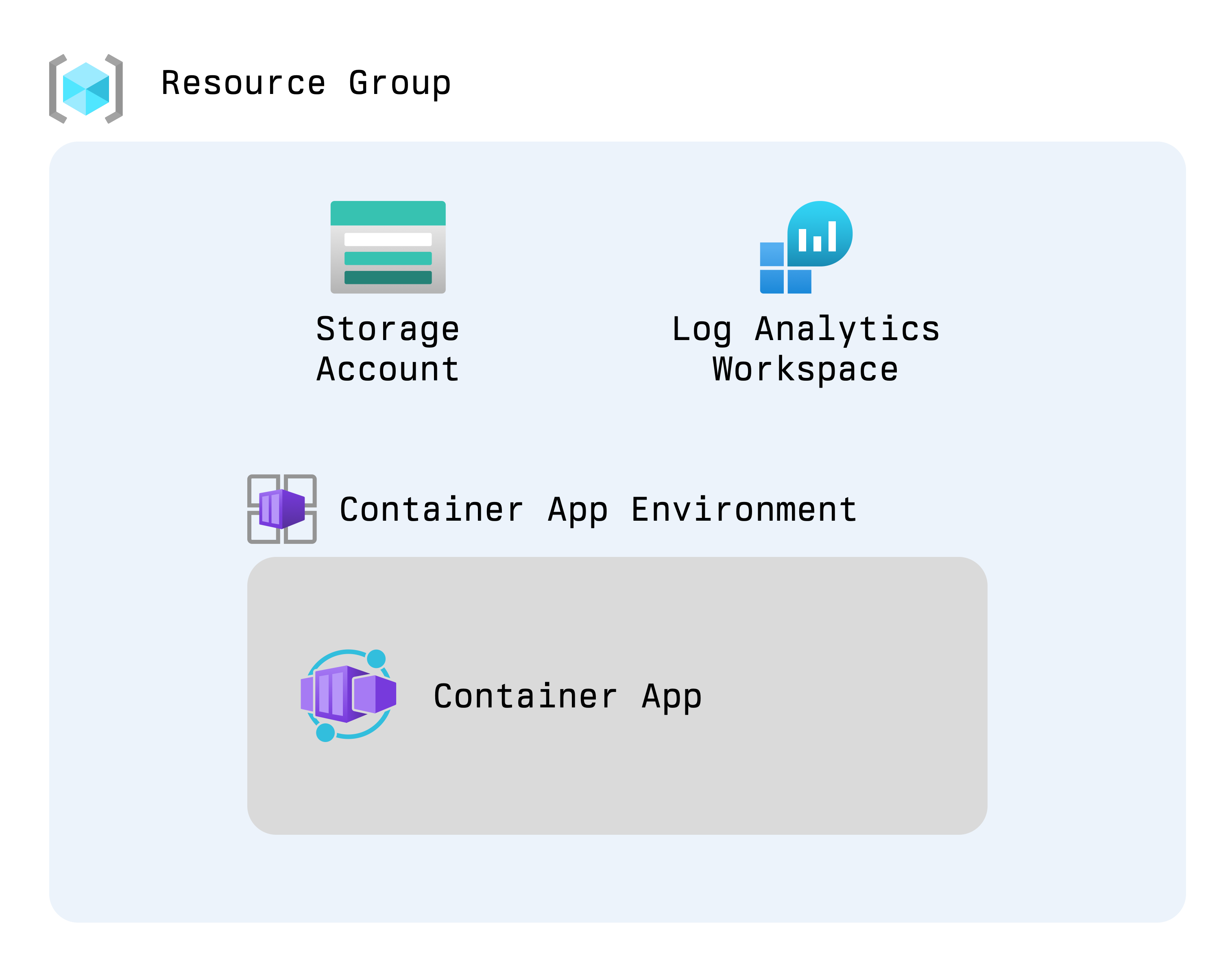
Example of export from a resource group
Here's how to generate the resources and import them into state with aztfexport.
- Run
aztfexport rg rg-aue-dev-tf. This tells aztfexport to export all resources in the rg-aue-dev-tf resource group on Azure. - A Text User Interface (TUI) opens and shows the items being discovered. Once it has identified them, you'll see the following interface.
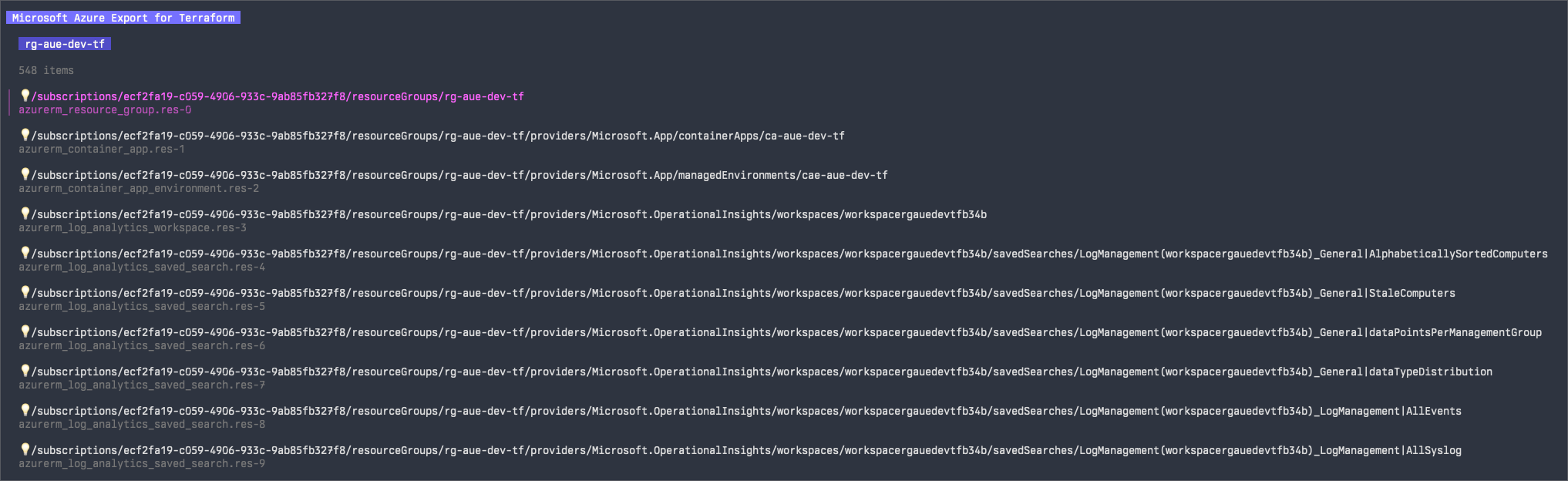
Example of items to import
From here you can select or deselect items to import. For this demo, we'll select the resource group and press w to start the import.
- Next comes the import/export process itself. Visually, it's a bit of a black box.
Example of the importing processing
- When the import/export finishes, you'll see a line telling you which directory the Terraform configuration was generated in. By default, that's the current working directory.

Example of imported state with folder
Before we move on to the exported Terraform, here are the other export modes aztfexport gives you:
resource: allows for exporting/importing a single resource.resource-group: allows for exporting/importing a resource group as well as all resources within that resource group.query: allows exporting/importing a set of resources as defined by an Azure Graph query, you can learn more about those queries at Starter query samples - Azure Resource Graph.mapping-file: allows for exporting/importing resources based on a resource mapping file this is ajsonfile containing the resource ID, type and name
Now for the generated Terraform. The export produces six files:
aztfexportResourceMapping.json: the mapping file between Azure resources and properties that will make up the Terraform resource.aztfexportSkippedResources.txt: resources that will be skipped by the export/import process.import.tf: import blocks for all resources.main.tf: Terraform definitions for all resources within the export/import.provider.tf: provider details.terraform.tf: Terraform constraints.
Below are excerpts from the three most interesting files: aztfexportResourceMapping.json, main.tf, and import.tf. I've left out the full content because it's long, and because exporting a Log Analytics workspace with aztfexport pulls in all of its default queries, which gets messy. The first file, aztfexportResourceMapping.json, contains every resource aztfexport identified. It defines the Terraform properties needed to produce the resource blocks, plus the resource ID for each import block.
{
	"/subscriptions/ecf2fa19-c059-4906-933c-9ab85fb327f8/resourceGroups/rg-aue-dev-tf": {
		"resource_id": "/subscriptions/ecf2fa19-c059-4906-933c-9ab85fb327f8/resourceGroups/rg-aue-dev-tf",
		"resource_type": "azurerm_resource_group",
		"resource_name": "res-0"
	},
	"/subscriptions/ecf2fa19-c059-4906-933c-9ab85fb327f8/resourceGroups/rg-aue-dev-tf/providers/Microsoft.App/containerApps/ca-aue-dev-tf": {
		"resource_id": "/subscriptions/ecf2fa19-c059-4906-933c-9ab85fb327f8/resourceGroups/rg-aue-dev-tf/providers/Microsoft.App/containerApps/ca-aue-dev-tf",
		"resource_type": "azurerm_container_app",
		"resource_name": "res-1"
	},
	"/subscriptions/ecf2fa19-c059-4906-933c-9ab85fb327f8/resourceGroups/rg-aue-dev-tf/providers/Microsoft.App/managedEnvironments/cae-aue-dev-tf": {
		"resource_id": "/subscriptions/ecf2fa19-c059-4906-933c-9ab85fb327f8/resourceGroups/rg-aue-dev-tf/providers/Microsoft.App/managedEnvironments/cae-aue-dev-tf",
		"resource_type": "azurerm_container_app_environment",
		"resource_name": "res-2"
	},
	"/subscriptions/ecf2fa19-c059-4906-933c-9ab85fb327f8/resourceGroups/rg-aue-dev-tf/providers/Microsoft.OperationalInsights/workspaces/workspacergauedevtfb34b": {
		"resource_id": "/subscriptions/ecf2fa19-c059-4906-933c-9ab85fb327f8/resourceGroups/rg-aue-dev-tf/providers/Microsoft.OperationalInsights/workspaces/workspacergauedevtfb34b",
		"resource_type": "azurerm_log_analytics_workspace",
		"resource_name": "res-3"
	},
	"/subscriptions/ecf2fa19-c059-4906-933c-9ab85fb327f8/resourceGroups/rg-aue-dev-tf/providers/Microsoft.Storage/storageAccounts/saaurdevtf": {
		"resource_id": "/subscriptions/ecf2fa19-c059-4906-933c-9ab85fb327f8/resourceGroups/rg-aue-dev-tf/providers/Microsoft.Storage/storageAccounts/saaurdevtf",
		"resource_type": "azurerm_storage_account",
		"resource_name": "res-543"
	}
}
Here's what each property does:
resource_id: the Azure Resource ID for the resource, this will act as the ID in Terraform state.resource_type: the fully qualified resource type which will be used in the resource block.resource_name: this will be used as the identifier for the given resource block.
main.tf takes those properties and defines the resource blocks, so you'll see each resource_type and resource_name in the block headers. If you're using this for real, it's a good idea to either intercept the aztfexportResourceMapping.json file and give the resources more usable resource_name definitions, or use a move block after the export/import.
resource "azurerm_resource_group" "res-0" {
  location = "australiaeast"
  name     = "rg-aue-dev-tf"
}
resource "azurerm_container_app" "res-1" {
  container_app_environment_id = "/subscriptions/ecf2fa19-c059-4906-933c-9ab85fb327f8/resourceGroups/rg-aue-dev-tf/providers/Microsoft.App/managedEnvironments/cae-aue-dev-tf"
  name                         = "ca-aue-dev-tf"
  resource_group_name          = "rg-aue-dev-tf"
  revision_mode                = "Single"
  ingress {
    external_enabled = true
    target_port      = 80
    traffic_weight {
      latest_revision = true
      percentage      = 100
    }
  }
  template {
    container {
      cpu    = 0.25
      image  = "mcr.microsoft.com/k8se/quickstart:latest"
      memory = "0.5Gi"
      name   = "simple-hello-world-container"
    }
  }
  depends_on = [
    azurerm_container_app_environment.res-2,
  ]
}
resource "azurerm_container_app_environment" "res-2" {
  location            = "australiaeast"
  name                = "cae-aue-dev-tf"
  resource_group_name = "rg-aue-dev-tf"
}
resource "azurerm_log_analytics_workspace" "res-3" {
  location            = "australiaeast"
  name                = "workspacergauedevtfb34b"
  resource_group_name = "rg-aue-dev-tf"
}
resource "azurerm_storage_account" "res-543" {
  account_replication_type         = "RAGRS"
  account_tier                     = "Standard"
  allow_nested_items_to_be_public  = false
  cross_tenant_replication_enabled = false
  location                         = "australiaeast"
  name                             = "saaurdevtf"
  resource_group_name              = "rg-aue-dev-tf"
}
With the mappings and generated Terraform in place, importing into Terraform state is easy. You do it with the import block, which is great because it gives you tracking and auditability when you import resources. The mapping file supplied every attribute these blocks need.
import {
  id = "/subscriptions/ecf2fa19-c059-4906-933c-9ab85fb327f8/resourceGroups/rg-aue-dev-tf"
  to = azurerm_resource_group.res-0
}
import {
  id = "/subscriptions/ecf2fa19-c059-4906-933c-9ab85fb327f8/resourceGroups/rg-aue-dev-tf/providers/Microsoft.App/containerApps/ca-aue-dev-tf"
  to = azurerm_container_app.res-1
}
import {
  id = "/subscriptions/ecf2fa19-c059-4906-933c-9ab85fb327f8/resourceGroups/rg-aue-dev-tf/providers/Microsoft.App/managedEnvironments/cae-aue-dev-tf"
  to = azurerm_container_app_environment.res-2
}
import {
  id = "/subscriptions/ecf2fa19-c059-4906-933c-9ab85fb327f8/resourceGroups/rg-aue-dev-tf/providers/Microsoft.OperationalInsights/workspaces/workspacergauedevtfb34b"
  to = azurerm_log_analytics_workspace.res-3
}
import {
  id = "/subscriptions/ecf2fa19-c059-4906-933c-9ab85fb327f8/resourceGroups/rg-aue-dev-tf/providers/Microsoft.Storage/storageAccounts/saaurdevtf"
  to = azurerm_storage_account.res-543
}
This file can be deleted once the import is completed into state.
Microsoft's aztfexport makes it easy to get existing Azure assets into Terraform. The code it spits out won't always be the best, but it's a much better starting point than writing everything by hand. I can see it being especially useful for teams that moved to the cloud before they started doing IaC.
Get started using Scalr by signing up today.
Frequently asked questions
What is aztfexport and what does it do?
aztfexport is a Microsoft tool that brings existing Azure resources under Terraform management. It scans your Azure resources, generates the Terraform configuration for them, and creates import blocks so they can be brought into Terraform state. You interact with it through a Text User Interface where you select or deselect the resources to import.
What export modes does aztfexport support?
aztfexport has four modes: resource for exporting a single resource, resource-group for a resource group and everything in it, query for a set of resources defined by an Azure Resource Graph query, and mapping-file for resources listed in a JSON mapping file. For example, aztfexport rg my-group exports all resources in that resource group.
What files does aztfexport generate?
The export produces six files: main.tf with the Terraform resource definitions, import.tf with import blocks for every resource, provider.tf with provider details, terraform.tf with Terraform constraints, aztfexportResourceMapping.json mapping Azure resource IDs to Terraform types and names, and aztfexportSkippedResources.txt listing resources the process skipped. The import.tf file can be deleted once the import into state completes.
How do I fix the generic resource names aztfexport generates?
aztfexport names resources generically, like res-0 and res-1, which isn't great for real codebases. You can either edit the aztfexportResourceMapping.json file before the export to give resources more usable names, or use Terraform move blocks after the import to rename them. Either way, plan on renaming before treating the generated code as production-ready.
About the author

solutions engineer at Scalr
Brendan Thompson is a solutions engineer at Scalr, specializing in Terraform and cloud infrastructure.
Part of this guide
2 sheets