

Article · part of a guide
OpenTofu Language Guide
Learn about OpenTofu in part one of this guide

Key takeaways
- Every OpenTofu block is built from a type, label, identifier, arguments, a body, and optional nested blocks.
- Resource blocks provision resources while data source blocks read information about resources that already exist, and references between them pass information around the configuration.
- Provider blocks sit at the top of the hierarchy and create the client to an external API, though they can be implicit when sensible defaults exist.
- OpenTofu offers input variables that define a configuration's interface, local variables that act like constants, and outputs that return data to callers.
- Modules reduce complexity and repetition and come in three types: root, child, and published; the import block brings existing resources under OpenTofu management.
This guide walks through the OpenTofu language and the options you have when writing OpenTofu code. Here are the concepts it covers:
- Blocks
- Resource Blocks
- Datasource Blocks
- Provider Blocks
- Variables & Outputs
- Modules
- Imports
- Functions
- Terraform Settings
Before we get into the different types of blocks, it helps to understand what a block is made of.
- Type: the type of block that is being declared, as examples;
resource,data,check - Label: This depends on the type of block, both
dataandresourceblocks require the use of a label as they instruct OpenTofu which service resource to operate on. As an exampledata "scratch_string" "" {}the label for thatdatablock isscratch_stringwhich indicates both the provider and the provider resource. - Identifier: the unique ID that Terraform and engineers will use to reference this particular instance as an example
data "scratch_string" "unique_name" {}. - Arguments: a block will contain n-number of arguments, these are used to compose the properties of the block type.
- Body: the body of a block is demarcated by the use of a pair of curly braces
{ }, everything that is between those braces makes up the body. - Blocks: inside a block can be any number of nested blocks, these apply by the same rules as their parent.
<BLOCK_TYPE> "<BLOCK_LABEL>" "<BLOCK_IDENTIFIER>" {
   <ARGUMENT_NAME> = <ARGUMENT_VALUE>
   <BLOCK_TYPE> "<BLOCK_LABEL>" {
     # ...
}

# ...
}
What Do Resource Blocks Do in OpenTofu?
The Resource Block uses the same format that we defined earlier for all blocks. These blocks are responsible for provisioning resources on a platform or service, and an example of this is a workspace on a Scalr instance which would use a resource "scalr_workspace" "this" block. Here's a closer look at the example:
resource "scalr_workspace" "this" {
 name = "Meowforce One"
 environment_id = "env-xxxxxxxxxxxxxxx"
working_directory = "opentofu/"
}
From the above definition of a block we can break up the resource into its components:
- Type:
resource - Label:
scalr_workspace - Identifier:
this - Arguments:
name,environment_idandworking_directory
Together these components describe a resource in OpenTofu, and they give us a consistent way to define what a service resource is.
How Do Data Source Blocks Read Existing Resources?
Data Source blocks are how we get information about resources that already exist on a platform. Maybe they were created by another OpenTofu definition, or by hand, or we just want to query an external API for some piece of information. A data block handles all of these. To follow on from the Resource Block example above, instead of hardcoding the environment_id we can use a Data Source to fetch it, which keeps the value current and correct.
data "scalr_environment" "dev" {
   name       = "dev"
   account_id = "acc-xxxxxxxxxx"
}
Here the type is set by the data keyword, and the block is identified as dev. With this new data block in place we can refactor the resource block:
data "scalr_environment" "dev" {
   name       = "dev"
   account_id = "acc-xxxxxxxxxx"

 }
 resource "scalr_workspace" "this" {
     name           = "Meowforce One"
     environment_id = data.scalr_environment.dev.id
     working_directory = "opentofu/"
 }
Instead of the static reference to env-xxxxxxxxxxxxxxx, we now use data.scalr_environment.dev.id. The data source lets us read any attribute it defines, or the whole data source itself. Referencing between resources and data sources like this is one of OpenTofu's most useful features, because it makes passing important information around the configuration easy.
Why Do Provider Blocks Sit at the Top of the Hierarchy?
In the hierarchy of OpenTofu blocks, the Provider Block sits at the top. A provider block is always required to use a resource or data block, but it can be implicit or explicit. Some providers have no configuration requirements, or have sensible defaults for everything, so you don't have to declare the block yourself. It still exists in some form.
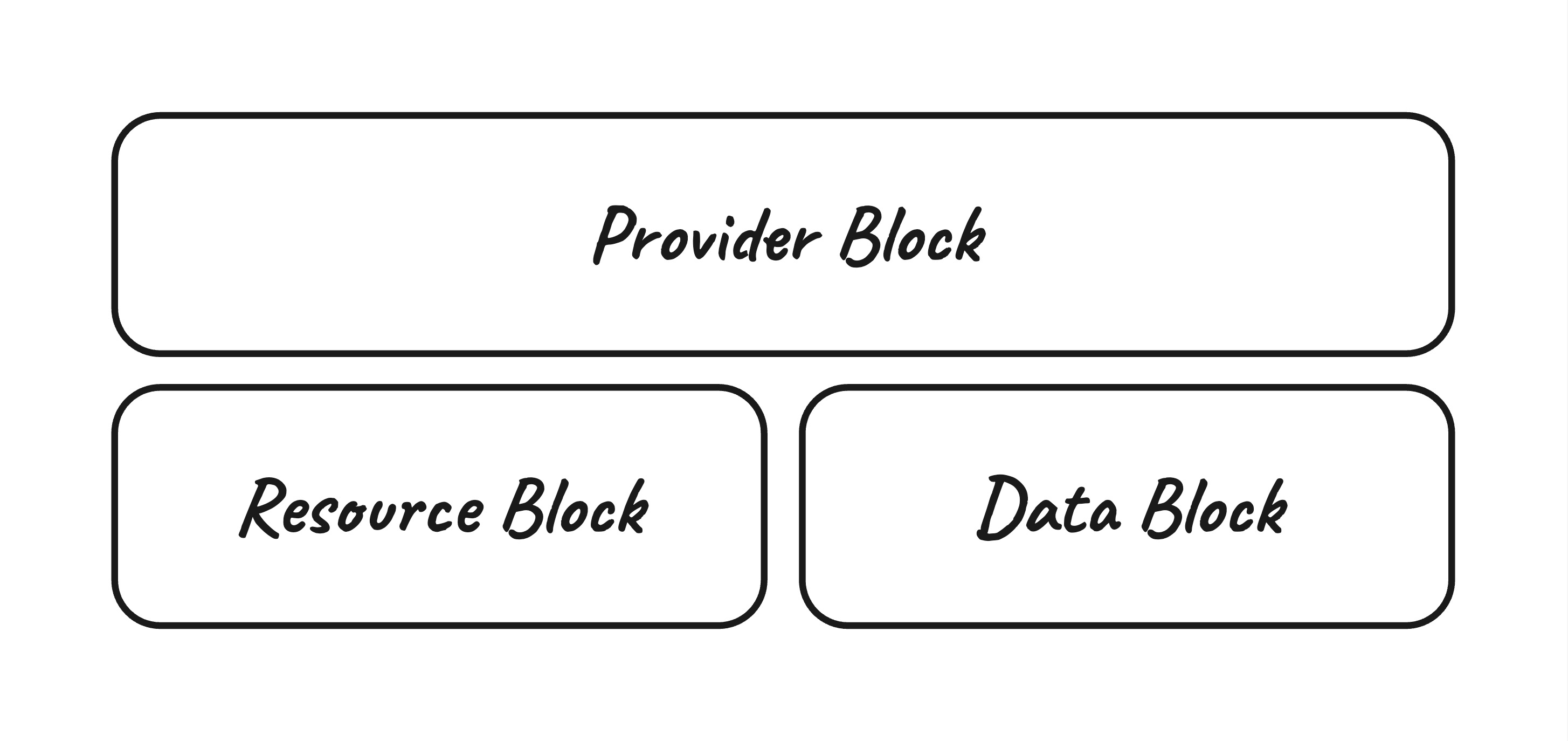
Example of structure
Continuing with our running example, we would need a provider block for the scalr provider. It would look like this:
provider "scalr" {
   hostname = var.hostname
   token    = var.token
}
The provider, and by extension the provider block, creates a client to the external service's API we want to talk to. In the example above, we give the scalr provider the credentials it needs to authenticate with Scalr so we can run operations on the platform.
How Do Variables and Outputs Work in OpenTofu?
Variables in OpenTofu come in two kinds: Input Variables and Local Variables. Input Variables define the interface of your OpenTofu code. Think of them as the API for anyone who consumes that code. Local Variables are defined within the codebase and act like constants, since they can only be set once. A Local Variable's value can also be mutating, meaning it changes over time based on the values it's built from.
Input Variables
When defining an Input Variable it's best practice to put those within a variables.tf file, the variable block itself has a number of properties available to us:
default- sets a default value for the variable, this makes the variable an optional variabletype- the data type of the variable, the following are valid types:description- the description is extremely important, since it's how we tell consumers what the variable requires. It can be a simple string or aheredocstring; the latter allows more complete documentation.validation- this allows us to ensure that the data being passed into the code is of the correct format, it also allows returning an error when the data does not match the validationsensitive: marks the variable as sensitive ensuring that its value won't be shown in any logsnullable- demarcates that the variable is able to be set tonull
Here are a couple of examples of declaring different variables: one for an environment, one for firewall rules. The first makes sure we get an environment passed in with the right format:
variable "environment" {
 type = string
 description = <<-DESC
 (Optional) The three letter description for the environment.
 Default:
 `dev`
 DESC
 default = "dev"
 validation {
 condition = contains(["dev", "uat", "prd"], var.environment)
 error_message = "Err: the environment value must be valid."
 }
}
This next example requires a set of firewall rules to be passed in. Using a set here means there are no duplicate rules, since any duplicates that turn up are ignored. The description spells out the requirements of the interface. It could go further, but at a minimum it should carry the details below. The default is there to show what the value would look like. Notice the two validation blocks: one checks that the priority is correct, the other restricts the action property to certain values. The port property on our source object is optional and defaults to 0 when not provided. Marking specific object properties as optional like this is one of the more handy things the language lets you do.
variable "firewall_rules" {
 type = set(object({
 name = string
 priority = number
 source = object({
 address = string
 port = optional(number, 0)
 })
 destination = object({
 address = string
 port = number
 })
 action = string
 }))
 description = <<-DESC
 (Required) a set of firewall rules with the following properties.

 Properties:
 - `name` (Required): unique name for the rule
 - `priority` (Required): an integer for the priority, must be above 1,000
 - `source` (Required): the source object
 - `address` (Required): an IPv4 address space
 - `port` (Optional): an integer port
 - `destination` (Required): the destination object
 - `address` (Required): an IPv4 address space
 - `port` (Required): an integer port
 - `action` (Required): a valid action; `block`, `allow`
 DESC
 default = [
 {
 name = "example-rule"
 priority = 1001
 source = {
 address = "10.0.0.0/16"
 }
 destination = {
 address = "192.168.0.0/24"
 port = 443
 }
 action = "allow"
 }
 ]
 validation {
 condition = alltrue([
 for rule in var.firewall_rules :
 contains(["allow", "block"], rule.action) ? true : false
 ])
 error_message = "Err: invalid action provided, it must be: 'allow',
'block'."
 }
 validation {
 condition = alltrue([
 for rule in var.firewall_rules :
 rule.priority > 1000 ? true : false
 ])
 error_message = "Err: invalid priorty provided, the value must be over
1,000."
 }
}
Local Variables
Local variables are a staple in OpenTofu for building, mutating, and storing static data inside the code. Think of them as constants in a programming language: once they're set they don't change. (Mutating local variables being the exception.)
Here are some examples.
locals {
 default_port = 443
}
The example above defines a local variable called default_port, which sets the default port we expect for services built by the rest of the OpenTofu code. The value is never going to change, so a local variable is a good fit. The next example shows a mutating variable that builds a name out of several other variables.
locals {
 resource_prefix = format(
 "%s-%s",
 var.environment,
 lower(var.project.acronym)
 )
}
This local variable mutates with the data passed into it, and it calls a builtin function to lowercase the project acronym. Mutating local variables like this can save a lot of time when you need to shape data into the right format across different parts of your code.
You can use the string, number, bool, list and map types out of the box, and you can cast a list to a set with the toset() function.
Outputs
Outputs allow engineers to return data/information back to the caller of the OpenTofu code, this is especially useful when your code produces some assets that are a dependency for other resources. The output block contains the following properties:
description: a useful description of what the output is returning; given that this output forms part of the API you provide it should be descriptive as to what the output issensitive: this marks the value as sensitive which then ensures it is not returned in any outputsvalue: the value of the output, this could be any from a static string to the result of a resource being createddepends_on: alistof resource references that are required to be in existence prior to the output returning a valueprecondition: similar to variable validation this ensures that the data that is to be returned is as expected or an error is returned, you can have zero to manypreconditionblocks
The following example is an output that returns the value from a locals block declaring animal sounds:
locals {
 sounds = {
 cat = "meow"
 }
}
output "cat_sound" {
 description = "The sound a cat makes"
 value = local.sounds.cat
 precondition {
 condition = local.sounds.cat == "meow"
 error_message = "Err: the defined cat sound is incorrect."
 }
}
What Are OpenTofu Modules and How Do You Call One?
Modules are a big part of what makes OpenTofu useful, because they cut down on both complexity and repetition. They're a bit like a class in another language. A module lets you wrap up technical and business logic and expose only a slim, easy-to-use interface to whoever consumes it. There are three types of modules:
- The Root Module: this term is used to refer to any directory that contains
.tffiles, the root module is what we call when we want to provision resources - Child Module(s): a child module refers to modules that are defined locally within a root module, these modules are normally declared within a
modulesdirectory and can only be consumed by that root module - Published Modules: these are modules that have been published in some mechanism, such as; git, a registry or a filesystem. These modules are designed to be consumed by others.
You could think of a child module as a private class, and a published module as a public one.
There are two sides to working with modules: developing the module and calling it. Developing a module is just like writing any other OpenTofu code, so we'll skip that and focus on how to call one. The module block has a few properties out of the box:
source: the source of the module, this would be a registry address, a file path, a git address amongst other things. This is how OpenTofu knows where to find the module.version: on sources that support versioning (e.g. registry) you can specify the explicit version or a version constraint to ensure you're getting the right version of the modulefor_each: an optional property that allows us to iterate over amapto produce multiple instances of a module, in the same way as a resourcecount: an optional property that allows us to define the number of instances to create (for_eachis nearly always a better alternative)depends_on: alistof explicit resource references required to exist before the module will be createdproviders: amapof providers and aliases to pass to the module
Here's an example module that creates servers, using a pretend registry:
module "servers" {
 for_each = var.server_config
 source = "https://registry.meowforce.one"
 version = "1.0.0"
 name = each.key
 type = each.value.type
 size = each.value.size
}
This creates n-number of servers as defined by the server_config variable, and pulls the matching properties from it to satisfy the module's own API. The version is pinned explicitly to 1.0.0 here. We do have other options, such as the recommended pessimistic version constraint:
module "servers" {
 ...
 version = "~> 1.0"
 ...
}
The above will allow for module versions for the range of version >= 1.0.0 and version < 2.0.0, this ensures that you're getting updates to the module but not receiving breaking changes. The breaking changes would require manual intervention by an engineer, which is the desired state.
How Do You Import Existing Resources With the OpenTofu Import Block?
OpenTofu lets engineers import existing resources into its state so they can be managed by OpenTofu going forward. There are two ways to do this: the Import CLI command and the import block. This section looks at the import block.
For a resource to be imported into state and kept under management, a corresponding OpenTofu resource has to exist too. You can auto-generate these with existing open source tools, or write the code by hand. In this example, we have a single Azure Resource Group sitting in a subscription that we want OpenTofu to manage from now on. We'd build a main.tf file like this:
import {
 to = azurerm_resource_group.this
 id = "/subscriptions/00000000-0000-0000-0000-000000000000/resourceGroups/rgmeow"
}
resource "azurerm_resource_group" "this" {
 name = "rg-meow"
 location = "AustraliaSoutheast"
}
The import block itself contains two properties to be set:
to: the OpenTofu resource reference constructed by the resource type and its nameid: the resource ID, this can usually be identified by looking at the resource in situ on the service it comes from, the registry or state of a resource managed by OpenTofu already
Once an apply has finished, the import block can be removed from the code. It's also recommended to keep that block as close to the resource it imports as possible, so it's clear to other engineers what is going on.
What Built-in Functions Does OpenTofu Provide?
OpenTofu has a lot of builtin functions, and they're a big part of what the language can do. Rather than walk through each one, we'll describe the categories and then pick a few of the more useful functions to show as examples.
- Numeric Functions: this is where any function pertaining to numbers lives, if you're looking for
min,maxorparseintthis is where you should look. - String Functions: these are some of the most useful as they allow engineers to manipulate and validate strings.
- Collection Functions: these functions allow for augmentation, validation and combination of the collection types (
list,set,map). - Encoding Functions: these functions allow an engineer to encode data from one type into another, or decode. As an example you may read in a file and decode that from
yamlorjson. - Filesystem Functions: for working with files, or the filesystem in general.
- Date & Time Functions: here lives date formatting, and computation.
- Hash & Crypto Functions: these provide a good set of useful hashing functions as well as ID generation.
- IP Network Functions: these functions allow for the slicing, dicing and calculation of IP networks.
- Type Conversion Functions: when you have one type and need another, start here for explicit type conversion.
Here are some of the most useful functions within OpenTofu:
format (String): this lets engineers format strings in all sorts of ways; I prefer it over string interpolation
split (String): if you have structured string data (perhaps like the name above) and you need to get a singular component the split function allows you to turn the string into list based on a separator
alltrue (Collection): this function is useful when you're checking multiple things in variable validation
contains (Collection): often used for validating incoming data, an example of this might be for the environment variable
yamldecode (Encoding): this function is used to decode a yaml file, or raw representation into an openTofu object allowing for easy interaction. The example for this will be coupled with the next function as they go hand-in-hand.
file (Filesystem): use this to retrieve the contents of a given file into an OpenTofu object, this is commonly used with the Encoding functions as you will see in the example.
try (Type Conversion): this function lets you attempt to access a piece of data and return a default value if none exists. Using the above example, we'll try to access a property from the config yaml file that doesn't exist.
What Does the Terraform Settings Block Configure?
NOTE: This particular key is a hold over from the migration away from Terraform, this may change in the future with the addition of a
tofublock.
The primary function of the terraform configuration block is for enabling backends, providing provider constraints and enabling experimental features.
Here's a complete example, broken down into its different parts:
required_version: allows for a version constraint to be placed on OpenTofu itself, the example shows a pessimistic version constraint.backend: allows for configuration of an OpenTofu compatible backend where state will be stored.required_providers: lists out each provider that is required by the OpenTofu root module, each provider can also have a version constraint.
Backends come in a lot of flavours. For more detail on them, see this post: How to use Terraform remote backends. For more advanced reading, How to set Terraform backend configuration dynamically is a good follow-on.
Frequently asked questions
What are the parts of a block in the OpenTofu language?
Every OpenTofu block is built from a type (such as resource or data), a label that names the provider resource, an identifier used to reference that instance, arguments that set its properties, and a body enclosed in curly braces. Blocks can also contain nested blocks that follow the same rules as their parent.
What is the difference between resource and data blocks in OpenTofu?
Resource blocks provision resources on a platform or service, while data source blocks read information about resources that already exist, whether created by other OpenTofu code, by hand, or exposed by an external API. You can reference a data source's attributes from a resource block instead of hardcoding values, which keeps the configuration current and correct.
What types of modules does OpenTofu have?
There are three types: the root module, which is any directory containing .tf files and is what you call to provision resources; child modules, defined locally within a root module and consumable only by it; and published modules, shared through git, a registry, or a filesystem for others to consume. Think of a child module as a private class and a published module as a public one.
How do you import existing resources into OpenTofu?
You can use the import CLI command or the import block. The import block takes two properties: to, the OpenTofu resource reference, and id, the resource's ID on the service it comes from. A matching resource block must exist in the code, and once the apply finishes the import block can be removed.
About the author

solutions engineer at Scalr
Brendan Thompson is a solutions engineer at Scalr, specializing in Terraform and cloud infrastructure.
Part of this guide
15 sheets
What is OpenTofu?
- What Is an OpenTofu Management Platform?
- An Overview of Scalr's CI/CD Capabilities for Terraform and OpenTofu
- Debugging opentofu apply Failures
- Scalr VSCode Extension for Terraform & OpenTofu
- The Terraform & OpenTofu Terralith
- New Feature: Terraform & OpenTofu Ephemeral Workspaces
- Understanding Terraform & OpenTofu Workspaces
- API Driven Workflows for Terraform and OpenTofu
- OpenTofu Runs are Free in Scalr
- 10 OpenTofu Commands
- Finding a Home for OpenTofu: Unpacking The Decision to Join The Linux Foundation
- Announcing OpenTF
- Is Terraform Still Open Source?