

Article · part of a guide
How to easily migrate from Terraform Cloud to Scalr
Learn how to quickly migrate from Terraform Cloud

Key takeaways
- You can migrate from Terraform Cloud to Scalr two ways: with Scalr's migration script (migrate.sh), or by manually updating the Terraform backend and pushing state via the CLI.
- Scalr only charges for Terraform runs, and a script that calls the Terraform Cloud API to pull your total run count helps you estimate cost using the Scalr pricing calculator.
- Because Scalr is also a remote operations backend, the migration is straightforward and you keep the ability to use the Terraform CLI; a TFC workspace maps directly to a Scalr workspace.
- As of September 2026, the migration script turns a TFC organization or project into a Scalr environment and workspaces into Scalr workspaces, and moves variables, variable sets (including recovered sensitive values) and each workspace's current state file.
The recent pricing changes to Terraform Cloud, along with the Terraform license change from Mozilla to a business source license, have driven a lot of discussion about migrating off Terraform Cloud.
Migrating from one piece of software to another is never trivial, and it's harder when that software manages all of your cloud infrastructure. Usually you run a cost-benefit analysis to see whether the effort is worth the savings. We try to be transparent and fair at Scalr, so we make it easy to move in and just as easy to move out. There are two ways to migrate: with our migration script, or by updating your Terraform backend or code block by hand.
Cost is the other thing to weigh against the migration effort. Scalr bills by Terraform run, with no per-user or per-resource fees; a few features such as audit logs and SCIM are on the Enterprise plan. Terraform Cloud has various pricing tiers, which can make it hard to compare apples to apples, so we've built a script (see below) that calls the Terraform Cloud API to pull your Terraform run count.
The pricing model itself matters here too. Concurrency-based pricing, which some alternatives use, sells a fixed number of parallel run slots. There's no setting that works for everyone. Too few slots and engineers queue up during a release or an incident. Too many and you pay for capacity that sits idle. Usage-based, per-run pricing only charges for runs that actually executed, so there's no slot count to forecast and no cap that bites during peak load.
Terraform Cloud vs. Scalr: How Similar Are They?
Before switching from Terraform Cloud, it helps to know how much work the migration takes. Scalr is a full remote operations backend, the same model as Terraform Cloud, which means the migration is fairly straightforward and you won't lose the ability to use the Terraform CLI. We wrote a separate post on where Terraform Cloud and Scalr line up and where they differ.
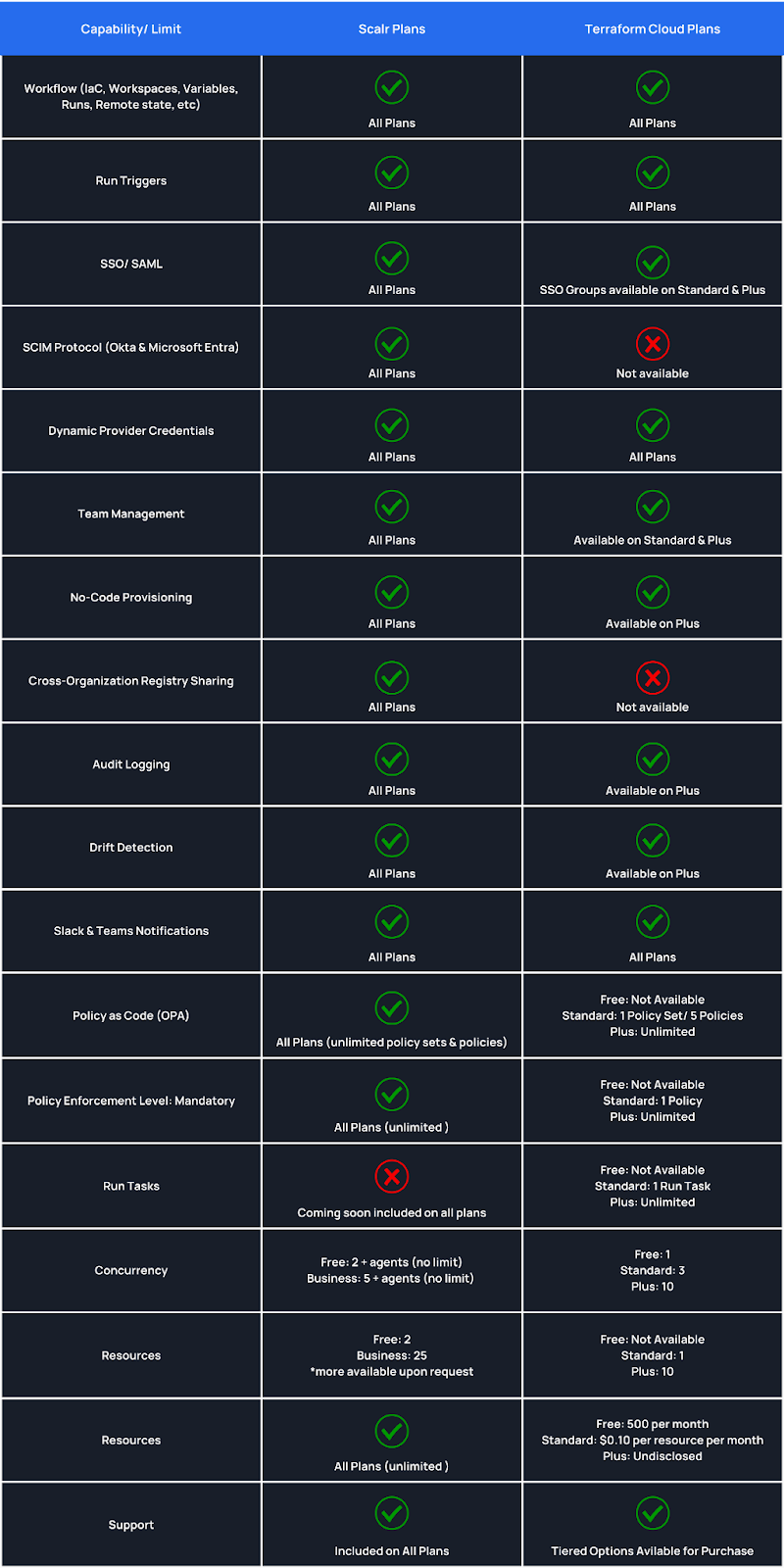
A comparison of capabilities on specific plans for Scalr and Terraform Cloud
How Does Scalr Count Runs for Billing?
Scalr counts a Terraform plan and a Terraform apply as a run. You aren't charged for many runs that error out, such as errors at the Terraform init phase. You can find out more about that here.
We have created a script that helps you estimate the number of Terraform runs that you can expect in Scalr. The script uses a Terraform Cloud API token to call the API and count your runs, and its --period argument limits the count to the last N days, so a 30-day period gives you a monthly figure. Based on the run count that is pulled from Terraform Cloud, you can now estimate your cost in Scalr with our pricing calculator.
What Decisions Do You Need to Make Before Migrating?
Once you've decided to migrate, the next question is what to move. Depending on when you started using Terraform Cloud, you may have a single organization with many Terraform Cloud workspaces or many organizations with many workspaces. The big decision is whether you're happy with your existing structure or want to use this as a chance to redesign it, which can help with workspace isolation. It's also a good time to look at your existing Terraform Cloud workspaces and decide if they're still needed and whether you want to create a new workspace in Scalr.
The Terraform state file has to move, so that part isn't a question. Terraform variables and environment variables are, though.
If you'd rather understand the manual steps before using the script, how to export state from Terraform Cloud shows how to pull state out with the CLI, the API, or the UI, and explains why Terraform won't move it out of TFC for you.
Then there's who does the migration. For smaller teams, it's often practical for a cloud infrastructure team to move all of the existing state files over with the script. In larger organizations, it can make more sense to let workspace owners do it at their own pace.
During a phased migration like this, the platform team can watch progress from Scalr's account-level fleet reports. These break down resources, modules, providers, Terraform and OpenTofu versions, drift, and stale workspaces across every workspace, plus queued runs and pending approvals. Scalr is a drop-in Terraform Cloud alternative, so every workspace maps directly from its TFC counterpart and reads as native Terraform or OpenTofu objects. That makes it easy to see which teams have moved over, spot a team that's stuck, and step in to raise a quota, fix a policy, or unblock a run.
If you are going to have a slower migration, Scalr's Business plan is free up to 50 runs a month and then billed per run ($0.99 per run before volume discounts, as of September 2026), so you can swap workspaces out of Terraform Cloud and into Scalr at your own pace and not have to worry about high costs.
How Does the Scalr Migration Script Work?
Our migration script, migrate.sh, uses Terraform Cloud and Scalr API tokens. As of September 2026 it moves:
- A Terraform Cloud organization, or a single project, into a Scalr environment.
- Each Terraform Cloud workspace into a Scalr workspace, with its VCS settings and trigger patterns, Terraform version, execution mode, working directory, auto-apply setting, remote state sharing and workspace dependencies.
- Terraform and environment variables, and variable sets. Global variable sets become shared variable sets in Scalr.
- Sensitive values where the script can recover them. The Terraform Cloud API never returns a sensitive value, so the script reads sensitive Terraform variables from a plan file and starts one TFC run per cloud account to read sensitive credentials. Workspaces that authenticate with OIDC dynamic credentials are reported and skipped; configure OIDC on the Scalr provider configuration instead.
- Each workspace's current state file.
It creates the environments and workspaces in Scalr, so there's no need to pre-create them, and it locks each migrated Terraform Cloud workspace so runs don't happen in two places. You can migrate everything at once or pass a workspace name pattern to go a batch at a time. Teams, policies and run tasks aren't on its list, so plan to set those up by hand.
One limit to check before you start: by default the script supports Terraform up to 1.5.7 and downgrades a workspace pinned to a newer version to 1.5.7. Pass --use-opentofu to move workspaces on Terraform 1.6 or later to OpenTofu instead.
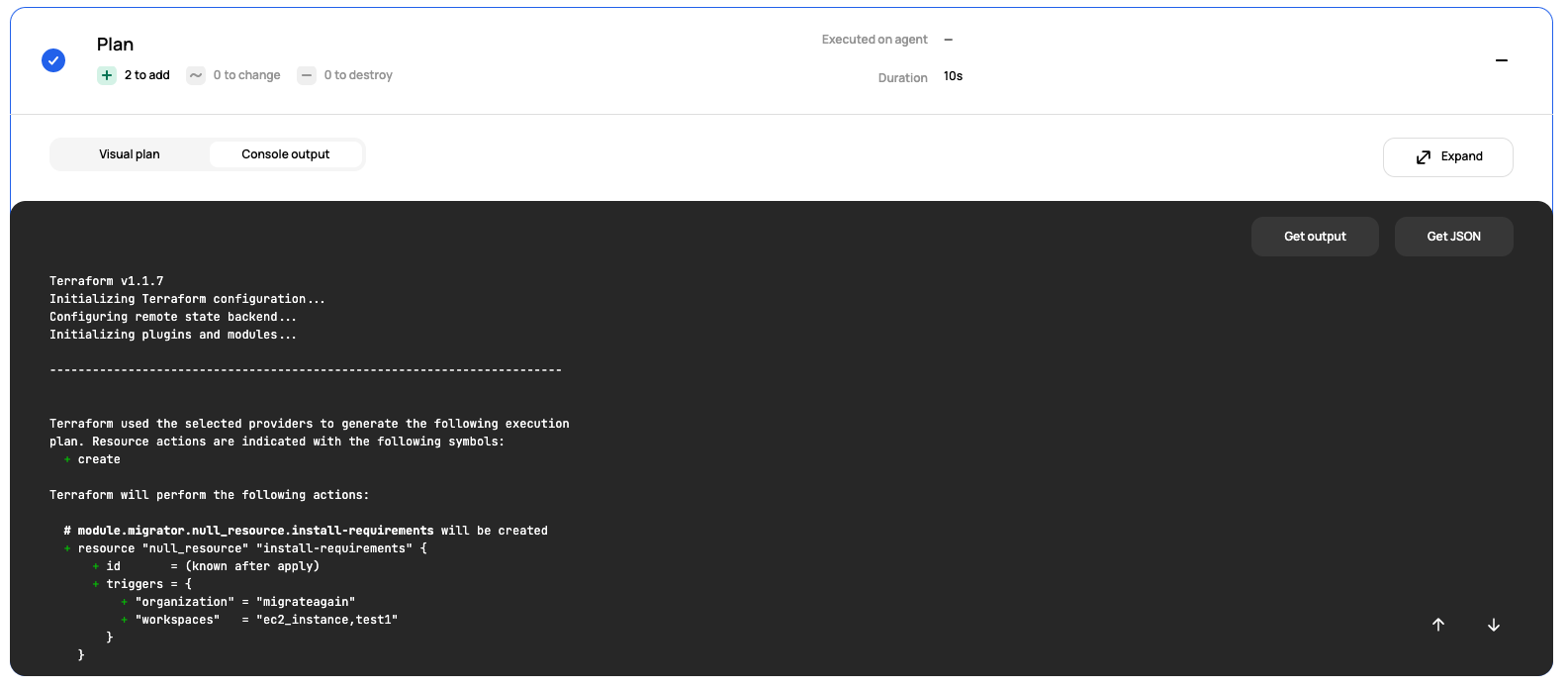
Screenshot of the example console output
General Terraform Migration from any Remote Backend
If you'd rather not use the script, the Terraform CLI handles the same job in a few steps. Before you start, stop all operations in Terraform Cloud so nothing updates the existing state while you migrate.
You'll also need the Terraform CLI installed on your local machine, or wherever you plan to run the Terraform commands.
First, pull the state down from Terraform Cloud to your local machine. You'll need a Terraform Cloud API token for this:
terraform state pull > terraform.state
Next, get the API token from Scalr using the Terraform CLI and Terraform login command:
terraform login <account-name>.scalr.io
Update the Terraform backend configuration and add Scalr as the new cloud backend. Make sure to update the fields below. The Scalr environment ID can be seen on the environment dashboard.
terraform {
  backend "remote" {
    hostname     = "<account-name>.scalr.io"
    organization = "<environment-id>"   # env-xxxxxxxxxxxxxxx, from the environment dashboard
    workspaces {
      name = "<workspace-name>"
    }
  }
}
Execute terraform init to initialize Scalr as the backend.
Run terraform state push terraform.state to push the existing state into the Scalr workspaces. Once you log into Scalr, you'll see the Terraform state in the Scalr workspace.
Note: you can use this same process to migrate local state files that don't use Terraform Cloud as a backend. In that case, just add Scalr as the backend to your Terraform code and run Terraform init to create the workspace and upload the state.
How Should You Approach a Terraform Cloud Migration?
Picking a replacement for Terraform Cloud happens in stages. Start by confirming the tool is right for you and getting a feel for the effort and the practices involved before you commit. A big part of that is knowing whether your Terraform code has to change and how much your day-to-day operations shift. With Scalr, a Terraform Cloud workspace is the same concept as a Scalr workspace, so there's little to relearn.
Once that's clear, you can start the state migration, either with the Terraform CLI on a local machine or with the Scalr migration script to automate it.
To try the migration yourself, sign up for Scalr.
Frequently asked questions
How do I migrate from Terraform Cloud to Scalr?
There are two ways: Scalr's migration script (migrate.sh), or a manual migration with the Terraform CLI. The script uses Terraform Cloud and Scalr API tokens to move organizations, workspaces, variables, and state automatically. The manual route pulls state down with terraform state pull, updates the backend configuration to point at Scalr, and pushes the state back up with terraform state push.
What does Scalr's migration script move over from Terraform Cloud?
As of September 2026, a Terraform Cloud organization or project becomes a Scalr environment, and each workspace becomes a Scalr workspace with its VCS settings, working directory, execution mode and auto-apply setting. Terraform and environment variables and variable sets move across, sensitive values included where the script can recover them, and each workspace's current state file moves too. The script creates the environments and workspaces for you, and you can migrate everything at once or a name pattern at a time. Teams, policies and run tasks are not on its migration list.
How can I estimate my Scalr cost before leaving Terraform Cloud?
Scalr charges only for Terraform runs, counting a plan and an apply as a run, and errored runs like init failures don't count against billing. Scalr publishes a script that calls the Terraform Cloud API with your token to pull your total run count, which you can plug into the Scalr pricing calculator. The script's --period argument limits the count to the last N days, so you can read runs per month directly.
Can I migrate Terraform state to Scalr using only the Terraform CLI?
Yes. Stop all operations in Terraform Cloud first, pull the state with terraform state pull, run terraform login against your Scalr account, update the backend configuration to point at Scalr, run terraform init, then push the state with terraform state push. The same process works for migrating local state files that never used Terraform Cloud.
About the author

director of platform engineering at Scalr
Ryan Fee is the director of platform engineering at Scalr, with over 15 years of experience improving infrastructure experiences at companies large and small.
Part of this guide
6 sheets