

Article
Securing and Sharing Cloud Credentials for Terraform in Scalr
Handling cloud API credentials is risky even at a small scale. This post covers how to keep them secure.

Key takeaways
- Sharing cloud API credentials across systems that run Terraform creates security risks, complicates key rotation, and gives little visibility into who uses which credential.
- Scalr lets you run Terraform through a central system that securely stores keys, rather than distributing keys to every system that runs Terraform.
- Scalr publishes credentials as sensitive, hidden-value environment variables to selected workspaces, so templates consume access keys invisibly.
- Cloud credentials are stored encrypted in Scalr's internal database and can only be set up and managed by authorized administrators.
- Open Policy Agent policies can be added to deployment pipelines to check that credentials are being used correctly.
Terraform providers need a few parameters before they can talk to the cloud API. Sometimes that's just a username and password. Sometimes it's access keys, subscriptions, and a handful of other IDs.
You can pass these straight to the provider through Terraform variables, like this azurerm example.
provider "azurerm" {
  version                     = "1.44.0"
  subscription_id             = var.subscription_id
  client_id                   = var.client_id
  client_certificate_path     = var.client_certificate_path
  client_certificate_password = var.client_certificate_password
  tenant_id                   = var.tenant_id
}
Or they can be provided through environment variables that are set in the workspace where Terraform is being run.
Either way, the credential values have to reach whoever's running the template. That happens directly, or through a key vault system, which means more code to write.
Credential Management Challenges
Once more than one person is working with Terraform, even in a small organization, handling cloud API credentials gets risky.
- Sharing the keys creates security and access management challenges
- Keys could be accidentally disclosed/published in a git repo
- Key rotation becomes a complex management problem
- Key vaults are common practice, but if your organization doesn't use one, how do you manage the keys safely?
Inhibited by Security
Giving every DevOps team the cloud API access they need is hard to manage and easy to get wrong. You might be exposing cloud accounts, and you have little visibility into who's using which credential for what.
You want more teams using Terraform, but the way you hand out security parameters keeps getting in the way.
Take Terraform to the Keys
Instead of copying the keys out to every system that runs Terraform, you can run Terraform through one central system that hands the keys to it automatically. You take Terraform to the keys instead of taking the keys to Terraform.
That's one of the security reasons to use Scalr. Scalr implements a Terraform Enhanced Remote Backend, so every Terraform operation runs through a central system that stores state and applies access controls and deployment policies.
You set up your credentials there once. Scalr publishes them as sensitive (hidden value) environment variables to the workspaces you choose.
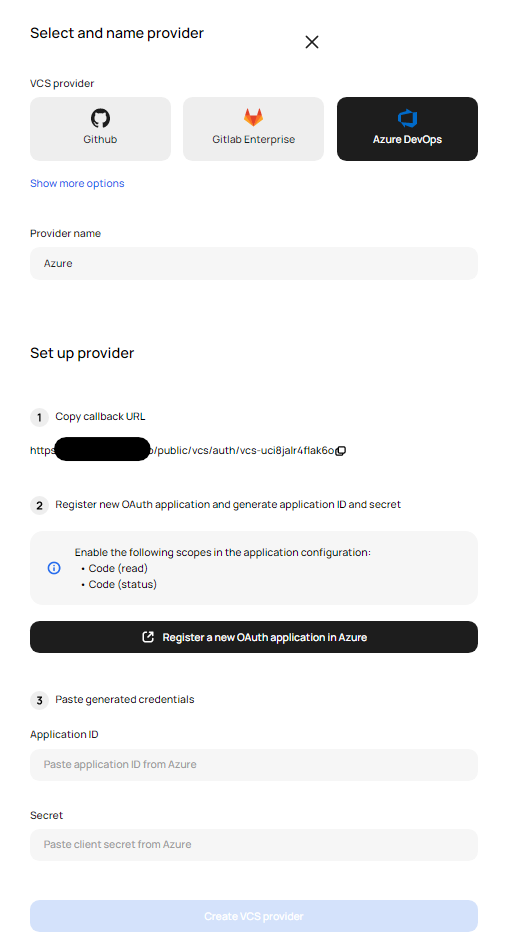
Azure Credentials Configuration in Scalr
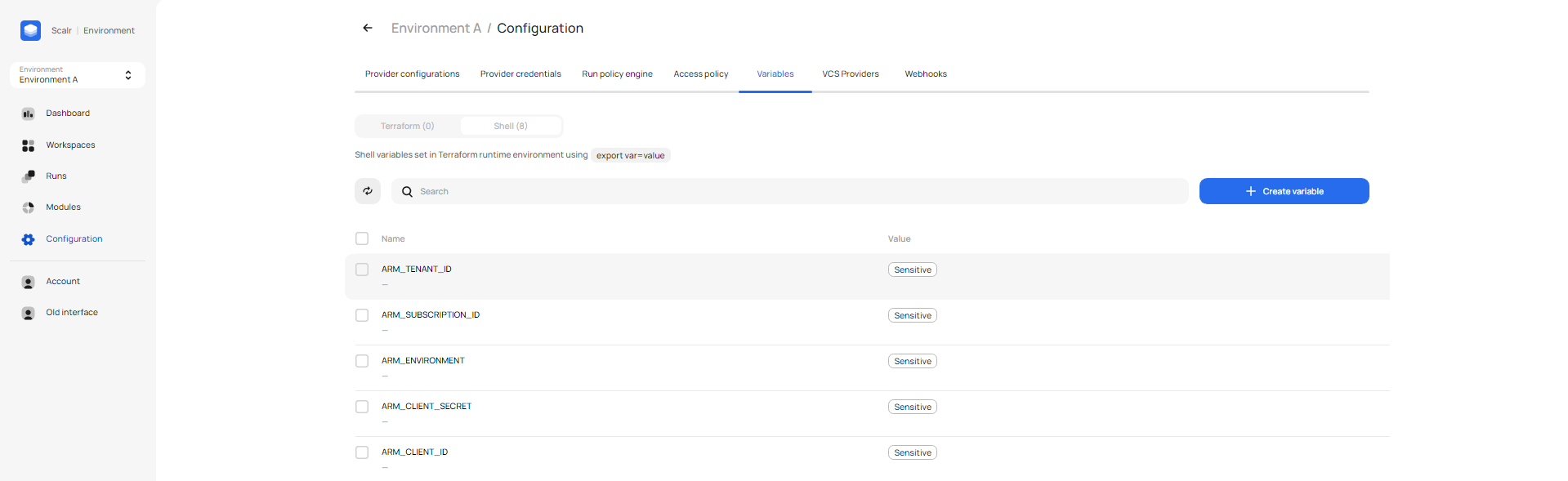
Credentials exported to workspace as environment variables
Templates running from any source (VCS integration, CLI, Template registry) then consume the access keys invisibly.
provider "azurerm" {
  version = "=1.44.0"
}
You can configure multiple sets of credentials for different use cases, e.g. production, development, etc.
DevOps engineers no longer have to hold keys or write code to reach a key vault, and as an administrator you can be sure the right keys get used in the right places.
You can also add Open Policy Agent policies to your deployment pipelines to check that credentials are being used correctly.
package terraform
import input.tfplan as tfplan
import input.tfrun as tfrun

deny[reason] {
  r = tfplan.resource_changes[_]
  r.change.actions[_] == "delete"
  tfrun.credentials.aws == "asde2342fef"
  reason := sprintf("Delete denied on %q account", [tfrun.credentials.aws])
}
Cloud credentials are stored with encryption in Scalr's secure internal database, and only authorised administrators can set them up and manage them.
Scalr credentials and environment variables together make access keys much easier to manage and publish. Your DevOps teams can get on with Terraform instead of handling security parameters.
Note (2026): sensitive environment variables have since shipped. Scalr shell variables can be marked sensitive, so values like cluster credentials or SSH keys are stored the same way, and cloud credentials are now managed as provider configurations, which also support OIDC.
Conclusion
Storing cloud credentials in Scalr removes the need to get cloud API access keys to every Terraform developer. The keys live in one place, where administrators control and manage them. Rotation gets easy, and the access controls and policies built into Scalr handle how keys are distributed and used.
Frequently asked questions
Why is sharing cloud credentials for Terraform risky?
Once more than one person runs Terraform, shared cloud API keys create security and access management problems: keys can be accidentally published in a git repo, rotation becomes a complex chore, and you have little visibility into who is using which credential for what. Key vaults help, but not every organization runs one.
How does Scalr manage cloud credentials for Terraform?
Instead of copying keys to every system that runs Terraform, Scalr runs Terraform through one central system that hands keys to it automatically. You set up credentials once, and Scalr publishes them as sensitive hidden-value environment variables to the workspaces you choose, so templates consume the access keys invisibly. Credentials are stored encrypted in Scalr's internal database and only authorized administrators can manage them.
Can I use different cloud credentials for production and development in Scalr?
Yes. You can configure multiple sets of credentials for different use cases, such as production and development, and control which workspaces receive each set. As an administrator you can be sure the right keys get used in the right places.
How can I enforce policies on how Terraform uses cloud credentials?
You can add Open Policy Agent policies to your deployment pipelines to check that credentials are being used correctly. For example, a policy can deny delete actions when a run is using a specific cloud account's credentials.
About the author

director of platform engineering at Scalr
Ryan Fee is the director of platform engineering at Scalr, with over 15 years of experience improving infrastructure experiences at companies large and small.
Related
- Terraform Wiz: How to Scan, Secure, and Enforce Policy on Your IaC
- Bring Your Own Key (BYOK): Customer-Managed Encryption for Terraform Platforms
- OpenTofu + Atlantis vs a Managed Platform: When Self-Hosting Costs More
- Spacelift Alternatives: Spacelift vs Scalr, Terraform Cloud, env0, and Atlantis (2026)