Terraform Modules Explained
A comprehensive guide to understanding, creating, and managing Terraform modules for scalable Infrastructure as Code.
What Are Terraform Modules?
A Terraform module is a set of Terraform configuration files (.tf or .tf.json) within a single directory that function as a reusable building block. Even your simplest Terraform configuration, run from one directory, is technically a "root module."
Modules act as reusable building blocks. They encapsulate a collection of resources, data sources, variables, and outputs, treating them as a single logical unit. Think of them as programming functions: they take inputs, provision infrastructure, and produce outputs.
The Module Hierarchy
Terraform configurations follow a hierarchical module structure:
- Root Module: This module invokes another module. It provides input variable values to the child module and consumes its outputs. Your root Terraform configuration—the one you run
terraform applyon—is always a root module. - Child Module: This module is called or instantiated by a root module. It defines resources and exposes functionality through inputs and outputs.
When a parent module calls a child module, the child module creates its own isolated scope for resources and variables. This isolation prevents naming collisions and ensures changes within a child module don't inadvertently affect resources in the parent or other child modules, promoting stable, predictable infrastructure.
Why Use Modules?
Adopting Terraform modules offers significant benefits:
Organization and Readability
Break down large, complex infrastructure into smaller, manageable, logical units. This improves code readability and makes infrastructure definition easier to understand, especially as your codebase grows.
Reusability and Efficiency
Write infrastructure code once and reuse it across projects, teams, or environments. This eliminates redundant code, saves development time, and speeds up deployments. The Don't Repeat Yourself (DRY) principle is essential—instead of copying and pasting large blocks of Terraform code for similar components, call the module multiple times with different inputs.
Consistency and Standardization
Ensure common infrastructure components deploy uniformly across your organization. Modules enforce best practices, naming conventions, and security policies, reducing configuration drift and errors.
Abstraction of Complexity
Hide intricate resource provisioning details from higher-level configurations. Module users only need to know inputs and expected outputs, simplifying the experience and reducing cognitive load.
Version Control and Collaboration
Modules can be independently versioned and managed. Teams can collaborate on specific infrastructure components without affecting others. Module updates can be rolled out systematically.
When to Create Modules
Use modules when you:
- Repeat the same resources: If you copy/paste Terraform code for similar components (e.g., multiple VPCs, specific EC2 instances, or database clusters).
- Need to enforce standards: To ensure infrastructure components always deploy with specific configurations, tags, or security settings across projects or teams.
- Want to abstract complexity: When a complex set of resources forms a logical unit (e.g., an application stack including network, compute, and database).
- Are building a shared library: For organizations providing pre-approved, tested infrastructure building blocks to development teams.
Module Structure and Standards
A well-structured module is easier to understand, use, and maintain. While Terraform is flexible, certain conventions are widely adopted.
Standard Directory Layout
A typical module includes these core files:
my-module/
├── main.tf # Primary resource definitions
├── variables.tf # Input variable declarations
├── outputs.tf # Output value declarations
├── versions.tf # Terraform and provider version constraints
├── README.md # Essential documentation
├── examples/ # Usage examples
└── LICENSE # Software license
File Purposes
- main.tf: Contains the primary resource definitions of the module. For complex modules, this can be split (e.g.,
network.tf,compute.tf). - variables.tf: Declares all input variables the module accepts. This is the module's API. Each variable should have a type, a clear description, and a default value if optional.
variable "instance_type" {
description = "The EC2 instance type"
type = string
default = "t3.micro"
}
- outputs.tf: Defines output values the module exposes to its calling module.
output "instance_public_ip" {
description = "The public IP address of the EC2 instance"
value = aws_instance.example.public_ip
}
- versions.tf: Specifies required Terraform versions and provider constraints, ensuring compatibility.
terraform {
required_version = ">= 1.3.0"
required_providers {
aws = {
source = "hashicorp/aws"
version = "~> 5.0"
}
}
}
- README.md: Crucial documentation. This file should explain the module's purpose, usage, inputs, outputs, and provide examples.
Naming Conventions
Consistent naming improves readability and maintainability:
- General: Use underscores (_) to delimit words (e.g.,
web_server_sg) - Files: Lowercase with underscores (e.g.,
networking.tf) - Resources: Singular nouns. If only one of its type, consider naming it
main(e.g.,aws_instance.main). Don't repeat the resource type in the name. - Variables: Descriptive, using underscores. Include units for numeric values (e.g.,
ram_size_gb). Use positive names for booleans (e.g.,enable_monitoringinstead ofdisable_monitoring).
Creating Your First Module
Let's create a simple S3 bucket module to understand the complete process.
Step 1: Create Your Module Directory
my-terraform-project/
├── main.tf
├── variables.tf
├── outputs.tf
└── modules/
└── s3_bucket/
├── main.tf
├── variables.tf
└── outputs.tf
Step 2: Define Input Variables
In modules/s3_bucket/variables.tf:
variable "bucket_name" {
description = "The name of the S3 bucket."
type = string
}
variable "acl" {
description = "The ACL to apply to the bucket (e.g., 'private', 'public-read')"
type = string
default = "private"
}
variable "tags" {
description = "A map of tags to assign to the bucket."
type = map(string)
default = {}
}
Step 3: Define Resources
In modules/s3_bucket/main.tf:
resource "aws_s3_bucket" "this" {
bucket = var.bucket_name
acl = var.acl
tags = var.tags
versioning {
enabled = true
}
server_side_encryption_configuration {
rule {
apply_server_side_encryption_by_default {
sse_algorithm = "AES256"
}
}
}
}
Step 4: Define Outputs
In modules/s3_bucket/outputs.tf:
output "bucket_id" {
description = "The ID of the S3 bucket."
value = aws_s3_bucket.this.id
}
output "bucket_arn" {
description = "The ARN of the S3 bucket."
value = aws_s3_bucket.this.arn
}
output "bucket_domain_name" {
description = "The domain name of the S3 bucket."
value = aws_s3_bucket.this.bucket_domain_name
}
Step 5: Use Your Module in Root Configuration
In your root main.tf:
provider "aws" {
region = "us-east-1"
}
module "my_first_bucket" {
source = "./modules/s3_bucket"
bucket_name = "my-unique-application-bucket-12345"
acl = "private"
tags = {
Environment = "Development"
Project = "TerraformModuleDemo"
}
}
module "my_second_bucket" {
source = "./modules/s3_bucket"
bucket_name = "another-unique-app-bucket-67890"
acl = "public-read"
tags = {
Environment = "Staging"
Owner = "TeamA"
}
}
output "first_bucket_arn" {
description = "ARN of the first S3 bucket."
value = module.my_first_bucket.bucket_arn
}
Step 6: Initialize and Apply
# Initialize Terraform
terraform init
# Plan the changes
terraform plan
# Apply the configuration
terraform apply
Module Inputs and Outputs
Module reusability heavily relies on accepting inputs and producing outputs.
Inputs (Variables)
Inputs are parameterized using variable blocks within the module. Instead of hardcoding values like region, instance types, or CIDR blocks, define them as variables. When calling the module, you provide values for these variables, making the module flexible across different scenarios.
Best practices for inputs:
- Name: Descriptive (e.g.,
instance_count,disk_size_gb) - Type: Always declare (e.g.,
string,number,bool,list(string),map(object(...))) - Description: Mandatory for every variable
- Default Value: Provide sensible defaults for optional variables; omit for required ones
- Validation: Use validation blocks to enforce constraints
- Sensitive: Mark sensitive inputs (passwords, API keys) with
sensitive = true - Minimize: Only expose variables that genuinely need to change
Outputs
Outputs are defined using output blocks within the module. They expose specific values about the created resources. These outputs can be used by the calling (parent) module, other modules, or external systems for further configuration or information.
Best practices for outputs:
- Name: Descriptive
- Description: Mandatory. Explains what data the output provides
- Sensitive: Mark sensitive outputs with
sensitive = true
Sourcing Modules
The source argument is versatile, supporting various locations:
Local Paths
source = "./modules/my-module"
source = "../shared-modules/vpc"
Ideal for modules within the same project or during development.
Terraform Registry
Public Registry:
source = "hashicorp/vpc/aws"
Access a vast library of community and official modules.
Private Registry:
source = "app.terraform.io/my-org/vpc/aws"
Securely share and manage modules within your organization. Platforms like Scalr offer robust private module registries, integrating seamlessly with version control and providing enhanced governance features crucial for enterprise adoption.
Version Control Systems
source = "github.com/my-org/terraform-modules//aws/vpc?ref=v1.2.3"
The // separates the repository URL from a path within the repo, and ?ref= pins to a specific branch, tag, or commit.
HTTP Archives
source = "https://example.com/modules/my-module-v1.0.zip"
Object Storage
source = "s3::https://my-bucket.s3.us-east-1.amazonaws.com/modules/vpc-module.zip"
source = "gcs::storage.googleapis.com/bucket/key.zip"
Quick Reference Table
| Source Type | Example Syntax | Versioning |
|---|---|---|
| Local Paths | ./modules/local-module | Via parent repository's VCS |
| Public Terraform Registry | hashicorp/vpc/aws | version argument (e.g., ~> 1.0) |
| Private Registry (Scalr, HCP) | app.terraform.io/org/module/provider | version argument |
| GitHub | github.com/owner/repo//path?ref=v1.0.0 | ?ref= query (tag, branch, commit) |
| Generic Git | git::https://example.com/repo.git//path?ref=tag | ?ref= query |
| S3 Buckets | s3::s3-region.amazonaws.com/bucket/key.zip | Via S3 object key/versioning |
Module Design Patterns and Abstraction
The Abstraction Principle
Determine the right level of abstraction for your modules. Overly complex monolithic modules with dozens of conditional parameters become difficult to maintain and understand.
Anti-pattern (over-engineered):
module "network" {
source = "./modules/network"
enable_nat_gateway = var.environment == "prod" ? true : false
enable_vpn = var.enable_vpn != null ? var.enable_vpn : (var.environment == "prod" ? true : false)
subnet_count = var.subnet_count != null ? var.subnet_count : (var.environment == "prod" ? 6 : 2)
# 20 more conditional parameters...
}
Better approach (opinionated modules):
module "production_network" {
source = "./modules/production-network"
region = var.region
cidr_block = var.cidr_block
# Production standards are baked in
}
Three-Layer Architecture
The most sustainable architectures follow a three-layer pattern:
- Base Modules: Individual resources (VPC, security groups)
- System Modules: Logical groupings (complete network stack)
- Environment Modules: Full deployments (dev, staging, prod)
This hierarchy works because it matches how teams actually think about infrastructure.
Encapsulation and Composition
- Design for Encapsulation: Group logically related resources. Hide underlying implementation details while exposing a clean interface.
- Embrace Module Composition: Favor smaller, focused modules that can be combined, over monolithic ones.
- Dependency Injection: Pass VPC IDs as inputs rather than creating VPCs inside compute modules.
Meta-Arguments for Advanced Control
version: Constrains the module version, ensuring stability.
module "vpc" {
source = "terraform-aws-modules/vpc/aws"
version = "~> 5.0.0"
# ...
}
count: Creates N instances based on an integer.
resource "aws_instance" "example" {
count = var.enable_instances ? 3 : 0
instance_type = var.instance_type
# ...
}
for_each: Creates instances based on a map or set.
variable "environments" {
type = map(object({
cidr_block = string
instance_type = string
}))
}
module "env_vpc" {
for_each = var.environments
source = "./modules/vpc"
name = "vpc-${each.key}"
cidr_block = each.value.cidr_block
}
providers: Passes specific provider configurations, essential for multi-region setups.
provider "aws" {
alias = "secondary_region"
region = "us-west-2"
}
module "app_in_secondary_region" {
source = "./modules/app_instance"
providers = {
aws = aws.secondary_region
}
instance_name = "my-app-us-west-2"
}
Creating Modules with Cookiecutter
Cookiecutter is a command-line utility that creates projects from project templates. The TerraformInDepth/terraform-module-cookiecutter is a specialized template designed to generate Terraform modules incorporating a comprehensive set of best practices from the ground up.
Key Features
The cookiecutter template bundles a suite of tools and configurations:
| Feature Category | Tool(s) | Purpose |
|---|---|---|
| Security Scanning | Checkov, Trivy | Identify security vulnerabilities and misconfigurations |
| Quality Control | TFLint | Lint Terraform code for errors and best practices |
| Formatting & Validation | Terraform/OpenTofu fmt & validate | Ensure consistent code style and syntactic correctness |
| CI Integration | GitHub Actions Workflows | Automate checks on code changes |
| Git Hooks | Pre-Commit Framework | Run local checks before commits |
| Version Management | tenv | Manage Terraform and OpenTofu versions |
| Testing | Terratest, Terraform Testing Framework | Unit and integration tests |
Getting Started
Install Cookiecutter:
pip install cookiecutter
Generate your module from the template:
cookiecutter gh:TerraformInDepth/terraform-module-cookiecutter
You'll be prompted for details like module name, Terraform provider, GitHub owner, and version information. The generated module will include:
- Standard Terraform files (
main.tf,variables.tf,outputs.tf) - An
examples/directory with usage examples - A
tests/directory with Terratest and native test setups .github/workflows/for CI/CD automation.pre-commit-config.yamlfor pre-commit hooks- A
Makefilefor common tasks - Version management files
Running Built-in Tools
Once generated, you can immediately benefit from integrated tooling:
CI Pipeline: Pushing to GitHub automatically triggers validation, linting, security scanning, and testing.
Manual Checks:
# Run TFLint
tflint --recursive
# Run Checkov
checkov -d .
Pre-Commit Hooks:
pre-commit install
This automatically runs configured checks before each commit.
Testing Terraform Modules
Effective module testing requires a layered approach.
Static Analysis
The foundation of your testing pyramid:
- terraform validate: Check syntax and basic structure
- terraform fmt: Ensure consistent code formatting
- TFLint: Identify potential issues and best practices violations
- Checkov/Trivy: Security vulnerability scanning
terraform validate
terraform fmt --recursive
tflint --recursive
checkov -d .
Native Testing with HCL
Terraform v1.6+ introduced a native test command allowing you to write declarative tests directly in HCL:
Use cases:
- Module Unit Testing: Verify that module inputs correctly translate into expected resource attributes
- Module Integration Testing: Validate that the module provisions the correct set of resources
- Quick Feedback Loops: Fast validation during module development
Example: Verifying an S3 bucket module
# Does it always create a private bucket?
# Does it correctly apply tags based on inputs?
# The native test framework can answer these directly
Integration Testing with Terratest
For more complex scenarios, frameworks like Terratest (Go-based) enable end-to-end testing:
func TestProductionNetworkModule(t *testing.T) {
terraformOptions := &terraform.Options{
TerraformDir: "../modules/production-network",
Vars: map[string]interface{}{
"region": "us-west-2",
"cidr_block": "10.0.0.0/16",
},
}
defer terraform.Destroy(t, terraformOptions)
terraform.InitAndApply(t, terraformOptions)
vpcId := terraform.Output(t, terraformOptions, "vpc_id")
assert.NotEmpty(t, vpcId)
privateSubnets := terraform.OutputList(t, terraformOptions, "private_subnet_ids")
assert.Equal(t, 3, len(privateSubnets))
}
When to use Terratest:
- End-to-end testing with real deployments
- Complex post-deployment validation
- Cross-tool orchestration (Terraform + Helm + Kubernetes)
- Advanced error handling and reporting
Recommended Testing Pyramid
- Static Analysis (Fast, Cheap): terraform validate, fmt, TFLint, Checkov
- Plan Testing (Medium): Terraform native tests validating plan outputs
- Integration Testing (Slow, Expensive): Terratest for critical modules
- Drift Detection (Ongoing): Production monitoring with platforms like Scalr
Private Module Registries
What is a Private Module Registry?
A Private Module Registry is an organization-owned, centralized repository dedicated to storing, sharing, and managing Terraform modules. It acts as the secure, internal source of truth for all your pre-vetted, organization-specific Terraform configurations.
Comparison:
| Feature | Public Registry | Private Registry |
|---|---|---|
| Audience | Global community | Internal organization |
| Content | Third-party providers, generic modules | Proprietary, hardened, internal modules |
| Governance | Community/HashiCorp vetting | Organization enforced security & compliance |
Core Benefits
1. Enhanced Security & Compliance
The "golden image" approach: Platform teams vet a module for security and compliance once. Once approved and published, application teams consume this pre-hardened infrastructure, ensuring security standards are met by default. Proprietary intellectual property remains safely inside the corporate boundary.
2. Standardization and Consistency (The "Golden Path")
Configuration drift is the enemy of stability. By forcing teams to use the same module for core infrastructure like networking or IAM roles, you guarantee consistency across all environments and projects.
3. Improved Developer Experience and Discoverability
An "App Store" for infrastructure: The private module registry provides a single, searchable catalog where engineers can browse, filter, and discover pre-vetted components. Auto-generated documentation makes modules easier to understand.
4. Simplified Dependency Management
The registry leverages Semantic Versioning (SemVer). Module consumers can use intelligent version constraints (e.g., version = "~> 1.2.0") to automatically pull in bug fixes without risking breaking changes.
5. Decoupling Consumer from Source
When consuming a module via Git, the consumer's code is tightly coupled to the repository location. With a registry, consumers reference a logical name (e.g., account.scalr.io/org/vpc/aws). The registry acts as an abstraction layer, allowing you to reorganize backend storage without breaking consuming configurations.
Setting Up a Private Module Registry
Option 1: Managed Solution (Recommended)
- Scalr: A comprehensive IaC management platform with a fully featured private registry. It automatically syncs modules from your VCS when you tag releases with SemVer (e.g.,
v1.2.3). Includes policy enforcement, environment management, and collaboration features. Available on free tier for Terraform and OpenTofu. - Terraform Cloud / HCP Terraform: Offers native VCS integration and seamless workspace integration. Includes zero infrastructure management and role-based access control. Free tier available; Terraform only.
- GitLab: For organizations already using GitLab for VCS and CI/CD, provides a built-in, native Terraform Module Registry. Convenient for keeping source, pipelines, and registry in one platform.
Option 2: Self-Hosted (For Custom Needs)
Tools like Terrakube implement the Terraform Module Registry Protocol but require setting up and maintaining API endpoints and module storage yourself. This provides maximum control but significantly higher operational overhead.
Using a Private Module
The clean syntax makes private modules easy to use:
Public Registry Example:
module "vpc" {
source = "terraform-aws-modules/vpc/aws"
version = "5.0.0"
# ...
}
Private Registry Example (Scalr):
module "standard_vpc" {
source = "<account>.scalr.io/<ACCOUNT_NAME>/standard-vpc/aws"
version = "1.2.3"
# ...
}
The source clearly points to your organization's hostname, and authentication is seamlessly handled via terraform login or API tokens.
Best Practices for Private Module Registry Management
- Mandate SemVer: Enforce strict adherence to Semantic Versioning (MAJOR.MINOR.PATCH)
- CI/CD Integration: Every module change must undergo automated testing and static analysis before release
- Producer/Consumer Access Control: Define which teams publish modules vs. consume them
- Prioritize Documentation: Every module must have high-quality README.md documentation
Popular Terraform Modules
Understanding the most popular modules provides insight into common practices and trusted solutions.
AWS: The Reign of terraform-aws-modules
For Amazon Web Services, the terraform-aws-modules collection remains the undisputed champion:
- terraform-aws-modules/iam/aws: 235.9 million all-time downloads. Foundational for Identity and Access Management.
- terraform-aws-modules/vpc/aws: 126.0 million all-time downloads. The go-to for setting up network infrastructure.
- terraform-aws-modules/s3-bucket/aws: 117.8 million all-time downloads. Essential for storage.
- terraform-aws-modules/eks/aws: 96.3 million all-time downloads. For Kubernetes on AWS.
- terraform-aws-modules/lambda/aws: 78.9 million all-time downloads. Powering serverless applications.
Example: AWS VPC Module
module "vpc" {
source = "terraform-aws-modules/vpc/aws"
version = "~> 5.0"
name = "my-app-vpc"
cidr = "10.0.0.0/16"
azs = ["us-east-1a", "us-east-1b", "us-east-1c"]
private_subnets = ["10.0.1.0/24", "10.0.2.0/24", "10.0.3.0/24"]
public_subnets = ["10.0.101.0/24", "10.0.102.0/24", "10.0.103.0/24"]
enable_nat_gateway = true
single_nat_gateway = true
tags = {
Terraform = "true"
Environment = "dev"
}
}
Azure: Azure Verified Modules (AVM)
Microsoft Azure is taking a curated approach with Azure Verified Modules (AVM), officially supported, high-quality modules:
- Azure/avm-res-compute-virtualmachine/azurerm: Key module for VMs
- Azure/avm-res-storage-storageaccount/azurerm: Fundamental storage needs
- Azure/avm-res-network-virtualnetwork/azurerm: Core for VNet provisioning
- Azure/avm-res-containerservice-managedcluster/azurerm: For Azure Kubernetes Service
Example: Azure Storage Account
module "storage_account" {
source = "Azure/avm-res-storage-storageaccount/azurerm"
version = "~> 0.6"
name = "myappstgacct${random_string.suffix.result}"
resource_group_name = "my-app-rg"
location = "eastus"
account_tier = "Standard"
account_replication_type = "LRS"
tags = {
environment = "production"
project = "myapp"
}
}
GCP: terraform-google-modules and Opinionated Design
Google Cloud Platform users heavily rely on terraform-google-modules, which are often described as "opinionated," meaning they encapsulate Google's recommended best practices:
- terraform-google-modules/project-factory/google: 48.5 million all-time downloads. Standard for setting up GCP projects.
- terraform-google-modules/network/google: 36.0 million all-time downloads. For VPCs and firewall rules.
- terraform-google-modules/kubernetes-engine/google: 39.3 million all-time downloads. Standard for GKE clusters.
Example: GCP Project Factory
module "my_project" {
source = "terraform-google-modules/project-factory/google"
version = "~> 18.0"
name = "my-gcp-project-123"
random_project_id = true
billing_account = "YOUR_BILLING_ACCOUNT_ID"
folder_id = "YOUR_FOLDER_ID"
activate_apis = [
"compute.googleapis.com",
"storage.googleapis.com",
"container.googleapis.com",
]
labels = {
environment = "staging"
owner = "data-platform-team"
}
}
Why These Modules Dominate
- Trust and Official Support: Official or community-backed modules come with assurance regarding quality and maintenance.
- Active Maintenance: Strong GitHub activity and responsive maintainers build confidence.
- Good Documentation: Clear documentation and practical examples lower adoption barriers.
- Policy Enforcement: Tools like Scalr integrate with OPA for applying organizational guardrails to module usage.
Module Best Practices
Design Principles
Modularity and Focused Scope: Each module should manage a specific, well-defined function or abstract a single cloud service. Avoid "thin wrappers" around single resources.
Encapsulation: Package logical resource groupings and hide implementation details. Expose a clean interface through inputs and outputs.
Idempotency: Applying the same module configuration multiple times should yield the same state without unintended changes.
Separation of Concerns:
- Root Modules: Direct
terraform applytargets. Contain provider configurations and orchestrate reusable modules. - Reusable Modules (Child Modules): Building blocks designed for import. Should not contain provider configurations.
Development Practices
Clear Input/Output Conventions
Inputs should have specific types, clear descriptions, sensible defaults, and validation:
variable "instance_type" {
type = string
description = "The EC2 instance type for the web server."
default = "t3.micro"
}
variable "environment_name" {
type = string
description = "The name of the environment (e.g., dev, staging, prod)."
# No default - caller must specify
}
variable "enable_detailed_monitoring" {
type = bool
description = "Enable detailed CloudWatch monitoring."
default = false
}
Semantic Versioning: Use MAJOR.MINOR.PATCH versioning. Maintain a CHANGELOG.md. In consuming configurations, always pin module versions.
module "vpc" {
source = "terraform-aws-modules/vpc/aws"
version = "~> 5.0.0" # Allows 5.0.x but not 5.1.0 or 6.0.0
# ...
}
Comprehensive Documentation: Write detailed README.md files and provide working examples in an examples/ subdirectory. Tools like terraform-docs can automate documentation generation.
Avoid Hardcoding: Parameterize all configurable values using input variables. Never hardcode environment-specific values or regions.
Minimize Dependencies: While modules can call other modules, avoid deep dependency trees. Circular dependencies are particularly problematic—design clear boundaries where dependencies flow in one direction.
Testing Practices
- Static Analysis: terraform validate, terraform fmt, TFLint, Checkov
- Native Testing: Use terraform test (v1.6+) for HCL-based tests
- Integration Testing: Frameworks like Terratest for extensive testing
- Avoid Custom Scripts: Custom scripts via local-exec should be a last resort
Common Pitfalls and Solutions
The God Module
Problem: Creating modules that do everything with dozens of conditional flags.
Solution: Break into smaller, purpose-specific modules that compose together.
# Instead of this monolith:
module "everything" {
source = "./modules/kitchen-sink"
create_vpc = true
create_rds = true
create_ecs = true
# ...
}
# Do this:
module "database" {
source = "./modules/database"
engine = var.database_engine
}
module "compute" {
source = "./modules/compute"
instance_type = var.instance_type
}
Hardcoded Values
Problem: Hardcoding environment-specific values or regions in modules.
Solution: Always parameterize with variables.
# Wrong
resource "aws_s3_bucket" "data" {
bucket = "my-company-prod-data-bucket"
region = "us-east-1"
}
# Right
resource "aws_s3_bucket" "data" {
bucket = var.bucket_name
# Region comes from provider configuration
}
Missing Path Context
Problem: Using relative file paths that break when modules are used from other locations.
Solution: Use path.module to reference files relative to the module directory.
# Breaks when used as a module
data "template_file" "config" {
template = file("templates/config.json")
}
# Works everywhere
data "template_file" "config" {
template = file("${path.module}/templates/config.json")
}
Copy-Paste Drift
Problem: Local module directories copied across projects, leading to divergent instances.
Solution: Promote modules to a versioned registry (public/private) or versioned Git repository.
Implicit Provider Configurations
Problem: Modules silently using default provider configurations not explicitly set by the caller.
Solution: Modules must not define providers. Root module configures and passes providers. Modules declare required_providers.
Workspace Mismanagement
Problem: Over-reliance on Terraform CLI workspaces with complex conditional logic within modules.
Solution: Prefer directory-based environment separation. Each environment has its own root module.
Circular Dependencies
Problem: Module A depends on Module B's output; Module B depends on Module A's output.
Solution: Redesign module boundaries. If necessary, use terraform_remote_state data sources for indirect information sharing.
Refactoring Without Breaking Production
Terraform 1.1+ introduced moved blocks for safe refactoring:
moved {
from = aws_instance.web_server
to = module.web_tier.aws_instance.server
}
moved {
from = aws_security_group.web_sg
to = module.web_tier.aws_security_group.main
}
module "web_tier" {
source = "./modules/web-tier"
instance_type = "t3.large"
}
Scaling Module Usage
The Evolution Stages
Organizations typically progress through predictable stages:
- Chaos: Everyone writes their own Terraform
- Sharing: Teams copy each other's code
- Modules: Shared modules emerge organically
- Platform: Central team provides governed modules
The Platform Team Model
Successful enterprises establish clear ownership:
- Platform Teams: Create core modules and establish standards
- Domain Teams: Own specific infrastructure areas
- Application Teams: Consume modules from the registry
Module Registry Structure at Scale
terraform-modules/
├── networking/
│ ├── vpc/
│ │ ├── v1.0.0/
│ │ ├── v2.0.0/
│ │ └── v2.1.0/
│ └── security-groups/
├── compute/
│ ├── ecs-cluster/
│ └── kubernetes/
└── data/
├── rds/
└── dynamodb/
Managing Modules at Enterprise Scale
Scalability Challenges:
- Discovery: How do teams find the right modules?
- Versioning: Managing versions across many teams and projects
- Governance: Ensuring modules meet security and compliance standards
- Consistency: Preventing drift in how modules are used
Decision Matrix by Organizational Stage:
| Decision Point | Small Teams | Growing Organizations | Enterprise Scale |
|---|---|---|---|
| Module Design | Simple, focused | Layered (base/system/env) | Domain-driven with clear contracts |
| Testing Strategy | Manual plan review | Automated tests + Terratest | Full pyramid: static → integration → drift |
| Versioning | Git tags | Semantic versioning | Automated compatibility testing |
| Registry | Git repositories | Private module registry | Registry with dependency tracking |
| Governance | Code reviews | CODEOWNERS + PR templates | Policy-as-code enforcement |
| Team Model | Shared ownership | Platform + consumers | Federated with domain expertise |
Using Scalr's Private Module Registry
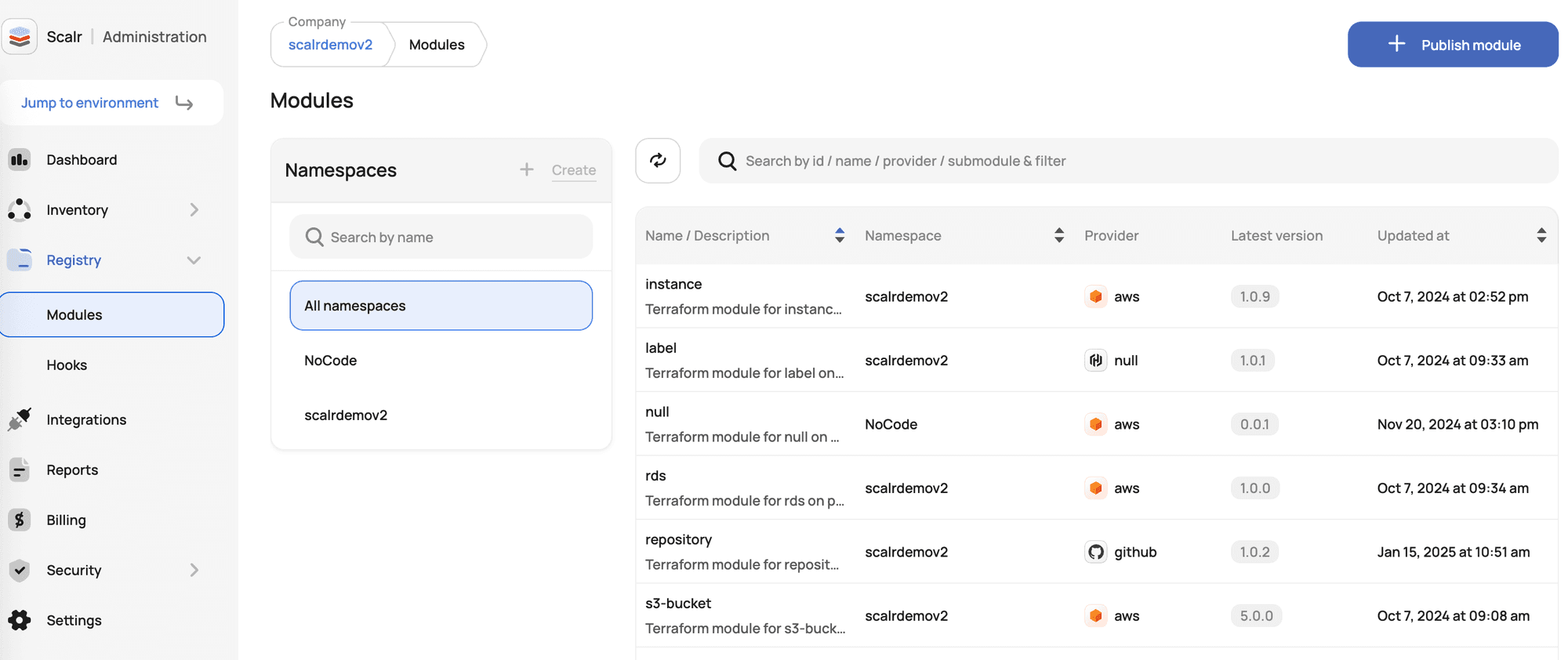
Scalr's private module registry with namespaces provides enterprise-scale module management:
Module Registry Namespaces
Namespaces act as dedicated, top-level registries for modules within your Scalr account. They introduce a powerful organizational layer, allowing you to logically group modules based on teams, projects, or departments.
Key Features:
- Centralized Namespace Creation: Namespaces are created at account scope, establishing a clear organizational layer
- Flexible Sharing: Instead of all-or-nothing visibility, choose to share namespaces with all environments or select environments
- Namespace Ownership: Optionally assign team ownership; only that team can manage the namespace
- Backward Compatibility: Existing module URLs remain fully functional; no disruption to current IaC workflows
Example Usage:
module "standard_vpc" {
source = "account.scalr.io/networking/standard-vpc/aws"
version = "1.2.3"
cidr_block = "10.0.0.0/16"
region = "us-east-1"
}
Key Success Factors at Scale
Organizations that succeed with Terraform modules share three characteristics:
- Invest Early: Create modules before you "need" them
- Choose Boring Technology: Standard patterns over clever abstractions
- Use Dedicated Platforms: Systems like Scalr handle governance and discovery so teams focus on infrastructure
Conclusion
Terraform modules are foundational to mature Infrastructure as Code. They transform infrastructure provisioning from ad hoc scripting into standardized, reusable, and governed components.
Key Takeaways:
- Modules enable reusability, consistency, and scalability across your infrastructure
- Well-structured modules with clear inputs, outputs, and documentation are essential
- Test modules at multiple levels: static analysis, native tests, and integration tests
- Private module registries centralize module management and enforce organizational standards
- Scalr's private module registry with namespaces provides enterprise-grade module governance
As your organization's Infrastructure as Code practice matures, investing in a robust module strategy—supported by platforms designed for IaC governance—will dramatically accelerate deployment velocity while maintaining security, compliance, and consistency.
Start where you are: Build local modules for patterns you repeat. Structure your repository to support growth. Gradually migrate to a private registry as your library expands. Use platforms like Scalr to provide the discovery, versioning, governance, and policy enforcement that allow modules to truly scale.
Your infrastructure is too important to leave to chance. Make the investment in modules and governance platforms early. Your team and your future self will thank you.
Further Reading
- Private Module Registries and Namespaces
- Top 10 Most Popular Terraform Modules
- Setting up Terraform a Private Module Registry