

Terraform & Terragrunt with Atlantis: The Complete Guide
Terraform Atlantis brings infrastructure automation into your PR workflows. This guide covers implementing, securing, and scaling Atlantis in prod.

TL;DR
- Atlantis brings Terraform plan/apply into PR comments. Open a PR, comment
atlantis plan, review the output inline, commentatlantis apply. The full workflow lives in your VCS, with one caveat: you self-host and operate it. - Production Atlantis needs hardening. Webhook-secret enforcement, repo-allowlists, locked-down workspaces, and TLS aren't optional — see securing Atlantis in production before you put it in front of real infra.
- Terragrunt + Atlantis works, but isn't free. You get DRY config and dependency awareness. You also need extra
pre_workflow_hooksandterragrunt run-allglue. Pair this guide with our beginner's guide to Terragrunt if Terragrunt itself is new. - OpenTofu is a drop-in replacement. Atlantis works with both Terraform and OpenTofu via the
terraformbinary path orterragrunt-tfpath. - Alternatives matter. If self-hosting and operating Atlantis isn't where you want to spend engineering time, see Atlantis vs GitHub Actions for the comparison, or skip the comparison and look at managed platforms in the Scalr workflow section near the end.
What is Atlantis?
Atlantis is an open-source automation tool designed to streamline Terraform workflows through pull request-based interactions. Rather than requiring developers to execute Terraform commands locally or through separate CI/CD interfaces, Atlantis brings plan and apply operations directly into version control, enabling teams to review, discuss, and approve infrastructure changes within familiar pull request interfaces.
Core Benefits
Enhanced Collaboration: Infrastructure changes are visible directly in pull requests, enabling focused team discussions about proposed modifications before they're deployed.
Centralized Execution: All Terraform operations run on a dedicated server rather than individual machines, eliminating "works on my machine" issues and ensuring consistency across your organization.
Improved Governance: Pull requests create a natural audit trail for all infrastructure changes, documenting who proposed what, when, and with what approval.
State Management: Atlantis implements project-level locking to prevent concurrent operations on the same infrastructure, complementing Terraform's backend locking mechanisms.
Productivity: Automation of plan generation and the ability to apply changes through simple PR comments accelerates deployment cycles while maintaining rigor.
Pros and Cons of Using Atlantis
Understanding the strengths and limitations of Atlantis helps teams make informed decisions about adoption and plan for operational gaps.
Pros
GitOps for Infrastructure: Atlantis deeply integrates with your version control system (GitHub, GitLab, Bitbucket, Azure DevOps), enabling teams to manage infrastructure changes using familiar pull request workflows with a clear audit trail.
Automation of plan and apply: Automatic plan generation on PR creation and one-command applies reduce manual effort and accelerate deployment cycles.
Consistency and Standardization: Terraform commands run in a consistent server environment, eliminating "works on my machine" issues and standardizing how changes are reviewed and implemented.
Improved Security: Developers may not need direct cloud provider credentials on their local machines, and changes are reviewed and explicitly approved before being applied.
State Locking: Atlantis automatically locks Terraform states during plan and apply operations, preventing concurrent modifications that could lead to state corruption.
Open Source: Free to use and customizable. Self-hosting gives organizations complete control over the Atlantis instance, its configuration, and credential storage.
Cons
Self-Hosting and Maintenance Overhead: Your team is responsible for deploying, maintaining, securing, and upgrading the Atlantis server, which requires ongoing operational effort.
Single Point of Failure: Unless configured for high availability (which adds complexity), the Atlantis server can become a single point of failure that stalls automated workflows.
Concurrency Limitations: By default, Atlantis processes operations sequentially for a given instance. High volumes of concurrent PRs across many teams may lead to queues and delays without scaling strategies such as multiple instances with sharding logic.
Limited Native Integrations Beyond VCS: Compared to commercial platforms (Terraform Cloud, Scalr, env0, Spacelift), Atlantis has fewer built-in integrations for advanced policy checking, cost estimation, or security scanning. These can be added with custom workflows but require more setup.
Basic UI/UX: Atlantis primarily operates via PR comments and has a basic web UI for viewing logs and locks. It lacks the dashboards and reporting features of commercial alternatives.
Workflow Rigidity: The core workflow is tied to pull requests. Complex scenarios not fitting this model may be harder to implement.
No Built-in Advanced RBAC: Role-based access control is primarily managed through VCS repository permissions and Atlantis's own configuration. More granular RBAC within Atlantis is limited.
Problems Atlantis Solves
Without a dedicated automation layer, Terraform teams encounter several challenges:
- Decentralized Execution: Running Terraform locally leads to environment drift and inconsistent results
- Manual Processes: Plans and applies require manual coordination and communication
- Limited Visibility: Tracking who did what and when becomes difficult without centralized logging
- State Conflicts: Concurrent operations without proper coordination can compromise state integrity
- Onboarding Friction: New team members must set up complete local Terraform environments to participate
Architecture and Core Concepts
Deployment Model
Atlantis operates as a self-hosted service that you deploy and manage on your infrastructure. This differs from managed solutions and means you retain control over the environment while assuming responsibility for operational maintenance.
Common deployment approaches:
- Docker containers on any container host
- Kubernetes using Helm charts for scalability
- Cloud VMs on AWS EC2, Azure VMs, or Google Compute Engine
- Binary deployment on dedicated servers
The service listens for webhook events from your version control system and responds to pull request activity and comment commands.
How Atlantis Works
The fundamental Atlantis workflow follows this pattern:
- Developer Creates PR: Engineer pushes Terraform changes and opens a pull request
- Webhook Notification: VCS sends webhook event to Atlantis server
- Automatic Planning: Atlantis detects changed files and runs
terraform plan - Result Posting: Plan output appears as a comment in the pull request
- Review Phase: Team members review the proposed infrastructure changes
- Apply via Comment: Authorized user comments
atlantis applyto execute changes - Completion: Atlantis applies the plan and posts results
- PR Merge: Team merges the PR, completing the cycle
Essential PR Commands
atlantis plan [-d dir] [-w workspace] [-p project_name]: Manually trigger a planatlantis apply [-d dir] [-w workspace] [-p project_name]: Apply a planned changeatlantis unlock: Release a stuck lockatlantis help: Show available commands
Getting Started: Setup and Deployment
Prerequisites
Before deploying Atlantis, ensure you have:
Server Infrastructure: A dedicated server, VM, or container cluster with:
- 1-2 vCPUs minimum
- 2-8GB RAM depending on workload
- 5-50GB disk space for Git clones and plan files
- Public IP or domain name for webhook access
Git and Terraform:
- Git client installed and accessible
- Terraform installed (Atlantis can manage versions)
- Remote Terraform state backend (S3, Azure Blob, GCS, etc.)
Version Control System:
- Repository access configured
- GitHub, GitLab, Bitbucket, or Azure DevOps account
- Personal Access Token or GitHub App credentials
Cloud Provider Credentials:
- AWS credentials, Azure service principal, GCP service account, etc.
- IAM roles/permissions for infrastructure operations
Docker Deployment
The quickest way to get started is using Docker:
docker run --name atlantis -d -p 4141:4141 \
  -e ATLANTIS_ATLANTIS_URL="https://atlantis.example.com" \
  -e ATLANTIS_GH_USER="your-github-user" \
  -e ATLANTIS_GH_TOKEN="your-github-pat" \
  -e ATLANTIS_GH_WEBHOOK_SECRET="your-webhook-secret" \
  -e ATLANTIS_REPO_ALLOWLIST="github.com/your-org/*" \
  -v /path/to/atlantis-data:/atlantis-data \
  ghcr.io/runatlantis/atlantis:latest server
Kubernetes Deployment with Helm
For production Kubernetes environments:
helm repo add runatlantis https://runatlantis.io
helm install atlantis runatlantis/atlantis \
  --set atlantisURL=https://atlantis.example.com \
  --set github.user=your-github-user \
  --set github.token=your-github-token \
  --set github.webhook_secret=your-webhook-secret \
  --set repoAllowlist="github.com/your-org/*"
VCS Integration: GitHub Authentication
Atlantis requires GitHub credentials to interact with your repositories. You have two options:
Personal Access Token (simpler but less granular):
- Generate token with
reposcope - Less secure due to broad permissions
- Easier to set up initially
GitHub App (recommended for production):
- More granular permissions
- Better security posture
- Atlantis can guide setup via
/github-app/setupendpoint
For the GitHub App approach:
- Navigate to your Atlantis server's
/github-app/setupendpoint - Follow the guided setup to create an app in your organization
- Grant specific permissions (Contents, Pull Requests, Commit Statuses)
- Atlantis will handle app registration and private key management
Webhook Configuration
After deploying Atlantis, configure webhooks in your version control system:
Webhook Settings:
- URL:
https://your-atlantis-domain.com/events(note the/eventssuffix) - Content Type:
application/json - Secret: The same value as
ATLANTIS_GH_WEBHOOK_SECRET - Events: Pull requests, Issue comments, Pushes, Pull request reviews
The /events suffix is critical—missing it is a common setup error that prevents Atlantis from receiving notifications.
Configuration Deep Dive
The atlantis.yaml File
Every Terraform repository using Atlantis should have an atlantis.yaml file at its root. This file tells Atlantis how to handle infrastructure projects in your repository.
Basic Structure
version: 3
automerge: false
parallel_plan: true
parallel_apply: true

projects:
  - name: my-app-staging
    dir: infra/staging
    workspace: staging
    terraform_version: v1.5.0
    autoplan:
      when_modified: ["**/*.tf", "**/*.tfvars", ".terraform.lock.hcl"]
      enabled: true
    apply_requirements: [approved]
Key Configuration Options
Projects Array: Defines Terraform projects Atlantis manages
name: Unique identifier for the projectdir: Directory path (relative to repo root)workspace: Terraform workspace to useterraform_version: Pin specific Terraform versionautoplan: Configure automatic planning behaviorapply_requirements: Conditions that must be met before applyingexecution_order_group: Numeric priority for execution orderdepends_on: List of projects this depends on
Autoplan Configuration: Controls when plans automatically trigger
enabled: Whether autoplan is activewhen_modified: File patterns that trigger planning
Apply Requirements: Enforce approval conditions
approved: PR must be approved by a reviewermergeable: PR must be mergeable (no conflicts)undiverged: PR branch must be up-to-date with base branch
Repository Structure for Optimal Workflows
Monorepo Pattern
Useful when all infrastructure code lives in a single repository:
Configuration for monorepo structure:
version: 3
projects:
  - name: network-dev
    dir: environments/dev/network
  - name: compute-dev
    dir: environments/dev/compute
    depends_on: [network-dev]
  - name: network-prod
    dir: environments/prod/network
  - name: compute-prod
    dir: environments/prod/compute
    depends_on: [network-prod]
Multi-Repo Pattern
Separate repositories for different infrastructure components:
networking-repo/
├── atlantis.yaml
├── modules/
└── environments/

compute-repo/
├── atlantis.yaml
├── modules/
└── environments/
Optimizing when_modified Patterns
The when_modified setting determines which file changes trigger plans. Poor patterns cause unnecessary operations.
Inefficient Pattern (too broad):
autoplan:
  when_modified: ["**/*.tf"]  # Triggers for any .tf file anywhere
Optimized Pattern (targeted):
projects:
  - name: networking
    dir: networking
    autoplan:
      when_modified:
        - "networking/*.tf"
        - "networking/*.tfvars"
        - "modules/network/**/*.tf"
Remember that paths are relative to the project's dir, not the repository root.
Custom Workflows and Advanced Automation
Beyond Default Plan and Apply
While Atlantis includes default plan and apply workflows, custom workflows enable sophisticated automation patterns.
Defining Custom Workflows
version: 3
projects:
  - name: production
    dir: environments/production
    workflow: prod-workflow
    apply_requirements: [approved]

workflows:
  prod-workflow:
    plan:
      steps:
        - run: terraform fmt -check
        - run: tflint .
        - init
        - plan:
            extra_args: ["-var-file=prod.tfvars"]
    apply:
      steps:
        - apply
        - run: ./scripts/post-deploy-validation.sh
Advanced Workflow Patterns
Pre-Deployment Validation:
workflows:
  secure-workflow:
    plan:
      steps:
        - run: tfsec --no-color .
        - run: checkov -d . --quiet
        - init
        - plan
Cost Estimation Integration:
workflows:
  cost-aware:
    plan:
      steps:
        - init
        - plan
        - show
        - run: |
            infracost breakdown --path $SHOWFILE \
              --format json \
              --out-file /tmp/infracost.json
Multi-Module Orchestration with Environment Variables:
workflows:
  multi-env:
    plan:
      steps:
        - env:
            name: AWS_REGION
            value: us-east-1
        - env:
            name: TF_VAR_environment
            value: production
        - init
        - plan
Available Environment Variables in Workflows
$PLANFILE: Path to generated plan file$WORKSPACE: Terraform workspace name$PROJECT_NAME: Project name from atlantis.yaml$DIR: Project directory$PULL_NUM: Pull request number$BASE_REPO_OWNER: Repository owner$BASE_REPO_NAME: Repository name
Security in Production
Server Security Fundamentals
Securing the Atlantis server is critical since it executes infrastructure changes with elevated permissions.
Network Security
Firewall Configuration:
# Allow webhook traffic only from VCS provider IPs
iptables -A INPUT -p tcp -s <GITHUB_IPS> --dport 4141 -j ACCEPT
# Deny all other incoming traffic to Atlantis port
iptables -A INPUT -p tcp --dport 4141 -j DROP
Best Practices:
- Place Atlantis behind a reverse proxy with TLS termination
- Restrict incoming traffic to VCS provider IP ranges
- Configure egress rules limiting outbound connectivity
- Use IP allowlisting for webhook sources
TLS/SSL Configuration
atlantis server \
  --ssl-cert-file=/path/to/cert.pem \
  --ssl-key-file=/path/to/key.pem \
--atlantis-url="https://atlantis.example.com"Requirements:
- Valid certificates from trusted CAs
- Strong TLS ciphers with old protocols disabled
- Automatic certificate renewal
OS-Level Hardening
# Create dedicated non-root user
sudo useradd -r -m -s /bin/false atlantis

# Set restrictive directory permissions
sudo mkdir -p /var/lib/atlantis
sudo chown atlantis:atlantis /var/lib/atlantis
sudo chmod 700 /var/lib/atlantis
Container Security
docker run --name atlantis \
  --user atlantis \
  --read-only \
  --cap-drop=ALL \
  --security-opt=no-new-privileges \
  --mount type=volume,source=atlantis-data,target=/var/lib/atlantis \
  -p 4141:4141 \
  ghcr.io/runatlantis/atlantis:latest server
Webhook Security
Strong Webhook Secrets
# Generate cryptographically secure webhook secret
webhook_secret=$(openssl rand -hex 32)

# Set in Atlantis configuration
export ATLANTIS_GH_WEBHOOK_SECRET="$webhook_secret"Requirements:
- Minimum 24 characters with high entropy
- Stored securely in environment variables or secrets manager
- Rotated periodically
- Never committed to version control
IP Allowlisting
server {
    listen 443 ssl;
    server_name atlantis.example.com;

    # GitHub webhook IP ranges
    allow 192.30.252.0/22;
    allow 185.199.108.0/22;
    allow 140.82.112.0/20;

    deny all;

    location / {
        proxy_pass http://localhost:4141;
    }
}
Repository Allowlist
atlantis server \
  --repo-allowlist="github.com/yourorg/*" \
  --gh-webhook-secret="$WEBHOOK_SECRET"
Cloud Provider Credential Management
Least Privilege IAM Roles
resource "aws_iam_role" "atlantis" {
  name = "atlantis-terraform-role"

  assume_role_policy = jsonencode({
    Version = "2012-10-17"
    Statement = [{
      Action = "sts:AssumeRole"
      Effect = "Allow"
      Principal = {
        Service = "ec2.amazonaws.com"
      }
    }]
  })
}

resource "aws_iam_role_policy" "atlantis" {
  role = aws_iam_role.atlantis.name

  policy = jsonencode({
    Version = "2012-10-17"
    Statement = [
      {
        Effect = "Allow"
        Action = [
          "s3:GetObject",
          "s3:PutObject",
          "s3:ListBucket"
        ]
        Resource = [
          "arn:aws:s3:::${var.terraform_state_bucket}",
          "arn:aws:s3:::${var.terraform_state_bucket}/*"
        ]
      }
    ]
  })
}Principles:
- Use IAM roles instead of static access keys
- Implement principle of least privilege
- Create separate roles for different environments
- Regularly audit permissions
OIDC Workload Identity
For Kubernetes deployments:
resource "aws_iam_openid_connect_provider" "atlantis" {
  url             = "https://your-atlantis-domain"
  client_id_list  = ["atlantis"]
  thumbprint_list = ["<certificate-thumbprint>"]
}

resource "aws_iam_role" "atlantis_oidc" {
  name = "atlantis-oidc-role"

  assume_role_policy = jsonencode({
    Version = "2012-10-17"
    Statement = [{
      Action = "sts:AssumeRoleWithWebIdentity"
      Effect = "Allow"
      Principal = {
        Federated = aws_iam_openid_connect_provider.atlantis.arn
      }
      Condition = {
        StringEquals = {
          "${aws_iam_openid_connect_provider.atlantis.url}:sub": "system:serviceaccount:atlantis:atlantis"
        }
      }
    }]
  })
}
Secret Management
Use external secret managers instead of hardcoding credentials:
provider "vault" {
  address = "https://vault.example.com"
}

data "vault_aws_access_credentials" "aws" {
  backend = "aws"
  role    = "atlantis"
}

provider "aws" {
  access_key = data.vault_aws_access_credentials.aws.access_key
  secret_key = data.vault_aws_access_credentials.aws.secret_key
  region     = var.aws_region
}
Repository-Level Security with atlantis.yaml
Server-Side Configuration
Use repos.yaml to enforce organization-wide policies:
repos:
  - id: /.*/  # Applies to all repositories
    allowed_overrides: [workflow]
    allow_custom_workflows: false
    apply_requirements: [approved, mergeable]
    pre_workflow_hooks:
      - run: terraform fmt -check
      - run: tflint
Security Controls:
- Restrict which configurations repositories can override
- Disable custom workflows for untrusted repos
- Enforce approval requirements
- Run validation steps before Terraform operations
API Authentication
# Enable basic authentication for web interface
atlantis server \
  --web-basic-auth=true \
  --web-username=admin \
  --web-password=secure-password
Deployment Behind a Reverse Proxy
server {
    listen 443 ssl;
    server_name atlantis.example.com;

    ssl_certificate /path/to/cert.pem;
    ssl_certificate_key /path/to/key.pem;

    # Security headers
    add_header Strict-Transport-Security "max-age=31536000; includeSubDomains" always;
    add_header X-Content-Type-Options "nosniff" always;
    add_header X-Frame-Options "DENY" always;
    add_header Content-Security-Policy "default-src 'self'" always;

    location / {
        proxy_pass http://localhost:4141;
        proxy_set_header Host $host;
        proxy_set_header X-Real-IP $remote_addr;
        proxy_set_header X-Forwarded-For $proxy_add_x_forwarded_for;
        proxy_set_header X-Forwarded-Proto $scheme;
    }
}
See "securing Terraform Atlantis in production" for deeper security configurations and advanced threat mitigation.
Terragrunt Integration
Terragrunt adds powerful DRY (Don't Repeat Yourself) capabilities to Terraform, and Atlantis integrates well with it for managing complex infrastructure-as-code. New to Terragrunt? Start with our beginner's guide to Terragrunt.
Why Combine Atlantis with Terragrunt
Enhanced Automation: PR-based workflows combined with Terragrunt's modular approach creates scalable infrastructure management
DRY Principles: Terragrunt's configuration inheritance prevents repetition across environments while Atlantis automates execution
Dependency Management: Terragrunt explicitly defines module relationships that Atlantis respects during planning and applying
Parallel Execution: Atlantis can execute Terragrunt run-all operations to manage multiple modules efficiently
Setup for Terragrunt Projects
Custom Docker Image
The default Atlantis image doesn't include Terragrunt, so create a custom image:
FROM ghcr.io/runatlantis/atlantis:latest

ARG TERRAGRUNT_VERSION=v0.55.0
RUN curl -Lo /usr/local/bin/terragrunt \
    "https://github.com/gruntwork-io/terragrunt/releases/download/${TERRAGRUNT_VERSION}/terragrunt_linux_amd64" && \
    chmod +x /usr/local/bin/terragrunt
Server Configuration
atlantis server \
  --repo-allowlist="github.com/your-org/*" \
  --atlantis-url="https://your-atlantis-server.com" \
  --gh-user="your-github-user" \
  --gh-token="your-github-token" \
  --gh-webhook-secret="your-webhook-secret" \
  --autoplan-file-list="**/*.tf,**/*.tfvars,**/terragrunt.hcl,**/.terraform.lock.hcl"
Project Structure
Optimal structure for Terragrunt with Atlantis:
.
├── terragrunt.hcl          # Root configuration
├── environments
│   ├── dev
│   │   ├── terragrunt.hcl
│   │   ├── us-east-1
│   │   │   ├── terragrunt.hcl
│   │   │   ├── vpc
│   │   │   │   └── terragrunt.hcl
│   │   │   ├── rds
│   │   │   │   └── terragrunt.hcl
│   │   │   └── eks
│   │   │       └── terragrunt.hcl
│   ├── staging
│   └── prod
└── modules
    ├── vpc
    ├── rds
    └── eks
atlantis.yaml for Terragrunt
Using terragrunt-atlantis-config
The terragrunt-atlantis-config tool automatically generates Atlantis configuration from Terragrunt dependencies:
terragrunt-atlantis-config generate --output atlantis.yaml \
  --autoplan --parallel --create-workspace --cascade-dependencies
This generates an atlantis.yaml that respects your Terragrunt dependency tree.
Manual Configuration
version: 3
projects:
  - name: dev_us_east_vpc
    dir: environments/dev/us-east-1/vpc
    workflow: terragrunt
    autoplan:
      enabled: true
      when_modified:
        - "*.hcl"
        - "*.tf*"
        - "../../../modules/**/*.tf*"
    workspace: dev_us_east_vpc

  - name: dev_us_east_rds
    dir: environments/dev/us-east-1/rds
    workflow: terragrunt
    depends_on:
      - dev_us_east_vpc
    workspace: dev_us_east_rds

workflows:
  terragrunt:
    plan:
      steps:
        - env:
            name: TERRAGRUNT_TFPATH
            command: 'echo "terraform${ATLANTIS_TERRAFORM_VERSION}"'
        - env:
            name: TF_IN_AUTOMATION
            value: 'true'
        - run: terragrunt plan -input=false -no-color -out=$PLANFILE
    apply:
      steps:
        - env:
            name: TERRAGRUNT_TFPATH
            command: 'echo "terraform${ATLANTIS_TERRAFORM_VERSION}"'
        - run: terragrunt apply -input=false $PLANFILE
Managing Dependencies
Handling Mock Outputs
When dependencies haven't been applied yet, use mock outputs:
dependency "vpc" {
  config_path = "../vpc"

  mock_outputs = {
    vpc_id = "mock-vpc-id"
  }
  mock_outputs_allowed_terraform_commands = ["plan", "validate"]
}
Using run-all for Multi-Module Operations
workflows:
  terragrunt-run-all:
    plan:
      steps:
        - run: cd $DIR && terragrunt run-all plan -out atlantis.tfplan
    apply:
      steps:
        - run: cd $DIR && terragrunt run-all apply atlantis.tfplan
Dependency Cascade
Configure execution order in atlantis.yaml:
version: 3
parallel_plan: true
parallel_apply: true
projects:
  - name: network
    dir: infrastructure/network
    execution_order_group: 1

  - name: security
    dir: infrastructure/security
    execution_order_group: 2
    depends_on:
      - network

  - name: database
    dir: infrastructure/database
    execution_order_group: 3
    depends_on:
      - security
See the linked spoke article "The Ultimate Guide to Terraform Atlantis with Terragrunt" for comprehensive Terragrunt integration patterns and advanced configurations.
Cost Optimization
Atlantis enables organizations to implement rigorous cost control by making infrastructure changes visible and reviewable before deployment.
Preventing Unnecessary Provisioning
Visibility as a Control Mechanism: Every proposed change appears in the PR with a complete terraform plan output. This visibility acts as a powerful checkpoint for preventing accidental resource deployment.
Mandatory Review: Infrastructure changes require team review before implementation. This human checkpoint catches unjustified resource creation that could lead to unnecessary costs.
Version Control Audit Trail: Git history combined with Atlantis PR logs creates a permanent record of infrastructure modifications, enabling cost tracking and allocation.
Cost Awareness Shift Left
Infracost Integration
Integrate cost estimation into your PR workflow:
workflows:
  terraform-infracost:
    plan:
      steps:
        - init
        - plan
        - show
        - run: |
            infracost breakdown --path $SHOWFILE \
              --format json \
              --out-file /tmp/infracost-$PULL_NUM.json

repos:
  - id: /.*/
    workflow: terraform-infracost
    post_workflow_hooks:
      - run: |
          infracost comment github \
            --path /tmp/infracost-*.json \
            --repo $BASE_REPO_OWNER/$BASE_REPO_NAME \
            --pull-request $PULL_NUM \
            --github-token $GITHUB_TOKEN \
            --behavior update
        commands: plan
This posts estimated cost impact directly in the PR, enabling data-driven decisions before infrastructure is deployed.
Cost-Saving Strategies with Atlantis
Identifying and Removing Unused Resources
The PR workflow ensures resource deletion is as deliberate as creation:
- Developer creates PR removing Terraform code
terraform planshows exactly what will be destroyed- Team verifies these resources are no longer needed
- Approval and
atlantis applyexecutes the removal
This prevents orphaned resources that silently drain budgets.
Rightsizing Infrastructure
Use Atlantis to systematize instance type and capacity adjustments:
# Example: Resize EC2 instance
resource "aws_instance" "app_server" {
  instance_type = var.instance_type  # Change from t3.large to t3.medium
  # ... other configuration
}
With Infracost integrated, the PR immediately shows cost savings, providing confidence for the change.
Non-Production Environment Scheduling
Automate non-production environment lifecycles using Atlantis APIs:
# Shutdown non-prod at end of day
curl -X POST https://atlantis.example.com/apply \
  -H "Authorization: Bearer $ATLANTIS_TOKEN" \
  -d '{
    "workspace": "dev",
    "project": "infrastructure",
    "pull_request_number": 12345,
    "comment": "atlantis apply"
  }'
Terraform code defines "shutdown" states (ASG scaling to zero, database pauses), which external schedulers trigger to save on non-production costs.
Resource Tagging and Cost Allocation
Consistent Tagging: Tags are critical for cloud billing allocation and cost tracking.
provider "aws" {
  region = "us-east-1"
  default_tags {
    tags = {
      Environment = var.environment
      Project     = "phoenix"
      CostCenter  = "engineering-123"
      ManagedBy   = "Terraform-Atlantis"
      CreatedDate = timestamp()
    }
  }
}
Audit Trail Integration: Correlate Git commit history with Atlantis PR logs to understand cost drivers and allocation.
OpenTofu Support
As organizations explore vendor-neutral infrastructure automation, OpenTofu (the open-source Terraform fork) has emerged as an important alternative. Atlantis fully supports OpenTofu workloads.
Atlantis and OpenTofu: Vendor Neutrality
Atlantis was designed from inception to be VCS-agnostic and now extends that philosophy to IaC tools. The project supports both Terraform and OpenTofu, allowing organizations to choose their preferred tool without switching automation platforms.
Using OpenTofu with Atlantis
Project-Level Configuration
Specify OpenTofu for specific projects in atlantis.yaml:
projects:
  - name: project-terraform
    dir: project-terraform
    terraform_version: 1.5.0

  - name: project-opentofu
    dir: project-opentofu
    terraform_distribution: opentofu
    terraform_version: 1.6.0
Server Configuration
Set default distribution via server flags:
atlantis server \
  --terraform-distribution=opentofu \
  --default-tf-version=1.6.0
Benefits of OpenTofu with Atlantis
Vendor Independence: Use OpenTofu without changing your infrastructure automation tooling
Flexibility: Mix Terraform and OpenTofu projects in the same repository
Future-Proof: OpenTofu's community-driven development ensures long-term support
Cost Control: No licensing fees or commercial vendor lock-in
Considerations for OpenTofu Migration
Provider Ecosystem: Ensure providers you use have OpenTofu versions available
State Compatibility: Terraform and OpenTofu can share state files, enabling gradual migration
Testing: Thoroughly test OpenTofu plans before migrating production workloads
Alternatives and Comparisons
Atlantis vs. GitHub Actions
GitHub Actions offers a general-purpose CI/CD platform that can run Terraform, while Atlantis is purpose-built for infrastructure automation. Understanding the tradeoffs helps inform your choice.
| Aspect | Atlantis | GitHub Actions |
|---|---|---|
| Setup Complexity | Host service, configure webhooks | Configure YAML workflows |
| Infrastructure Cost | Server hosting + maintenance | GitHub plan + compute minutes |
| Terraform Integration | Purpose-built, native PR experience | Custom workflow configuration needed |
| State Management | Built-in locking and management | Manual state backend setup |
| Customization | Focused on IaC operations | Extensive third-party action ecosystem |
| Team Learning Curve | Lower for IaC teams | Higher for multi-purpose CI/CD |
Choose Atlantis if: Your team prioritizes a streamlined Terraform workflow, you want centralized execution, or you value native PR integration.
Choose GitHub Actions if: You need multi-purpose CI/CD beyond infrastructure, prefer managed services, or use GitHub exclusively.
Other Alternatives
The broader ecosystem includes several commercial and open-source platforms:
- Scalr: A managed IaC platform providing infrastructure automation, policy enforcement, and team governance with integrated cost estimation and role-based access control
- Terraform Cloud/Enterprise: HashiCorp's managed solution with workspace isolation, policy as code, and VCS integration
- Spacelift: A modern IaC management platform with sophisticated policy enforcement and GitOps workflows
- env0: A collaborative IaC platform focusing on governance, cost management, and compliance
Each alternative approaches different organizational needs around scale, governance, support requirements, and cost structure.
Best Practices
1. Version Control Your Atlantis Configuration
Store atlantis.yaml in version control to track configuration changes through the same audit process as infrastructure code:
version: 3
automerge: false
parallel_plan: true
parallel_apply: true
projects:
  - name: networking
    dir: infrastructure/networking
    autoplan:
      when_modified: ["*.tf", "*.tfvars", "../modules/network/**/*.tf"]
    terraform_version: 1.5.0
    execution_order_group: 1

  - name: database
    dir: infrastructure/database
    autoplan:
      when_modified: ["*.tf", "*.tfvars", "../modules/database/**/*.tf"]
    terraform_version: 1.5.0
    execution_order_group: 2
    depends_on:
      - networking
Benefits include configuration review through PRs, rollback capability, and historical audit trail.
2. Implement Robust State Locking and Backend Configuration
Always use remote state backends with locking mechanisms:
terraform {
  backend "s3" {
    bucket         = "terraform-state-bucket"
    key            = "path/to/my/key"
    region         = "us-east-1"
    encrypt        = true
    dynamodb_table = "terraform-lock-table"
  }
}
For complex backends, use custom workflows:
workflows:
  custom_backend:
    plan:
      steps:
      - run: rm -rf .terraform
      - init:
          extra_args: [
            "-backend-config=bucket=terraform-state-bucket",
            "-backend-config=key=${WORKSPACE}/state.tfstate",
            "-backend-config=dynamodb_table=terraform-lock-table"
          ]
      - plan
3. Use Dedicated Least-Privilege IAM Roles
Create specific IAM roles for Atlantis with minimal necessary permissions:
resource "aws_iam_role" "atlantis" {
  name = "atlantis-terraform-role"

  assume_role_policy = jsonencode({
    Version = "2012-10-17"
    Statement = [{
      Action = "sts:AssumeRole"
      Effect = "Allow"
      Principal = {
        Service = "ec2.amazonaws.com"
      }
    }]
  })
}

# Attach only required specific policies, not AdminAccess
resource "aws_iam_role_policy_attachment" "atlantis" {
  role       = aws_iam_role.atlantis.name
  policy_arn = "arn:aws:iam::aws:policy/specific-policy"
}
4. Keep Atlantis and Terraform Versions Updated
Maintain a version upgrade strategy:
projects:
  - name: legacy
    dir: legacy
    terraform_version: 0.14.11  # Pinned for backward compatibility

  - name: modern
    dir: modern
    terraform_version: 1.5.0    # Current version
Upgrade Strategy:
- Test new versions in non-production environments
- Document compatibility matrix of tested versions
- Schedule upgrades during low-activity periods
- Prepare rollback plans for each upgrade
- Communicate changes to all team members
5. Structure Repositories for Efficient Planning
Organize code to reduce unnecessary plans and conflicts:
terraform-repo/
├── atlantis.yaml
├── modules/
│   ├── networking/
│   ├── compute/
│   └── storage/
├── environments/
│   ├── dev/
│   │   ├── network
│   │   ├── compute
│   │   └── database
│   ├── staging/
│   └── production/
└── README.md
Benefits: Reduced plan frequency, clearer responsibility boundaries, easier dependency management.
6. Optimize when_modified Patterns
Use targeted patterns to trigger plans only when relevant files change:
projects:
  - name: networking
    dir: networking
    autoplan:
      when_modified:
        - "networking/*.tf"
        - "networking/*.tfvars"
        - "modules/network/**/*.tf"  # Include related modules
Test patterns with sample PRs to verify correctness.
7. Implement Pre-Plan Validation and Security Scanning
Integrate validation before Terraform operations:
workflows:
  validate-and-plan:
    plan:
      steps:
        - run: terraform fmt -check
        - run: terraform validate
        - run: tfsec --no-color .
        - run: checkov -d . --quiet
        - init
        - plan
Recommended tools:
terraform fmtandterraform validate: Built-in syntax checkstflint: Extended lintingtfsec: Security vulnerability scanningcheckov: Policy-based security scanningconftest/OPA: Custom policy enforcementterrascan: Compliance and security violation scanner
For organization-wide scanning, use the server-side repos.yaml:
repos:
  - id: /.*/
    pre_workflow_hooks:
      - run: terraform fmt -check
      - run: tflint
      - run: tfsec . --no-color
Integrate with policy-as-code tools like OPA/Conftest for custom policy enforcement. Example OPA policy (save as policy/terraform.rego):
package terraform

deny[msg] {
  input.resource.aws_s3_bucket[name].acl == "public-read"
  msg = sprintf("S3 bucket '%v' is publicly readable", [name])
}

deny[msg] {
  input.resource.aws_security_group_rule[name].cidr_blocks[_] == "0.0.0.0/0"
  input.resource.aws_security_group_rule[name].type == "ingress"
  port = input.resource.aws_security_group_rule[name].to_port
  msg = sprintf("Security group rule '%v' allows ingress from internet to port %v", [name, port])
}
8. Monitor Atlantis Server Health and Logs
Implement comprehensive monitoring:
atlantis server --metrics-prometheus-endpoint="/metrics"Key Metrics:
atlantis_project_plan_execution_success/error: Plan success/failureatlantis_project_apply_execution_success/error: Apply success/failureatlantis_project_plan/apply_execution_time: Execution duration
Alerting:
- High error rates
- Unusually long execution times
- Server resource constraints
- Lock contention
For Kubernetes deployments, configure health probes:
livenessProbe:
  httpGet:
    path: /healthz
    port: 4141
  initialDelaySeconds: 30
  periodSeconds: 30
readinessProbe:
  httpGet:
    path: /healthz
    port: 4141
  initialDelaySeconds: 30
  periodSeconds: 30
Grafana Dashboard Recommendations: Visualize command execution success/failure rates, execution times, project plan/apply success rates, lock statistics, and server resource utilization.
Centralized Log Forwarding: Forward Atlantis logs to a centralized system (ELK, CloudWatch, etc.) for analysis and retention:
# Filebeat configuration example
filebeat.inputs:
- type: log
  paths:
    - /var/log/atlantis/atlantis.log
output.elasticsearch:
  hosts: ["elasticsearch:9200"]
9. Secure Webhooks and Atlantis Endpoints
Use strong webhook secrets and HTTPS:
atlantis server \
  --ssl-cert-file=/path/to/cert.pem \
  --ssl-key-file=/path/to/key.pem \
  --gh-webhook-secret="$(openssl rand -hex 32)"
Deploy behind a reverse proxy with additional security headers and IP allowlisting.
10. Train Teams and Establish Clear Workflows
Successful adoption requires team alignment:
Documentation:
- Basic Atlantis commands and workflow
- Repository-specific configurations
- Troubleshooting guides
- Project-specific procedures
Training:
- Hands-on workshops with real examples
- Role-specific training (developer vs. approver)
- Record sessions for future reference
- Assign Atlantis champions to assist teams
Rollout Strategy:
- Pilot with small, low-risk project
- Gradually expand to more projects
- Make Atlantis the standard workflow
- Continuously refine based on team feedback
11. Leverage Execution Order Groups and Dependencies
For complex infrastructures, properly configure execution order:
version: 3
parallel_plan: true
parallel_apply: true
projects:
  - name: network
    dir: infrastructure/network
    execution_order_group: 1

  - name: security
    dir: infrastructure/security
    execution_order_group: 2
    depends_on:
      - network

  - name: database
    dir: infrastructure/database
    execution_order_group: 3
    depends_on:
      - security

  - name: application
    dir: infrastructure/application
    execution_order_group: 4
    depends_on:
      - database
This ensures resources are created in correct sequence while maximizing parallelism where dependencies allow.
Troubleshooting Common Issues
Problem 1: Credential Misconfigurations
Symptoms: AccessDenied, NoCredentialProviders, or VCS authentication errors
Common Causes:
- Incorrect IAM roles or permissions
- Missing or incorrect environment variables
- Expired or insufficiently scoped VCS tokens
- Misconfigured assume_role policies
Diagnosis:
# Check Atlantis logs with debug level
docker logs atlantis --tail 100

# Verify credentials in the container
docker exec atlantis aws sts get-caller-identity
docker exec atlantis env | grep AWSResolution:
- Verify IAM permissions using AWS Policy Simulator
- Ensure environment variables are exported correctly
- Regenerate VCS tokens with appropriate scopes
- Use least-privilege IAM roles instead of broad access
- Prefer cloud-native mechanisms like instance profiles
Prevention: Use centralized secret management (Vault, AWS Secrets Manager) and rotate credentials regularly.
Problem 2: Webhook Delivery Failures
Symptoms: Atlantis doesn't comment on PRs or respond to commands
Common Causes:
- Incorrect webhook URL (missing
/eventssuffix is common) - Mismatched webhook secrets
- Firewall blocking VCS IPs
- Incorrect event subscriptions
Diagnosis: Check VCS webhook delivery logs first. Then verify:
# Test webhook connectivity
curl -X POST https://atlantis.yourcompany.com/events \
     -H "Content-Type: application/json" \
     -H "X-GitHub-Event: ping" \
     -d '{"zen": "test"}' -v

# Check Atlantis server logs
docker logs atlantis --grep "webhook"Resolution:
- Verify webhook URL ends with
/events - Ensure webhook secret matches
ATLANTIS_GH_WEBHOOK_SECRET - Configure correct event subscriptions (Pull requests, Issue comments)
- Allow VCS provider IP ranges through firewall
- Fix any TLS/SSL misconfigurations
Problem 3: Plan/Apply Lock Contention
Symptoms: "Project locked by PR #XYZ" message, operations blocked
Common Causes:
- Legitimate concurrent operations on same project
- Stuck plans/applies not releasing locks
- Long-running Terraform operations
- Overly broad project definitions
Diagnosis:
- Check Atlantis PR comments for lock information
- Use Atlantis UI to view active locks
Resolution:
# For stale locks, manually unlock via PR comment
atlantis unlock

# For performance issues, consider running Terraform more efficiently
# Refine atlantis.yaml to split broad projects into more granular ones
Problem 4: Plan Inconsistencies
Symptoms: Atlantis plan differs from local plan, unexpected resource changes
Common Causes:
- Terraform version mismatch
- Provider version differences
- Inconsistent
.terraform.lock.hclfiles - Different environment variables
- Backend configuration discrepancies
Diagnosis:
# Check Terraform version in Atlantis
atlantis version -p <project_name>

# Compare lock files
diff local/.terraform.lock.hcl remote/.terraform.lock.hcl

# Verify environment variables
docker exec atlantis env | grep TF_VARResolution:
- Pin Terraform versions in
atlantis.yaml - Always commit
.terraform.lock.hclto version control - Standardize environment variable injection
- Ensure backend configuration consistency
Problem 5: atlantis.yaml Syntax Errors
Symptoms: Autoplan failures, wrong workflow execution, project not found errors
Common Causes:
- YAML syntax errors (indentation, colons)
- Incorrect
when_modifiedpatterns - Misconfigured custom workflows
- Server-side restrictions
Diagnosis:
# Validate YAML syntax locally
yamllint atlantis.yaml

# Check server logs with debug level
docker logs atlantis --tail 200 | grep -i errorResolution:
- Validate YAML syntax before committing
- Remember that
when_modifiedpaths are relative to projectdir - Test patterns with sample PRs
- Verify server-side
repos.yamlallows desired overrides
Problem 6: Performance Bottlenecks
Symptoms: Slow plan/apply operations, high server CPU/memory, lock contention
Common Causes:
- Large Terraform state files
- Complex configurations with many modules
- Insufficient server resources
- Suboptimal parallel pool size
- Slow disk I/O
Diagnosis:
# Monitor server resources
docker stats atlantis

# Check Terraform state size
ls -lh terraform.tfstate

# Enable Atlantis profiling
curl http://localhost:4141/debug/pprof/Resolution:
- Split large Terraform projects into smaller ones
- Increase server CPU and RAM
- Tune
--parallel-pool-sizebased on capacity - Use SSD storage for
--data-dir - Enable Terraform plugin cache
Problem 7: Security Oversights
Symptoms: Unauthenticated UI, HTTP webhooks, overly broad permissions
Diagnosis: Security audit covering:
- Atlantis server configuration flags
- VCS webhook settings
- IAM permissions
- Secret management practices
- Custom workflow controls
Resolution:
- Enable UI authentication:
--web-basic-auth=true - Enforce HTTPS with valid certificates
- Use IP allowlisting for webhooks
- Implement least-privilege IAM
- Secure secrets with external managers
- Disable or restrict custom workflows
Problem 8: Stale Plans and Diverged Branches
Symptoms: Apply fails due to state drift, undiverged requirement blocks apply
Causes:
- Base branch updated after plan generation
- PR behind base branch
- Delayed PR merging
Resolution:
# Configure merge checkout strategy with undiverged requirement
apply_requirements: [approved, undiverged]
Use branch protection rules requiring branches to be up-to-date, and implement automatic PR updates with external tools.
See the linked spoke article "Troubleshooting Common Terraform Atlantis Issues" for more detailed diagnostic procedures and resolution steps.
The Atlantis Workflow in Scalr
For teams that want the Atlantis-style PR comment workflow without the self-hosting burden, Scalr provides a managed alternative that reproduces core Atlantis patterns with additional governance features.
1. Enable PR Comment Features for Your VCS Provider
In addition to existing VCS features such as "Trigger runs for draft pull requests" and "Send the plan summary back to pull request comments", Scalr offers "Allow triggering plan-only runs from the PR comments" and "Allow triggering apply runs from the PR comments". Once admins enable these, users can trigger runs directly from PR comments.
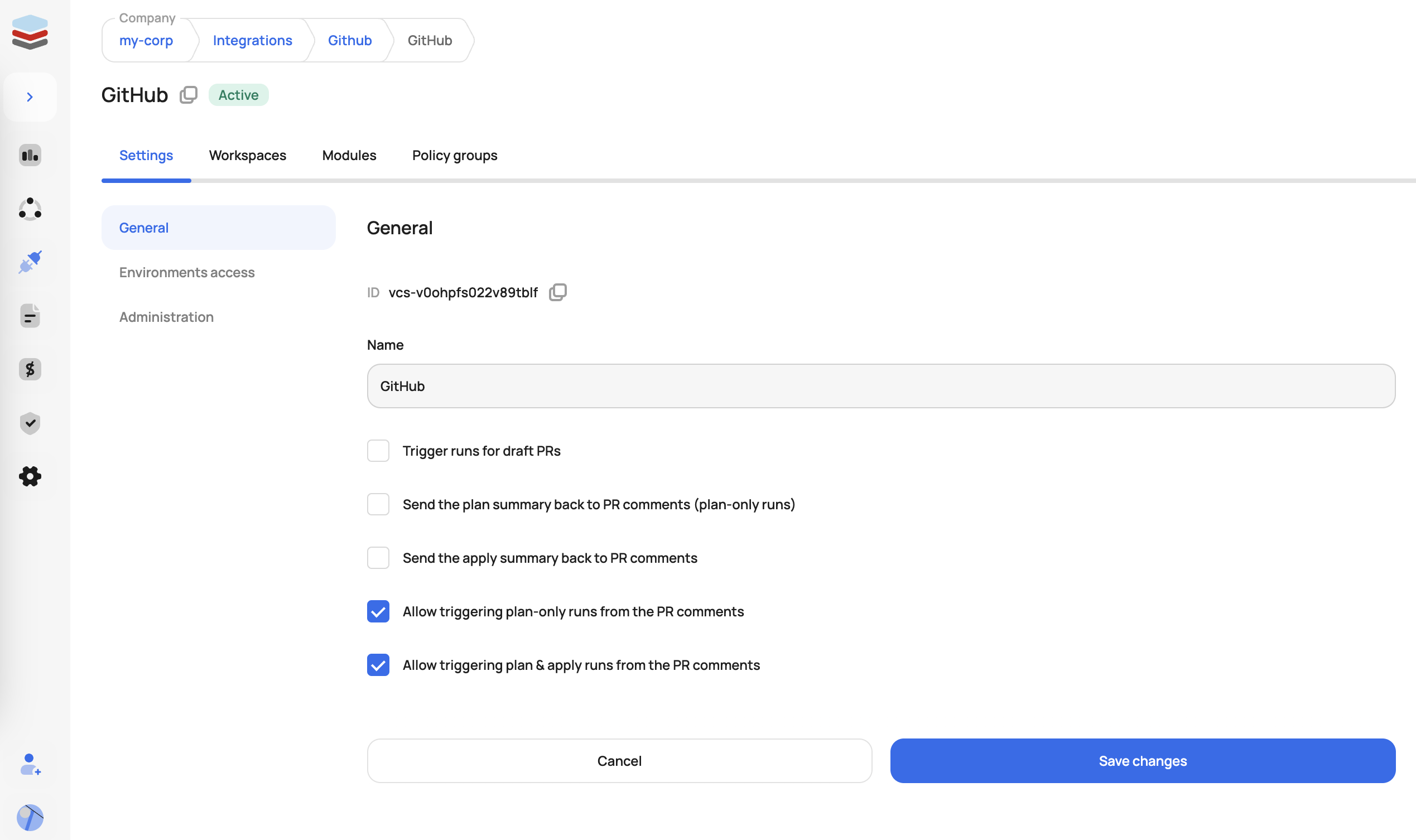
Connect the VCS you want to use for your Atlantis workflow
2. Execute a Run From a Pull Request
Once VCS admins enable end-users to trigger plans and applies from the PR, users can add the following comments to trigger runs in Scalr:
- /scalr plan - triggers plan-only Terraform runs in all affected workspaces with VCS-driven dry runs enabled
- /scalr plan -force - triggers plan-only runs, ignoring the workspace dry runs setting
- /scalr apply - triggers apply Terraform runs in all workspaces affected by the PR
- /scalr apply -workspace-id=ws-12345678 - limits apply to a specific workspace
- /scalr approve - approves a Terraform run waiting on approval before apply
3. Output and Feedback
Once the plan is completed, the result (success/failure, resource changes, etc.) is automatically posted as a comment in the pull request thread, keeping your code review and infrastructure workflows fully integrated.
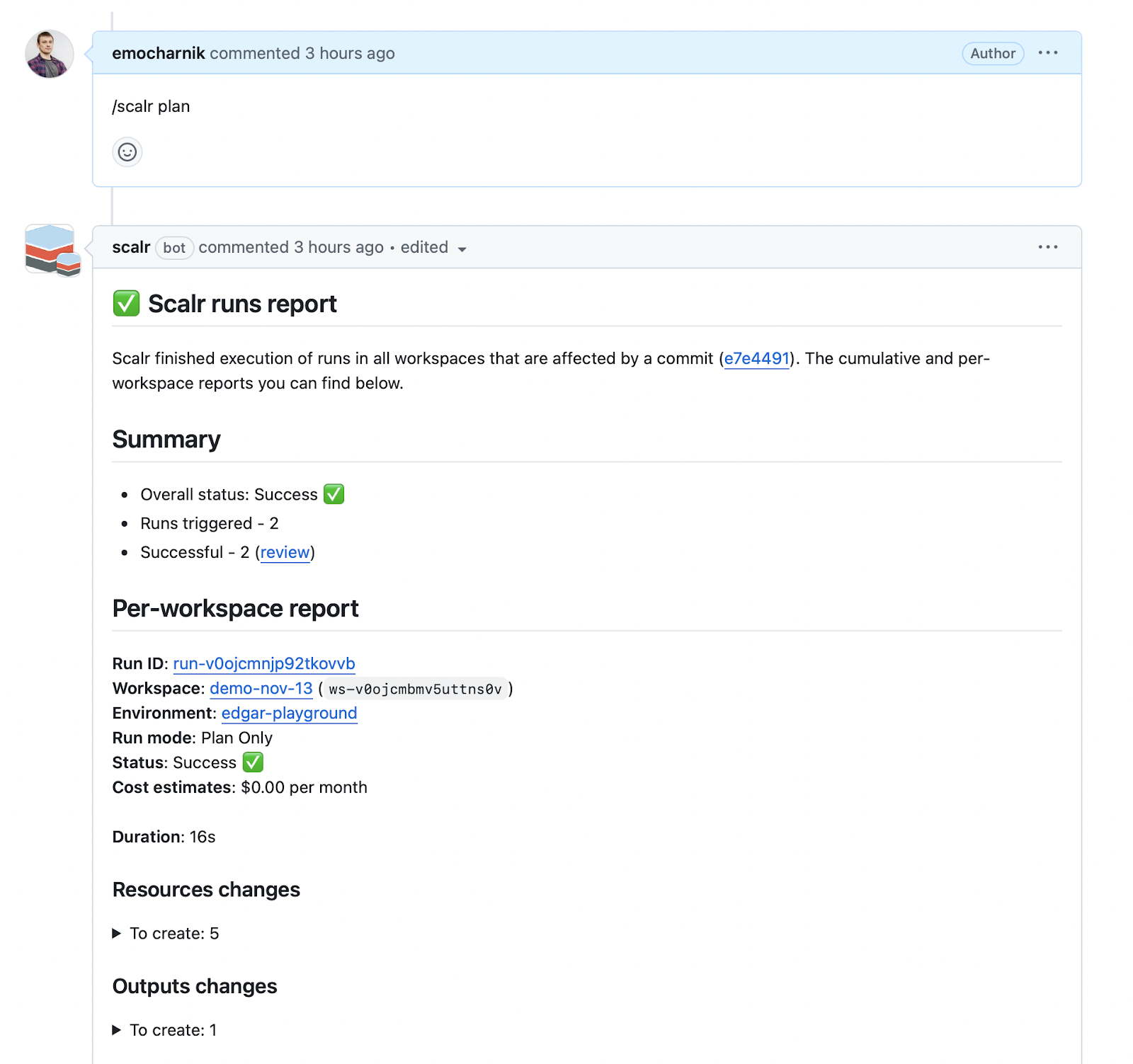
You can now use comments to trigger Terraform / OpenTofu plan and apply
4. Control Runs Through OPA (Optional)
Want to limit which Scalr environments can have runs executed from PR comments? Scalr's integration with Open Policy Agent (OPA) can prevent various run sources, including PR comments. An OPA policy check can deny any run with the source comment-github or deny any run that is not from that source. A common use case is allowing PR-driven runs from lab and development environments but not production.
5. Additional Scalr Features for PR Workflows
Avoid State Updates by Unmerged PRs: Scalr displays warnings when changes are attempted from branches with unmerged pull requests and automatically prevents auto-apply operations when the state-generating branch differs from your run's configuration branch.
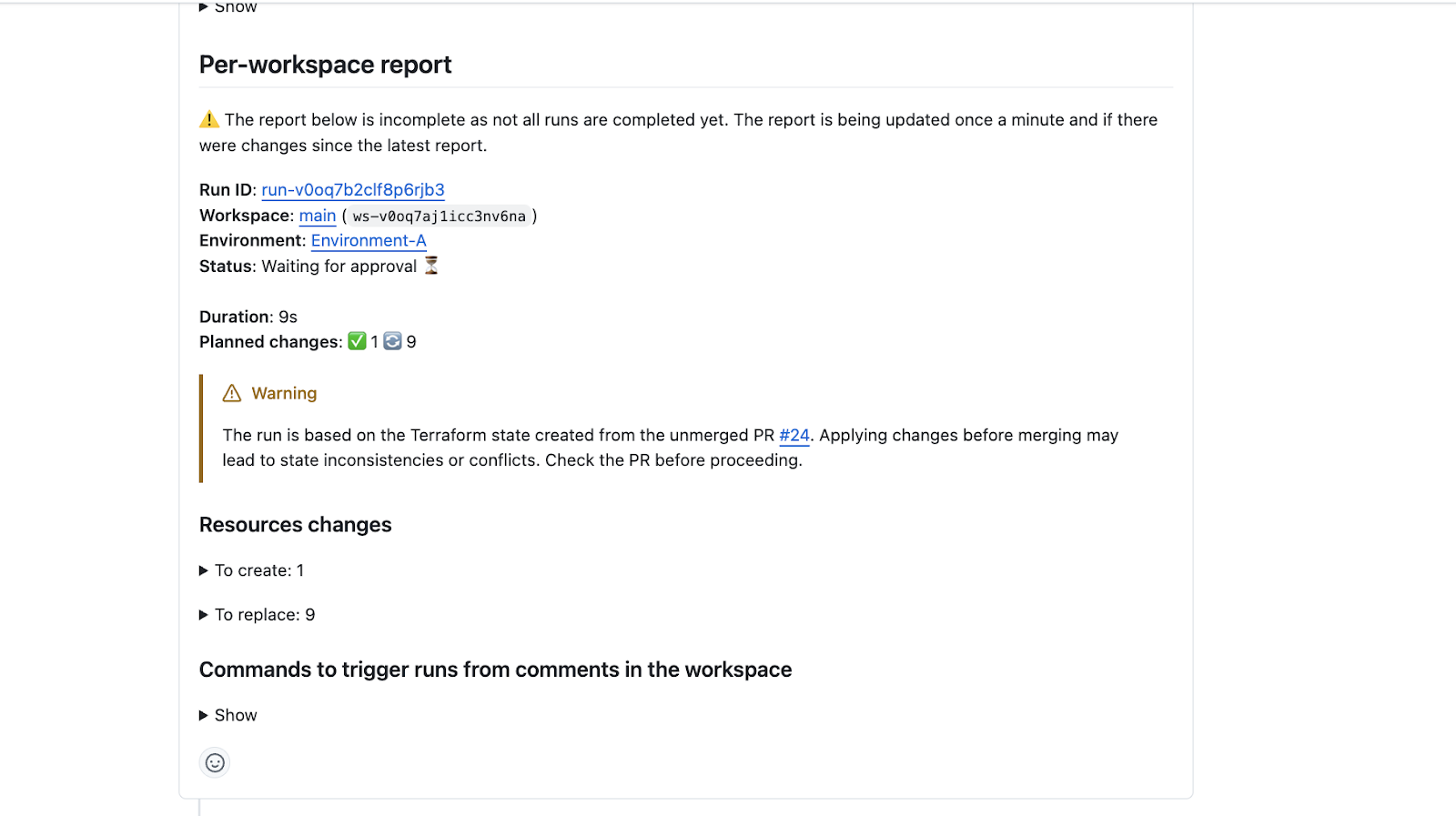
Prevent Apply from a Non-Mergeable PR: Using the apply-before-merge workflow, the /scalr apply command can be restricted to only execute after a PR is approved and passes branch protection checks, enforced through the merge_error attribute in the run input.
Automatic Base Branch Merge Before Run Execution: VCS-driven workspaces can automatically merge the base branch into the head branch before triggering a run, ensuring runs execute against the latest code and reducing false-positive results.
Conclusion
Terraform Atlantis transforms infrastructure automation by embedding Terraform operations directly into pull request workflows. Its GitOps approach to infrastructure enhances collaboration, governance, and auditability while providing teams with centralized control over infrastructure changes.
The combination of Atlantis with Terragrunt, OpenTofu support, cost optimization integrations, and robust security controls makes it a powerful choice for organizations seeking to scale their infrastructure-as-code practices. When paired with proper team training, documented workflows, and monitoring practices, Atlantis enables teams to manage complex infrastructure reliably and efficiently.
However, managing Atlantis at scale requires attention to operational details—credential management, webhook configuration, version management, and performance optimization. Teams should carefully consider their organizational capacity for managing these operational aspects.
For organizations prioritizing operational simplicity, integrated governance features, or enterprise support, platforms like Scalr offer managed alternatives that abstract away much of Atlantis's operational burden while providing similar workflow capabilities, policy enforcement, and team collaboration features.
Whether you choose Atlantis or explore managed alternatives, the key is establishing GitOps practices that bring infrastructure changes through the same rigorous review and approval processes as application code—ensuring consistency, auditability, and reliability across your infrastructure ecosystem.
Additional Resources
- Top 10 Best Practices for Terraform Atlantis
- Troubleshooting Common Terraform Atlantis Issues
- Terraform Atlantis vs. GitHub Actions: Comprehensive IaC Automation Comparison
- Securing Atlantis
External Resources:
- Atlantis GitHub Repository
- Atlantis Official Documentation
- Terragrunt Documentation
- OpenTofu Project
- Infracost Documentation
This pillar article consolidates comprehensive knowledge about Terraform Atlantis, synthesizing multiple focused guides into a single authoritative reference for infrastructure teams implementing GitOps workflows in 2026.
Related Posts
- Atlantis for Terraform: What It Is, How It Works, Pros & Cons
- Securing Terraform Atlantis in production (June 2025)
- Terraform Atlantis Best Practices: 10 Tips for Production
- Terraform Atlantis vs GitHub Actions: Complete IaC Automation Comparison 2025
- Troubleshooting Common Terraform Atlantis Issues
Related articles

Securing Terraform Atlantis in production (June 2025)
Step-by-step guide to harden Terraform Atlantis: secure secrets, enforce policies, isolate environments and automate audits for production.
Terraform Atlantis vs GitHub Actions: Complete IaC Automation Comparison 2025
Compare Terraform Atlantis and GitHub Actions for IaC: setup, workflow, security, cost & scale—get the facts to choose the right automation tool.
Troubleshooting Common Terraform Atlantis Issues
Resolve Terraform Atlantis hiccups fast: step-by-step fixes for plan/apply failures, repo config, credentials, webhooks, drift detection and more.