
Selecting a Terraform Cloud Alternative (February 2026)
Review how alternatives to TFC are not only different, but also similar, making the migration easier than expected.

The topic of Terraform Cloud alternatives has been coming up more and more with the announcement of their pricing changes, as well as the growth of OpenTofu since the licensing change. There are many DevOps tools that can help automate your Terraform workflows, but in this blog, we will focus on products in the Terraform Automation and Collaboration (TACOs) space.
The market is divided into two areas: products built specifically for Terraform and those that focus more on general CI/CD. The products built specifically for Terraform are Terraform Cloud and Scalr (which also supports OpenTofu), while Spacelift and Envo fall more under the general CI/CD category, as they support a broader range of IaC tools.
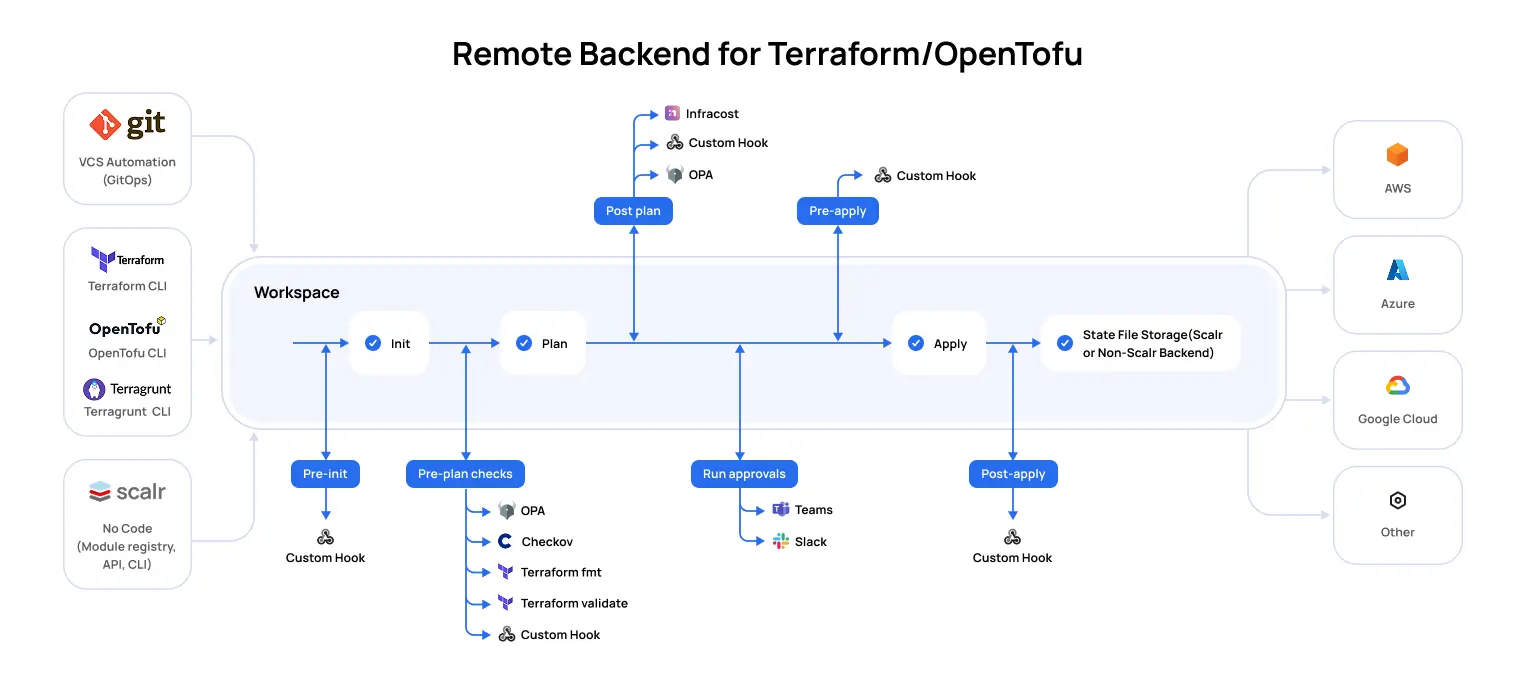
Automation tools purposely built for Terraform create workflow automation that you’ll find to be the best choice for Terraform, as they are designed with the Terraform core workflow and APIs in mind. Everything from the Terraform state file to integration with policy, to remote state management is native to these products, and Scalr is the only other remote operations backend in the market other than Terraform Cloud. This means that Scalr is a drop-in replacement for Terraform Cloud or even Terraform Enterprise, making the migration effort seamless.
In the following sections, we’ll talk about the key areas to review when looking for Terraform Cloud alternatives.
Background: HashiCorp is discontinuing the HCP Terraform free tier effective March 31, 2026, making the choice of alternative platform more urgent than ever.
Differentiators
All of the products in the space have some differences in their approach:
Terraform Cloud - Purposefully built for Terraform, the first product in the space, now owned by IBM.
Scalr - Purposefully built for Terraform and OpenTofu, supports GitOps, the Terraform CLI, API driven workspaces, and no-code workflows. Scalr has a strong focus on platform teams by providing tools and insights to help them scalr their operations.
Env0 - Supports multiple IaC tools, with a strong focus on FinOps as well.
Spacelift - Support for multiple IaC tools, strong focus on GitOps as other workflows are not supported.
Given that Terraform Cloud and Scalr are the only products that focus solely on Terraform (and OpenTofu for Scalr), we see that Scalr is the only drop-in replacement for Terraform Cloud in a side-by-side comparison. That being said, let's review the key differentiators between the two products.
Pipeline
While the pipeline between Scalr and Terraform Cloud is very similar in workspace types and use of Terraform, there are two distinct differences: the ability to use OpenTofu and Terragrunt.
OpenTofu
OpenTofu is a fork of Terraform after HashiCorp updated the Terraform license from MPL to BSL. Users can continue to use Terraform versions up to Terraform 1.5.7. After that, it is encouraged to migrate to OpenTofu. The Scalr team is one of the founding members of the OpenTofu fork and contributes resources to ensure the project is maintained. OpenTofu is not available for use in HCP Terraform Cloud.
Terragrunt
At Scalr, we understand that large organizations have many teams that provision infrastructure as code in different ways. While Scalr has many features similar to Terragrunt, we support the Terragrunt wrapper for teams who want to continue using it while also adopting Terraform Automation & Collaboration (TACO) software. Scalr natively supports keeping code DRY through the workspace structure, variable inheritance, and a module registry. Terragrunt is not available for use in HCP Terraform Cloud.
Backend & Storage
Scalr and Terraform Cloud are both remote operation backends for Terraform. A remote operation backend means that the execution runs on the backend and the state is stored there. While this deployment model works for most customers, we believe that customers should have the flexibility to select what type of backend is used and where the state is stored.
Backends: Terraform Cloud supports only one backend type, which is the Terraform Cloud backend. At Scalr, we want to Scalr backend or ANY backendTerraform supports. Configured per Scalr environment, this gives users the flexibility needed to onboard all types of deployments without changing the Terraform configuration or the state storage location. The runs execute in Scalr, and the state is then stored in the backend of choice. The flexibility helps larger organizations that already have many teams using many types of backends prior to onboarding into Scalr.
State Storage: Terraform Cloud only gives users the option to store state in Terraform Cloud. At Scalr, we believe users should choose where their state is stored, whether that is in Scalr or in a location of their choice, such as AWS S3, GCP, or Azure bucket. Users can store their state in their own bucket regardless of the backend that is used, so a Scalr backend with state stored in AWS S3 is an option that many compliance teams opt for.
Scalr storage profiles will even allow customers to choose where the state is stored per environment, which makes the Scalr structure extremely flexible for managed service providers or customers with complex data requirements.
Whether it is a backend type or state location, Scalr leaves it up to the user to determine what is best for their organization.
Structure
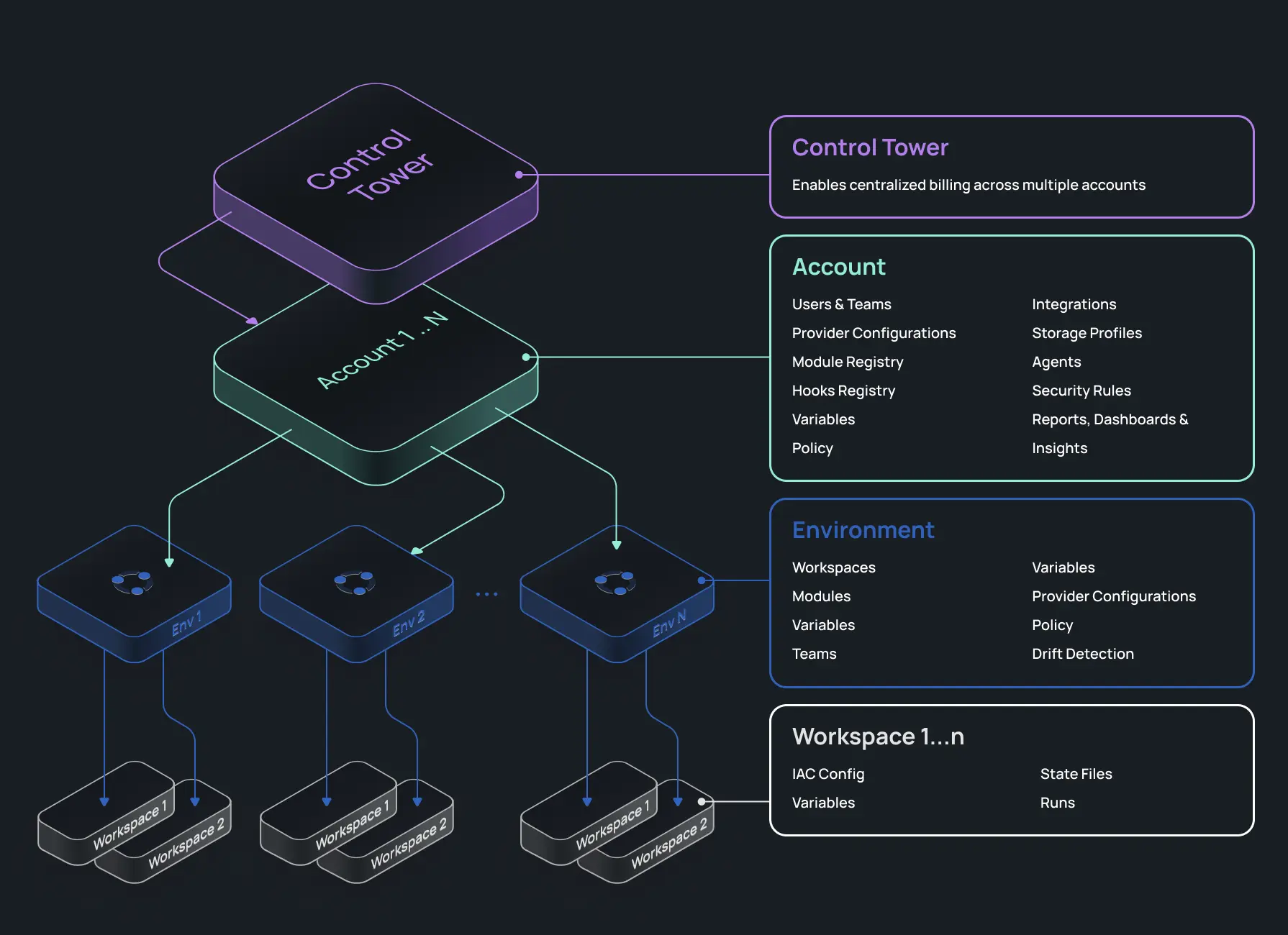
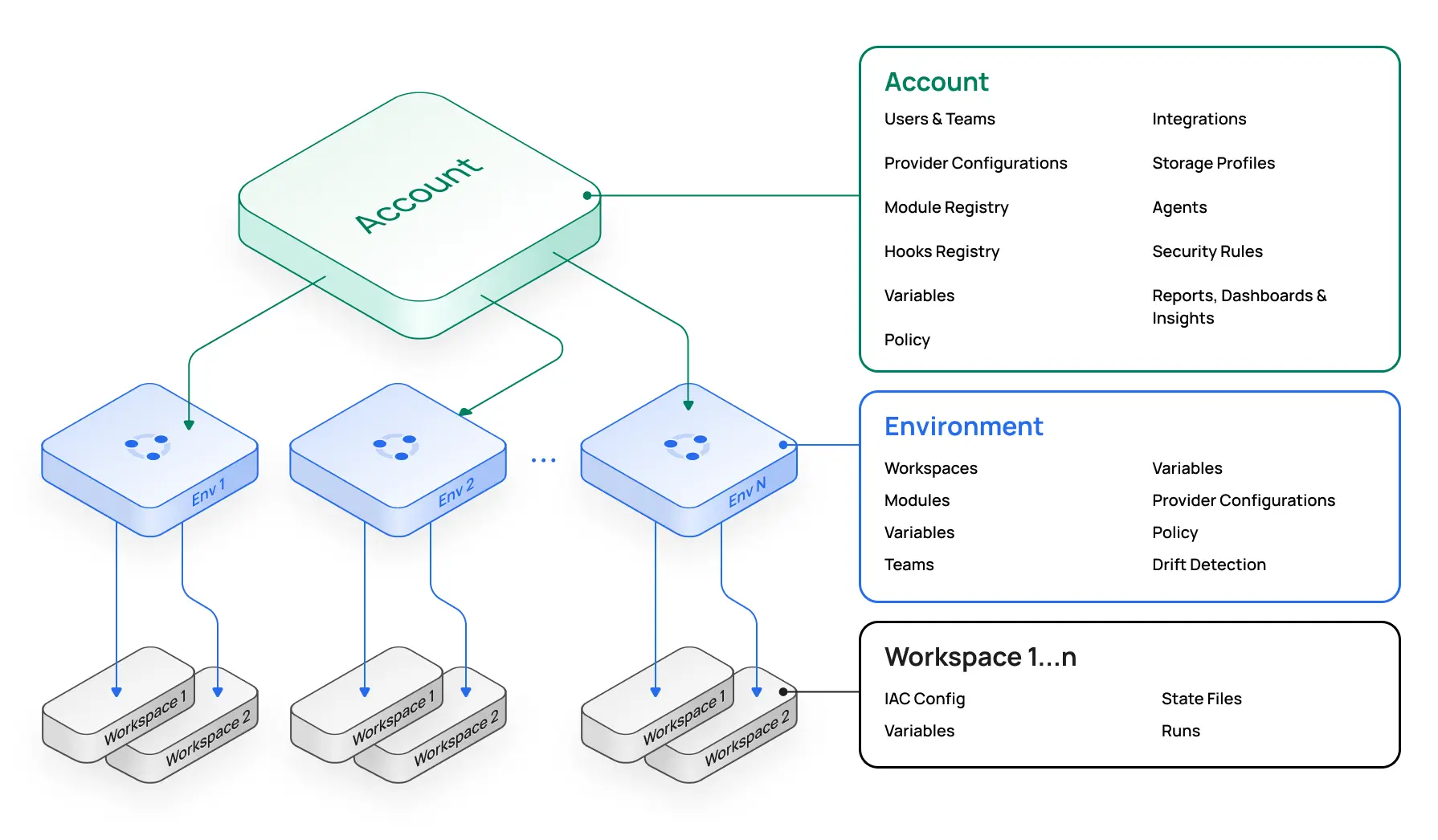
When you sign up for Scalr, you start with the account scope, within which you can create environments. A Scalr environment is similar to a Terraform Cloud project. The difference is that in Scalr, you can create and share multiple objects from the account scope. For example, share your provider credentials, modules, or OPA policies across environments without having to recreate them, as you have to in Terraform Cloud. Also, information rolls up in Scalr, so for a platform engineering perspective, you'll have reporting and dashboards on all objects in a single place at the account scope. You don't have to waste time searching for workspaces or runs like you do in Terraform Cloud, making your operations team more productive. Optionally, at the top of the hierarchy is the Control Tower, which can be used for consolidated billing if multiple Scalr accounts are required. The organizational model is the key difference that enables many of the other differentiators to come.
Observability
Metrics
The Scalr metrics feature helps Platform teams understand how their overall Terraform or OpenTofu ecosystem is operating. Most importantly, the metrics surface issues that you might not otherwise be aware of. Questions like, why did my apply durations increase by 50% over the last 30 days, or why is my queue latency increased by 25%.
This information is not easily noticeable or discoverable when looking at individual workspaces.
Metrics rolls up plan information and apply durations, slowest workspaces, daily executions, and more, so that administrators can quickly identify issues in their pipeline and get them resolved:
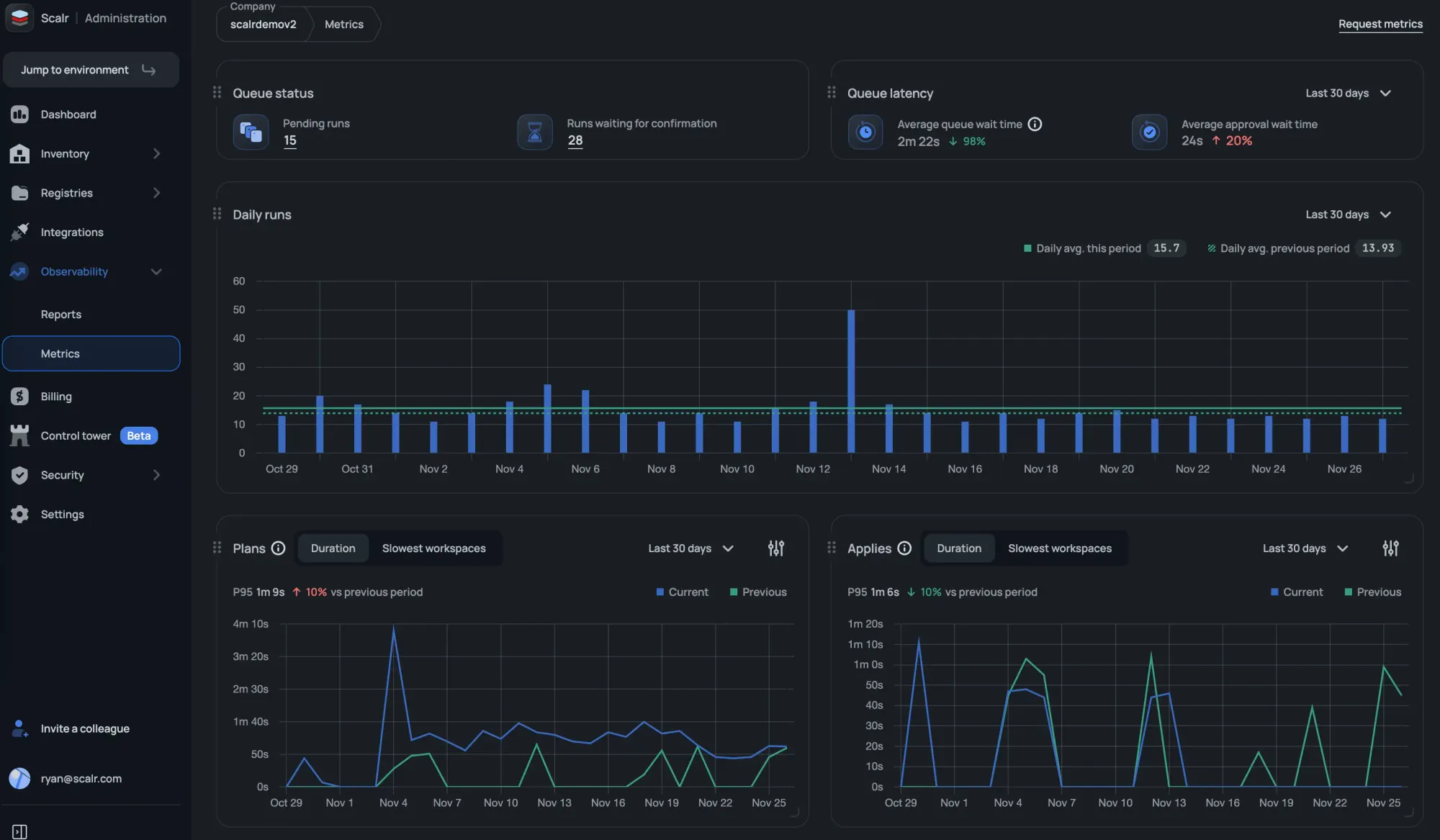
At the time of writing this, Terraform Cloud does not display metrics.
Reporting
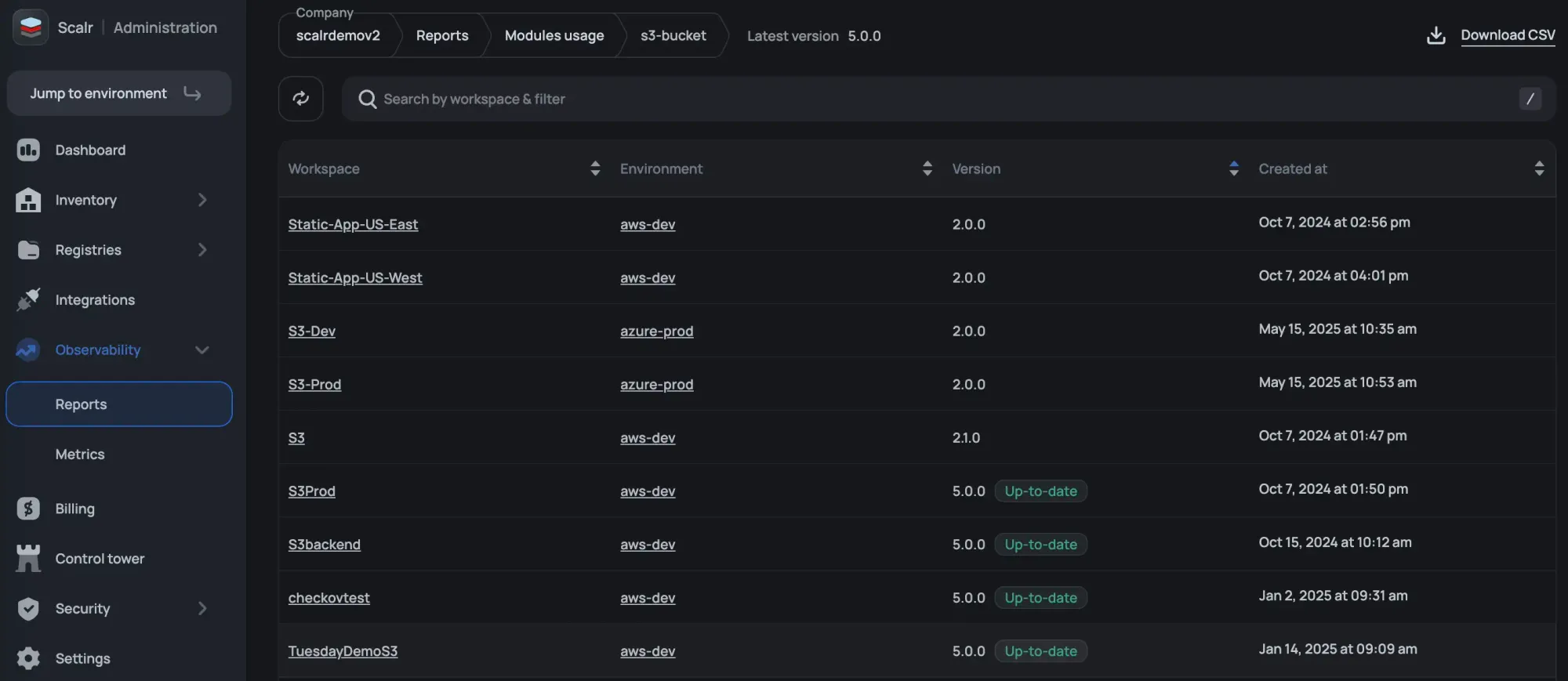
Terraform Cloud has an explorer that shows high-level information about versions and the frequency with which objects such as modules and providers are used. As an admin in Scalr, you can view reports, filter by environments and workspace, and take action by drilling into workspaces, runs, and more. The current reports available are:
- Resources under management and even deleted resources to help with troubleshooting. Actionable buttons like “show run” and “show state” let you drill into components quickly.
- Which modules are being used, along with their sources and versions.
- Which providers are being used, along with their sources and versions.
- Which Terraform and OpenTofu versions are being used.
- Which workspaces are “stale” and haven't had a run in a specified timeframe?
- What Scalr API token have never been used or those that haven’t been rotated recently.
- Audit logs for AI calls made to third parties.
Operations
Pull Request Comments
Terraform Cloud sends a basic pass/fail status check back to your VCS provider, enough to know whether a run succeeded but nothing more. When something breaks, engineers are left context-switching to the Terraform Cloud UI to understand what went wrong.
Scalr posts detailed pull request comments that do the work for you. When a run succeeds, the comment is minimal, a clean summary that confirms everything passed without cluttering the PR thread. When a run fails, the comment surfaces the full logs directly in the PR. The result is that your engineers stay in the code review context where they're already working. No tab-switching, no hunting through run histories.
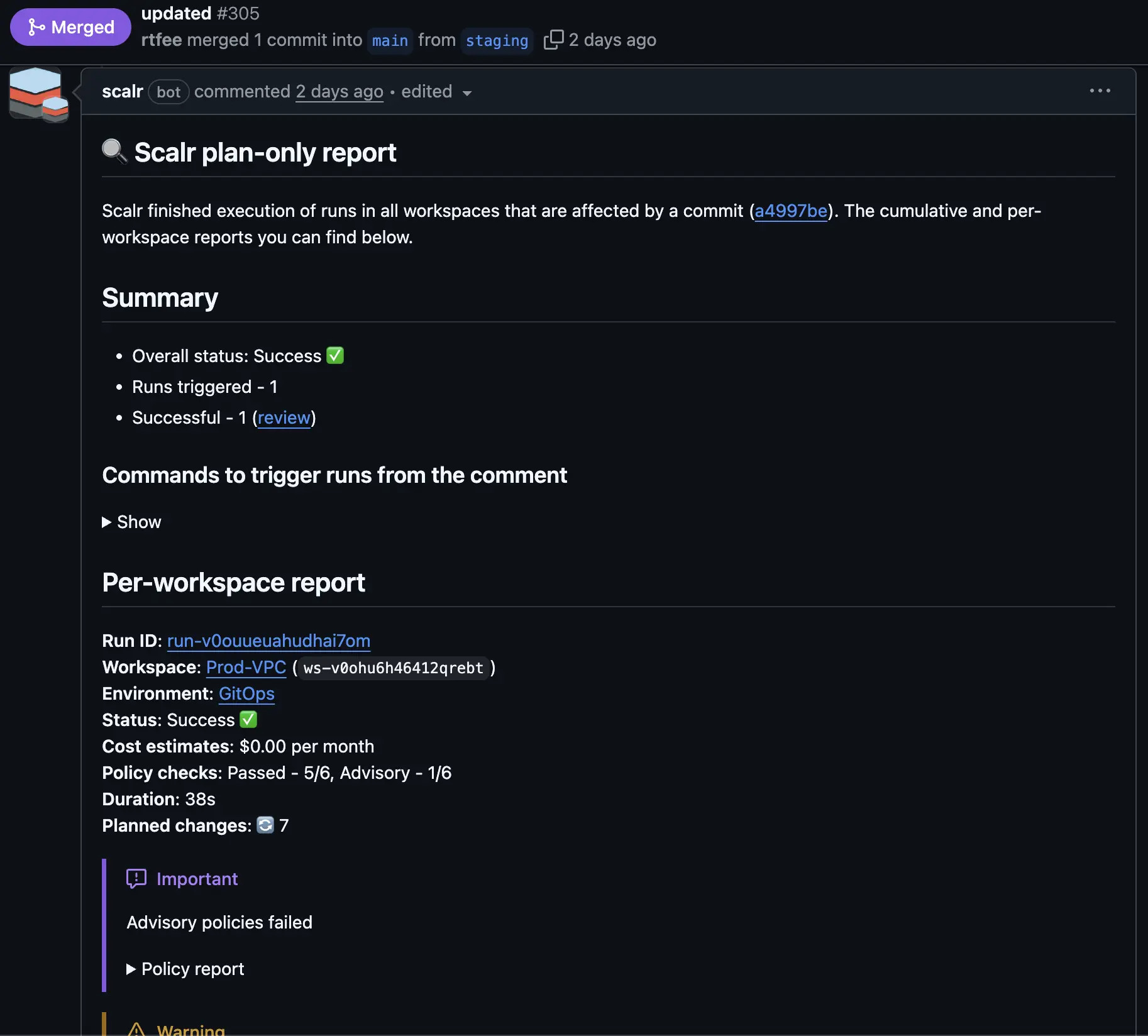
Execute Runs from PR Comments
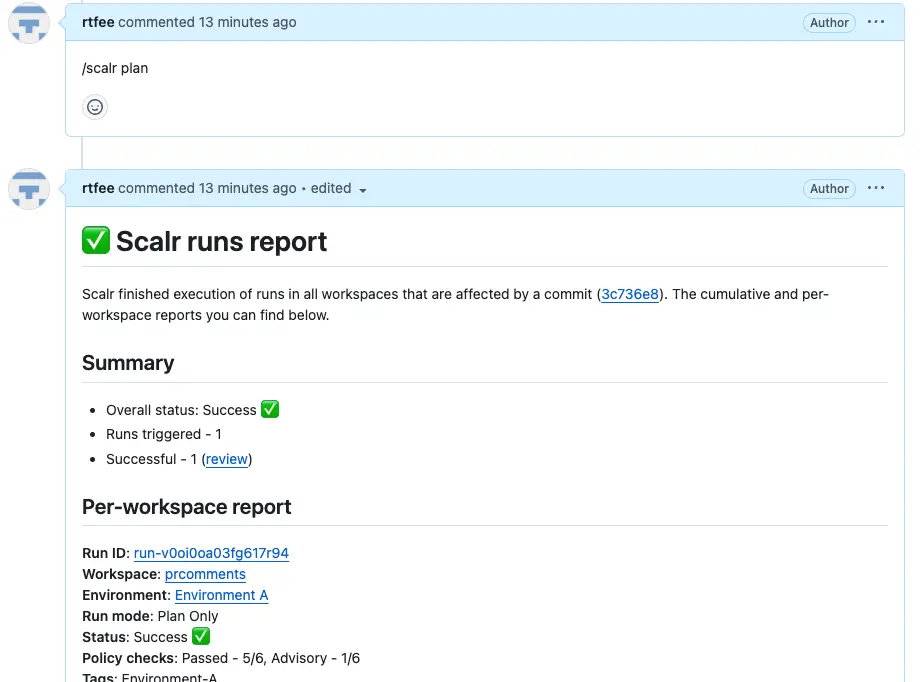
Terraform Cloud offers no way to trigger a plan or apply directly from a pull request comment. For teams coming from Atlantis, that means giving up a workflow they've built around.
Scalr supports comment-driven run execution natively. You can trigger plans and applies from pull request comments, or disable the feature entirely if your organization requires runs to go through a different approval path. Either way, the choice is yours. Teams migrating from Atlantis can keep the exact workflow they already have, and teams with stricter controls can enforce the boundaries they need.
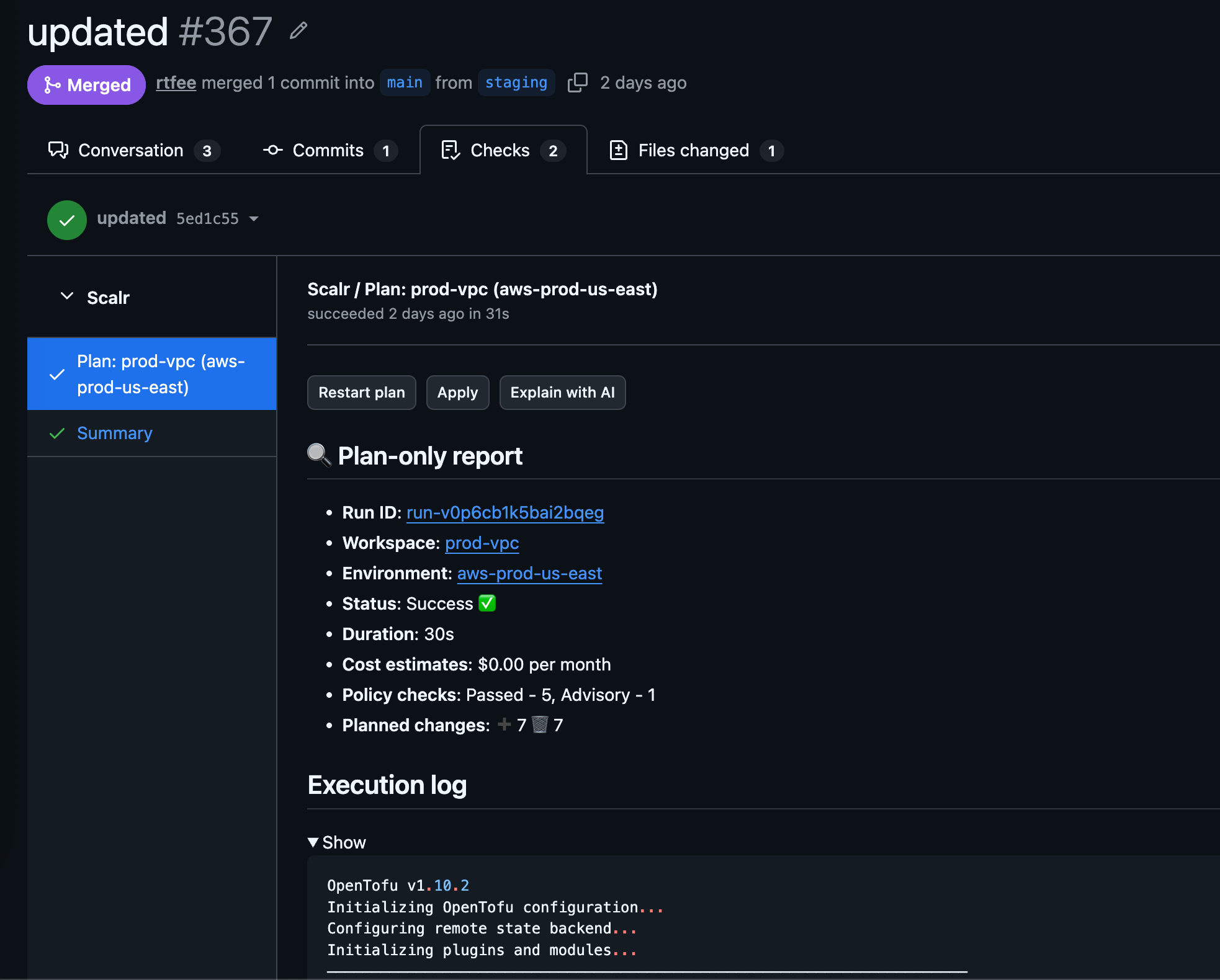
Pull Request Checks
Prefer pull request checks over comments? Scalr supports sending plan details directly to checks as well, making it easier to build policy in your VCS provider. You can trigger a plan or apply from a check, or request an AI explanation sent back without leaving your pull request.
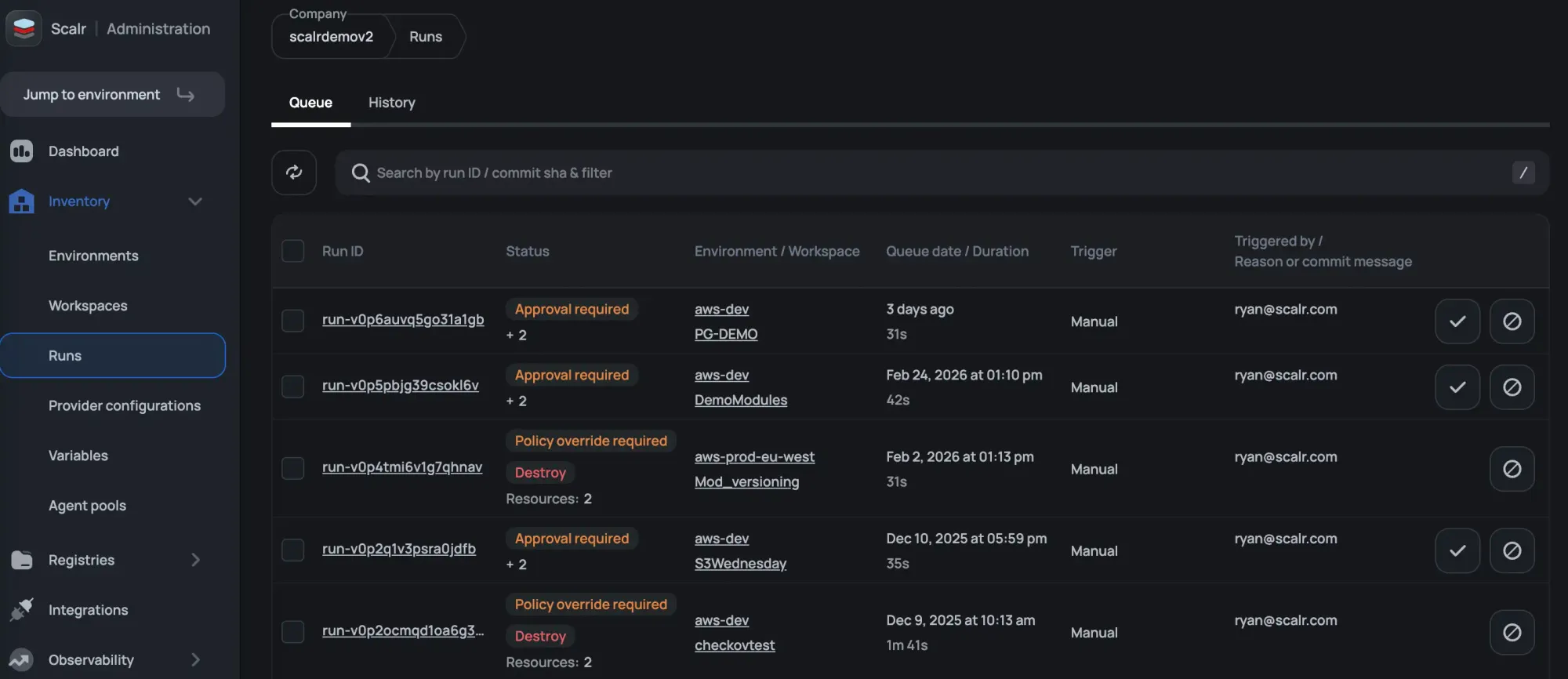
Run Dashboards
Ever have a maintenance window where you wish you could see all runs across all Terraform Cloud organizations and workspaces in a single place? That’s exactly what the Scalr run dashboard does for you at the account scope. The same concept exists in the environment scope for the workspaces within the environment. Make your DevOps engineers more productive by providing operational information to them in one place.
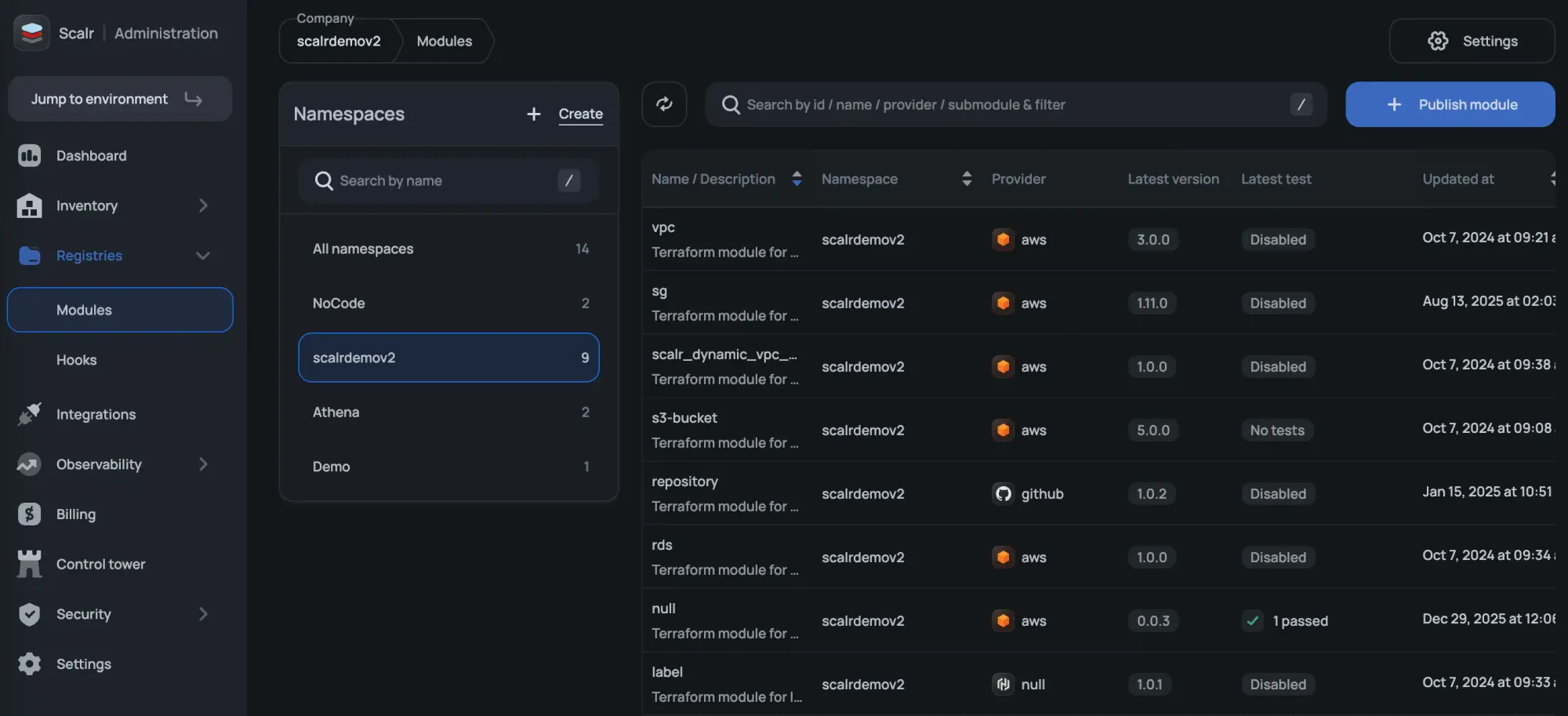
Module Registry Namespaces
Terraform Cloud scopes module registries to individual organizations, which means duplicating registry management work as your organization grows.
Scalr lets you create module registry namespaces at the account level and share them with whichever environments need them. Namespaces can also be assigned to a specific team, so only that team has management access. One registry, shared where it makes sense, with the ownership controls to match.
Security
Provider Credentials
Provider credentials are the way to authenticate to a cloud like AWS, Microsoft Azure, and Google Cloud. Provider credentials can be managed at the account and environment scope and then assigned to workspaces instead of managing them individually within workspaces as you have to in Terraform Cloud. The providers will be injected into the Terraform code during the Terraform plan and apply.
You can also choose to enforce a credential for a plan vs an apply so you are always following the least privileged model.
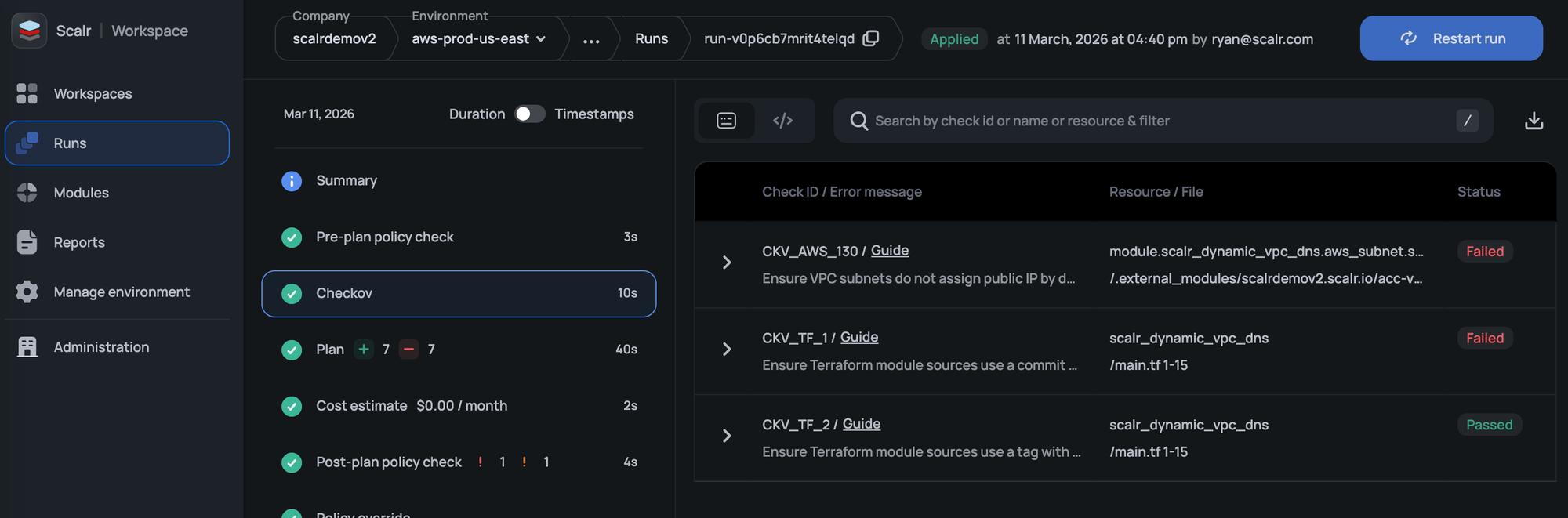
Checkov Integration
Scalr includes native Checkov integration that scans your code for vulnerabilities before a Terraform run executes. If Checkov finds issues, the run is blocked automatically. Problems get caught at the source, before infrastructure is ever touched.
RBAC
We have heard countless times that companies are restricted in whom they can invite to Terraform Cloud due to system role limitations in their RBAC. Scalr has over 130 permissions that can be grouped into custom roles and assigned to teams at the account, environment, or workspace scope. Invite all team members who need access, but follow the least-privilege doctrine in Scalr.
OIDC API Authentication
Scalr now supports OpenID Connect (OIDC), allowing users to authenticate to the Scalr API using ID tokens from providers like GitHub, GitLab, AWS, Azure, and others. This removes the need for static personal or service account tokens and simplifies access management. See the docs on this here.
SCIM Protocol
Have you had to do a cleanup of users because Terraform Cloud does not support the option to automatically add and remove them? Scalr supports the SCIM protocol, which automatically adds and removes users based on their status in your SAML provider. Many security teams see this as a best practice to avoid lingering accounts.
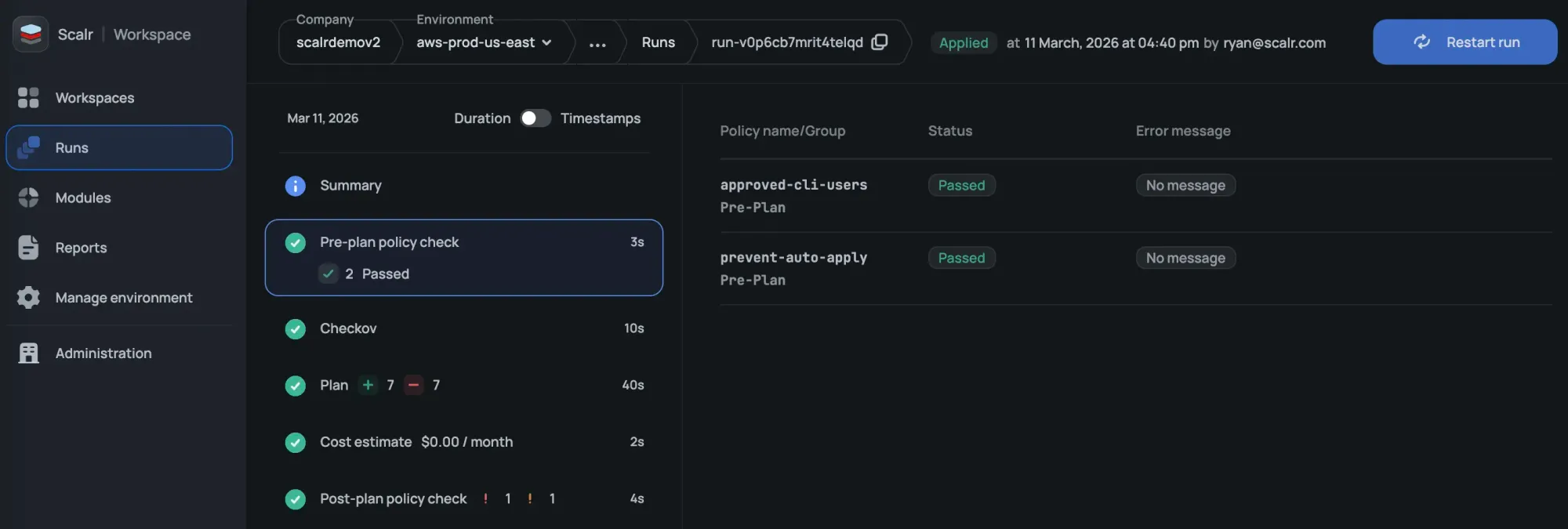
Pre and Post-Plan OPA Checks
Scalr not only checks runs against OPA policies during the post-plan, but also before the plan executes. Prevent runs from starting based on the source executing them, commit authors, workspace name, and anything else available based on tfrun data:
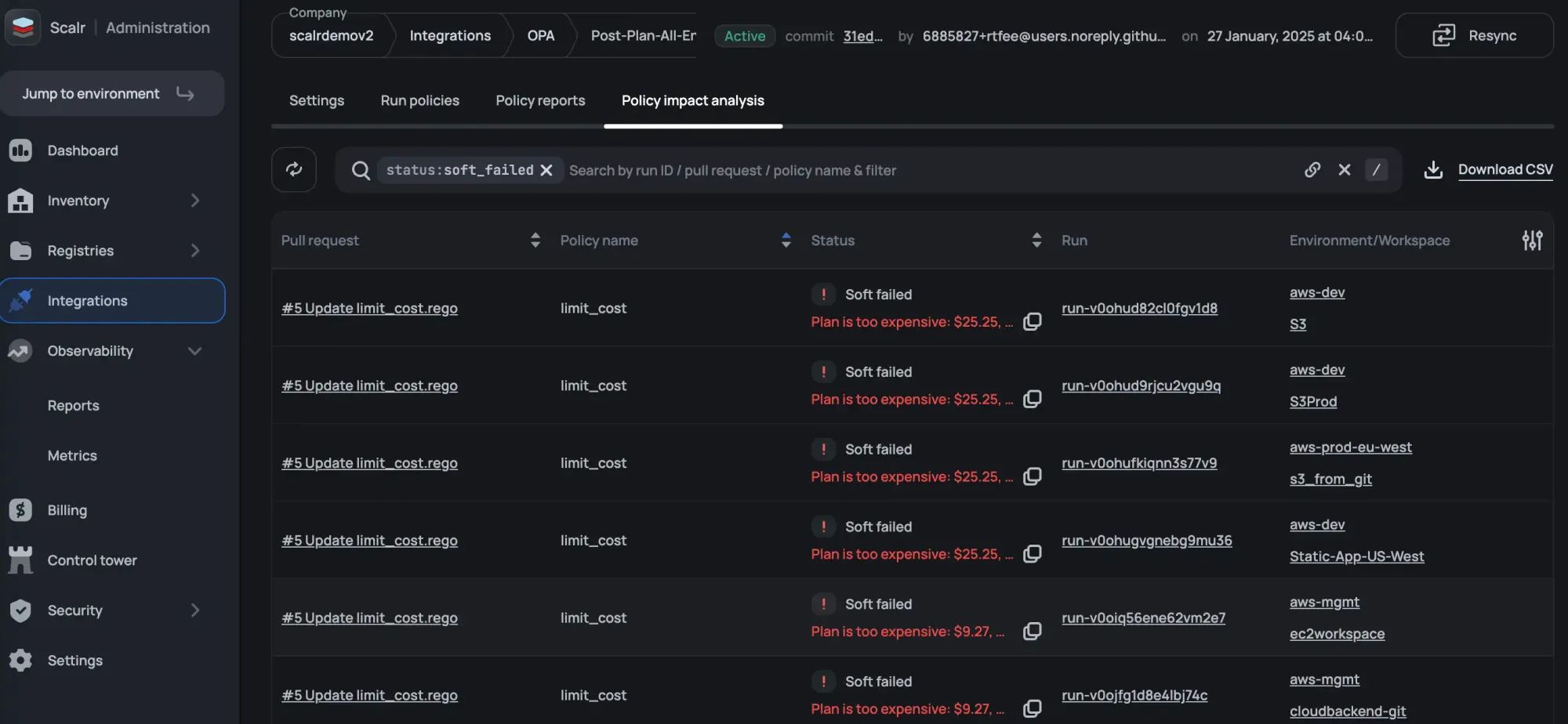
Open Policy Agent Impact Analysis
You don’t merge Terraform code changes without a speculative run so why would you do that with OPA? The OPA impact analysis tells you if there are errors or breaking changes to your workspaces before merging the policy to main.
VCS Agents
VCS agents allow you to make your Terraform code available from your internal VCS provider to Scalr without having to open it to the internet, which is critical from a security perspective. This feature does not exist in Terraform Cloud, so you are required to open the VCS provider to the internet, which is not a best practice.
Integrations
Terragrunt
Many organizations have built production workflows around Terragrunt and have no interest in migrating off it. Scalr doesn't force the issue. You can execute runs with native Terraform or OpenTofu, or use the Terragrunt wrapper if that's what your team already relies on. Workspace owners can use the run-all command as needed. Scalr gives you the choice without requiring you to change how your infrastructure is already structured.
AWS EventBridge
The Scalr integration with EventBridge allows users to build event-driven Terraform and OpenTofu pipelines based on events that happen in Scalr. The EventBridge integration supports events such as a Terraform run failure or Scalr audit logs. Users can then expand the integration by integrating EventBridge with a monitoring solution to alert when critical workspaces fail or forward audit logs to a tool such as CloudWatch.
Slack & MS Teams Integration
Receiving a notification about a Terraform run event is nice, but in Terraform Cloud, you still have to go into the UI to approve it.
Scalr not only sends notifications based on Terraform run events below, but users can also approve runs directly from Slack and Teams
Events:
- Approval Required - An approval from a user is required before the Terraform apply can run.
- Run Finished Successfully - The Terraform plan or Terraform apply finished successfully.
- Run Errored - The Terraform plan or Terraform apply resulted in an error.
- Drift Detected - Scalr executed a drift run and found that the workspace had drift.
Scalr allows you to approve or deny runs directly from Slack or Teams to avoid having to switch contexts.

Datadog Integration
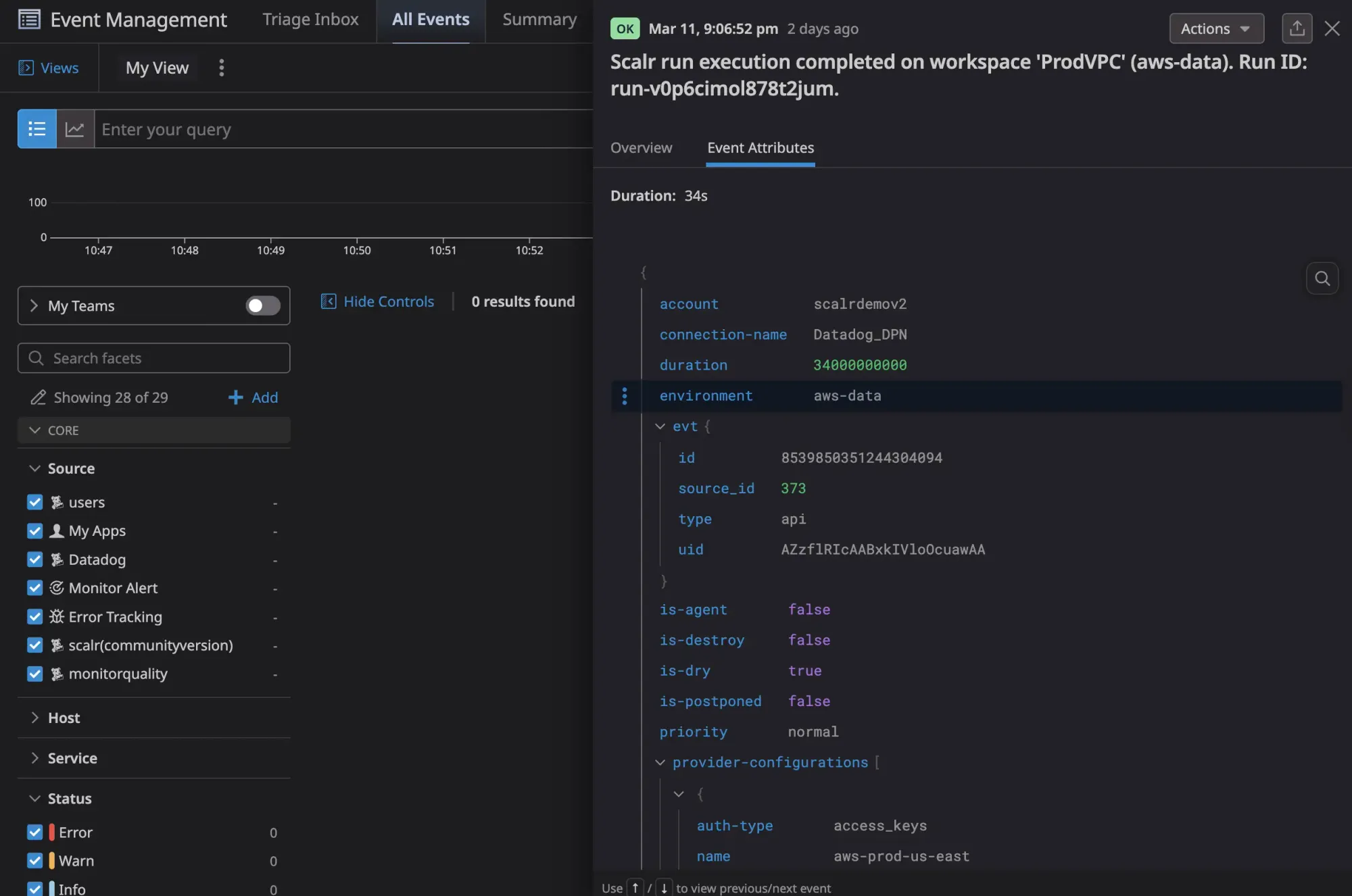
Scalr's Datadog integration streams run events, metrics, and audit logs directly to Datadog so your Terraform operations live alongside the rest of your observability stack.
Run events include status, VCS details, and provider configurations used, and an out-of-the-box Scalr dashboard gives you run results, queue size, concurrency, and billing usage without any custom setup. Audit logs stream to Datadog as well, with a full record of every action taken in Scalr. If audit log streaming is ever disabled, Scalr fires an AuditLogDisabled event automatically so compliance gaps don't go unnoticed.
Pricing & Packaging
The pricing model between all TACOs is very different. Here are some highlights for all of the products:
Terraform Cloud - Based on resources under management with multiple tiers. Features included depend on the tier.
Scalr - Only charges per run. There are no other factors, and all core features are included in the free and business tiers. Advanced security and compliance included in the enterprise tier.
Env0 - Have tier-based pricing. Other factors include the number of environments needed, features required, and resources under management.
Spacelift - Have tier-based pricing. Other factors include the number of workers needed, the features required, and the support levels.
Here is more information on Scalr's model:
Pricing Plans
Scalr has a free, business tier, and an enterprise tier. The only difference is that the free tier has a max of 50 runs per month. All core features are included in the free and business tiers. Advanced security and compliance are included in the enterprise tier.
Run Concurrency
Scalr gives you 5 concurrent runs to start, and we’ll scale the concurrency as you scale your runs at no charge. Terraform Cloud has 3 concurrent runs on the standard tier, but no visibility into how much it will cost for more.
Self-Hosted Agents
Scalr starts with 25 agents, need more? Just ask and we’ll increase that limit free of charge. Terraform Cloud starts you with 1 agent on the standard tier, but no visibility into how much it will cost for more.
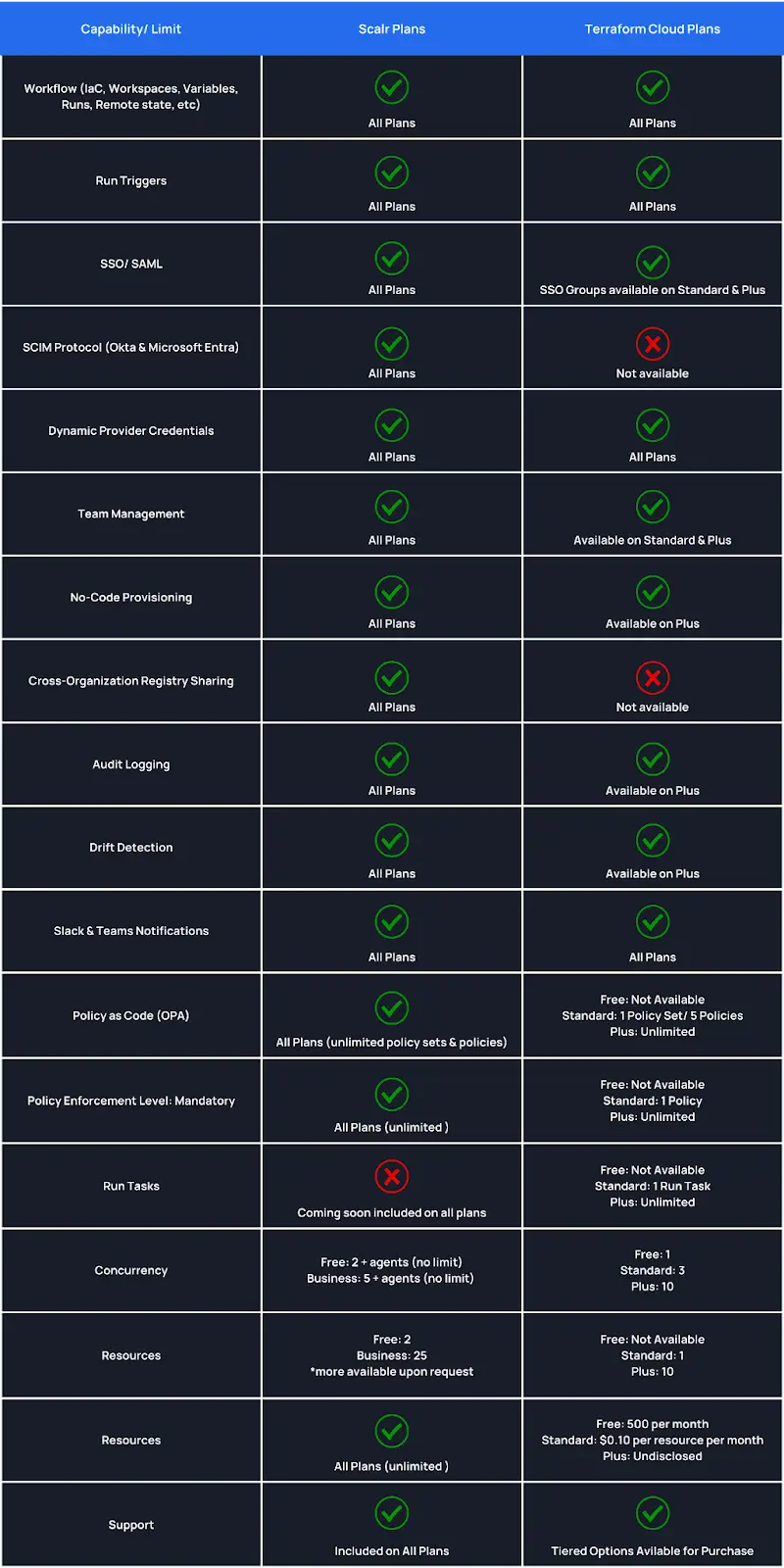
All information based on https://www.hashicorp.com/products/terraform/pricing as of April 2024
Differentiator Summary
Other than pricing, the key difference in Scalr is the inheritance organizational model that enables all of the other differentiators. The reporting, dashboards, and module registry allow you to monitor how your Terraform code is used in a way that is invaluable when running at scale.
The flexibility that Scalr gives you around security, specifically RBAC, ensures that all of your DevOps engineers will be able to do so without you having to sacrifice on security.
Lastly, everyone wants transparency when it comes to pricing, which is why Scalr believes in a simple pricing model that makes it the only Terraform Cloud alternative.
Similarities
As you look through your alternatives to Terraform Cloud, it’s not only important to look at differentiators, but also how the other offerings have all of the functionality you use daily. As a reminder, Scalr is the only remote operations backend other than Terraform Cloud, meaning you can continue to use the same workflows that you used in Terraform Cloud. Below, we’ll highlight the similarities between the two products:
Structure
While Scalr has an improved structure overall, there are a number of similarities in how the overall organizational model is used and applied:
- A Scalr workspace is the equivalent of the Terraform Cloud workspace.
- A Scalr environment is the parent of a workspace, which is a similar concept to a Terraform Cloud organization.
- Scalr has the addition of the account scope, where many of the differentiators come into play
Operations
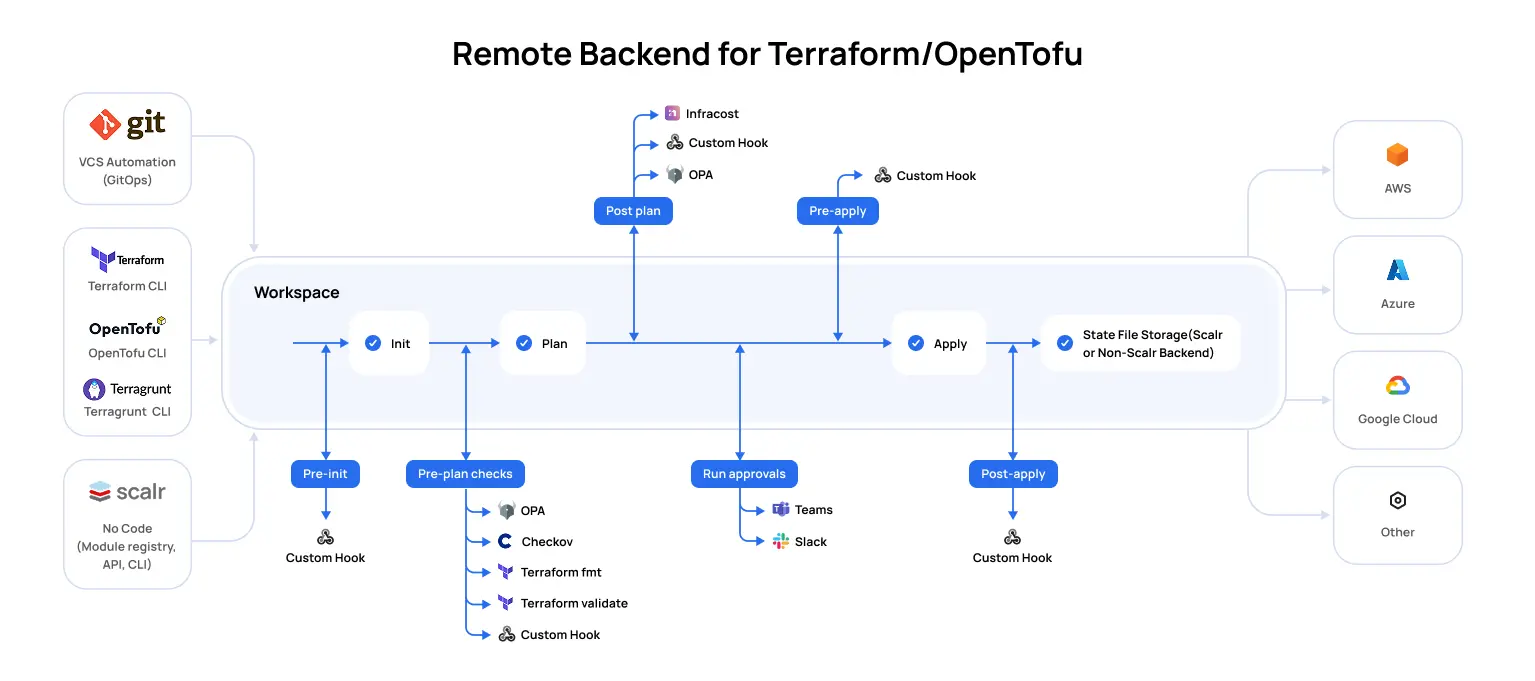
Scalr supports the same workspace options as Terraform Cloud:
- VCS: Integrate your Scalr workspace with a VCS provider of your choice to enable PR automation.
- Terraform CLI: Use the native Terraform CLI to execute runs in your workspace.
- No Code Provisioning: Deploy Terraform code to workspaces directly through the Scalr module registry to make it easier for your novice years to adopt Terraform. Scalr allows you to upgrade module versions in a workspace without redeploying.
In addition, Scalr also has a private module registry, the main difference being that you can maintain the registry at the account or environment scope.
Lastly, Scalr offers drift detection to help workspace owners catch any resources that have drifted. Runs that are executed in Scalr using the drift detector are free. Similar to Terraform Cloud, Scalr will send notifications based on drift to either Slack or webhooks, and users can also remediate drift by manually updating, reverting the infrastructure, or syncing the state file.
Security
- Self-Hosted Agents: Scalr also has the concept of a self-hosted agent which allows you to execute runs on your own infrastructure, but we don’t limit the number of agents you can use. Often agents are needed to reach Kubernetes clusters that have network restrictions.
- Policy as Code: Scalr has always integrated with Open Policy Agent as the tool of choice for policy as code. Terraform Cloud has recently adopted this, but Scalr takes it to the next level with the policy impact analysis features.
- Provider Credentials: Both products support OIDC authentication for Amazon Web Services, Microsoft Azure, or Google Cloud. Scalr gives more flexibility in where the credentials can be managed and assigned.
These are a few of the ways that Scalr and Terraform Cloud are similar. The similarities will make sure your DevOps teams have a smooth transition from one Terraform automation tool to another. Easing the pain for the team members during a migration is key to the migration process.
Similarities Summary
When looking for Terraform Cloud alternatives you’ll want to understand the undertaking of the migration project. Being that Scalr is also a remote operations backend with similar constructs of workspaces and environments make it the best choice for an easy migration. Your DevOps engineers will have a smooth transition from Terraform Cloud to Scalr helping to maintain productivity during this time.
Migration from Terraform Cloud to Scalr
When choosing an alternative, there are a few main factors that should be considered before you start a migration:
- Feature comparison
- Cost Comparison
- Migration Effort
Features:
Scalr is the only TACO that is a drop-in replacement for HCP Terraform Cloud. The outline above explained the similarities and differences between the two products' feature sets, but if you prefer to see it in a table format, check out our guide here.
Cost Comparison:
Interested in migrating to Scalr, but not sure what it will cost you? This script can be used to call the TFC API to get the total number of runs that have ever been executed in your TFC account. Unfortunately, the API doesn't allow for date filters so you will still need to estimate the per-month or year usage.
Scalr does not charge for all runs, see the following as a guideline to understand what runs you will not be charged for:
- Runs executed based on the drift detector schedule.
- Runs that use local execution mode in the workspace.
- Runs that are stopped by an OPA policy in the pre-plan phase.
- Runs that Checkov stops due to security violations in the pre-plan phase.
- All runs that fail during the Terraform init due to. A couple examples of this, but not limited to are:
- Missing folder or var file
- Terraform code parsing errors
- Connectivity errors (registries, Docker, etc)
- Broken provider configs errors
- Runs that fail during the cost-estimate phase.
- Runs failed due to an internal Scalr error.
Migration Effort
Scalr offers free migration periods to avoid being charged for two products simultaneously. If interested in applying for the migration period, please open a support ticket with the title "Free migration period" and supply the following:
- TFC renewal date
- Total number of workspaces
Migration Script
If you are currently using Terraform Cloud or Enterprise and planning to migrate to Scalr, the quickest way to do this is by using our TFC migration script here. The script will migrate the following objects among others:
- Organizations - Will be migrated into Scalr environments.
- Workspaces - Will be migrated into Scalr workspaces.
- Workspace variables - Terraform and environment variables will be created as Terraform and shell variables in Scalr.
- State files - The current workspace state file will be migrated.
See the full description and instructions in the script readme.
Ready to make the switch? Our step-by-step migration guide covers everything from state migration to CI/CD reconfiguration, with real-world examples from teams that have already made the move.
Summary
Picking an automation tool to replace Terraform Cloud is a big decision, but we wanted to make sure you had all of the information to help with making the best choice possible. At Scalr, we have implemented key differences to help your team members follow best practices when deploying the Terraform code at scale. At the same time, we made sure the general workflow automation was similar enough that your DevOps teams would not have a hard time transitioning.
Interested in seeing how easy it is to migrate? Try it out today and use the free tier.
Resources to help with a migration:
- HCP Terraform Cloud migration documentation
- Learn how other companies migrated
- Use our Terraform module to automatically migrate from Terraform Cloud to Scalr
- Use the following script to figure out how many runs you executed in Terraform Cloud
- Changes to the HCP Free Tier
If you'd like to understand HCP Terraform Cloud pricing better.
If you'd like to learn more about open source and/or free alternatives to HPC Terraform Cloud.